Presented by Michelle Crapo
abap4fun@gmail.com
mcrapo@perrigo.com
Well you’re here
Contents
 Step by step from learning to using
 Discussion
 Benefits
 Old Dog tricks used in a New world!
 Closing
Step 1 – Make the time
 Normal work hours
   Lull in projects
   During project where can use the new technology
   Something that you might use.
       Presentations and demos to internal customers
 Non-work hours
   Prior to work
   After work
   During lunch break
Lull in projects
 Support work
    Timelines
    Level of priority
 Waiting for a response when you are complete with
 your development
   Usually it goes back and forth a couple of times
Project Work
 Question to ask yourself or know the answer if asked:
   Why
   Will it change any of the requirements
   Extra time needed
   What are you using differently
 Describe benefits
 Use the new tool without causing project issues or
  changes (Transparently)
 Demo it!
Non-work hours
 Only when it is fun!
 Learn things that excite you
 Logistically
    Prior to work
    After work
    Lunch
 Only when family doesn’t need you for something else.
Groups
 What could you use at home?
 How?
Something you might use
 Read it
 Read case studies on it
 Schedule a meeting – add your overview to the invite.
  What will they learn?
 Demo it!
Step 2 - Learn
 SAP Teched – my #1 place
 Local Events
 Web
    Blogs
    Websites
 SCN E-Learning
    http://www.sdn.sap.com/irj/scn/elearn
 Outside resources (people you’ve met, mentors,
 forums)
   Learn how the new technology was used.
SAP Teched
 Hands-on
 High level overview of what is coming
 Lecture on new technology
 ASUG lectures – these add the tools that most of us
 can get to now.
Local Events
 Easy to get to
 Less expensive (may be no cost to you except travel.
  SIT)
 Network. Introduce or get introductions from many of
  the SAP type people in your local area
 Examples
   SAP Insider Track
   ASUG Meetings
SCN E-learning
 Start the presentation have an open SAP Screen
 Run the presentation pausing when you need to,
 create it on your system (if possible)
Web
 Google, YAHOO, SAPhoo
 Articles
 Blogs
 Question / Answers
 Free training - See some of them that I’ve found at the
 end of the presentation
   Examples HTML, XML..
   Tutorials
On your own system
 ABAPDOCU
 SE30 – Tips and Tricks
 SE38 - DEMO*
Outside Resources
 Send an e-mail to one of those people on your business
 cards. (I’m one of many.)
   Do they have time to show you something new they may
    have learned?
   Have they used a new technology on a project.
   Use social networking
 Request Mentor Webinars
Step 3 - Implement
 WebDynpro
 ABAP objects
 Enhancement Framework
 Quality tools inside ABAP
 MII
 Web UI
 Floorplan Manager
Just do it!
And so.. What about my skills?
 Take an inventory
 Most of the “new” stuff is based upon ABAP
 You KNOW ABAP
Old Tricks
 Loop / exit / Endloop
 Table for variables
 Table Maintenance
 KISS
 Documentation in programs
 Performance tuning
 Stop – does it make sense?
Example
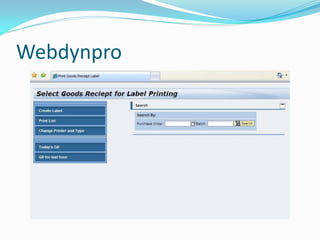
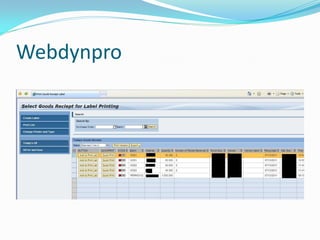
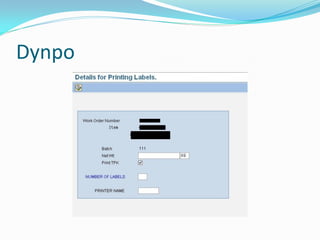
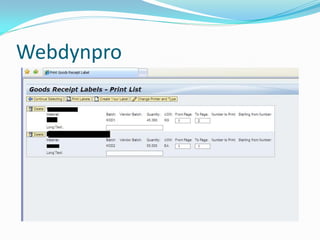
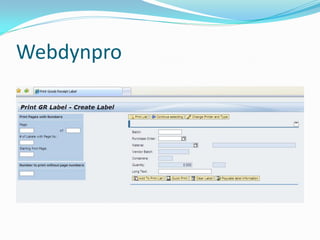
 Webdynpro for printing labels – combined with
 SMARTFORMS
Webdynpro
Webdynpro
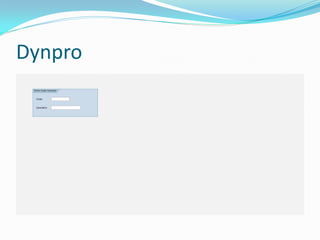
Dynpo
Webdynpro
Dynpro
Webdynpro
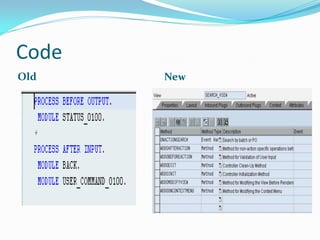
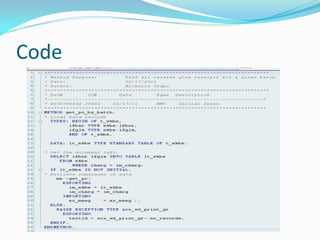
Code
Old    New
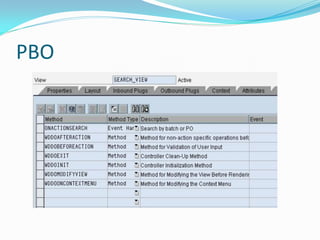
PBO
Code
Discussion points
 Project time
 Justification
    Learning
    Using
Project Timeline
 When you estimate, estimate for the new technology
 During a project get permission to extend timelines
 based upon new technology.
   Demo new technology for the project team.
   Present slideshow with information for case studies for
    business that have already used the technology.
       If possible get a phone call set up with one of those
        companies.
Justification Learning
 Share the information learned with co-workers
 Create Demos
 Be able to present new technology to the team and / or
  management
 Once start doing it – get ready to show why it has
  helped.
   User Satisfaction
   Quicker ABAP programming with a good repository of
    reusable code.
Justification Using
 Customer Satisfaction
 Reusable code
 Personal Job Satisfaction
 Keeping skills current – we support SAP code, we need
  to understand it.
 More options for projects
 Better design / testing leading to less maintenance
  work in the future.
Benefits!
 Endless.
 You decide based upon the technology you choose.
 Make sure you keep a log of lessons learned, and
  benefits after your project(s).
 See justification above.
Closing
 Coding standards should gradually change to use new
  coding techniques.
   An example no longer used the ALV function module
    instead use the ALV class / methods
 Learning / using is a great justification for going to
  training
 Learning new things increase you as an asset of the
  company.
abap4fun@gmail.com
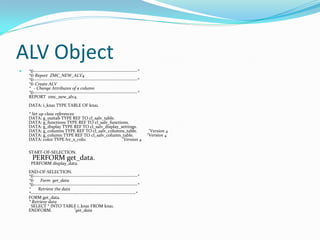
ALV Object
   *&---------------------------------------------------------------------*
    *& Report ZMC_NEW_ALV4
    *&---------------------------------------------------------------------*
    *& Create ALV
    * - Change Attributes of a column
    *&---------------------------------------------------------------------*
    REPORT zmc_new_alv4.
    DATA: i_kna1 TYPE TABLE OF kna1.
    * Set up class references
    DATA: g_outtab TYPE REF TO cl_salv_table.
    DATA: g_functions TYPE REF TO cl_salv_functions.
    DATA: g_display TYPE REF TO cl_salv_display_settings.
    DATA: g_columns TYPE REF TO cl_salv_columns_table.                          "Version 4
    DATA: g_column TYPE REF TO cl_salv_column_table.                           "Version 4
    DATA: color TYPE lvc_s_colo.                 "Version 4

    START-OF-SELECTION.
      PERFORM get_data.
     PERFORM display_data.
    END-OF-SELECTION.
    *&---------------------------------------------------------------------*
    *& Form get_data
    *&---------------------------------------------------------------------*
    *     Retrieve the data
    *----------------------------------------------------------------------*
    FORM get_data.
    * Retrieve data
      SELECT * INTO TABLE i_kna1 FROM kna1.
    ENDFORM.                      "get_data
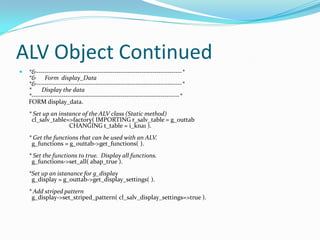
ALV Object Continued
   *&---------------------------------------------------------------------*
    *& Form display_Data
    *&---------------------------------------------------------------------*
    *     Display the data
    *----------------------------------------------------------------------*
    FORM display_data.
    * Set up an instance of the ALV class (Static method)
     cl_salv_table=>factory( IMPORTING r_salv_table = g_outtab
                    CHANGING t_table = i_kna1 ).
    * Get the functions that can be used with an ALV.
     g_functions = g_outtab->get_functions( ).
    * Set the functions to true. Display all functions.

     g_functions->set_all( abap_true ).
    *Set up an istanance for g_display
     g_display = g_outtab->get_display_settings( ).
    * Add striped pattern
     g_display->set_striped_pattern( cl_salv_display_settings=>true ).
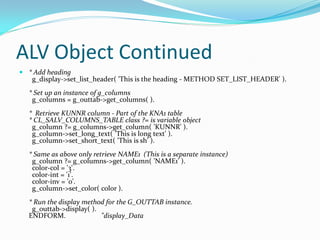
ALV Object Continued
 * Add heading
   g_display->set_list_header( 'This is the heading - METHOD SET_LIST_HEADER' ).
  * Set up an instance of g_columns
   g_columns = g_outtab->get_columns( ).
  * Retrieve KUNNR column - Part of the KNA1 table
  * CL_SALV_COLUMNS_TABLE class ?= is variable object
   g_column ?= g_columns->get_column( 'KUNNR' ).
   g_column->set_long_text( 'This is long text' ).
   g_column->set_short_text( 'This is sh' ).
  * Same as above only retrieve NAME1 (This is a separate instance)
   g_column ?= g_columns->get_column( 'NAME1' ).
   color-col = '3'.
   color-int = '1'.
   color-inv = '0'.
   g_column->set_color( color ).
  * Run the display method for the G_OUTTAB instance.
   g_outtab->display( ).
  ENDFORM.               "display_Data
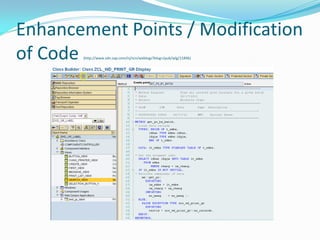
Enhancement Points / Modification
of Code(http://www.sdn.sap.com/irj/scn/weblogs?blog=/pub/wlg/11896)
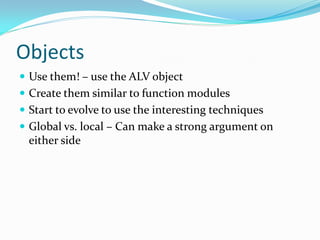
Objects
 Use them! – use the ALV object
 Create them similar to function modules
 Start to evolve to use the interesting techniques
 Global vs. local – Can make a strong argument on
  either side

Learning & using new technology

  • 1.
    Presented by MichelleCrapo abap4fun@gmail.com mcrapo@perrigo.com
  • 2.
  • 3.
    Contents  Step bystep from learning to using  Discussion  Benefits  Old Dog tricks used in a New world!  Closing
  • 4.
    Step 1 –Make the time  Normal work hours  Lull in projects  During project where can use the new technology  Something that you might use.  Presentations and demos to internal customers  Non-work hours  Prior to work  After work  During lunch break
  • 5.
    Lull in projects Support work  Timelines  Level of priority  Waiting for a response when you are complete with your development  Usually it goes back and forth a couple of times
  • 6.
    Project Work  Questionto ask yourself or know the answer if asked:  Why  Will it change any of the requirements  Extra time needed  What are you using differently  Describe benefits  Use the new tool without causing project issues or changes (Transparently)  Demo it!
  • 7.
    Non-work hours  Onlywhen it is fun!  Learn things that excite you  Logistically  Prior to work  After work  Lunch  Only when family doesn’t need you for something else.
  • 8.
    Groups  What couldyou use at home?  How?
  • 9.
    Something you mightuse  Read it  Read case studies on it  Schedule a meeting – add your overview to the invite. What will they learn?  Demo it!
  • 10.
    Step 2 -Learn  SAP Teched – my #1 place  Local Events  Web  Blogs  Websites  SCN E-Learning  http://www.sdn.sap.com/irj/scn/elearn  Outside resources (people you’ve met, mentors, forums)  Learn how the new technology was used.
  • 11.
    SAP Teched  Hands-on High level overview of what is coming  Lecture on new technology  ASUG lectures – these add the tools that most of us can get to now.
  • 12.
    Local Events  Easyto get to  Less expensive (may be no cost to you except travel. SIT)  Network. Introduce or get introductions from many of the SAP type people in your local area  Examples  SAP Insider Track  ASUG Meetings
  • 13.
    SCN E-learning  Startthe presentation have an open SAP Screen  Run the presentation pausing when you need to, create it on your system (if possible)
  • 14.
    Web  Google, YAHOO,SAPhoo  Articles  Blogs  Question / Answers  Free training - See some of them that I’ve found at the end of the presentation  Examples HTML, XML..  Tutorials
  • 15.
    On your ownsystem  ABAPDOCU  SE30 – Tips and Tricks  SE38 - DEMO*
  • 16.
    Outside Resources  Sendan e-mail to one of those people on your business cards. (I’m one of many.)  Do they have time to show you something new they may have learned?  Have they used a new technology on a project.  Use social networking  Request Mentor Webinars
  • 17.
    Step 3 -Implement  WebDynpro  ABAP objects  Enhancement Framework  Quality tools inside ABAP  MII  Web UI  Floorplan Manager
  • 18.
  • 19.
    And so.. Whatabout my skills?  Take an inventory  Most of the “new” stuff is based upon ABAP  You KNOW ABAP
  • 20.
    Old Tricks  Loop/ exit / Endloop  Table for variables  Table Maintenance  KISS  Documentation in programs  Performance tuning  Stop – does it make sense?
  • 21.
    Example  Webdynpro forprinting labels – combined with SMARTFORMS
  • 22.
  • 23.
  • 24.
  • 25.
  • 26.
  • 27.
  • 28.
  • 29.
  • 30.
  • 31.
    Discussion points  Projecttime  Justification  Learning  Using
  • 32.
    Project Timeline  Whenyou estimate, estimate for the new technology  During a project get permission to extend timelines based upon new technology.  Demo new technology for the project team.  Present slideshow with information for case studies for business that have already used the technology.  If possible get a phone call set up with one of those companies.
  • 33.
    Justification Learning  Sharethe information learned with co-workers  Create Demos  Be able to present new technology to the team and / or management  Once start doing it – get ready to show why it has helped.  User Satisfaction  Quicker ABAP programming with a good repository of reusable code.
  • 34.
    Justification Using  CustomerSatisfaction  Reusable code  Personal Job Satisfaction  Keeping skills current – we support SAP code, we need to understand it.  More options for projects  Better design / testing leading to less maintenance work in the future.
  • 35.
    Benefits!  Endless.  Youdecide based upon the technology you choose.  Make sure you keep a log of lessons learned, and benefits after your project(s).  See justification above.
  • 36.
    Closing  Coding standardsshould gradually change to use new coding techniques.  An example no longer used the ALV function module instead use the ALV class / methods  Learning / using is a great justification for going to training  Learning new things increase you as an asset of the company.
  • 37.
  • 38.
    ALV Object  *&---------------------------------------------------------------------* *& Report ZMC_NEW_ALV4 *&---------------------------------------------------------------------* *& Create ALV * - Change Attributes of a column *&---------------------------------------------------------------------* REPORT zmc_new_alv4. DATA: i_kna1 TYPE TABLE OF kna1. * Set up class references DATA: g_outtab TYPE REF TO cl_salv_table. DATA: g_functions TYPE REF TO cl_salv_functions. DATA: g_display TYPE REF TO cl_salv_display_settings. DATA: g_columns TYPE REF TO cl_salv_columns_table. "Version 4 DATA: g_column TYPE REF TO cl_salv_column_table. "Version 4 DATA: color TYPE lvc_s_colo. "Version 4 START-OF-SELECTION. PERFORM get_data. PERFORM display_data. END-OF-SELECTION. *&---------------------------------------------------------------------* *& Form get_data *&---------------------------------------------------------------------* * Retrieve the data *----------------------------------------------------------------------* FORM get_data. * Retrieve data SELECT * INTO TABLE i_kna1 FROM kna1. ENDFORM. "get_data
  • 39.
    ALV Object Continued  *&---------------------------------------------------------------------* *& Form display_Data *&---------------------------------------------------------------------* * Display the data *----------------------------------------------------------------------* FORM display_data. * Set up an instance of the ALV class (Static method) cl_salv_table=>factory( IMPORTING r_salv_table = g_outtab CHANGING t_table = i_kna1 ). * Get the functions that can be used with an ALV. g_functions = g_outtab->get_functions( ). * Set the functions to true. Display all functions. g_functions->set_all( abap_true ). *Set up an istanance for g_display g_display = g_outtab->get_display_settings( ). * Add striped pattern g_display->set_striped_pattern( cl_salv_display_settings=>true ).
  • 40.
    ALV Object Continued * Add heading g_display->set_list_header( 'This is the heading - METHOD SET_LIST_HEADER' ). * Set up an instance of g_columns g_columns = g_outtab->get_columns( ). * Retrieve KUNNR column - Part of the KNA1 table * CL_SALV_COLUMNS_TABLE class ?= is variable object g_column ?= g_columns->get_column( 'KUNNR' ). g_column->set_long_text( 'This is long text' ). g_column->set_short_text( 'This is sh' ). * Same as above only retrieve NAME1 (This is a separate instance) g_column ?= g_columns->get_column( 'NAME1' ). color-col = '3'. color-int = '1'. color-inv = '0'. g_column->set_color( color ). * Run the display method for the G_OUTTAB instance. g_outtab->display( ). ENDFORM. "display_Data
  • 41.
    Enhancement Points /Modification of Code(http://www.sdn.sap.com/irj/scn/weblogs?blog=/pub/wlg/11896)
  • 42.
    Objects  Use them!– use the ALV object  Create them similar to function modules  Start to evolve to use the interesting techniques  Global vs. local – Can make a strong argument on either side