
Oracle
Flashback
• Flashback technology is a revolutionary advancing recovery
• Traditional recovery techniques are slow
– Entire database or file has to be restored, not just the incorrect
data
– Every change in the database log must be examined
• Flashback is fast
– Changes are indexed by row and by transaction
– Only the changed data is restored
• Flashback commands are easy
– No complex multi-step procedures
Flashback Technology
Benefits
When to Use Flashback
Technology
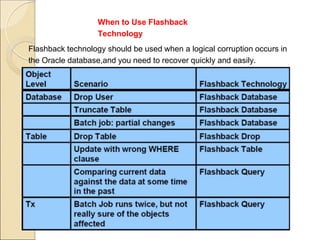
Flashback technology should be used when a logical corruption occurs in
the Oracle database,and you need to recover quickly and easily.
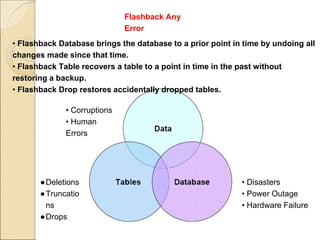
• Corruptions
• Human
Errors
●Deletions
●Truncatio
ns
●Drops
• Disasters
• Power Outage
• Hardware Failure
• Flashback Database brings the database to a prior point in time by undoing all
changes made since that time.
• Flashback Table recovers a table to a point in time in the past without
restoring a backup.
• Flashback Drop restores accidentally dropped tables.
Flashback Any
Error
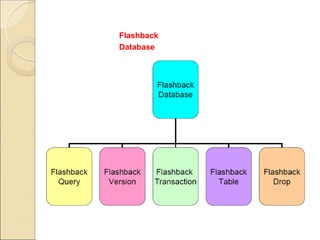
Flashback
Database
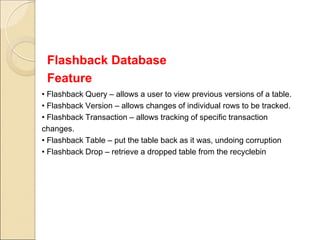
• Flashback Query – allows a user to view previous versions of a table.
• Flashback Version – allows changes of individual rows to be tracked.
• Flashback Transaction – allows tracking of specific transaction
changes.
• Flashback Table – put the table back as it was, undoing corruption
• Flashback Drop – retrieve a dropped table from the recyclebin
Flashback Database
Feature
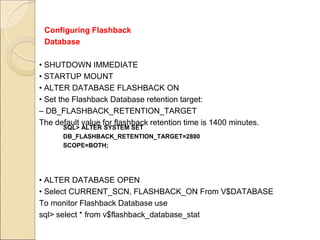
• SHUTDOWN IMMEDIATE
• STARTUP MOUNT
• ALTER DATABASE FLASHBACK ON
• Set the Flashback Database retention target:
– DB_FLASHBACK_RETENTION_TARGET
The default value for flashback retention time is 1400 minutes.
• ALTER DATABASE OPEN
• Select CURRENT_SCN, FLASHBACK_ON From V$DATABASE
To monitor Flashback Database use
sql> select * from v$flashback_database_stat
Configuring Flashback
Database
SQL> ALTER SYSTEM SET
DB_FLASHBACK_RETENTION_TARGET=2880
SCOPE=BOTH;
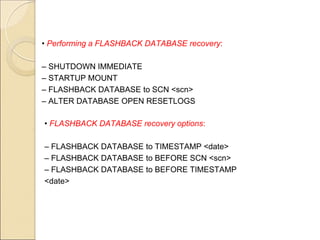
• Performing a FLASHBACK DATABASE recovery:
– SHUTDOWN IMMEDIATE
– STARTUP MOUNT
– FLASHBACK DATABASE to SCN <scn>
– ALTER DATABASE OPEN RESETLOGS
• FLASHBACK DATABASE recovery options:
– FLASHBACK DATABASE to TIMESTAMP <date>
– FLASHBACK DATABASE to BEFORE SCN <scn>
– FLASHBACK DATABASE to BEFORE TIMESTAMP
<date>
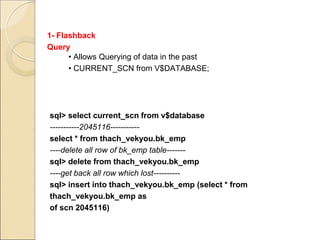
1- Flashback
Query
sql> select current_scn from v$database
-----------2045116-----------
select * from thach_vekyou.bk_emp
----delete all row of bk_emp table-------
sql> delete from thach_vekyou.bk_emp
----get back all row which lost----------
sql> insert into thach_vekyou.bk_emp (select * from
thach_vekyou.bk_emp as
of scn 2045116)
• Allows Querying of data in the past
• CURRENT_SCN from V$DATABASE;
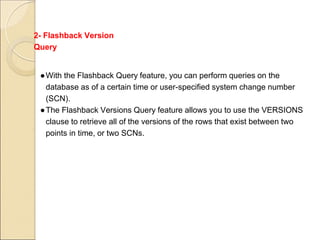
2- Flashback Version
Query
●With the Flashback Query feature, you can perform queries on the
database as of a certain time or user-specified system change number
(SCN).
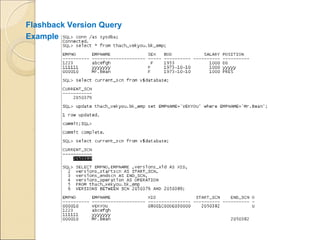
●The Flashback Versions Query feature allows you to use the VERSIONS
clause to retrieve all of the versions of the rows that exist between two
points in time, or two SCNs.
Flashback Version Query
Example
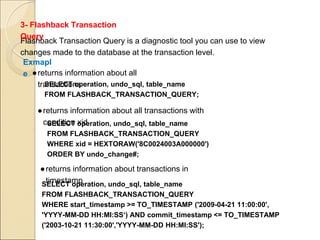
Flashback Transaction Query is a diagnostic tool you can use to view
changes made to the database at the transaction level.
3- Flashback Transaction
Query
SELECT operation, undo_sql, table_name
FROM FLASHBACK_TRANSACTION_QUERY;
●returns information about all
transactions
Exmapl
e
SELECT operation, undo_sql, table_name
FROM FLASHBACK_TRANSACTION_QUERY
WHERE xid = HEXTORAW('8C0024003A000000')
ORDER BY undo_change#;
●returns information about all transactions with
condition xid
SELECT operation, undo_sql, table_name
FROM FLASHBACK_TRANSACTION_QUERY
WHERE start_timestamp >= TO_TIMESTAMP ('2009-04-21 11:00:00',
'YYYY-MM-DD HH:MI:SS‘) AND commit_timestamp <= TO_TIMESTAMP
('2003-10-21 11:30:00','YYYY-MM-DD HH:MI:SS');
●returns information about transactions in
timestamp
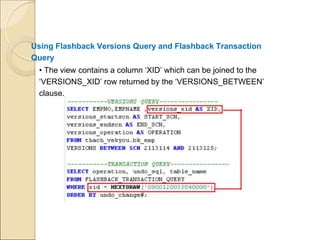
Using Flashback Versions Query and Flashback Transaction
Query
• The view contains a column ‘XID’ which can be joined to the
‘VERSIONS_XID’ row returned by the ‘VERSIONS_BETWEEN’
clause.
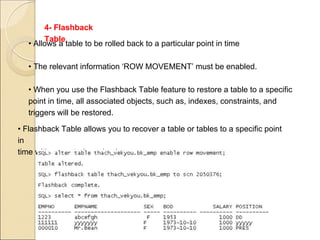
4- Flashback
Table
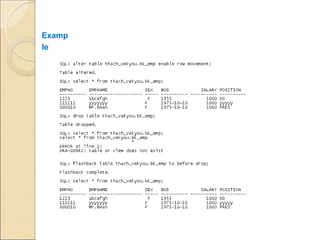
• Allows a table to be rolled back to a particular point in time
• The relevant information ‘ROW MOVEMENT’ must be enabled.
• When you use the Flashback Table feature to restore a table to a specific
point in time, all associated objects, such as, indexes, constraints, and
triggers will be restored.
• Flashback Table allows you to recover a table or tables to a specific point
in
time without restoring a backup.
5- Flashback
Drop
• Acts as a ‘RECYCLEBIN’ allowing dropped tables to be retrieved
• Flashback Drop is a variation of Flashback table as it handles rolling
back a dropped table.
• Dropped tables are ‘RENAMED’ in the ‘RECYCLEBIN’ and can be retrieved
using the ‘FLASHBACK DROP’ command.
• Tables must be in Locally managed tablespaces
• Tables must not be in the SYSTEM tablespace
• The relevant information ‘ROW MOVEMENT’ must be enabled.
Examp
le
The End
Author : Thach
Vekyou
http://top10town.com

Oracle flashback

  • 1.
  • 2.
    • Flashback technologyis a revolutionary advancing recovery • Traditional recovery techniques are slow – Entire database or file has to be restored, not just the incorrect data – Every change in the database log must be examined • Flashback is fast – Changes are indexed by row and by transaction – Only the changed data is restored • Flashback commands are easy – No complex multi-step procedures Flashback Technology Benefits
  • 3.
    When to UseFlashback Technology Flashback technology should be used when a logical corruption occurs in the Oracle database,and you need to recover quickly and easily.
  • 4.
    • Corruptions • Human Errors ●Deletions ●Truncatio ns ●Drops •Disasters • Power Outage • Hardware Failure • Flashback Database brings the database to a prior point in time by undoing all changes made since that time. • Flashback Table recovers a table to a point in time in the past without restoring a backup. • Flashback Drop restores accidentally dropped tables. Flashback Any Error
  • 5.
  • 6.
    • Flashback Query– allows a user to view previous versions of a table. • Flashback Version – allows changes of individual rows to be tracked. • Flashback Transaction – allows tracking of specific transaction changes. • Flashback Table – put the table back as it was, undoing corruption • Flashback Drop – retrieve a dropped table from the recyclebin Flashback Database Feature
  • 7.
    • SHUTDOWN IMMEDIATE •STARTUP MOUNT • ALTER DATABASE FLASHBACK ON • Set the Flashback Database retention target: – DB_FLASHBACK_RETENTION_TARGET The default value for flashback retention time is 1400 minutes. • ALTER DATABASE OPEN • Select CURRENT_SCN, FLASHBACK_ON From V$DATABASE To monitor Flashback Database use sql> select * from v$flashback_database_stat Configuring Flashback Database SQL> ALTER SYSTEM SET DB_FLASHBACK_RETENTION_TARGET=2880 SCOPE=BOTH;
  • 8.
    • Performing aFLASHBACK DATABASE recovery: – SHUTDOWN IMMEDIATE – STARTUP MOUNT – FLASHBACK DATABASE to SCN <scn> – ALTER DATABASE OPEN RESETLOGS • FLASHBACK DATABASE recovery options: – FLASHBACK DATABASE to TIMESTAMP <date> – FLASHBACK DATABASE to BEFORE SCN <scn> – FLASHBACK DATABASE to BEFORE TIMESTAMP <date>
  • 9.
    1- Flashback Query sql> selectcurrent_scn from v$database -----------2045116----------- select * from thach_vekyou.bk_emp ----delete all row of bk_emp table------- sql> delete from thach_vekyou.bk_emp ----get back all row which lost---------- sql> insert into thach_vekyou.bk_emp (select * from thach_vekyou.bk_emp as of scn 2045116) • Allows Querying of data in the past • CURRENT_SCN from V$DATABASE;
  • 10.
    2- Flashback Version Query ●Withthe Flashback Query feature, you can perform queries on the database as of a certain time or user-specified system change number (SCN). ●The Flashback Versions Query feature allows you to use the VERSIONS clause to retrieve all of the versions of the rows that exist between two points in time, or two SCNs.
  • 11.
  • 12.
    Flashback Transaction Queryis a diagnostic tool you can use to view changes made to the database at the transaction level. 3- Flashback Transaction Query SELECT operation, undo_sql, table_name FROM FLASHBACK_TRANSACTION_QUERY; ●returns information about all transactions Exmapl e SELECT operation, undo_sql, table_name FROM FLASHBACK_TRANSACTION_QUERY WHERE xid = HEXTORAW('8C0024003A000000') ORDER BY undo_change#; ●returns information about all transactions with condition xid SELECT operation, undo_sql, table_name FROM FLASHBACK_TRANSACTION_QUERY WHERE start_timestamp >= TO_TIMESTAMP ('2009-04-21 11:00:00', 'YYYY-MM-DD HH:MI:SS‘) AND commit_timestamp <= TO_TIMESTAMP ('2003-10-21 11:30:00','YYYY-MM-DD HH:MI:SS'); ●returns information about transactions in timestamp
  • 13.
    Using Flashback VersionsQuery and Flashback Transaction Query • The view contains a column ‘XID’ which can be joined to the ‘VERSIONS_XID’ row returned by the ‘VERSIONS_BETWEEN’ clause.
  • 14.
    4- Flashback Table • Allowsa table to be rolled back to a particular point in time • The relevant information ‘ROW MOVEMENT’ must be enabled. • When you use the Flashback Table feature to restore a table to a specific point in time, all associated objects, such as, indexes, constraints, and triggers will be restored. • Flashback Table allows you to recover a table or tables to a specific point in time without restoring a backup.
  • 15.
    5- Flashback Drop • Actsas a ‘RECYCLEBIN’ allowing dropped tables to be retrieved • Flashback Drop is a variation of Flashback table as it handles rolling back a dropped table. • Dropped tables are ‘RENAMED’ in the ‘RECYCLEBIN’ and can be retrieved using the ‘FLASHBACK DROP’ command. • Tables must be in Locally managed tablespaces • Tables must not be in the SYSTEM tablespace • The relevant information ‘ROW MOVEMENT’ must be enabled.
  • 16.
  • 17.
    The End Author :Thach Vekyou http://top10town.com