Virtually ThereVirtual Worlds for Online Collaboration and Community BuildingSchool of Urban and Public Affairs, UT ArlingtonJuly 20, 2011Sarah Jones, Digital Library ServicesUT Arlington Library
Virtually ThereScenario:You have two groups of people who need to work together to accomplish goals. These people cannot meet face-to-face regularly, so they need to communicate and collaborate using internet-based tools.Question:What online environment will be most successful in enabling the group to hold live meetings?
Options for Online Meetings - 1Web-based conferencingExamples: Adobe Connect, GoToMeeting, WebEx, Yugma (or other free solutions).Pros: very easy for people to attend your event, usually provide for a variety of multimedia presentations, usually provide at least a speaker’s webcam.Cons: usually expensive and/or require someone to set it up for you, are best for presentations rather than a group discussion.
Options for Online Meetings - 2TeleconferencingExamples: Skype, videoconferencing, telepresence.Pros: Skype is pretty easy and free and provides a conference call experience, telepresence is reportedly impressive (I don’t have experience with it).Cons: Skype is basically a phone call and can be a useful component in a broader online meeting experience but may not be sufficient on its own, videoconferencing usually requires others to do setup and tech support, telepresence has got to be expensive (though there are two public Cisco Telepresence rooms in North Texas: at the DFW Airport Marriott and at the Sheraton Dallas).
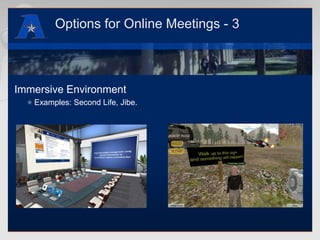
Options for Online Meetings - 3Immersive EnvironmentExamples: Second Life, Jibe.
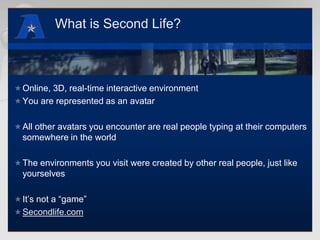
What is Second Life?Online, 3D, real-time interactive environment You are represented as an avatarAll other avatars you encounter are real people typing at their computers somewhere in the worldThe environments you visit were created by other real people, just like yourselvesIt’s not a “game”Secondlife.com
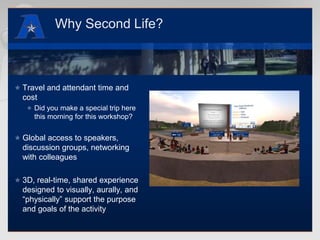
Why Second Life?Travel and attendant time and costDid you make a special trip here this morning for this workshop?Global access to speakers, discussion groups, networking with colleagues3D, real-time, shared experience designed to visually, aurally, and “physically” support the purpose and goals of the activity
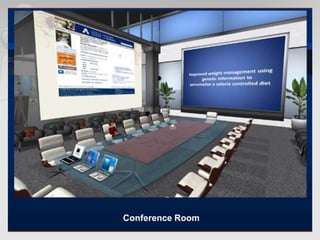
Conference Room
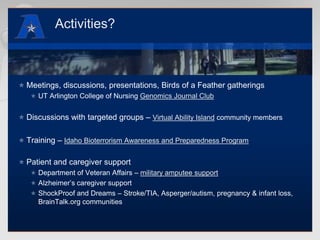
Activities?Meetings, discussions, presentations, Birds of a Feather gatheringsUT Arlington College of Nursing Genomics Journal ClubDiscussions with targeted groups – Virtual Ability Island community membersTraining – Idaho Bioterrorism Awareness and Preparedness ProgramPatient and caregiver supportDepartment of Veteran Affairs – military amputee supportAlzheimer’s caregiver supportShockProof and Dreams – Stroke/TIA, Asperger/autism, pregnancy & infant loss, BrainTalk.org communities
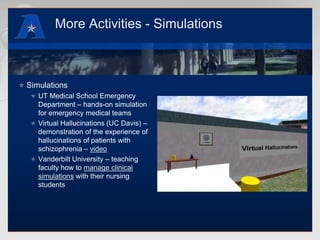
More Activities - SimulationsSimulationsUT Medical School Emergency Department – hands-on simulation for emergency medical teamsVirtual Hallucinations (UC Davis) – demonstration of the experience of hallucinations of patients with schizophrenia – videoVanderbilt University – teaching faculty how to manage clinical simulations with their nursing students
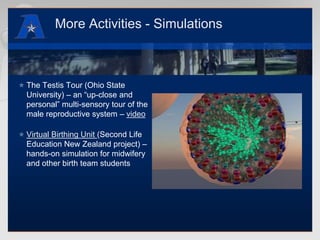
More Activities - SimulationsThe Testis Tour (Ohio State University) – an “up-close and personal” multi-sensory tour of the male reproductive system – videoVirtual Birthing Unit (Second Life Education New Zealand project) – hands-on simulation for midwifery and other birth team students
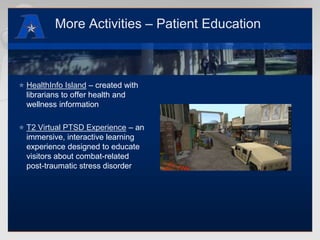
More Activities – Patient EducationHealthInfo Island – created with librarians to offer health and wellness informationT2 Virtual PTSD Experience – an immersive, interactive learning experience designed to educate visitors about combat-related post-traumatic stress disorder
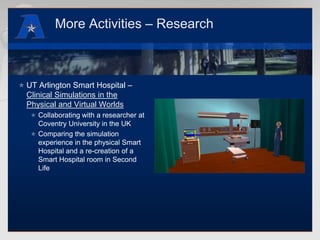
More Activities – ResearchUT Arlington Smart Hospital – Clinical Simulations in the Physical and Virtual WorldsCollaborating with a researcher at Coventry University in the UKComparing the simulation experience in the physical Smart Hospital and a re-creation of a Smart Hospital room in Second Life
Let’s take a look at JibeIt’s all in a web page: no software to download and installIncludes text and voice chat - or use Skype on the side if you preferCreate items/displays/environments that include interactivity - tutorials? games? self-paced learning modules?Use an inworld Presentation screen for slides or video, or supplement your presentation with a desktop sharing application like join.meIndustry-standard creation and development toolsSee Jibemix.com
Why use an immersive environment?Opportunity for participating in activities, such as abovePlus: Sense of Self, Sense of Place, Sense of PresenceEmbodiment - as you adjust to seeing yourself as an avatar, you start to feel embodied in that avatar .. not scary! but rather you find that what you experience as an avatar becomes part of your entire personal experience (same mind! just one body is made of molecules, and the other is made of pixels) – dancing, floating in water, mirror therapy for amputeesCo-presence – the other people/avatars share your experience: visually, aurally, mentally (through the conversations you share)As a result, you “feel” that you are all together, even though physically you are distant.More engaging than a videoconference, webcast, or Skype meeting
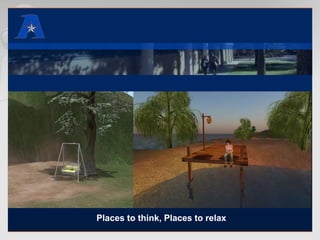
Places to think, Places to relax
Cons?TechnologyNeed a fairly modern computer with good graphics card for the best experience (but notice my small laptop from 2007)Need DSL or cable internet (wireless can be ok; satellite internet is too slow)“Culture shock”Can take a while to adjust to “seeing” in a 3D, computer screen, environmentCan be an adjustment to “being” an avatarBUT – you do not need to be a gamer or techie nerdMostly, what’s helpful is to have a flexible imagination to feel at home in a virtual environment
Pros and Cons – Second Life vs. JibePros (both):Immersive, 3D, multimedia, real-time/synchronous experience, avatar-based.Leads to attendees having an enhanced sense of place, sense of co-presence, engagement with the event, memory of their online experience.
Pros and Cons – Second Life vs. JibePros (Jibe)No software to download, user interface is intuitive, pricing is attractive ($47/month hosted, $295 one time cost for self-hosted), support for mobile devices coming in 2011.Pros (Second Life)Mature, well-established, large community; real-time inworld collaborative creation of nearly anything you can imagine; nearly infinitely customizable avatars.
Pros and Cons – Second Life vs. JibeCons (Second Life)requires software installation, software interface can be challenging and requires some commitment for users to adjust, environment creation/development requires learning skills, pricing is less attractive ($295/month).Cons (Jibe)environment creation/development requires learning some skills, it’s a new-ish platform but with additional features in development, including support for iOS and Android.
Second Life LocationsThe Alamo at UT ArlingtonUTA Smart Hospital roomOther places to visitEducationReplicas of Real Life locationsMore Second Life destinations
Jibe LocationsDemonstration Jibe world created for the Defense Acquisition UniversityJohn “Pathfinder” Lester’s Jibe world - Office Hours in your web browserVirtual Career Center @ Rock Creek Park - See how a Jibe world can be embedded in a Facebook pageUT Arlington Library’s first foray into Jibe
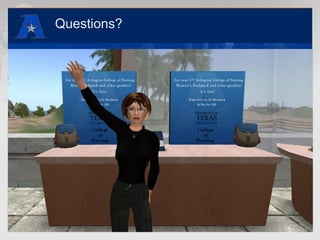
Questions?
Thank you!Sarah Jones - sjones@uta.eduUniversity of Texas Arlington, Digital Library Serviceswww.uta.edu/librarywww.uta.edu/secondlifeIn SL: RazitraArtizar (Raz)This presentation: www.slideshare.net/razitra

Options for Online Meetings

  • 1.
    Virtually ThereVirtual Worldsfor Online Collaboration and Community BuildingSchool of Urban and Public Affairs, UT ArlingtonJuly 20, 2011Sarah Jones, Digital Library ServicesUT Arlington Library
  • 2.
    Virtually ThereScenario:You havetwo groups of people who need to work together to accomplish goals. These people cannot meet face-to-face regularly, so they need to communicate and collaborate using internet-based tools.Question:What online environment will be most successful in enabling the group to hold live meetings?
  • 3.
    Options for OnlineMeetings - 1Web-based conferencingExamples: Adobe Connect, GoToMeeting, WebEx, Yugma (or other free solutions).Pros: very easy for people to attend your event, usually provide for a variety of multimedia presentations, usually provide at least a speaker’s webcam.Cons: usually expensive and/or require someone to set it up for you, are best for presentations rather than a group discussion.
  • 4.
    Options for OnlineMeetings - 2TeleconferencingExamples: Skype, videoconferencing, telepresence.Pros: Skype is pretty easy and free and provides a conference call experience, telepresence is reportedly impressive (I don’t have experience with it).Cons: Skype is basically a phone call and can be a useful component in a broader online meeting experience but may not be sufficient on its own, videoconferencing usually requires others to do setup and tech support, telepresence has got to be expensive (though there are two public Cisco Telepresence rooms in North Texas: at the DFW Airport Marriott and at the Sheraton Dallas).
  • 5.
    Options for OnlineMeetings - 3Immersive EnvironmentExamples: Second Life, Jibe.
  • 6.
    What is SecondLife?Online, 3D, real-time interactive environment You are represented as an avatarAll other avatars you encounter are real people typing at their computers somewhere in the worldThe environments you visit were created by other real people, just like yourselvesIt’s not a “game”Secondlife.com
  • 7.
    Why Second Life?Traveland attendant time and costDid you make a special trip here this morning for this workshop?Global access to speakers, discussion groups, networking with colleagues3D, real-time, shared experience designed to visually, aurally, and “physically” support the purpose and goals of the activity
  • 8.
  • 9.
    Activities?Meetings, discussions, presentations,Birds of a Feather gatheringsUT Arlington College of Nursing Genomics Journal ClubDiscussions with targeted groups – Virtual Ability Island community membersTraining – Idaho Bioterrorism Awareness and Preparedness ProgramPatient and caregiver supportDepartment of Veteran Affairs – military amputee supportAlzheimer’s caregiver supportShockProof and Dreams – Stroke/TIA, Asperger/autism, pregnancy & infant loss, BrainTalk.org communities
  • 10.
    More Activities -SimulationsSimulationsUT Medical School Emergency Department – hands-on simulation for emergency medical teamsVirtual Hallucinations (UC Davis) – demonstration of the experience of hallucinations of patients with schizophrenia – videoVanderbilt University – teaching faculty how to manage clinical simulations with their nursing students
  • 11.
    More Activities -SimulationsThe Testis Tour (Ohio State University) – an “up-close and personal” multi-sensory tour of the male reproductive system – videoVirtual Birthing Unit (Second Life Education New Zealand project) – hands-on simulation for midwifery and other birth team students
  • 12.
    More Activities –Patient EducationHealthInfo Island – created with librarians to offer health and wellness informationT2 Virtual PTSD Experience – an immersive, interactive learning experience designed to educate visitors about combat-related post-traumatic stress disorder
  • 13.
    More Activities –ResearchUT Arlington Smart Hospital – Clinical Simulations in the Physical and Virtual WorldsCollaborating with a researcher at Coventry University in the UKComparing the simulation experience in the physical Smart Hospital and a re-creation of a Smart Hospital room in Second Life
  • 14.
    Let’s take alook at JibeIt’s all in a web page: no software to download and installIncludes text and voice chat - or use Skype on the side if you preferCreate items/displays/environments that include interactivity - tutorials? games? self-paced learning modules?Use an inworld Presentation screen for slides or video, or supplement your presentation with a desktop sharing application like join.meIndustry-standard creation and development toolsSee Jibemix.com
  • 15.
    Why use animmersive environment?Opportunity for participating in activities, such as abovePlus: Sense of Self, Sense of Place, Sense of PresenceEmbodiment - as you adjust to seeing yourself as an avatar, you start to feel embodied in that avatar .. not scary! but rather you find that what you experience as an avatar becomes part of your entire personal experience (same mind! just one body is made of molecules, and the other is made of pixels) – dancing, floating in water, mirror therapy for amputeesCo-presence – the other people/avatars share your experience: visually, aurally, mentally (through the conversations you share)As a result, you “feel” that you are all together, even though physically you are distant.More engaging than a videoconference, webcast, or Skype meeting
  • 16.
    Places to think,Places to relax
  • 17.
    Cons?TechnologyNeed a fairlymodern computer with good graphics card for the best experience (but notice my small laptop from 2007)Need DSL or cable internet (wireless can be ok; satellite internet is too slow)“Culture shock”Can take a while to adjust to “seeing” in a 3D, computer screen, environmentCan be an adjustment to “being” an avatarBUT – you do not need to be a gamer or techie nerdMostly, what’s helpful is to have a flexible imagination to feel at home in a virtual environment
  • 18.
    Pros and Cons– Second Life vs. JibePros (both):Immersive, 3D, multimedia, real-time/synchronous experience, avatar-based.Leads to attendees having an enhanced sense of place, sense of co-presence, engagement with the event, memory of their online experience.
  • 19.
    Pros and Cons– Second Life vs. JibePros (Jibe)No software to download, user interface is intuitive, pricing is attractive ($47/month hosted, $295 one time cost for self-hosted), support for mobile devices coming in 2011.Pros (Second Life)Mature, well-established, large community; real-time inworld collaborative creation of nearly anything you can imagine; nearly infinitely customizable avatars.
  • 20.
    Pros and Cons– Second Life vs. JibeCons (Second Life)requires software installation, software interface can be challenging and requires some commitment for users to adjust, environment creation/development requires learning skills, pricing is less attractive ($295/month).Cons (Jibe)environment creation/development requires learning some skills, it’s a new-ish platform but with additional features in development, including support for iOS and Android.
  • 21.
    Second Life LocationsTheAlamo at UT ArlingtonUTA Smart Hospital roomOther places to visitEducationReplicas of Real Life locationsMore Second Life destinations
  • 22.
    Jibe LocationsDemonstration Jibeworld created for the Defense Acquisition UniversityJohn “Pathfinder” Lester’s Jibe world - Office Hours in your web browserVirtual Career Center @ Rock Creek Park - See how a Jibe world can be embedded in a Facebook pageUT Arlington Library’s first foray into Jibe
  • 23.
  • 24.
    Thank you!Sarah Jones- sjones@uta.eduUniversity of Texas Arlington, Digital Library Serviceswww.uta.edu/librarywww.uta.edu/secondlifeIn SL: RazitraArtizar (Raz)This presentation: www.slideshare.net/razitra