
Operator Errors and What 
Can be Done to Minimize 
Global Congress on 
Process Safety 
March 31, 2014
Presenter 
Tom Nolan 
• Graduated from Ohio University with B.S. 
in Chemical Engineering 
• 24 years experience in chemical process 
industry in a variety of roles 
• MAIC and DFSS Six Sigma Black Belt
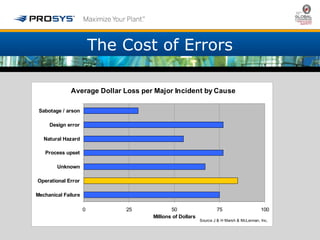
The Cost of Errors 
Average Dollar Loss per Major Incident by Cause 
0 25 50 75 100 
Sabotage / arson 
Design error 
Natural Hazard 
Process upset 
Unknown 
Operational Error 
Mechanical Failure 
Millions of Dollars 
Source J & H Marsh & McLennan, Inc.
The Cost of Operator Errors 
• ASM estimates total loss due to operator 
error is $8B per year 
• Chemical Safety Topical Committee - average 
of one chemical incident per day - cost of 
over $2 million per incident to comply with 
requirements 
• Errors cause 42% of unscheduled shutdowns 
• 70% of process incidents occur during start-up 
or shutdown
Reasons for Errors 
• Lack of Skill 
• Lack of Knowledge 
• Carelessness 
• System Design 
• Operator set up to make errors by 
inappropriate design – built in errors 
• Errors that are predictable are preventable 
by better design
Focus of this Discussion 
• System Design 
• Alarm Management 
• Operator Graphics 
• Operator set up to make errors by 
inappropriate design – built in errors 
• Errors that are predictable are preventable 
by better design
Alarm Floods 
In a number of industrial incidents, alarm 
floods were identified as a significant 
contributing cause to the incident… 
As found by EEMUA in 1999 and CSB 
Alarm Flood defined by ISA 18.2 as - 
“10 or more annunciated alarms in 
any 10 minute period per operator”
Why do Alarm Floods Occur? 
One reason is not providing dynamic alarm management 
• Alarms need to indicate abnormal situations that 
require operator action 
• Processes do not operate in one state 
• What is normal vs abnormal changes with state 
• Alarms are typically configured for run therefore many 
alarms are triggered upon a Change of State: Run to 
Shutdown 
• Many of the alarms are not applicable or actionable for 
the new state impleading the operators ability to act 
quickly on what is important
What is Impacted by Alarm Floods? 
• Product quality 
• Operability or profitability of the 
process 
• Loss of equipment 
• Loss of containment – 
environmental releases 
• Injury and loss of life in plant or 
community
What Makes Alarm Floods so Dangerous? 
Can be a problem for three reasons: 
• A deluge of alarms can cause critical 
alarms to be missed 
• Floods can be a significant distraction 
when dealing with process upsets 
• Can be an indicator of larger systemic 
safety issues
Impacting Alarm Management Design 
• Alarm rationalization is not a process to 
eliminate alarms - its about quality 
• Good rationalization will add alarms when 
appropriate 
• Typical (Static) rationalization is only for run 
mode 
• Dynamic rationalization considers all plant 
modes
Dynamic Alarm Management 
• Dynamic rationalization does everything 
a static rationalization does plus asks 
“when” for each alarm 
• Requires dynamic software to make 
changes based upon operating mode of 
the plant 
• Eliminates redundant alarms and lowers 
operator loading during transitions 
• Only alarms what is abnormal and 
actionable for the given state
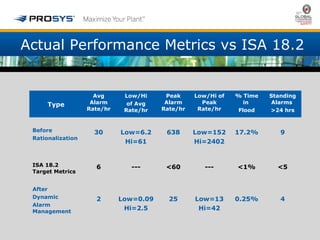
Actual Performance Metrics vs ISA 18.2 
Type 
Avg 
Alarm 
Rate/hr 
Low/Hi 
of Avg 
Rate/hr 
Peak 
Alarm 
Rate/hr 
Low/Hi of 
Peak 
Rate/hr 
% Time 
in 
Flood 
Standing 
Alarms 
>24 hrs 
Before 
Rationalization 
30 Low=6.2 
Hi=61 
638 Low=152 
Hi=2402 
17.2% 9 
ISA 18.2 
Target Metrics 
6 --- <60 --- <1% <5 
After 
Dynamic 
Alarm 
Management 
2 Low=0.09 
Hi=2.5 
25 Low=13 
Hi=42 
0.25% 4
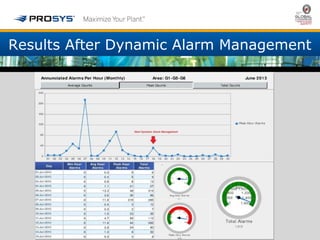
Results After Dynamic Alarm Management
Operator Graphics – The Risk of Changing Focus 
• Distraction of changing focus from process 
graphic to faceplate window 
• Added workload from managing multiple 
open windows 
• Increased probability of errors when 
changing values for un-intended tag with 
multiple faceplates open 
• All of above become multiplied and more 
complex when process is transitioning from 
one state to another
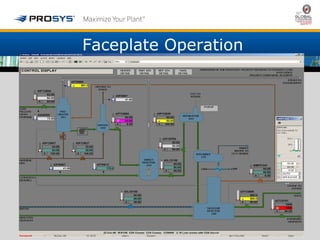
Faceplate Operation
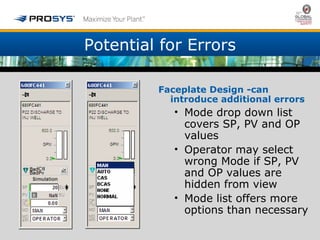
Potential for Errors 
Faceplate Design -can 
introduce additional errors 
• Mode drop down list 
covers SP, PV and OP 
values 
• Operator may select 
wrong Mode if SP, PV 
and OP values are 
hidden from view 
• Mode list offers more 
options than necessary
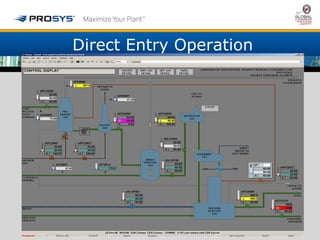
Direct Entry Operation
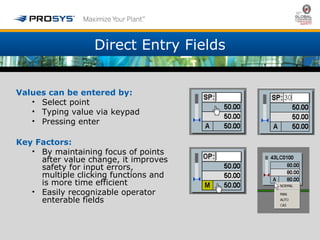
Direct Entry Fields 
Values can be entered by: 
• Select point 
• Typing value via keypad 
• Pressing enter 
Key Factors: 
• By maintaining focus of points 
after value change, it improves 
safety for input errors, 
multiple clicking functions and 
is more time efficient 
• Easily recognizable operator 
enterable fields
Evaluation of Methods 
Comparison of Faceplate to Direct Entry 
• Keystroke Level Analysis 
• Operator Loading Analysis 
• Risk Analysis
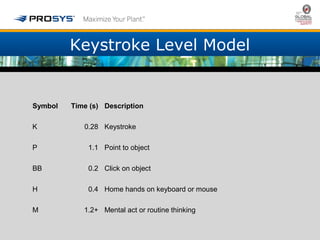
Keystroke Level Model 
Symbol Time (s) Description 
K 0.28 Keystroke 
P 1.1 Point to object 
BB 0.2 Click on object 
H 0.4 Home hands on keyboard or mouse 
M 1.2+ Mental act or routine thinking
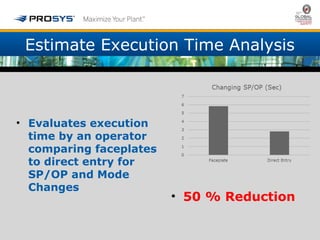
Estimate Execution Time Analysis 
• Evaluates execution 
time by an operator 
comparing faceplates 
to direct entry for 
SP/OP and Mode 
Changes 
• 50 % Reduction
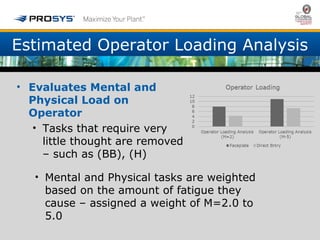
Estimated Operator Loading Analysis 
• Evaluates Mental and 
Physical Load on 
Operator 
• Tasks that require very 
little thought are removed 
– such as (BB), (H) 
• Mental and Physical tasks are weighted 
based on the amount of fatigue they 
cause – assigned a weight of M=2.0 to 
5.0
Risk Analysis 
• Identifies actions where operator 
entry errors can occur
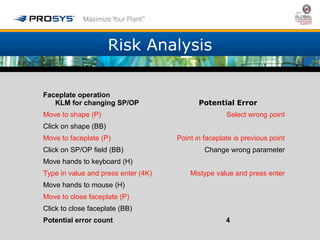
Risk Analysis 
Faceplate operation 
KLM for changing SP/OP Potential Error 
Move to shape (P) Select wrong point 
Click on shape (BB) 
Move to faceplate (P) Point in faceplate is previous point 
Click on SP/OP field (BB) Change wrong parameter 
Move hands to keyboard (H) 
Type in value and press enter (4K) Mistype value and press enter 
Move hands to mouse (H) 
Move to close faceplate (P) 
Click to close faceplate (BB) 
Potential error count 4
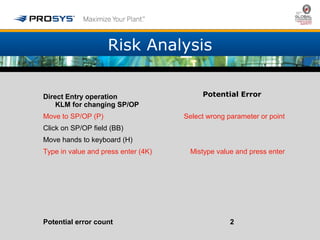
Risk Analysis 
Direct Entry operation 
KLM for changing SP/OP 
Potential Error 
Move to SP/OP (P) Select wrong parameter or point 
Click on SP/OP field (BB) 
Move hands to keyboard (H) 
Type in value and press enter (4K) Mistype value and press enter 
Potential error count 2
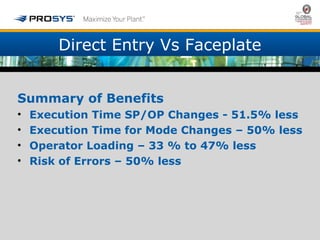
Direct Entry Vs Faceplate 
Summary of Benefits 
• Execution Time SP/OP Changes - 51.5% less 
• Execution Time for Mode Changes – 50% less 
• Operator Loading – 33 % to 47% less 
• Risk of Errors – 50% less
Conclusion 
• Many industrial errors are a result of 
operators using control systems with flawed 
designs 
• Poor design and performance by alarm management 
distracts operators and/or occludes critical alarms 
• Operator graphics with multiple open faceplates can 
cause a change intended for one controller to be entered 
into the faceplate of another 
• The two mechanisms listed above are predictable and 
therefore preventable through better design available 
today
Questions? 
Comments? 
Contact Prosys 
@prosys.com or 
225-291-9591 x225

Operator errors and what can be done to minimize

  • 1.
    Operator Errors andWhat Can be Done to Minimize Global Congress on Process Safety March 31, 2014
  • 2.
    Presenter Tom Nolan • Graduated from Ohio University with B.S. in Chemical Engineering • 24 years experience in chemical process industry in a variety of roles • MAIC and DFSS Six Sigma Black Belt
  • 3.
    The Cost ofErrors Average Dollar Loss per Major Incident by Cause 0 25 50 75 100 Sabotage / arson Design error Natural Hazard Process upset Unknown Operational Error Mechanical Failure Millions of Dollars Source J & H Marsh & McLennan, Inc.
  • 4.
    The Cost ofOperator Errors • ASM estimates total loss due to operator error is $8B per year • Chemical Safety Topical Committee - average of one chemical incident per day - cost of over $2 million per incident to comply with requirements • Errors cause 42% of unscheduled shutdowns • 70% of process incidents occur during start-up or shutdown
  • 5.
    Reasons for Errors • Lack of Skill • Lack of Knowledge • Carelessness • System Design • Operator set up to make errors by inappropriate design – built in errors • Errors that are predictable are preventable by better design
  • 6.
    Focus of thisDiscussion • System Design • Alarm Management • Operator Graphics • Operator set up to make errors by inappropriate design – built in errors • Errors that are predictable are preventable by better design
  • 7.
    Alarm Floods Ina number of industrial incidents, alarm floods were identified as a significant contributing cause to the incident… As found by EEMUA in 1999 and CSB Alarm Flood defined by ISA 18.2 as - “10 or more annunciated alarms in any 10 minute period per operator”
  • 8.
    Why do AlarmFloods Occur? One reason is not providing dynamic alarm management • Alarms need to indicate abnormal situations that require operator action • Processes do not operate in one state • What is normal vs abnormal changes with state • Alarms are typically configured for run therefore many alarms are triggered upon a Change of State: Run to Shutdown • Many of the alarms are not applicable or actionable for the new state impleading the operators ability to act quickly on what is important
  • 9.
    What is Impactedby Alarm Floods? • Product quality • Operability or profitability of the process • Loss of equipment • Loss of containment – environmental releases • Injury and loss of life in plant or community
  • 10.
    What Makes AlarmFloods so Dangerous? Can be a problem for three reasons: • A deluge of alarms can cause critical alarms to be missed • Floods can be a significant distraction when dealing with process upsets • Can be an indicator of larger systemic safety issues
  • 11.
    Impacting Alarm ManagementDesign • Alarm rationalization is not a process to eliminate alarms - its about quality • Good rationalization will add alarms when appropriate • Typical (Static) rationalization is only for run mode • Dynamic rationalization considers all plant modes
  • 12.
    Dynamic Alarm Management • Dynamic rationalization does everything a static rationalization does plus asks “when” for each alarm • Requires dynamic software to make changes based upon operating mode of the plant • Eliminates redundant alarms and lowers operator loading during transitions • Only alarms what is abnormal and actionable for the given state
  • 13.
    Actual Performance Metricsvs ISA 18.2 Type Avg Alarm Rate/hr Low/Hi of Avg Rate/hr Peak Alarm Rate/hr Low/Hi of Peak Rate/hr % Time in Flood Standing Alarms >24 hrs Before Rationalization 30 Low=6.2 Hi=61 638 Low=152 Hi=2402 17.2% 9 ISA 18.2 Target Metrics 6 --- <60 --- <1% <5 After Dynamic Alarm Management 2 Low=0.09 Hi=2.5 25 Low=13 Hi=42 0.25% 4
  • 14.
    Results After DynamicAlarm Management
  • 15.
    Operator Graphics –The Risk of Changing Focus • Distraction of changing focus from process graphic to faceplate window • Added workload from managing multiple open windows • Increased probability of errors when changing values for un-intended tag with multiple faceplates open • All of above become multiplied and more complex when process is transitioning from one state to another
  • 16.
  • 17.
    Potential for Errors Faceplate Design -can introduce additional errors • Mode drop down list covers SP, PV and OP values • Operator may select wrong Mode if SP, PV and OP values are hidden from view • Mode list offers more options than necessary
  • 18.
  • 19.
    Direct Entry Fields Values can be entered by: • Select point • Typing value via keypad • Pressing enter Key Factors: • By maintaining focus of points after value change, it improves safety for input errors, multiple clicking functions and is more time efficient • Easily recognizable operator enterable fields
  • 20.
    Evaluation of Methods Comparison of Faceplate to Direct Entry • Keystroke Level Analysis • Operator Loading Analysis • Risk Analysis
  • 21.
    Keystroke Level Model Symbol Time (s) Description K 0.28 Keystroke P 1.1 Point to object BB 0.2 Click on object H 0.4 Home hands on keyboard or mouse M 1.2+ Mental act or routine thinking
  • 22.
    Estimate Execution TimeAnalysis • Evaluates execution time by an operator comparing faceplates to direct entry for SP/OP and Mode Changes • 50 % Reduction
  • 23.
    Estimated Operator LoadingAnalysis • Evaluates Mental and Physical Load on Operator • Tasks that require very little thought are removed – such as (BB), (H) • Mental and Physical tasks are weighted based on the amount of fatigue they cause – assigned a weight of M=2.0 to 5.0
  • 24.
    Risk Analysis •Identifies actions where operator entry errors can occur
  • 25.
    Risk Analysis Faceplateoperation KLM for changing SP/OP Potential Error Move to shape (P) Select wrong point Click on shape (BB) Move to faceplate (P) Point in faceplate is previous point Click on SP/OP field (BB) Change wrong parameter Move hands to keyboard (H) Type in value and press enter (4K) Mistype value and press enter Move hands to mouse (H) Move to close faceplate (P) Click to close faceplate (BB) Potential error count 4
  • 26.
    Risk Analysis DirectEntry operation KLM for changing SP/OP Potential Error Move to SP/OP (P) Select wrong parameter or point Click on SP/OP field (BB) Move hands to keyboard (H) Type in value and press enter (4K) Mistype value and press enter Potential error count 2
  • 27.
    Direct Entry VsFaceplate Summary of Benefits • Execution Time SP/OP Changes - 51.5% less • Execution Time for Mode Changes – 50% less • Operator Loading – 33 % to 47% less • Risk of Errors – 50% less
  • 28.
    Conclusion • Manyindustrial errors are a result of operators using control systems with flawed designs • Poor design and performance by alarm management distracts operators and/or occludes critical alarms • Operator graphics with multiple open faceplates can cause a change intended for one controller to be entered into the faceplate of another • The two mechanisms listed above are predictable and therefore preventable through better design available today
  • 29.
    Questions? Comments? ContactProsys @prosys.com or 225-291-9591 x225

Editor's Notes

  • #8 ________________________________________________________________________________________________________________________________________________________________________________________________________________________________________________________________________________________________________________________________________________________________________________________________________________________________________________________________________________________________________________________________________________________________________________________________________________________________________________________________________________________________________________________________
  • #12 ________________________________________________________________________________________________________________________________________________________________________________________________________________________________________________________________________________________________________________________________________________________________________________________________________________________________________________________________________________________________________________________________________________________________________________________________________________________________________________________________________________________________________________________________
  • #13 ________________________________________________________________________________________________________________________________________________________________________________________________________________________________________________________________________________________________________________________________________________________________________________________________________________________________________________________________________________________________________________________________________________________________________________________________________________________________________________________________________________________________________________________________