OS STRUCTURE
BY ,
B.NIVEGEETHA
I MSC CS
 To understand an OS,let’s first look at its components
and then how they’re composed or organized.
 We’ll come back and look at each of these in detail as
the course progresses.
 Realize that it’s never as simple as it looks.
 These basic concepts exist in some form in all
systems, however each system implements them in a
slightly different way.
 Also, the divisions between components may not be
as clean in the real world as in the model
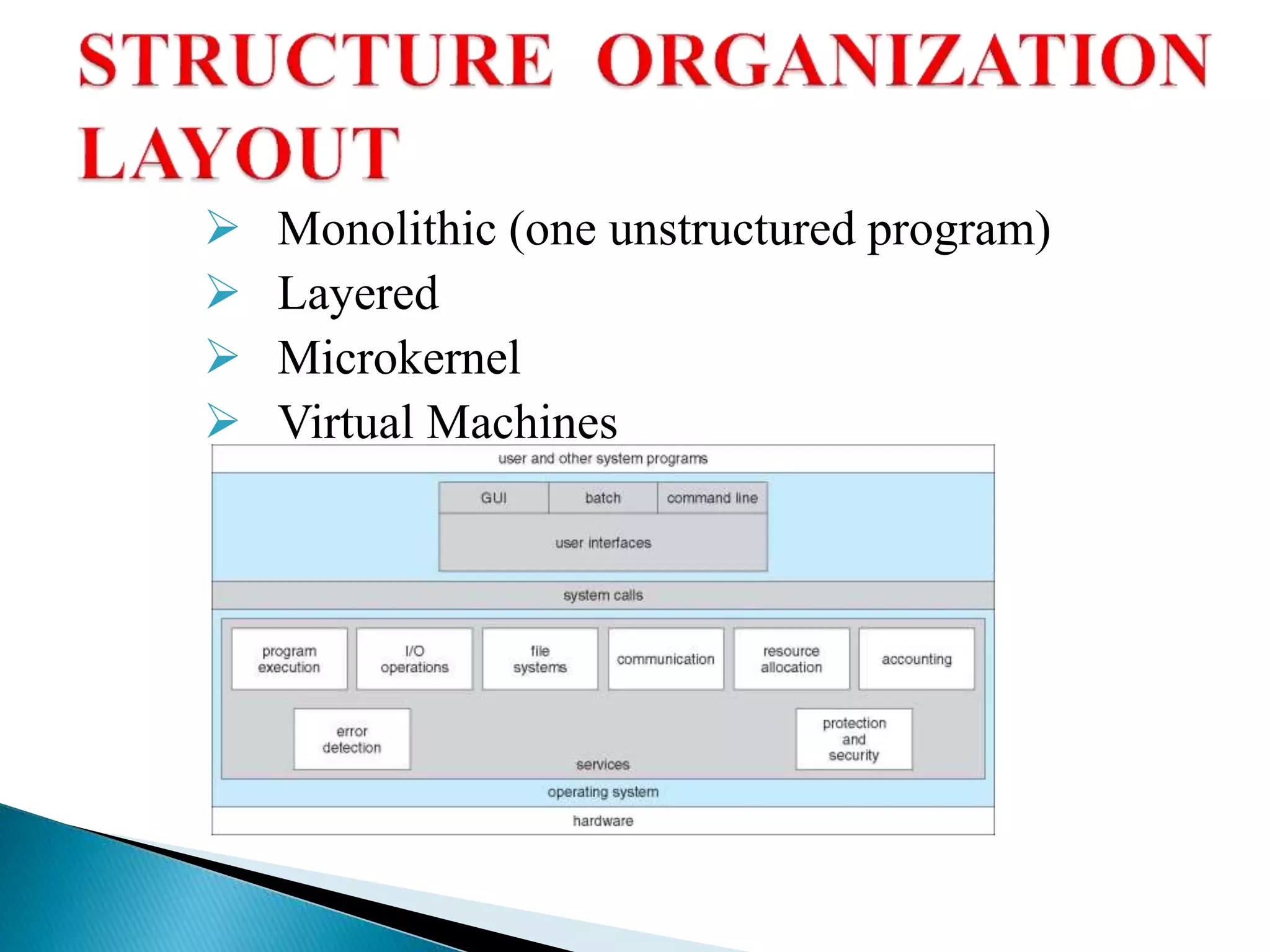
 Monolithic (one unstructured program)
 Layered
 Microkernel
 Virtual Machines
 An operating system executes many kinds of activities:
 user programs
 batch jobs or command scripts
 system programs: print spoolers, name servers, file
servers, network listeners, etc...
 Each of these “execution entities” is encapsulated in a
process.
 The process includes the execution context (pc, registers,
resources, etc) and all info the activity (program) needs to
run.
 The OS schedules processes to run.
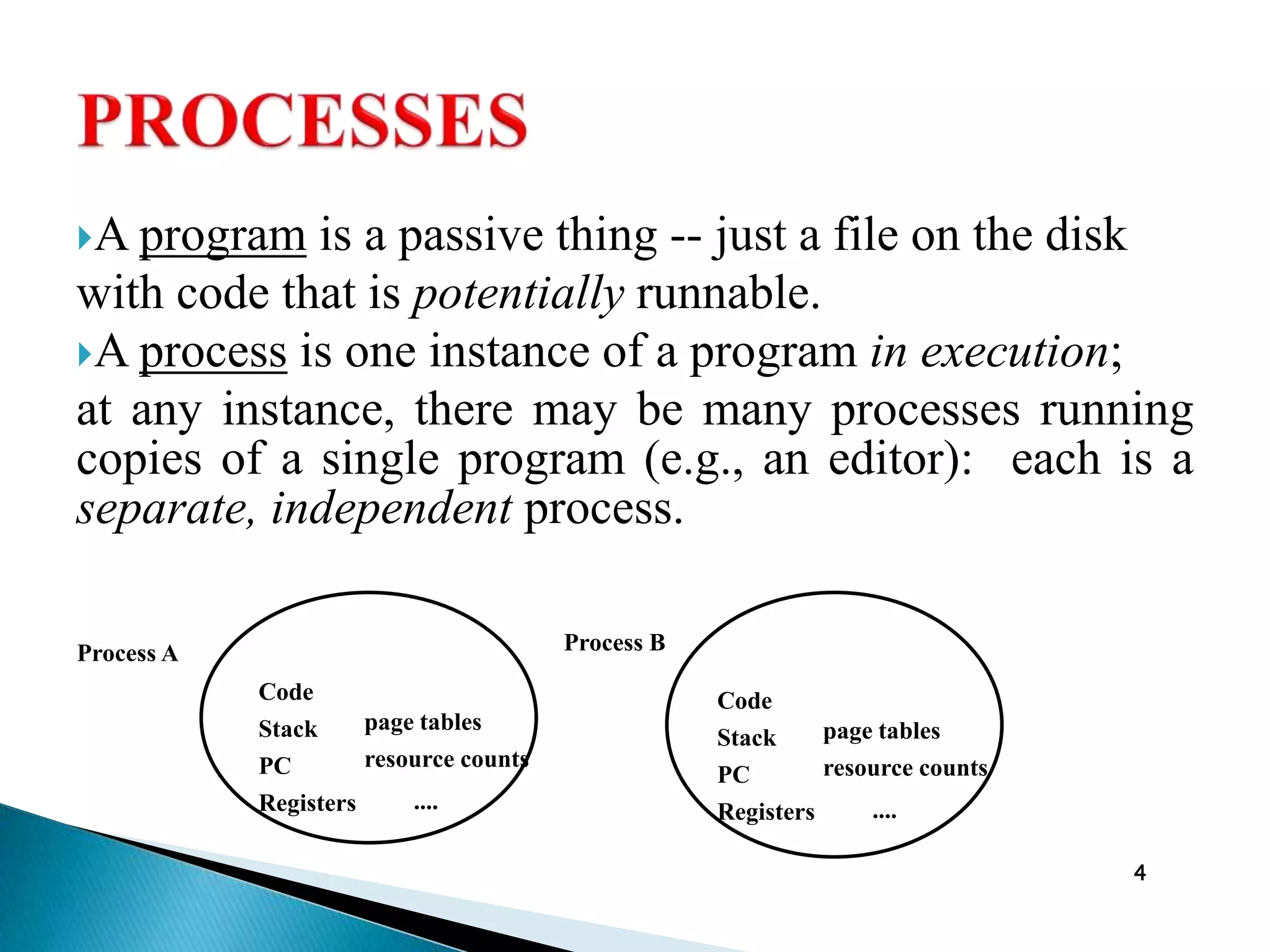
A program is a passive thing -- just a file on the disk
with code that is potentially runnable.
A process is one instance of a program in execution;
at any instance, there may be many processes running
copies of a single program (e.g., an editor): each is a
separate, independent process.
4
Code
Stack
PC
Registers
page tables
resource counts
....
Code
Stack
PC
Registers
page tables
resource counts
....
Process BProcess A
Allocation/de-allocation for processes, files, I/O.
Maintenance of several processes at a time
Keep track of who's using what memory
Movement of process memory to/from secondary storage.
A file is a collection of related information defined by its creator.
Commonly, files represent programs (both source and object
forms) and data.
The operating system is responsible for the following activities
in connections with file management:
• File creation and deletion.
• Directory creation and deletion.
• Support of primitives for manipulating files and directories.
• Mapping files onto secondary storage.
• File backup on stable (nonvolatile) storage media.
Buffer caching system
Generic device driver code
Drivers for each device - translate read/write requests into
disk position commands.
Disks, tapes, optical, ...
Free space management ( paging/swapping )
Storage allocation ( what data goes where on disk )
Disk scheduling
 Obtain access to system space
 Do parameter validation
 System resource collection ( locks on structures )
 Ask device/system for requested item
 Suspend waiting for device
 Interrupt makes this thread ready to run
 Wrap-up
 Return to user
In a Virtual Machine - each process "seems" to execute on its
own processor with its own memory, devices, etc.
 The resources of the physical machine are shared. Virtual
devices are sliced out of the physical ones. Virtual disks are
subsets of physical ones.
 Useful for running different OS simultaneously on the same
machine.
 Protection is excellent, but no sharing possible.
 Virtual privileged instructions are trapped.
Operating system

Operating system

  • 1.
  • 2.
     To understandan OS,let’s first look at its components and then how they’re composed or organized.  We’ll come back and look at each of these in detail as the course progresses.  Realize that it’s never as simple as it looks.  These basic concepts exist in some form in all systems, however each system implements them in a slightly different way.  Also, the divisions between components may not be as clean in the real world as in the model
  • 3.
     Monolithic (oneunstructured program)  Layered  Microkernel  Virtual Machines
  • 4.
     An operatingsystem executes many kinds of activities:  user programs  batch jobs or command scripts  system programs: print spoolers, name servers, file servers, network listeners, etc...  Each of these “execution entities” is encapsulated in a process.  The process includes the execution context (pc, registers, resources, etc) and all info the activity (program) needs to run.  The OS schedules processes to run.
  • 5.
    A program isa passive thing -- just a file on the disk with code that is potentially runnable. A process is one instance of a program in execution; at any instance, there may be many processes running copies of a single program (e.g., an editor): each is a separate, independent process. 4 Code Stack PC Registers page tables resource counts .... Code Stack PC Registers page tables resource counts .... Process BProcess A
  • 6.
    Allocation/de-allocation for processes,files, I/O. Maintenance of several processes at a time Keep track of who's using what memory Movement of process memory to/from secondary storage.
  • 7.
    A file isa collection of related information defined by its creator. Commonly, files represent programs (both source and object forms) and data. The operating system is responsible for the following activities in connections with file management: • File creation and deletion. • Directory creation and deletion. • Support of primitives for manipulating files and directories. • Mapping files onto secondary storage. • File backup on stable (nonvolatile) storage media.
  • 8.
    Buffer caching system Genericdevice driver code Drivers for each device - translate read/write requests into disk position commands.
  • 9.
    Disks, tapes, optical,... Free space management ( paging/swapping ) Storage allocation ( what data goes where on disk ) Disk scheduling
  • 10.
     Obtain accessto system space  Do parameter validation  System resource collection ( locks on structures )  Ask device/system for requested item  Suspend waiting for device  Interrupt makes this thread ready to run  Wrap-up  Return to user
  • 11.
    In a VirtualMachine - each process "seems" to execute on its own processor with its own memory, devices, etc.  The resources of the physical machine are shared. Virtual devices are sliced out of the physical ones. Virtual disks are subsets of physical ones.  Useful for running different OS simultaneously on the same machine.  Protection is excellent, but no sharing possible.  Virtual privileged instructions are trapped.