Opening Prayer
Our Heavenly Father,
We thank you for the opportunity to
begin this new school year.
We ask that you bless the students and the faculty that
make our school a great place.
We pray thatYou will guide us in all ways,
so that we will seekYour will in everything
that we do.
We ask this in the name of Jesus, our Lord. Amen.
Miriam of Nazareth,
Teach us your ways and lead us to Jesus.
COMPUTER III
ORIENTATION
SY 2012-2013
The Teacher
Mr. Mon Ritche Y. Bacero
GTKY
 Name
 Nickname
List down at least 2-3 things
 What I like/love about the computer
 My fears about computer
Orientation:
A. Course Outline
B. Grading System
C. Guidelines and Rules
D. Expectations
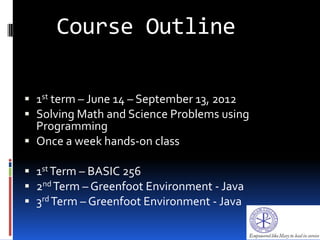
Course Outline
 1st term – June 14 – September 13, 2012
 Solving Math and Science Problems using
Programming
 Once a week hands-on class
 1st Term – BASIC 256
 2nd Term – Greenfoot Environment - Java
 3rd Term – Greenfoot Environment - Java
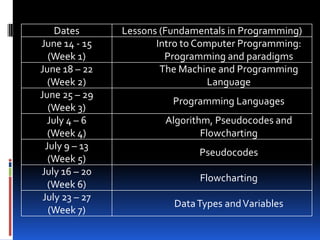
Dates Lessons (Fundamentals in Programming)
June 14 - 15
(Week 1)
Intro to Computer Programming:
Programming and paradigms
June 18 – 22
(Week 2)
The Machine and Programming
Language
June 25 – 29
(Week 3)
Programming Languages
July 4 – 6
(Week 4)
Algorithm, Pseudocodes and
Flowcharting
July 9 – 13
(Week 5)
Pseudocodes
July 16 – 20
(Week 6)
Flowcharting
July 23 – 27
(Week 7)
DataTypes andVariables
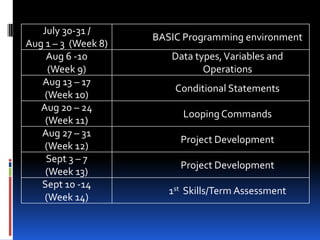
July 30-31 /
Aug 1 – 3 (Week 8)
BASIC Programming environment
Aug 6 -10
(Week 9)
Data types,Variables and
Operations
Aug 13 – 17
(Week 10)
Conditional Statements
Aug 20 – 24
(Week 11)
Looping Commands
Aug 27 – 31
(Week 12)
Project Development
Sept 3 – 7
(Week 13)
Project Development
Sept 10 -14
(Week 14)
1st Skills/Term Assessment
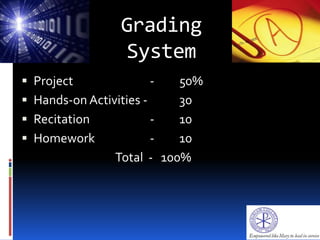
Grading
System
 Project - 50%
 Hands-on Activities - 30
 Recitation - 10
 Homework - 10
Total - 100%
Guidelines and
Rules
 Be safety smart right from the start.
 PC assignment will be by class number, good for
the 1st term.
 Use edmodo for file sharing and other
instructions for the class.
 Visual.ly account is required for project
submission
 Deadlines and schedule for project submission
and other requirements will be strictly followed.
 Follow the SOPs and Rules from the Student
Handbook.
Computer Laboratory Safety and
Orderliness Guidelines
An empowered computer education student makes safety and
orderliness a top priority:
1. Avoid eating, drinking and littering inside the room.
2. Follow the right procedure in turning on or off the
computer and its peripherals.
3. Use only the designated computer terminal for you.
4. Keep each terminal tidy by arranging the monitor,
keyboard, mouse, mouse pad and chair before leaving.
5. Respect the concentration of your fellow students.
Unnecessary noise and horseplay in the room are always
counterproductive.
6. Running other applications or programs which
are not part of the lesson is strictly prohibited.
7. Refrain from making any changes in the default
settings of the computer.
8. It is crucial to maintain the proper posture and
positioning when performing the tasks.
9. Be mindful of possible sources or causes of
electric shock and other electricity-relate
problems.
10. Seek the help of your teacher or laboratory aid
when in doubt concerning an instruction or
tasks.
 Why do we need rules for the class and the
computer laboratory?
 What can you contribute to maintain order
during the Computer class?
Expectations
 Don't procrastinate. Meet the deadline.
 Stay organized. Use of clear book (recycled) for
hand-outs and activity sheets.
 Be responsible and active. Recite and share.
 Respect. We make aTEAM.
 Be updated. Visit educational technology sites.
 Integrity. Intellectual honesty.
Let’s work
on IT!
“Success is the sum of small efforts,
repeated day in and day out.”
~ Robert Collier
Mr. Mon Ritche Y. Bacero
Teacher
Closing Prayer
Loving God, thank you for the joys
that summer brought to us.
MayYou bless us, as we return to our studies, inspire
us to take on a new interest in new classes and new
topics.
Be with us as we discover old friendships and start
new ones. Amen.
Miriam of Nazareth,
Teach us your ways and lead us toJesus.
Ganbatte
Kudasai!
(Hope you do well!
Please keep up the
good work!)

Opening orientation PPT June 2013 (Test)

  • 1.
    Opening Prayer Our HeavenlyFather, We thank you for the opportunity to begin this new school year. We ask that you bless the students and the faculty that make our school a great place. We pray thatYou will guide us in all ways, so that we will seekYour will in everything that we do. We ask this in the name of Jesus, our Lord. Amen. Miriam of Nazareth, Teach us your ways and lead us to Jesus.
  • 2.
  • 3.
    The Teacher Mr. MonRitche Y. Bacero
  • 4.
    GTKY  Name  Nickname Listdown at least 2-3 things  What I like/love about the computer  My fears about computer
  • 5.
    Orientation: A. Course Outline B.Grading System C. Guidelines and Rules D. Expectations
  • 6.
    Course Outline  1stterm – June 14 – September 13, 2012  Solving Math and Science Problems using Programming  Once a week hands-on class  1st Term – BASIC 256  2nd Term – Greenfoot Environment - Java  3rd Term – Greenfoot Environment - Java
  • 7.
    Dates Lessons (Fundamentalsin Programming) June 14 - 15 (Week 1) Intro to Computer Programming: Programming and paradigms June 18 – 22 (Week 2) The Machine and Programming Language June 25 – 29 (Week 3) Programming Languages July 4 – 6 (Week 4) Algorithm, Pseudocodes and Flowcharting July 9 – 13 (Week 5) Pseudocodes July 16 – 20 (Week 6) Flowcharting July 23 – 27 (Week 7) DataTypes andVariables
  • 8.
    July 30-31 / Aug1 – 3 (Week 8) BASIC Programming environment Aug 6 -10 (Week 9) Data types,Variables and Operations Aug 13 – 17 (Week 10) Conditional Statements Aug 20 – 24 (Week 11) Looping Commands Aug 27 – 31 (Week 12) Project Development Sept 3 – 7 (Week 13) Project Development Sept 10 -14 (Week 14) 1st Skills/Term Assessment
  • 9.
    Grading System  Project -50%  Hands-on Activities - 30  Recitation - 10  Homework - 10 Total - 100%
  • 10.
    Guidelines and Rules  Besafety smart right from the start.  PC assignment will be by class number, good for the 1st term.  Use edmodo for file sharing and other instructions for the class.  Visual.ly account is required for project submission  Deadlines and schedule for project submission and other requirements will be strictly followed.  Follow the SOPs and Rules from the Student Handbook.
  • 11.
    Computer Laboratory Safetyand Orderliness Guidelines An empowered computer education student makes safety and orderliness a top priority: 1. Avoid eating, drinking and littering inside the room. 2. Follow the right procedure in turning on or off the computer and its peripherals. 3. Use only the designated computer terminal for you. 4. Keep each terminal tidy by arranging the monitor, keyboard, mouse, mouse pad and chair before leaving. 5. Respect the concentration of your fellow students. Unnecessary noise and horseplay in the room are always counterproductive.
  • 12.
    6. Running otherapplications or programs which are not part of the lesson is strictly prohibited. 7. Refrain from making any changes in the default settings of the computer. 8. It is crucial to maintain the proper posture and positioning when performing the tasks. 9. Be mindful of possible sources or causes of electric shock and other electricity-relate problems. 10. Seek the help of your teacher or laboratory aid when in doubt concerning an instruction or tasks.
  • 13.
     Why dowe need rules for the class and the computer laboratory?  What can you contribute to maintain order during the Computer class?
  • 14.
    Expectations  Don't procrastinate.Meet the deadline.  Stay organized. Use of clear book (recycled) for hand-outs and activity sheets.  Be responsible and active. Recite and share.  Respect. We make aTEAM.  Be updated. Visit educational technology sites.  Integrity. Intellectual honesty.
  • 15.
    Let’s work on IT! “Successis the sum of small efforts, repeated day in and day out.” ~ Robert Collier Mr. Mon Ritche Y. Bacero Teacher
  • 16.
    Closing Prayer Loving God,thank you for the joys that summer brought to us. MayYou bless us, as we return to our studies, inspire us to take on a new interest in new classes and new topics. Be with us as we discover old friendships and start new ones. Amen. Miriam of Nazareth, Teach us your ways and lead us toJesus.
  • 17.
    Ganbatte Kudasai! (Hope you dowell! Please keep up the good work!)