Computer Studies - Grade 8 Common Schemes of Work (1).docx
1.
MINISTRY OF EDUCATION,SICENCE, VOCATIONAL AND EARLY EDUCATION
NORTHERN PROVINCE JUNIOR SECONDARY
COMPUTER STUDIES
ANNUAL SCHEMES OF WORK FOR GRADE 8
NAME OF SCHOOL: _________________________________________________________
NAME OF TEACHER: ________________________________________________________
CLASS/CLASES: __________________________________________________________
TS NUMBER: ______________________________________________________________
2.
Assessment Scheme
The assessmentframework utilises various types of continuous assessment strategies. This is meant to determine learners’ competences in the CS
outcomes presented here. It is desired that the teacher as much as possible utilise assessment strategies that promote active learning by the learner. The
case in point includes portfolios, observation sheets (to gauge certain competences), written assignments and reports, presentations, projects and
experiments.
Computer Studies is a practical subject and as such this syllabus places a lot of emphasis on the use of common application packages. Object oriented
programming languages will not be examined at this level. It will therefore the schools’ responsibility to ensure that relevant equipment and software
needed by learners to meet the minimum requirements for assessment purposes are acquired.
The final assessment of Computer Studies is divided into two sections
1. Theory (Paper 1) - (External assessment by the examination board): 60%
2. Practical (Paper 2) - (External assessment by the examination board): 40%
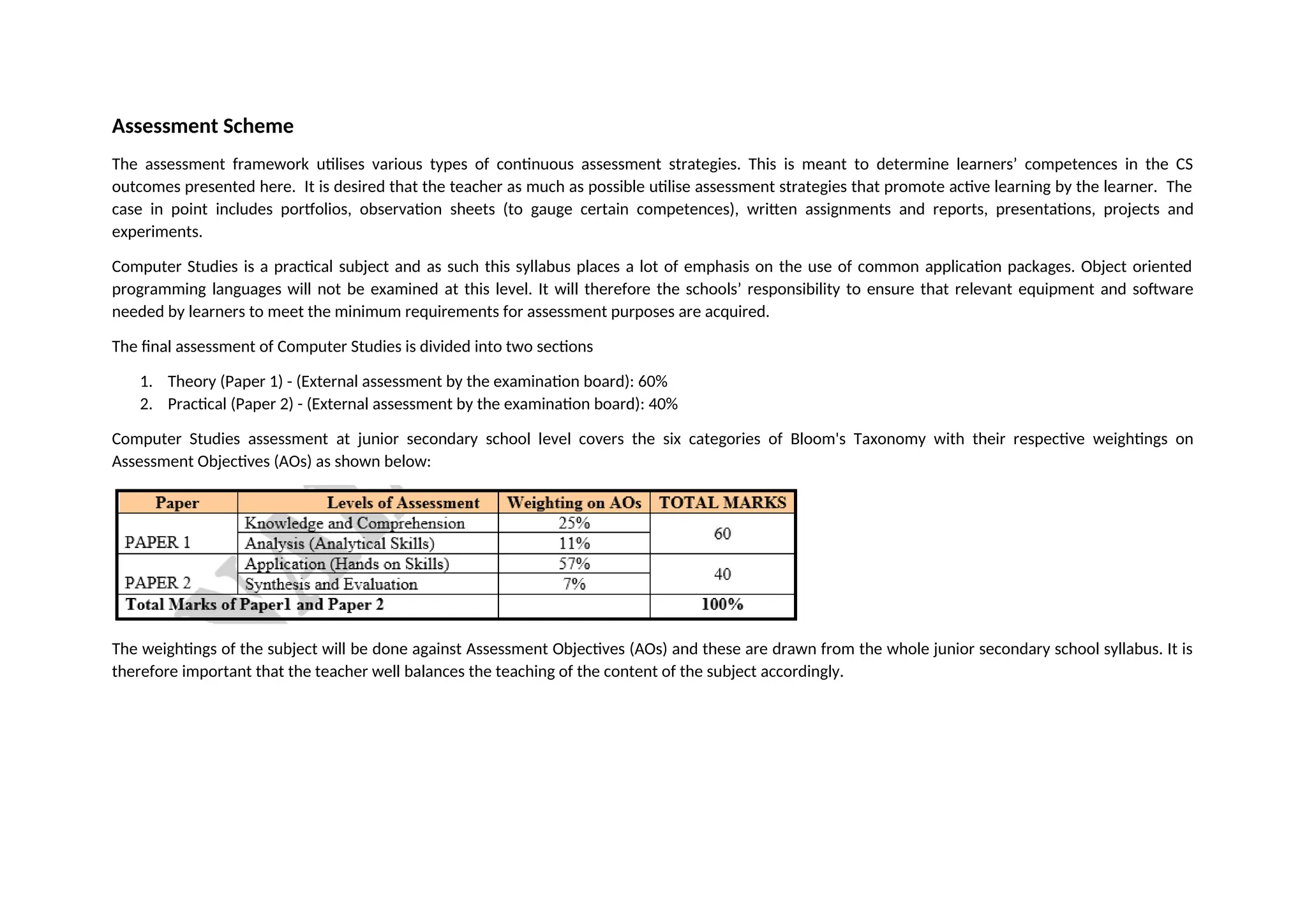
Computer Studies assessment at junior secondary school level covers the six categories of Bloom's Taxonomy with their respective weightings on
Assessment Objectives (AOs) as shown below:
The weightings of the subject will be done against Assessment Objectives (AOs) and these are drawn from the whole junior secondary school syllabus. It is
therefore important that the teacher well balances the teaching of the content of the subject accordingly.
3.
TERM 1
WEEK
NO.
DATE BEG.TOPIC &TEACHING
OBJECTIVES
TEACHING AIDS REFERENCES METHODOLOGY EVALUATION
1 INTRODUCTION TO COMPUTER
STUDIES: Parts of a computer
- Identify a computer as a
general purpose machine
that operates under
different sets of
instructions for various
uses
- Describe the main parts
of a computer
- Components of a
computer system
- Chalk board
- Overhead projector
- Personal Computers
- Computer peripherals
- Charts
- Still Images
- Motion Images (videos)
- Verbal Exposition
- Recitation
- Class discussion
- Group discussion
- Demonstrations
- Presentations
- Interviews
- Field trip
- Exercises
- Homework
- Assignment
- Recitation
2 INTRODUCTION TO COMPUTER
STUDIES: Input-process output
operations
- State the three basic
operations in a
computer system.
- Relate computer parts
to the basic operations
- Differentiate between
data and information.
- Chalk board
- Overhead projector
- Personal Computers
- Computer peripherals
- Charts
- Still Images
- Motion Images (videos)
- Computer studies
Compiled Notes for
Northern Province
- ECDL Advanced Learning
Software
- Mr B. Mwanza Class
Notes.
- http://www.bbc.co.uk/
bitesize/standard/
computing/
computer_systems
- Verbal Exposition
- Recitation
- Class discussion
- Group discussion
- Demonstrations
- Presentations
- Case study
- Interviews
- Field trip
- Exercises
- Homework
- Assignment
- Recitation
3 BASIC OPERATIONS: Health and
safety and Care for Computer
Systems
- Chalk board
- Overhead projector
- Personal Computers
- Computer peripherals
- Computer studies
Compiled Notes for
Northern Province
- ECDL Advanced Learning
- Verbal Exposition
- Recitation
- Class discussion
- Group discussion
- Exercises
- Homework
- Assignee
- Recitation
4.
- Know correctposture
to avoid injuries.
- Demonstrate the need
to take care of
computer and storage
media to prevent data
loss
- Explain the
consequences of theft
of computers or other
portable ICT devices
- Charts
- Still Images
- Motion Images (videos)
Software
- Mr B. Mwanza Class
Notes.
- http://www.bbc.co.uk/
bitesize/standard/
computing/
computer_systems
- Demonstrations
- Presentations
- Case study
- Interviews
- Field trip
4 BASIC OPERATIONS: Computers
and peripherals
- Power up and down of
computers and various
technologies and
peripherals correctly
BASIC OPERATIONS: Security and
Viruses
- Explain the
consequences
computer viruses on a
computer system
- Chalk board
- Overhead projector
- Personal Computers
- Computer peripherals
- Charts
- Still Images
- Motion Images (videos)
- Computer studies
Compiled Notes for
Northern Province
- ECDL Advanced Learning
Software
- Mr B. Mwanza Class
Notes.
- http://www.bbc.co.uk/
bitesize/standard/
computing/
computer_systems
- Verbal Exposition
- Recitation
- Class discussion
- Group discussion
- Demonstrations
- Presentations
- Case study
- Interviews
- Field trip
- Exercises
- Homework
- Assignment
- Recitation
5 BASIC OPERATIONS: Types of
user interfaces
- Describe types of user
interfaces
- Interact with icons and
menus in a Graphic
User Interface (GUI)
environment
- Perform basic
- Chalk board
- Overhead projector
- Personal Computers
- Computer peripherals
- Charts
- Still Images
- Motion Images (videos)
- Computer studies
Compiled Notes for
Northern Province
- ECDL Advanced Learning
Software
- Mr B. Mwanza Class
Notes.
- http://www.bbc.co.uk/
bitesize/standard/
computing/computer
- Verbal Exposition
- Recitation
- Class discussion
- Group discussion
- Demonstrations
- Presentations
- Case study
- Interviews
- Field trip
- Exercises
- Homework
- Assignment
- Recitation
5.
computer operations
e.g. Movingcursor,
clicking on icon, using
pulldown menus,
ejecting disks etc.
6 Mid – Term Tests - - - Case Study - Tests
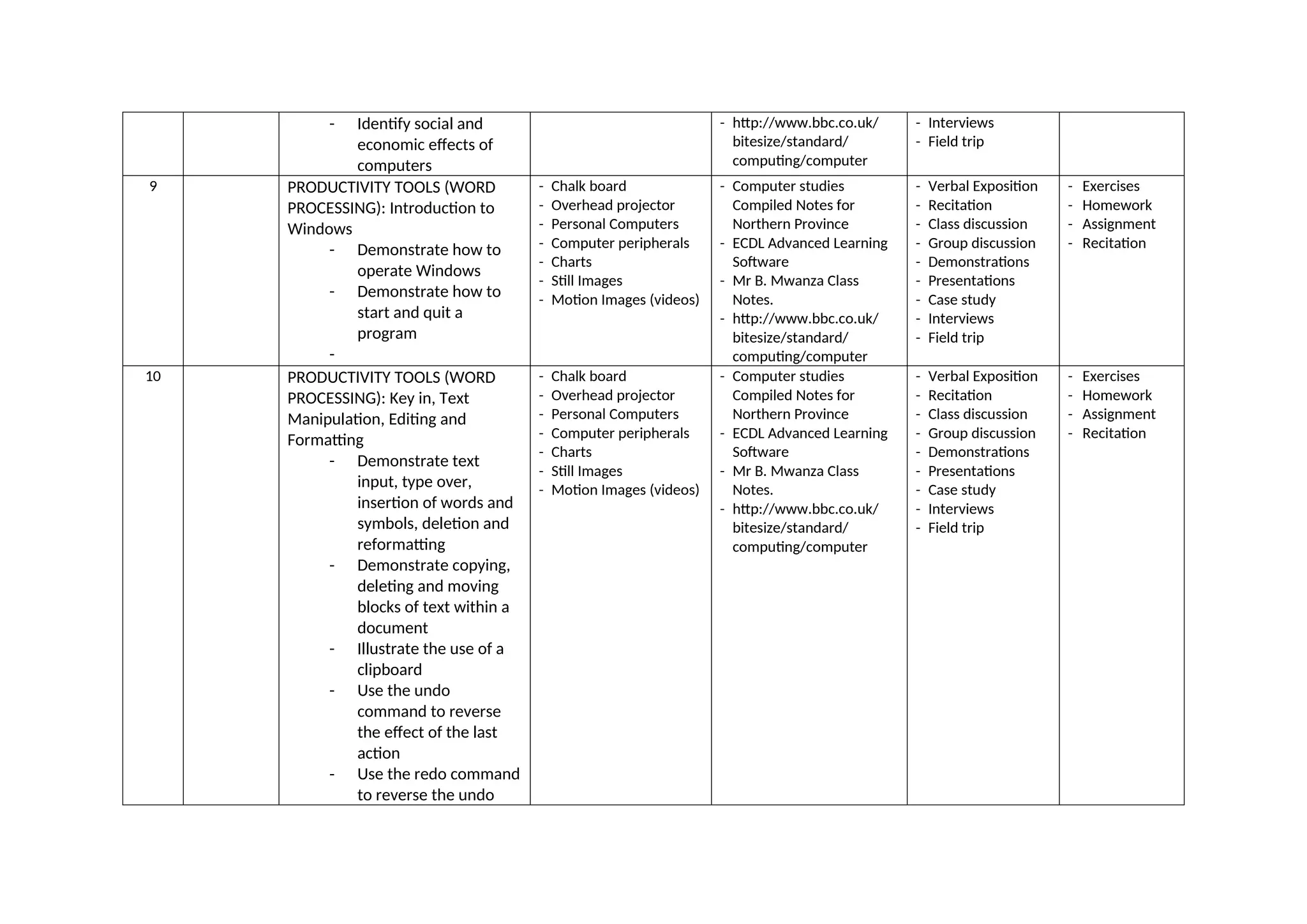
7 COMPUTERS IN EVERYDAY LIFE:
Household, Entertainment and
recreation appliances
- Identify and
demonstrate the use of
household appliances
and devices that are
controlled by
embedded
microprocessors
COMPUTERS IN EVERYDAY LIFE:
Office Equipment
- State common uses of
office equipment
COMPUTERS IN EVERYDAY LIFE:
Industrial and Commercial
Applications of compute
- Describe knowledge of
using computers in
Industry
- Chalk board
- Overhead projector
- Personal Computers
- Computer peripherals
- Charts
- Still Images
- Motion Images (videos)
- Computer studies
Compiled Notes for
Northern Province
- ECDL Advanced Learning
Software
- Mr B. Mwanza Class
Notes.
- http://www.bbc.co.uk/
bitesize/standard/
computing/computer
- Verbal Exposition
- Recitation
- Class discussion
- Group discussion
- Demonstrations
- Presentations
- Case study
- Interviews
- Field trip
- Exercises
- Homework
- Assignment
- Recitation
8 COMPUTERS IN EVERYDAY LIFE:
Computer based learning
- Identify the role
computers play in
aiding learning
COMPUTERS IN EVERYDAY LIFE:
- Chalk board
- Overhead projector
- Personal Computers
- Computer peripherals
- Charts
- Still Images
- Motion Images (videos)
- Computer studies
Compiled Notes for
Northern Province
- ECDL Advanced Learning
Software
- Mr B. Mwanza Class
Notes.
- Verbal Exposition
- Recitation
- Class discussion
- Group discussion
- Demonstrations
- Presentations
- Case study
- Exercises
- Homework
- Assignment
- Recitation
6.
- Identify socialand
economic effects of
computers
- http://www.bbc.co.uk/
bitesize/standard/
computing/computer
- Interviews
- Field trip
9 PRODUCTIVITY TOOLS (WORD
PROCESSING): Introduction to
Windows
- Demonstrate how to
operate Windows
- Demonstrate how to
start and quit a
program
-
- Chalk board
- Overhead projector
- Personal Computers
- Computer peripherals
- Charts
- Still Images
- Motion Images (videos)
- Computer studies
Compiled Notes for
Northern Province
- ECDL Advanced Learning
Software
- Mr B. Mwanza Class
Notes.
- http://www.bbc.co.uk/
bitesize/standard/
computing/computer
- Verbal Exposition
- Recitation
- Class discussion
- Group discussion
- Demonstrations
- Presentations
- Case study
- Interviews
- Field trip
- Exercises
- Homework
- Assignment
- Recitation
10 PRODUCTIVITY TOOLS (WORD
PROCESSING): Key in, Text
Manipulation, Editing and
Formatting
- Demonstrate text
input, type over,
insertion of words and
symbols, deletion and
reformatting
- Demonstrate copying,
deleting and moving
blocks of text within a
document
- Illustrate the use of a
clipboard
- Use the undo
command to reverse
the effect of the last
action
- Use the redo command
to reverse the undo
- Chalk board
- Overhead projector
- Personal Computers
- Computer peripherals
- Charts
- Still Images
- Motion Images (videos)
- Computer studies
Compiled Notes for
Northern Province
- ECDL Advanced Learning
Software
- Mr B. Mwanza Class
Notes.
- http://www.bbc.co.uk/
bitesize/standard/
computing/computer
- Verbal Exposition
- Recitation
- Class discussion
- Group discussion
- Demonstrations
- Presentations
- Case study
- Interviews
- Field trip
- Exercises
- Homework
- Assignment
- Recitation
7.
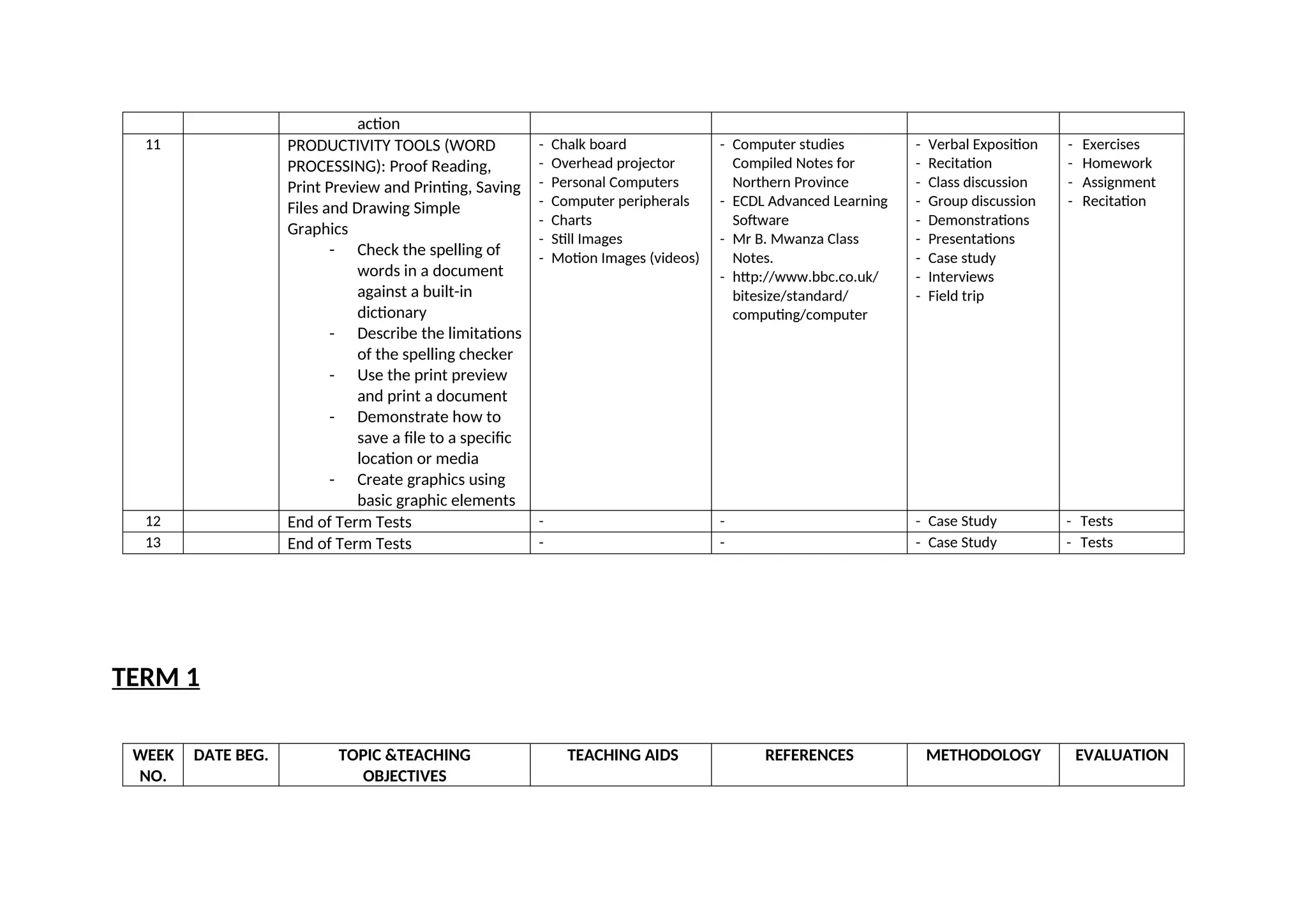
action
11 PRODUCTIVITY TOOLS(WORD
PROCESSING): Proof Reading,
Print Preview and Printing, Saving
Files and Drawing Simple
Graphics
- Check the spelling of
words in a document
against a built-in
dictionary
- Describe the limitations
of the spelling checker
- Use the print preview
and print a document
- Demonstrate how to
save a file to a specific
location or media
- Create graphics using
basic graphic elements
- Chalk board
- Overhead projector
- Personal Computers
- Computer peripherals
- Charts
- Still Images
- Motion Images (videos)
- Computer studies
Compiled Notes for
Northern Province
- ECDL Advanced Learning
Software
- Mr B. Mwanza Class
Notes.
- http://www.bbc.co.uk/
bitesize/standard/
computing/computer
- Verbal Exposition
- Recitation
- Class discussion
- Group discussion
- Demonstrations
- Presentations
- Case study
- Interviews
- Field trip
- Exercises
- Homework
- Assignment
- Recitation
12 End of Term Tests - - - Case Study - Tests
13 End of Term Tests - - - Case Study - Tests
TERM 1
WEEK
NO.
DATE BEG. TOPIC &TEACHING
OBJECTIVES
TEACHING AIDS REFERENCES METHODOLOGY EVALUATION
8.
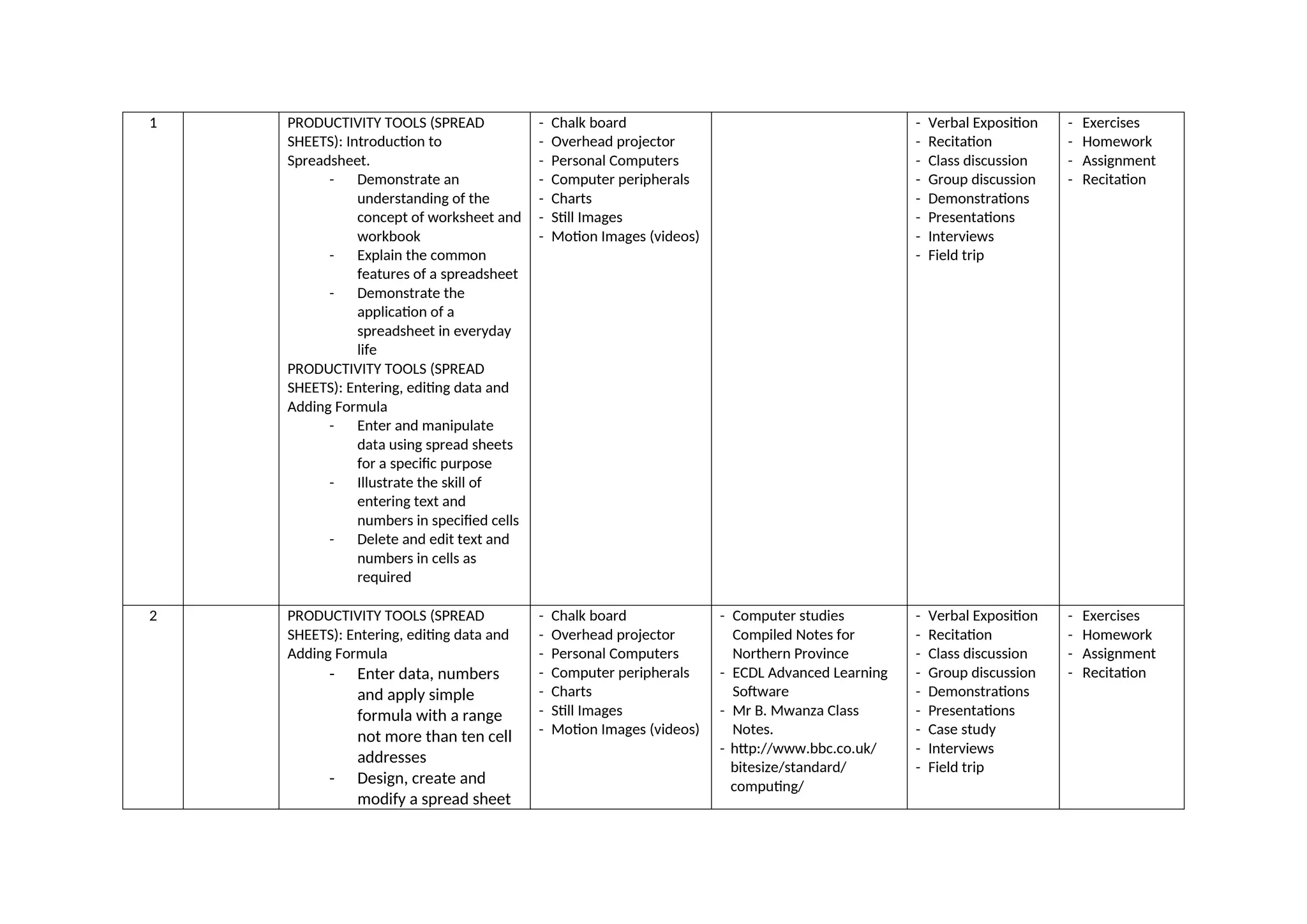
1 PRODUCTIVITY TOOLS(SPREAD
SHEETS): Introduction to
Spreadsheet.
- Demonstrate an
understanding of the
concept of worksheet and
workbook
- Explain the common
features of a spreadsheet
- Demonstrate the
application of a
spreadsheet in everyday
life
PRODUCTIVITY TOOLS (SPREAD
SHEETS): Entering, editing data and
Adding Formula
- Enter and manipulate
data using spread sheets
for a specific purpose
- Illustrate the skill of
entering text and
numbers in specified cells
- Delete and edit text and
numbers in cells as
required
- Chalk board
- Overhead projector
- Personal Computers
- Computer peripherals
- Charts
- Still Images
- Motion Images (videos)
- Verbal Exposition
- Recitation
- Class discussion
- Group discussion
- Demonstrations
- Presentations
- Interviews
- Field trip
- Exercises
- Homework
- Assignment
- Recitation
2 PRODUCTIVITY TOOLS (SPREAD
SHEETS): Entering, editing data and
Adding Formula
- Enter data, numbers
and apply simple
formula with a range
not more than ten cell
addresses
- Design, create and
modify a spread sheet
- Chalk board
- Overhead projector
- Personal Computers
- Computer peripherals
- Charts
- Still Images
- Motion Images (videos)
- Computer studies
Compiled Notes for
Northern Province
- ECDL Advanced Learning
Software
- Mr B. Mwanza Class
Notes.
- http://www.bbc.co.uk/
bitesize/standard/
computing/
- Verbal Exposition
- Recitation
- Class discussion
- Group discussion
- Demonstrations
- Presentations
- Case study
- Interviews
- Field trip
- Exercises
- Homework
- Assignment
- Recitation
9.
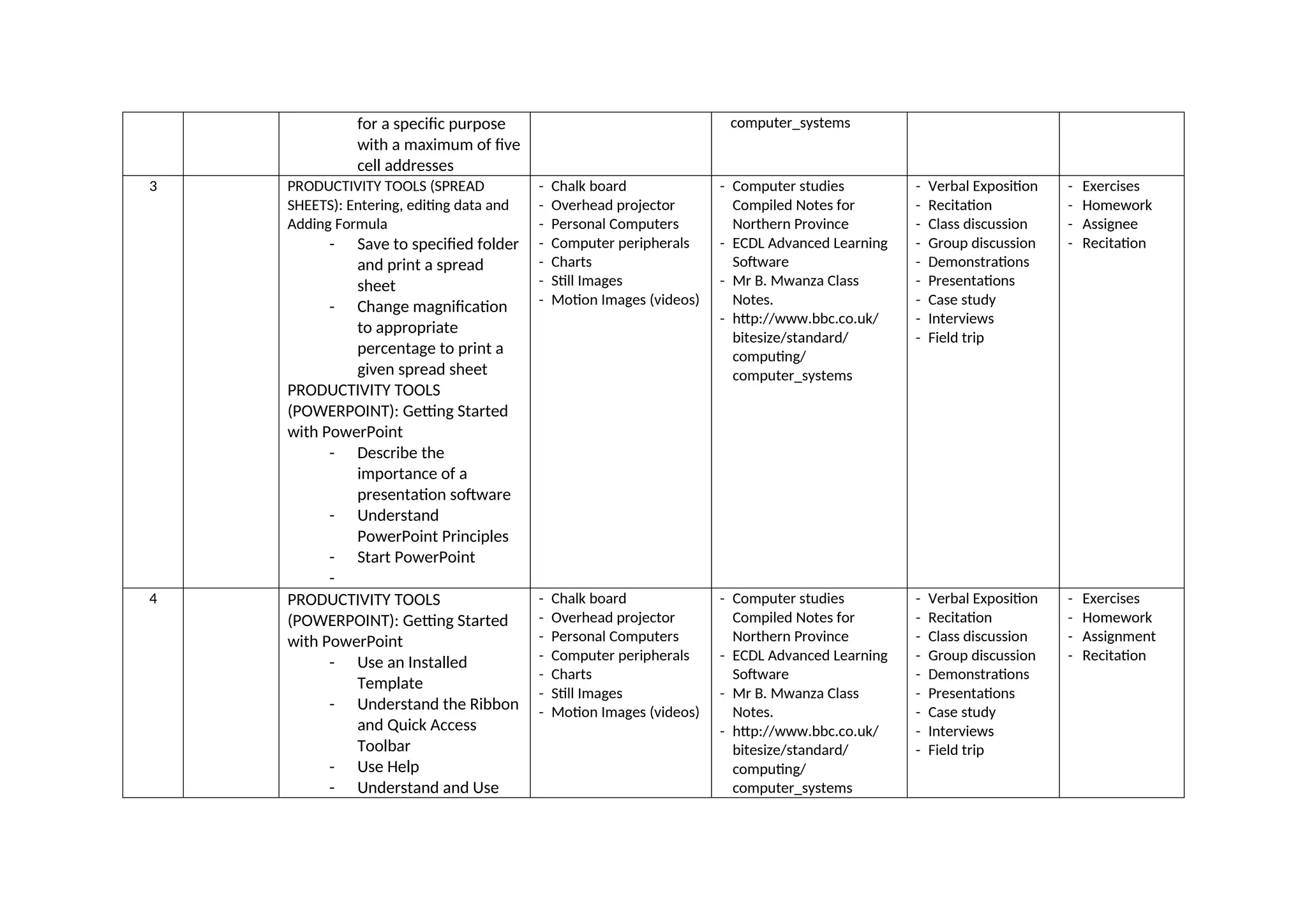
for a specificpurpose
with a maximum of five
cell addresses
computer_systems
3 PRODUCTIVITY TOOLS (SPREAD
SHEETS): Entering, editing data and
Adding Formula
- Save to specified folder
and print a spread
sheet
- Change magnification
to appropriate
percentage to print a
given spread sheet
PRODUCTIVITY TOOLS
(POWERPOINT): Getting Started
with PowerPoint
- Describe the
importance of a
presentation software
- Understand
PowerPoint Principles
- Start PowerPoint
-
- Chalk board
- Overhead projector
- Personal Computers
- Computer peripherals
- Charts
- Still Images
- Motion Images (videos)
- Computer studies
Compiled Notes for
Northern Province
- ECDL Advanced Learning
Software
- Mr B. Mwanza Class
Notes.
- http://www.bbc.co.uk/
bitesize/standard/
computing/
computer_systems
- Verbal Exposition
- Recitation
- Class discussion
- Group discussion
- Demonstrations
- Presentations
- Case study
- Interviews
- Field trip
- Exercises
- Homework
- Assignee
- Recitation
4 PRODUCTIVITY TOOLS
(POWERPOINT): Getting Started
with PowerPoint
- Use an Installed
Template
- Understand the Ribbon
and Quick Access
Toolbar
- Use Help
- Understand and Use
- Chalk board
- Overhead projector
- Personal Computers
- Computer peripherals
- Charts
- Still Images
- Motion Images (videos)
- Computer studies
Compiled Notes for
Northern Province
- ECDL Advanced Learning
Software
- Mr B. Mwanza Class
Notes.
- http://www.bbc.co.uk/
bitesize/standard/
computing/
computer_systems
- Verbal Exposition
- Recitation
- Class discussion
- Group discussion
- Demonstrations
- Presentations
- Case study
- Interviews
- Field trip
- Exercises
- Homework
- Assignment
- Recitation
10.
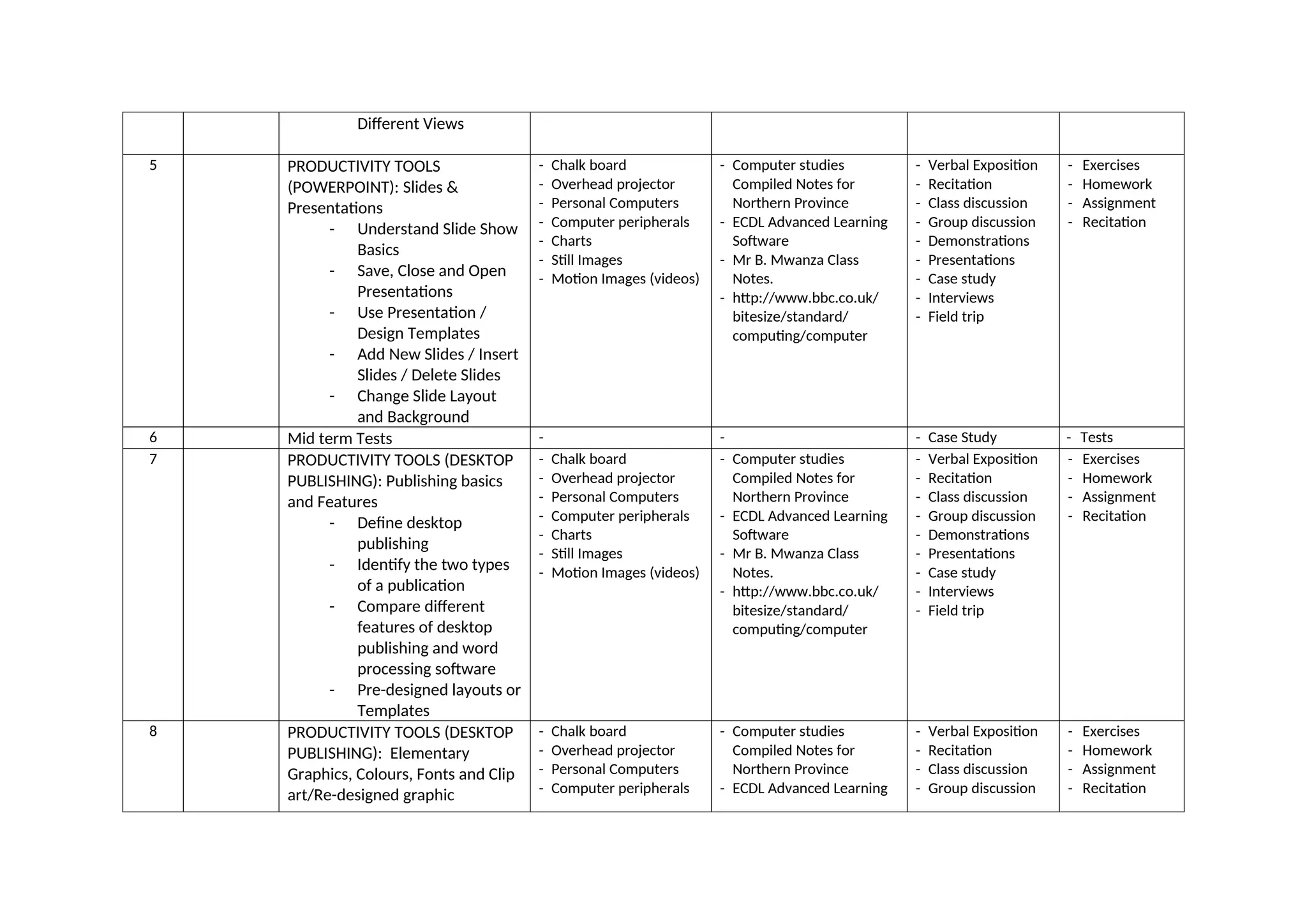
Different Views
5 PRODUCTIVITYTOOLS
(POWERPOINT): Slides &
Presentations
- Understand Slide Show
Basics
- Save, Close and Open
Presentations
- Use Presentation /
Design Templates
- Add New Slides / Insert
Slides / Delete Slides
- Change Slide Layout
and Background
- Chalk board
- Overhead projector
- Personal Computers
- Computer peripherals
- Charts
- Still Images
- Motion Images (videos)
- Computer studies
Compiled Notes for
Northern Province
- ECDL Advanced Learning
Software
- Mr B. Mwanza Class
Notes.
- http://www.bbc.co.uk/
bitesize/standard/
computing/computer
- Verbal Exposition
- Recitation
- Class discussion
- Group discussion
- Demonstrations
- Presentations
- Case study
- Interviews
- Field trip
- Exercises
- Homework
- Assignment
- Recitation
6 Mid term Tests - - - Case Study - Tests
7 PRODUCTIVITY TOOLS (DESKTOP
PUBLISHING): Publishing basics
and Features
- Define desktop
publishing
- Identify the two types
of a publication
- Compare different
features of desktop
publishing and word
processing software
- Pre-designed layouts or
Templates
- Chalk board
- Overhead projector
- Personal Computers
- Computer peripherals
- Charts
- Still Images
- Motion Images (videos)
- Computer studies
Compiled Notes for
Northern Province
- ECDL Advanced Learning
Software
- Mr B. Mwanza Class
Notes.
- http://www.bbc.co.uk/
bitesize/standard/
computing/computer
- Verbal Exposition
- Recitation
- Class discussion
- Group discussion
- Demonstrations
- Presentations
- Case study
- Interviews
- Field trip
- Exercises
- Homework
- Assignment
- Recitation
8 PRODUCTIVITY TOOLS (DESKTOP
PUBLISHING): Elementary
Graphics, Colours, Fonts and Clip
art/Re-designed graphic
- Chalk board
- Overhead projector
- Personal Computers
- Computer peripherals
- Computer studies
Compiled Notes for
Northern Province
- ECDL Advanced Learning
- Verbal Exposition
- Recitation
- Class discussion
- Group discussion
- Exercises
- Homework
- Assignment
- Recitation
11.
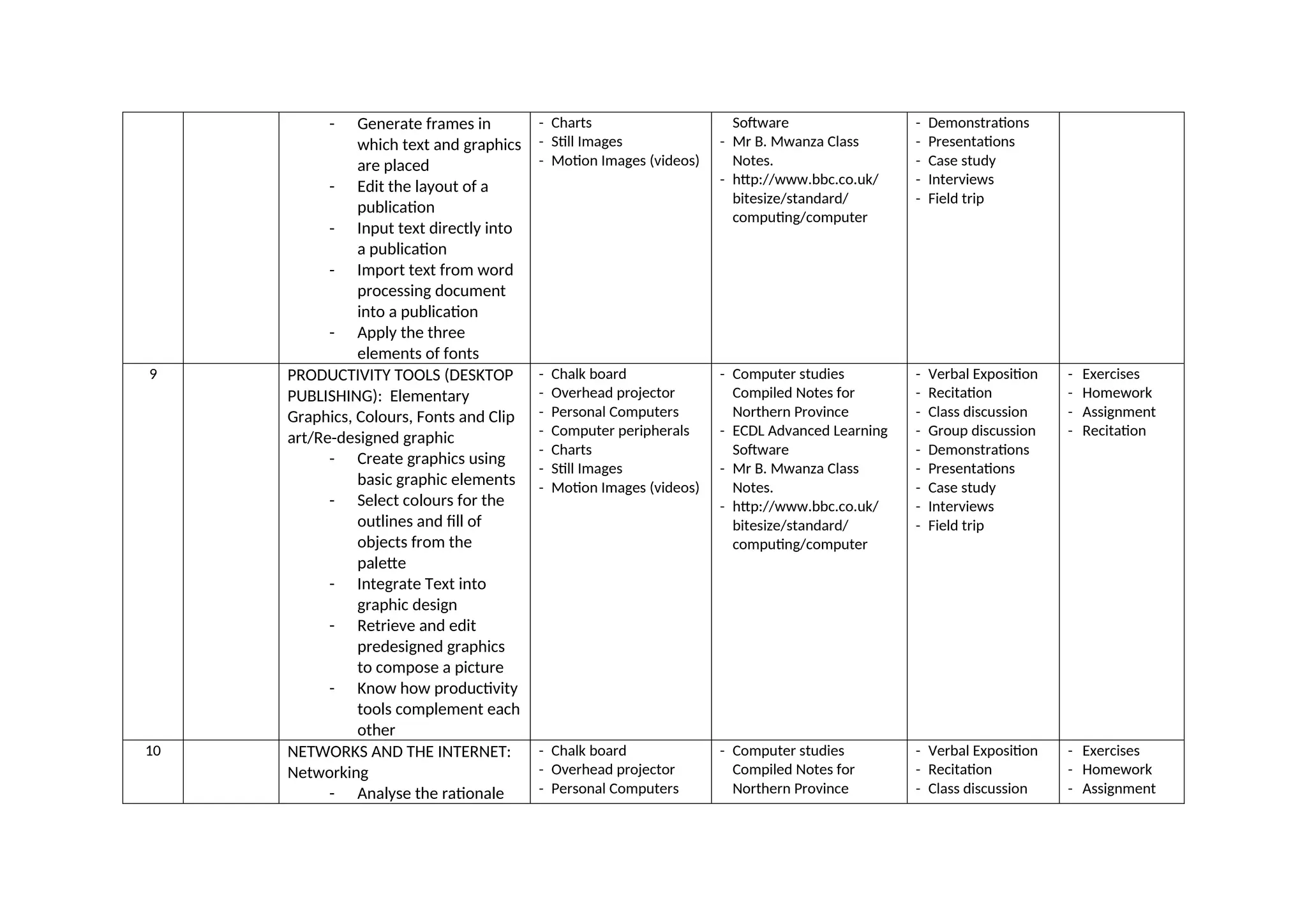
- Generate framesin
which text and graphics
are placed
- Edit the layout of a
publication
- Input text directly into
a publication
- Import text from word
processing document
into a publication
- Apply the three
elements of fonts
- Charts
- Still Images
- Motion Images (videos)
Software
- Mr B. Mwanza Class
Notes.
- http://www.bbc.co.uk/
bitesize/standard/
computing/computer
- Demonstrations
- Presentations
- Case study
- Interviews
- Field trip
9 PRODUCTIVITY TOOLS (DESKTOP
PUBLISHING): Elementary
Graphics, Colours, Fonts and Clip
art/Re-designed graphic
- Create graphics using
basic graphic elements
- Select colours for the
outlines and fill of
objects from the
palette
- Integrate Text into
graphic design
- Retrieve and edit
predesigned graphics
to compose a picture
- Know how productivity
tools complement each
other
- Chalk board
- Overhead projector
- Personal Computers
- Computer peripherals
- Charts
- Still Images
- Motion Images (videos)
- Computer studies
Compiled Notes for
Northern Province
- ECDL Advanced Learning
Software
- Mr B. Mwanza Class
Notes.
- http://www.bbc.co.uk/
bitesize/standard/
computing/computer
- Verbal Exposition
- Recitation
- Class discussion
- Group discussion
- Demonstrations
- Presentations
- Case study
- Interviews
- Field trip
- Exercises
- Homework
- Assignment
- Recitation
10 NETWORKS AND THE INTERNET:
Networking
- Analyse the rationale
- Chalk board
- Overhead projector
- Personal Computers
- Computer studies
Compiled Notes for
Northern Province
- Verbal Exposition
- Recitation
- Class discussion
- Exercises
- Homework
- Assignment
12.
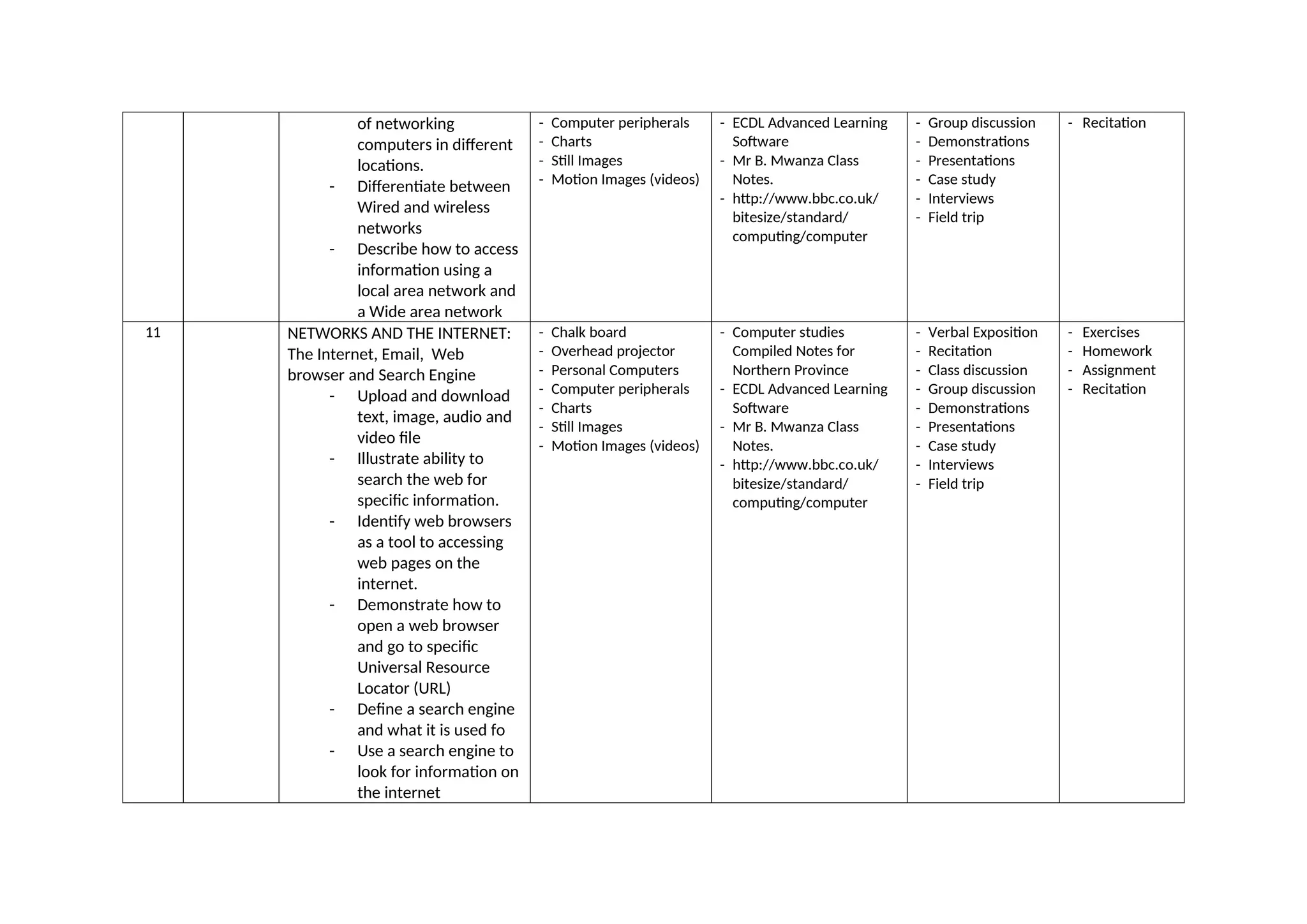
of networking
computers indifferent
locations.
- Differentiate between
Wired and wireless
networks
- Describe how to access
information using a
local area network and
a Wide area network
- Computer peripherals
- Charts
- Still Images
- Motion Images (videos)
- ECDL Advanced Learning
Software
- Mr B. Mwanza Class
Notes.
- http://www.bbc.co.uk/
bitesize/standard/
computing/computer
- Group discussion
- Demonstrations
- Presentations
- Case study
- Interviews
- Field trip
- Recitation
11 NETWORKS AND THE INTERNET:
The Internet, Email, Web
browser and Search Engine
- Upload and download
text, image, audio and
video file
- Illustrate ability to
search the web for
specific information.
- Identify web browsers
as a tool to accessing
web pages on the
internet.
- Demonstrate how to
open a web browser
and go to specific
Universal Resource
Locator (URL)
- Define a search engine
and what it is used fo
- Use a search engine to
look for information on
the internet
- Chalk board
- Overhead projector
- Personal Computers
- Computer peripherals
- Charts
- Still Images
- Motion Images (videos)
- Computer studies
Compiled Notes for
Northern Province
- ECDL Advanced Learning
Software
- Mr B. Mwanza Class
Notes.
- http://www.bbc.co.uk/
bitesize/standard/
computing/computer
- Verbal Exposition
- Recitation
- Class discussion
- Group discussion
- Demonstrations
- Presentations
- Case study
- Interviews
- Field trip
- Exercises
- Homework
- Assignment
- Recitation
13.
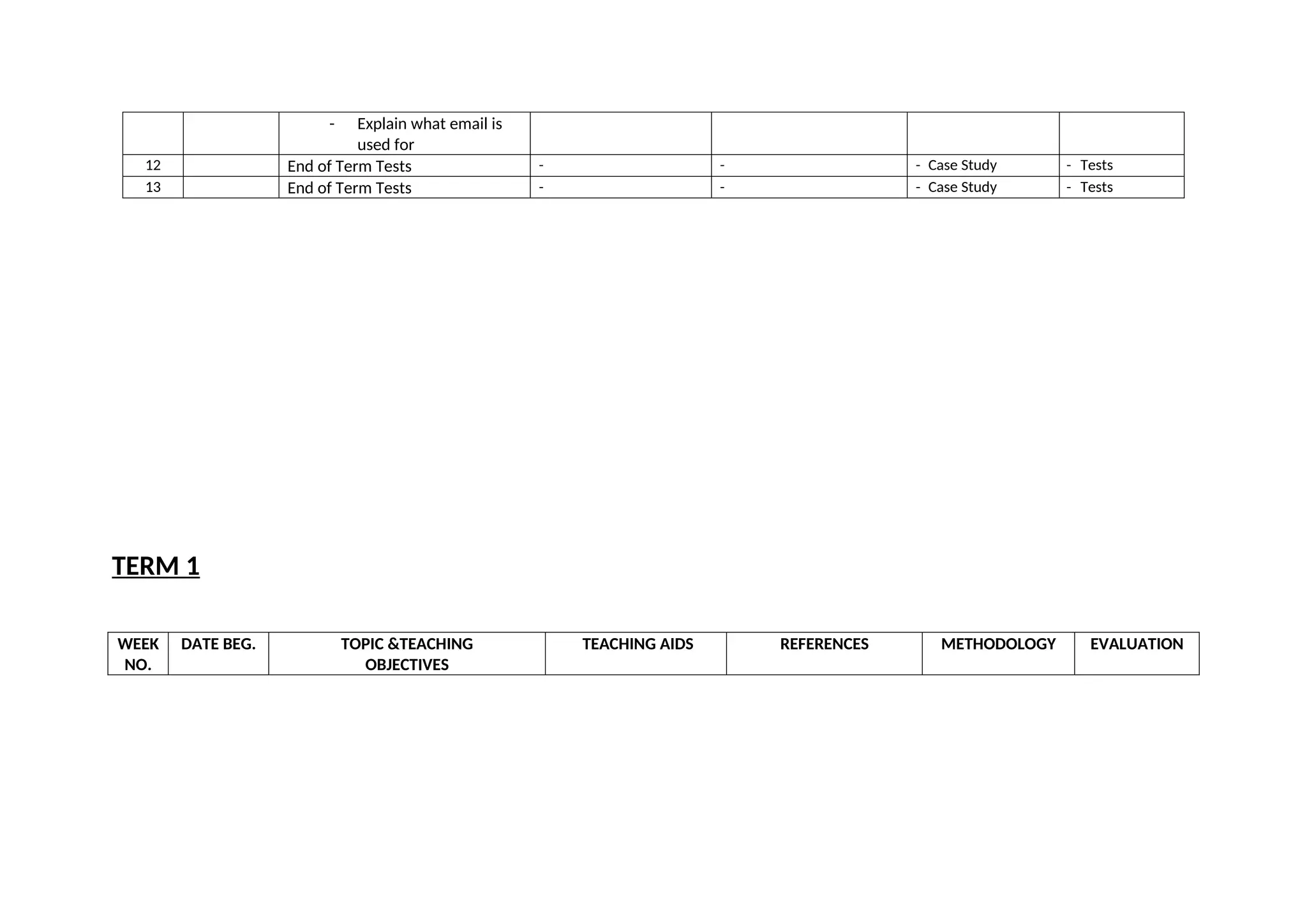
- Explain whatemail is
used for
12 End of Term Tests - - - Case Study - Tests
13 End of Term Tests - - - Case Study - Tests
TERM 1
WEEK
NO.
DATE BEG. TOPIC &TEACHING
OBJECTIVES
TEACHING AIDS REFERENCES METHODOLOGY EVALUATION
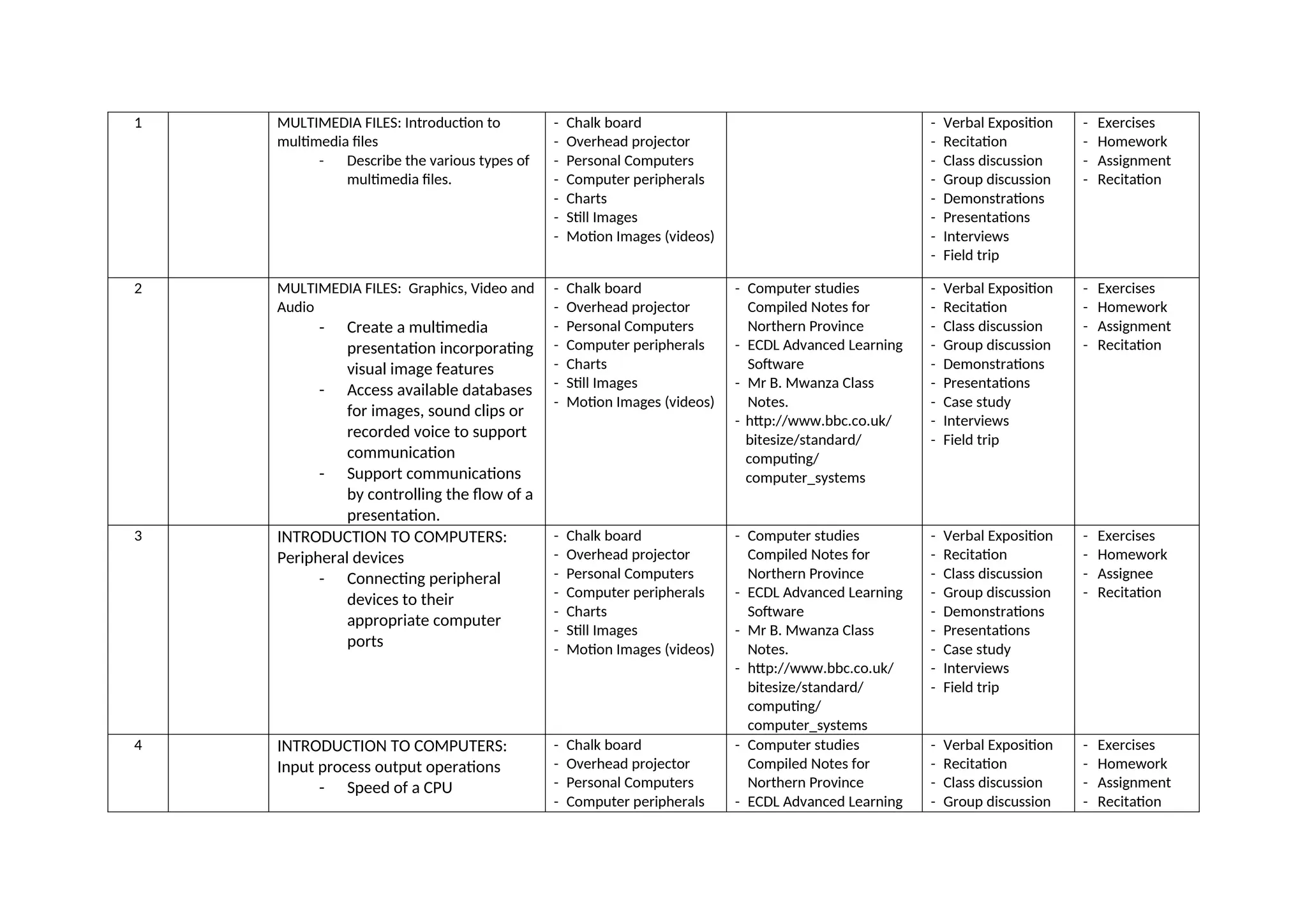
14.
1 MULTIMEDIA FILES:Introduction to
multimedia files
- Describe the various types of
multimedia files.
- Chalk board
- Overhead projector
- Personal Computers
- Computer peripherals
- Charts
- Still Images
- Motion Images (videos)
- Verbal Exposition
- Recitation
- Class discussion
- Group discussion
- Demonstrations
- Presentations
- Interviews
- Field trip
- Exercises
- Homework
- Assignment
- Recitation
2 MULTIMEDIA FILES: Graphics, Video and
Audio
- Create a multimedia
presentation incorporating
visual image features
- Access available databases
for images, sound clips or
recorded voice to support
communication
- Support communications
by controlling the flow of a
presentation.
- Chalk board
- Overhead projector
- Personal Computers
- Computer peripherals
- Charts
- Still Images
- Motion Images (videos)
- Computer studies
Compiled Notes for
Northern Province
- ECDL Advanced Learning
Software
- Mr B. Mwanza Class
Notes.
- http://www.bbc.co.uk/
bitesize/standard/
computing/
computer_systems
- Verbal Exposition
- Recitation
- Class discussion
- Group discussion
- Demonstrations
- Presentations
- Case study
- Interviews
- Field trip
- Exercises
- Homework
- Assignment
- Recitation
3 INTRODUCTION TO COMPUTERS:
Peripheral devices
- Connecting peripheral
devices to their
appropriate computer
ports
- Chalk board
- Overhead projector
- Personal Computers
- Computer peripherals
- Charts
- Still Images
- Motion Images (videos)
- Computer studies
Compiled Notes for
Northern Province
- ECDL Advanced Learning
Software
- Mr B. Mwanza Class
Notes.
- http://www.bbc.co.uk/
bitesize/standard/
computing/
computer_systems
- Verbal Exposition
- Recitation
- Class discussion
- Group discussion
- Demonstrations
- Presentations
- Case study
- Interviews
- Field trip
- Exercises
- Homework
- Assignee
- Recitation
4 INTRODUCTION TO COMPUTERS:
Input process output operations
- Speed of a CPU
- Chalk board
- Overhead projector
- Personal Computers
- Computer peripherals
- Computer studies
Compiled Notes for
Northern Province
- ECDL Advanced Learning
- Verbal Exposition
- Recitation
- Class discussion
- Group discussion
- Exercises
- Homework
- Assignment
- Recitation
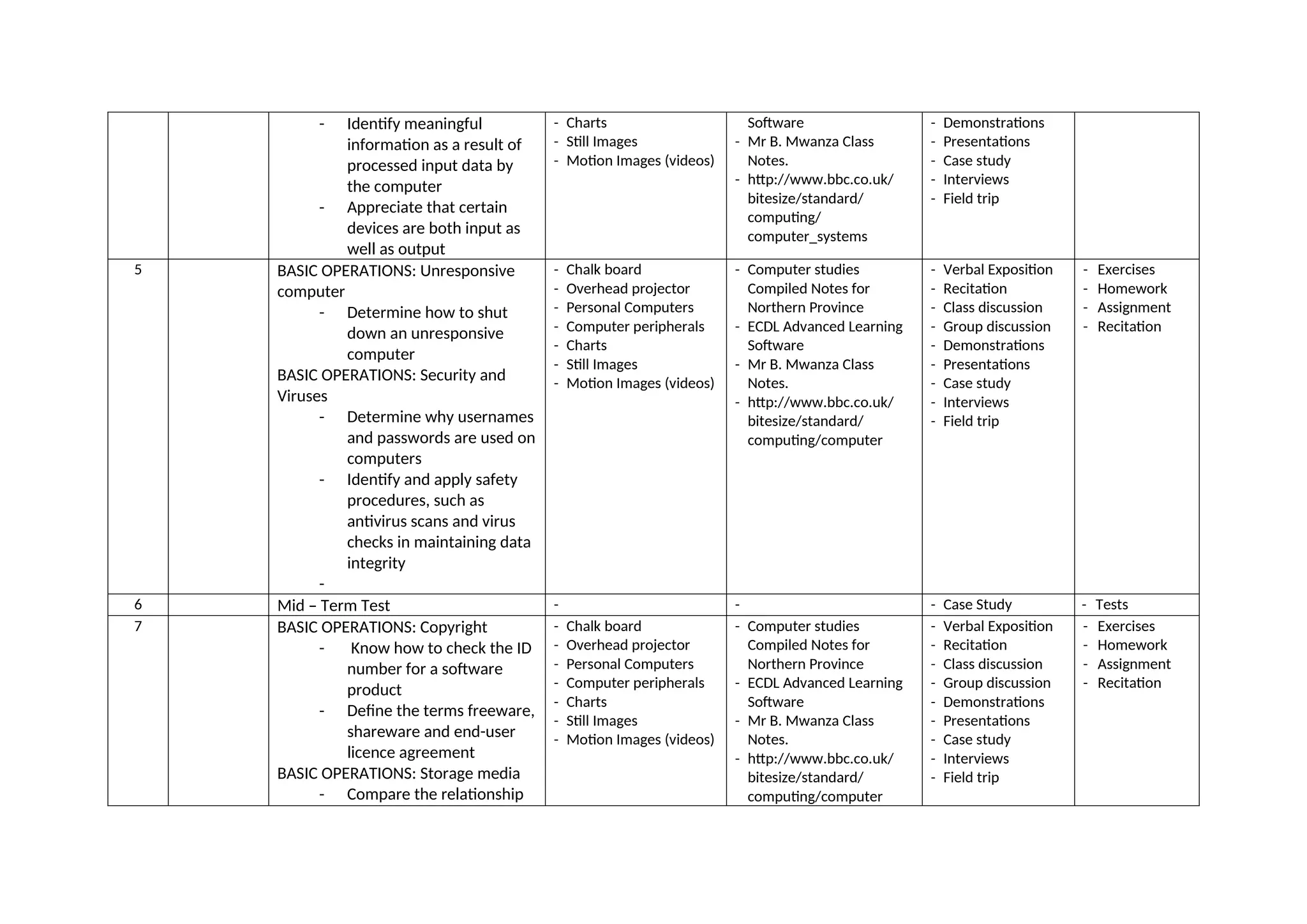
15.
- Identify meaningful
informationas a result of
processed input data by
the computer
- Appreciate that certain
devices are both input as
well as output
- Charts
- Still Images
- Motion Images (videos)
Software
- Mr B. Mwanza Class
Notes.
- http://www.bbc.co.uk/
bitesize/standard/
computing/
computer_systems
- Demonstrations
- Presentations
- Case study
- Interviews
- Field trip
5 BASIC OPERATIONS: Unresponsive
computer
- Determine how to shut
down an unresponsive
computer
BASIC OPERATIONS: Security and
Viruses
- Determine why usernames
and passwords are used on
computers
- Identify and apply safety
procedures, such as
antivirus scans and virus
checks in maintaining data
integrity
-
- Chalk board
- Overhead projector
- Personal Computers
- Computer peripherals
- Charts
- Still Images
- Motion Images (videos)
- Computer studies
Compiled Notes for
Northern Province
- ECDL Advanced Learning
Software
- Mr B. Mwanza Class
Notes.
- http://www.bbc.co.uk/
bitesize/standard/
computing/computer
- Verbal Exposition
- Recitation
- Class discussion
- Group discussion
- Demonstrations
- Presentations
- Case study
- Interviews
- Field trip
- Exercises
- Homework
- Assignment
- Recitation
6 Mid – Term Test - - - Case Study - Tests
7 BASIC OPERATIONS: Copyright
- Know how to check the ID
number for a software
product
- Define the terms freeware,
shareware and end-user
licence agreement
BASIC OPERATIONS: Storage media
- Compare the relationship
- Chalk board
- Overhead projector
- Personal Computers
- Computer peripherals
- Charts
- Still Images
- Motion Images (videos)
- Computer studies
Compiled Notes for
Northern Province
- ECDL Advanced Learning
Software
- Mr B. Mwanza Class
Notes.
- http://www.bbc.co.uk/
bitesize/standard/
computing/computer
- Verbal Exposition
- Recitation
- Class discussion
- Group discussion
- Demonstrations
- Presentations
- Case study
- Interviews
- Field trip
- Exercises
- Homework
- Assignment
- Recitation
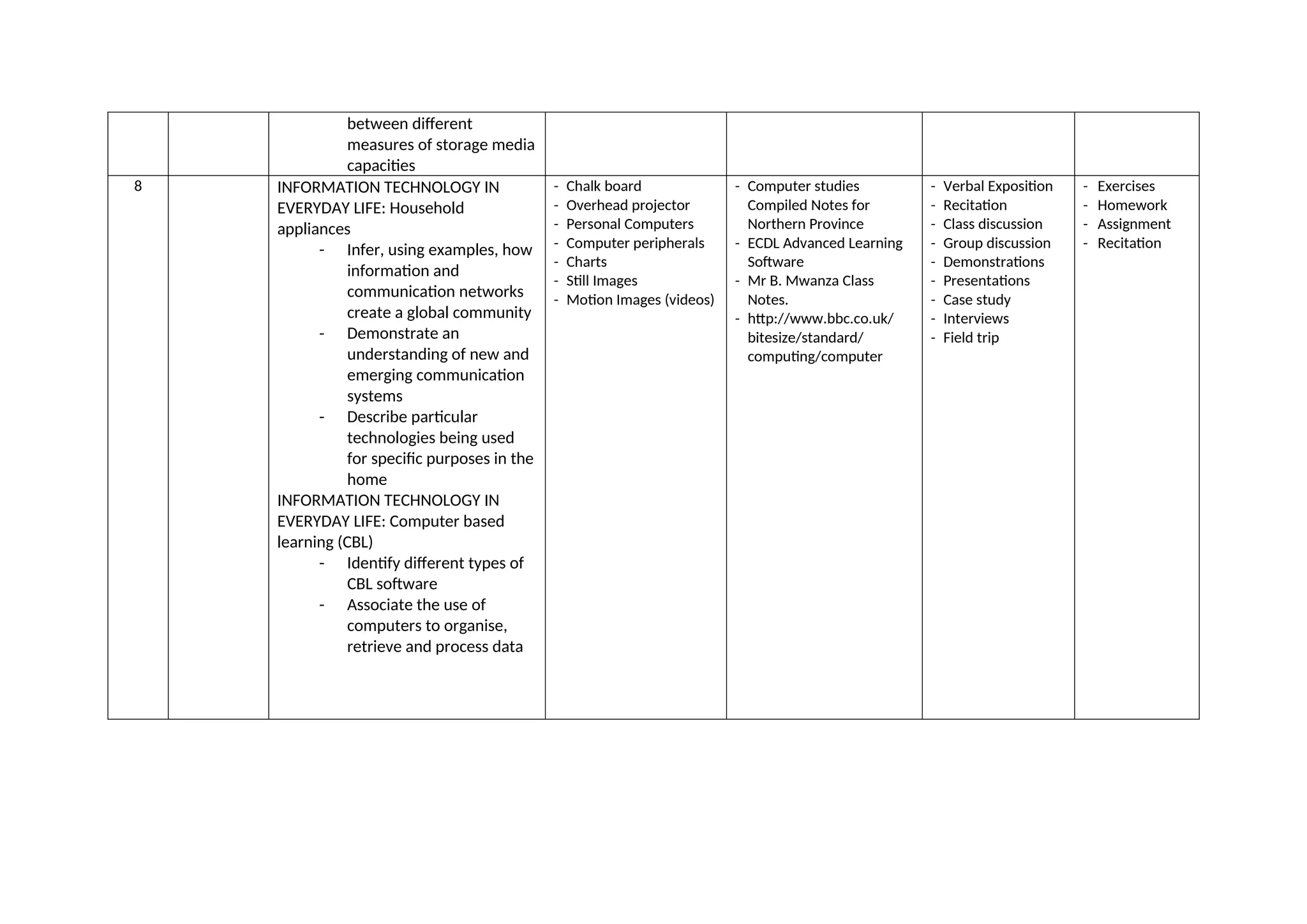
16.
between different
measures ofstorage media
capacities
8 INFORMATION TECHNOLOGY IN
EVERYDAY LIFE: Household
appliances
- Infer, using examples, how
information and
communication networks
create a global community
- Demonstrate an
understanding of new and
emerging communication
systems
- Describe particular
technologies being used
for specific purposes in the
home
INFORMATION TECHNOLOGY IN
EVERYDAY LIFE: Computer based
learning (CBL)
- Identify different types of
CBL software
- Associate the use of
computers to organise,
retrieve and process data
- Chalk board
- Overhead projector
- Personal Computers
- Computer peripherals
- Charts
- Still Images
- Motion Images (videos)
- Computer studies
Compiled Notes for
Northern Province
- ECDL Advanced Learning
Software
- Mr B. Mwanza Class
Notes.
- http://www.bbc.co.uk/
bitesize/standard/
computing/computer
- Verbal Exposition
- Recitation
- Class discussion
- Group discussion
- Demonstrations
- Presentations
- Case study
- Interviews
- Field trip
- Exercises
- Homework
- Assignment
- Recitation
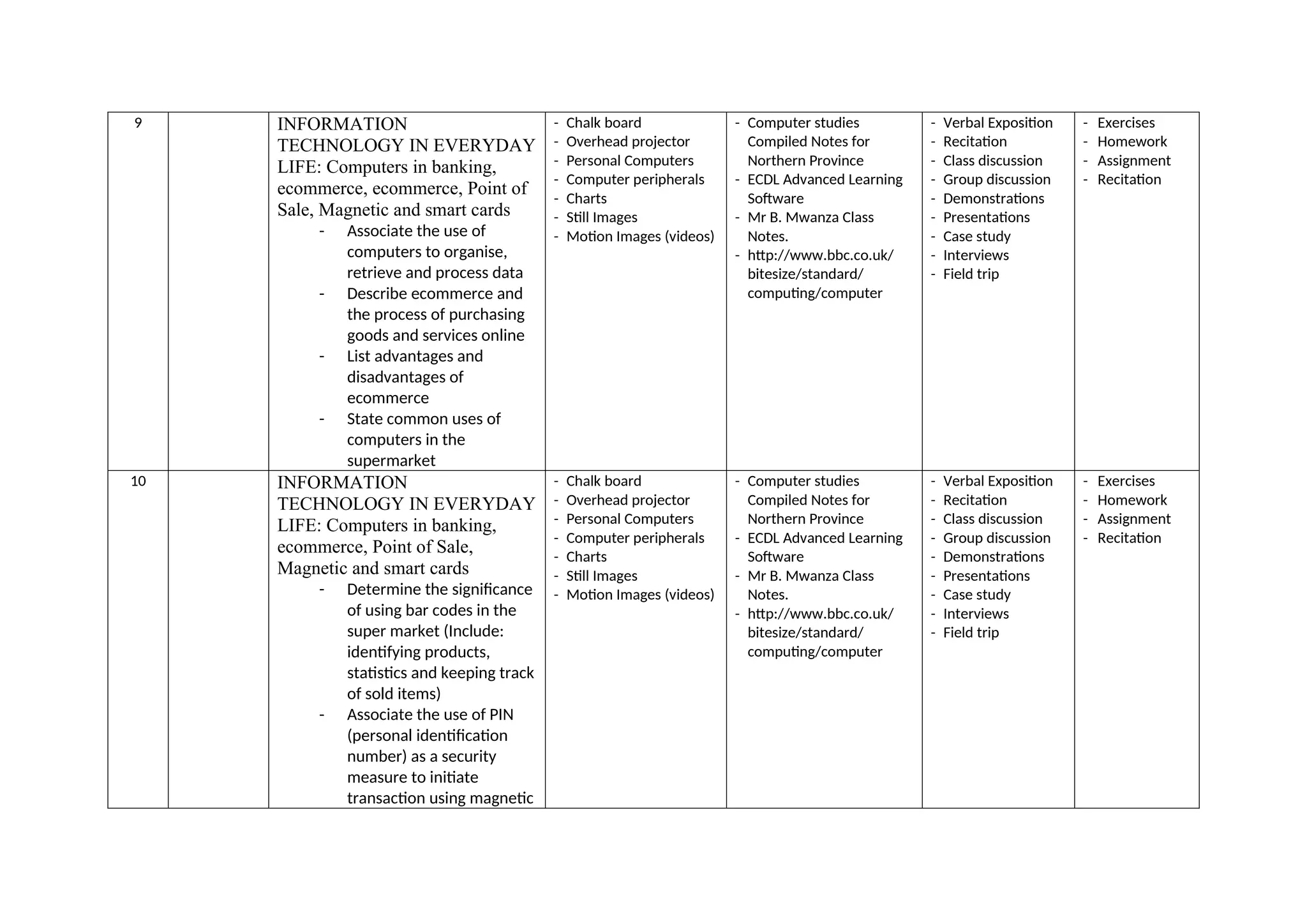
17.
9 INFORMATION
TECHNOLOGY INEVERYDAY
LIFE: Computers in banking,
ecommerce, ecommerce, Point of
Sale, Magnetic and smart cards
- Associate the use of
computers to organise,
retrieve and process data
- Describe ecommerce and
the process of purchasing
goods and services online
- List advantages and
disadvantages of
ecommerce
- State common uses of
computers in the
supermarket
- Chalk board
- Overhead projector
- Personal Computers
- Computer peripherals
- Charts
- Still Images
- Motion Images (videos)
- Computer studies
Compiled Notes for
Northern Province
- ECDL Advanced Learning
Software
- Mr B. Mwanza Class
Notes.
- http://www.bbc.co.uk/
bitesize/standard/
computing/computer
- Verbal Exposition
- Recitation
- Class discussion
- Group discussion
- Demonstrations
- Presentations
- Case study
- Interviews
- Field trip
- Exercises
- Homework
- Assignment
- Recitation
10 INFORMATION
TECHNOLOGY IN EVERYDAY
LIFE: Computers in banking,
ecommerce, Point of Sale,
Magnetic and smart cards
- Determine the significance
of using bar codes in the
super market (Include:
identifying products,
statistics and keeping track
of sold items)
- Associate the use of PIN
(personal identification
number) as a security
measure to initiate
transaction using magnetic
- Chalk board
- Overhead projector
- Personal Computers
- Computer peripherals
- Charts
- Still Images
- Motion Images (videos)
- Computer studies
Compiled Notes for
Northern Province
- ECDL Advanced Learning
Software
- Mr B. Mwanza Class
Notes.
- http://www.bbc.co.uk/
bitesize/standard/
computing/computer
- Verbal Exposition
- Recitation
- Class discussion
- Group discussion
- Demonstrations
- Presentations
- Case study
- Interviews
- Field trip
- Exercises
- Homework
- Assignment
- Recitation
18.
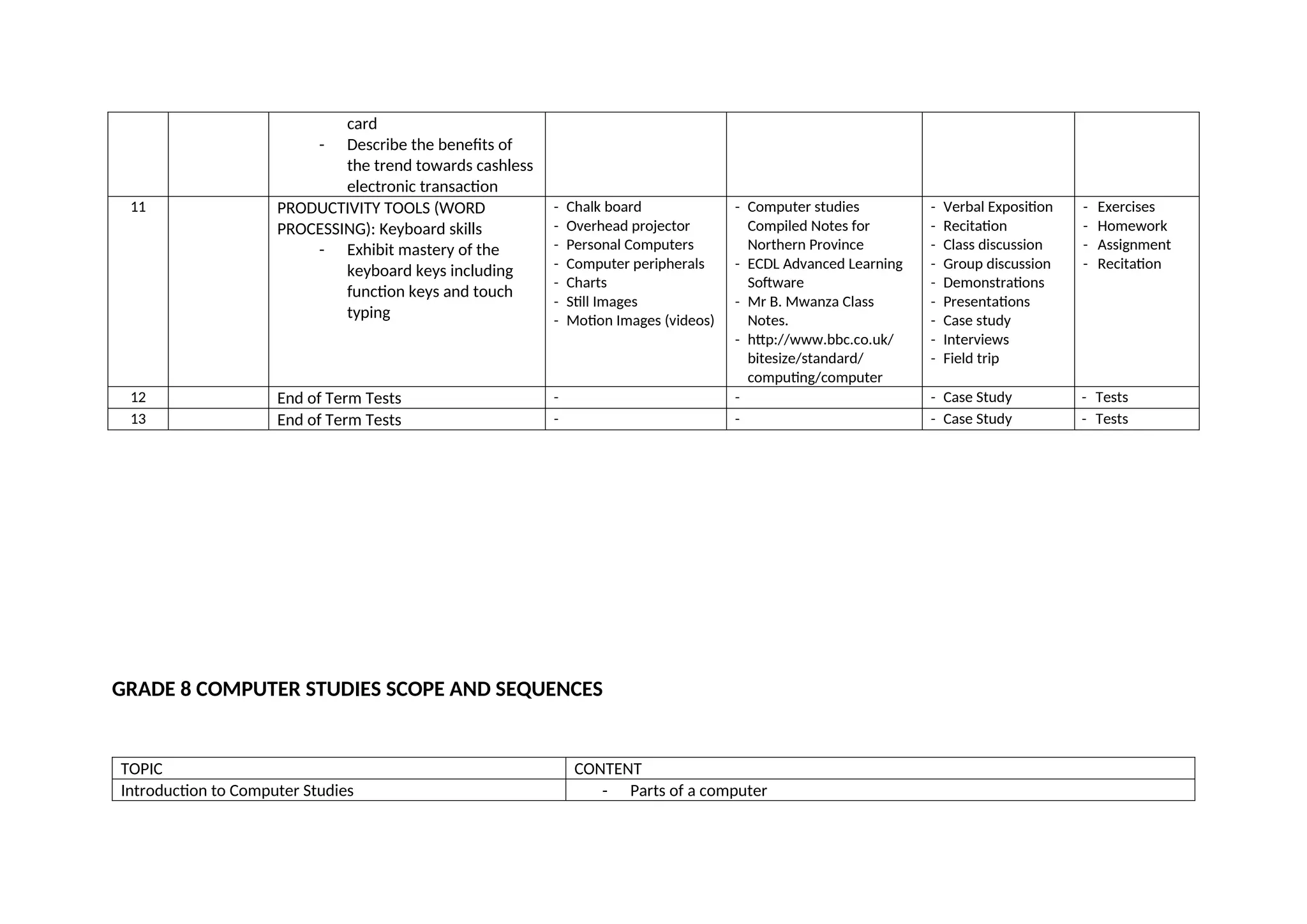
card
- Describe thebenefits of
the trend towards cashless
electronic transaction
11 PRODUCTIVITY TOOLS (WORD
PROCESSING): Keyboard skills
- Exhibit mastery of the
keyboard keys including
function keys and touch
typing
- Chalk board
- Overhead projector
- Personal Computers
- Computer peripherals
- Charts
- Still Images
- Motion Images (videos)
- Computer studies
Compiled Notes for
Northern Province
- ECDL Advanced Learning
Software
- Mr B. Mwanza Class
Notes.
- http://www.bbc.co.uk/
bitesize/standard/
computing/computer
- Verbal Exposition
- Recitation
- Class discussion
- Group discussion
- Demonstrations
- Presentations
- Case study
- Interviews
- Field trip
- Exercises
- Homework
- Assignment
- Recitation
12 End of Term Tests - - - Case Study - Tests
13 End of Term Tests - - - Case Study - Tests
GRADE 8 COMPUTER STUDIES SCOPE AND SEQUENCES
TOPIC CONTENT
Introduction to Computer Studies - Parts of a computer
19.
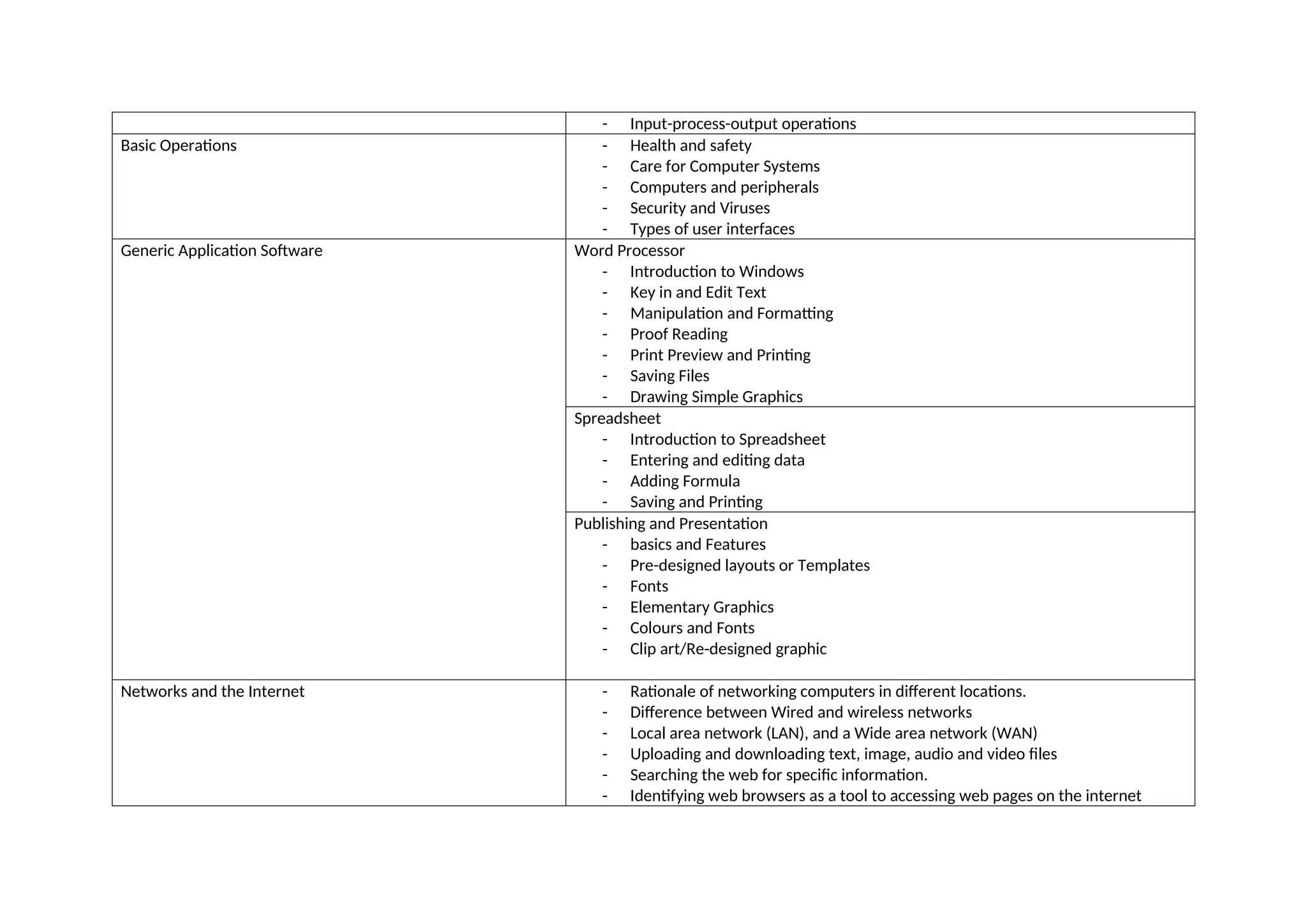
- Input-process-output operations
BasicOperations - Health and safety
- Care for Computer Systems
- Computers and peripherals
- Security and Viruses
- Types of user interfaces
Generic Application Software Word Processor
- Introduction to Windows
- Key in and Edit Text
- Manipulation and Formatting
- Proof Reading
- Print Preview and Printing
- Saving Files
- Drawing Simple Graphics
Spreadsheet
- Introduction to Spreadsheet
- Entering and editing data
- Adding Formula
- Saving and Printing
Publishing and Presentation
- basics and Features
- Pre-designed layouts or Templates
- Fonts
- Elementary Graphics
- Colours and Fonts
- Clip art/Re-designed graphic
Networks and the Internet - Rationale of networking computers in different locations.
- Difference between Wired and wireless networks
- Local area network (LAN), and a Wide area network (WAN)
- Uploading and downloading text, image, audio and video files
- Searching the web for specific information.
- Identifying web browsers as a tool to accessing web pages on the internet
20.
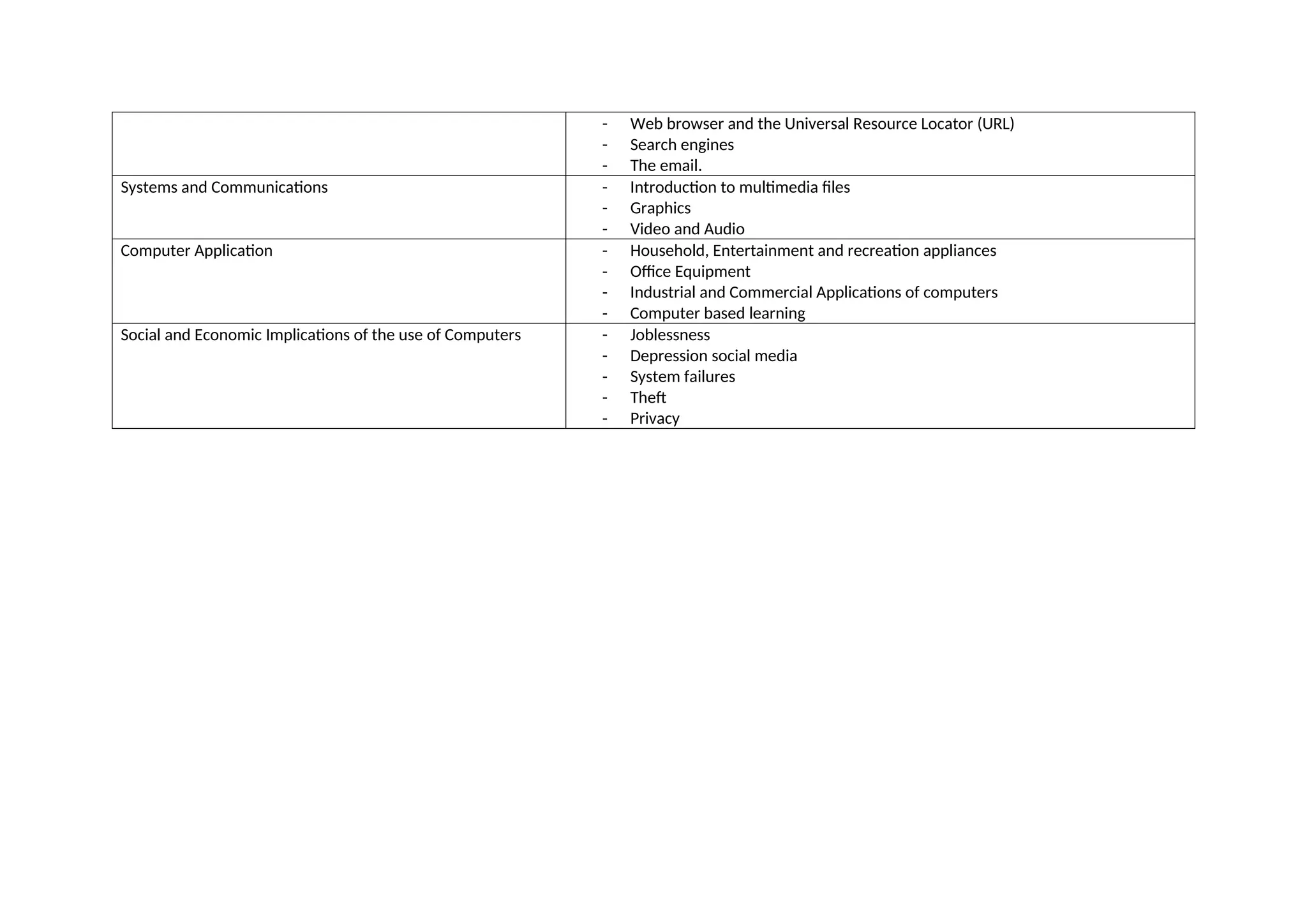
- Web browserand the Universal Resource Locator (URL)
- Search engines
- The email.
Systems and Communications - Introduction to multimedia files
- Graphics
- Video and Audio
Computer Application - Household, Entertainment and recreation appliances
- Office Equipment
- Industrial and Commercial Applications of computers
- Computer based learning
Social and Economic Implications of the use of Computers - Joblessness
- Depression social media
- System failures
- Theft
- Privacy