OPEN TEXT
ADMINISTRATION
Introduction To SYSTEM Landscape
Open Text Application/Server Involved In Support
By Sumit Kumar
Agenda
1. Overview Of Open Text
2 .Data In SAP
3. Product/Solution Of Open Text
4.Archive Server Architecture
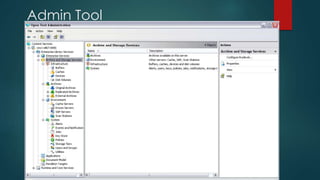
5. Administration Tool In Open Text
6.Archive Server Internal Structure-a Submit And Retrieval Request.
7.Archive Server Services/Logs For Troubleshooting
8.Typical Open Text Landscape
9.Document Pipeline Architecture And Component
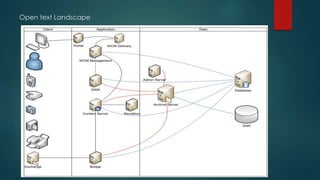
Open Text Landscape
 3 Tier Architecture- Database Layer ,Application Layer, Presentation
Layer
 Database Layer-oracle 11G
 Application Layer-windows 2008,2008R2,2003,2003R2,AIX 6.1
 Presentation Layer- SAP ECC/CRM, Livelink ,WCM/WSM Etc.
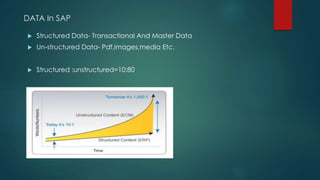
DATA In SAP
 Structured Data- Transactional And Master Data
 Un-structured Data- Pdf,images,media Etc.
 Structured :unstructured=10:80
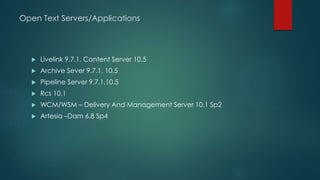
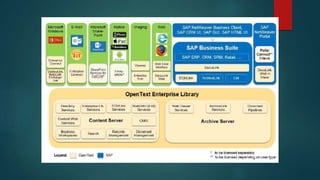
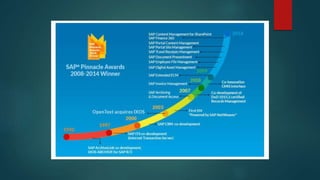
Open Text Servers/Applications
 Livelink 9.7.1, Content Server 10.5
 Archive Sever 9.7.1, 10.5
 Pipeline Server 9.7.1,10.5
 Rcs 10.1
 WCM/WSM – Delivery And Management Server 10.1 Sp2
 Artesia –Dam 6.8 Sp4
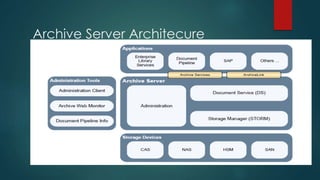
Archive Server Architecure
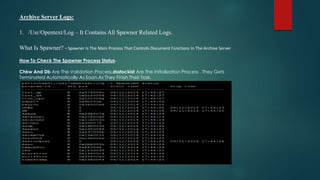
Archive Server Logs:
1. /Usr/Opentext/Log – It Contains All Spawner Related Logs.
What Is Spawner? - Spawner Is The Main Process That Controls Document Functions In The Archive Server
How To Check The Spawner Process Status-
Chkw And Db Are The Validation Process,dsstockist Are The Initialization Process . They Gets
Terminated Automatically As Soon As They Finish Their Task.
/Usr/Opentext/Tomcat/Logs- It Will Give You All Tomcat, RCS Related Logs .
What Is Tomcat- /Software/Tomcat/Apache-tomcat-5.5.23 ?- Tomcat Makes The Web Services Available
Through Rcs And Needs To Be Running In Order To Successfully Archive And Retrieve Documents.
What Is RCS - Runtime And Core Services- It Work As An Gateway To Open Text Aplication,it Is Used To
Provide Connection Between Your Content Server(formally Known As Livelink ) With Your Archive Server
(Open Text Runtime And Core Services)
Common Problem In Archive Server:
User Cannot Retrieve Document From SAP If The Rcs.Log For The Archive Server Shows The Following
Message
WARN [Cs-workerthread #32] Otx.LES : Com.Opentext.Livelink.Service.Core.Exceptionutil - Could Not
Access Server
Login To Admin Server And Check The Livelink Server 9.7.1/Content Server10.1 Service And Make Sure It Is
Running, If It Is Running Check To Make Sure Llserver.Exe Is Not Running At 63%.
Start /Stop Procedure Of Archive Server:
Su – Otxadm Or Sudo Su – Otxadm
Stop Spawner – ./Run.Sp Stop
Stop Tomcat – ./Run.Tc Stop
Make Sure There Are No Processes Running As Otxadm – Ps-ef | Grep Otxadm
If There Are Still Process Running As Otxadm – Kill -9 <PID>
Start Spawner – ./Run.Sp Start
Start Tomcat – ./Run.Tc Start
Archive Server Internal Structure
A Submit Request:
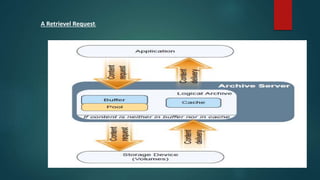
A Retrievel Request:
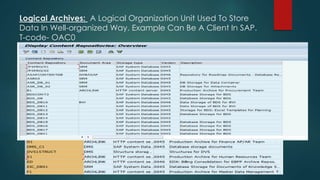
Logical Archives: A Logical Organization Unit Used To Store
Data In Well-organized Way. Example Can Be A Client In SAP.
T-code- OAC0
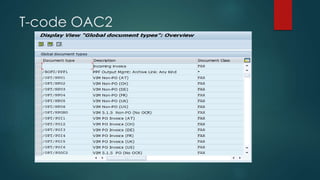
T-code OAC2
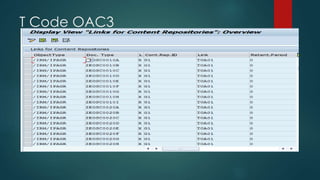
T Code OAC3
Open text Landscape
Admin Tool
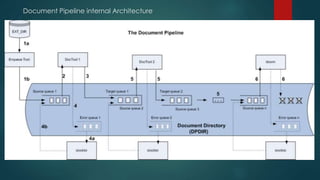
Document Pipeline internal Architecture
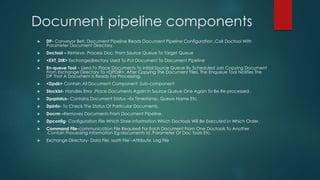
Document pipeline components
 DP- Conveyor Belt, Document Pipeline Reads Document Pipeline Configuration ,Call Doctool With
Parameter Document Directory.
 Doctool – Retrieve ,Process Doc. From Source Queue To Target Queue
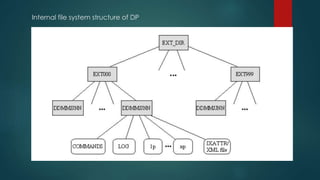
 <EXT_DIR> Exchangedirectory Used To Put Document To Document Pipeline
 En-queue Tool – Used To Place Documents To Initial Source Queue By Scheduled Job Copying Document
From Exchange Directory To <DPDIR>, After Copying The Document Files, The Enqueue Tool Notifies The
DP That A Document Is Ready For Processing.
 <Dpdir> Contain All Document Component ,Sub-component
 Stockist- Handles Error ,Place Documents Again In Source Queue One Again To Be Re-processed.
 Dpqstatus- Contains Document Status –Ex Timestamp, Queue Name Etc.
 Dpinfo- To Check The Status Of Particular Documents.
 Docrm –Removes Documents From Document Pipeline.
 Dpconfig- Configuration File Which Store Information Which Doctools Will Be Executed In Which Order.
 Command File-communication File Required For Each Document From One Doctools To Another
,Contain Processing Information Eg-documents Id ,Parameter Of Doc Tools Etc.
 Exchange Directory- Data File, Ixattr File –Attribute, Log File
 Document Pipeliner(dp)- Controls Flow Of Documents And Doc Tools
Involved, Register Etc.After Successful Processing It Place Document To
Next Doctool To Process And Update Dpqstatus File .
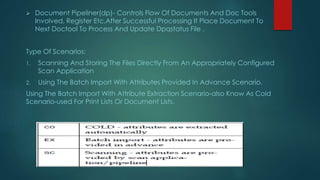
Type Of Scenarios:
1. Scanning And Storing The Files Directly From An Appropriately Configured
Scan Application
2. Using The Batch Import With Attributes Provided In Advance Scenario.
Using The Batch Import With Attribute Extraction Scenario-also Know As Cold
Scenario-used For Print Lists Or Document Lists.
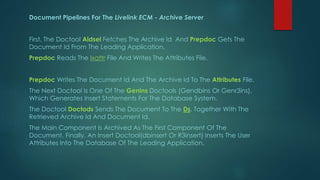
Document Pipelines For The Livelink ECM - Archive Server
First, The Doctool Aidsel Fetches The Archive Id And Prepdoc Gets The
Document Id From The Leading Application.
Prepdoc Reads The Ixattr File And Writes The Attributes File.
Prepdoc Writes The Document Id And The Archive Id To The Attributes File.
The Next Doctool Is One Of The Genins Doctools (Gendbins Or Genr3ins),
Which Generates Insert Statements For The Database System.
The Doctool Doctods Sends The Document To The Ds, Together With The
Retrieved Archive Id And Document Id.
The Main Component Is Archived As The First Component Of The
Document. Finally, An Insert Doctool(dbinsert Or R3insert) Inserts The User
Attributes Into The Database Of The Leading Application.
Internal file system structure of DP
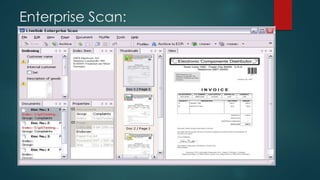
Enterprise Scan:
Livelink
 Livelink is a Enterprise Content Management (ECM) tool which is basically used
for storing and sharing files on web-based platform
 But whats ECM ?
Enterprise Content Management refers to the creation, management,
personalization, and distribution of content, including documents, recorded
discussions, e-mail, Web pages, and so-called rich media, or multimedia. ECM
has become an important and complex element of software infrastructure. Not
only has the sheer volume of content created and retained by organisations
grown significantly with the advent of e-mail and the Internet but also new
regulations affect the storing and accessing of certain types of content .ECM
addresses structured and unstructured content. The former can be managed by
a "relational database" and fits into such a database's typical rows and
columns. Unstructured content includes everything else, such as text files,
presentations, Web sites, XML files, e-mail, graphics, and audio and sound.
Analyst studies have shown that more than 80% of all content is unstructured.
Livelink Contd.
 Livelink is a Web-based application for storing, sharing, and
distributing information. It provides a collaborative work
environment that helps your organization manage documents
and project information, improve business processes, and
share information. It makes collaboration a part of every
business process, even across organizational and geographic
barriers. Livelink brings together employees across your
organization, as well as partners and customers throughout
your business community.
 Whats OpenText ?
LiveLink, an electronic document management system, is a 3
rd party product from and is used for storing and sharing files
on a web based platform. LiveLink offers functionality like
applying metadata to documents, auditing all document
events and managing version history.
Livelink Contd.
 Some of the main benefits of using LiveLink:
 Central repository. Share data files globally, all file types
 Manage access privileges
 Anonymous (open content) access allowed
 Allow 3rd party access via the Internet. Controlled by content owners
 Version control for file updates between team members
 Ability to "lock" documents while editing
 Content auditing (who and when viewed)
 Assign tasks and monitor progress
 Conduct on-line discussions
 Automatic notification of content changes
 Content indexed and searchable
 View and edit content offline Avoid attachments in email. Use direct web link to
the content in LiveLink.
Livelink architecture
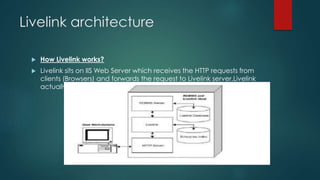
 How Livelink works?
 Livelink sits on IIS Web Server which receives the HTTP requests from
clients (Browsers) and forwards the request to Livelink server.Livelink
actually has 2 services running :
Livelink contd.
 1) llServer which handles core Livelink functionality
2) Admin Server which handles Indexing and other Java based
processes.
 When a request comes from IIS server, Livelink processes the request
.If required Livelink server interacts with database , retrieves or dates
data and sends the response to IIS server which in turn forwards the
formatted response in HTTP form to the client.The simplest of Livelink
systems is a single-host architecture where everything is installed on
the same host machine as shown in the figure.Generally at
organisational level Livelink is implementated in Cluster architecture
where Database , Admin servers (referred as back end) and
LLServer, IIS (front end) are all installed on different server machines.
Livelink Contd.
 What are Livelink Modules?
Livelink’s functionality is organized into core modules, which are pre-
installed with the
base Livelink software, and optional modules, which are installed
separately. So any changes or enhancements to livelink should be
wrapped as modules and installed on the system. These modules
can be developed using Livelink builder. Oscript is used as the
programming language for coding.
 Livelink Explorer
Livelink Explorer is a supplemental tool for Livelink account holders.
Instead of using the LiveLink web interface through Internet Explorer
to manage LiveLink content, LLE provides a more seamless Windows
destop integration to work with LiveLink content directly from
Microsoft Office and Windows Explorer.
Livelink Contd.
 From Windows Explorer, users can also access all of the Livelink
functions (e.g. delete, copy, add version, download, permissions)
associated with an item by simply right-clicking over the item to
access the LiveLink functions menu list.
With LLE, users can open, edit, and save Livelink content directly
from their desktop applications including Word, PowerPoint, and
Excel. In Microsoft Outlook, LiveLink folders appear as Outlook
folders, allowing users to drag-and-drop email into LiveLink.
LLE also makes it easier for mobile users to mark documents in
LiveLink for offline use. With the offline utility, users can access and
edit their LiveLink content when not connected to the Shell network.
When users reconnect after working offline, LiveLink Explorer ensures
that the offline changes remain synchronized with changes to items
in the LiveLink repository and vice-versa.
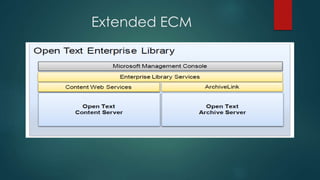
Extended ECM
Vendor Invoice Management

OPEN TEXT ADMINISTRATION

  • 1.
    OPEN TEXT ADMINISTRATION Introduction ToSYSTEM Landscape Open Text Application/Server Involved In Support By Sumit Kumar
  • 2.
    Agenda 1. Overview OfOpen Text 2 .Data In SAP 3. Product/Solution Of Open Text 4.Archive Server Architecture 5. Administration Tool In Open Text 6.Archive Server Internal Structure-a Submit And Retrieval Request. 7.Archive Server Services/Logs For Troubleshooting 8.Typical Open Text Landscape 9.Document Pipeline Architecture And Component
  • 3.
    Open Text Landscape 3 Tier Architecture- Database Layer ,Application Layer, Presentation Layer  Database Layer-oracle 11G  Application Layer-windows 2008,2008R2,2003,2003R2,AIX 6.1  Presentation Layer- SAP ECC/CRM, Livelink ,WCM/WSM Etc.
  • 4.
    DATA In SAP Structured Data- Transactional And Master Data  Un-structured Data- Pdf,images,media Etc.  Structured :unstructured=10:80
  • 5.
    Open Text Servers/Applications Livelink 9.7.1, Content Server 10.5  Archive Sever 9.7.1, 10.5  Pipeline Server 9.7.1,10.5  Rcs 10.1  WCM/WSM – Delivery And Management Server 10.1 Sp2  Artesia –Dam 6.8 Sp4
  • 6.
  • 7.
    Archive Server Logs: 1./Usr/Opentext/Log – It Contains All Spawner Related Logs. What Is Spawner? - Spawner Is The Main Process That Controls Document Functions In The Archive Server How To Check The Spawner Process Status- Chkw And Db Are The Validation Process,dsstockist Are The Initialization Process . They Gets Terminated Automatically As Soon As They Finish Their Task.
  • 8.
    /Usr/Opentext/Tomcat/Logs- It WillGive You All Tomcat, RCS Related Logs . What Is Tomcat- /Software/Tomcat/Apache-tomcat-5.5.23 ?- Tomcat Makes The Web Services Available Through Rcs And Needs To Be Running In Order To Successfully Archive And Retrieve Documents. What Is RCS - Runtime And Core Services- It Work As An Gateway To Open Text Aplication,it Is Used To Provide Connection Between Your Content Server(formally Known As Livelink ) With Your Archive Server (Open Text Runtime And Core Services) Common Problem In Archive Server: User Cannot Retrieve Document From SAP If The Rcs.Log For The Archive Server Shows The Following Message WARN [Cs-workerthread #32] Otx.LES : Com.Opentext.Livelink.Service.Core.Exceptionutil - Could Not Access Server Login To Admin Server And Check The Livelink Server 9.7.1/Content Server10.1 Service And Make Sure It Is Running, If It Is Running Check To Make Sure Llserver.Exe Is Not Running At 63%. Start /Stop Procedure Of Archive Server: Su – Otxadm Or Sudo Su – Otxadm Stop Spawner – ./Run.Sp Stop Stop Tomcat – ./Run.Tc Stop Make Sure There Are No Processes Running As Otxadm – Ps-ef | Grep Otxadm If There Are Still Process Running As Otxadm – Kill -9 <PID> Start Spawner – ./Run.Sp Start Start Tomcat – ./Run.Tc Start
  • 9.
    Archive Server InternalStructure A Submit Request:
  • 10.
  • 11.
    Logical Archives: ALogical Organization Unit Used To Store Data In Well-organized Way. Example Can Be A Client In SAP. T-code- OAC0
  • 12.
  • 13.
  • 14.
  • 15.
  • 16.
  • 17.
    Document pipeline components DP- Conveyor Belt, Document Pipeline Reads Document Pipeline Configuration ,Call Doctool With Parameter Document Directory.  Doctool – Retrieve ,Process Doc. From Source Queue To Target Queue  <EXT_DIR> Exchangedirectory Used To Put Document To Document Pipeline  En-queue Tool – Used To Place Documents To Initial Source Queue By Scheduled Job Copying Document From Exchange Directory To <DPDIR>, After Copying The Document Files, The Enqueue Tool Notifies The DP That A Document Is Ready For Processing.  <Dpdir> Contain All Document Component ,Sub-component  Stockist- Handles Error ,Place Documents Again In Source Queue One Again To Be Re-processed.  Dpqstatus- Contains Document Status –Ex Timestamp, Queue Name Etc.  Dpinfo- To Check The Status Of Particular Documents.  Docrm –Removes Documents From Document Pipeline.  Dpconfig- Configuration File Which Store Information Which Doctools Will Be Executed In Which Order.  Command File-communication File Required For Each Document From One Doctools To Another ,Contain Processing Information Eg-documents Id ,Parameter Of Doc Tools Etc.  Exchange Directory- Data File, Ixattr File –Attribute, Log File
  • 18.
     Document Pipeliner(dp)-Controls Flow Of Documents And Doc Tools Involved, Register Etc.After Successful Processing It Place Document To Next Doctool To Process And Update Dpqstatus File . Type Of Scenarios: 1. Scanning And Storing The Files Directly From An Appropriately Configured Scan Application 2. Using The Batch Import With Attributes Provided In Advance Scenario. Using The Batch Import With Attribute Extraction Scenario-also Know As Cold Scenario-used For Print Lists Or Document Lists.
  • 19.
    Document Pipelines ForThe Livelink ECM - Archive Server First, The Doctool Aidsel Fetches The Archive Id And Prepdoc Gets The Document Id From The Leading Application. Prepdoc Reads The Ixattr File And Writes The Attributes File. Prepdoc Writes The Document Id And The Archive Id To The Attributes File. The Next Doctool Is One Of The Genins Doctools (Gendbins Or Genr3ins), Which Generates Insert Statements For The Database System. The Doctool Doctods Sends The Document To The Ds, Together With The Retrieved Archive Id And Document Id. The Main Component Is Archived As The First Component Of The Document. Finally, An Insert Doctool(dbinsert Or R3insert) Inserts The User Attributes Into The Database Of The Leading Application.
  • 20.
    Internal file systemstructure of DP
  • 21.
  • 22.
    Livelink  Livelink isa Enterprise Content Management (ECM) tool which is basically used for storing and sharing files on web-based platform  But whats ECM ? Enterprise Content Management refers to the creation, management, personalization, and distribution of content, including documents, recorded discussions, e-mail, Web pages, and so-called rich media, or multimedia. ECM has become an important and complex element of software infrastructure. Not only has the sheer volume of content created and retained by organisations grown significantly with the advent of e-mail and the Internet but also new regulations affect the storing and accessing of certain types of content .ECM addresses structured and unstructured content. The former can be managed by a "relational database" and fits into such a database's typical rows and columns. Unstructured content includes everything else, such as text files, presentations, Web sites, XML files, e-mail, graphics, and audio and sound. Analyst studies have shown that more than 80% of all content is unstructured.
  • 23.
    Livelink Contd.  Livelinkis a Web-based application for storing, sharing, and distributing information. It provides a collaborative work environment that helps your organization manage documents and project information, improve business processes, and share information. It makes collaboration a part of every business process, even across organizational and geographic barriers. Livelink brings together employees across your organization, as well as partners and customers throughout your business community.  Whats OpenText ? LiveLink, an electronic document management system, is a 3 rd party product from and is used for storing and sharing files on a web based platform. LiveLink offers functionality like applying metadata to documents, auditing all document events and managing version history.
  • 24.
    Livelink Contd.  Someof the main benefits of using LiveLink:  Central repository. Share data files globally, all file types  Manage access privileges  Anonymous (open content) access allowed  Allow 3rd party access via the Internet. Controlled by content owners  Version control for file updates between team members  Ability to "lock" documents while editing  Content auditing (who and when viewed)  Assign tasks and monitor progress  Conduct on-line discussions  Automatic notification of content changes  Content indexed and searchable  View and edit content offline Avoid attachments in email. Use direct web link to the content in LiveLink.
  • 25.
    Livelink architecture  HowLivelink works?  Livelink sits on IIS Web Server which receives the HTTP requests from clients (Browsers) and forwards the request to Livelink server.Livelink actually has 2 services running :
  • 26.
    Livelink contd.  1)llServer which handles core Livelink functionality 2) Admin Server which handles Indexing and other Java based processes.  When a request comes from IIS server, Livelink processes the request .If required Livelink server interacts with database , retrieves or dates data and sends the response to IIS server which in turn forwards the formatted response in HTTP form to the client.The simplest of Livelink systems is a single-host architecture where everything is installed on the same host machine as shown in the figure.Generally at organisational level Livelink is implementated in Cluster architecture where Database , Admin servers (referred as back end) and LLServer, IIS (front end) are all installed on different server machines.
  • 27.
    Livelink Contd.  Whatare Livelink Modules? Livelink’s functionality is organized into core modules, which are pre- installed with the base Livelink software, and optional modules, which are installed separately. So any changes or enhancements to livelink should be wrapped as modules and installed on the system. These modules can be developed using Livelink builder. Oscript is used as the programming language for coding.  Livelink Explorer Livelink Explorer is a supplemental tool for Livelink account holders. Instead of using the LiveLink web interface through Internet Explorer to manage LiveLink content, LLE provides a more seamless Windows destop integration to work with LiveLink content directly from Microsoft Office and Windows Explorer.
  • 28.
    Livelink Contd.  FromWindows Explorer, users can also access all of the Livelink functions (e.g. delete, copy, add version, download, permissions) associated with an item by simply right-clicking over the item to access the LiveLink functions menu list. With LLE, users can open, edit, and save Livelink content directly from their desktop applications including Word, PowerPoint, and Excel. In Microsoft Outlook, LiveLink folders appear as Outlook folders, allowing users to drag-and-drop email into LiveLink. LLE also makes it easier for mobile users to mark documents in LiveLink for offline use. With the offline utility, users can access and edit their LiveLink content when not connected to the Shell network. When users reconnect after working offline, LiveLink Explorer ensures that the offline changes remain synchronized with changes to items in the LiveLink repository and vice-versa.
  • 29.
  • 32.