DATA ARCHIVING D.RAMESH RAO SAP-CONSULTANT
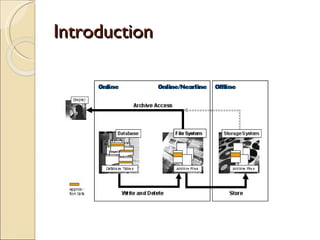
Introduction
ASAP- Methodology Stage 1: Project preparation  Stage 2:  Analysis , Designing and  Maintenance Stage 3:Configuration/ customisation Stage 4:Test Stage 5:Implement Stage 6:Documentation
Reasons for Archiving     Resolves memory space and performance problems caused by large volumes of transaction data Ensures that data growth remains moderate so that the database remains manageable in the long term Ensures that companies can meet the legal requirements for data storage in a cost-efficient manner Ensures that data can be reused at a later date, for example, in new product development
Data Archiving Requirements..Data semantics      Hardware independence Because the encoding of numerical fields, such as integers, depends on the hardware being used, archiving must ensure that information about hardware is appended to the archived data so that the data can be displayed later with different hardware. Release dependence Because the data structure may depend on the release status of the mySAP Business Suite solution that you are using, record structure and field definition information must also be archived. Data Dependencies Many data objects depend on other data objects. Consequently, when archiving data, we must check whether, in order to archive a specific data object, another object must first be archived or whether other objects are to be archived at the same time.       
Data Archiving Requirements…  Data semantics  Enterprise and business structure Some data is only of use in conjunction with an enterprise’s organizational structure, such as how it is divided into different areas for sales. Archiving must therefore ensure that this information is also archived. The above list shows that data archiving requires a detailed knowledge of data semantics and through its application integration, SAP Data Archiving has taken this aspect fully into account in its programs and functions. For this reason, SAP’s application-integrated archiving is superior to archiving products that are not integrated into mySAP Business Suite solutions (database tools).
Stage I1: Analysis, Designing  and Maintenance
Monitoring Monitoring , we should monitor the behavior of the database and database tables with respect to data growth.  Tools: Database Monitor DB02 Performance Monitor ST04 With the Database Monitor (transaction DB02), you can check the size of database tables and determine their growth behavior in the past.  We  can also use SAPDBA and the Performance Monitor (transaction ST04). These tools provide you with additional indicators that can help us make decisions concerning data archiving.
DB02
ST04
Analyzing and Categorizing In this IT process  we examine the fastest-growing tables and those involved in performance-demanding queries in depth, and group data according to different requirements. Analyzing and Categorizing , analyze individual database tables and examine their contents.  categorize  the data to later determine which archiving objects you require. The analyses provide information about which selection criteria could have the greatest effect during archiving. In this way, we  can avoid examining archiving objects or organizational units that contribute little to the data volume. Table Analysis Administration TAANA Tables and Archiving Objects DB15
TAANA
DB15
Lesson 2: Content Add text here. To add a picture, chart, or other content in the right column, click the appropriate icon. To add a slide, click the  Slides  tab, then click the  New Slide  gallery.
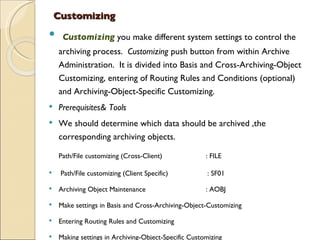
Customizing Customizing  you make different system settings to control the archiving process.  Customizing  push button from within Archive Administration.  It is divided into Basis and Cross-Archiving-Object Customizing, entering of Routing Rules and Conditions (optional) and Archiving-Object-Specific Customizing. Prerequisites& Tools We should determine which data should be archived ,the corresponding archiving objects.  Path/File customizing (Cross-Client) : FILE Path/File customizing (Client Specific)   : SF01 Archiving Object Maintenance : AOBJ Make settings in Basis and Cross-Archiving-Object-Customizing Entering Routing Rules and Customizing Making settings in Archiving-Object-Specific Customizing
Path/File customizing (Cross-Client) T.code  : FILE
Path/File customizing (Client Specific)   T.code  : SF01
  Archiving Object Maintenance : AOBJ
Archiving ( transaction SARA).  Archiving Administrator : SARA Scheduling and Executing Write Jobs Scheduling and Executing Delete Jobs Scheduling and Execution of the Storage Phase
Archiving development kit ADK Archiving in BW uses the Archiving Development Kit (ADK). The ADK is well established in the R/3 environment..  Handling structural changes Platform independency Data compression Archiving Information System (SAP-AS) Administration via transaction SARA
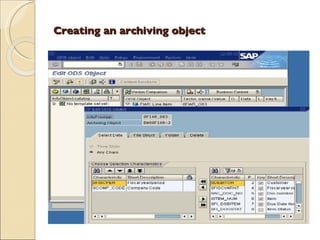
Step by Step analysis Creating an archiving object Scheduling the archiving session Monitoring and statistics of the archiving  session Reloading archived data to a data target Reporting or displaying archived data
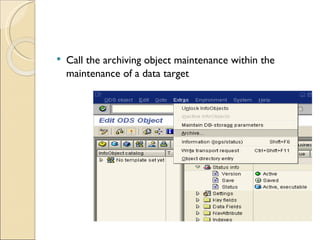
Call the archiving object maintenance within the maintenance of a data target
Creating an archiving object
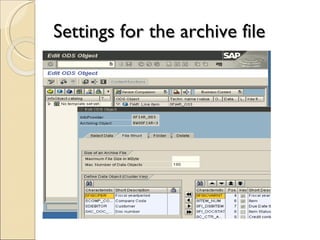
Settings for the archive file

Data Archiving -Ramesh sap bw

  • 1.
    DATA ARCHIVING D.RAMESHRAO SAP-CONSULTANT
  • 2.
  • 3.
    ASAP- Methodology Stage1: Project preparation Stage 2: Analysis , Designing and Maintenance Stage 3:Configuration/ customisation Stage 4:Test Stage 5:Implement Stage 6:Documentation
  • 4.
    Reasons for Archiving    Resolves memory space and performance problems caused by large volumes of transaction data Ensures that data growth remains moderate so that the database remains manageable in the long term Ensures that companies can meet the legal requirements for data storage in a cost-efficient manner Ensures that data can be reused at a later date, for example, in new product development
  • 5.
    Data Archiving Requirements..Datasemantics     Hardware independence Because the encoding of numerical fields, such as integers, depends on the hardware being used, archiving must ensure that information about hardware is appended to the archived data so that the data can be displayed later with different hardware. Release dependence Because the data structure may depend on the release status of the mySAP Business Suite solution that you are using, record structure and field definition information must also be archived. Data Dependencies Many data objects depend on other data objects. Consequently, when archiving data, we must check whether, in order to archive a specific data object, another object must first be archived or whether other objects are to be archived at the same time.       
  • 6.
    Data Archiving Requirements… Data semantics Enterprise and business structure Some data is only of use in conjunction with an enterprise’s organizational structure, such as how it is divided into different areas for sales. Archiving must therefore ensure that this information is also archived. The above list shows that data archiving requires a detailed knowledge of data semantics and through its application integration, SAP Data Archiving has taken this aspect fully into account in its programs and functions. For this reason, SAP’s application-integrated archiving is superior to archiving products that are not integrated into mySAP Business Suite solutions (database tools).
  • 7.
    Stage I1: Analysis,Designing and Maintenance
  • 8.
    Monitoring Monitoring ,we should monitor the behavior of the database and database tables with respect to data growth. Tools: Database Monitor DB02 Performance Monitor ST04 With the Database Monitor (transaction DB02), you can check the size of database tables and determine their growth behavior in the past. We can also use SAPDBA and the Performance Monitor (transaction ST04). These tools provide you with additional indicators that can help us make decisions concerning data archiving.
  • 9.
  • 10.
  • 11.
    Analyzing and CategorizingIn this IT process we examine the fastest-growing tables and those involved in performance-demanding queries in depth, and group data according to different requirements. Analyzing and Categorizing , analyze individual database tables and examine their contents. categorize the data to later determine which archiving objects you require. The analyses provide information about which selection criteria could have the greatest effect during archiving. In this way, we can avoid examining archiving objects or organizational units that contribute little to the data volume. Table Analysis Administration TAANA Tables and Archiving Objects DB15
  • 12.
  • 13.
  • 14.
    Lesson 2: ContentAdd text here. To add a picture, chart, or other content in the right column, click the appropriate icon. To add a slide, click the Slides tab, then click the New Slide gallery.
  • 15.
    Customizing Customizing you make different system settings to control the archiving process. Customizing push button from within Archive Administration.  It is divided into Basis and Cross-Archiving-Object Customizing, entering of Routing Rules and Conditions (optional) and Archiving-Object-Specific Customizing. Prerequisites& Tools We should determine which data should be archived ,the corresponding archiving objects.  Path/File customizing (Cross-Client) : FILE Path/File customizing (Client Specific) : SF01 Archiving Object Maintenance : AOBJ Make settings in Basis and Cross-Archiving-Object-Customizing Entering Routing Rules and Customizing Making settings in Archiving-Object-Specific Customizing
  • 16.
  • 17.
    Path/File customizing (ClientSpecific) T.code : SF01
  • 18.
    ArchivingObject Maintenance : AOBJ
  • 19.
    Archiving ( transactionSARA). Archiving Administrator : SARA Scheduling and Executing Write Jobs Scheduling and Executing Delete Jobs Scheduling and Execution of the Storage Phase
  • 20.
    Archiving development kitADK Archiving in BW uses the Archiving Development Kit (ADK). The ADK is well established in the R/3 environment.. Handling structural changes Platform independency Data compression Archiving Information System (SAP-AS) Administration via transaction SARA
  • 21.
    Step by Stepanalysis Creating an archiving object Scheduling the archiving session Monitoring and statistics of the archiving session Reloading archived data to a data target Reporting or displaying archived data
  • 22.
    Call the archivingobject maintenance within the maintenance of a data target
  • 23.
  • 24.
    Settings for thearchive file