
WordPress & Other
Content Management Systems


                    Emily Lewis
                    UNMCE InfoByte   February 24, 2011
Freelance Web Designer
http://emilylewisdesign.com


Webuquerque Co-Founder & Co-Manager
http://webuquerque.com


Author, Microformats Made Simple
http://microformatsmadesimple.com


Email:     emily@emilylewisdesign.com
Blog:      http://ablognotlimited.com
Twitter:   @emilylewis
I am not
•   A back-end developer

I have not developed with
•   Joomla
•   Plone
I prefer
•   ExpressionEngine
•   MojoMotor

I tolerate
•   WordPress
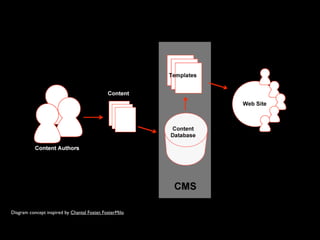
What is a CMS?
“A content management system, or
CMS, is a web application designed to
make it easy for non-technical users
 to add, edit and manage a website.”
                               - Plone
Diagram concept inspired by Chantal Foster, FosterMilo
Key benefits
•   Update your site content as often and whenever
    you want
•   Updates can be instant or scheduled
•   No need to understand a programming language
•   Can reduce maintenance costs
Common challenges
•   Upfront costs can be expensive
•   Often has a learning curve
•   Takes time and resources to create, edit and
    maintain your own content
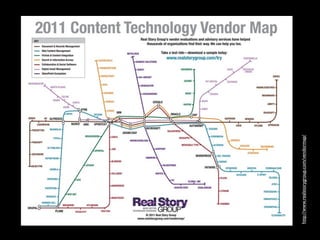
Many to choose from
http://www.realstorygroup.com/vendormap/
And there are many “types”
•   Blog software based
•   “Full” content management/publishing systems
•   “Simple” CMS
•   Custom in-house solutions
•   In-content editing based
•   Control panel based
OpenSource? Commercial?
•   Free download           •   Can be more expensive

•   Consulting firms can     •   Consulting firms can
    install and configure        configure and install, but
                                can also be proprietary
•   Can customize code?         to one company
•   Anyone can contribute
                            •   Generally more stable
    new functionality and       and optimized
    bug fixes
                            •   Often has greater
                                longevity
Today, we’ll look at:
•   WordPress
•   ExpressionEngine
•   Plone
•   Drupal
•   Joomla
•   MojoMotor
WordPress
•   Open source
•   Hosted
•   Managed
•   Blog based
•   No ads allowed
•   Limited space
•   No plugins
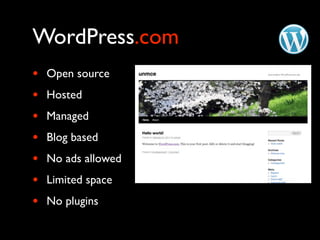
WordPress.com
WordPress
•   Open source
•   Hosted
•   Managed
•   Blog based
•   No ads allowed
•   Limited space
•   No plugins
WordPress.com
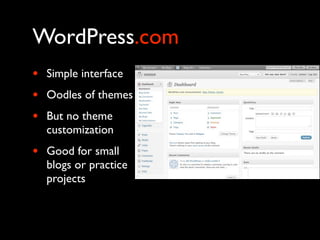
•   Simple interface
•   Oodles of themes
•   But no theme
    customization
•   Good for small
    blogs or practice
    projects
WordPress.com
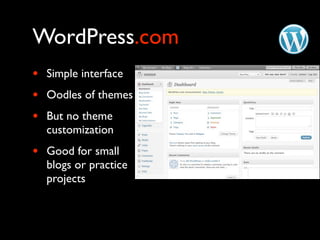
•   Simple interface
•   Oodles of themes
•   But no theme
    customization
•   Good for small
    blogs or practice
    projects
WordPress.org
•   Open source
•   Built with PHP
•   Install, host and manage yourself or with help from a
    vendor
•   Oodles of free themes and you can customize them
    or create your own
•   Oodles of free plugins to extend functionality
    beyond blogging to most any kind of site
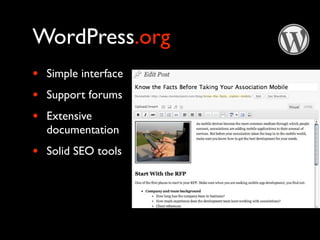
WordPress.org
•   Simple interface
•   Support forums
•   Extensive
    documentation
•   Solid SEO tools
ExpressionEngine
•   Commercial ($99, $149, $299)
•   Built on the CodeIgniter framework (PHP)
•   Full-featured CMS (publishing system)
    •   Basic ecommerce       •   Search
    •   Membership            •   Email
    •   Photo gallery         •   RSS
    •   Discussion forums     •   Mailing list ... and more
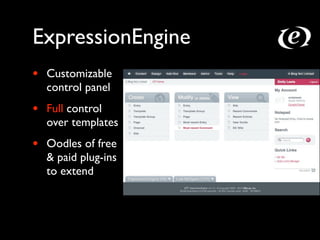
ExpressionEngine
•   Customizable
    control panel
•   Full control
    over templates
•   Oodles of free
    & paid plug-ins
    to extend
ExpressionEngine
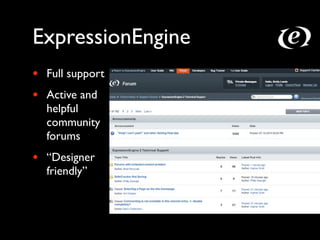
•   Full support
•   Active and
    helpful
    community
    forums
•   “Designer
    friendly”
Plone
•   Open source
•   Built with Zope (Python)
•   Full content management system
    •   Content publishing     •   Authentication
    •   Forums                 •   Live search
    •   Wikis                  •   Versioning, history
    •   Workflows               •   ... and more
Plone
•   In-context editing for content creation and
    maintenance
•   Themes available or you can customize
•   Free plug-ins to extend functionality
•   Active community of developers
•   Extensive online documentation and resources
•   Supports web standards and accessibility
Drupal
•   Open source
•   PHP
•   Full content management system
    •   Blogging             •   Multi-language
    •   Forum                •   Caching
    •   Search               •   Statistics
    •   RSS                  •   ... and more
Drupal
•   Offers solid security and performance
•   Active community
•   Some free themes, but you can customize or
    create your own
•   Oodles of modules to extend core functionality
•   “Developer friendly”
Joomla
•   Open source
•   PHP
•   Full content management system
    •   Search               • Multiple languages
    •   Polls                • Integrated help
    •   User management      • ... and more
    •   RSS
Joomla
•   Oodles of extensions to customize to your needs
•   Some templates available, but you can customize
    or make your own
•   Active community for support
MojoMotor
•   Commercial ($49)
•   Built on CodeIgniter (PHP)
•   Simple, lightweight publishing tool
•   Full control over templates
•   In-context editing
•   A few plug-ins
•   Extremely easy to install, configure and use
How to decide?
Understand your users
•   Who are your content authors?
    •   What are their technical skills?
    •   What are their writing skills?
    •   Do they need editorial approval?
    •   Who will train these authors?
    •   Will multiple people be editing/creating content?
Understand your users
•   Who are your content readers?
    • What tasks do they need to complete on your
      site?
    • What type of device are they using?
    • Are they external or internal users?
Understand your needs
•   What are your user goals?
    • What actions do you want users to take on your
      site?
    • Do your users currently have problems with your
      site? What are they?
Understand your needs
•   What are your business goals?
    •   Target audience
    •   Branding and awareness
    •   Recruitment
    •   Online self-service
A CMS is just a tool
Don’t be seduced by demos
•   Test before you buy
•   Avoid vendor lock-in
•   Consider systems against your needs and goals
•   Understand the technical requirements
Extensibility?
•   Can you brand or customize the interface?
•   Can the CMS integrate with other systems, such
    as for ecommerce?
•   Can you access the source code?
•   Does it have an open API?
•   What is process for adding new functionality?
Ease of use?
•   Can users embed/attach images, files?
•   Can users easily change font colors? Resize
    images?
•   Can users publish without oversight?
•   Can different users be assigned different
    administrative rights?
•   Is documentation easy to understand and
    thorough?
Functionality & Usability?
•   What is the core functionality?
•   How easy is it for site users to accomplish core
    tasks?
•   Is it accessible to all users (search engines,
    screenreaders, mobile users)?
•   Does it work in all browsers? On all devices?
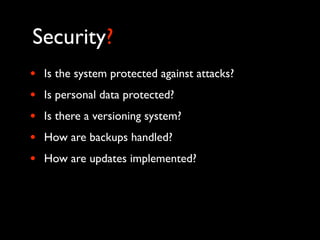
Security?
•   Is the system protected against attacks?
•   Is personal data protected?
•   Is there a versioning system?
•   How are backups handled?
•   How are updates implemented?
Support?
•   Is there a knowledgebase, documentation?
•   Is there a community who offers support?
•   Is there a support plan?
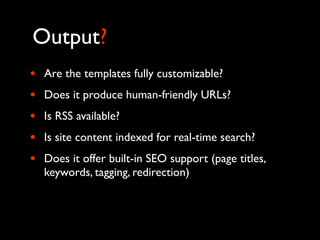
Output?
•   Are the templates fully customizable?
•   Does it produce human-friendly URLs?
•   Is RSS available?
•   Is site content indexed for real-time search?
•   Does it offer built-in SEO support (page titles,
    keywords, tagging, redirection)
No such thing as
 one size fits all
Thank you!
Questions? Comments?


emily@emilylewisdesign.com   @emilylewis

WordPress & Other Content Management Systems

  • 1.
    WordPress & Other ContentManagement Systems Emily Lewis UNMCE InfoByte February 24, 2011
  • 2.
    Freelance Web Designer http://emilylewisdesign.com WebuquerqueCo-Founder & Co-Manager http://webuquerque.com Author, Microformats Made Simple http://microformatsmadesimple.com Email: emily@emilylewisdesign.com Blog: http://ablognotlimited.com Twitter: @emilylewis
  • 3.
    I am not • A back-end developer I have not developed with • Joomla • Plone I prefer • ExpressionEngine • MojoMotor I tolerate • WordPress
  • 4.
  • 5.
    “A content managementsystem, or CMS, is a web application designed to make it easy for non-technical users to add, edit and manage a website.” - Plone
  • 6.
    Diagram concept inspiredby Chantal Foster, FosterMilo
  • 7.
    Key benefits • Update your site content as often and whenever you want • Updates can be instant or scheduled • No need to understand a programming language • Can reduce maintenance costs
  • 8.
    Common challenges • Upfront costs can be expensive • Often has a learning curve • Takes time and resources to create, edit and maintain your own content
  • 9.
  • 10.
  • 11.
    And there aremany “types” • Blog software based • “Full” content management/publishing systems • “Simple” CMS • Custom in-house solutions • In-content editing based • Control panel based
  • 12.
    OpenSource? Commercial? • Free download • Can be more expensive • Consulting firms can • Consulting firms can install and configure configure and install, but can also be proprietary • Can customize code? to one company • Anyone can contribute • Generally more stable new functionality and and optimized bug fixes • Often has greater longevity
  • 13.
    Today, we’ll lookat: • WordPress • ExpressionEngine • Plone • Drupal • Joomla • MojoMotor
  • 14.
    WordPress • Open source • Hosted • Managed • Blog based • No ads allowed • Limited space • No plugins
  • 15.
    WordPress.com WordPress • Open source • Hosted • Managed • Blog based • No ads allowed • Limited space • No plugins
  • 16.
    WordPress.com • Simple interface • Oodles of themes • But no theme customization • Good for small blogs or practice projects
  • 17.
    WordPress.com • Simple interface • Oodles of themes • But no theme customization • Good for small blogs or practice projects
  • 18.
    WordPress.org • Open source • Built with PHP • Install, host and manage yourself or with help from a vendor • Oodles of free themes and you can customize them or create your own • Oodles of free plugins to extend functionality beyond blogging to most any kind of site
  • 19.
    WordPress.org • Simple interface • Support forums • Extensive documentation • Solid SEO tools
  • 20.
    ExpressionEngine • Commercial ($99, $149, $299) • Built on the CodeIgniter framework (PHP) • Full-featured CMS (publishing system) • Basic ecommerce • Search • Membership • Email • Photo gallery • RSS • Discussion forums • Mailing list ... and more
  • 21.
    ExpressionEngine • Customizable control panel • Full control over templates • Oodles of free & paid plug-ins to extend
  • 22.
    ExpressionEngine • Full support • Active and helpful community forums • “Designer friendly”
  • 23.
    Plone • Open source • Built with Zope (Python) • Full content management system • Content publishing • Authentication • Forums • Live search • Wikis • Versioning, history • Workflows • ... and more
  • 24.
    Plone • In-context editing for content creation and maintenance • Themes available or you can customize • Free plug-ins to extend functionality • Active community of developers • Extensive online documentation and resources • Supports web standards and accessibility
  • 25.
    Drupal • Open source • PHP • Full content management system • Blogging • Multi-language • Forum • Caching • Search • Statistics • RSS • ... and more
  • 26.
    Drupal • Offers solid security and performance • Active community • Some free themes, but you can customize or create your own • Oodles of modules to extend core functionality • “Developer friendly”
  • 27.
    Joomla • Open source • PHP • Full content management system • Search • Multiple languages • Polls • Integrated help • User management • ... and more • RSS
  • 28.
    Joomla • Oodles of extensions to customize to your needs • Some templates available, but you can customize or make your own • Active community for support
  • 29.
    MojoMotor • Commercial ($49) • Built on CodeIgniter (PHP) • Simple, lightweight publishing tool • Full control over templates • In-context editing • A few plug-ins • Extremely easy to install, configure and use
  • 30.
  • 31.
    Understand your users • Who are your content authors? • What are their technical skills? • What are their writing skills? • Do they need editorial approval? • Who will train these authors? • Will multiple people be editing/creating content?
  • 32.
    Understand your users • Who are your content readers? • What tasks do they need to complete on your site? • What type of device are they using? • Are they external or internal users?
  • 33.
    Understand your needs • What are your user goals? • What actions do you want users to take on your site? • Do your users currently have problems with your site? What are they?
  • 34.
    Understand your needs • What are your business goals? • Target audience • Branding and awareness • Recruitment • Online self-service
  • 35.
    A CMS isjust a tool
  • 36.
    Don’t be seducedby demos • Test before you buy • Avoid vendor lock-in • Consider systems against your needs and goals • Understand the technical requirements
  • 37.
    Extensibility? • Can you brand or customize the interface? • Can the CMS integrate with other systems, such as for ecommerce? • Can you access the source code? • Does it have an open API? • What is process for adding new functionality?
  • 38.
    Ease of use? • Can users embed/attach images, files? • Can users easily change font colors? Resize images? • Can users publish without oversight? • Can different users be assigned different administrative rights? • Is documentation easy to understand and thorough?
  • 39.
    Functionality & Usability? • What is the core functionality? • How easy is it for site users to accomplish core tasks? • Is it accessible to all users (search engines, screenreaders, mobile users)? • Does it work in all browsers? On all devices?
  • 40.
    Security? • Is the system protected against attacks? • Is personal data protected? • Is there a versioning system? • How are backups handled? • How are updates implemented?
  • 41.
    Support? • Is there a knowledgebase, documentation? • Is there a community who offers support? • Is there a support plan?
  • 42.
    Output? • Are the templates fully customizable? • Does it produce human-friendly URLs? • Is RSS available? • Is site content indexed for real-time search? • Does it offer built-in SEO support (page titles, keywords, tagging, redirection)
  • 43.
    No such thingas one size fits all
  • 44.