Content Management Systems
BITM 3730
Developing Web Applications
11/8
What is CMS?
• Content Management Systems (CMS) are commonly used to create and store data
online
• The most commonly used CMS tools allow individuals to create their own website
without knowing anything about web development [coding in HTML, CSS, JS, etc.]
• Individuals merely install the CMS software to their website and type in specific
information to create websites
Two Common Reasons to Use CMS
• User-friendly browser-based publishing tools
• No technical skills required
• Compliance with Accessibility requirements
• W3C standards
What is Content?
• Any type or unit of digital information.
• Text, images, graphics, video, sound, documents, records, etc
• Anything that we would like to manage in an electronic format.
Why CMS?
• Web Content Management System
• Create/manage HTML & images
• Authoring tools
• Templates for presentation
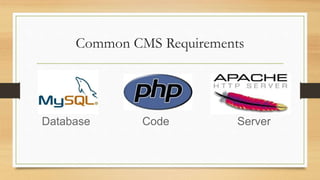
Common CMS Requirements
Database Code Server
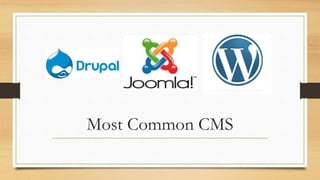
Most Common CMS
Differences in CMS
• Every CMS has its own unique way of organizing and managing content.
• It helps you to create/edit/delete content in a shared repository (database).
• It contains much improved CSS (Cascading Style Sheets).
• CMS enables content to be shared across the Web sites.
Why Use Them?
• Drupal, Joomla, WordPress use a database (tables) to store information
• CMS uses a different technology than standard html/css sites
• The technology is open-source (free!)
• Allows people to update their owns sites
• You are the master of your own domain!
Joomla
• The name Joomla is derived from the Swahili word "Jumla", which means "all
together" or "as a whole".
• Joomla! is one of the most powerful Open Source Content Management Systems. It
is used all over the world for everything from simple websites to complex corporate
applications.
• Joomla! is easy to install, simple to manage, and reliable.
Joomla
• Joomla is written in PHP, uses object-oriented programming structure
(OOPS) techniques and software design pattern, stores data in a MySql
database, and includes features such as page caching, RSS feeds, printable
versions of pages, news flashes, blogs, polls, search, and support for language
internationalization.
• It is based on a model-view-controller (MVC) web application framework
that can be used independently.
Why Joomla?
• It is designed to work perfectly in basic shared web hosting environments, a package that is
least expensive and most common. Installer is simple and just like any other common
desktop software.
• It is supported by several extensions, add-on, and plug in. They are written in PHP, which is
most widely used, general purpose scripting language and best suited for web development.
• Joomla supports SSL logins and SSL pages.
• Joomla probably has a pre built module to transform it in a social bookmarking website.
• Joomla's greatest advantage is availability of a large number of extensions that you can use
to Plug-in extra features into your website and transform your website into anything you
like.
WordPress Issues
• The WordPress content management system is an ideal platform for
bloggers as it is easy to install and use.
• Adding or removing post dates, need to be changed in design mode and it
requires knowledge of WP scripting.
• You can add membership functionality in WordPress.
Why WordPress?
• With WordPress, any type of website can be created like a personal blog or
website, a photoblog, a business website, a professional portfolio, a
government website, a magazine or news website, an online community, even
a network of websites.
• Website can be made with beautiful with themes, and can be extended with
plugins.
WordPress
• Free website on WordPress website
• Installed to your website if you own a domain
• Themes can be uploaded or created for use
Drupal Issues
• Learning curve is bigger than Joomla and WordPress
• Less support available than Joomla and WordPress
Other CMS
• Shopify
• Squarespace
• Wix
• Blogger
• Weebly
• Moodle
Learning Curve
• WordPress
• Easy, No experience required
• Joomla
• Medium, Easier than Drupal, harder than WordPress.
• Drupal
• Requires technical expertise. Major updates are an effort
E-Commerce
• WordPress
• Yes, with plugins
• Joomla
• Extensions for managing products and content
• Drupal
• the latest version, does not support a stable e-commerce module yet
SEO Friendliness
• WordPress
• Excellent
• Joomla
• Basic
• Drupal
• Good
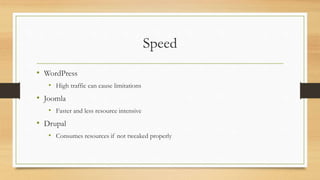
Speed
• WordPress
• High traffic can cause limitations
• Joomla
• Faster and less resource intensive
• Drupal
• Consumes resources if not tweaked properly
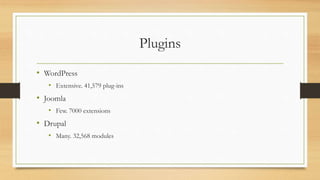
Plugins
• WordPress
• Extensive. 41,579 plug-ins
• Joomla
• Few. 7000 extensions
• Drupal
• Many. 32,568 modules
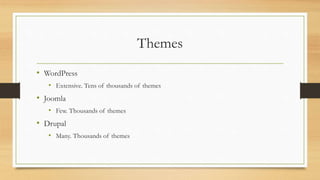
Themes
• WordPress
• Extensive. Tens of thousands of themes
• Joomla
• Few. Thousands of themes
• Drupal
• Many. Thousands of themes
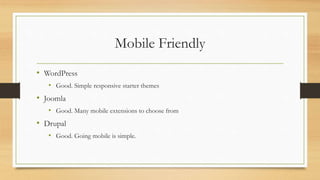
Mobile Friendly
• WordPress
• Good. Simple responsive starter themes
• Joomla
• Good. Many mobile extensions to choose from
• Drupal
• Good. Going mobile is simple.
Once Installed
• Easier to have website host install for you to avoid potential errors
• Login through Admin Panel, such as wp-admin
• All actions occur with the Admin panel, impact how website looks and is
accessed
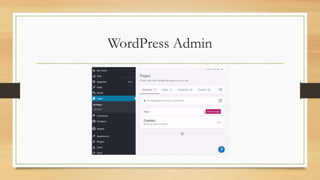
WordPress Admin
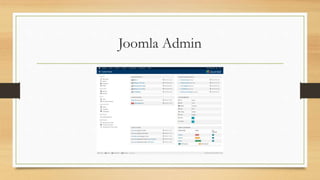
Joomla Admin
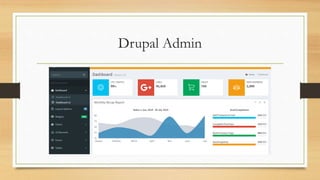
Drupal Admin
Homework
Assignment 9:
Of the Content Management Systems described in class, pick one and explain why you would choose that
CMS over other options.

BITM3730 11-8.pptx

  • 1.
    Content Management Systems BITM3730 Developing Web Applications 11/8
  • 2.
    What is CMS? •Content Management Systems (CMS) are commonly used to create and store data online • The most commonly used CMS tools allow individuals to create their own website without knowing anything about web development [coding in HTML, CSS, JS, etc.] • Individuals merely install the CMS software to their website and type in specific information to create websites
  • 3.
    Two Common Reasonsto Use CMS • User-friendly browser-based publishing tools • No technical skills required • Compliance with Accessibility requirements • W3C standards
  • 4.
    What is Content? •Any type or unit of digital information. • Text, images, graphics, video, sound, documents, records, etc • Anything that we would like to manage in an electronic format.
  • 5.
    Why CMS? • WebContent Management System • Create/manage HTML & images • Authoring tools • Templates for presentation
  • 6.
  • 7.
  • 8.
    Differences in CMS •Every CMS has its own unique way of organizing and managing content. • It helps you to create/edit/delete content in a shared repository (database). • It contains much improved CSS (Cascading Style Sheets). • CMS enables content to be shared across the Web sites.
  • 9.
    Why Use Them? •Drupal, Joomla, WordPress use a database (tables) to store information • CMS uses a different technology than standard html/css sites • The technology is open-source (free!) • Allows people to update their owns sites • You are the master of your own domain!
  • 10.
    Joomla • The nameJoomla is derived from the Swahili word "Jumla", which means "all together" or "as a whole". • Joomla! is one of the most powerful Open Source Content Management Systems. It is used all over the world for everything from simple websites to complex corporate applications. • Joomla! is easy to install, simple to manage, and reliable.
  • 11.
    Joomla • Joomla iswritten in PHP, uses object-oriented programming structure (OOPS) techniques and software design pattern, stores data in a MySql database, and includes features such as page caching, RSS feeds, printable versions of pages, news flashes, blogs, polls, search, and support for language internationalization. • It is based on a model-view-controller (MVC) web application framework that can be used independently.
  • 12.
    Why Joomla? • Itis designed to work perfectly in basic shared web hosting environments, a package that is least expensive and most common. Installer is simple and just like any other common desktop software. • It is supported by several extensions, add-on, and plug in. They are written in PHP, which is most widely used, general purpose scripting language and best suited for web development. • Joomla supports SSL logins and SSL pages. • Joomla probably has a pre built module to transform it in a social bookmarking website. • Joomla's greatest advantage is availability of a large number of extensions that you can use to Plug-in extra features into your website and transform your website into anything you like.
  • 13.
    WordPress Issues • TheWordPress content management system is an ideal platform for bloggers as it is easy to install and use. • Adding or removing post dates, need to be changed in design mode and it requires knowledge of WP scripting. • You can add membership functionality in WordPress.
  • 14.
    Why WordPress? • WithWordPress, any type of website can be created like a personal blog or website, a photoblog, a business website, a professional portfolio, a government website, a magazine or news website, an online community, even a network of websites. • Website can be made with beautiful with themes, and can be extended with plugins.
  • 15.
    WordPress • Free websiteon WordPress website • Installed to your website if you own a domain • Themes can be uploaded or created for use
  • 16.
    Drupal Issues • Learningcurve is bigger than Joomla and WordPress • Less support available than Joomla and WordPress
  • 17.
    Other CMS • Shopify •Squarespace • Wix • Blogger • Weebly • Moodle
  • 18.
    Learning Curve • WordPress •Easy, No experience required • Joomla • Medium, Easier than Drupal, harder than WordPress. • Drupal • Requires technical expertise. Major updates are an effort
  • 19.
    E-Commerce • WordPress • Yes,with plugins • Joomla • Extensions for managing products and content • Drupal • the latest version, does not support a stable e-commerce module yet
  • 20.
    SEO Friendliness • WordPress •Excellent • Joomla • Basic • Drupal • Good
  • 21.
    Speed • WordPress • Hightraffic can cause limitations • Joomla • Faster and less resource intensive • Drupal • Consumes resources if not tweaked properly
  • 22.
    Plugins • WordPress • Extensive.41,579 plug-ins • Joomla • Few. 7000 extensions • Drupal • Many. 32,568 modules
  • 23.
    Themes • WordPress • Extensive.Tens of thousands of themes • Joomla • Few. Thousands of themes • Drupal • Many. Thousands of themes
  • 24.
    Mobile Friendly • WordPress •Good. Simple responsive starter themes • Joomla • Good. Many mobile extensions to choose from • Drupal • Good. Going mobile is simple.
  • 25.
    Once Installed • Easierto have website host install for you to avoid potential errors • Login through Admin Panel, such as wp-admin • All actions occur with the Admin panel, impact how website looks and is accessed
  • 26.
  • 27.
  • 28.
  • 29.
    Homework Assignment 9: Of theContent Management Systems described in class, pick one and explain why you would choose that CMS over other options.