Paris, France – August 25th 2014 
OpenNebula 
CentOS Dojo 
OpenNebula and tips for CentOS 7 
Javi Fontán 
Project Engineer 
© OpenNebula Project. Creative Commons Attribution-NonCommercial-ShareAlike License 
OpenNebula - Latest Innovations in Private Cloud Computing 1/18
What is OpenNebula?
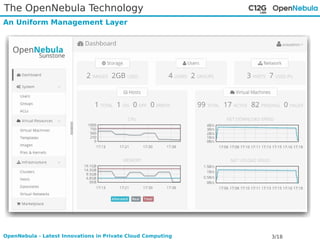
The OpenNebula Technology 
An Uniform Management Layer 
OpenNebula - Latest Innovations in Private Cloud Computing 3/18
The OpenNebula Technology 
Cloud Architecture - The Internals of the Cloud 
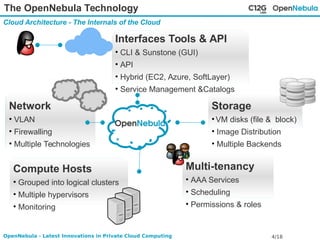
Interfaces Tools & API 
• CLI & Sunstone (GUI) 
• API 
• Hybrid (EC2, Azure, SoftLayer) 
• Service Management &Catalogs 
Network 
• VLAN 
• Firewalling 
• Multiple Technologies 
Compute Hosts 
• Grouped into logical clusters 
• Multiple hypervisors 
• Monitoring 
Storage 
• VM disks (file & block) 
• Image Distribution 
• Multiple Backends 
Multi-tenancy 
• AAA Services 
• Scheduling 
• Permissions & roles 
OpenNebula - Latest Innovations in Private Cloud Computing 4/18
The OpenNebula Vision 
The Power of Simplicity 
Simple for Users 
• Single-click provision, manage and access to virtual servers 
• Just enough details of the underlying chaos 
Simple for Sys Admins 
• Do not hide the complexity 
• Easy to inspect, understand and adapt 
• Ease task automation 
• Be prepared for different application types 
• Just enough components and simple protocols 
• Simplicity is the path to scale! 
OpenNebula - Latest Innovations in Private Cloud Computing 5/18
Installing OpenNebula
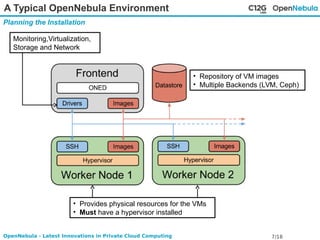
A Typical OpenNebula Environment 
Planning the Installation 
• Repository of VM images 
• Multiple Backends (LVM, Ceph) 
Monitoring,Virtualization, 
Storage and Network 
• Provides physical resources for the VMs 
• Must have a hypervisor installed 
OpenNebula - Latest Innovations in Private Cloud Computing 7/18
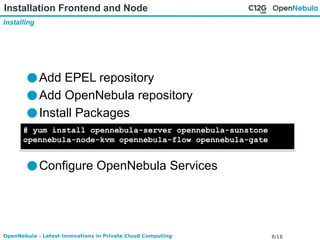
Installation Frontend and Node 
Installing 
●Add EPEL repository 
●Add OpenNebula repository 
●Install Packages 
# yum install opennebula-server opennebula-sunstone 
opennebula-node-kvm opennebula-flow opennebula-gate 
●Configure OpenNebula Services 
OpenNebula - Latest Innovations in Private Cloud Computing 8/18
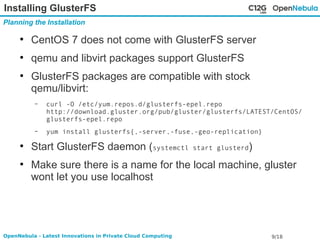
Installing GlusterFS 
Planning the Installation 
● CentOS 7 does not come with GlusterFS server 
● qemu and libvirt packages support GlusterFS 
● GlusterFS packages are compatible with stock 
qemu/libvirt: 
– curl -O /etc/yum.repos.d/glusterfs-epel.repo 
http://download.gluster.org/pub/gluster/glusterfs/LATEST/CentOS/ 
glusterfs-epel.repo 
– yum install glusterfs{,-server,-fuse,-geo-replication} 
● Start GlusterFS daemon (systemctl start glusterd) 
● Make sure there is a name for the local machine, gluster 
wont let you use localhost 
OpenNebula - Latest Innovations in Private Cloud Computing 9/18
More information 
OpenNebula web pages 
● http://opennebula.org 
● http://opennebula.org/tryout 
● http://docs.opennebula.org 
● http://docs.opennebula.org/4.8/design_and_installation/q 
uick_starts/qs_centos7_kvm.html 
● http://dev.opennebula.org 
● http://github.com/OpenNebula/one 
OpenNebula - Latest Innovations in Private Cloud Computing 10/18
Tips for CentOS 7
Disable Firewall 
Tips for CentOS 7 
● Only do this for testing! 
● Service iptables does not exist anymore 
● Stop firewalld instead 
– systemctl stop firewalld 
● Enable it after finished testing! 
– Systemctl start firewalld 
OpenNebula - Latest Innovations in Private Cloud Computing 12/18
Use OpenNebula with qemu 
Tips for CentOS 7 
● When testing inside a VM you don't have VT extensions 
● You can still test creation of VMs using qemu emulation 
● Modify /etc/one/oned.conf: 
– VM_MAD = [ 
– name = "kvm", 
– executable = "one_vmm_exec", 
– arguments = "-t 15 -r 0 kvm", 
– default = "vmm_exec/vmm_exec_kvm.conf", 
– type = "qemu" ] 
OpenNebula - Latest Innovations in Private Cloud Computing 13/18
Use Host KVM from an LXC container 
Tips for CentOS 7 
● It's possible to allow the use of specific host devices 
● KVM module creates a device (10, 232) 
● Add this line to the LXC container config 
– lxc.cgroup.devices.allow = c 10:232 rwm 
● Create the device in your container: 
– mknod /dev/kvm c 10 232 
● Change de permissions 
OpenNebula - Latest Innovations in Private Cloud Computing 14/18
TMP directories 
Tips for CentOS 7 
● lock and run directories now reside in memory 
● Manually created directories won't exist anymore after a 
reboot 
● systemd has way to create those directories 
● Create a .conf file in /etc/tmpfiles.d: 
– d /var/run/one 0750 oneadmin oneadmin 
● Execute directory creation manually: 
– systemd-tmpfile --create 
OpenNebula - Latest Innovations in Private Cloud Computing 15/18
qcow format 
Tips for CentOS 7 
● qemu creates qcow images with newer features by 
default 
● Use -o compat=0.10 so the image is compatible with 
older qemu/kvm versions 
● Create new image: 
– qemu-img create -f qcow2 -o compat=0.10 image.qcow2 10G 
● Convert image: 
– qemu-img convert -f qcow2 -O qcow2 -o compat=0.10 image.qcow2 
image2.qcow2 
OpenNebula - Latest Innovations in Private Cloud Computing 16/18
Use virtio! 
Tips for CentOS 7 
● CentOS 6.x stock kernel supports virtio 
● Greatly enhances performance 
● User virtio-scsi for disks. You get the speed 
improvements and the number of devices is increased 
● virtio network interfaces are called ETH*! 
OpenNebula - Latest Innovations in Private Cloud Computing 17/18
Questions? 
We Will Be Happy to Answer Your Questions 
OpenNebula.org @OpenNebula 
OpenNebula - Latest Innovations in Private Cloud Computing 18/18

OpenNebula - OpenNebula and tips for CentOS 7

  • 1.
    Paris, France –August 25th 2014 OpenNebula CentOS Dojo OpenNebula and tips for CentOS 7 Javi Fontán Project Engineer © OpenNebula Project. Creative Commons Attribution-NonCommercial-ShareAlike License OpenNebula - Latest Innovations in Private Cloud Computing 1/18
  • 2.
  • 3.
    The OpenNebula Technology An Uniform Management Layer OpenNebula - Latest Innovations in Private Cloud Computing 3/18
  • 4.
    The OpenNebula Technology Cloud Architecture - The Internals of the Cloud Interfaces Tools & API • CLI & Sunstone (GUI) • API • Hybrid (EC2, Azure, SoftLayer) • Service Management &Catalogs Network • VLAN • Firewalling • Multiple Technologies Compute Hosts • Grouped into logical clusters • Multiple hypervisors • Monitoring Storage • VM disks (file & block) • Image Distribution • Multiple Backends Multi-tenancy • AAA Services • Scheduling • Permissions & roles OpenNebula - Latest Innovations in Private Cloud Computing 4/18
  • 5.
    The OpenNebula Vision The Power of Simplicity Simple for Users • Single-click provision, manage and access to virtual servers • Just enough details of the underlying chaos Simple for Sys Admins • Do not hide the complexity • Easy to inspect, understand and adapt • Ease task automation • Be prepared for different application types • Just enough components and simple protocols • Simplicity is the path to scale! OpenNebula - Latest Innovations in Private Cloud Computing 5/18
  • 6.
  • 7.
    A Typical OpenNebulaEnvironment Planning the Installation • Repository of VM images • Multiple Backends (LVM, Ceph) Monitoring,Virtualization, Storage and Network • Provides physical resources for the VMs • Must have a hypervisor installed OpenNebula - Latest Innovations in Private Cloud Computing 7/18
  • 8.
    Installation Frontend andNode Installing ●Add EPEL repository ●Add OpenNebula repository ●Install Packages # yum install opennebula-server opennebula-sunstone opennebula-node-kvm opennebula-flow opennebula-gate ●Configure OpenNebula Services OpenNebula - Latest Innovations in Private Cloud Computing 8/18
  • 9.
    Installing GlusterFS Planningthe Installation ● CentOS 7 does not come with GlusterFS server ● qemu and libvirt packages support GlusterFS ● GlusterFS packages are compatible with stock qemu/libvirt: – curl -O /etc/yum.repos.d/glusterfs-epel.repo http://download.gluster.org/pub/gluster/glusterfs/LATEST/CentOS/ glusterfs-epel.repo – yum install glusterfs{,-server,-fuse,-geo-replication} ● Start GlusterFS daemon (systemctl start glusterd) ● Make sure there is a name for the local machine, gluster wont let you use localhost OpenNebula - Latest Innovations in Private Cloud Computing 9/18
  • 10.
    More information OpenNebulaweb pages ● http://opennebula.org ● http://opennebula.org/tryout ● http://docs.opennebula.org ● http://docs.opennebula.org/4.8/design_and_installation/q uick_starts/qs_centos7_kvm.html ● http://dev.opennebula.org ● http://github.com/OpenNebula/one OpenNebula - Latest Innovations in Private Cloud Computing 10/18
  • 11.
  • 12.
    Disable Firewall Tipsfor CentOS 7 ● Only do this for testing! ● Service iptables does not exist anymore ● Stop firewalld instead – systemctl stop firewalld ● Enable it after finished testing! – Systemctl start firewalld OpenNebula - Latest Innovations in Private Cloud Computing 12/18
  • 13.
    Use OpenNebula withqemu Tips for CentOS 7 ● When testing inside a VM you don't have VT extensions ● You can still test creation of VMs using qemu emulation ● Modify /etc/one/oned.conf: – VM_MAD = [ – name = "kvm", – executable = "one_vmm_exec", – arguments = "-t 15 -r 0 kvm", – default = "vmm_exec/vmm_exec_kvm.conf", – type = "qemu" ] OpenNebula - Latest Innovations in Private Cloud Computing 13/18
  • 14.
    Use Host KVMfrom an LXC container Tips for CentOS 7 ● It's possible to allow the use of specific host devices ● KVM module creates a device (10, 232) ● Add this line to the LXC container config – lxc.cgroup.devices.allow = c 10:232 rwm ● Create the device in your container: – mknod /dev/kvm c 10 232 ● Change de permissions OpenNebula - Latest Innovations in Private Cloud Computing 14/18
  • 15.
    TMP directories Tipsfor CentOS 7 ● lock and run directories now reside in memory ● Manually created directories won't exist anymore after a reboot ● systemd has way to create those directories ● Create a .conf file in /etc/tmpfiles.d: – d /var/run/one 0750 oneadmin oneadmin ● Execute directory creation manually: – systemd-tmpfile --create OpenNebula - Latest Innovations in Private Cloud Computing 15/18
  • 16.
    qcow format Tipsfor CentOS 7 ● qemu creates qcow images with newer features by default ● Use -o compat=0.10 so the image is compatible with older qemu/kvm versions ● Create new image: – qemu-img create -f qcow2 -o compat=0.10 image.qcow2 10G ● Convert image: – qemu-img convert -f qcow2 -O qcow2 -o compat=0.10 image.qcow2 image2.qcow2 OpenNebula - Latest Innovations in Private Cloud Computing 16/18
  • 17.
    Use virtio! Tipsfor CentOS 7 ● CentOS 6.x stock kernel supports virtio ● Greatly enhances performance ● User virtio-scsi for disks. You get the speed improvements and the number of devices is increased ● virtio network interfaces are called ETH*! OpenNebula - Latest Innovations in Private Cloud Computing 17/18
  • 18.
    Questions? We WillBe Happy to Answer Your Questions OpenNebula.org @OpenNebula OpenNebula - Latest Innovations in Private Cloud Computing 18/18