Clouds using Opennebula
Gabor Kecskemeti
kecskemeti.gabor@sztaki.mta.hu
http://www.lpds.sztaki.hu/CloudResearch
This presentation is heavily based on multiple presentations of the following people:
Ignacio M. Llorente, Rubén S. Montero, Jaime Melis, Javier Fontán, Rafael Moreno
Outline
• Virtual infrastructure managers
• OpenNebula as a whole
• Architectural view on OpenNebula
• Constructing a Private cloud
• Virtual Machines in OpenNebula
• Constructing a Hybrid cloud
VIRTUAL INFRASTRUCTURE
MANAGERS
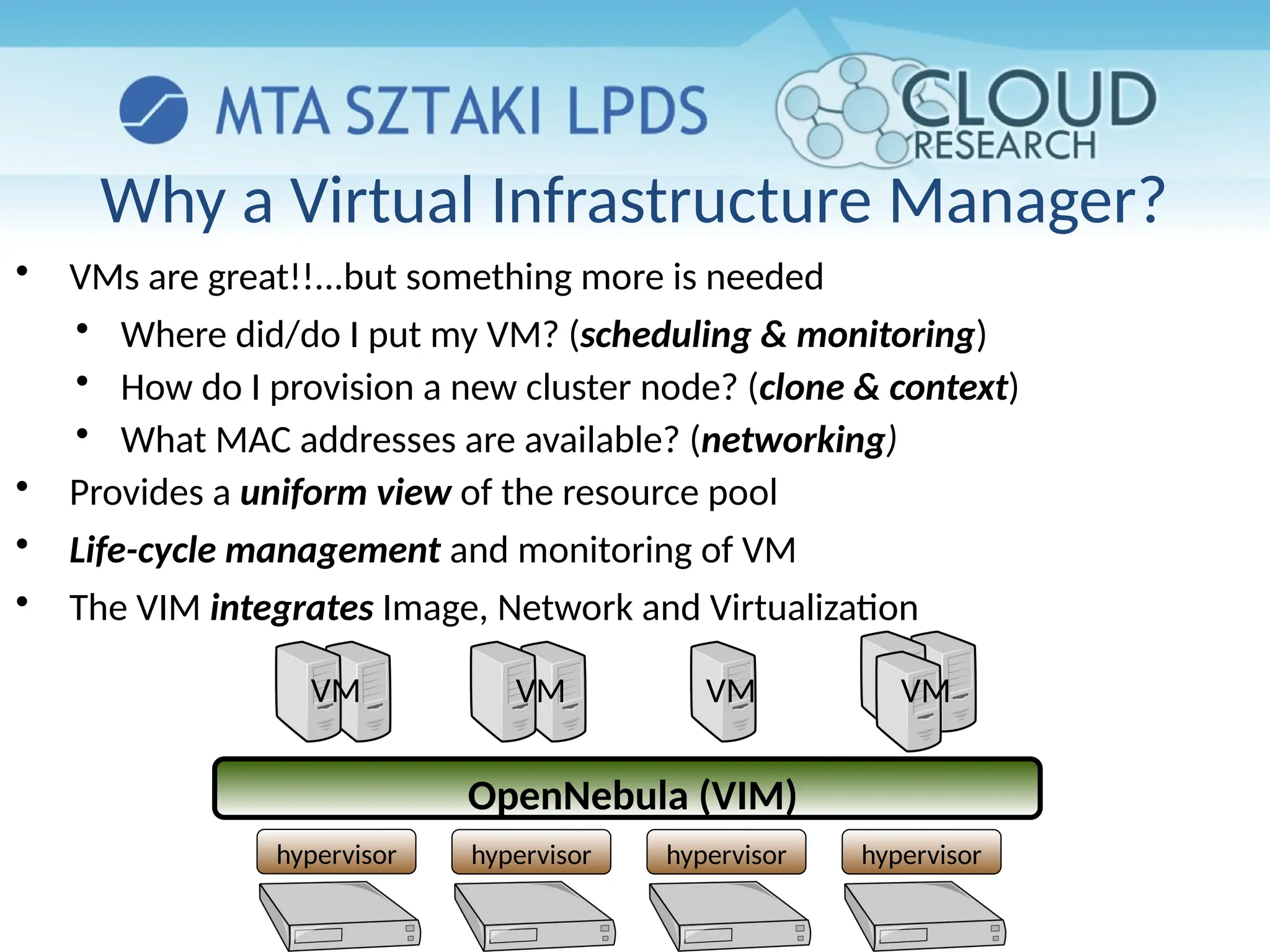
Why a Virtual Infrastructure Manager?
hypervisor hypervisor hypervisor hypervisor
OpenNebula (VIM)
VM VM VM VM

VMs are great!!...but something more is needed

Where did/do I put my VM? (scheduling & monitoring)

How do I provision a new cluster node? (clone & context)

What MAC addresses are available? (networking)

Provides a uniform view of the resource pool

Life-cycle management and monitoring of VM

The VIM integrates Image, Network and Virtualization
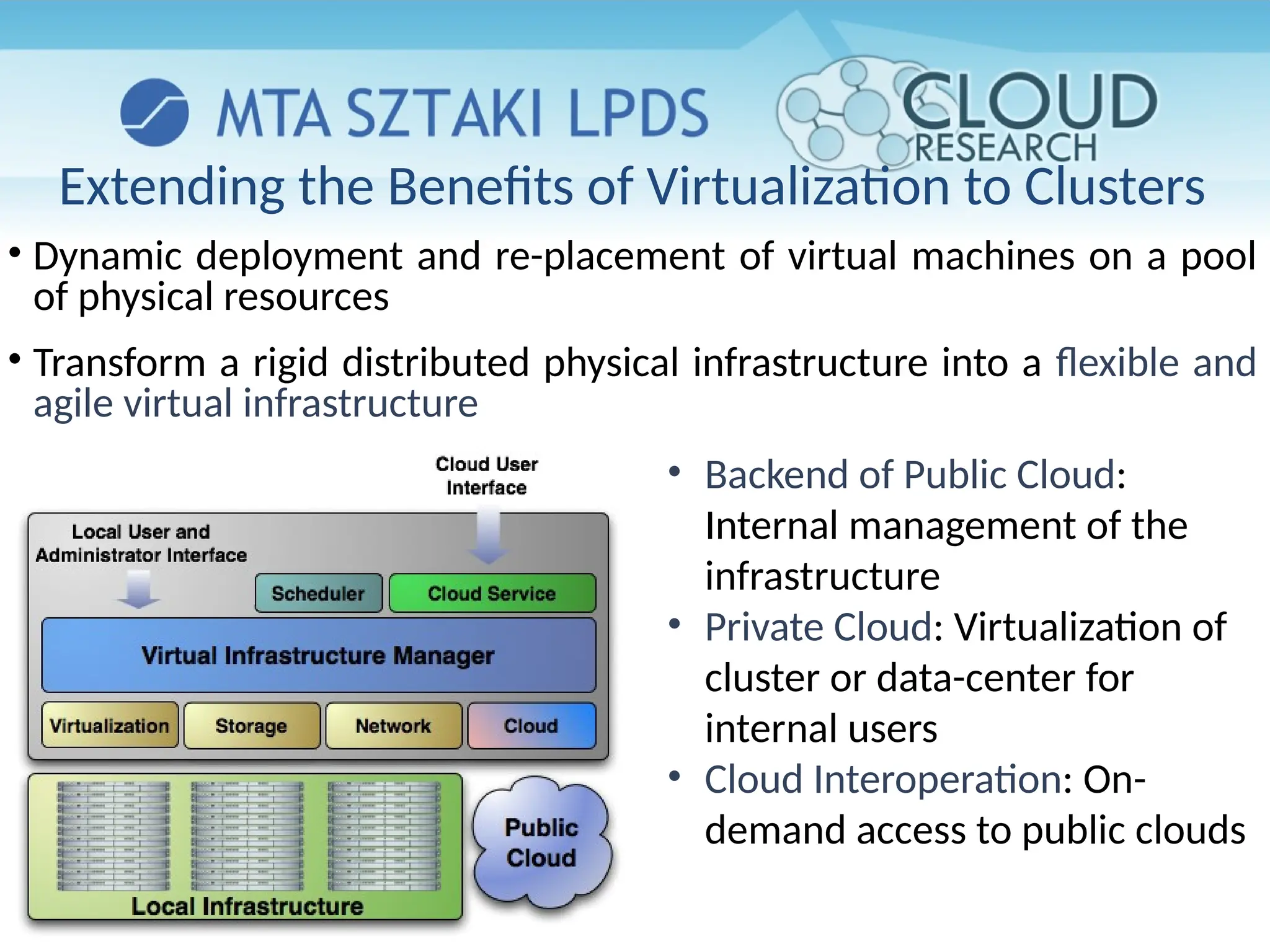
• Dynamic deployment and re-placement of virtual machines on a pool
of physical resources
• Transform a rigid distributed physical infrastructure into a flexible and
agile virtual infrastructure
• Backend of Public Cloud:
Internal management of the
infrastructure
• Private Cloud: Virtualization of
cluster or data-center for
internal users
• Cloud Interoperation: On-
demand access to public clouds
Extending the Benefits of Virtualization to Clusters
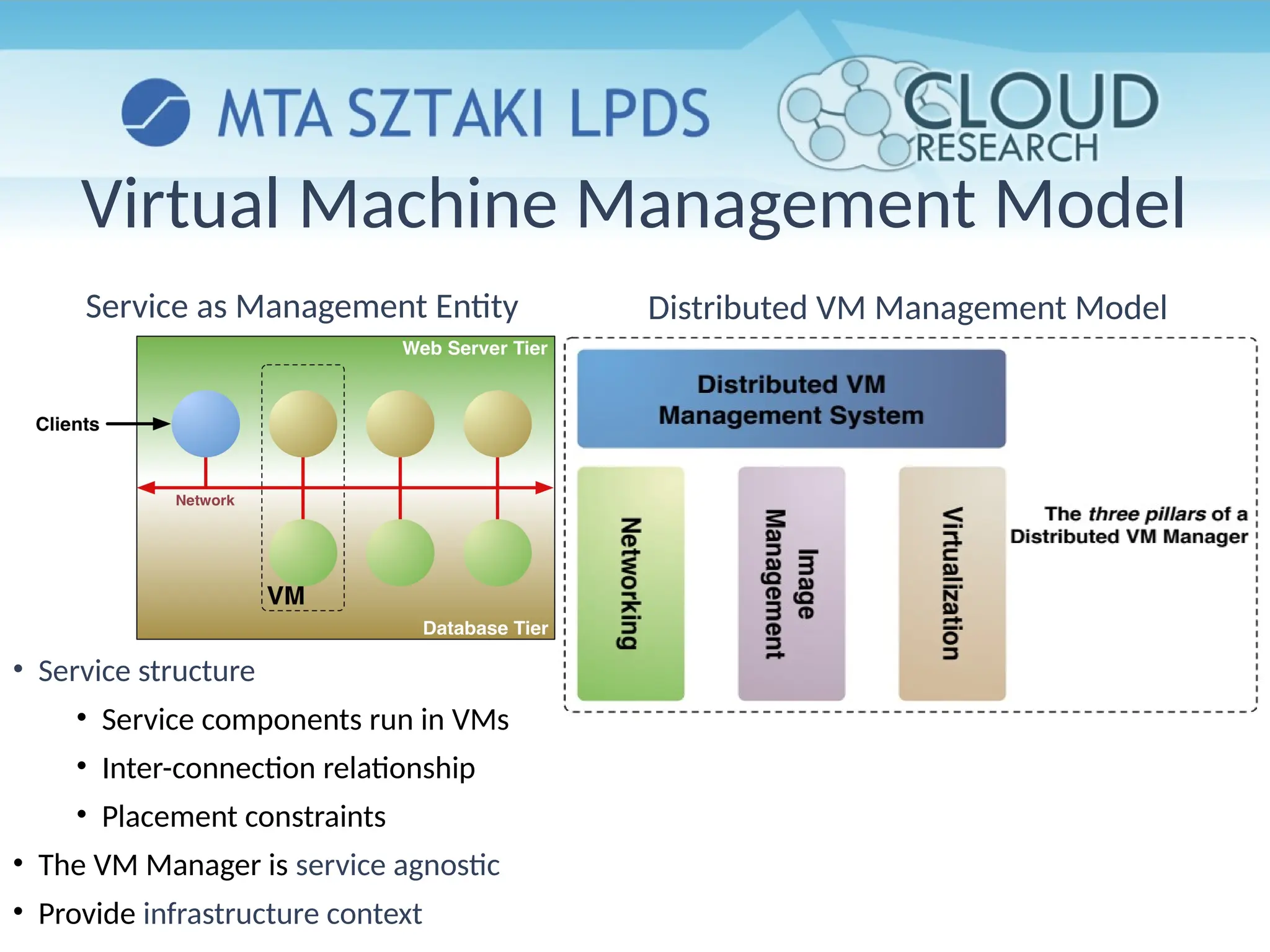
Distributed VM Management Model
Virtual Machine Management Model
Service as Management Entity
• Service structure
• Service components run in VMs
• Inter-connection relationship
• Placement constraints
• The VM Manager is service agnostic
• Provide infrastructure context
WHAT IS OPENNEBULA?
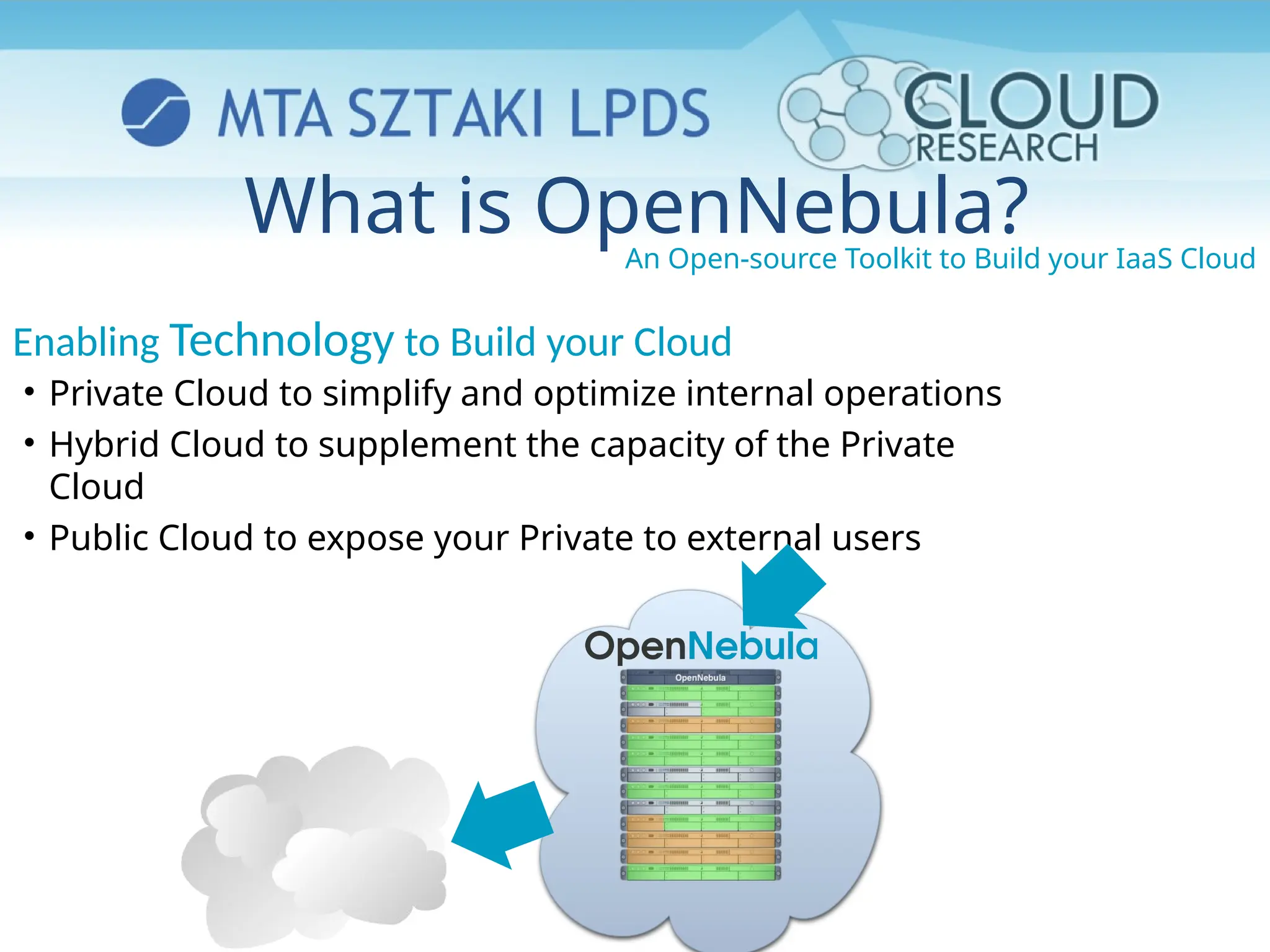
An Open-source Toolkit to Build your IaaS Cloud
• Private Cloud to simplify and optimize internal operations
• Hybrid Cloud to supplement the capacity of the Private
Cloud
• Public Cloud to expose your Private to external users
Enabling Technology to Build your Cloud
What is OpenNebula?
Building the Industry Standard Open Source Cloud Computing Tool
Lead Innovation in Enterprise-Class Cloud Computing Management
●Develop, maintain and assure the quality of OpenNebula
●Collaborate with open-source and research projects and communities
●Support the community and the ecosystem
An Active and Engaged Community
●4,000 downloads/month
●100 active contributors
●OSS distribution channels
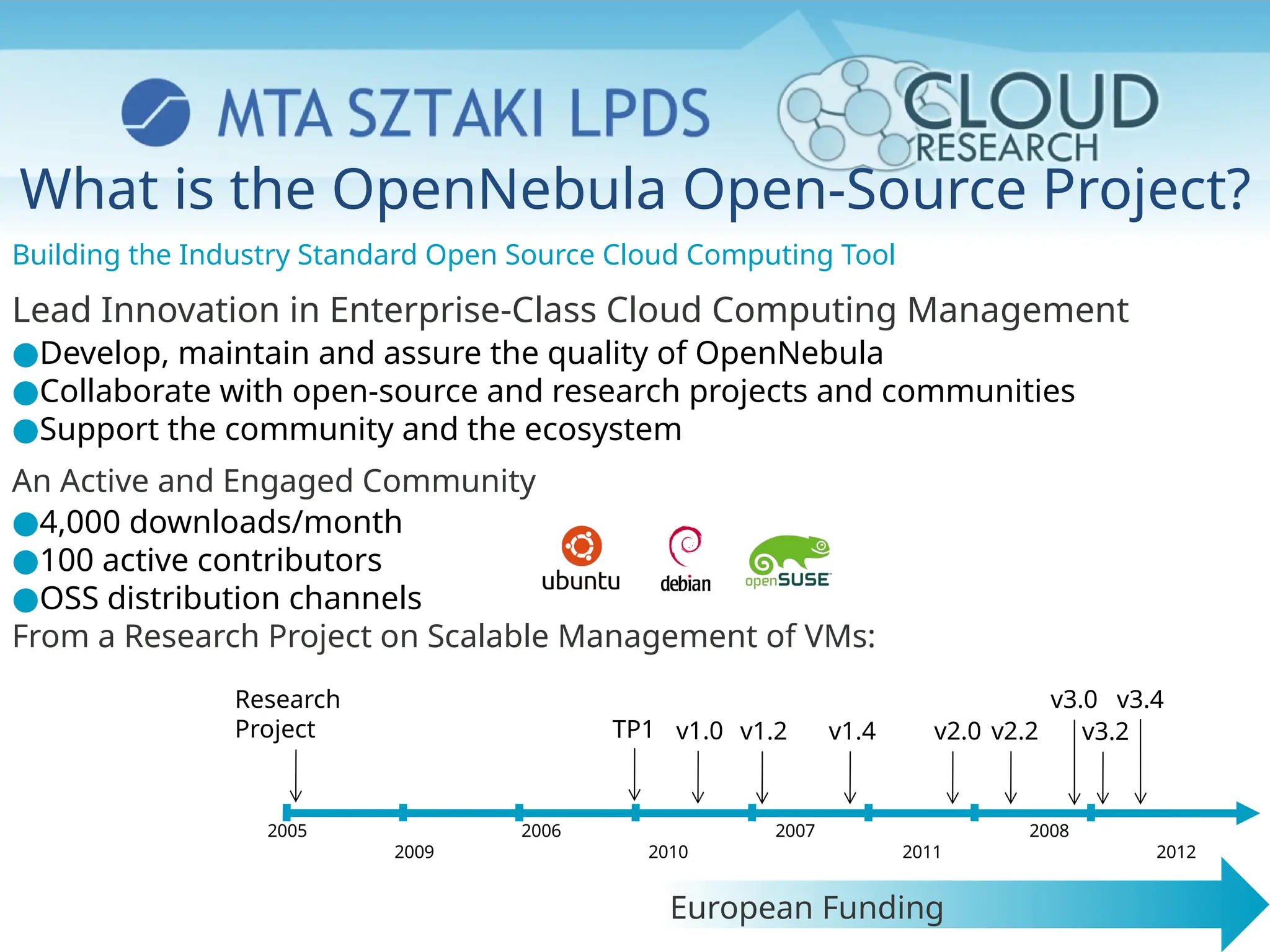
From a Research Project on Scalable Management of VMs:
2005 2006 2007 2008
2009 2010 2011 2012
Research
Project TP1 v1.0 v1.2 v1.4 v2.0 v2.2
European Funding
What is the OpenNebula Open-Source Project?
v3.4
v3.0
v3.2
The Benefits of OpenNebula
• For the Infrastructure Manager
• Centralized management of VM workload and distributed infrastructures
• Support for VM placement policies: balance of workload, server consolidation…
• Dynamic resizing of the infrastructure
• Dynamic partition and isolation of clusters
• Dynamic scaling of private infrastructure to meet fluctuating demands
• Lower infrastructure expenses combining local and remote Cloud resources
• For the Infrastructure User
• Faster delivery and scalability of services
• Support for heterogeneous execution environments
• Full control of the lifecycle of virtualized services management
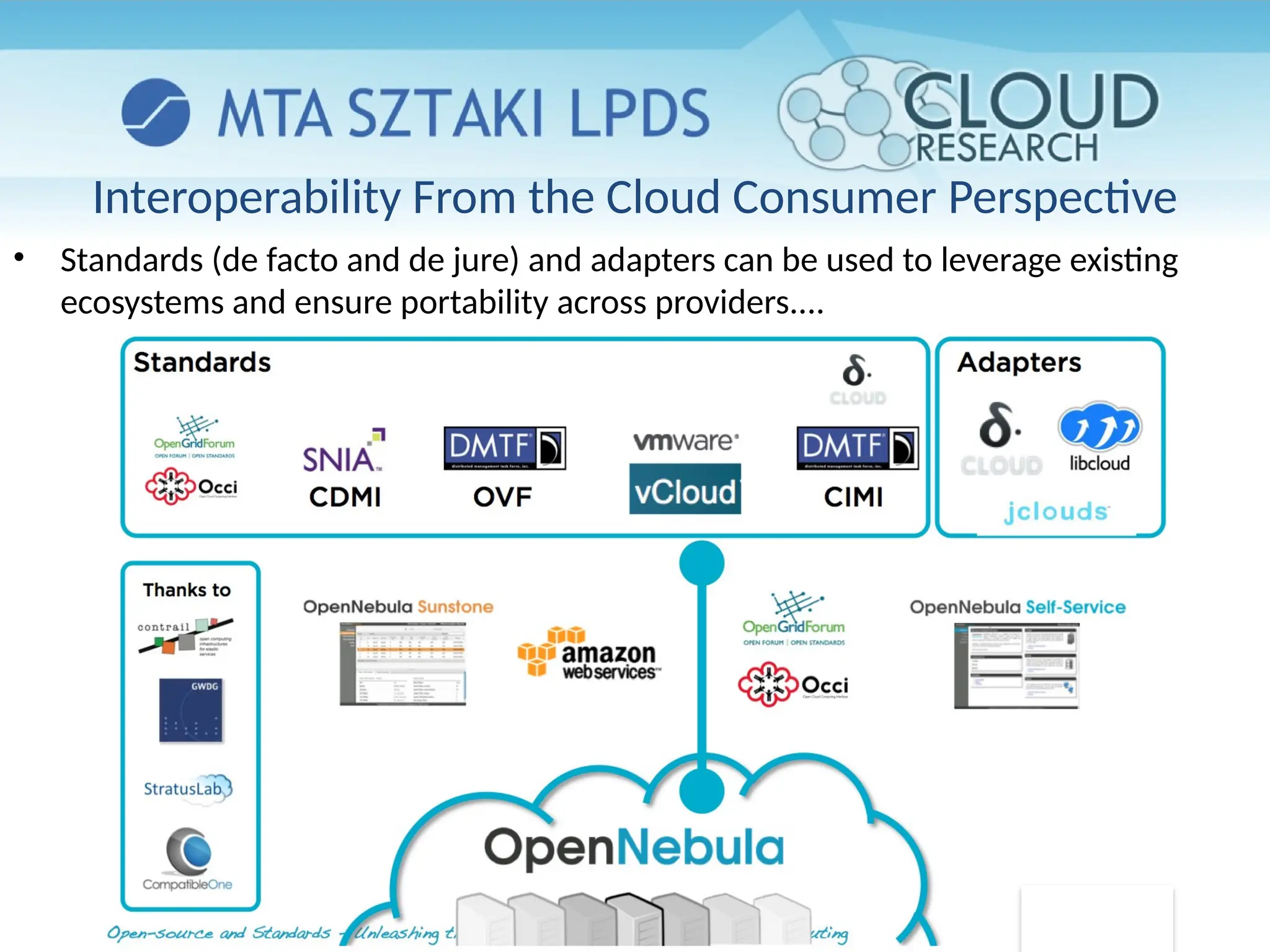
Interoperability From the Cloud Consumer Perspective
• Standards (de facto and de jure) and adapters can be used to leverage existing
ecosystems and ensure portability across providers....
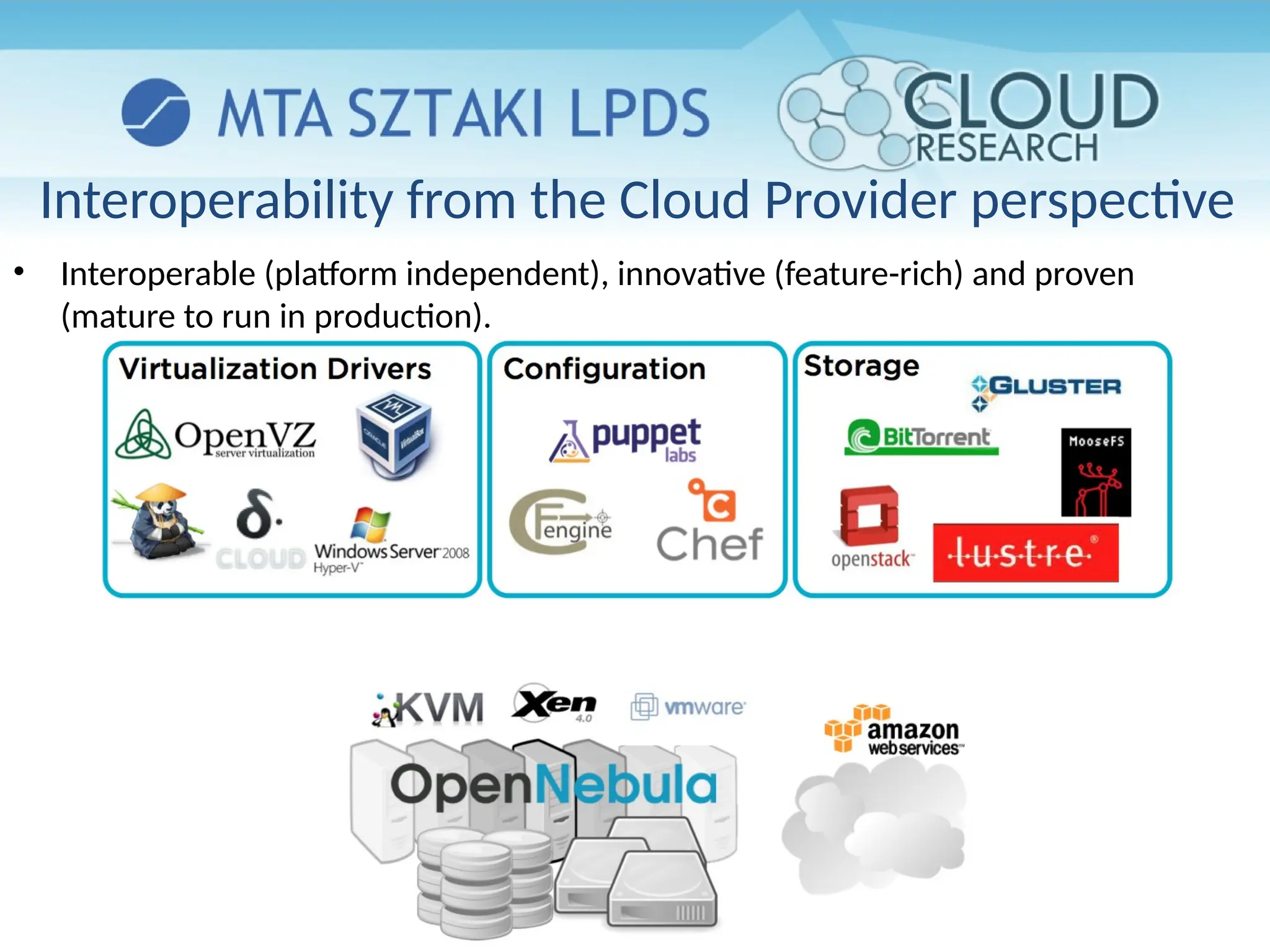
Interoperability from the Cloud Provider perspective
• Interoperable (platform independent), innovative (feature-rich) and proven
(mature to run in production).
The Benefits for System Integrators
• Fits into any existing data center, due to its open, flexible and
extensible interfaces, architecture and components
• Builds any type of Cloud deployment
• Open source software, Apache license
• Seamless integration with any product and service in the cloud
ecosystem and management tool in the data center, such as
– cloud providers
– VM managers
– virtual image managers
– service managers
– management tools
– schedulers
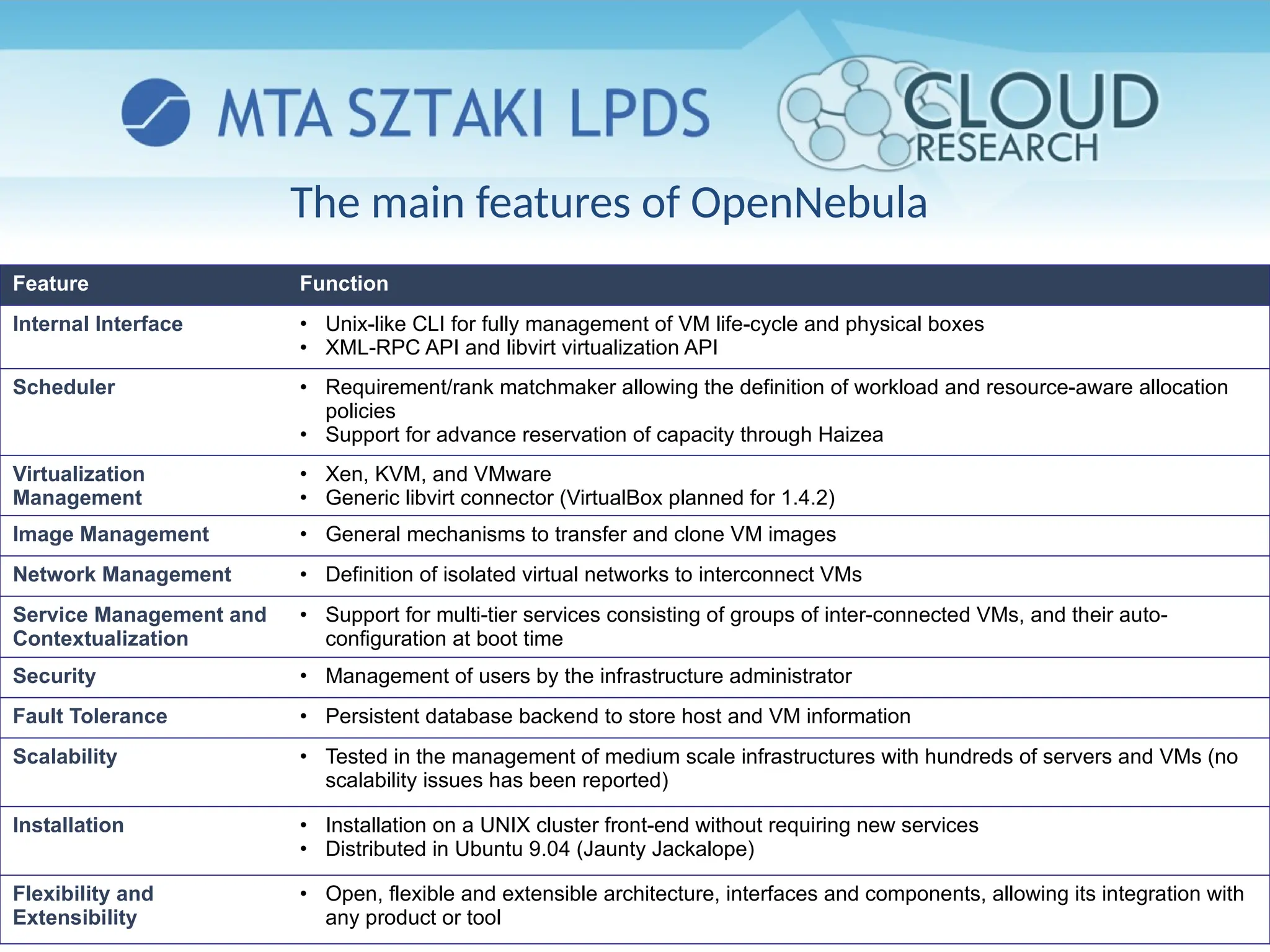
The main features of OpenNebula
Feature Function
Internal Interface • Unix-like CLI for fully management of VM life-cycle and physical boxes
• XML-RPC API and libvirt virtualization API
Scheduler • Requirement/rank matchmaker allowing the definition of workload and resource-aware allocation
policies
• Support for advance reservation of capacity through Haizea
Virtualization
Management
• Xen, KVM, and VMware
• Generic libvirt connector (VirtualBox planned for 1.4.2)
Image Management • General mechanisms to transfer and clone VM images
Network Management • Definition of isolated virtual networks to interconnect VMs
Service Management and
Contextualization
• Support for multi-tier services consisting of groups of inter-connected VMs, and their auto-
configuration at boot time
Security • Management of users by the infrastructure administrator
Fault Tolerance • Persistent database backend to store host and VM information
Scalability • Tested in the management of medium scale infrastructures with hundreds of servers and VMs (no
scalability issues has been reported)
Installation • Installation on a UNIX cluster front-end without requiring new services
• Distributed in Ubuntu 9.04 (Jaunty Jackalope)
Flexibility and
Extensibility
• Open, flexible and extensible architecture, interfaces and components, allowing its integration with
any product or tool
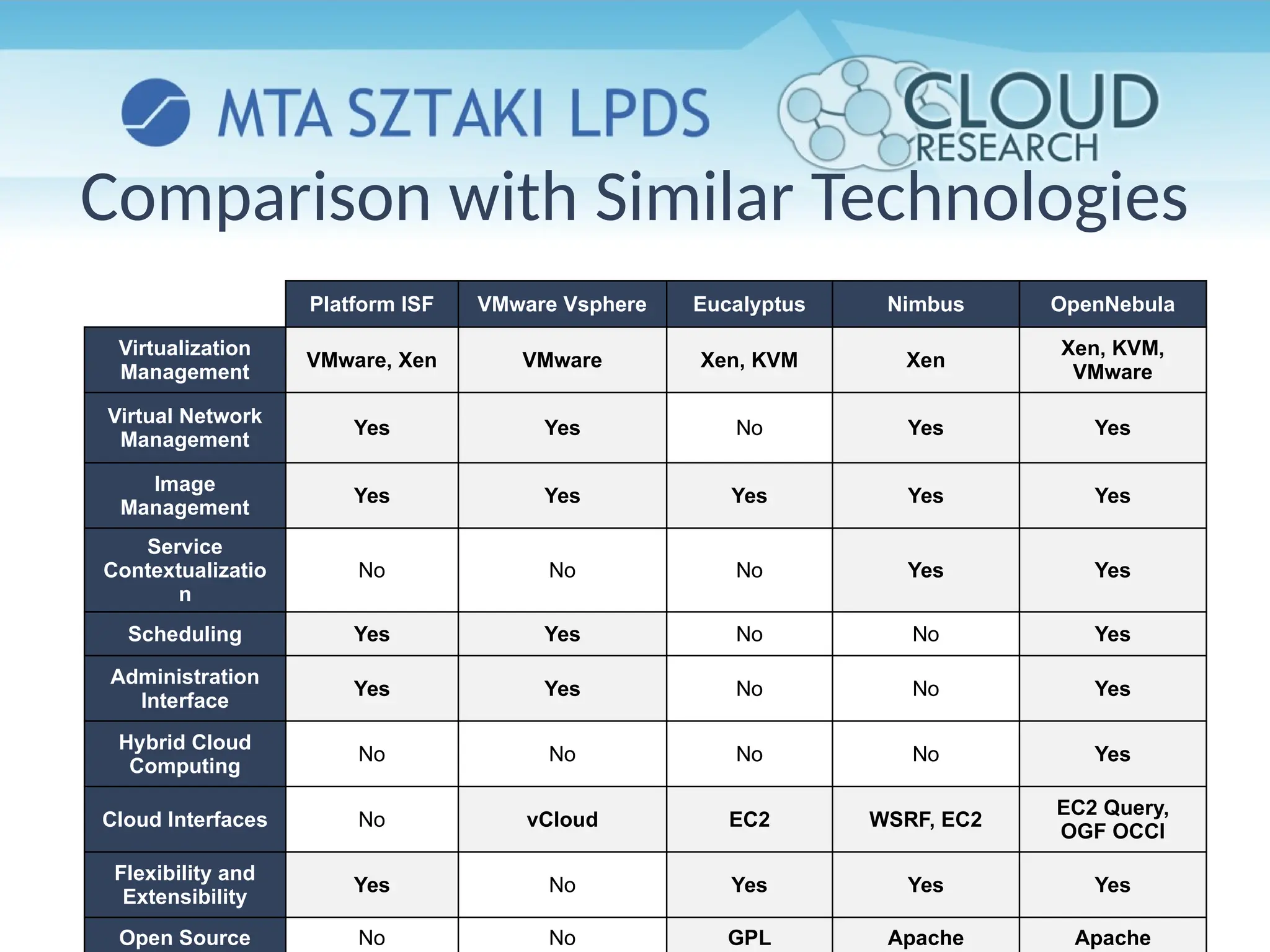
Platform ISF VMware Vsphere Eucalyptus Nimbus OpenNebula
Virtualization
Management
VMware, Xen VMware Xen, KVM Xen
Xen, KVM,
VMware
Virtual Network
Management
Yes Yes No Yes Yes
Image
Management
Yes Yes Yes Yes Yes
Service
Contextualizatio
n
No No No Yes Yes
Scheduling Yes Yes No No Yes
Administration
Interface
Yes Yes No No Yes
Hybrid Cloud
Computing
No No No No Yes
Cloud Interfaces No vCloud EC2 WSRF, EC2
EC2 Query,
OGF OCCI
Flexibility and
Extensibility
Yes No Yes Yes Yes
Open Source No No GPL Apache Apache
Comparison with Similar Technologies
INSIDE OPENNEBULA
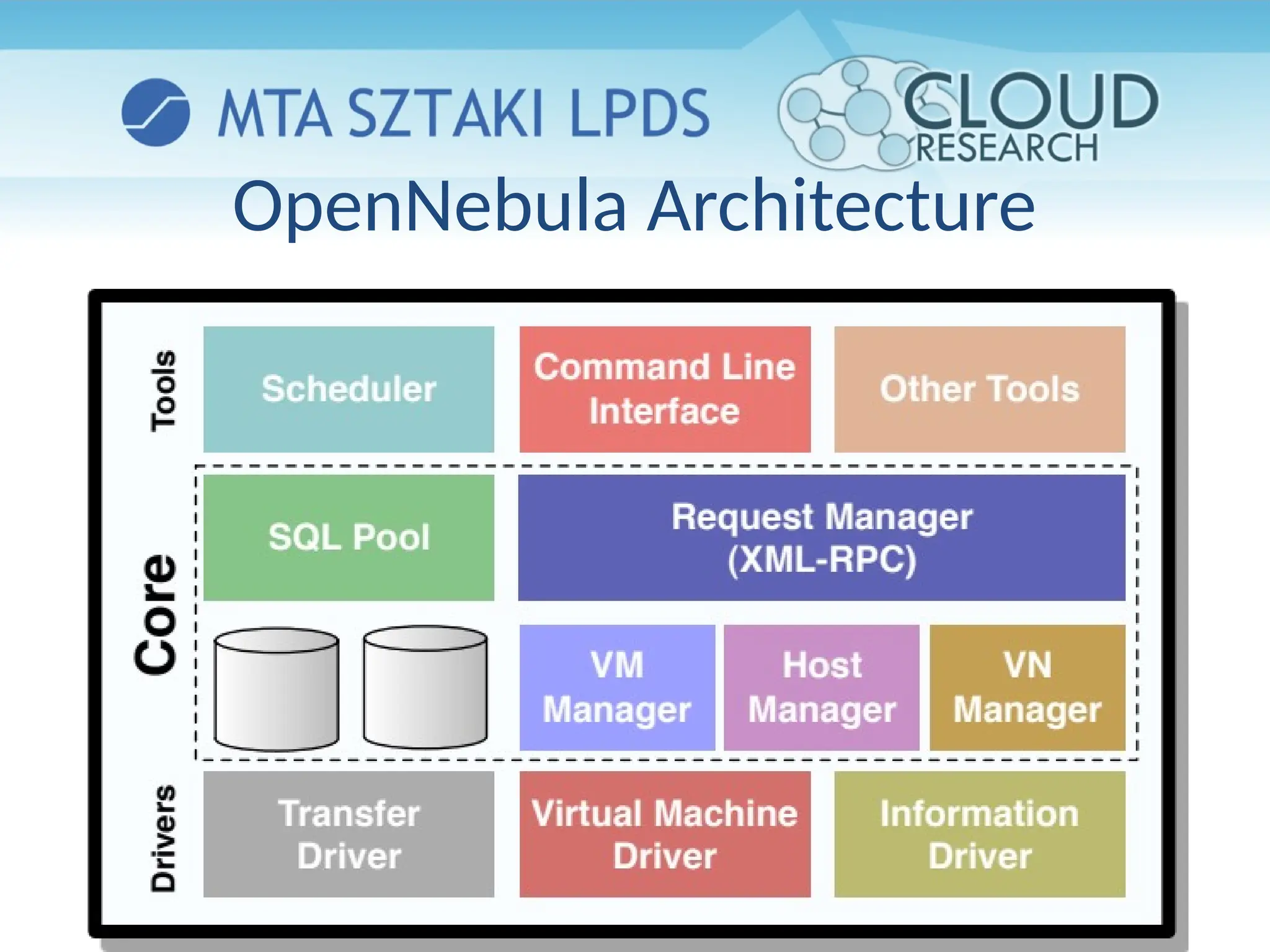
OpenNebula Architecture
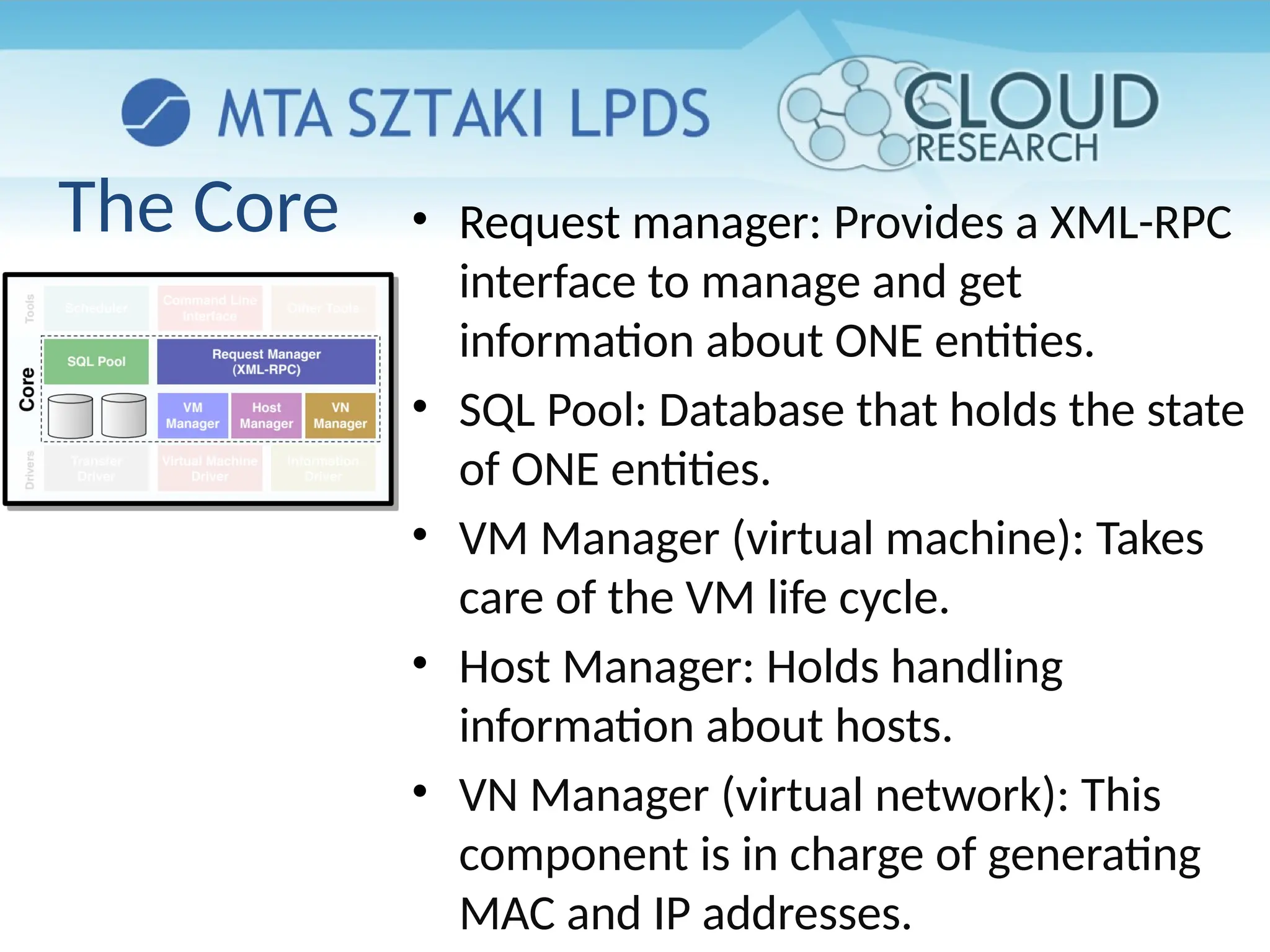
The Core • Request manager: Provides a XML-RPC
interface to manage and get
information about ONE entities.
• SQL Pool: Database that holds the state
of ONE entities.
• VM Manager (virtual machine): Takes
care of the VM life cycle.
• Host Manager: Holds handling
information about hosts.
• VN Manager (virtual network): This
component is in charge of generating
MAC and IP addresses.
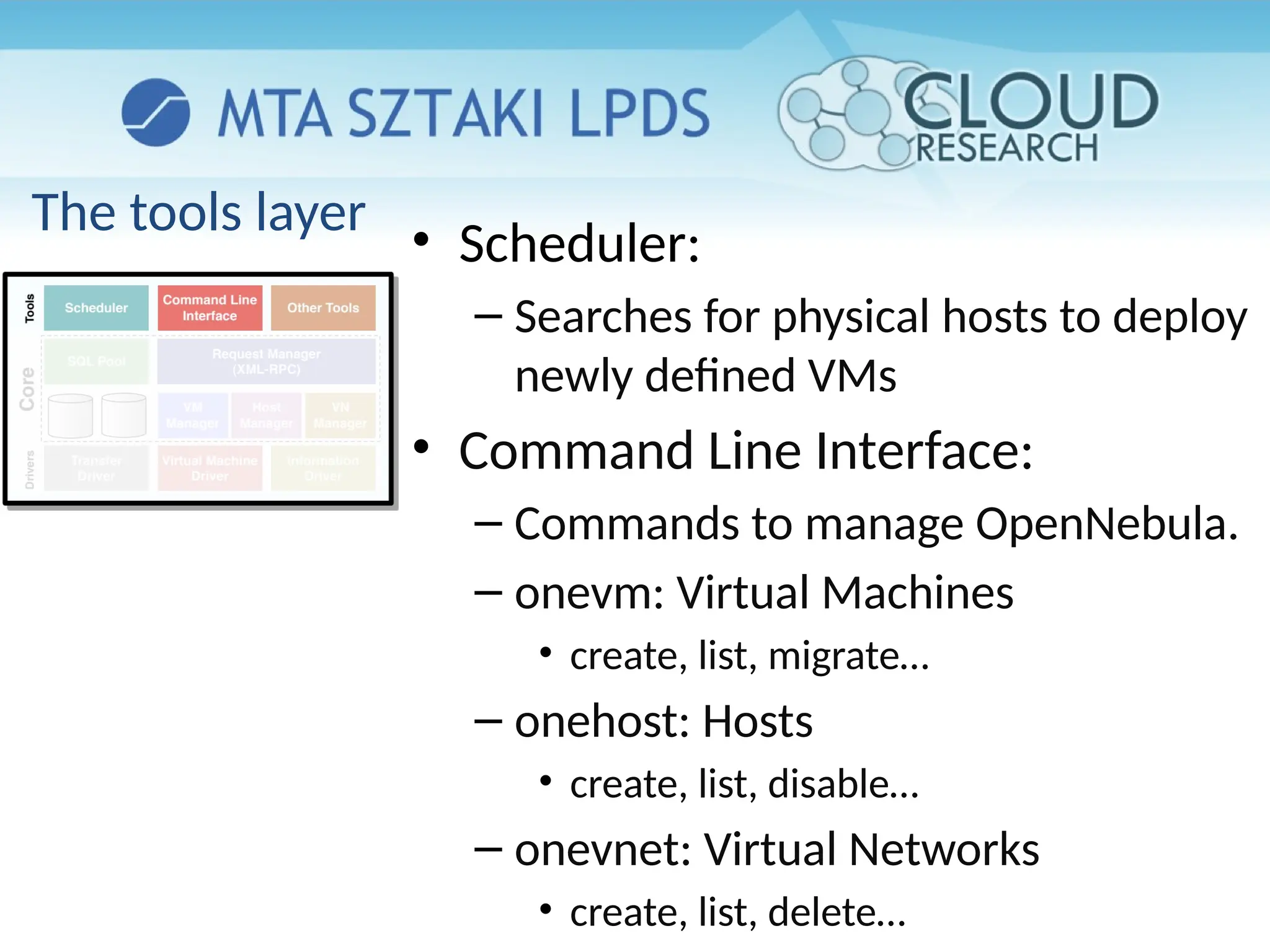
The tools layer
• Scheduler:
– Searches for physical hosts to deploy
newly defined VMs
• Command Line Interface:
– Commands to manage OpenNebula.
– onevm: Virtual Machines
• create, list, migrate…
– onehost: Hosts
• create, list, disable…
– onevnet: Virtual Networks
• create, list, delete…
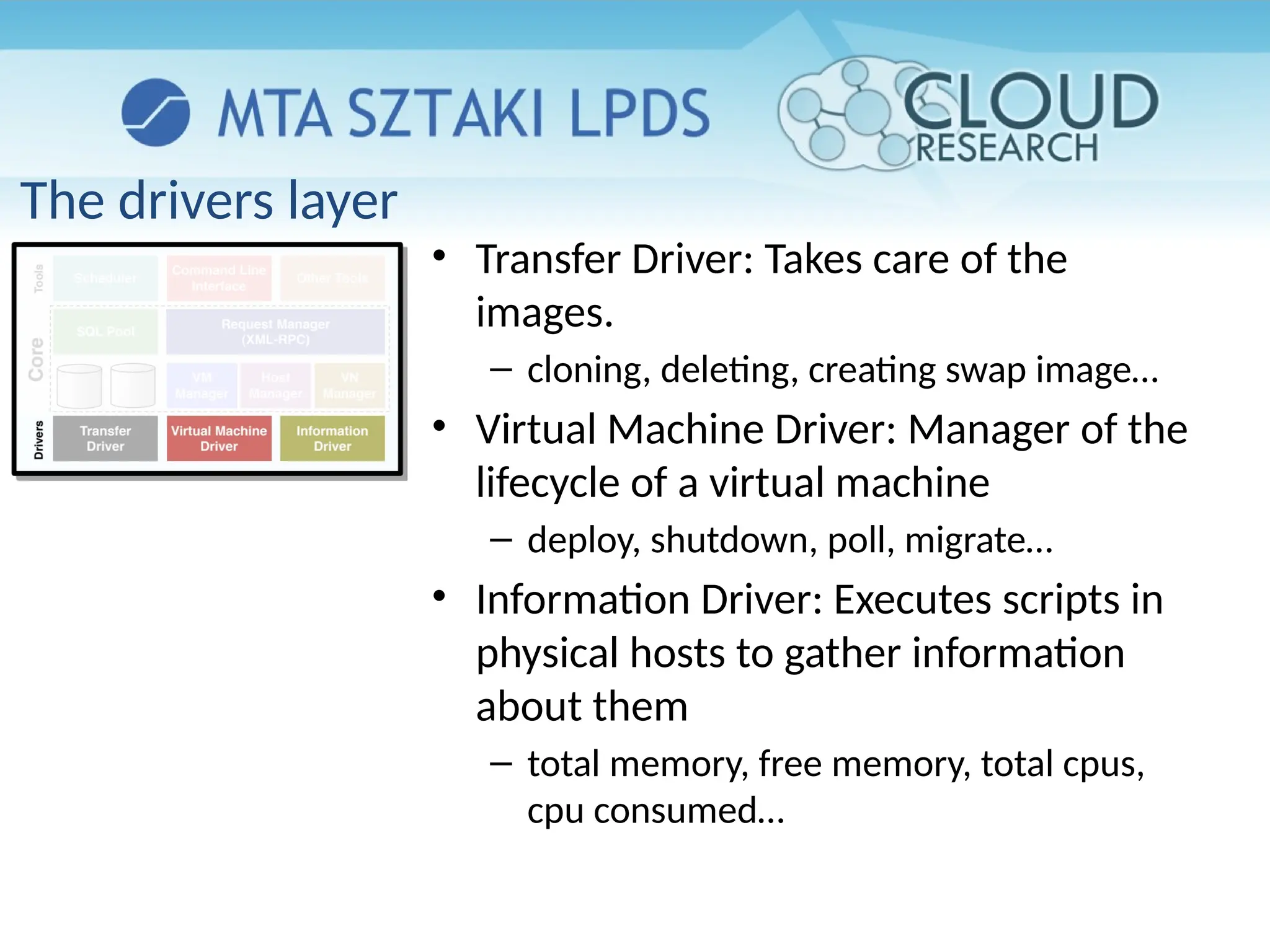
The drivers layer
• Transfer Driver: Takes care of the
images.
– cloning, deleting, creating swap image…
• Virtual Machine Driver: Manager of the
lifecycle of a virtual machine
– deploy, shutdown, poll, migrate…
• Information Driver: Executes scripts in
physical hosts to gather information
about them
– total memory, free memory, total cpus,
cpu consumed…
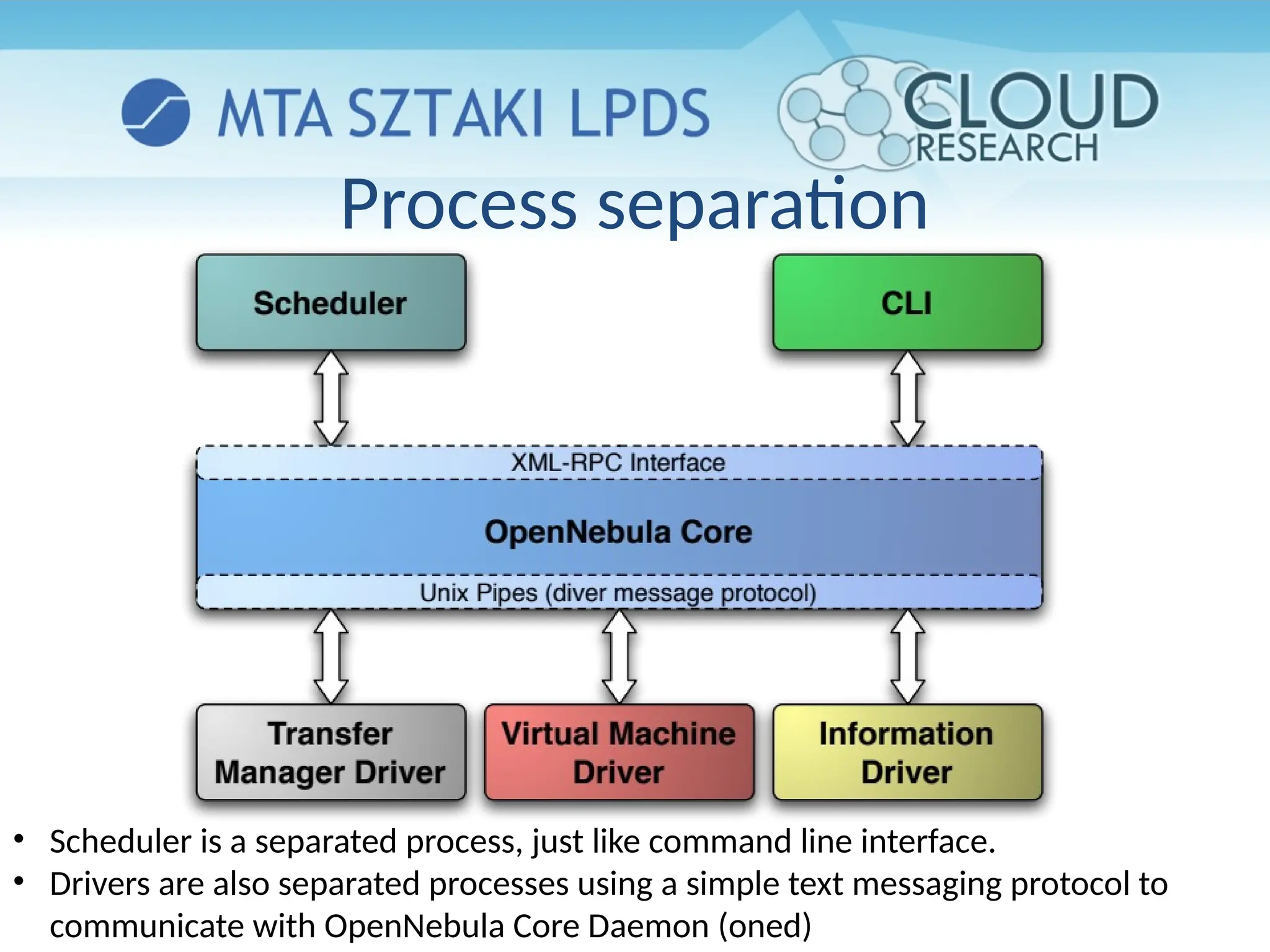
Process separation
• Scheduler is a separated process, just like command line interface.
• Drivers are also separated processes using a simple text messaging protocol to
communicate with OpenNebula Core Daemon (oned)
CONSTRUCTING A PRIVATE CLOUD
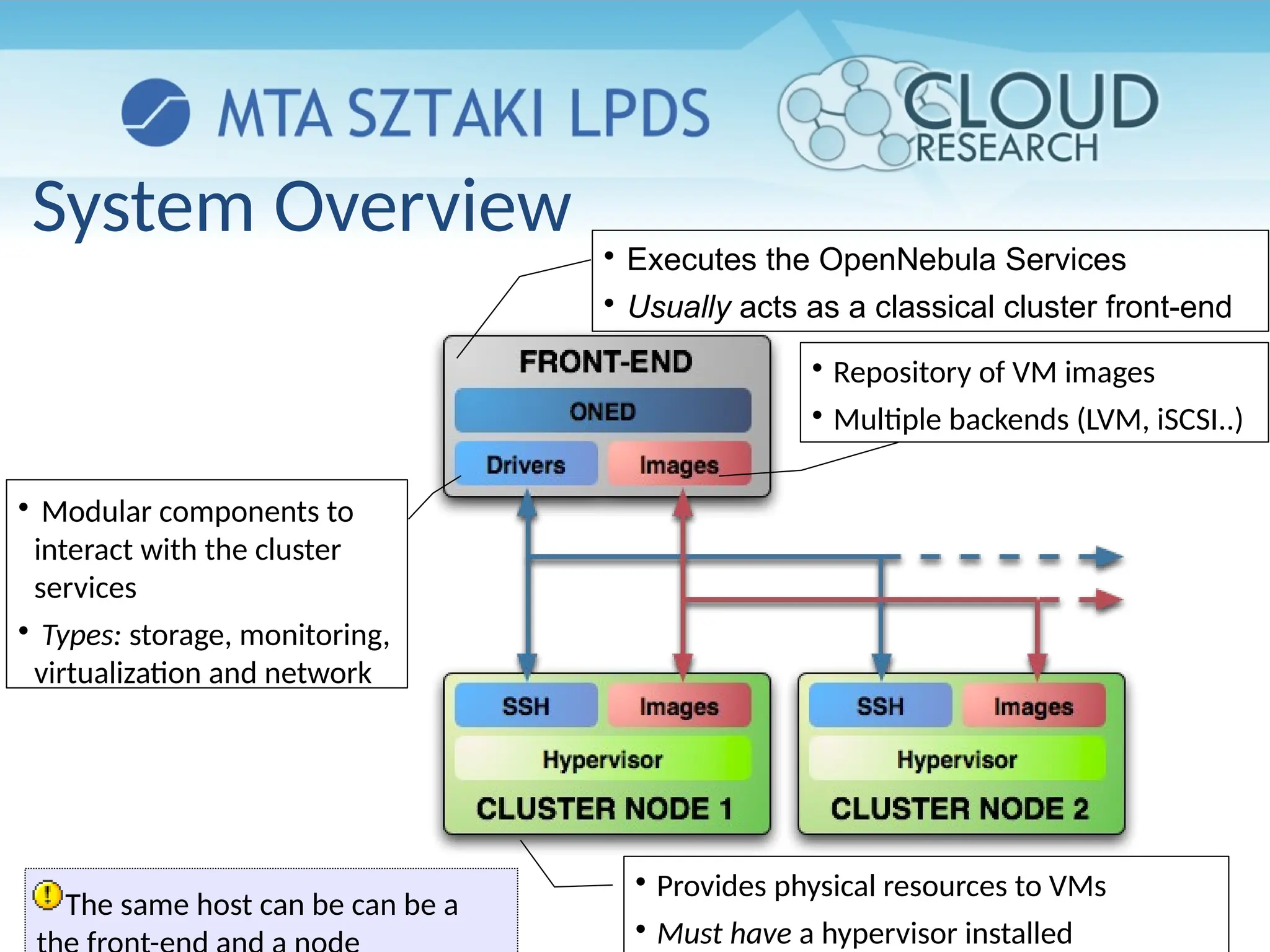
System Overview 
Executes the OpenNebula Services

Usually acts as a classical cluster front-end

Provides physical resources to VMs

Must have a hypervisor installed

Modular components to
interact with the cluster
services

Types: storage, monitoring,
virtualization and network

Repository of VM images

Multiple backends (LVM, iSCSI..)
The same host can be can be a
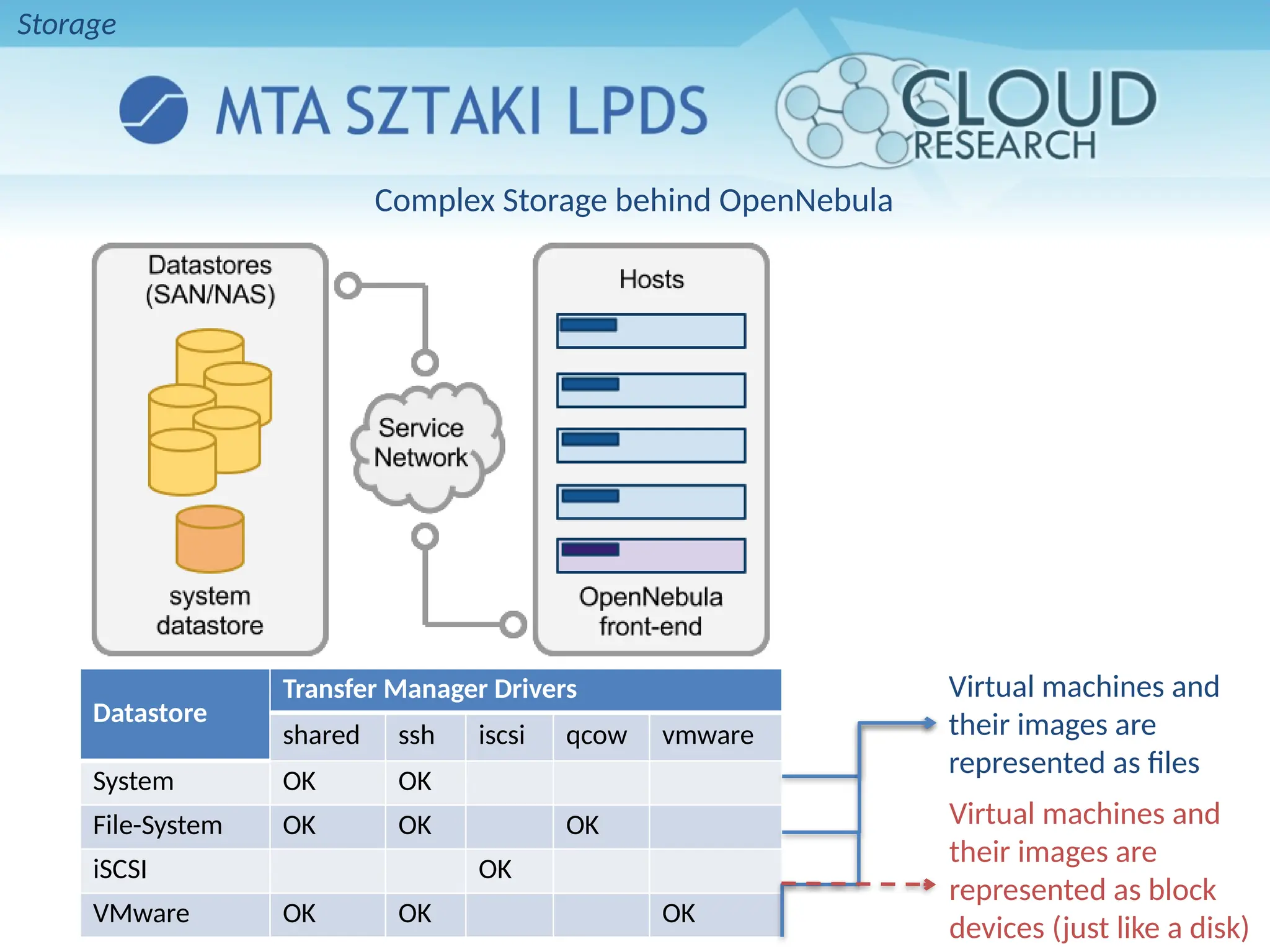
Complex Storage behind OpenNebula
Datastore
Transfer Manager Drivers
shared ssh iscsi qcow vmware
System OK OK
File-System OK OK OK
iSCSI OK
VMware OK OK OK
Virtual machines and
their images are
represented as files
Virtual machines and
their images are
represented as block
devices (just like a disk)
Storage
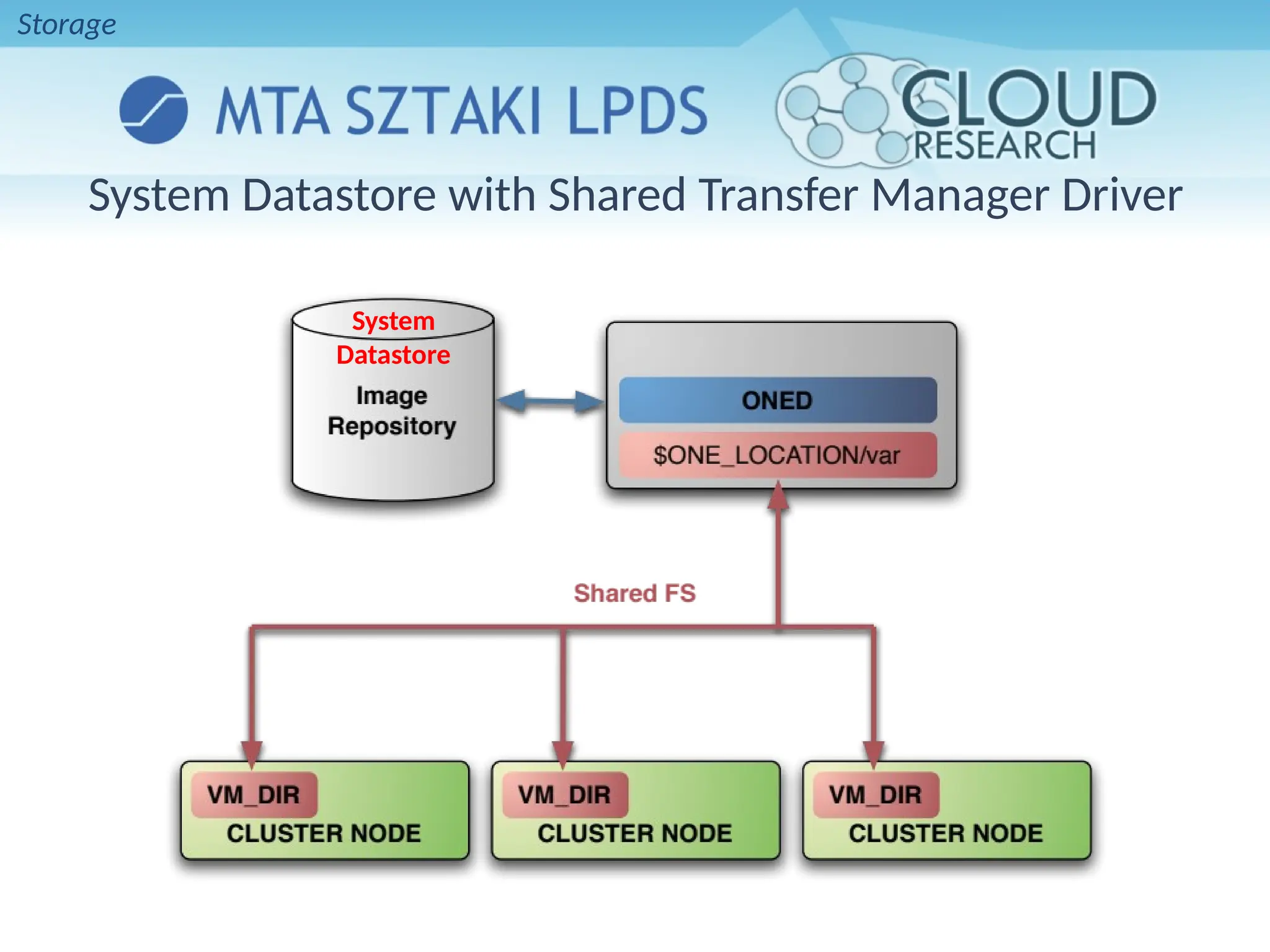
System Datastore with Shared Transfer Manager Driver
System
Datastore
Storage

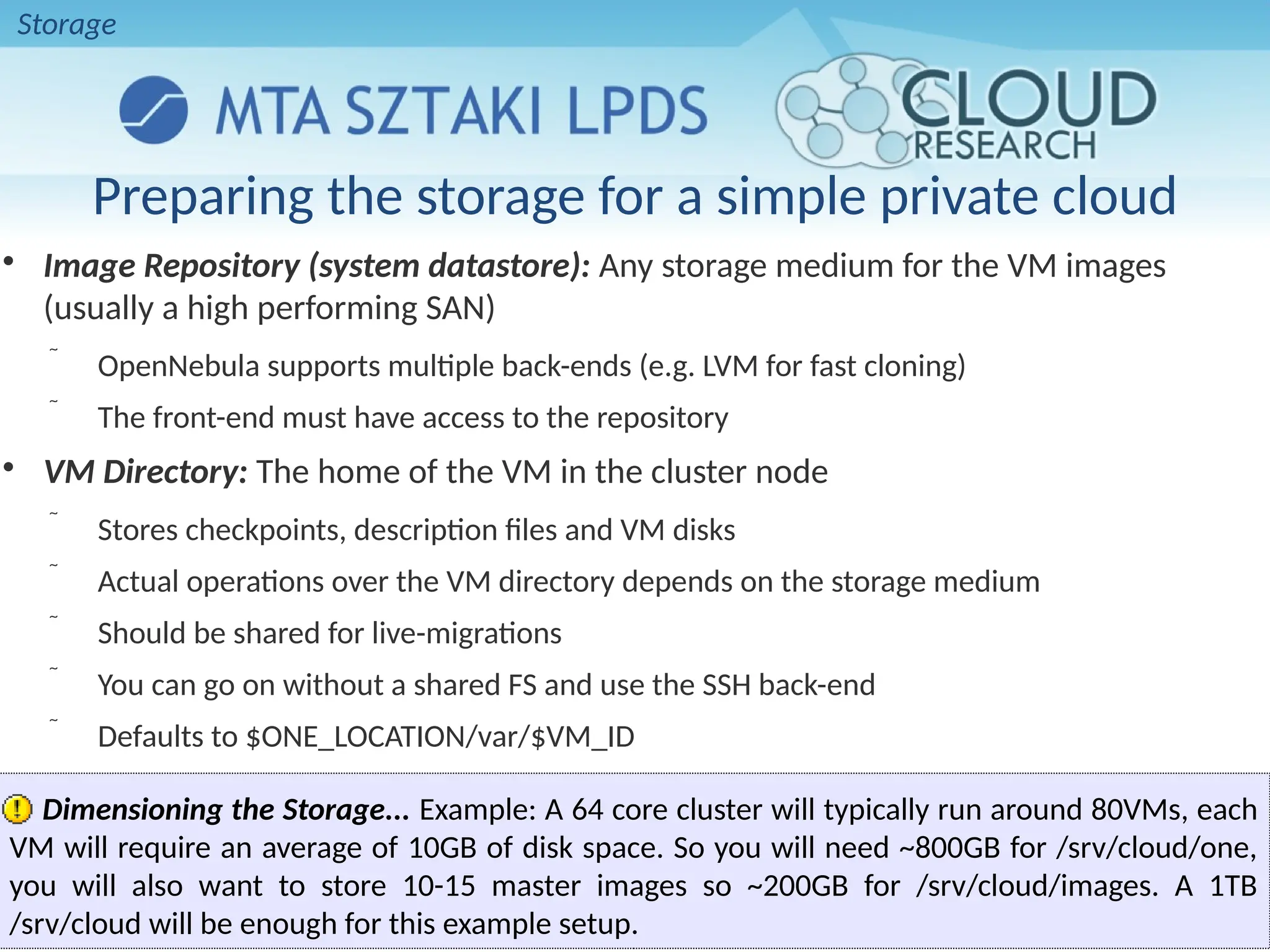
Image Repository (system datastore): Any storage medium for the VM images
(usually a high performing SAN)
 OpenNebula supports multiple back-ends (e.g. LVM for fast cloning)
 The front-end must have access to the repository

VM Directory: The home of the VM in the cluster node
 Stores checkpoints, description files and VM disks
 Actual operations over the VM directory depends on the storage medium
 Should be shared for live-migrations
 You can go on without a shared FS and use the SSH back-end
 Defaults to $ONE_LOCATION/var/$VM_ID
Dimensioning the Storage... Example: A 64 core cluster will typically run around 80VMs, each
VM will require an average of 10GB of disk space. So you will need ~800GB for /srv/cloud/one,
you will also want to store 10-15 master images so ~200GB for /srv/cloud/images. A 1TB
/srv/cloud will be enough for this example setup.
Preparing the storage for a simple private cloud
Storage
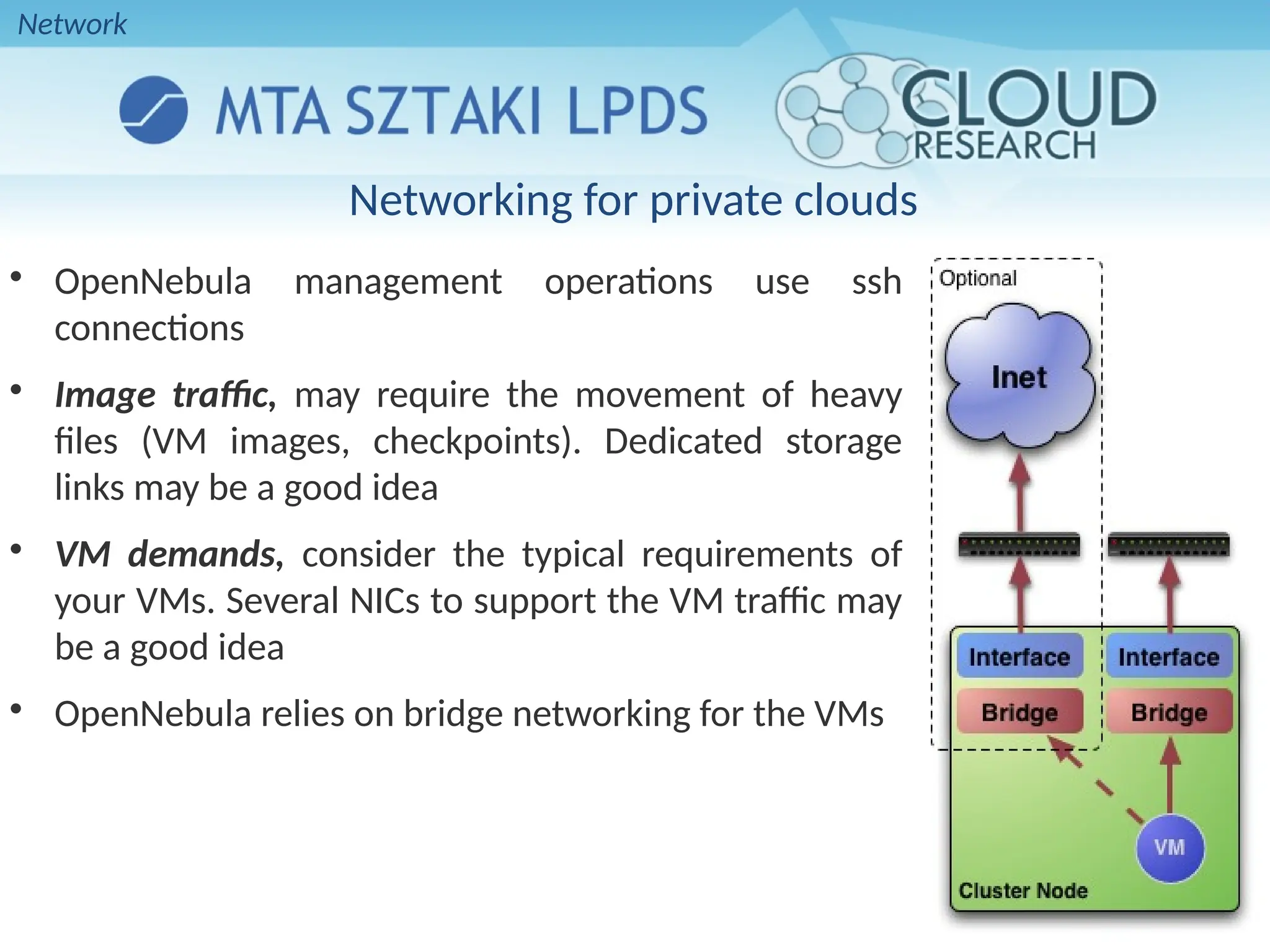
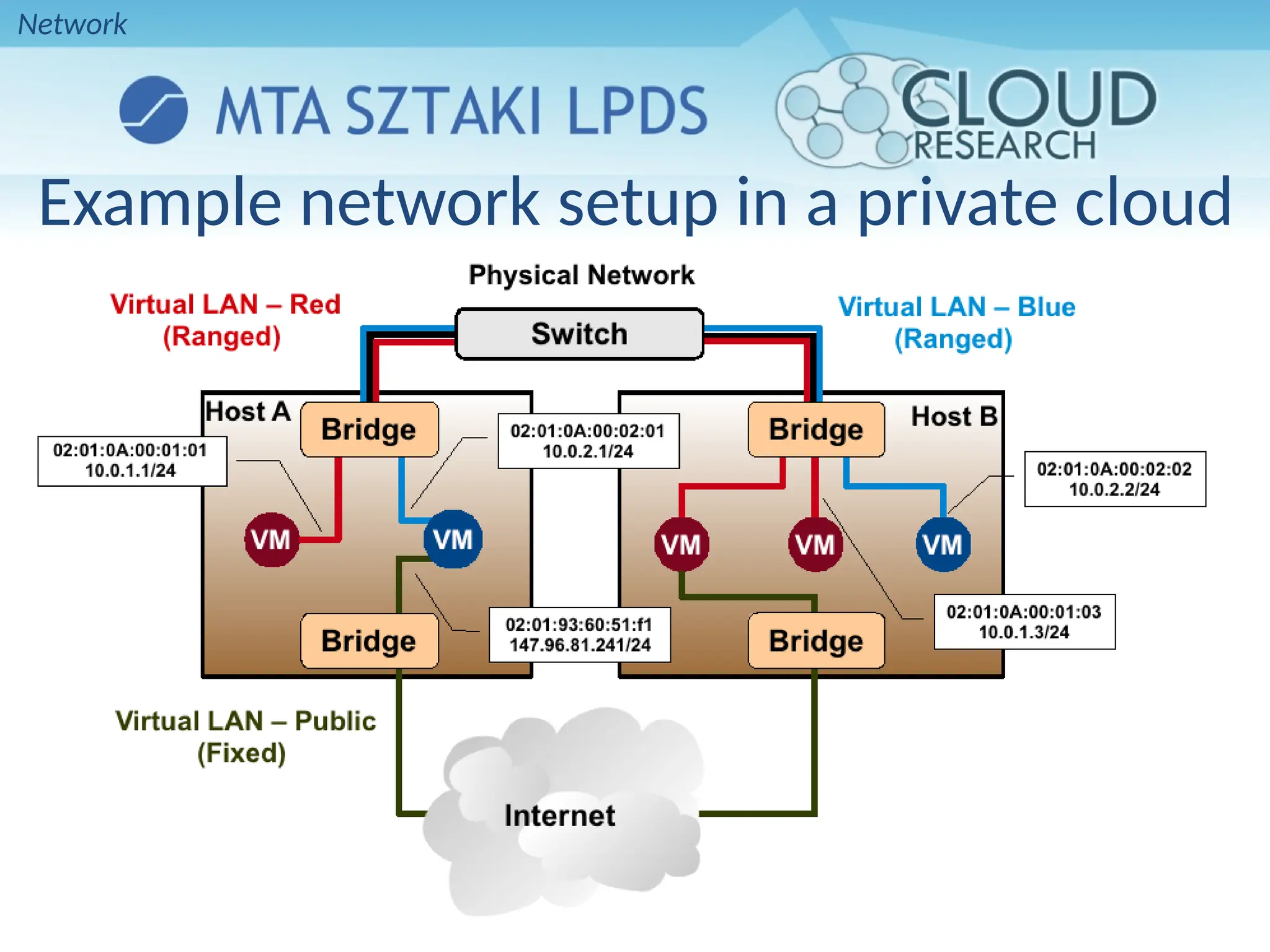
Networking for private clouds

OpenNebula management operations use ssh
connections

Image traffic, may require the movement of heavy
files (VM images, checkpoints). Dedicated storage
links may be a good idea

VM demands, consider the typical requirements of
your VMs. Several NICs to support the VM traffic may
be a good idea

OpenNebula relies on bridge networking for the VMs
Network
Example network setup in a private cloud
Network
Virtual Networks

A Virtual Network in OpenNebula

Defines a separated MAC/IP address space to be used by VMs

Each virtual network is associated with a physical network through a bridge

Virtual Networks can be isolated (at layer 2 level) with ebtables and hooks

Virtual Networks are managed with the onevnet utility
Network
Users
• A User in OpenNebula
– Is a pair of username:password
• Only oneadmin can add/delete users
• Users are managed with the oneuser utility
Users
User Management
• Native user support since v1.4
– oneadmin: privileged account
• Usage, management, administrative rights for:
– Templates, VMs, Images, Virtual Networks
• Through ACLs further operations/rights are available:
– Rights for users, groups, datastores and clusters
– Creation operation
• SHA1 passwords (+AA module)
– Stored in FS
– Alternatively in environment
Users
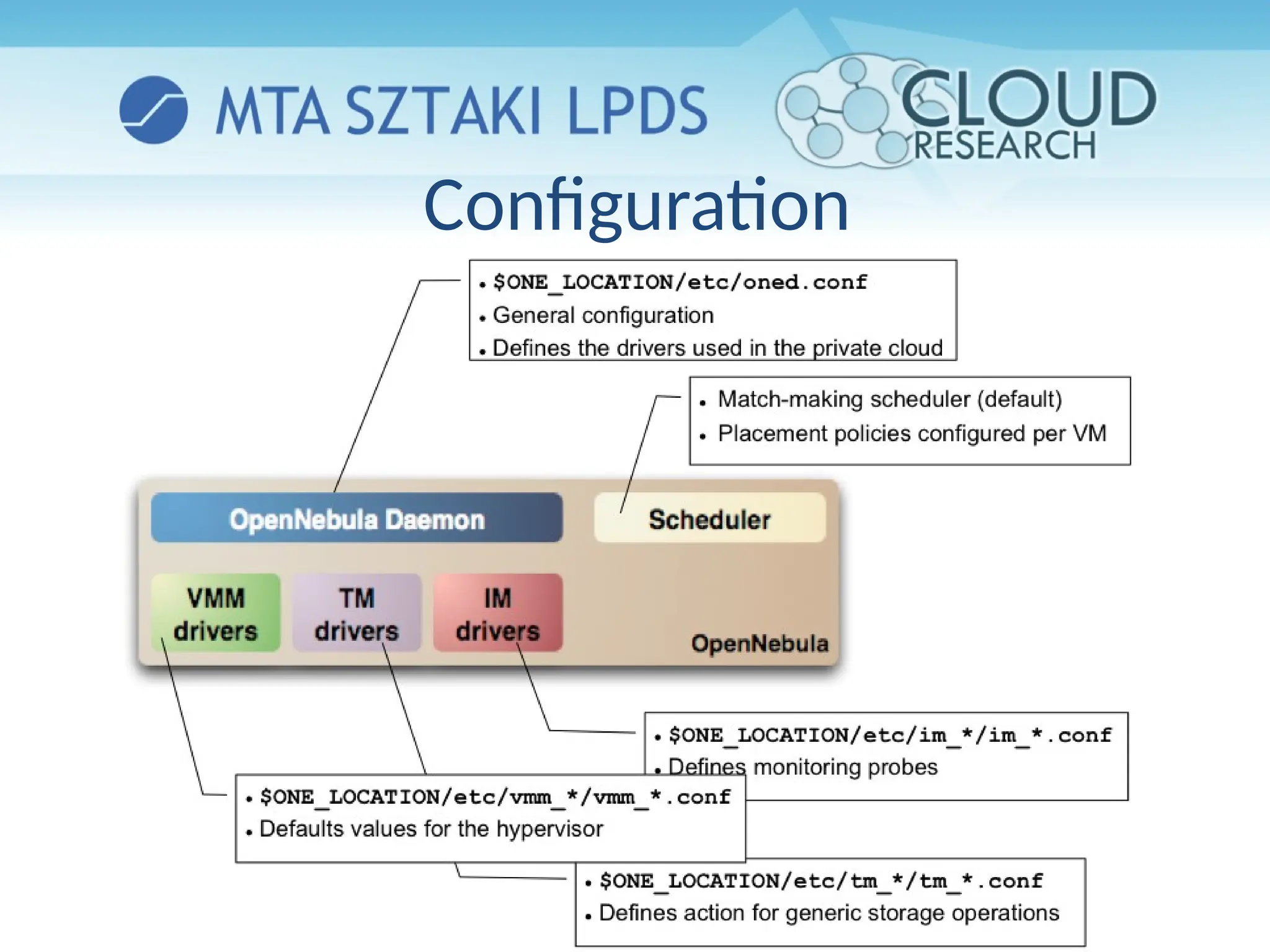
Configuration
VIRTUAL MACHINES
Preparing VMs for OpenNebula
• Virtual Machines are managed with the oneuser utility
• You can use any VM prepared for the target hypervisor
• Hint I: Place the vmcontext.sh script in the boot process to make
better use of vlans
• Hint II: Do not pack useless information in the VM images:
– swap. OpenNebula can create swap partitions on-the-fly in the target host
– Scratch or volatile storage. OpenNebula can create plain FS on-the-fly in
the target host
• Hint III: Install once and deploy many; prepare master images
• Hint IV: Do not put private information (e.g. ssh keys) in the master
images, use the CONTEXT
• Hint V: Pass arbitrary data to a master image using CONTEXT
VMs
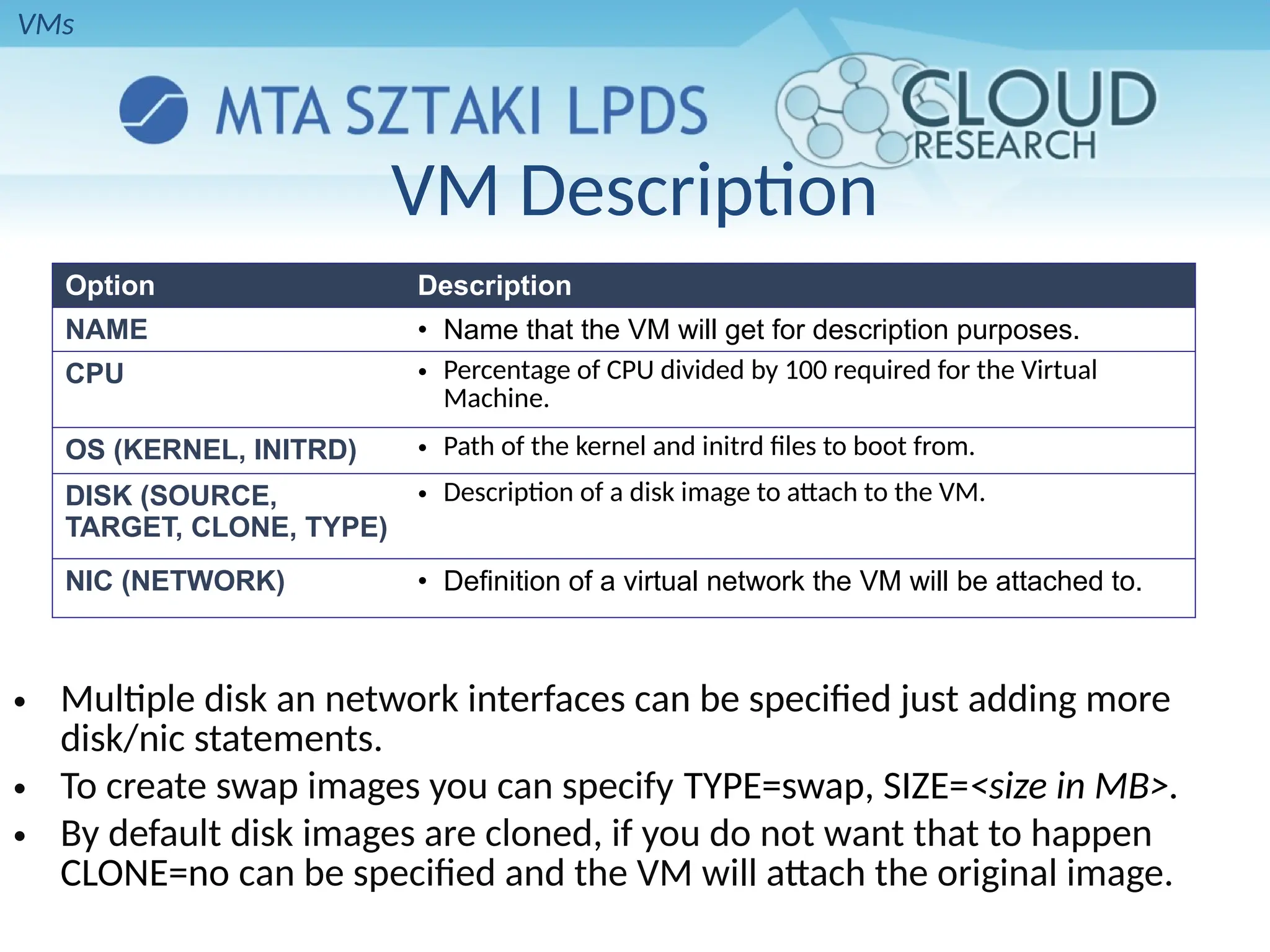
Option Description
NAME • Name that the VM will get for description purposes.
CPU • Percentage of CPU divided by 100 required for the Virtual
Machine.
OS (KERNEL, INITRD) • Path of the kernel and initrd files to boot from.
DISK (SOURCE,
TARGET, CLONE, TYPE)
• Description of a disk image to attach to the VM.
NIC (NETWORK) • Definition of a virtual network the VM will be attached to.
VM Description
• Multiple disk an network interfaces can be specified just adding more
disk/nic statements.
• To create swap images you can specify TYPE=swap, SIZE=<size in MB>.
• By default disk images are cloned, if you do not want that to happen
CLONE=no can be specified and the VM will attach the original image.
VMs
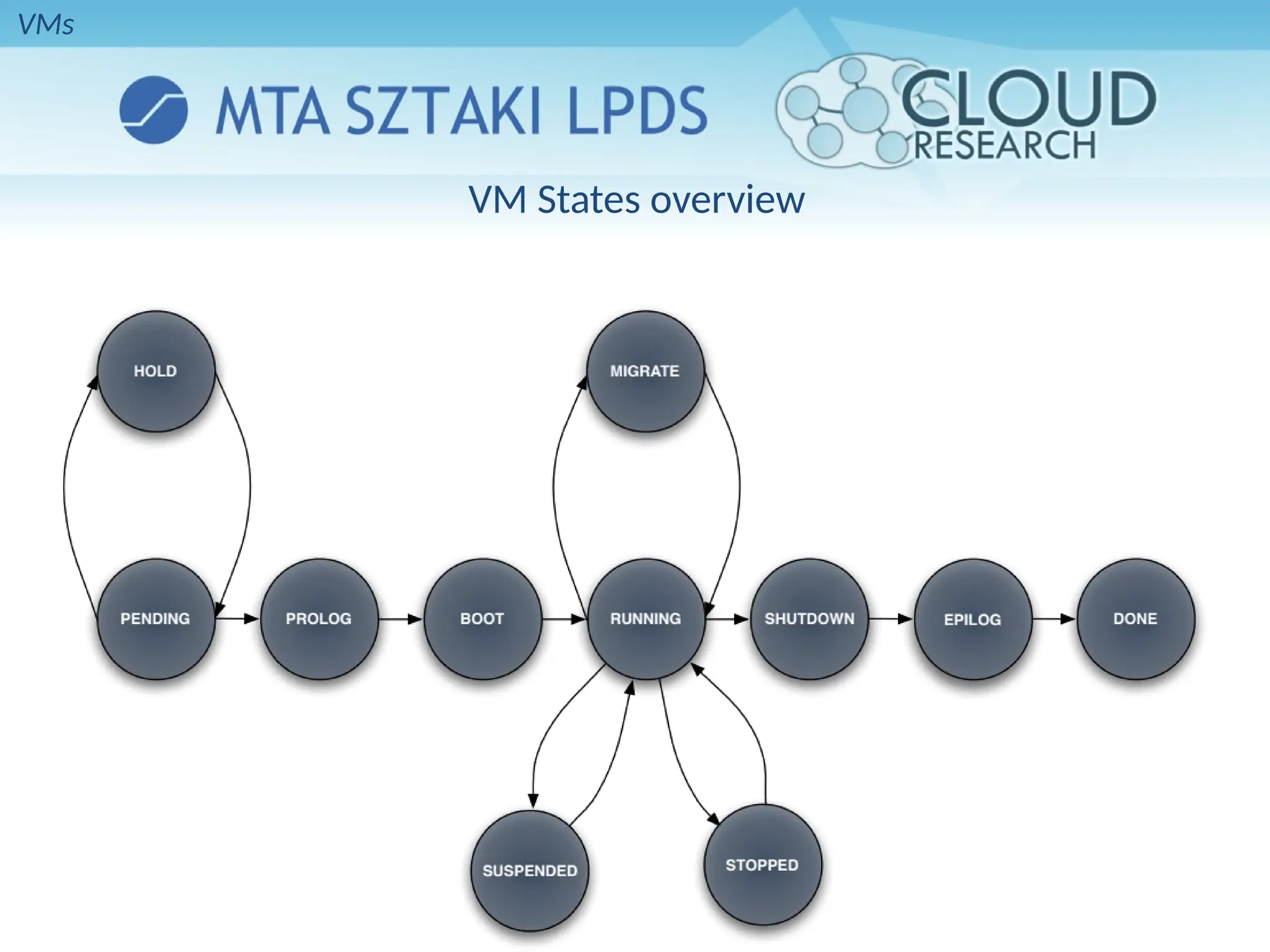
VM States overview
VMs
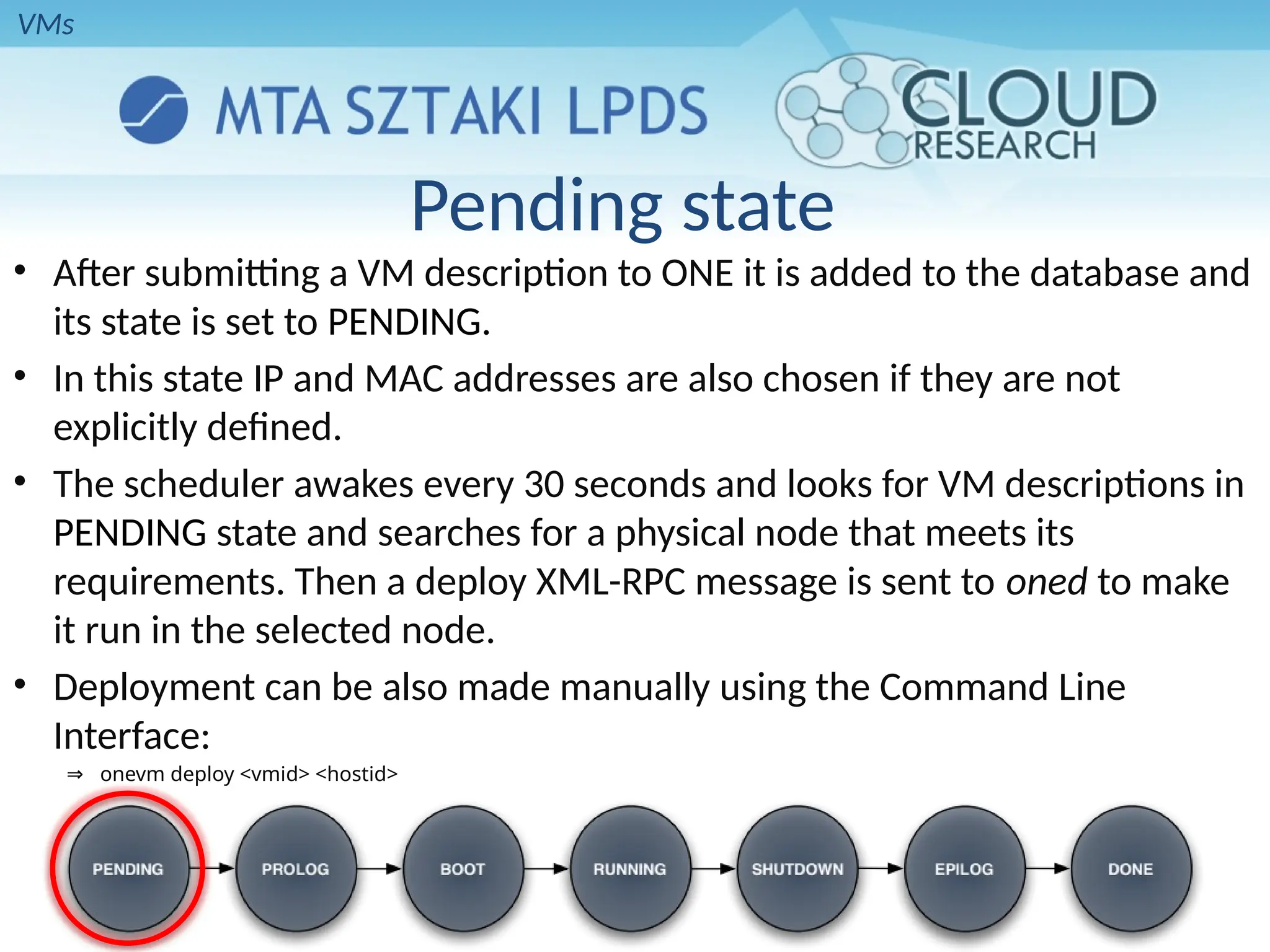
Pending state
• After submitting a VM description to ONE it is added to the database and
its state is set to PENDING.
• In this state IP and MAC addresses are also chosen if they are not
explicitly defined.
• The scheduler awakes every 30 seconds and looks for VM descriptions in
PENDING state and searches for a physical node that meets its
requirements. Then a deploy XML-RPC message is sent to oned to make
it run in the selected node.
• Deployment can be also made manually using the Command Line
Interface:
⇒ onevm deploy <vmid> <hostid>
VMs
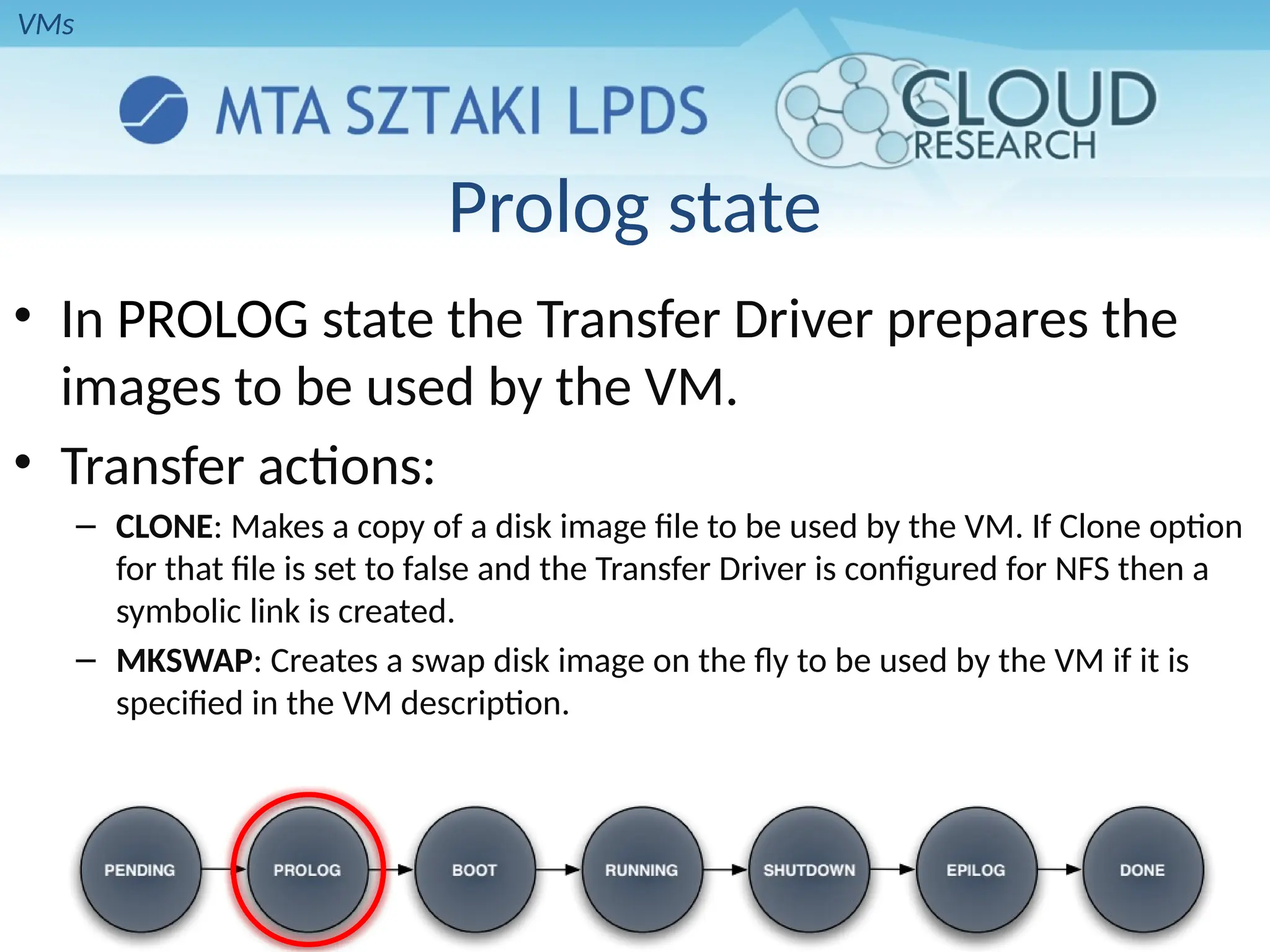
Prolog state
• In PROLOG state the Transfer Driver prepares the
images to be used by the VM.
• Transfer actions:
– CLONE: Makes a copy of a disk image file to be used by the VM. If Clone option
for that file is set to false and the Transfer Driver is configured for NFS then a
symbolic link is created.
– MKSWAP: Creates a swap disk image on the fly to be used by the VM if it is
specified in the VM description.
VMs
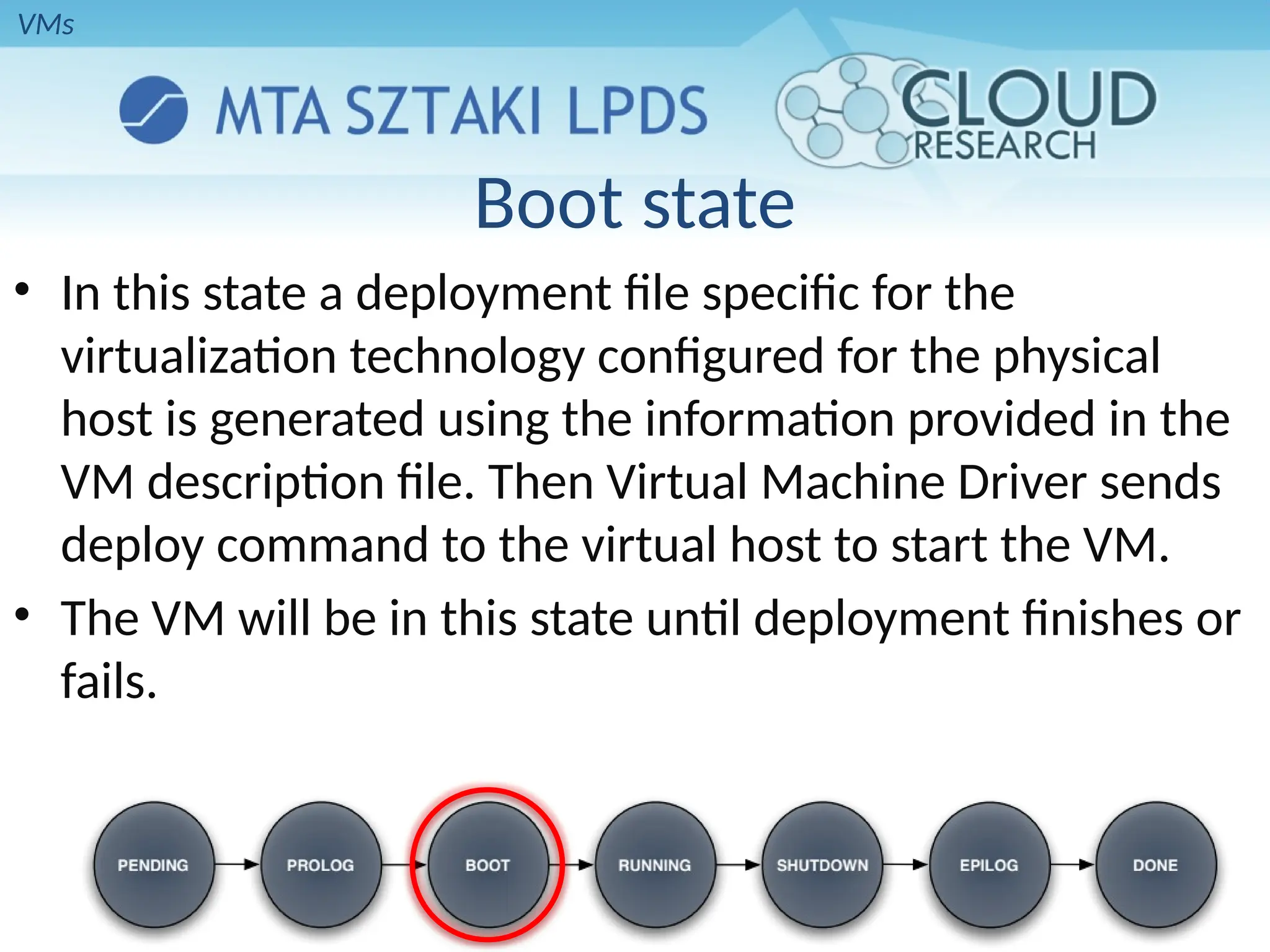
Boot state
• In this state a deployment file specific for the
virtualization technology configured for the physical
host is generated using the information provided in the
VM description file. Then Virtual Machine Driver sends
deploy command to the virtual host to start the VM.
• The VM will be in this state until deployment finishes or
fails.
VMs
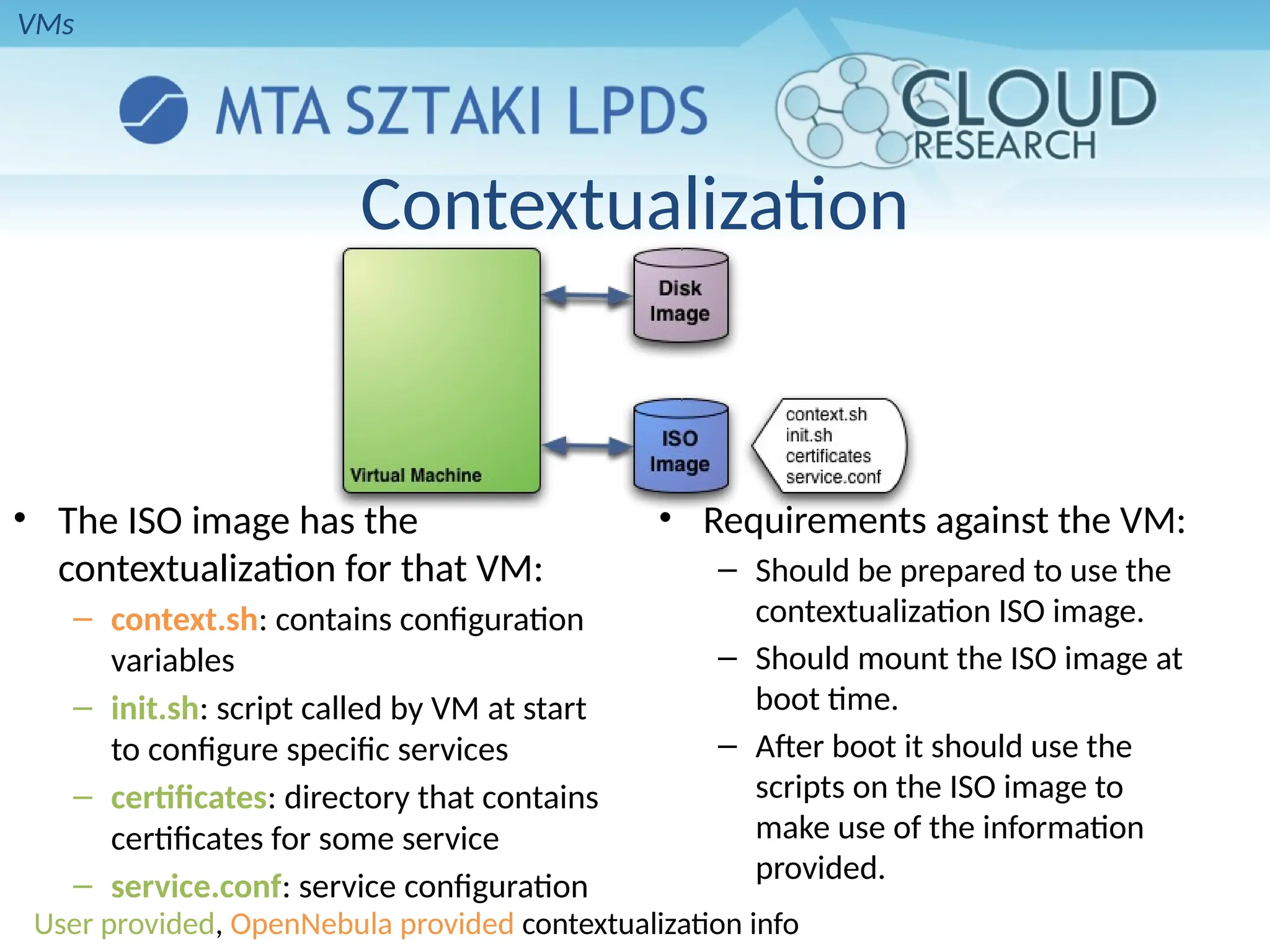
Contextualization
• The ISO image has the
contextualization for that VM:
– context.sh: contains configuration
variables
– init.sh: script called by VM at start
to configure specific services
– certificates: directory that contains
certificates for some service
– service.conf: service configuration
• Requirements against the VM:
– Should be prepared to use the
contextualization ISO image.
– Should mount the ISO image at
boot time.
– After boot it should use the
scripts on the ISO image to
make use of the information
provided.
User provided, OpenNebula provided contextualization info
VMs
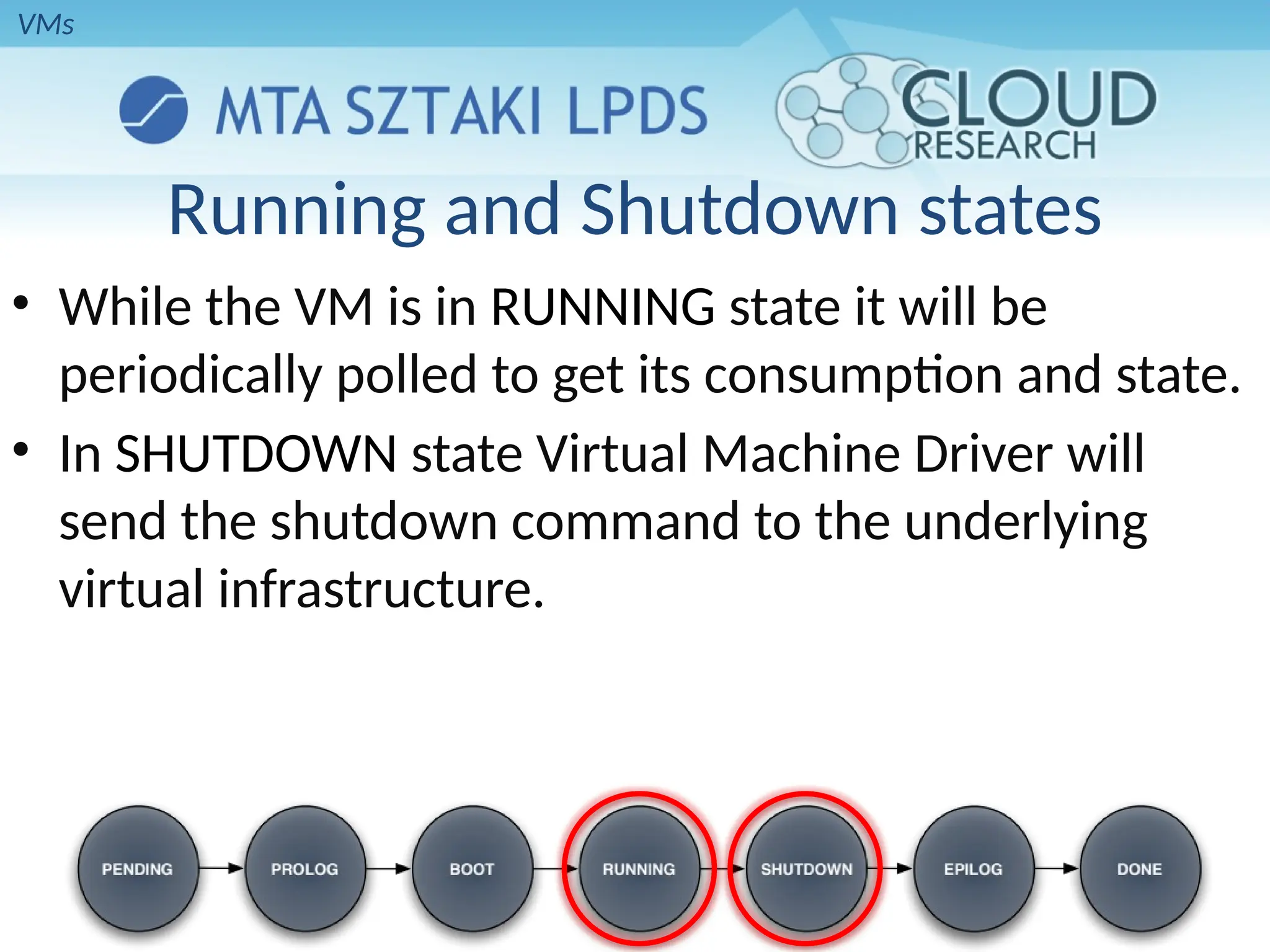
Running and Shutdown states
• While the VM is in RUNNING state it will be
periodically polled to get its consumption and state.
• In SHUTDOWN state Virtual Machine Driver will
send the shutdown command to the underlying
virtual infrastructure.
VMs
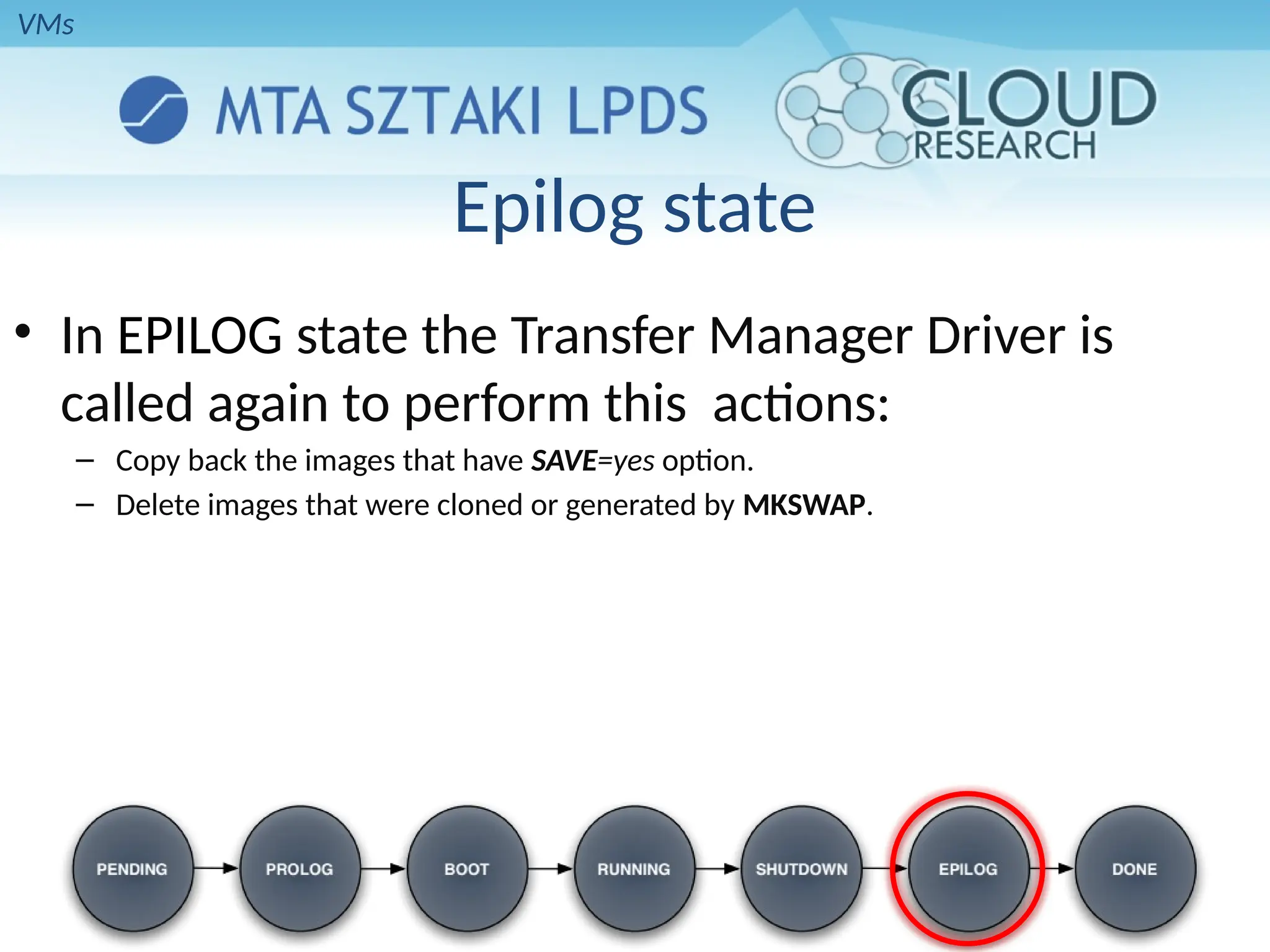
Epilog state
• In EPILOG state the Transfer Manager Driver is
called again to perform this actions:
– Copy back the images that have SAVE=yes option.
– Delete images that were cloned or generated by MKSWAP.
VMs
HYBRID CLOUD
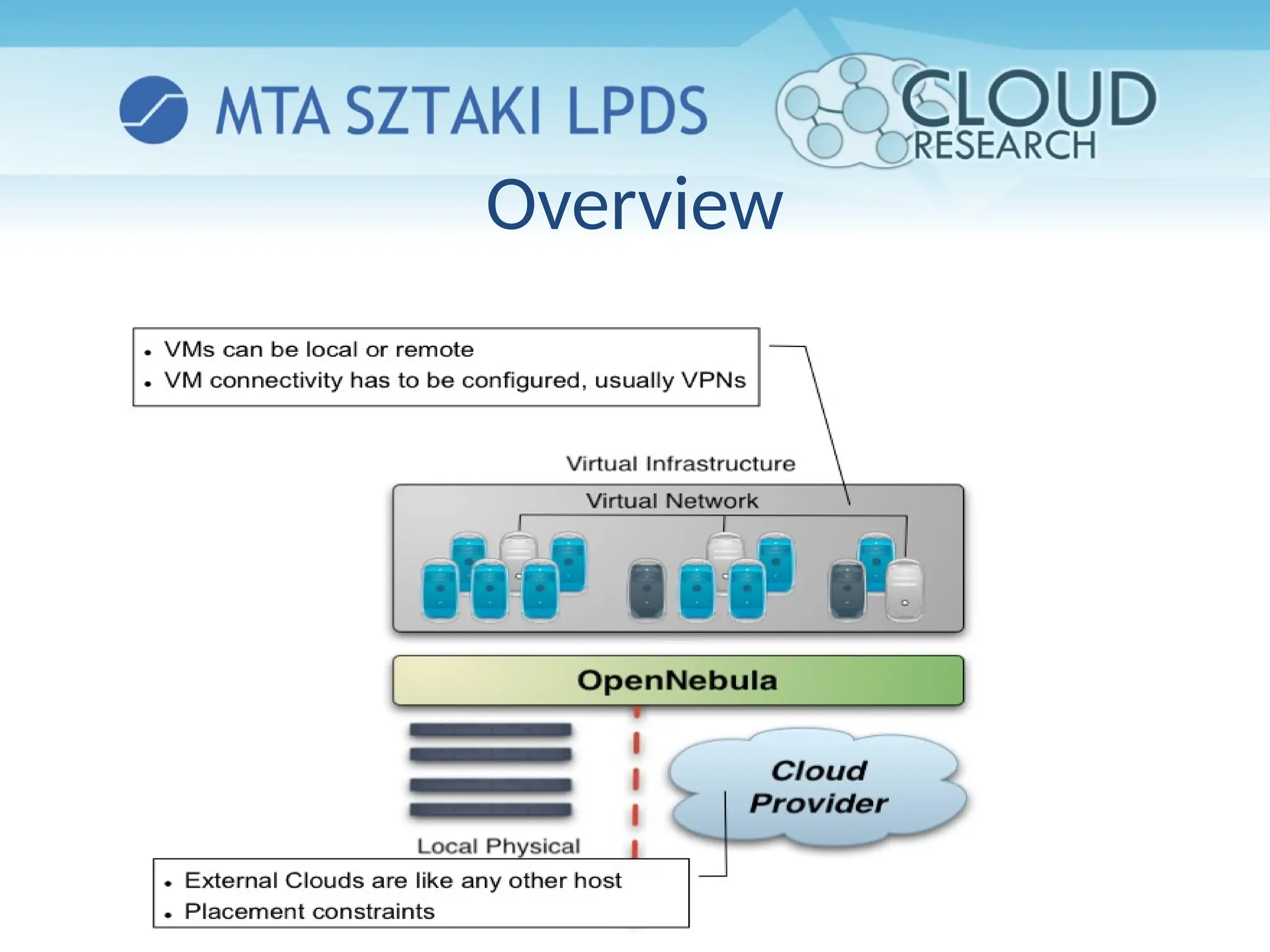
Overview
Making an Amazon EC2 hybrid
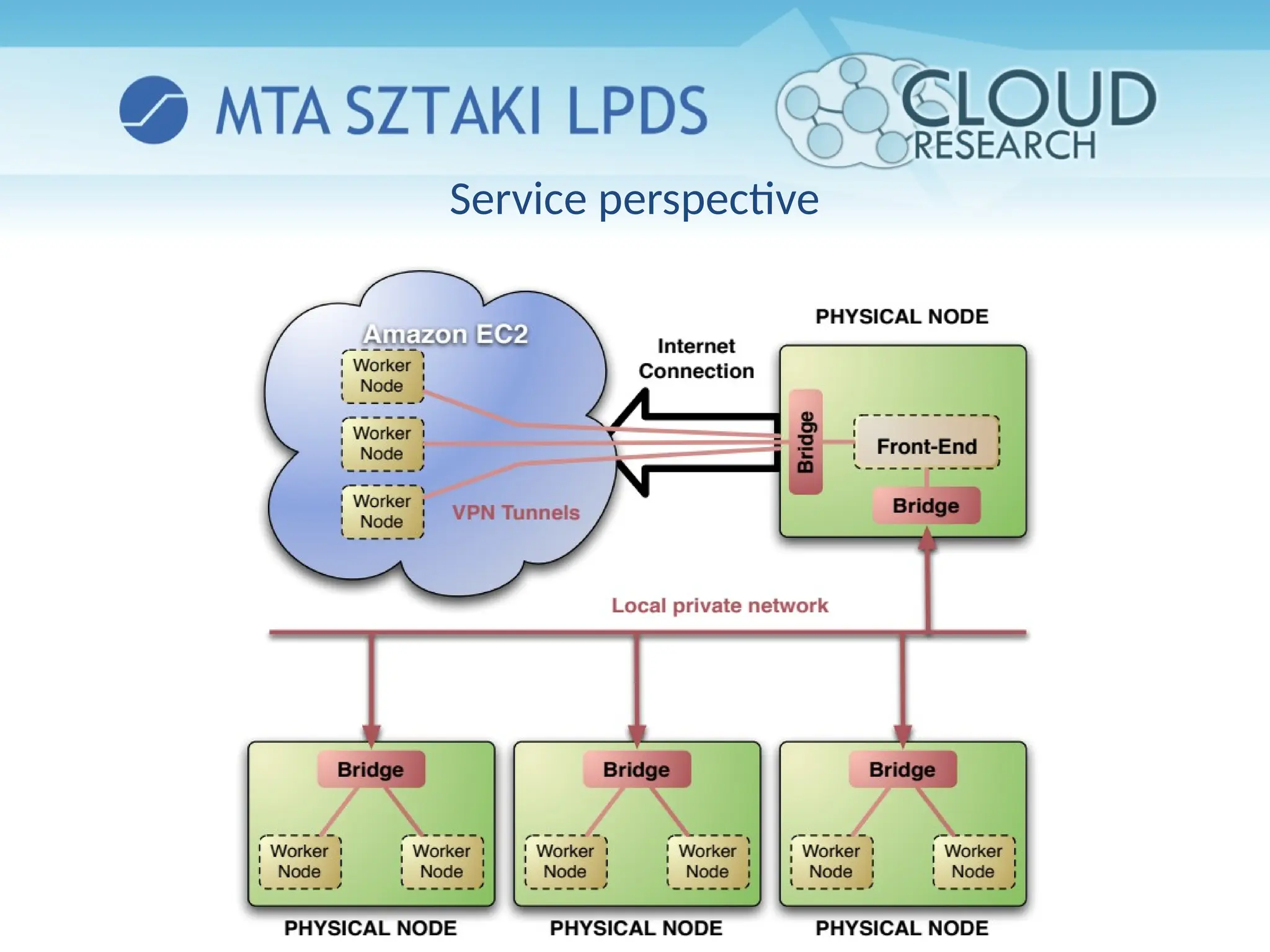
• Amazon EC2 cloud is managed by OpenNebula as
any other cluster node
– You can use several accounts by adding a driver for each
account (use the arguments attribute, -k and -c options).
Then create a host that uses the driver
– You can use multiple EC2 zones, add a driver for each
zone (use the arguments attribute, -u option), and a host
that uses that driver
– You can limit the use of EC2 instances by modifying the
IM file
Using an EC2 hybrid cloud
• Virtual Machines can be instantiated locally or in
EC2
• The VM template must provide a description for
both instantiation methods.
• The EC2 counterpart of your VM (AMI_ID) must be
available for the driver account
• The EC2 VM template attribute should describe not
only the VM’s properties but the contact details of
the external cloud provider
Service perspective
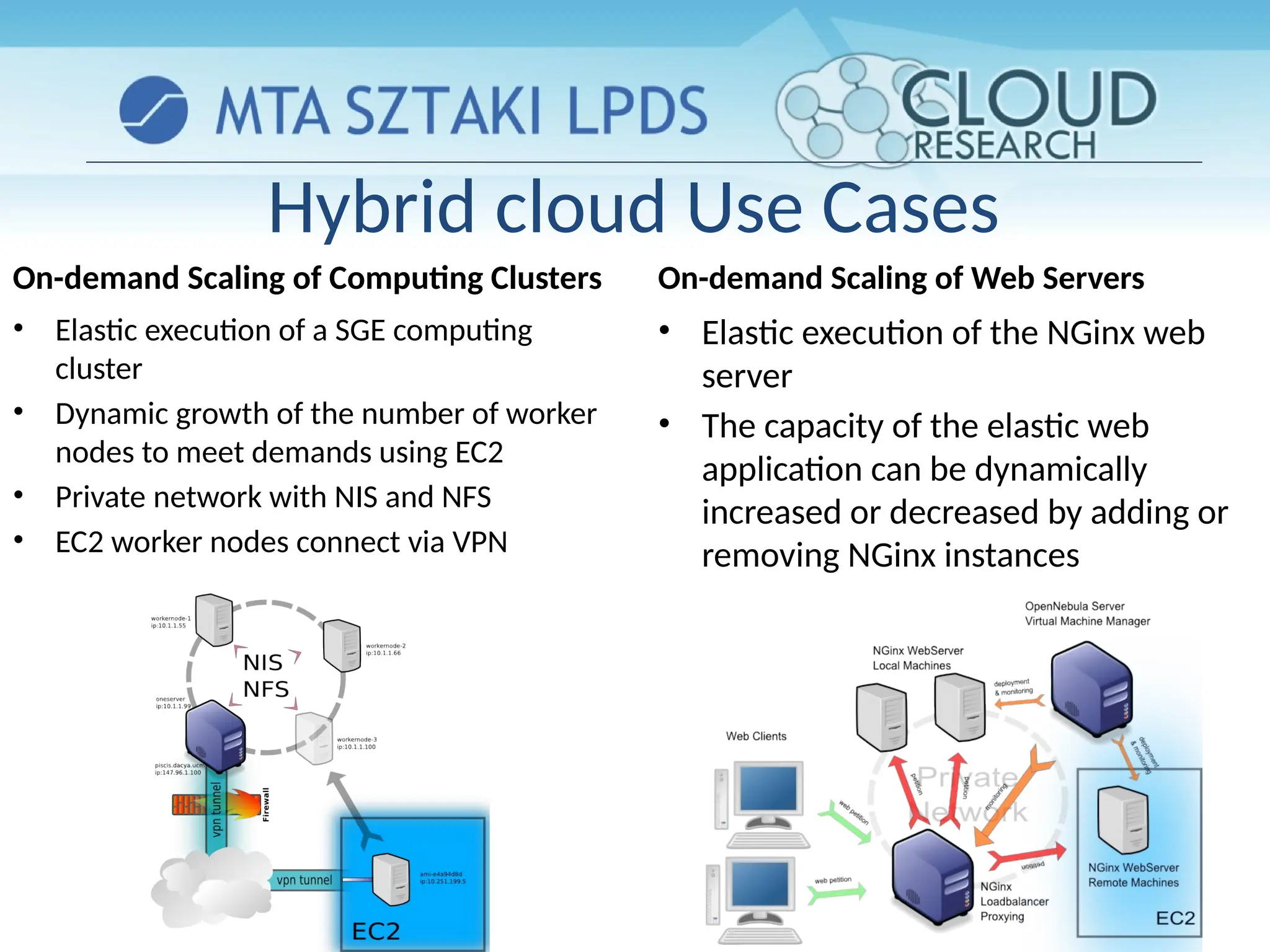
Hybrid cloud Use Cases
On-demand Scaling of Computing Clusters
• Elastic execution of a SGE computing
cluster
• Dynamic growth of the number of worker
nodes to meet demands using EC2
• Private network with NIS and NFS
• EC2 worker nodes connect via VPN
On-demand Scaling of Web Servers
• Elastic execution of the NGinx web
server
• The capacity of the elastic web
application can be dynamically
increased or decreased by adding or
removing NGinx instances
Questions?
https://www.lpds.sztaki.hu/CloudResearch
Upcoming Conference Special Session organized by our group:
http://users.iit.uni-miskolc.hu/~kecskemeti/PDP13CC/

Cloud using opennebulla for research work.pptx

  • 1.
    Clouds using Opennebula GaborKecskemeti kecskemeti.gabor@sztaki.mta.hu http://www.lpds.sztaki.hu/CloudResearch This presentation is heavily based on multiple presentations of the following people: Ignacio M. Llorente, Rubén S. Montero, Jaime Melis, Javier Fontán, Rafael Moreno
  • 2.
    Outline • Virtual infrastructuremanagers • OpenNebula as a whole • Architectural view on OpenNebula • Constructing a Private cloud • Virtual Machines in OpenNebula • Constructing a Hybrid cloud
  • 3.
  • 4.
    Why a VirtualInfrastructure Manager? hypervisor hypervisor hypervisor hypervisor OpenNebula (VIM) VM VM VM VM  VMs are great!!...but something more is needed  Where did/do I put my VM? (scheduling & monitoring)  How do I provision a new cluster node? (clone & context)  What MAC addresses are available? (networking)  Provides a uniform view of the resource pool  Life-cycle management and monitoring of VM  The VIM integrates Image, Network and Virtualization
  • 5.
    • Dynamic deploymentand re-placement of virtual machines on a pool of physical resources • Transform a rigid distributed physical infrastructure into a flexible and agile virtual infrastructure • Backend of Public Cloud: Internal management of the infrastructure • Private Cloud: Virtualization of cluster or data-center for internal users • Cloud Interoperation: On- demand access to public clouds Extending the Benefits of Virtualization to Clusters
  • 6.
    Distributed VM ManagementModel Virtual Machine Management Model Service as Management Entity • Service structure • Service components run in VMs • Inter-connection relationship • Placement constraints • The VM Manager is service agnostic • Provide infrastructure context
  • 7.
  • 8.
    An Open-source Toolkitto Build your IaaS Cloud • Private Cloud to simplify and optimize internal operations • Hybrid Cloud to supplement the capacity of the Private Cloud • Public Cloud to expose your Private to external users Enabling Technology to Build your Cloud What is OpenNebula?
  • 9.
    Building the IndustryStandard Open Source Cloud Computing Tool Lead Innovation in Enterprise-Class Cloud Computing Management ●Develop, maintain and assure the quality of OpenNebula ●Collaborate with open-source and research projects and communities ●Support the community and the ecosystem An Active and Engaged Community ●4,000 downloads/month ●100 active contributors ●OSS distribution channels From a Research Project on Scalable Management of VMs: 2005 2006 2007 2008 2009 2010 2011 2012 Research Project TP1 v1.0 v1.2 v1.4 v2.0 v2.2 European Funding What is the OpenNebula Open-Source Project? v3.4 v3.0 v3.2
  • 10.
    The Benefits ofOpenNebula • For the Infrastructure Manager • Centralized management of VM workload and distributed infrastructures • Support for VM placement policies: balance of workload, server consolidation… • Dynamic resizing of the infrastructure • Dynamic partition and isolation of clusters • Dynamic scaling of private infrastructure to meet fluctuating demands • Lower infrastructure expenses combining local and remote Cloud resources • For the Infrastructure User • Faster delivery and scalability of services • Support for heterogeneous execution environments • Full control of the lifecycle of virtualized services management
  • 11.
    Interoperability From theCloud Consumer Perspective • Standards (de facto and de jure) and adapters can be used to leverage existing ecosystems and ensure portability across providers....
  • 12.
    Interoperability from theCloud Provider perspective • Interoperable (platform independent), innovative (feature-rich) and proven (mature to run in production).
  • 13.
    The Benefits forSystem Integrators • Fits into any existing data center, due to its open, flexible and extensible interfaces, architecture and components • Builds any type of Cloud deployment • Open source software, Apache license • Seamless integration with any product and service in the cloud ecosystem and management tool in the data center, such as – cloud providers – VM managers – virtual image managers – service managers – management tools – schedulers
  • 14.
    The main featuresof OpenNebula Feature Function Internal Interface • Unix-like CLI for fully management of VM life-cycle and physical boxes • XML-RPC API and libvirt virtualization API Scheduler • Requirement/rank matchmaker allowing the definition of workload and resource-aware allocation policies • Support for advance reservation of capacity through Haizea Virtualization Management • Xen, KVM, and VMware • Generic libvirt connector (VirtualBox planned for 1.4.2) Image Management • General mechanisms to transfer and clone VM images Network Management • Definition of isolated virtual networks to interconnect VMs Service Management and Contextualization • Support for multi-tier services consisting of groups of inter-connected VMs, and their auto- configuration at boot time Security • Management of users by the infrastructure administrator Fault Tolerance • Persistent database backend to store host and VM information Scalability • Tested in the management of medium scale infrastructures with hundreds of servers and VMs (no scalability issues has been reported) Installation • Installation on a UNIX cluster front-end without requiring new services • Distributed in Ubuntu 9.04 (Jaunty Jackalope) Flexibility and Extensibility • Open, flexible and extensible architecture, interfaces and components, allowing its integration with any product or tool
  • 15.
    Platform ISF VMwareVsphere Eucalyptus Nimbus OpenNebula Virtualization Management VMware, Xen VMware Xen, KVM Xen Xen, KVM, VMware Virtual Network Management Yes Yes No Yes Yes Image Management Yes Yes Yes Yes Yes Service Contextualizatio n No No No Yes Yes Scheduling Yes Yes No No Yes Administration Interface Yes Yes No No Yes Hybrid Cloud Computing No No No No Yes Cloud Interfaces No vCloud EC2 WSRF, EC2 EC2 Query, OGF OCCI Flexibility and Extensibility Yes No Yes Yes Yes Open Source No No GPL Apache Apache Comparison with Similar Technologies
  • 16.
  • 17.
  • 18.
    The Core •Request manager: Provides a XML-RPC interface to manage and get information about ONE entities. • SQL Pool: Database that holds the state of ONE entities. • VM Manager (virtual machine): Takes care of the VM life cycle. • Host Manager: Holds handling information about hosts. • VN Manager (virtual network): This component is in charge of generating MAC and IP addresses.
  • 19.
    The tools layer •Scheduler: – Searches for physical hosts to deploy newly defined VMs • Command Line Interface: – Commands to manage OpenNebula. – onevm: Virtual Machines • create, list, migrate… – onehost: Hosts • create, list, disable… – onevnet: Virtual Networks • create, list, delete…
  • 20.
    The drivers layer •Transfer Driver: Takes care of the images. – cloning, deleting, creating swap image… • Virtual Machine Driver: Manager of the lifecycle of a virtual machine – deploy, shutdown, poll, migrate… • Information Driver: Executes scripts in physical hosts to gather information about them – total memory, free memory, total cpus, cpu consumed…
  • 21.
    Process separation • Scheduleris a separated process, just like command line interface. • Drivers are also separated processes using a simple text messaging protocol to communicate with OpenNebula Core Daemon (oned)
  • 22.
  • 23.
    System Overview  Executesthe OpenNebula Services  Usually acts as a classical cluster front-end  Provides physical resources to VMs  Must have a hypervisor installed  Modular components to interact with the cluster services  Types: storage, monitoring, virtualization and network  Repository of VM images  Multiple backends (LVM, iSCSI..) The same host can be can be a
  • 24.
    Complex Storage behindOpenNebula Datastore Transfer Manager Drivers shared ssh iscsi qcow vmware System OK OK File-System OK OK OK iSCSI OK VMware OK OK OK Virtual machines and their images are represented as files Virtual machines and their images are represented as block devices (just like a disk) Storage
  • 25.
    System Datastore withShared Transfer Manager Driver System Datastore Storage
  • 26.
     Image Repository (systemdatastore): Any storage medium for the VM images (usually a high performing SAN)  OpenNebula supports multiple back-ends (e.g. LVM for fast cloning)  The front-end must have access to the repository  VM Directory: The home of the VM in the cluster node  Stores checkpoints, description files and VM disks  Actual operations over the VM directory depends on the storage medium  Should be shared for live-migrations  You can go on without a shared FS and use the SSH back-end  Defaults to $ONE_LOCATION/var/$VM_ID Dimensioning the Storage... Example: A 64 core cluster will typically run around 80VMs, each VM will require an average of 10GB of disk space. So you will need ~800GB for /srv/cloud/one, you will also want to store 10-15 master images so ~200GB for /srv/cloud/images. A 1TB /srv/cloud will be enough for this example setup. Preparing the storage for a simple private cloud Storage
  • 27.
    Networking for privateclouds  OpenNebula management operations use ssh connections  Image traffic, may require the movement of heavy files (VM images, checkpoints). Dedicated storage links may be a good idea  VM demands, consider the typical requirements of your VMs. Several NICs to support the VM traffic may be a good idea  OpenNebula relies on bridge networking for the VMs Network
  • 28.
    Example network setupin a private cloud Network
  • 29.
    Virtual Networks  A VirtualNetwork in OpenNebula  Defines a separated MAC/IP address space to be used by VMs  Each virtual network is associated with a physical network through a bridge  Virtual Networks can be isolated (at layer 2 level) with ebtables and hooks  Virtual Networks are managed with the onevnet utility Network
  • 30.
    Users • A Userin OpenNebula – Is a pair of username:password • Only oneadmin can add/delete users • Users are managed with the oneuser utility Users
  • 31.
    User Management • Nativeuser support since v1.4 – oneadmin: privileged account • Usage, management, administrative rights for: – Templates, VMs, Images, Virtual Networks • Through ACLs further operations/rights are available: – Rights for users, groups, datastores and clusters – Creation operation • SHA1 passwords (+AA module) – Stored in FS – Alternatively in environment Users
  • 32.
  • 33.
  • 34.
    Preparing VMs forOpenNebula • Virtual Machines are managed with the oneuser utility • You can use any VM prepared for the target hypervisor • Hint I: Place the vmcontext.sh script in the boot process to make better use of vlans • Hint II: Do not pack useless information in the VM images: – swap. OpenNebula can create swap partitions on-the-fly in the target host – Scratch or volatile storage. OpenNebula can create plain FS on-the-fly in the target host • Hint III: Install once and deploy many; prepare master images • Hint IV: Do not put private information (e.g. ssh keys) in the master images, use the CONTEXT • Hint V: Pass arbitrary data to a master image using CONTEXT VMs
  • 35.
    Option Description NAME •Name that the VM will get for description purposes. CPU • Percentage of CPU divided by 100 required for the Virtual Machine. OS (KERNEL, INITRD) • Path of the kernel and initrd files to boot from. DISK (SOURCE, TARGET, CLONE, TYPE) • Description of a disk image to attach to the VM. NIC (NETWORK) • Definition of a virtual network the VM will be attached to. VM Description • Multiple disk an network interfaces can be specified just adding more disk/nic statements. • To create swap images you can specify TYPE=swap, SIZE=<size in MB>. • By default disk images are cloned, if you do not want that to happen CLONE=no can be specified and the VM will attach the original image. VMs
  • 36.
  • 37.
    Pending state • Aftersubmitting a VM description to ONE it is added to the database and its state is set to PENDING. • In this state IP and MAC addresses are also chosen if they are not explicitly defined. • The scheduler awakes every 30 seconds and looks for VM descriptions in PENDING state and searches for a physical node that meets its requirements. Then a deploy XML-RPC message is sent to oned to make it run in the selected node. • Deployment can be also made manually using the Command Line Interface: ⇒ onevm deploy <vmid> <hostid> VMs
  • 38.
    Prolog state • InPROLOG state the Transfer Driver prepares the images to be used by the VM. • Transfer actions: – CLONE: Makes a copy of a disk image file to be used by the VM. If Clone option for that file is set to false and the Transfer Driver is configured for NFS then a symbolic link is created. – MKSWAP: Creates a swap disk image on the fly to be used by the VM if it is specified in the VM description. VMs
  • 39.
    Boot state • Inthis state a deployment file specific for the virtualization technology configured for the physical host is generated using the information provided in the VM description file. Then Virtual Machine Driver sends deploy command to the virtual host to start the VM. • The VM will be in this state until deployment finishes or fails. VMs
  • 40.
    Contextualization • The ISOimage has the contextualization for that VM: – context.sh: contains configuration variables – init.sh: script called by VM at start to configure specific services – certificates: directory that contains certificates for some service – service.conf: service configuration • Requirements against the VM: – Should be prepared to use the contextualization ISO image. – Should mount the ISO image at boot time. – After boot it should use the scripts on the ISO image to make use of the information provided. User provided, OpenNebula provided contextualization info VMs
  • 41.
    Running and Shutdownstates • While the VM is in RUNNING state it will be periodically polled to get its consumption and state. • In SHUTDOWN state Virtual Machine Driver will send the shutdown command to the underlying virtual infrastructure. VMs
  • 42.
    Epilog state • InEPILOG state the Transfer Manager Driver is called again to perform this actions: – Copy back the images that have SAVE=yes option. – Delete images that were cloned or generated by MKSWAP. VMs
  • 43.
  • 44.
  • 45.
    Making an AmazonEC2 hybrid • Amazon EC2 cloud is managed by OpenNebula as any other cluster node – You can use several accounts by adding a driver for each account (use the arguments attribute, -k and -c options). Then create a host that uses the driver – You can use multiple EC2 zones, add a driver for each zone (use the arguments attribute, -u option), and a host that uses that driver – You can limit the use of EC2 instances by modifying the IM file
  • 46.
    Using an EC2hybrid cloud • Virtual Machines can be instantiated locally or in EC2 • The VM template must provide a description for both instantiation methods. • The EC2 counterpart of your VM (AMI_ID) must be available for the driver account • The EC2 VM template attribute should describe not only the VM’s properties but the contact details of the external cloud provider
  • 47.
  • 48.
    Hybrid cloud UseCases On-demand Scaling of Computing Clusters • Elastic execution of a SGE computing cluster • Dynamic growth of the number of worker nodes to meet demands using EC2 • Private network with NIS and NFS • EC2 worker nodes connect via VPN On-demand Scaling of Web Servers • Elastic execution of the NGinx web server • The capacity of the elastic web application can be dynamically increased or decreased by adding or removing NGinx instances
  • 49.
    Questions? https://www.lpds.sztaki.hu/CloudResearch Upcoming Conference SpecialSession organized by our group: http://users.iit.uni-miskolc.hu/~kecskemeti/PDP13CC/

Editor's Notes

  • #5 Datacenters for flexibility providing services Cloud providers willing to offer their static infrastructure
  • #6 Datacenters for flexibility providing services Cloud providers willing to offer their static infrastructure
  • #10 OpenNebula provides benefits for different stakeholders For service managers, it provides We will talk about this later, related to Green IT Provides an open… This allows its integration… cloud providers (we now have support for EC2 and EH), hypervisors (we have support for Xen, KVM), we provide our own VM image manager but…
  • #13 OpenNebula provides benefits for different stakeholders For service managers, it provides We will talk about this later, related to Green IT Provides an open… This allows its integration… cloud providers (we now have support for EC2 and EH), hypervisors (we have support for Xen, KVM), we provide our own VM image manager but…
  • #14 Three types of features according to the different deployment models About features…
  • #45 Create your EC2 hybrid cloud by adding a new host $ onehost create ec2 im_ec2 vmm_ec2 tm_dummy $ onehost list ID NAME RVM TCPU FCPU ACPU TMEM FMEM STAT 0 84.21.x.y 0 200 200 200 2017004 1667080 on 1 84.21.x.z 1 200 200 200 2017004 1681676 on 2 ec2 0 500 500 500 8912896 8912896 on
  • #47 On-demand resource provisioning Heterogenous workloads
  • #48 In order to illustrate the functionality provided by OpenNebula, we have developed some use cases. For example: On-demand…. That is the …This use case demonstrates the dynamic,,, On-demand… That is the … This use case illustrates how