Dirgha Raj Joshi | Ph.D.
Nepal
Open and e-Learning with ICT Utilization on
Teaching Learning Activities
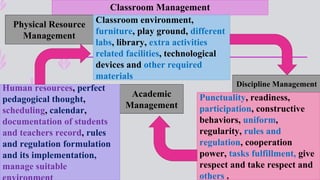
Classroom Management
Physical Resource
Management
Discipline Management
Academic
Management
Classroom environment,
furniture, play ground, different
labs, library, extra activities
related facilities, technological
devices and other required
materials
Human resources, perfect
pedagogical thought,
scheduling, calendar,
documentation of students
and teachers record, rules
and regulation formulation
and its implementation,
manage suitable
Punctuality, readiness,
participation, constructive
behaviors, uniform,
regularity, rules and
regulation, cooperation
power, tasks fulfillment, give
respect and take respect and
others .
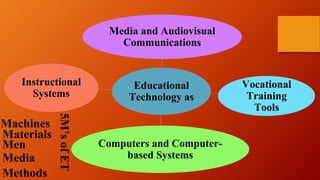
Educational
Technology as
Media and Audiovisual
Communications
Vocational
Training
Tools
Computers and Computer-
based Systems
Instructional
Systems
5M’sofET
Machines
Materials
Men
Media
Methods
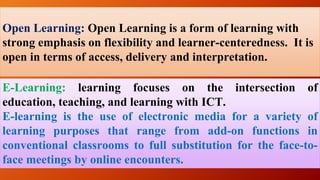
Open Learning: Open Learning is a form of learning with
strong emphasis on flexibility and learner-centeredness. It is
open in terms of access, delivery and interpretation.
E-Learning: learning focuses on the intersection of
education, teaching, and learning with ICT.
E-learning is the use of electronic media for a variety of
learning purposes that range from add-on functions in
conventional classrooms to full substitution for the face-to-
face meetings by online encounters.
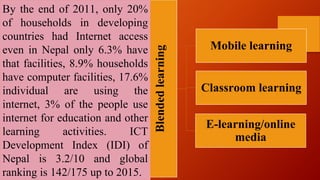
Blendedlearning
Mobile learning
Classroom learning
E-learning/online
media
By the end of 2011, only 20%
of households in developing
countries had Internet access
even in Nepal only 6.3% have
that facilities, 8.9% households
have computer facilities, 17.6%
individual are using the
internet, 3% of the people use
internet for education and other
learning activities. ICT
Development Index (IDI) of
Nepal is 3.2/10 and global
ranking is 142/175 up to 2015.
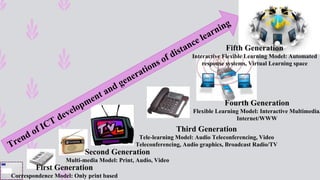
Third Generation
Tele-learning Model: Audio Teleconferencing, Video
Teleconferencing, Audio graphics, Broadcast Radio/TV
First Generation
Correspondence Model: Only print based
Fourth Generation
Flexible Learning Model: Interactive Multimedia,
Internet/WWW
Fifth Generation
Interactive Flexible Learning Model: Automated
response systems, Virtual Learning space
Second Generation
Multi-media Model: Print, Audio, Video
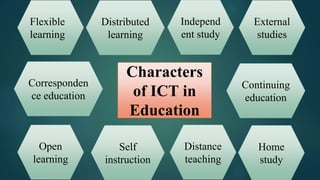
Characters
of ICT in
Education
Distributed
learning
Continuing
education
External
studies
Independ
ent study
Home
study
Distance
teaching
Corresponden
ce education
Self
instruction
Open
learning
Flexible
learning
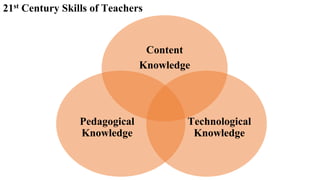
Content
Knowledge
Technological
Knowledge
Pedagogical
Knowledge
21st Century Skills of Teachers
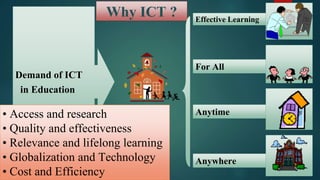
Why ICT ? Effective Learning
Demand of ICT
in Education
For All
Anytime
Anywhere
• Access and research
• Quality and effectiveness
• Relevance and lifelong learning
• Globalization and Technology
• Cost and Efficiency
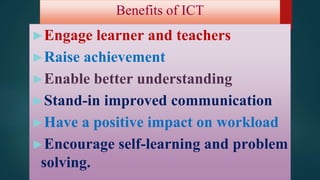
Benefits of ICT
►Engage learner and teachers
►Raise achievement
►Enable better understanding
►Stand-in improved communication
►Have a positive impact on workload
►Encourage self-learning and problem
solving.
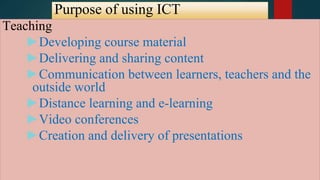
Purpose of using ICT
Teaching
►Developing course material
►Delivering and sharing content
►Communication between learners, teachers and the
outside world
►Distance learning and e-learning
►Video conferences
►Creation and delivery of presentations
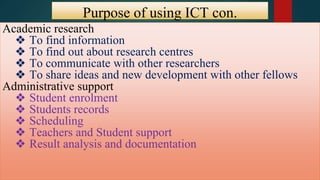
Purpose of using ICT con.
con.Academic research
❖ To find information
❖ To find out about research centres
❖ To communicate with other researchers
❖ To share ideas and new development with other fellows
Administrative support
❖ Student enrolment
❖ Students records
❖ Scheduling
❖ Teachers and Student support
❖ Result analysis and documentation
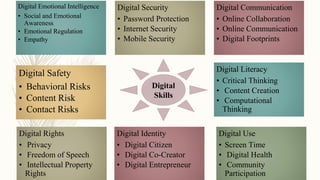
Digital Emotional Intelligence
• Social and Emotional
Awareness
• Emotional Regulation
• Empathy
Digital Security
• Password Protection
• Internet Security
• Mobile Security
Digital Communication
• Online Collaboration
• Online Communication
• Digital Footprints
Digital Safety
• Behavioral Risks
• Content Risk
• Contact Risks
Digital Use
• Screen Time
• Digital Health
• Community
Participation
Digital Literacy
• Critical Thinking
• Content Creation
• Computational
Thinking
Digital Rights
• Privacy
• Freedom of Speech
• Intellectual Property
Rights
Digital Identity
• Digital Citizen
• Digital Co-Creator
• Digital Entrepreneur
Digital
Skills
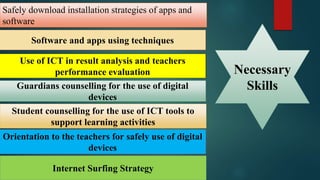
Software and apps using techniques
Use of ICT in result analysis and teachers
performance evaluation
Guardians counselling for the use of digital
devices
Student counselling for the use of ICT tools to
support learning activities
Orientation to the teachers for safely use of digital
devices
Internet Surfing Strategy
Safely download installation strategies of apps and
software
Necessary
Skills
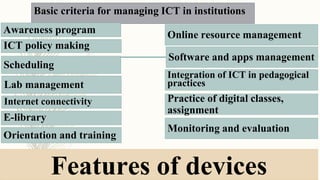
Basic criteria for managing ICT in institutions
Awareness program
Integration of ICT in pedagogical
practices
Monitoring and evaluation
Scheduling
Online resource management
Software and apps management
ICT policy making
E-library
Practice of digital classes,
assignment
Orientation and training
Lab management
Internet connectivity
Features of devices
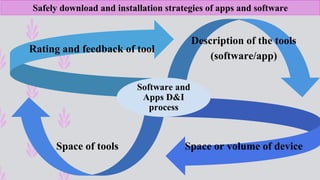
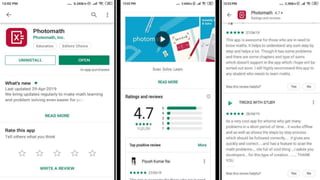
Safely download and installation strategies of apps and software
Rating and feedback of tool
Description of the tools
(software/app)
Space of tools Space or volume of device
Software and
Apps D&I
process
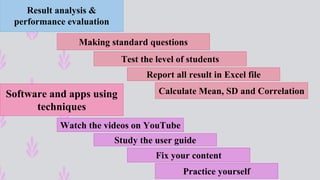
Software and apps using
techniques
Result analysis &
performance evaluation
Watch the videos on YouTube
Study the user guide
Practice yourself
Fix your content
Making standard questions
Test the level of students
Report all result in Excel file
Calculate Mean, SD and Correlation
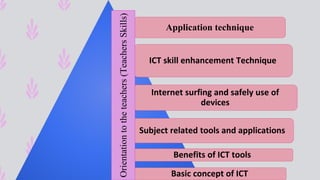
Application technique
ICT skill enhancement Technique
Internet surfing and safely use of
devices
Subject related tools and applications
Benefits of ICT tools
Basic concept of ICT
Orientationtotheteachers(TeachersSkills)
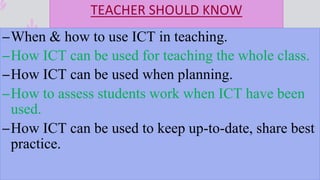
TEACHER SHOULD KNOW
–When & how to use ICT in teaching.
–How ICT can be used for teaching the whole class.
–How ICT can be used when planning.
–How to assess students work when ICT have been
used.
–How ICT can be used to keep up-to-date, share best
practice.
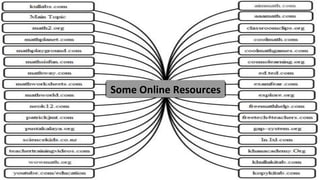
Some Online Resources
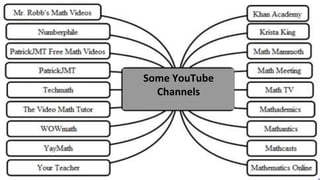
Some YouTube
Channels
ANY
QUARRIES
Thanks

Open and e learning

  • 1.
    Dirgha Raj Joshi| Ph.D. Nepal Open and e-Learning with ICT Utilization on Teaching Learning Activities
  • 2.
    Classroom Management Physical Resource Management DisciplineManagement Academic Management Classroom environment, furniture, play ground, different labs, library, extra activities related facilities, technological devices and other required materials Human resources, perfect pedagogical thought, scheduling, calendar, documentation of students and teachers record, rules and regulation formulation and its implementation, manage suitable Punctuality, readiness, participation, constructive behaviors, uniform, regularity, rules and regulation, cooperation power, tasks fulfillment, give respect and take respect and others .
  • 3.
    Educational Technology as Media andAudiovisual Communications Vocational Training Tools Computers and Computer- based Systems Instructional Systems 5M’sofET Machines Materials Men Media Methods
  • 4.
    Open Learning: OpenLearning is a form of learning with strong emphasis on flexibility and learner-centeredness. It is open in terms of access, delivery and interpretation. E-Learning: learning focuses on the intersection of education, teaching, and learning with ICT. E-learning is the use of electronic media for a variety of learning purposes that range from add-on functions in conventional classrooms to full substitution for the face-to- face meetings by online encounters.
  • 5.
    Blendedlearning Mobile learning Classroom learning E-learning/online media Bythe end of 2011, only 20% of households in developing countries had Internet access even in Nepal only 6.3% have that facilities, 8.9% households have computer facilities, 17.6% individual are using the internet, 3% of the people use internet for education and other learning activities. ICT Development Index (IDI) of Nepal is 3.2/10 and global ranking is 142/175 up to 2015.
  • 6.
    Third Generation Tele-learning Model:Audio Teleconferencing, Video Teleconferencing, Audio graphics, Broadcast Radio/TV First Generation Correspondence Model: Only print based Fourth Generation Flexible Learning Model: Interactive Multimedia, Internet/WWW Fifth Generation Interactive Flexible Learning Model: Automated response systems, Virtual Learning space Second Generation Multi-media Model: Print, Audio, Video
  • 7.
    Characters of ICT in Education Distributed learning Continuing education External studies Independ entstudy Home study Distance teaching Corresponden ce education Self instruction Open learning Flexible learning
  • 8.
  • 9.
    Why ICT ?Effective Learning Demand of ICT in Education For All Anytime Anywhere • Access and research • Quality and effectiveness • Relevance and lifelong learning • Globalization and Technology • Cost and Efficiency
  • 10.
    Benefits of ICT ►Engagelearner and teachers ►Raise achievement ►Enable better understanding ►Stand-in improved communication ►Have a positive impact on workload ►Encourage self-learning and problem solving.
  • 11.
    Purpose of usingICT Teaching ►Developing course material ►Delivering and sharing content ►Communication between learners, teachers and the outside world ►Distance learning and e-learning ►Video conferences ►Creation and delivery of presentations
  • 12.
    Purpose of usingICT con. con.Academic research ❖ To find information ❖ To find out about research centres ❖ To communicate with other researchers ❖ To share ideas and new development with other fellows Administrative support ❖ Student enrolment ❖ Students records ❖ Scheduling ❖ Teachers and Student support ❖ Result analysis and documentation
  • 13.
    Digital Emotional Intelligence •Social and Emotional Awareness • Emotional Regulation • Empathy Digital Security • Password Protection • Internet Security • Mobile Security Digital Communication • Online Collaboration • Online Communication • Digital Footprints Digital Safety • Behavioral Risks • Content Risk • Contact Risks Digital Use • Screen Time • Digital Health • Community Participation Digital Literacy • Critical Thinking • Content Creation • Computational Thinking Digital Rights • Privacy • Freedom of Speech • Intellectual Property Rights Digital Identity • Digital Citizen • Digital Co-Creator • Digital Entrepreneur Digital Skills
  • 14.
    Software and appsusing techniques Use of ICT in result analysis and teachers performance evaluation Guardians counselling for the use of digital devices Student counselling for the use of ICT tools to support learning activities Orientation to the teachers for safely use of digital devices Internet Surfing Strategy Safely download installation strategies of apps and software Necessary Skills
  • 15.
    Basic criteria formanaging ICT in institutions Awareness program Integration of ICT in pedagogical practices Monitoring and evaluation Scheduling Online resource management Software and apps management ICT policy making E-library Practice of digital classes, assignment Orientation and training Lab management Internet connectivity Features of devices
  • 16.
    Safely download andinstallation strategies of apps and software Rating and feedback of tool Description of the tools (software/app) Space of tools Space or volume of device Software and Apps D&I process
  • 18.
    Software and appsusing techniques Result analysis & performance evaluation Watch the videos on YouTube Study the user guide Practice yourself Fix your content Making standard questions Test the level of students Report all result in Excel file Calculate Mean, SD and Correlation
  • 19.
    Application technique ICT skillenhancement Technique Internet surfing and safely use of devices Subject related tools and applications Benefits of ICT tools Basic concept of ICT Orientationtotheteachers(TeachersSkills)
  • 20.
    TEACHER SHOULD KNOW –When& how to use ICT in teaching. –How ICT can be used for teaching the whole class. –How ICT can be used when planning. –How to assess students work when ICT have been used. –How ICT can be used to keep up-to-date, share best practice.
  • 21.
  • 22.
  • 25.