Virtual Voices:
Collaboration in an online
environment using VoiceThread
Presentation for Undergraduate Module
Decoding the Digital Society
University of Hull
By Margaret Korosec, PhD Student and eLearning Strategist
17 February 2014
Overview

Salac, M. (2013). Framed [Photo]. Retrieved from http://www.flickr.com/
Overview
• Why should we collaborate online?
• How do we collaborate online?
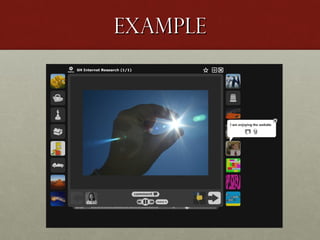
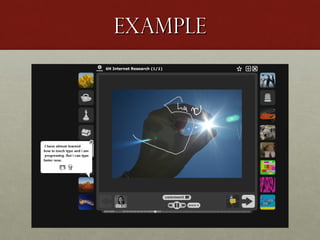
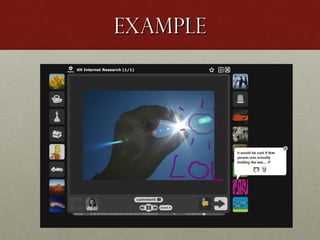
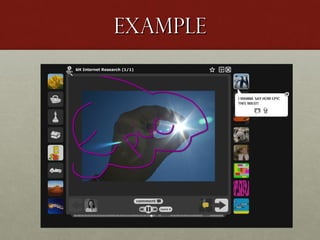
• Useful technology?
• Case study
• Year 6 class in Hull, UK
• Example: from introduction to collaboration in 30
seconds

• Further resources
Why Collaborate?
• Cognitive processing occurs when interacting with other
students (Piaget, 1932).
• Scaffolding or guided participation enables students to
learn from one another (Vygotsky, 1978).
• Increased effort when working with other students
(Slavin, 1983).
• By constructing knowledge together student collaboration
leads to new learning opportunities (Barron, 2000).
• According to Kearney, M. Schuck, S., Burden, K., &
Aubusson, P. (2012) collaboration is one part of a
pedagogical framework for mobile learning, along with
personalisation and authenticity.
Why Collaborate?

University of British Colombia (2010) Supporting critical thinking online (Wiki) [Online] Available at:
https://wiki.ubc.ca/Documentation:Supporting_Critical_Thinking_Online/Critical_Thinking_and_Cognitive_Presence
(Accessed: 14 Feb 2014)
How to Collaborate
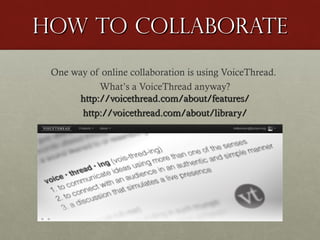
One way of online collaboration is using VoiceThread.
What’s a VoiceThread anyway?
http://voicethread.com/about/features/
http://voicethread.com/about/library/
How to Collaborate
A VoiceThread is a collaborative, interactive,
multimedia slide show that holds images,
documents, and videos. It allows participants to
navigate through media chosen by the creator
(teacher or student), such as a presentation or just
one image, and leave comments in several ways:
recording voice (with a microphone), typing text, or
recording video (via a webcam).
Useful
Technology?

Technology
can get in the way…
but it does not have to!
Just be prepared.

Stewart, N. (2013) Held back by technology? [Photo].
Retrieved from http://www.flickr.com/
technology
The following ought to be considered with any online technology:
…students have access;
…teachers know how to use the online tool;
…contributions are saved (often “automagically”….);
…understand limitations of free access (no analytics and limited
creations);
…look into enterprise licenses if deemed useful for your school
(useful analytics and unlimited creations);
…consider integration into your school system.
Take a closer look

Claremont Colleges Digital Library (1965). Students In Class – Pitzer College. [Photo]. Retrieved from
http://www.flickr.com/
Case study
2013/2014 Academic Year:
•As Technology-Enhanced Learning Coordinator, the
presenter introduced VoiceThread to teachers at a secondary
school in Hull, UK.
•As ICT Teacher, the presenter introduced VoiceThread to a
Year 6 class.

-- We will take a closer look at the Year 6 class --
Case study
• VoiceThread was introduced to a Year 6 class after completing
two lessons on the importance of using keywords in internet
research. This was also the first instance of using VoiceThread
in the school and the Year 6 students were eager to be involved
with this experiment.
• The point of this instance of VoiceThread was to reflect on the
important messages from the previous lessons and to share
these ideas with classmates.
Case study
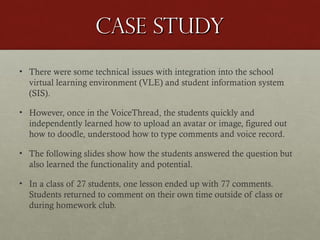
• There were some technical issues with integration into the school
virtual learning environment (VLE) and student information system
(SIS).
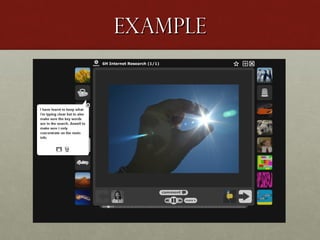
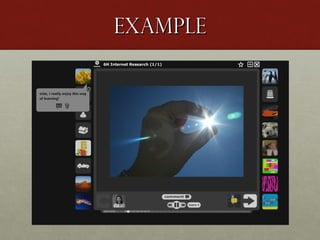
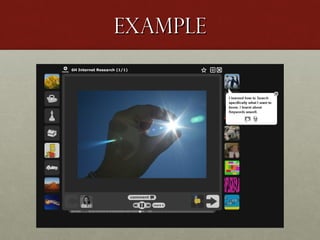
• However, once in the VoiceThread, the students quickly and
independently learned how to upload an avatar or image, figured out
how to doodle, understood how to type comments and voice record.
• The following slides show how the students answered the question but
also learned the functionality and potential.
• In a class of 27 students, one lesson ended up with 77 comments.
Students returned to comment on their own time outside of class or
during homework club.
Example
Example
Example
Example
Example
Example
Example
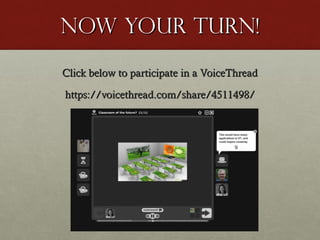
Now your turn!
Click below to participate in a VoiceThread
https://voicethread.com/share/4511498/
Which
direction?
VoiceThread is only one example
of an online, multimedia tool for
collaboration. There are many
more!
Explore what works for you as a
student and then expand into what
works for your teaching.

Lee, S. (2009). Every which way in downtown Brooklyn [Photo].
Retrieved from http://www.flickr.com/
Resources
Explore VoiceThread http://voicethread.com/
Create an account.
Explore the samples.
Look up Michelle Pacansky-Brock for practical tips
• On VoiceThread
• On YouTube
What will you offer
your students?

MacPhail, W. (2009). Students in the Class. [Photo]. Retrieved from http://www.flickr.com/
Margaret Korosec
eLearning Strategist
and

Thank you

PhD Student @
University of Hull
~
Follow on Twitter
@mdkorosec

Online Collaboration using VoiceThread

  • 1.
    Virtual Voices: Collaboration inan online environment using VoiceThread Presentation for Undergraduate Module Decoding the Digital Society University of Hull By Margaret Korosec, PhD Student and eLearning Strategist 17 February 2014
  • 2.
    Overview Salac, M. (2013).Framed [Photo]. Retrieved from http://www.flickr.com/
  • 3.
    Overview • Why shouldwe collaborate online? • How do we collaborate online? • Useful technology? • Case study • Year 6 class in Hull, UK • Example: from introduction to collaboration in 30 seconds • Further resources
  • 4.
    Why Collaborate? • Cognitiveprocessing occurs when interacting with other students (Piaget, 1932). • Scaffolding or guided participation enables students to learn from one another (Vygotsky, 1978). • Increased effort when working with other students (Slavin, 1983). • By constructing knowledge together student collaboration leads to new learning opportunities (Barron, 2000). • According to Kearney, M. Schuck, S., Burden, K., & Aubusson, P. (2012) collaboration is one part of a pedagogical framework for mobile learning, along with personalisation and authenticity.
  • 5.
    Why Collaborate? University ofBritish Colombia (2010) Supporting critical thinking online (Wiki) [Online] Available at: https://wiki.ubc.ca/Documentation:Supporting_Critical_Thinking_Online/Critical_Thinking_and_Cognitive_Presence (Accessed: 14 Feb 2014)
  • 6.
    How to Collaborate Oneway of online collaboration is using VoiceThread. What’s a VoiceThread anyway? http://voicethread.com/about/features/ http://voicethread.com/about/library/
  • 7.
    How to Collaborate AVoiceThread is a collaborative, interactive, multimedia slide show that holds images, documents, and videos. It allows participants to navigate through media chosen by the creator (teacher or student), such as a presentation or just one image, and leave comments in several ways: recording voice (with a microphone), typing text, or recording video (via a webcam).
  • 8.
    Useful Technology? Technology can get inthe way… but it does not have to! Just be prepared. Stewart, N. (2013) Held back by technology? [Photo]. Retrieved from http://www.flickr.com/
  • 9.
    technology The following oughtto be considered with any online technology: …students have access; …teachers know how to use the online tool; …contributions are saved (often “automagically”….); …understand limitations of free access (no analytics and limited creations); …look into enterprise licenses if deemed useful for your school (useful analytics and unlimited creations); …consider integration into your school system.
  • 10.
    Take a closerlook Claremont Colleges Digital Library (1965). Students In Class – Pitzer College. [Photo]. Retrieved from http://www.flickr.com/
  • 11.
    Case study 2013/2014 AcademicYear: •As Technology-Enhanced Learning Coordinator, the presenter introduced VoiceThread to teachers at a secondary school in Hull, UK. •As ICT Teacher, the presenter introduced VoiceThread to a Year 6 class. -- We will take a closer look at the Year 6 class --
  • 12.
    Case study • VoiceThreadwas introduced to a Year 6 class after completing two lessons on the importance of using keywords in internet research. This was also the first instance of using VoiceThread in the school and the Year 6 students were eager to be involved with this experiment. • The point of this instance of VoiceThread was to reflect on the important messages from the previous lessons and to share these ideas with classmates.
  • 13.
    Case study • Therewere some technical issues with integration into the school virtual learning environment (VLE) and student information system (SIS). • However, once in the VoiceThread, the students quickly and independently learned how to upload an avatar or image, figured out how to doodle, understood how to type comments and voice record. • The following slides show how the students answered the question but also learned the functionality and potential. • In a class of 27 students, one lesson ended up with 77 comments. Students returned to comment on their own time outside of class or during homework club.
  • 14.
  • 15.
  • 16.
  • 17.
  • 18.
  • 19.
  • 20.
  • 21.
    Now your turn! Clickbelow to participate in a VoiceThread https://voicethread.com/share/4511498/
  • 22.
    Which direction? VoiceThread is onlyone example of an online, multimedia tool for collaboration. There are many more! Explore what works for you as a student and then expand into what works for your teaching. Lee, S. (2009). Every which way in downtown Brooklyn [Photo]. Retrieved from http://www.flickr.com/
  • 23.
    Resources Explore VoiceThread http://voicethread.com/ Createan account. Explore the samples. Look up Michelle Pacansky-Brock for practical tips • On VoiceThread • On YouTube
  • 24.
    What will youoffer your students? MacPhail, W. (2009). Students in the Class. [Photo]. Retrieved from http://www.flickr.com/
  • 25.
    Margaret Korosec eLearning Strategist and Thankyou PhD Student @ University of Hull ~ Follow on Twitter @mdkorosec

Editor's Notes

  • #3 Salac, M. (2013). Framed [Photo]. Retrieved from http://www.flickr.com/photos/mik2/6225621707/in/photolist-au8Wri-e4FP3G-bkKu99/
  • #9 Stewart, N. (2013) Held back by technology? [Photo]. Retrieved from http://www.flickr.com/photos/54377432@N07/9968880795/in/photolist-gbV7X6-bbFf3R-e34rvi-9Q4HE3-9pRvLr-dXMpRv-8mVc4V-bWreKo-8Yu5EU-cCpE5Q-cCpEZG-cCpEdm-cCpED1-cCpFDb-cCpFsw-cCpERd-cCpFSd-cCpDTo-cCpFcm-cCpErb-byCfR9-arVKHY-aEsbpA-cYJZD9-acbuo9-arVKHE-dUj6wZ-dUpH3W-dUpH2d-dUpGZG-dUj6uB-dUpGUS-dUpH1q-dUj6tZ-7DByxs-9BUY2v-9id1jr-7Luou3-7Luqru-7LqpQn-7Lqrsk-arSNxg-aqwRFa-aqJ4yE-aqQU4n-aqwRFg-aqwRFk
  • #11 Claremont Colleges Digital Library (1965). Students In Class – Pitzer College. [Photo]. Retrieved from http://www.flickr.com/photos/53970289@N06/5097239229/in/photolist-8LqFCZ-84n71o-9Hq9JB-9Hqdfk-9Ht5QY-9Hqdr8-9Hqdbt-9Ht2Am-9Ht5GC-8LtKkW-8UH1CV-eFCGxb-8LtKjq-8CYA8A-8CYAvb-8CYAhL-8CVuFZ-9Hq9bK-9EmNop-9EmPEc-9EpJoW-9EmNCc-9EpJzo-9EpJH3-9EmPKg-9EmNsT-9EmPk6-9EpJg3-9EpJTw-9EmNPk-9EpJMJ-9EpJuC-9EmNya-9EmY7P
  • #23 Lee, S. (2009). Every which way in downtown Brooklyn [Photo]. Retrieved from http://www.flickr.com/photos/48973657@N00/4160117207/in/photolist-7kBFUK-dSiRbN-7JApH6-dTjYx6-7K8r2Q-7JorFk-dUgb1Q-7K92pY
  • #25 MacPhail, W. (2009). Students in the Class. [Photo]. Retrieved from http://www.flickr.com/