CrowdFusion	
The Front-end Edition, Part I


Red Tettemer Interactive, 3/19/10
Linus Graybill | lgraybill@redtettemer.com | @graybill
Today’s Edumacation
Use what you already know to create themes for
CrowdFusion
  Theme folder structure
  Using CSS, JavaScript, images, and Flash
  Demystifying the CrowdFusion template language
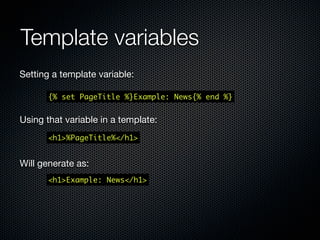
  Setting and getting a template variable
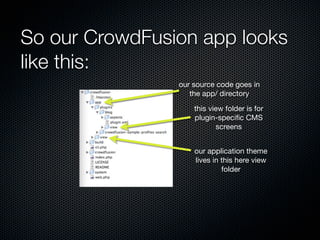
So our CrowdFusion app looks
like this:
                our source code goes in
                   the app/ directory

                    this view folder is for
                    plugin-specific CMS
                           screens


                    our application theme
                    lives in this here view
                             folder
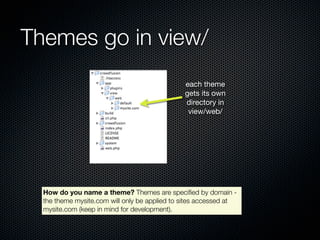
Themes go in view/
                                                each theme
                                                gets its own
                                                directory in
                                                 view/web/


  How do you name a theme? Themes are specified by domain -
  the theme mysite.com will only be applied to sites accessed at
  mysite.com (keep in mind for development).

  Note: Subdomains are supported, so you can have two themes,
  dev.mysite.com (for development) and mysite.com (for production)
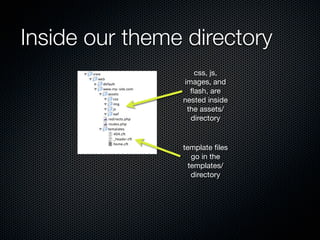
Inside our theme directory
                   css, js,
                images, and
                  flash, are
                nested inside
                 the assets/
                  directory


                template files
                   go in the
                  templates/
                   directory
What’s in a theme?
  CSS (oooh.)
  Javascript       (ahhhh.)


  Images (oooh.)
  Flash (ahhhh.)
  Template files (.cft’s)      (uhhhh.)
Basic theme concepts
A default theme needs to exists because it’s your
fallback.
      For example: If you don’t specify a 404.cft template in
      your theme, default/404.cft will be called in its place.


Themes are assigned based on domain name
      Why? CrowdFusion is optimized for multiple sites running
      from the same CMS.
Basic theme concepts
 All code to be processed by CrowdFusion is
 wrapped in {% ... %}

          {% if Data:#continued-contents %}
                  <p><a href="%RecordLink%">Read more</a></p>
          {% endif %}


                                          We reference a CrowdFusion
A CrowdFusion “if” block is written as:
                                           variable by wrapping the
     {% if ... %} ... {% endif %}
                                               variable in %...%
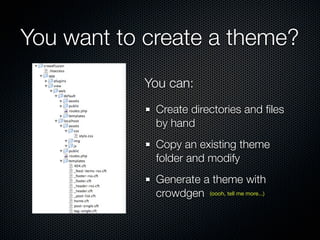
You want to create a theme?
            You can:
             Create directories and files
             by hand
             Copy an existing theme
             folder and modify
             Generate a theme with
             crowdgen (oooh, tell me more...)
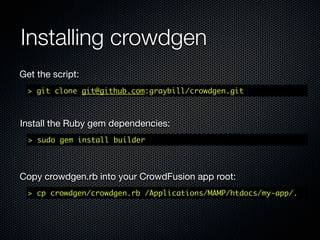
Installing crowdgen	
Get the script:
  > git clone git@github.com:graybill/crowdgen.git


Install the Ruby gem dependencies:
  > sudo gem install builder


Copy crowdgen.rb into your CrowdFusion app root:
  > cp crowdgen/crowdgen.rb /Applications/MAMP/htdocs/my-app/.
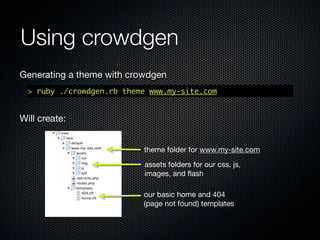
Using crowdgen
Generating a theme with crowdgen
  > ruby ./crowdgen.rb theme www.my-site.com


Will create:


                           theme folder for www.my-site.com
                           assets folders for our css, js,
                           images, and flash

                           our basic home and 404
                           (page not found) templates
Okay, so let’s look at one of
   these template files.
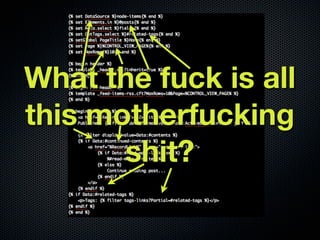
What the fuck is all
this motherfucking
       shit?
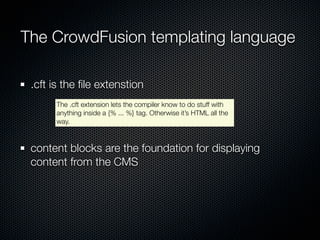
The CrowdFusion templating language

 .cft is the file extenstion
      The .cft extension lets the compiler know to do stuff with
      anything inside a {% ... %} tag. Otherwise it’s HTML all the
      way.


 content blocks are the foundation for displaying
 content from the CMS
      Anything you want to output as HTML to the page needs to
      be inside a content block.
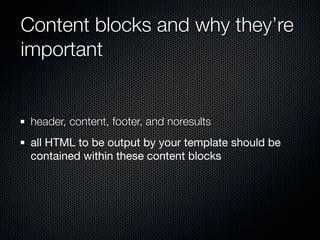
Content blocks
 Five types of content blocks:
                                                      HTML to generate before looping through
   header                                             the main content.
                                                      Loops through ever item in our
   contents                                           data call and outputs that HTML.
                                                      Is called between every line of data
   contents-inline                                    generated in contents
                                                      HTML to generate after the contents blocks
   footer                                             have been completed

   noresults                                          Shows when no data is found


        From the docs: All template blocks are optional, but there should be at
        least one in order to render output; in the absence of any defined template
        block, the system assumes that the entire template is enclosed in a contents
        block.
How do you use a content block?
“{%” marks the
beginning of a           “begin” initiates our content block
CrowdFusion block        and “header” specifies the type of
                         content block we want


        {% begin header %}
            <h1>My Awesome Site</h1>
            {% asset css?=css/screen.css %}
        {% end %}


             We tell CrowdFusion to close the
             content block with {% end %}
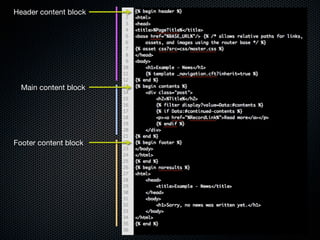
Header content block


Contents content block


 Footer content block
Well ain’t that inefficient.
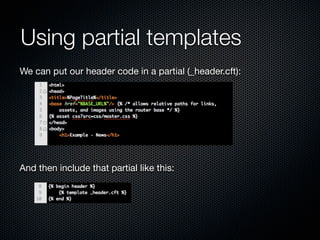
Using partial templates
We can include our header code in a partial (_header.cft):


And then include that partial like this:
Oh, I know, you want
     your pretty.
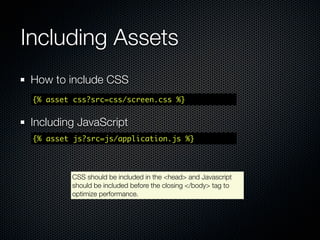
Including CSS & JS
Including stylesheets
 {% asset css?src=css/screen.css %}


Including javascript
 {% asset js?src=js/app.js %}
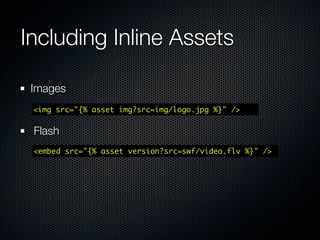
Including Images & Flash
Including images inline
 <img src="{% asset img?src=img/logo.jpg %}" />


 Including Flash inline
 <embed src="{% asset version?src=swf/video.flv %}" />


 Note: Since we’re using regular HTML tags, we can use all the tag attributes
 we’re used to:

     <img src="{% asset img?src=img/logo.jpg %}" class="myimage"
     alt= "my image, yo" />
{% end %}

Hopefully you now have an idea how to create a basic
CrowdFusion theme
Next time we’ll look at pulling in data from the CMS
Own it.
Browse this, you’ll find stuff you care about:

  https://www.assembla.com/wiki/show/crowdfusion/CFT_Template_Engine


Oh, and the crowdgen homepage

  http://github.com/graybill/crowdgen

CrowdFusion: The Front-End Edition, Part I: Presentation Layer

  • 1.
    CrowdFusion The Front-end Edition,Part I Red Tettemer Interactive, 3/19/10 Linus Graybill | lgraybill@redtettemer.com | @graybill
  • 2.
    Today’s Edumacation Use whatyou already know to create themes for CrowdFusion Theme folder structure Using CSS, JavaScript, images, and Flash Demystifying the CrowdFusion template language Setting and getting a template variable
  • 3.
    So our CrowdFusionapp looks like this: our source code goes in the app/ directory this view folder is for plugin-specific CMS screens our application theme lives in this here view folder
  • 4.
    Themes go inview/ each theme gets its own directory in view/web/ How do you name a theme? Themes are specified by domain - the theme mysite.com will only be applied to sites accessed at mysite.com (keep in mind for development). Note: Subdomains are supported, so you can have two themes, dev.mysite.com (for development) and mysite.com (for production)
  • 5.
    Inside our themedirectory css, js, images, and flash, are nested inside the assets/ directory template files go in the templates/ directory
  • 6.
    What’s in atheme? CSS (oooh.) Javascript (ahhhh.) Images (oooh.) Flash (ahhhh.) Template files (.cft’s) (uhhhh.)
  • 7.
    Basic theme concepts Adefault theme needs to exists because it’s your fallback. For example: If you don’t specify a 404.cft template in your theme, default/404.cft will be called in its place. Themes are assigned based on domain name Why? CrowdFusion is optimized for multiple sites running from the same CMS.
  • 8.
    Basic theme concepts All code to be processed by CrowdFusion is wrapped in {% ... %} {% if Data:#continued-contents %} <p><a href="%RecordLink%">Read more</a></p> {% endif %} We reference a CrowdFusion A CrowdFusion “if” block is written as: variable by wrapping the {% if ... %} ... {% endif %} variable in %...%
  • 9.
    You want tocreate a theme? You can: Create directories and files by hand Copy an existing theme folder and modify Generate a theme with crowdgen (oooh, tell me more...)
  • 10.
    Installing crowdgen Get thescript: > git clone git@github.com:graybill/crowdgen.git Install the Ruby gem dependencies: > sudo gem install builder Copy crowdgen.rb into your CrowdFusion app root: > cp crowdgen/crowdgen.rb /Applications/MAMP/htdocs/my-app/.
  • 11.
    Using crowdgen Generating atheme with crowdgen > ruby ./crowdgen.rb theme www.my-site.com Will create: theme folder for www.my-site.com assets folders for our css, js, images, and flash our basic home and 404 (page not found) templates
  • 12.
    Okay, so let’slook at one of these template files.
  • 13.
    What the fuckis all this motherfucking shit?
  • 14.
    The CrowdFusion templatinglanguage .cft is the file extenstion The .cft extension lets the compiler know to do stuff with anything inside a {% ... %} tag. Otherwise it’s HTML all the way. content blocks are the foundation for displaying content from the CMS Anything you want to output as HTML to the page needs to be inside a content block.
  • 15.
    Content blocks Fivetypes of content blocks: HTML to generate before looping through header the main content. Loops through ever item in our contents data call and outputs that HTML. Is called between every line of data contents-inline generated in contents HTML to generate after the contents blocks footer have been completed noresults Shows when no data is found From the docs: All template blocks are optional, but there should be at least one in order to render output; in the absence of any defined template block, the system assumes that the entire template is enclosed in a contents block.
  • 16.
    How do youuse a content block? “{%” marks the beginning of a “begin” initiates our content block CrowdFusion block and “header” specifies the type of content block we want {% begin header %} <h1>My Awesome Site</h1> {% asset css?=css/screen.css %} {% end %} We tell CrowdFusion to close the content block with {% end %}
  • 17.
    Header content block Contentscontent block Footer content block
  • 18.
    Well ain’t thatinefficient.
  • 19.
    Using partial templates Wecan include our header code in a partial (_header.cft): And then include that partial like this:
  • 20.
    Oh, I know,you want your pretty.
  • 21.
    Including CSS &JS Including stylesheets {% asset css?src=css/screen.css %} Including javascript {% asset js?src=js/app.js %}
  • 22.
    Including Images &Flash Including images inline <img src="{% asset img?src=img/logo.jpg %}" /> Including Flash inline <embed src="{% asset version?src=swf/video.flv %}" /> Note: Since we’re using regular HTML tags, we can use all the tag attributes we’re used to: <img src="{% asset img?src=img/logo.jpg %}" class="myimage" alt= "my image, yo" />
  • 23.
    {% end %} Hopefullyyou now have an idea how to create a basic CrowdFusion theme Next time we’ll look at pulling in data from the CMS
  • 24.
    Own it. Browse this,you’ll find stuff you care about: https://www.assembla.com/wiki/show/crowdfusion/CFT_Template_Engine Oh, and the crowdgen homepage http://github.com/graybill/crowdgen