




Jekyll and MarkDown
For fun and profit
What is Jekyll?
Jekyll is a Blog-Aware Static Site Generator written in Ruby
https://www.jekyllrb.com
Why use a Static Site Generator?
• It’s simple: for SiteOps, for devs and for content creators
• It’s safe: it’s no ”WordPress”
• It’s fast (cit.): serve only static content, on github pages or wherever you can!
• It’s personalized: themes & co. available
• It’s extensible: you can write plugins, extensions, etc…
• It’s cool: the coolest kids out there use Jekyll: Atlassian, Bootstrap, StackOverflow,
github, etc... Even Barack Obama!
Jekyll is simple – SiteOps & Devs
• You just need a server capable of serving static content, even
dropbox!
• Simplified deployment pipeline (from copying files via FTP to git
hooks)
• Themes structure is simple and developers can easily customize it
• Plugins can be written using Ruby
• Configuration based on YAML file(s)
Jekyll is simple – Content Creators
• Every page (or post) lives in a separate file
• Write only content. No layout or anything else
• You can use MarkDown, Liquid Syntax, HTML, mixed together
• You can easily define page/post “meta” in the “Front Matter”
• You can install it on your computer and see changes in realtime
• Built-in pagination, permalinks, tags, etc…
Jekyll is safe
• No back-end, means (almost) no security concerns
• WordPress is nice, but… (4.7.2 fixes a nasty unauthenticated privilege
escalation vulnerability that was discovered in a REST API endpoint)
• You can do bad things also with Jekyll, stay safe!
{% execute_shell "ls | wc -l" %}
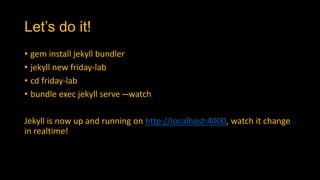
Let’s do it!
• gem install jekyll bundler
• jekyll new friday-lab
• cd friday-lab
• bundle exec jekyll serve --watch
Jekyll is now up and running on http://localhost:4000, watch it change
in realtime!
Your first post - 1
• Posts are in the _posts folder
• You can use markdown or HTML syntax
Let’s have a look together!
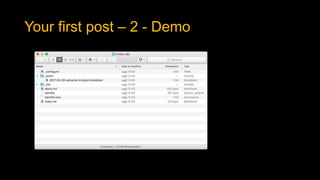
Your first post – 2 - Demo
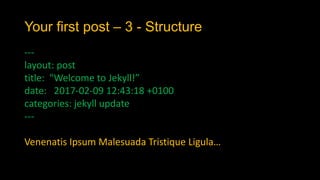
Your first post – 3 - Structure
---
layout: post
title: "Welcome to Jekyll!”
date: 2017-02-09 12:43:18 +0100
categories: jekyll update
---
Venenatis Ipsum Malesuada Tristique Ligula…
Your first post – 4 - MarkDown
• Markdown is a lightweight markup language with plain text formatting syntax
designed so that it can be converted to HTML and many other formats using a
tool by the same name.
• Markdown is often used to format readme files, for writing messages in online
discussion forums, and to create rich text using a plain text editor.
• In Jekyll you can mix HTML, MarkDown and Liquid Syntax
A DEMO IS BETTER THAN A THOUSAND
WORDS!
Your first post – 5 - Liquid
• Liquid is an open-source template language created by Shopify and written in
Ruby. It is the backbone of Shopify themes and is used to load dynamic content
on storefronts.
{% if page.title == "Awesome Post" %}
This post is awesome!
{% endif %}
• You can see the list of available Jekyll variables here:
https://jekyllrb.com/docs/variables/
Your first page - Demo
• Pages are in the root folder of the Jekyll installation
• You can use markdown or HTML syntax, like in posts.
• Front Matter is similar to posts
Configuration - 1
• Jekyll config file is called _config.yml
• You can use already defined variables / structures or define your
own
• Define here “global stuff” you’ll use everywhere:
• Navigation
• Common tags
• Website data
• Etc…
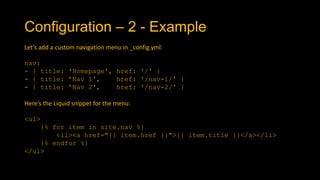
Configuration – 2 - Example
Let’s add a custom navigation menu in _config.yml:
nav:
- { title: 'Homepage', href: '/' }
- { title: ’Nav 1', href: '/nav-1/' }
- { title: ’Nav 2', href: '/nav-2/' }
Here’s the Liquid snippet for the menu:
<ul>
{% for item in site.nav %}
<li><a href="{{ item.href }}">{{ item.title }}</a></li>
{% endfor %}
</ul>
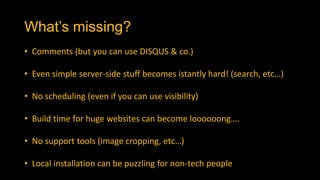
What’s missing?
• Comments (but you can use DISQUS & co.)
• Even simple server-side stuff becomes istantly hard! (search, etc…)
• No scheduling (even if you can use visibility)
• Build time for huge websites can become loooooong….
• No support tools (image cropping, etc…)
• Local installation can be puzzling for non-tech people
What else?
• Data files (JSON, CSV, etc…)
• QUESTIONS?
• GO AND MAKE YOUR WEBSITE!

Jekyll, static websites generator

  • 1.
  • 2.
    What is Jekyll? Jekyllis a Blog-Aware Static Site Generator written in Ruby https://www.jekyllrb.com
  • 3.
    Why use aStatic Site Generator? • It’s simple: for SiteOps, for devs and for content creators • It’s safe: it’s no ”WordPress” • It’s fast (cit.): serve only static content, on github pages or wherever you can! • It’s personalized: themes & co. available • It’s extensible: you can write plugins, extensions, etc… • It’s cool: the coolest kids out there use Jekyll: Atlassian, Bootstrap, StackOverflow, github, etc... Even Barack Obama!
  • 4.
    Jekyll is simple– SiteOps & Devs • You just need a server capable of serving static content, even dropbox! • Simplified deployment pipeline (from copying files via FTP to git hooks) • Themes structure is simple and developers can easily customize it • Plugins can be written using Ruby • Configuration based on YAML file(s)
  • 5.
    Jekyll is simple– Content Creators • Every page (or post) lives in a separate file • Write only content. No layout or anything else • You can use MarkDown, Liquid Syntax, HTML, mixed together • You can easily define page/post “meta” in the “Front Matter” • You can install it on your computer and see changes in realtime • Built-in pagination, permalinks, tags, etc…
  • 6.
    Jekyll is safe •No back-end, means (almost) no security concerns • WordPress is nice, but… (4.7.2 fixes a nasty unauthenticated privilege escalation vulnerability that was discovered in a REST API endpoint) • You can do bad things also with Jekyll, stay safe! {% execute_shell "ls | wc -l" %}
  • 7.
    Let’s do it! •gem install jekyll bundler • jekyll new friday-lab • cd friday-lab • bundle exec jekyll serve --watch Jekyll is now up and running on http://localhost:4000, watch it change in realtime!
  • 8.
    Your first post- 1 • Posts are in the _posts folder • You can use markdown or HTML syntax Let’s have a look together!
  • 9.
    Your first post– 2 - Demo
  • 10.
    Your first post– 3 - Structure --- layout: post title: "Welcome to Jekyll!” date: 2017-02-09 12:43:18 +0100 categories: jekyll update --- Venenatis Ipsum Malesuada Tristique Ligula…
  • 11.
    Your first post– 4 - MarkDown • Markdown is a lightweight markup language with plain text formatting syntax designed so that it can be converted to HTML and many other formats using a tool by the same name. • Markdown is often used to format readme files, for writing messages in online discussion forums, and to create rich text using a plain text editor. • In Jekyll you can mix HTML, MarkDown and Liquid Syntax A DEMO IS BETTER THAN A THOUSAND WORDS!
  • 12.
    Your first post– 5 - Liquid • Liquid is an open-source template language created by Shopify and written in Ruby. It is the backbone of Shopify themes and is used to load dynamic content on storefronts. {% if page.title == "Awesome Post" %} This post is awesome! {% endif %} • You can see the list of available Jekyll variables here: https://jekyllrb.com/docs/variables/
  • 13.
    Your first page- Demo • Pages are in the root folder of the Jekyll installation • You can use markdown or HTML syntax, like in posts. • Front Matter is similar to posts
  • 14.
    Configuration - 1 •Jekyll config file is called _config.yml • You can use already defined variables / structures or define your own • Define here “global stuff” you’ll use everywhere: • Navigation • Common tags • Website data • Etc…
  • 15.
    Configuration – 2- Example Let’s add a custom navigation menu in _config.yml: nav: - { title: 'Homepage', href: '/' } - { title: ’Nav 1', href: '/nav-1/' } - { title: ’Nav 2', href: '/nav-2/' } Here’s the Liquid snippet for the menu: <ul> {% for item in site.nav %} <li><a href="{{ item.href }}">{{ item.title }}</a></li> {% endfor %} </ul>
  • 16.
    What’s missing? • Comments(but you can use DISQUS & co.) • Even simple server-side stuff becomes istantly hard! (search, etc…) • No scheduling (even if you can use visibility) • Build time for huge websites can become loooooong…. • No support tools (image cropping, etc…) • Local installation can be puzzling for non-tech people
  • 17.
    What else? • Datafiles (JSON, CSV, etc…) • QUESTIONS? • GO AND MAKE YOUR WEBSITE!