Office Health
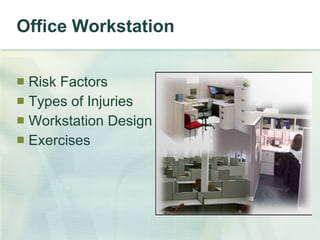
Office Workstation Risk Factors Types of Injuries Workstation Design Exercises
ERGONOMICS? The Relationship of People to their tools, task, and environment
Neutral Posture Defined as the position our bodies take in the absence of gravity Position in which repetitive injury is least likely to occur.
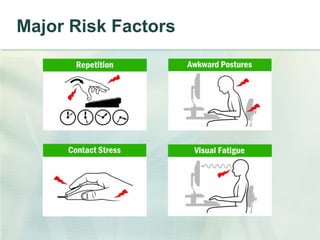
Major Risk Factors
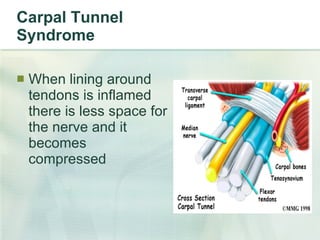
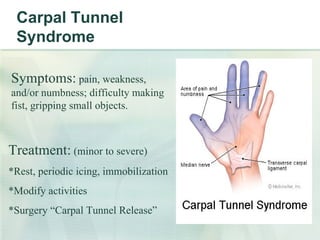
Carpal Tunnel Syndrome When lining around tendons is inflamed there is less space for the nerve and it becomes compressed
Carpal Tunnel Syndrome Symptoms:  pain, weakness, and/or numbness; difficulty making fist, gripping small objects. Treatment:  (minor to severe) *Rest, periodic icing, immobilization *Modify activities *Surgery “Carpal Tunnel Release”
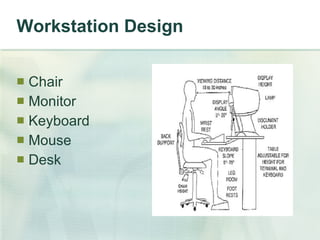
Workstation Design Chair Monitor Keyboard Mouse Desk
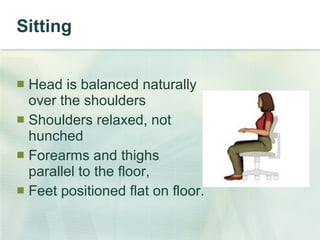
Sitting Head is balanced naturally  over the shoulders  Shoulders relaxed, not  hunched Forearms and thighs  parallel to the floor, Feet positioned flat on floor.
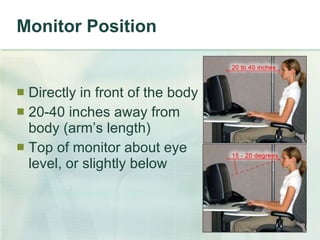
Monitor Position Directly in front of the body 20-40 inches away from body (arm’s length) Top of monitor about eye level, or slightly below
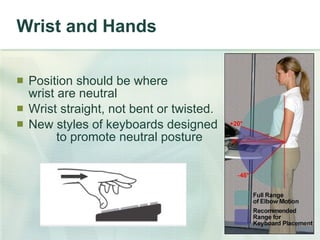
Wrist and Hands Position should be where  wrist are neutral Wrist straight, not bent or twisted. New styles of keyboards designed  to promote neutral posture
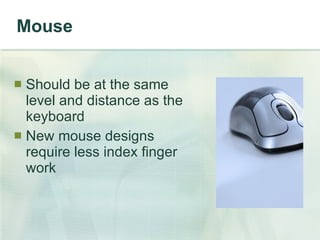
Mouse Should be at the same level and distance as the keyboard New mouse designs require less index finger work
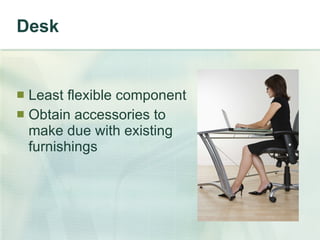
Desk Least flexible component Obtain accessories to make due with existing furnishings
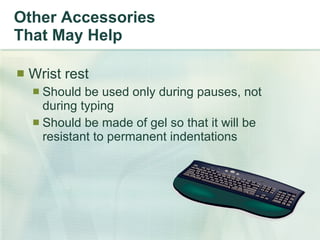
Other Accessories That May Help Wrist rest Should be used only during pauses, not during typing Should be made of gel so that it will be resistant to permanent indentations
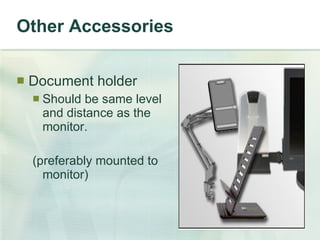
Other Accessories Document holder Should be same level and distance as the monitor.  (preferably mounted to monitor)
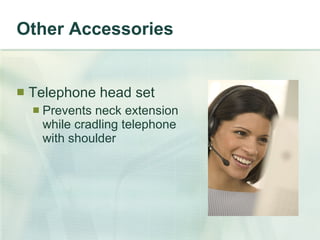
Other Accessories Telephone head set Prevents neck extension while cradling telephone with shoulder
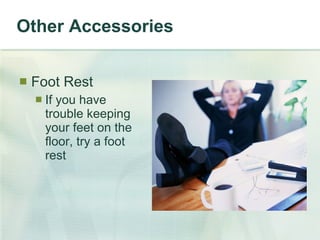
Other Accessories Foot Rest If you have trouble keeping your feet on the floor, try a foot rest
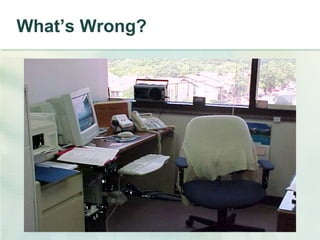
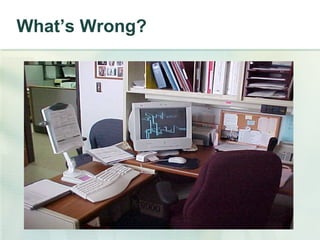
What’s Wrong?
What’s Wrong?
Exercises Stress ball Wrist curls Shoulder presses Shoulder shrugs Arm circles Prayer stretches
Conclusion If you are experiencing symptoms of MSD’s, notify your supv. & see your doctor Take an active role in designing your workspace to prevent injuries Strengthen and improve flexibility Put practices to work in office and at home.
Office Health Thanks for attending!!! Presented by:

Office health presentation (ergonomics)

  • 1.
  • 2.
    Office Workstation RiskFactors Types of Injuries Workstation Design Exercises
  • 3.
    ERGONOMICS? The Relationshipof People to their tools, task, and environment
  • 4.
    Neutral Posture Definedas the position our bodies take in the absence of gravity Position in which repetitive injury is least likely to occur.
  • 5.
  • 6.
    Carpal Tunnel SyndromeWhen lining around tendons is inflamed there is less space for the nerve and it becomes compressed
  • 7.
    Carpal Tunnel SyndromeSymptoms: pain, weakness, and/or numbness; difficulty making fist, gripping small objects. Treatment: (minor to severe) *Rest, periodic icing, immobilization *Modify activities *Surgery “Carpal Tunnel Release”
  • 8.
    Workstation Design ChairMonitor Keyboard Mouse Desk
  • 9.
    Sitting Head isbalanced naturally over the shoulders Shoulders relaxed, not hunched Forearms and thighs parallel to the floor, Feet positioned flat on floor.
  • 10.
    Monitor Position Directlyin front of the body 20-40 inches away from body (arm’s length) Top of monitor about eye level, or slightly below
  • 11.
    Wrist and HandsPosition should be where wrist are neutral Wrist straight, not bent or twisted. New styles of keyboards designed to promote neutral posture
  • 12.
    Mouse Should beat the same level and distance as the keyboard New mouse designs require less index finger work
  • 13.
    Desk Least flexiblecomponent Obtain accessories to make due with existing furnishings
  • 14.
    Other Accessories ThatMay Help Wrist rest Should be used only during pauses, not during typing Should be made of gel so that it will be resistant to permanent indentations
  • 15.
    Other Accessories Documentholder Should be same level and distance as the monitor. (preferably mounted to monitor)
  • 16.
    Other Accessories Telephonehead set Prevents neck extension while cradling telephone with shoulder
  • 17.
    Other Accessories FootRest If you have trouble keeping your feet on the floor, try a foot rest
  • 18.
  • 19.
  • 20.
    Exercises Stress ballWrist curls Shoulder presses Shoulder shrugs Arm circles Prayer stretches
  • 21.
    Conclusion If youare experiencing symptoms of MSD’s, notify your supv. & see your doctor Take an active role in designing your workspace to prevent injuries Strengthen and improve flexibility Put practices to work in office and at home.
  • 22.
    Office Health Thanksfor attending!!! Presented by:

Editor's Notes

  • #4 Basically, it’s the science of fitting jobs to people. Ergonomic design is focuses on the design of the workplace (i.e. work tasks, equipment, and environment) for the safe and efficient use by workers.
  • #5 Similar to the positions achieved when lying in the pool or floating in space. Point out people that aren’t in neutral position (i.e., slouched in chair, leaning to one side)
  • #6 Repetitive Stress: caused by performing actions again and again. Causes tears in tissue, which becomes inflamed. (Tendentious, Carpal Tunnel Syndrome, Rotator Cuff injury) -Inputting data, Playing tennis, frequent use of mouse Awkward Positions: Bending, Twisting, & reaching. Places extra load on muscles, joints, & tendons. Cause pains and strains. -Bending: Leaning forward towards screen, Twisting: Turning to read copies while keying, Reaching: Long stretch to mouse or phone. Contact Stress: prolonged pressure on a part of your body. Causes pain & numbness; restricts circulation. - arms pressed on edge of desk, thumb makes contact with mouse pad, keyboard contacting legs, legs contacting chair (calf area). Visual Fatigue: Causes stress on eyes (eye strain, blurred vision, headaches, muscle pain) Static work – Forceful exertions –amount of tension our muscles generate. (i.e., tilting head backward or forward of neutral, vertical position Removed from original presentation: Repetition Sustained static exertions Forceful exertions Localized contact stress Posture
  • #7 Caused by repetitive motions over a prolonged period of time. Very common in assembly line work and jobs that require continuous typing.
  • #8 Surgery involves severing the band of tissue around the wrist to reduce pressure on the median nerve. Although uncommon, symptoms can recur.
  • #13 Proper fitting mouse. Small mouse for big hands normally doesn’t work well. Have audience hold wrist with opposite hand and wiggle wrist from side to side. Hear any popping? -The wrist is a hinge joint; it’s not meant to move side to side. -Use arm to move mouse instead of wrist.
  • #14 Adjustable chairs, keyboards, monitors
  • #18 Phone book, 3-ring binder -Feet need to rest flat on the floor!!! Cuts off circulation: hanging feet & Crossed legs
  • #21 Shoulder stretches, calve stretches, CEO position (hands behind head, push chin straight back. Recommended at least twice a day, morning and afternoon.