Odoo Warehouse Management
Josse Colpaert, Technical Coordinator
1
Topics
Use Case
2 Configuration
3 Operating
4 Special Cases
5 Conclusion
Use Case
Bert's store needs to adapt for growth
Use Case Scenario
ConclusionSpecial CasesOperatingConfigurationUse Case
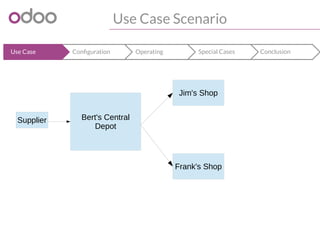
Bert has a little shop with vegetable green Lego
bricks and other Lego bricks.
His shop is growing, but growth is limited by his
shop being far from the city.
He decides to work together with his friends Jim
and Frank who will open shops in the city. Bert’s
shop would function as a central depot.
Use Case Scenario
ConclusionSpecial CasesOperatingConfigurationUse Case
Supplier Bert's Central
Depot
Jim's Shop
Frank's Shop
Use Case Scenario : Products
ConclusionSpecial CasesOperatingConfigurationUse Case
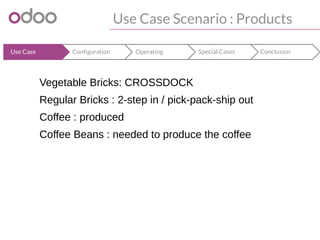
Vegetable Bricks: CROSSDOCK
Regular Bricks : 2-step in / pick-pack-ship out
Coffee : produced
Coffee Beans : needed to produce the coffee
Configuration
Warehouses and routes
Configuration
ConclusionOperatingOperatingConfigurationUse Case
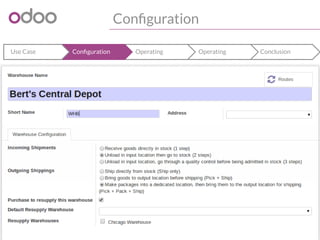
Configuration
ConclusionOperatingOperatingConfigurationUse Case
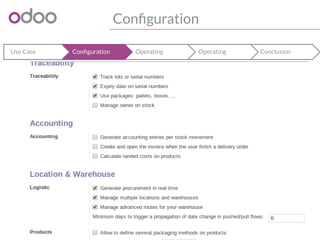
Show configuration of
warehouse : 2 step in, 3 step
out + shops
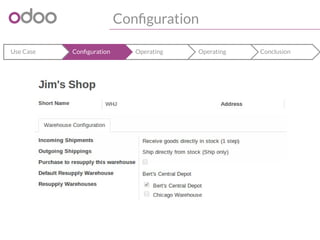
Configuration
ConclusionOperatingOperatingConfigurationUse Case
Show configuration of
warehouse : 2 step in, 3 step
out + shops
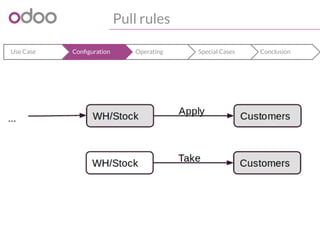
Pull rules
ConclusionSpecial CasesOperatingConfigurationUse Case
CustomersTake
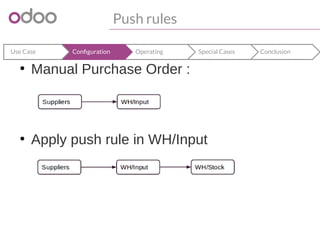
Push rules
ConclusionSpecial CasesOperatingConfigurationUse Case
â—Ź
Manual Purchase Order :
â—Ź
Apply push rule in WH/Input
Pull and push into routes
ConclusionSpecial CasesOperatingConfigurationUse Case
â—Ź
Pull and push are bundled into routes that
can be applied on :
– Procurement (Sale order)
– Product and product categories
– Warehouse
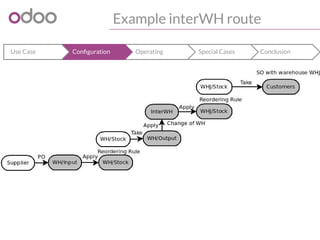
Example interWH route
ConclusionSpecial CasesOperatingConfigurationUse Case
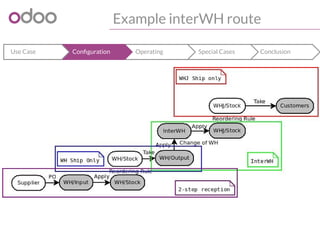
Example interWH route
ConclusionSpecial CasesOperatingConfigurationUse Case
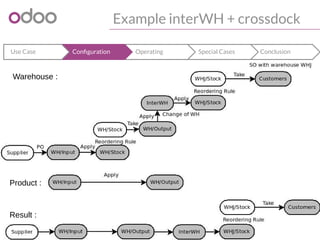
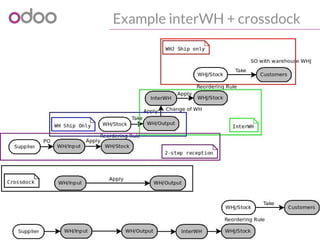
Example interWH + crossdock
ConclusionSpecial CasesOperatingConfigurationUse Case
Warehouse :
Product :
Result :
Example interWH + crossdock
ConclusionSpecial CasesOperatingConfigurationUse Case
Routes
ConclusionSpecial CasesOperatingConfigurationUse Case
â—Ź
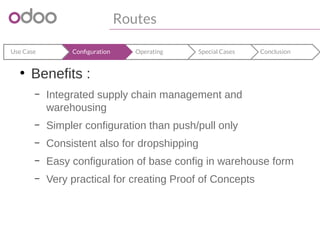
Benefits :
– Integrated supply chain management and
warehousing
– Simpler configuration than push/pull only
– Consistent also for dropshipping
– Easy configuration of base config in warehouse form
– Very practical for creating Proof of Concepts
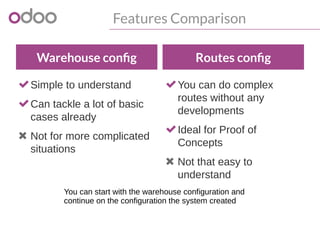
Features Comparison
Warehouse config
Simple to understand
Can tackle a lot of basic
cases already
 Not for more complicated
situations
Routes config
You can do complex
routes without any
developments
Ideal for Proof of
Concepts
 Not that easy to
understand
You can start with the warehouse configuration and
continue on the configuration the system created
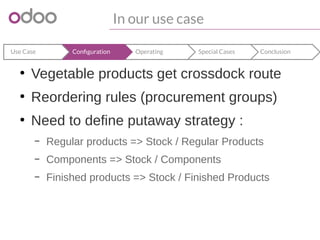
In our use case
ConclusionSpecial CasesOperatingConfigurationUse Case
â—Ź
Vegetable products get crossdock route
â—Ź
Reordering rules (procurement groups)
â—Ź
Need to define putaway strategy :
– Regular products => Stock / Regular Products
– Components => Stock / Components
– Finished products => Stock / Finished Products
Operating
Making sure our operators can do their work
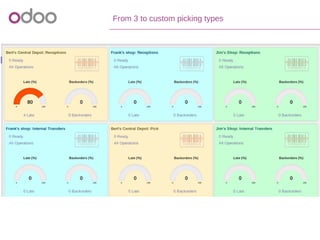
From 3 to custom picking types
ConclusionSpecial CasesOperatingConfigurationUse Case
â—Ź
Allows to follow up operations by picking
type <<screenshot dashboard>>
Back orders and splitting of moves
â—Ź Moves :
– Determine 'parent location flow' based on pull/push rules
– Cancelling splitting them will mostly be propagated
â—Ź Cancelling moves : forward direction
â—Ź Cancelling procurements : backwards direction
– Should not contain anything anymore with lots/packing
â—Ź Pickings
– Are a 'related' to the moves in them : moves get created and a
picking is assigned afterwards
– Moves can easily be transferred to another picking, for example when
creating backorders
Back orders and splitting of moves
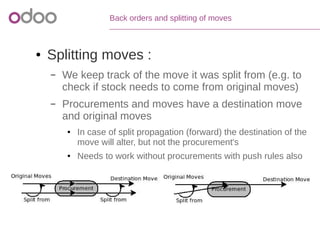
â—Ź Splitting moves :
– We keep track of the move it was split from (e.g. to
check if stock needs to come from original moves)
– Procurements and moves have a destination move
and original moves
â—Ź In case of split propagation (forward) the destination of the
move will alter, but not the procurement's
â—Ź Needs to work without procurements with push rules also
Reservation of stock
â—Ź Reservation of stock has custom domain
– Has to come from original moves
– Has to come from returned move
â—Ź Picking :
– Ready to Transfer :
â—Ź When all quants (stock) are reserved
– Partially Available
â—Ź When the move type of the picking is direct and at least some stock is
available
â—Ź Removal Strategy : FIFO/LIFO/FEFO
Pack Operations
â—Ź Take some product / Take entire pack
â—Ź Preparing pack operations for the picking:
– Are created based on quants reserved :
â—Ź Location from / quantities / lots / packs from
– Will be put somewhere according to putaway strategy
– Take entire packs as much as possible
â—Ź Bar code interface :
– Warehouse operator can decide otherwise
Manufacturing
● Finished Products ↔ Components
traceability
– Produce wizard based on stock reserved instead of
moves
â—Ź Simplified : no picking before
â—Ź MTO if from component in MTO route,
otherwise MTS
Benefits
â—Ź All logic towards extra moves, backorders,
splitting, reservation of stock,... is already
handled by the system
â—Ź Easy custom development :
– Grouping of moves in pickings allows easy development
of batch picking, dock & yard management, ...
– Creating own putaway and removal strategies
â—Ź FIFO, LIFO, FEFO
Special Cases
Special Cases
â—Ź
Negative stock
â—Ź
Returns
â—Ź
Multi-company and owner (see next slide)
â—Ź
Packaging
Inter company rules
â—Ź Intercompany vs Intracompany
interwarehouse location
â—Ź Real-time valuation : when changing
company
â—Ź Locations / warehouses are related to a
company, but « owner » makes it possible
to store something of someone else
Logistic Unit vs. Packaging
â—Ź Logistic unit : pallet, box of certain
dimensions
â—Ź Packaging : how one product can be
arranged
Conclusion
"
"From the announcement of this talk
The Odoo Warehouse Management System
fulfills the simplest needs in an intuitive way,
fulfills complex needs by default and is the
platform of choice for development of the most
complex needs.
Conclusion 
Customer References
Used by 2.000.000 users worldwide
Odoo
sales@odoo.com
+32 (0) 2 290 34 90
www.odoo.com
R&D and services office
Chaussée de Namur 40
B-1367 Grand Rosière
Sales office
Avenue Van Nieuwenhuyse 5
B-1160 Brussels
Thank You

Odoo Warehouse Management

  • 1.
    Odoo Warehouse Management JosseColpaert, Technical Coordinator
  • 2.
    1 Topics Use Case 2 Configuration 3Operating 4 Special Cases 5 Conclusion
  • 3.
    Use Case Bert's storeneeds to adapt for growth
  • 4.
    Use Case Scenario ConclusionSpecialCasesOperatingConfigurationUse Case Bert has a little shop with vegetable green Lego bricks and other Lego bricks. His shop is growing, but growth is limited by his shop being far from the city. He decides to work together with his friends Jim and Frank who will open shops in the city. Bert’s shop would function as a central depot.
  • 5.
    Use Case Scenario ConclusionSpecialCasesOperatingConfigurationUse Case Supplier Bert's Central Depot Jim's Shop Frank's Shop
  • 6.
    Use Case Scenario :Products ConclusionSpecial CasesOperatingConfigurationUse Case Vegetable Bricks: CROSSDOCK Regular Bricks : 2-step in / pick-pack-ship out Coffee : produced Coffee Beans : needed to produce the coffee
  • 7.
  • 8.
  • 9.
  • 10.
  • 11.
  • 12.
    Push rules ConclusionSpecial CasesOperatingConfigurationUseCase â—Ź Manual Purchase Order : â—Ź Apply push rule in WH/Input
  • 13.
    Pull and pushinto routes ConclusionSpecial CasesOperatingConfigurationUse Case ● Pull and push are bundled into routes that can be applied on : – Procurement (Sale order) – Product and product categories – Warehouse
  • 14.
    Example interWH route ConclusionSpecialCasesOperatingConfigurationUse Case
  • 15.
    Example interWH route ConclusionSpecialCasesOperatingConfigurationUse Case
  • 16.
    Example interWH +crossdock ConclusionSpecial CasesOperatingConfigurationUse Case Warehouse : Product : Result :
  • 17.
    Example interWH +crossdock ConclusionSpecial CasesOperatingConfigurationUse Case
  • 18.
    Routes ConclusionSpecial CasesOperatingConfigurationUse Case ● Benefits: – Integrated supply chain management and warehousing – Simpler configuration than push/pull only – Consistent also for dropshipping – Easy configuration of base config in warehouse form – Very practical for creating Proof of Concepts
  • 19.
    Features Comparison Warehouse config Simpleto understand Can tackle a lot of basic cases already  Not for more complicated situations Routes config You can do complex routes without any developments Ideal for Proof of Concepts  Not that easy to understand You can start with the warehouse configuration and continue on the configuration the system created
  • 20.
    In our usecase ConclusionSpecial CasesOperatingConfigurationUse Case ● Vegetable products get crossdock route ● Reordering rules (procurement groups) ● Need to define putaway strategy : – Regular products => Stock / Regular Products – Components => Stock / Components – Finished products => Stock / Finished Products
  • 21.
    Operating Making sure ouroperators can do their work
  • 22.
    From 3 tocustom picking types ConclusionSpecial CasesOperatingConfigurationUse Case â—Ź Allows to follow up operations by picking type <<screenshot dashboard>>
  • 23.
    Back orders andsplitting of moves ● Moves : – Determine 'parent location flow' based on pull/push rules – Cancelling splitting them will mostly be propagated ● Cancelling moves : forward direction ● Cancelling procurements : backwards direction – Should not contain anything anymore with lots/packing ● Pickings – Are a 'related' to the moves in them : moves get created and a picking is assigned afterwards – Moves can easily be transferred to another picking, for example when creating backorders
  • 24.
    Back orders andsplitting of moves ● Splitting moves : – We keep track of the move it was split from (e.g. to check if stock needs to come from original moves) – Procurements and moves have a destination move and original moves ● In case of split propagation (forward) the destination of the move will alter, but not the procurement's ● Needs to work without procurements with push rules also
  • 25.
    Reservation of stock ●Reservation of stock has custom domain – Has to come from original moves – Has to come from returned move ● Picking : – Ready to Transfer : ● When all quants (stock) are reserved – Partially Available ● When the move type of the picking is direct and at least some stock is available ● Removal Strategy : FIFO/LIFO/FEFO
  • 26.
    Pack Operations ● Takesome product / Take entire pack ● Preparing pack operations for the picking: – Are created based on quants reserved : ● Location from / quantities / lots / packs from – Will be put somewhere according to putaway strategy – Take entire packs as much as possible ● Bar code interface : – Warehouse operator can decide otherwise
  • 27.
    Manufacturing ● Finished Products↔ Components traceability – Produce wizard based on stock reserved instead of moves ● Simplified : no picking before ● MTO if from component in MTO route, otherwise MTS
  • 28.
    Benefits ● All logictowards extra moves, backorders, splitting, reservation of stock,... is already handled by the system ● Easy custom development : – Grouping of moves in pickings allows easy development of batch picking, dock & yard management, ... – Creating own putaway and removal strategies ● FIFO, LIFO, FEFO
  • 29.
  • 30.
  • 31.
    Inter company rules ●Intercompany vs Intracompany interwarehouse location ● Real-time valuation : when changing company ● Locations / warehouses are related to a company, but « owner » makes it possible to store something of someone else
  • 32.
    Logistic Unit vs.Packaging â—Ź Logistic unit : pallet, box of certain dimensions â—Ź Packaging : how one product can be arranged
  • 33.
  • 34.
    " "From the announcementof this talk The Odoo Warehouse Management System fulfills the simplest needs in an intuitive way, fulfills complex needs by default and is the platform of choice for development of the most complex needs. Conclusion 
  • 35.
    Customer References Used by2.000.000 users worldwide
  • 36.
    Odoo sales@odoo.com +32 (0) 2290 34 90 www.odoo.com R&D and services office Chaussée de Namur 40 B-1367 Grand Rosière Sales office Avenue Van Nieuwenhuyse 5 B-1160 Brussels Thank You