ODOO ERP SOLUTION
by
OUR PARTNERS
ABOUT Odoo ERP?
Odoo is a leading edge enterprise resource planning (ERP) and customer relationship management (CRM)
system based on open source technologies with a worldwide presence.
The solution was developed by Odoo S.A. a Belgium based company with a global R&D presence.
This ERP system can be specifically tailored and customized for the requirement of any industry,
it not only addresses the current requirements of your company but it also provides you with the
opportunity of continually improve and refine your business processes.
You can pick out a module for your current requirement and grow with it by adding other modules as
you deem fit.
It is used by more than 2 million users worldwide to manage companies of all different sizes for;
Project Management | Billing | Accounting | Warehouse Management | Manufacturing | Procurement
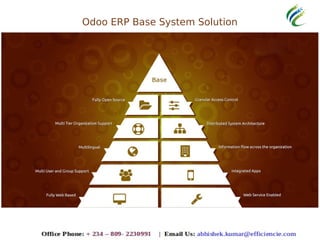
Odoo ERP Base System Solution
ODOO MODULE OVERVIEW
before the
PRESENTATION FOCUS
MODULE
Odoo ERP CRM System Solution
Odoo ERP Ecommerce System Solution
Odoo ERP HR System Solution
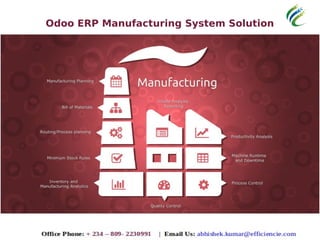
Odoo ERP Manufacturing System Solution
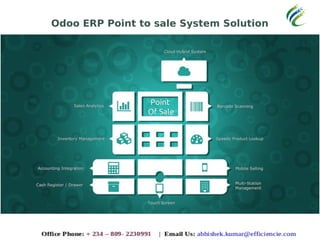
Odoo ERP Point to sale System Solution
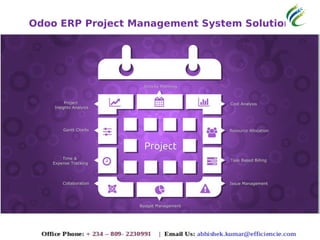
Odoo ERP Project Management System Solution
Odoo ERP Purchase Management System Solution
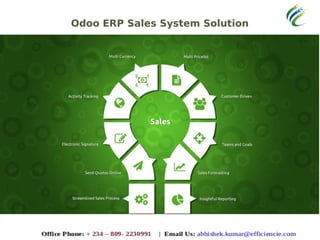
Odoo ERP Sales System Solution
Odoo ERP Warehouse System Solution
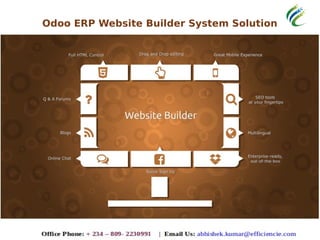
Odoo ERP Website Builder System Solution
PRESENTATION FOCUS
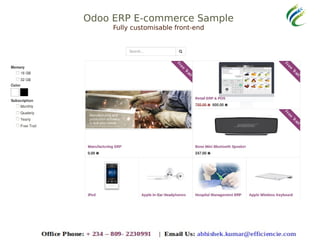
Odoo ERP E-commerce Solution
Odoo ERP E-commerce Sample
Fully customisable front-end
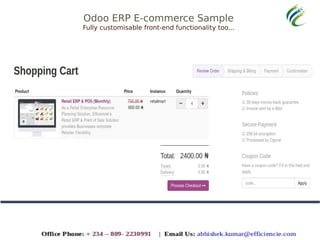
Odoo ERP E-commerce Sample
Fully customisable front-end functionality too...
Odoo ERP E-commerce Sample
Fully customisable front-end functionality too...
Odoo ERP E-commerce Sample
Fully standard & modern e-commerce features too...
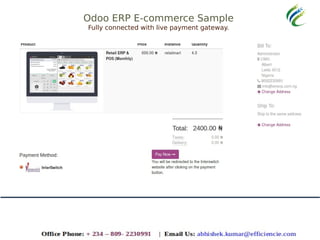
Odoo ERP E-commerce Sample
Fully connected with live payment gateway.
Odoo ERP E-commerce Sample
Fully connected with live payment gateway (Sample).
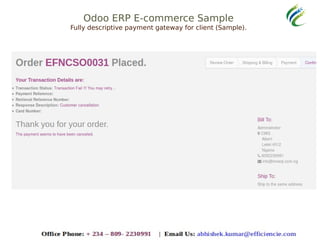
Odoo ERP E-commerce Sample
Fully descriptive payment gateway for client (Sample).
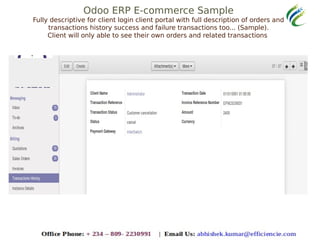
Odoo ERP E-commerce Sample
Fully descriptive for client login client portal with full description of orders and
transactions history success and failure transactions too... (Sample).
Client will only able to see their own orders and related transactions
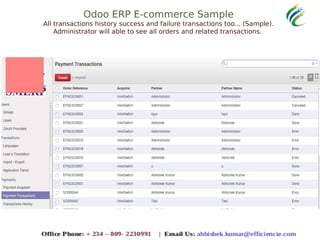
Odoo ERP E-commerce Sample
All transactions history success and failure transactions too... (Sample).
Administrator will able to see all orders and related transactions.
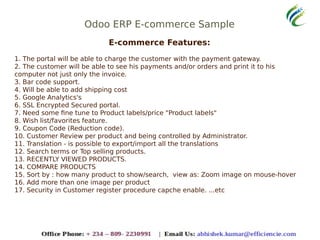
Odoo ERP E-commerce Sample
E-commerce Features:
1. The portal will be able to charge the customer with the payment gateway.
2. The customer will be able to see his payments and/or orders and print it to his
computer not just only the invoice.
3. Bar code support.
4. Will be able to add shipping cost
5. Google Analytics's
6. SSL Encrypted Secured portal.
7. Need some fine tune to Product labels/price "Product labels"
8. Wish list/favorites feature.
9. Coupon Code (Reduction code).
10. Customer Review per product and being controlled by Administrator.
11. Translation - is possible to export/import all the translations
12. Search terms or Top selling products.
13. RECENTLY VIEWED PRODUCTS.
14. COMPARE PRODUCTS
15. Sort by : how many product to show/search, view as: Zoom image on mouse-hover
16. Add more than one image per product
17. Security in Customer register procedure capche enable. ...etc
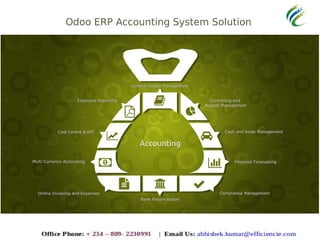
Odoo ERP Accounting System Solution
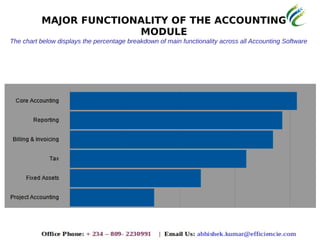
MAJOR FUNCTIONALITY OF THE ACCOUNTING
MODULE
The chart below displays the percentage breakdown of main functionality across all Accounting Software
ODOO CORE ACCOUNTING
The chart below displays the percentage breakdown of core accounting features across
all Accounting Software
General Ledger
The general ledger is where the financial records of the
company are located. Accounting software that includes
the general ledger module will automatically integrate
individual transactions into the company books.
Accounts Payable (A/P)
The module includes an accounts payable feature.
Accounts payable allows the functionality to track and
manage bills and other outstanding debts.
Accounts Receivable (A/R)
The accounts receivable feature deals with the money
coming into the company and its classifications.
Audit Trail
This feature will automatically log the changes made to the financial
records, allowing auditors to follow a number reported on the books
all the way back to the appropriate transaction.
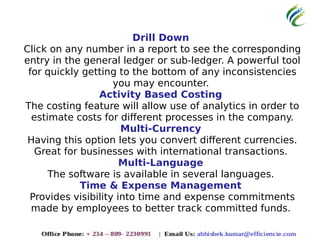
Drill Down
Click on any number in a report to see the corresponding
entry in the general ledger or sub-ledger. A powerful tool
for quickly getting to the bottom of any inconsistencies
you may encounter.
Activity Based Costing
The costing feature will allow use of analytics in order to
estimate costs for different processes in the company.
Multi-Currency
Having this option lets you convert different currencies.
Great for businesses with international transactions.
Multi-Language
The software is available in several languages.
Time & Expense Management
Provides visibility into time and expense commitments
made by employees to better track committed funds.
ODOO BILLING AND INVOICING
Billing and Invoicing features let you bill your clients and create invoices right from the software.
The chart below displays the percentage breakdown of billing & invoicing features across
all Accounting Software
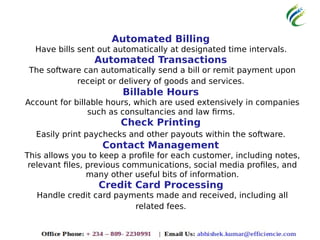
Automated Billing
Have bills sent out automatically at designated time intervals.
Automated Transactions
The software can automatically send a bill or remit payment upon
receipt or delivery of goods and services.
Billable Hours
Account for billable hours, which are used extensively in companies
such as consultancies and law firms.
Check Printing
Easily print paychecks and other payouts within the software.
Contact Management
This allows you to keep a profile for each customer, including notes,
relevant files, previous communications, social media profiles, and
many other useful bits of information.
Credit Card Processing
Handle credit card payments made and received, including all
related fees.
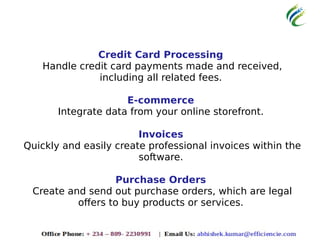
Credit Card Processing
Handle credit card payments made and received,
including all related fees.
E-commerce
Integrate data from your online storefront.
Invoices
Quickly and easily create professional invoices within the
software.
Purchase Orders
Create and send out purchase orders, which are legal
offers to buy products or services.
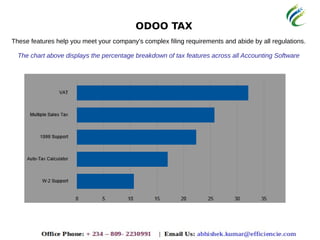
ODOO TAX
These features help you meet your company's complex filing requirements and abide by all regulations.
The chart above displays the percentage breakdown of tax features across all Accounting Software
1099 Support
Easily create 1099 forms, which detail alternative sources of
revenue, within the software.
Auto-Tax Calculator
Instantly compute taxes owed by inputting income and the relevant
tax rate(s).
Multiple Sales Tax
The software stores multiple sales tax rates, which is crucial if you
buy from vendors in multiple locations with different tax rates.
VAT
VAT refers to the country stipulated tax collected only on the value a
firm adds to a product during their stage of product's creation.
W-2 Support
Quickly and easily create W-2 forms - tax forms that detail
employees' earnings and withholdings - for remittance to employees
and tax authorities at the end of each fiscal year.
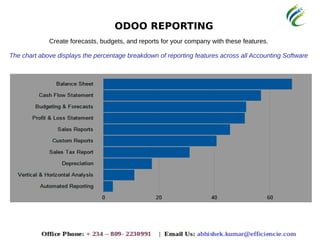
ODOO REPORTING
Create forecasts, budgets, and reports for your company with these features.
The chart above displays the percentage breakdown of reporting features across all Accounting Software
Automated Reporting
Have any report distributed to any number of recipients
automatically, based on triggers such as time intervals, account
status, etc.
Balance Sheet
A snapshot of a firm's financial status at a given point in time,
including assets, liabilities, and equity.
Budgeting & Forecasts
Compare budget figures to actual amounts.
Cash Flow Statement
The amount of cash and cash equivalents entering and exiting a
company, broken down into operating, investing, and financing
activities.
Custom Reports
Create custom reports on any segment of your business, beyond the
standard reports included with the software.
Sales Tax Report
The accumulated sales tax collected from customers that must be
remitted to tax authorities.
Depreciation
A report detailing the loss of value of an asset.
Profit & Loss Statement
A summary of revenues and costs during a fiscal quarter, year, or
other time frame.
Sales Reports
A summary of the revenue earned from selling products or
rendering services.
Vertical & Horizontal Analysis
Vertical analysis shows each line item as a proportion of another
item. For example, a vertical analysis of a company's balance sheet
will yield each item as a proportion of total assets. Such proportions
can be useful when compared to other companies, industry
averages, etc. Horizontal analysis, also known as trend analysis,
shows the percentage change of a line item compared over different
accounting periods. For example, a company could its percentage
increase or decrease in revenue compared to previous years.
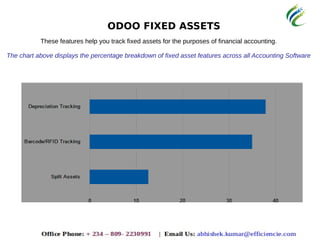
ODOO FIXED ASSETS
These features help you track fixed assets for the purposes of financial accounting.
The chart above displays the percentage breakdown of fixed asset features across all Accounting Software
Barcode/RFID Tracking
Tag physical assets with barcodes or RFID tags and track
them within the software. Useful for small items, such as
tools.
Depreciation Tracking
Allocate an asset's deprecation (loss of value) to the
income statement for the accounting period during
which the deprecation occurred.
Split Assets
Easily divide assets, such as raw materials, into smaller,
more usable pieces.
KEY WINS
Beautiful, easy, full featured
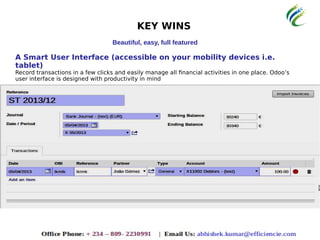
A Smart User Interface (accessible on your mobility devices i.e.
tablet)
Record transactions in a few clicks and easily manage all financial activities in one place. Odoo’s
user interface is designed with productivity in mind
KEY WINS
Beautiful, easy, full featured
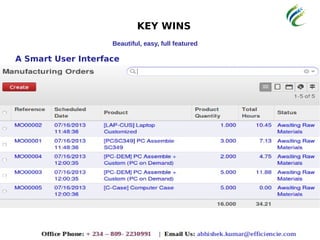
A Smart User Interface
KEY WINS
Beautiful, easy, full featured
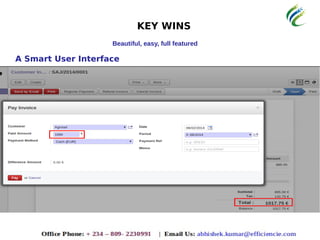
A Smart User Interface
KEY WINS
Beautiful, easy, full featured
A Smart User Interface
KEY WINS
Beautiful, easy, full featured
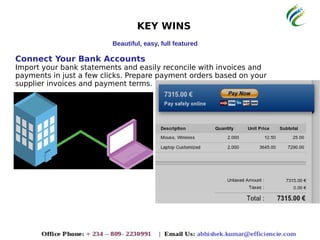
Connect Your Bank Accounts
Import your bank statements and easily reconcile with invoices and
payments in just a few clicks. Prepare payment orders based on your
supplier invoices and payment terms.
KEY WINS
Beautiful, easy, full featured
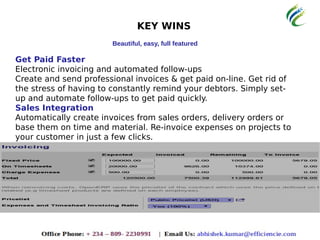
Get Paid Faster
Electronic invoicing and automated follow-ups
Create and send professional invoices & get paid online. Get rid of
the stress of having to constantly remind your debtors. Simply set-
up and automate follow-ups to get paid quickly.
KEY WINS
Beautiful, easy, full featured
Get Paid Faster
Electronic invoicing and automated follow-ups
Create and send professional invoices & get paid on-line. Get rid of
the stress of having to constantly remind your debtors. Simply set-
up and automate follow-ups to get paid quickly.
Sales Integration
Automatically create invoices from sales orders, delivery orders or
base them on time and material. Re-invoice expenses on projects to
your customer in just a few clicks.
KEY WINS
Beautiful, easy, full featured
Purchase Integration
Control supplier invoices based on purchase orders. Get real-time inventory
valuation reports automatically posted in your accounts.
Multi-Level Analytic Accounting
Integrate your analytic accounting operations with time-sheets, projects,
invoices, expenses, etc. No need to record transactions, all analytic entries
are posted automatically following your business rules.
Scale with Your Organization
Odoo supports multiple currencies, multiple users with different access
rights, multiple companies with real time consolidation and unlimited
analytic plans.
Dashboard & KPI
Get direct access to key information with dynamic and customizable
dashboards. Analyse your financial activities with the drill-up, drill-down,
drill-across and filter features.
AND YES THIS IS WHY ODOO ERP
IS BEING USED BY OVER 2MILLION
COMPANIES
ODOO AWARDS
2011 - INSEAD Innovator Award
2012 - Highest-ranked Belgian company in the Deloitte Technology
Fast50 Benelux (growth of turnover of 1549% in the past 5 years)
2012 & 2013 - Bossie Award for the Best Open Source Solution
2013 - Trends Gazelles Award
2013 - Linux New Media Award for The Best Open Source solution
compatible with European Accounting Systems
2013 - “L’Entreprise Prometteuse” by Ernst & Young
 2015 - “Fabian Pinkaers” Top Young manager of the year Award.
THANK YOU !
www.efficiencie.com
Office Phone: + 234 – 809- 2230991 | Email Us: abhishek.kumar@efficiencie.com

Efficiencie solutions odoo erp presentation

  • 1.
  • 2.
  • 3.
    ABOUT Odoo ERP? Odoo isa leading edge enterprise resource planning (ERP) and customer relationship management (CRM) system based on open source technologies with a worldwide presence. The solution was developed by Odoo S.A. a Belgium based company with a global R&D presence. This ERP system can be specifically tailored and customized for the requirement of any industry, it not only addresses the current requirements of your company but it also provides you with the opportunity of continually improve and refine your business processes. You can pick out a module for your current requirement and grow with it by adding other modules as you deem fit. It is used by more than 2 million users worldwide to manage companies of all different sizes for; Project Management | Billing | Accounting | Warehouse Management | Manufacturing | Procurement
  • 4.
    Odoo ERP BaseSystem Solution
  • 5.
    ODOO MODULE OVERVIEW beforethe PRESENTATION FOCUS MODULE
  • 6.
    Odoo ERP CRMSystem Solution
  • 7.
    Odoo ERP EcommerceSystem Solution
  • 8.
    Odoo ERP HRSystem Solution
  • 9.
    Odoo ERP ManufacturingSystem Solution
  • 10.
    Odoo ERP Pointto sale System Solution
  • 11.
    Odoo ERP ProjectManagement System Solution
  • 12.
    Odoo ERP PurchaseManagement System Solution
  • 13.
    Odoo ERP SalesSystem Solution
  • 14.
    Odoo ERP WarehouseSystem Solution
  • 15.
    Odoo ERP WebsiteBuilder System Solution
  • 16.
  • 17.
  • 18.
    Odoo ERP E-commerceSample Fully customisable front-end
  • 19.
    Odoo ERP E-commerceSample Fully customisable front-end functionality too...
  • 20.
    Odoo ERP E-commerceSample Fully customisable front-end functionality too...
  • 21.
    Odoo ERP E-commerceSample Fully standard & modern e-commerce features too...
  • 22.
    Odoo ERP E-commerceSample Fully connected with live payment gateway.
  • 23.
    Odoo ERP E-commerceSample Fully connected with live payment gateway (Sample).
  • 24.
    Odoo ERP E-commerceSample Fully descriptive payment gateway for client (Sample).
  • 25.
    Odoo ERP E-commerceSample Fully descriptive for client login client portal with full description of orders and transactions history success and failure transactions too... (Sample). Client will only able to see their own orders and related transactions
  • 26.
    Odoo ERP E-commerceSample All transactions history success and failure transactions too... (Sample). Administrator will able to see all orders and related transactions.
  • 27.
    Odoo ERP E-commerceSample E-commerce Features: 1. The portal will be able to charge the customer with the payment gateway. 2. The customer will be able to see his payments and/or orders and print it to his computer not just only the invoice. 3. Bar code support. 4. Will be able to add shipping cost 5. Google Analytics's 6. SSL Encrypted Secured portal. 7. Need some fine tune to Product labels/price "Product labels" 8. Wish list/favorites feature. 9. Coupon Code (Reduction code). 10. Customer Review per product and being controlled by Administrator. 11. Translation - is possible to export/import all the translations 12. Search terms or Top selling products. 13. RECENTLY VIEWED PRODUCTS. 14. COMPARE PRODUCTS 15. Sort by : how many product to show/search, view as: Zoom image on mouse-hover 16. Add more than one image per product 17. Security in Customer register procedure capche enable. ...etc
  • 28.
    Odoo ERP AccountingSystem Solution
  • 29.
    MAJOR FUNCTIONALITY OFTHE ACCOUNTING MODULE The chart below displays the percentage breakdown of main functionality across all Accounting Software
  • 30.
    ODOO CORE ACCOUNTING Thechart below displays the percentage breakdown of core accounting features across all Accounting Software
  • 31.
    General Ledger The generalledger is where the financial records of the company are located. Accounting software that includes the general ledger module will automatically integrate individual transactions into the company books. Accounts Payable (A/P) The module includes an accounts payable feature. Accounts payable allows the functionality to track and manage bills and other outstanding debts. Accounts Receivable (A/R) The accounts receivable feature deals with the money coming into the company and its classifications. Audit Trail This feature will automatically log the changes made to the financial records, allowing auditors to follow a number reported on the books all the way back to the appropriate transaction.
  • 32.
    Drill Down Click onany number in a report to see the corresponding entry in the general ledger or sub-ledger. A powerful tool for quickly getting to the bottom of any inconsistencies you may encounter. Activity Based Costing The costing feature will allow use of analytics in order to estimate costs for different processes in the company. Multi-Currency Having this option lets you convert different currencies. Great for businesses with international transactions. Multi-Language The software is available in several languages. Time & Expense Management Provides visibility into time and expense commitments made by employees to better track committed funds.
  • 33.
    ODOO BILLING ANDINVOICING Billing and Invoicing features let you bill your clients and create invoices right from the software. The chart below displays the percentage breakdown of billing & invoicing features across all Accounting Software
  • 34.
    Automated Billing Have billssent out automatically at designated time intervals. Automated Transactions The software can automatically send a bill or remit payment upon receipt or delivery of goods and services. Billable Hours Account for billable hours, which are used extensively in companies such as consultancies and law firms. Check Printing Easily print paychecks and other payouts within the software. Contact Management This allows you to keep a profile for each customer, including notes, relevant files, previous communications, social media profiles, and many other useful bits of information. Credit Card Processing Handle credit card payments made and received, including all related fees.
  • 35.
    Credit Card Processing Handlecredit card payments made and received, including all related fees. E-commerce Integrate data from your online storefront. Invoices Quickly and easily create professional invoices within the software. Purchase Orders Create and send out purchase orders, which are legal offers to buy products or services.
  • 36.
    ODOO TAX These featureshelp you meet your company's complex filing requirements and abide by all regulations. The chart above displays the percentage breakdown of tax features across all Accounting Software
  • 37.
    1099 Support Easily create1099 forms, which detail alternative sources of revenue, within the software. Auto-Tax Calculator Instantly compute taxes owed by inputting income and the relevant tax rate(s). Multiple Sales Tax The software stores multiple sales tax rates, which is crucial if you buy from vendors in multiple locations with different tax rates. VAT VAT refers to the country stipulated tax collected only on the value a firm adds to a product during their stage of product's creation. W-2 Support Quickly and easily create W-2 forms - tax forms that detail employees' earnings and withholdings - for remittance to employees and tax authorities at the end of each fiscal year.
  • 38.
    ODOO REPORTING Create forecasts,budgets, and reports for your company with these features. The chart above displays the percentage breakdown of reporting features across all Accounting Software
  • 39.
    Automated Reporting Have anyreport distributed to any number of recipients automatically, based on triggers such as time intervals, account status, etc. Balance Sheet A snapshot of a firm's financial status at a given point in time, including assets, liabilities, and equity. Budgeting & Forecasts Compare budget figures to actual amounts. Cash Flow Statement The amount of cash and cash equivalents entering and exiting a company, broken down into operating, investing, and financing activities. Custom Reports Create custom reports on any segment of your business, beyond the standard reports included with the software. Sales Tax Report The accumulated sales tax collected from customers that must be remitted to tax authorities.
  • 40.
    Depreciation A report detailingthe loss of value of an asset. Profit & Loss Statement A summary of revenues and costs during a fiscal quarter, year, or other time frame. Sales Reports A summary of the revenue earned from selling products or rendering services. Vertical & Horizontal Analysis Vertical analysis shows each line item as a proportion of another item. For example, a vertical analysis of a company's balance sheet will yield each item as a proportion of total assets. Such proportions can be useful when compared to other companies, industry averages, etc. Horizontal analysis, also known as trend analysis, shows the percentage change of a line item compared over different accounting periods. For example, a company could its percentage increase or decrease in revenue compared to previous years.
  • 41.
    ODOO FIXED ASSETS Thesefeatures help you track fixed assets for the purposes of financial accounting. The chart above displays the percentage breakdown of fixed asset features across all Accounting Software
  • 42.
    Barcode/RFID Tracking Tag physicalassets with barcodes or RFID tags and track them within the software. Useful for small items, such as tools. Depreciation Tracking Allocate an asset's deprecation (loss of value) to the income statement for the accounting period during which the deprecation occurred. Split Assets Easily divide assets, such as raw materials, into smaller, more usable pieces.
  • 43.
    KEY WINS Beautiful, easy,full featured A Smart User Interface (accessible on your mobility devices i.e. tablet) Record transactions in a few clicks and easily manage all financial activities in one place. Odoo’s user interface is designed with productivity in mind
  • 44.
    KEY WINS Beautiful, easy,full featured A Smart User Interface
  • 45.
    KEY WINS Beautiful, easy,full featured A Smart User Interface
  • 46.
    KEY WINS Beautiful, easy,full featured A Smart User Interface
  • 47.
    KEY WINS Beautiful, easy,full featured Connect Your Bank Accounts Import your bank statements and easily reconcile with invoices and payments in just a few clicks. Prepare payment orders based on your supplier invoices and payment terms.
  • 48.
    KEY WINS Beautiful, easy,full featured Get Paid Faster Electronic invoicing and automated follow-ups Create and send professional invoices & get paid online. Get rid of the stress of having to constantly remind your debtors. Simply set- up and automate follow-ups to get paid quickly.
  • 49.
    KEY WINS Beautiful, easy,full featured Get Paid Faster Electronic invoicing and automated follow-ups Create and send professional invoices & get paid on-line. Get rid of the stress of having to constantly remind your debtors. Simply set- up and automate follow-ups to get paid quickly. Sales Integration Automatically create invoices from sales orders, delivery orders or base them on time and material. Re-invoice expenses on projects to your customer in just a few clicks.
  • 50.
    KEY WINS Beautiful, easy,full featured Purchase Integration Control supplier invoices based on purchase orders. Get real-time inventory valuation reports automatically posted in your accounts. Multi-Level Analytic Accounting Integrate your analytic accounting operations with time-sheets, projects, invoices, expenses, etc. No need to record transactions, all analytic entries are posted automatically following your business rules. Scale with Your Organization Odoo supports multiple currencies, multiple users with different access rights, multiple companies with real time consolidation and unlimited analytic plans. Dashboard & KPI Get direct access to key information with dynamic and customizable dashboards. Analyse your financial activities with the drill-up, drill-down, drill-across and filter features.
  • 51.
    AND YES THISIS WHY ODOO ERP IS BEING USED BY OVER 2MILLION COMPANIES
  • 52.
    ODOO AWARDS 2011 -INSEAD Innovator Award 2012 - Highest-ranked Belgian company in the Deloitte Technology Fast50 Benelux (growth of turnover of 1549% in the past 5 years) 2012 & 2013 - Bossie Award for the Best Open Source Solution 2013 - Trends Gazelles Award 2013 - Linux New Media Award for The Best Open Source solution compatible with European Accounting Systems 2013 - “L’Entreprise Prometteuse” by Ernst & Young  2015 - “Fabian Pinkaers” Top Young manager of the year Award.
  • 53.
    THANK YOU ! www.efficiencie.com OfficePhone: + 234 – 809- 2230991 | Email Us: abhishek.kumar@efficiencie.com