October 30, 2018
Case Study:
Using JDE Advanced WMS to streamline
Warehouse Operations
Prepared by: Vijayan Kannan
@NexinfoSolution
Who Is NexInfo?
SUMMARY
•Consulting company focused on helping clients achieve Operational Excellence via an optimal blend of Business
Process & Software consulting services
•Deep domain expertise, including: Integrated Business Planning (IBP/S&OP), Enterprise Resource Planning
(ERP), Product Lifecycle Management (PLM), Customer Relationship management (CRM), Enterprise Planning
Management (EPM), Human Capital Management (HCM), Predictive Data Analytics, Security & Business
Transformations
•Founded in 1999 and managed by computer industry & business process professionals
•Clients include emerging companies and Fortune 1000 corporations
•Recognized in the industry, including features in Gartner Reports, The Silicon Review (50 Smartest Companies
of the Year 2016 and 10 Fastest Growing Oracle Solution Providers 2017), and CIO Review (100 Most Promising
Oracle Solution Providers 2015)
PARTNERS
CORPORATE INFO
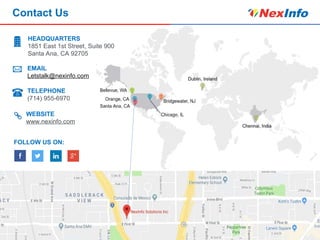
•HQ in Orange County, CA with offices in Redmond, WA, Chicago, IL, Bridgewater, NJ, Dublin, Ireland, Chennai &
Bangalore, India
•Operations across the United States, Europe (Ireland, UK, Switzerland, Belgium) & India
2
Presenter Information
3
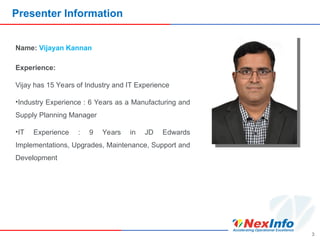
Name: Vijayan Kannan
Experience:
Vijay has 15 Years of Industry and IT Experience
•Industry Experience : 6 Years as a Manufacturing and
Supply Planning Manager
•IT Experience : 9 Years in JD Edwards
Implementations, Upgrades, Maintenance, Support and
Development
4
Reminder: Submitting Questions
Questions?
Please submit questions using
the questions option on the
sidebar.
5
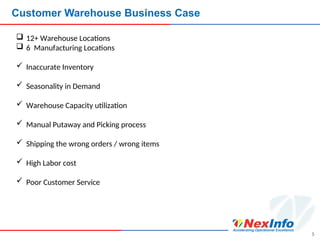
Customer Warehouse Business Case
 12+ Warehouse Locations
 6 Manufacturing Locations
 Inaccurate Inventory
 Seasonality in Demand
 Warehouse Capacity utilization
 Manual Putaway and Picking process
 Shipping the wrong orders / wrong items
 High Labor cost
 Poor Customer Service
Why We Are Here
Overview: JD Edwards WMS
Process: JD Edwards WMS
MANUFACTURING
PURCHASE RECEIPT
RECEIPT PUTAWAY
PRODUCTION PUTAWAY
PICKING
PACKING
SHIPPING
Case Study
WMS Dashboards
NexInfo Cloud Connectors
Q&As
6
JD Edwards WMS
JD Edwards WMS Overview
A JD Edwards warehouse management system process is generally
classified in to below three processes:
1.Put-away
2.Replenishment
3.Picking
8
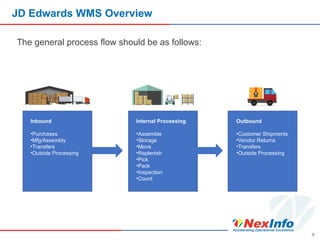
JD Edwards WMS Overview
The general process flow should be as follows:
9
Inbound
•Purchases
•Mfg/Assembly
•Transfers
•Outside Processing
Internal Processing
•Assemble
•Storage
•Move
•Replenish
•Pick
•Pack
•Inspection
•Count
Outbound
•Customer Shipments
•Vendor Returns
•Transfers
•Outside Processing
Process Flows for
WMS Enablement
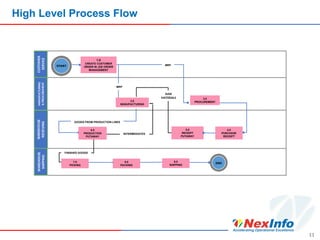
High Level Process Flow
11
CUSTOMER
SERVICE
MANUFUCTURING
&
PROCUREMENT
WAREHOUSE
SHIPPING
START
1.0
CREATE CUSTOMER
ORDER IN JDE ORDER
MANAGEMENT
2.0
MANUFACTURING
3.0
PROCUREMENT
4.0
PURCHASE
RECEIPT
5.0
RECEIPT
PUTAWAY
7.0
PICKING
8.0
PACKING
9.0
SHIPPING
RAW
MATERIALS
MRP
MRP
END
GOODS FROM PRODUCTION LINES
6.0
PRODUCTION
PUTAWAY
INTERMEDIATES
FINISHED GOODS
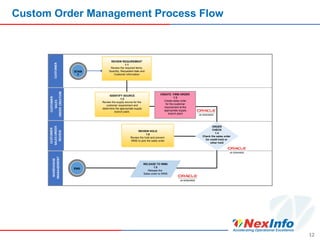
Custom Order Management Process Flow
12
REVIEW REQUIREMENT
1.1
Review the required items,
Quantity, Requested date and
Customer information
REVIEW HOLD
1.6
Review the hold and prevent
WMS to pick the sales order
STAR
T
END
IIDENTIFY SOURCE
1.2
Review the supply source for the
customer requirement and
determine the appropriate supply
branch plant.
CREATE FIRM ORDER
1.3
Create sales order
for the customer
requirement at the
appropriate supply
branch plant
ORDER
CHECK
1.4
Check the sales order
for credit hold or
other hold
RELEASE TO WMS
1.5
Release the
Sales order to WMS
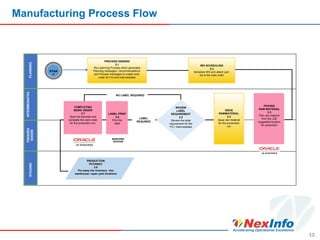
Manufacturing Process Flow
13
PLANNING
INTERMEDIATES
FINISHED
GOODS
STAGING
STAR
T
PROCESS DEMAND
2.1
Run planning Process which generates
Planning messages / recommendations
and Process messages to create work
order for FG and Intermediates
WO SCHEDULING
2.2
Schedule WO and attach part
list to the work order
COMPLETING
WORK ORDER
2.7
Scan the barcode and
complete the work order
for the production run.
LABEL PRINT
2.6
Print the
label
REVIEW
LABEL
REQUIREMENT
2.5
Review the label
requirement for the
FG / Intermediates
PICKING
RAW MATERIAL
2.3
Pick raw material
from the JDE
suggested location
for production
ISSUE
RAWMATERIAL
2.4
Issue raw material
for the production
run
PRODUCTION
PUTAWAY
2.8
Put away the inventory into
warehouse / open yard locations
BARCODE
SYSTEM
NO LABEL REQUIRED
LABEL
REQUIRED
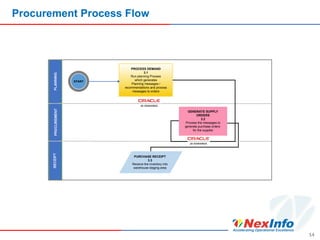
Procurement Process Flow
14
START
PROCESS DEMAND
3.1
Run planning Process
which generates
Planning messages /
recommendations and process
messages to orders
GENERATE SUPPLY
ORDERS
3.2
Process the messages to
generate purchase orders
for the supplier
PURCHASE RECEIPT
3.3
Receive the inventory into
warehouse staging area
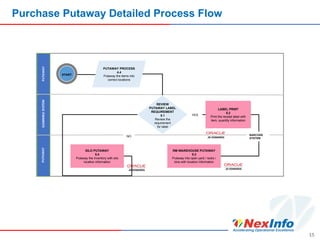
Purchase Putaway Detailed Process Flow
15
PUTAWAY PROCESS
4.4
Putaway the items into
correct locations
LABEL PRINT
5.2
Print the receipt label with
item, quantity information
RM WAREHOUSE PUTAWAY
5.3
Putaway into open yard / racks /
bins with location information
START
BARCODE
SYSTEM
REVIEW
PUTAWAY LABEL
REQUIREMENT
5.1
Review the
requirement
for label
SILO PUTAWAY
5.4
Putaway the inventory with silo
location information
NO
YES
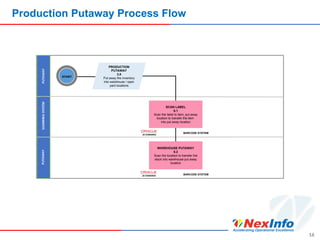
Production Putaway Process Flow
16
PRODUCTION
PUTAWAY
2.8
Put away the inventory
into warehouse / open
yard locations
SCAN LABEL
6.1
Scan the label to item, put away
location to transfer the item
into put away location
WAREHOUSE PUTAWAY
6.2
Scan the location to transfer the
stock into warehouse put away
location
START
BARCODE SYSTEM
BARCODE SYSTEM
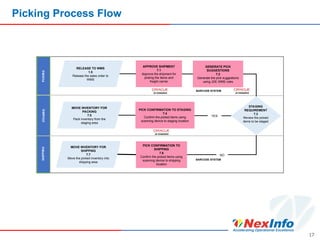
Picking Process Flow
17
RELEASE TO WMS
1.5
Release the sales order to
WMS
APPROVE SHIPMENT
7.1
Approve the shipment for
picking the items and
freight carrier
GENERATE PICK
SUGGESTIONS
7.2
Generate the pick suggestions
using JDE WMS rules
PICK CONFIRMATION TO STAGING
7.4
Confirm the picked items using
scanning device to staging location
PICK CONFIRMATION TO
SHIPPING
7.6
Confirm the picked items using
scanning device to shipping
location
BARCODE SYSTEM
MOVE INVENTORY FOR
PACKING
7.5
Pack inventory from the
staging area
STAGING
REQUIREMENT
7.3
Review the picked
items to be staged
MOVE INVENTORY FOR
SHIPPING
7.7
Move the picked inventory into
shipping area
YES
NO
BARCODE SYSTEM
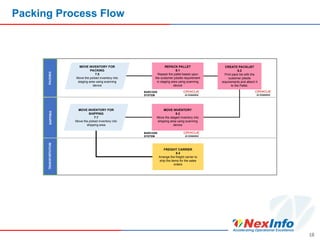
Packing Process Flow
18
MOVE INVENTORY FOR
PACKING
7.5
Move the picked inventory into
staging area using scanning
device
REPACK PALLET
8.1
Repack the pallet based upon
the customer jobsite requirement
in staging area using scanning
device
CREATE PACKLIST
8.2
Print pack list with the
customer jobsite
requirements and attach it
to the Pallet.
MOVE INVENTORY
8.3
Move the staged inventory into
shipping area using scanning
device
FREIGHT CARRIER
8.4
Arrange the freight carrier to
ship the items for the sales
orders
BARCODE
SYSTEM
MOVE INVENTORY FOR
SHIPPING
7.7
Move the picked inventory into
shipping area
BARCODE
SYSTEM
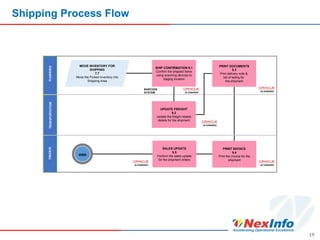
Shipping Process Flow
19
END
MOVE INVENTORY FOR
SHIPPING
7.7
Move the Picked Inventory into
Shipping Area
SHIP CONFIRMATION 9.1
Confirm the shipped items
using scanning devices to
staging location
PRINT DOCUMENTS
9.3
Print delivery note &
bill of lading for
the shipment
UPDATE FREIGHT
9.2
Update the freight related
details for the shipment
SALES UPDATE
9.5
Perform the sales update
for the shipment orders
PRINT INVOICE
9.4
Print the invoice for the
shipment
BARCODE
SYSTEM
Case Study
Objectives
21
• Understand the existing warehouse structure, location, zones
etc.
• Understand the receipt & put away process, predefined
movement rules
• Discover the pick/pack/ship process and the expectations on
the picking processes
• Discover if any replenishment needs of the warehouse
• Understand the volume of master data and its requirements
• Understand the barcoding/labelling /scanning requirement.
• Future State process definition and design
• Creation of roadmap with estimated effort and timelines
• Implemented the future state process design
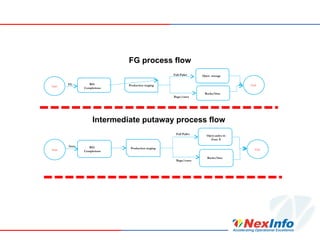
FG process flow
Start
WO
Completions
Production staging
Full Pallet
Bags/cases
Open storage
Racks/bins
End
FG
Start
WO
Completions
Production staging
Full Pallet
Bags/cases
Open aisles in
Zone X
Racks/bins
End
Inter
Intermediate putaway process flow
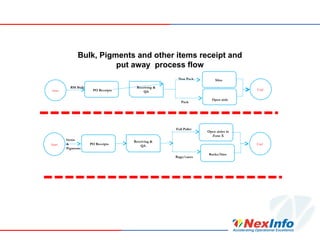
Bulk, Pigments and other items receipt and
put away process flow
Start PO Receipts
Receiving &
QA
Full Pallet
Bags/cases
Open aisles in
Zone X
Racks/bins
End
Items
&
Pigments
Start PO Receipts
Receiving &
QA
Non Pack
Pack
Silos
Open aisle
End
RM Bulk
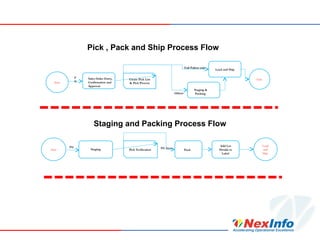
Staging and Packing Process Flow
Start
Sales Order Entry,
Confirmation and
Approval
Create Pick List
& Pick Process
Full Pallets only
Others
Load and Ship
Staging &
Packing
End
F
G
Start Staging Pick Verification
FG Items
Pack
Load
and
Ship
FG Add Lot
Details to
Label
Pick , Pack and Ship Process Flow
WMS Dashboards
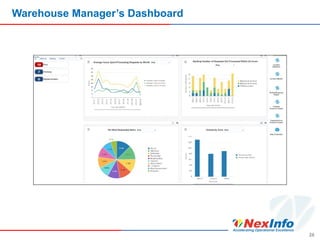
Warehouse Manager’s Dashboard
26
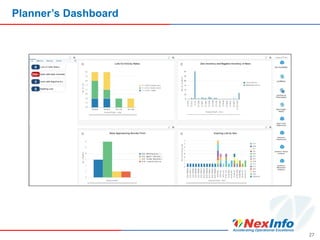
Planner’s Dashboard
27
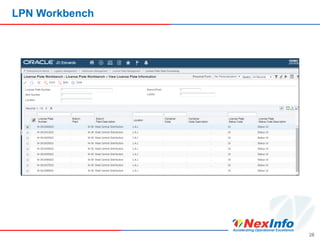
LPN Workbench
28
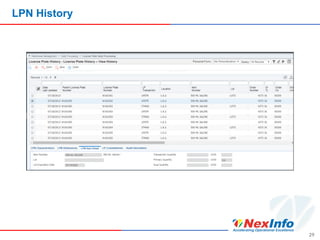
LPN History
29
30
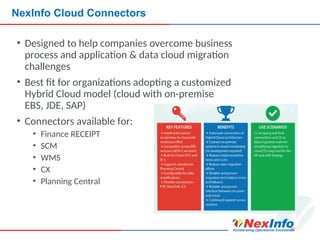
NexInfo Cloud Connectors
• Designed to help companies overcome business
process and application & data cloud migration
challenges
• Best fit for organizations adopting a customized
Hybrid Cloud model (cloud with on-premise
EBS, JDE, SAP)
• Connectors available for:
• Finance RECEIPT
• SCM
• WMS
• CX
• Planning Central
31
Ask Your Questions Via Sidebar
Contact Us
HEADQUARTERS
1851 East 1st Street, Suite 900
Santa Ana, CA 92705
EMAIL
Letstalk@nexinfo.com
TELEPHONE
(714) 955-6970
WEBSITE
www.nexinfo.com
FOLLOW US ON:

Maximizing Warehouse Efficiency with JDE Advanced WMS: NexInfo

  • 1.
    October 30, 2018 CaseStudy: Using JDE Advanced WMS to streamline Warehouse Operations Prepared by: Vijayan Kannan @NexinfoSolution
  • 2.
    Who Is NexInfo? SUMMARY •Consultingcompany focused on helping clients achieve Operational Excellence via an optimal blend of Business Process & Software consulting services •Deep domain expertise, including: Integrated Business Planning (IBP/S&OP), Enterprise Resource Planning (ERP), Product Lifecycle Management (PLM), Customer Relationship management (CRM), Enterprise Planning Management (EPM), Human Capital Management (HCM), Predictive Data Analytics, Security & Business Transformations •Founded in 1999 and managed by computer industry & business process professionals •Clients include emerging companies and Fortune 1000 corporations •Recognized in the industry, including features in Gartner Reports, The Silicon Review (50 Smartest Companies of the Year 2016 and 10 Fastest Growing Oracle Solution Providers 2017), and CIO Review (100 Most Promising Oracle Solution Providers 2015) PARTNERS CORPORATE INFO •HQ in Orange County, CA with offices in Redmond, WA, Chicago, IL, Bridgewater, NJ, Dublin, Ireland, Chennai & Bangalore, India •Operations across the United States, Europe (Ireland, UK, Switzerland, Belgium) & India 2
  • 3.
    Presenter Information 3 Name: VijayanKannan Experience: Vijay has 15 Years of Industry and IT Experience •Industry Experience : 6 Years as a Manufacturing and Supply Planning Manager •IT Experience : 9 Years in JD Edwards Implementations, Upgrades, Maintenance, Support and Development
  • 4.
    4 Reminder: Submitting Questions Questions? Pleasesubmit questions using the questions option on the sidebar.
  • 5.
    5 Customer Warehouse BusinessCase  12+ Warehouse Locations  6 Manufacturing Locations  Inaccurate Inventory  Seasonality in Demand  Warehouse Capacity utilization  Manual Putaway and Picking process  Shipping the wrong orders / wrong items  High Labor cost  Poor Customer Service
  • 6.
    Why We AreHere Overview: JD Edwards WMS Process: JD Edwards WMS MANUFACTURING PURCHASE RECEIPT RECEIPT PUTAWAY PRODUCTION PUTAWAY PICKING PACKING SHIPPING Case Study WMS Dashboards NexInfo Cloud Connectors Q&As 6
  • 7.
  • 8.
    JD Edwards WMSOverview A JD Edwards warehouse management system process is generally classified in to below three processes: 1.Put-away 2.Replenishment 3.Picking 8
  • 9.
    JD Edwards WMSOverview The general process flow should be as follows: 9 Inbound •Purchases •Mfg/Assembly •Transfers •Outside Processing Internal Processing •Assemble •Storage •Move •Replenish •Pick •Pack •Inspection •Count Outbound •Customer Shipments •Vendor Returns •Transfers •Outside Processing
  • 10.
  • 11.
    High Level ProcessFlow 11 CUSTOMER SERVICE MANUFUCTURING & PROCUREMENT WAREHOUSE SHIPPING START 1.0 CREATE CUSTOMER ORDER IN JDE ORDER MANAGEMENT 2.0 MANUFACTURING 3.0 PROCUREMENT 4.0 PURCHASE RECEIPT 5.0 RECEIPT PUTAWAY 7.0 PICKING 8.0 PACKING 9.0 SHIPPING RAW MATERIALS MRP MRP END GOODS FROM PRODUCTION LINES 6.0 PRODUCTION PUTAWAY INTERMEDIATES FINISHED GOODS
  • 12.
    Custom Order ManagementProcess Flow 12 REVIEW REQUIREMENT 1.1 Review the required items, Quantity, Requested date and Customer information REVIEW HOLD 1.6 Review the hold and prevent WMS to pick the sales order STAR T END IIDENTIFY SOURCE 1.2 Review the supply source for the customer requirement and determine the appropriate supply branch plant. CREATE FIRM ORDER 1.3 Create sales order for the customer requirement at the appropriate supply branch plant ORDER CHECK 1.4 Check the sales order for credit hold or other hold RELEASE TO WMS 1.5 Release the Sales order to WMS
  • 13.
    Manufacturing Process Flow 13 PLANNING INTERMEDIATES FINISHED GOODS STAGING STAR T PROCESSDEMAND 2.1 Run planning Process which generates Planning messages / recommendations and Process messages to create work order for FG and Intermediates WO SCHEDULING 2.2 Schedule WO and attach part list to the work order COMPLETING WORK ORDER 2.7 Scan the barcode and complete the work order for the production run. LABEL PRINT 2.6 Print the label REVIEW LABEL REQUIREMENT 2.5 Review the label requirement for the FG / Intermediates PICKING RAW MATERIAL 2.3 Pick raw material from the JDE suggested location for production ISSUE RAWMATERIAL 2.4 Issue raw material for the production run PRODUCTION PUTAWAY 2.8 Put away the inventory into warehouse / open yard locations BARCODE SYSTEM NO LABEL REQUIRED LABEL REQUIRED
  • 14.
    Procurement Process Flow 14 START PROCESSDEMAND 3.1 Run planning Process which generates Planning messages / recommendations and process messages to orders GENERATE SUPPLY ORDERS 3.2 Process the messages to generate purchase orders for the supplier PURCHASE RECEIPT 3.3 Receive the inventory into warehouse staging area
  • 15.
    Purchase Putaway DetailedProcess Flow 15 PUTAWAY PROCESS 4.4 Putaway the items into correct locations LABEL PRINT 5.2 Print the receipt label with item, quantity information RM WAREHOUSE PUTAWAY 5.3 Putaway into open yard / racks / bins with location information START BARCODE SYSTEM REVIEW PUTAWAY LABEL REQUIREMENT 5.1 Review the requirement for label SILO PUTAWAY 5.4 Putaway the inventory with silo location information NO YES
  • 16.
    Production Putaway ProcessFlow 16 PRODUCTION PUTAWAY 2.8 Put away the inventory into warehouse / open yard locations SCAN LABEL 6.1 Scan the label to item, put away location to transfer the item into put away location WAREHOUSE PUTAWAY 6.2 Scan the location to transfer the stock into warehouse put away location START BARCODE SYSTEM BARCODE SYSTEM
  • 17.
    Picking Process Flow 17 RELEASETO WMS 1.5 Release the sales order to WMS APPROVE SHIPMENT 7.1 Approve the shipment for picking the items and freight carrier GENERATE PICK SUGGESTIONS 7.2 Generate the pick suggestions using JDE WMS rules PICK CONFIRMATION TO STAGING 7.4 Confirm the picked items using scanning device to staging location PICK CONFIRMATION TO SHIPPING 7.6 Confirm the picked items using scanning device to shipping location BARCODE SYSTEM MOVE INVENTORY FOR PACKING 7.5 Pack inventory from the staging area STAGING REQUIREMENT 7.3 Review the picked items to be staged MOVE INVENTORY FOR SHIPPING 7.7 Move the picked inventory into shipping area YES NO BARCODE SYSTEM
  • 18.
    Packing Process Flow 18 MOVEINVENTORY FOR PACKING 7.5 Move the picked inventory into staging area using scanning device REPACK PALLET 8.1 Repack the pallet based upon the customer jobsite requirement in staging area using scanning device CREATE PACKLIST 8.2 Print pack list with the customer jobsite requirements and attach it to the Pallet. MOVE INVENTORY 8.3 Move the staged inventory into shipping area using scanning device FREIGHT CARRIER 8.4 Arrange the freight carrier to ship the items for the sales orders BARCODE SYSTEM MOVE INVENTORY FOR SHIPPING 7.7 Move the picked inventory into shipping area BARCODE SYSTEM
  • 19.
    Shipping Process Flow 19 END MOVEINVENTORY FOR SHIPPING 7.7 Move the Picked Inventory into Shipping Area SHIP CONFIRMATION 9.1 Confirm the shipped items using scanning devices to staging location PRINT DOCUMENTS 9.3 Print delivery note & bill of lading for the shipment UPDATE FREIGHT 9.2 Update the freight related details for the shipment SALES UPDATE 9.5 Perform the sales update for the shipment orders PRINT INVOICE 9.4 Print the invoice for the shipment BARCODE SYSTEM
  • 20.
  • 21.
    Objectives 21 • Understand theexisting warehouse structure, location, zones etc. • Understand the receipt & put away process, predefined movement rules • Discover the pick/pack/ship process and the expectations on the picking processes • Discover if any replenishment needs of the warehouse • Understand the volume of master data and its requirements • Understand the barcoding/labelling /scanning requirement. • Future State process definition and design • Creation of roadmap with estimated effort and timelines • Implemented the future state process design
  • 22.
    FG process flow Start WO Completions Productionstaging Full Pallet Bags/cases Open storage Racks/bins End FG Start WO Completions Production staging Full Pallet Bags/cases Open aisles in Zone X Racks/bins End Inter Intermediate putaway process flow
  • 23.
    Bulk, Pigments andother items receipt and put away process flow Start PO Receipts Receiving & QA Full Pallet Bags/cases Open aisles in Zone X Racks/bins End Items & Pigments Start PO Receipts Receiving & QA Non Pack Pack Silos Open aisle End RM Bulk
  • 24.
    Staging and PackingProcess Flow Start Sales Order Entry, Confirmation and Approval Create Pick List & Pick Process Full Pallets only Others Load and Ship Staging & Packing End F G Start Staging Pick Verification FG Items Pack Load and Ship FG Add Lot Details to Label Pick , Pack and Ship Process Flow
  • 25.
  • 26.
  • 27.
  • 28.
  • 29.
  • 30.
    30 NexInfo Cloud Connectors •Designed to help companies overcome business process and application & data cloud migration challenges • Best fit for organizations adopting a customized Hybrid Cloud model (cloud with on-premise EBS, JDE, SAP) • Connectors available for: • Finance RECEIPT • SCM • WMS • CX • Planning Central
  • 31.
  • 32.
    Contact Us HEADQUARTERS 1851 East1st Street, Suite 900 Santa Ana, CA 92705 EMAIL Letstalk@nexinfo.com TELEPHONE (714) 955-6970 WEBSITE www.nexinfo.com FOLLOW US ON: