Accounts Payable
Version 1.0

Unit 3: Invoice and Credit Note
Processing
Course Agenda


    Unit 1: Introduction
    Unit 2: Master Data
    Unit 3: Invoice and Credit Note Processing
    Unit 4: Payments
    Unit 5: Inquiries
    Unit 6: Reporting
    Unit 7: Vendor Reconciliation


                            Here comes your footer   FI: Accounts Payable   2
Unit Objectives


 At the completion of this unit, you will be able to:
  Understand non-Purchase Order and Purchase Order related
   invoice and Credit Memo processing.
  Perform non-Purchase Order related invoice and Credit Memo
   processing
  Perform purchase invoice processing through Logistics Invoice
   Verification


                              Here comes your footer   FI: Accounts Payable   Page 3 3
Key Terms

   2 Way- Match Concept
   3 Way-Match Concept
   Logistics Invoice Verification


                                     Here comes your footer   FI: Accounts Payable   Page 4 4
SAP R/3 Process


 Represents a process within LIMS

Represents a manual process outside of LIMS


                                              Here comes your footer   FI: Accounts Payable   Page 5 5
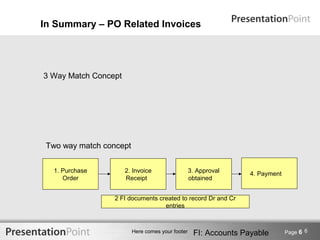
In Summary – PO Related Invoices


3 Way Match Concept


 Two way match concept


  1. Purchase         2. Invoice                  3. Approval     4. Payment
     Order            Receipt                     obtained


                 2 FI documents created to record Dr and Cr
                                  entries


                         Here comes your footer    FI: Accounts Payable        Page 6 6
Non-PO Related Invoices and Credit Memos


  Invoices and Credit Memos not requiring a Purchase Order are
   entered directly into SAP through the Accounts Payable
   module.
  Approvals:
  - Can be approved before they are entered into SAP R/3.
  - Can be entered and blocked for payment then trigger non-PO
    workflow
  Examples of purchases that do not require a Purchase Order
   are:
  - Utilities
  - Contributions

  Note: See Admin Policy 601


                       Here comes your footer   FI: Accounts Payable   Page 7 7
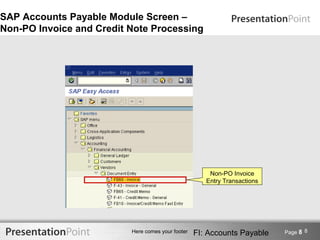
SAP Accounts Payable Module Screen –
Non-PO Invoice and Credit Note Processing


                                                       Non-PO Invoice
                                                      Entry Transactions


                          Here comes your footer   FI: Accounts Payable    Page 8 8
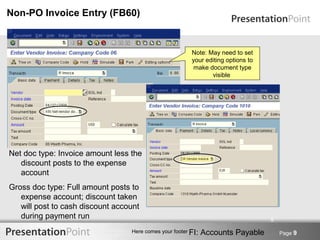
Non-PO Invoice Entry (FB60)


                                                         Note: May need to set
                                                         your editing options to
                                                          make document type
                                                                visible


Net doc type: Invoice amount less the
   discount posts to the expense
   account
Gross doc type: Full amount posts to
   expense account; discount taken
   will post to cash discount account
   during payment run                                                              9

                                  Here comes your footer FI:   Accounts Payable        Page 9
PO Related Invoices and Credit Memos


  Invoices requiring a purchase order are entered into the
   Materials Management module of SAP R/3 through Logistics
   Invoice Verification in order to verify them against the Purchase
   Order (PO) and the Goods Receipts (GR).
  In SAP R/3, 3-way matching process is known as Invoice
   Verification.
  Invoices which fall outside the price/quantity tolerances are
   blocked from payment.


                                                                              10
                       Here comes your footer   FI: Accounts Payable   Page 10
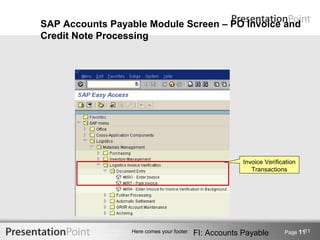
SAP Accounts Payable Module Screen – PO Invoice and
Credit Note Processing


                                                       Invoice Verification
                                                          Transactions


                                                                             11
                 Here comes your footer   FI: Accounts Payable        Page 11
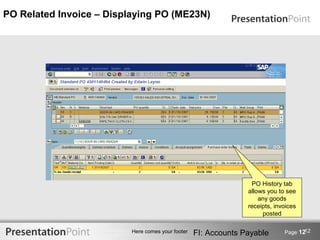
PO Related Invoice – Displaying PO (ME23N)


                                                                  PO History tab
                                                                 allows you to see
                                                                     any goods
                                                                 receipts, invoices
                                                                      posted

                                                                                     12
                          Here comes your footer   FI: Accounts Payable       Page 12
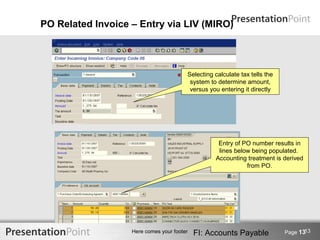
PO Related Invoice – Entry via LIV (MIRO)


                                        Selecting calculate tax tells the
                                         system to determine amount,
                                         versus you entering it directly


                                                   Entry of PO number results in
                                                   lines below being populated.
                                                  Accounting treatment is derived
                                                             from PO.


                                                                                   13
                   Here comes your footer   FI: Accounts Payable            Page 13
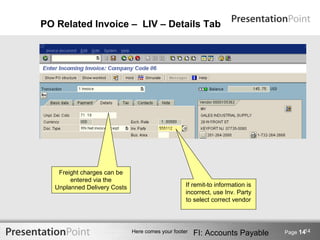
PO Related Invoice – LIV – Details Tab


    Freight charges can be
        entered via the
   Unplanned Delivery Costs                        If remit-to information is
                                                   incorrect, use Inv. Party
                                                   to select correct vendor


                                                                                       14
                              Here comes your footer   FI: Accounts Payable     Page 14
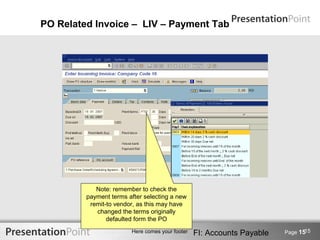
PO Related Invoice – LIV – Payment Tab


            Note: remember to check the
         payment terms after selecting a new
          remit-to vendor, as this may have
            changed the terms originally
                defaulted form the PO
                                                                               15
                        Here comes your footer   FI: Accounts Payable   Page 15
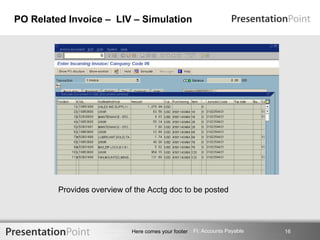
PO Related Invoice – LIV – Simulation


         Provides overview of the Acctg doc to be posted


                             Here comes your footer   FI: Accounts Payable   16
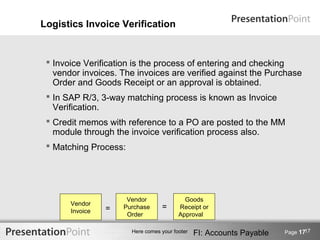
Logistics Invoice Verification


  Invoice Verification is the process of entering and checking
   vendor invoices. The invoices are verified against the Purchase
   Order and Goods Receipt or an approval is obtained.
  In SAP R/3, 3-way matching process is known as Invoice
   Verification.
  Credit memos with reference to a PO are posted to the MM
   module through the invoice verification process also.
  Matching Process:


                      Vendor               Goods
       Vendor
       Invoice   =   Purchase     =      Receipt or
                      Order              Approval

                                                                              17
                       Here comes your footer   FI: Accounts Payable   Page 17
Other Accounts Payable Processing Functions


  Reverse a Document
  Display Documents
  Change Documents


                                                                             18
                      Here comes your footer   FI: Accounts Payable   Page 18
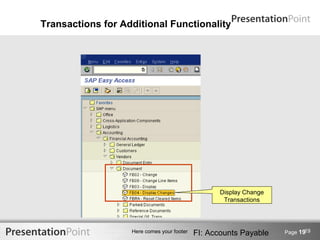
Transactions for Additional Functionality


                                                   Display Change
                                                    Transactions


                                                                           19
                   Here comes your footer   FI: Accounts Payable    Page 19
Reversing Vendor Invoices


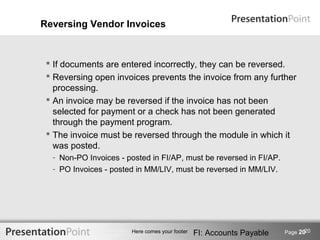
  If documents are entered incorrectly, they can be reversed.
  Reversing open invoices prevents the invoice from any further
   processing.
  An invoice may be reversed if the invoice has not been
   selected for payment or a check has not been generated
   through the payment program.
  The invoice must be reversed through the module in which it
   was posted.
  - Non-PO Invoices - posted in FI/AP, must be reversed in FI/AP.
  - PO Invoices - posted in MM/LIV, must be reversed in MM/LIV.


                                                                              20
                       Here comes your footer   FI: Accounts Payable   Page 20
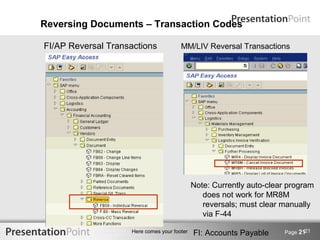
Reversing Documents – Transaction Codes

FI/AP Reversal Transactions            MM/LIV Reversal Transactions


                                             Note: Currently auto-clear program
                                                does not work for MR8M
                                                reversals; must clear manually
                                                via F-44

                                                                             21
                    Here comes your footer   FI: Accounts Payable     Page 21
Change/Display Documents


  It is possible to change certain fields on a posted invoice or
   credit note
  - Reference field
  - Payment Terms
  - Text fields
  Similar to reversing a document, an invoice posted in FI/AP is
   changed in the FI/AP module and an invoice posted in MM/LIV
   is changed in MM /LIV.


                                                                              22
                       Here comes your footer   FI: Accounts Payable   Page 22
Display Documents Posted


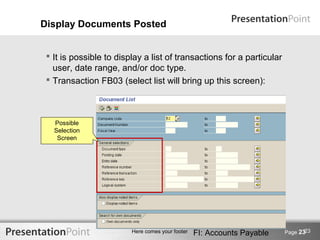
  It is possible to display a list of transactions for a particular
   user, date range, and/or doc type.
  Transaction FB03 (select list will bring up this screen):


   Possible
   Selection
    Screen


                                                                                23
                         Here comes your footer   FI: Accounts Payable   Page 23
Questions and Answers


                                                                        24
                 Here comes your footer   FI: Accounts Payable   Page 24

Accounts Payable Training 3

  • 1.
    Accounts Payable Version 1.0 Unit3: Invoice and Credit Note Processing
  • 2.
    Course Agenda Unit 1: Introduction Unit 2: Master Data Unit 3: Invoice and Credit Note Processing Unit 4: Payments Unit 5: Inquiries Unit 6: Reporting Unit 7: Vendor Reconciliation Here comes your footer FI: Accounts Payable 2
  • 3.
    Unit Objectives Atthe completion of this unit, you will be able to:  Understand non-Purchase Order and Purchase Order related invoice and Credit Memo processing.  Perform non-Purchase Order related invoice and Credit Memo processing  Perform purchase invoice processing through Logistics Invoice Verification Here comes your footer FI: Accounts Payable Page 3 3
  • 4.
    Key Terms  2 Way- Match Concept  3 Way-Match Concept  Logistics Invoice Verification Here comes your footer FI: Accounts Payable Page 4 4
  • 5.
    SAP R/3 Process Represents a process within LIMS Represents a manual process outside of LIMS Here comes your footer FI: Accounts Payable Page 5 5
  • 6.
    In Summary –PO Related Invoices 3 Way Match Concept Two way match concept 1. Purchase 2. Invoice 3. Approval 4. Payment Order Receipt obtained 2 FI documents created to record Dr and Cr entries Here comes your footer FI: Accounts Payable Page 6 6
  • 7.
    Non-PO Related Invoicesand Credit Memos  Invoices and Credit Memos not requiring a Purchase Order are entered directly into SAP through the Accounts Payable module.  Approvals: - Can be approved before they are entered into SAP R/3. - Can be entered and blocked for payment then trigger non-PO workflow  Examples of purchases that do not require a Purchase Order are: - Utilities - Contributions  Note: See Admin Policy 601 Here comes your footer FI: Accounts Payable Page 7 7
  • 8.
    SAP Accounts PayableModule Screen – Non-PO Invoice and Credit Note Processing Non-PO Invoice Entry Transactions Here comes your footer FI: Accounts Payable Page 8 8
  • 9.
    Non-PO Invoice Entry(FB60) Note: May need to set your editing options to make document type visible Net doc type: Invoice amount less the discount posts to the expense account Gross doc type: Full amount posts to expense account; discount taken will post to cash discount account during payment run 9 Here comes your footer FI: Accounts Payable Page 9
  • 10.
    PO Related Invoicesand Credit Memos  Invoices requiring a purchase order are entered into the Materials Management module of SAP R/3 through Logistics Invoice Verification in order to verify them against the Purchase Order (PO) and the Goods Receipts (GR).  In SAP R/3, 3-way matching process is known as Invoice Verification.  Invoices which fall outside the price/quantity tolerances are blocked from payment. 10 Here comes your footer FI: Accounts Payable Page 10
  • 11.
    SAP Accounts PayableModule Screen – PO Invoice and Credit Note Processing Invoice Verification Transactions 11 Here comes your footer FI: Accounts Payable Page 11
  • 12.
    PO Related Invoice– Displaying PO (ME23N) PO History tab allows you to see any goods receipts, invoices posted 12 Here comes your footer FI: Accounts Payable Page 12
  • 13.
    PO Related Invoice– Entry via LIV (MIRO) Selecting calculate tax tells the system to determine amount, versus you entering it directly Entry of PO number results in lines below being populated. Accounting treatment is derived from PO. 13 Here comes your footer FI: Accounts Payable Page 13
  • 14.
    PO Related Invoice– LIV – Details Tab Freight charges can be entered via the Unplanned Delivery Costs If remit-to information is incorrect, use Inv. Party to select correct vendor 14 Here comes your footer FI: Accounts Payable Page 14
  • 15.
    PO Related Invoice– LIV – Payment Tab Note: remember to check the payment terms after selecting a new remit-to vendor, as this may have changed the terms originally defaulted form the PO 15 Here comes your footer FI: Accounts Payable Page 15
  • 16.
    PO Related Invoice– LIV – Simulation Provides overview of the Acctg doc to be posted Here comes your footer FI: Accounts Payable 16
  • 17.
    Logistics Invoice Verification  Invoice Verification is the process of entering and checking vendor invoices. The invoices are verified against the Purchase Order and Goods Receipt or an approval is obtained.  In SAP R/3, 3-way matching process is known as Invoice Verification.  Credit memos with reference to a PO are posted to the MM module through the invoice verification process also.  Matching Process: Vendor Goods Vendor Invoice = Purchase = Receipt or Order Approval 17 Here comes your footer FI: Accounts Payable Page 17
  • 18.
    Other Accounts PayableProcessing Functions  Reverse a Document  Display Documents  Change Documents 18 Here comes your footer FI: Accounts Payable Page 18
  • 19.
    Transactions for AdditionalFunctionality Display Change Transactions 19 Here comes your footer FI: Accounts Payable Page 19
  • 20.
    Reversing Vendor Invoices  If documents are entered incorrectly, they can be reversed.  Reversing open invoices prevents the invoice from any further processing.  An invoice may be reversed if the invoice has not been selected for payment or a check has not been generated through the payment program.  The invoice must be reversed through the module in which it was posted. - Non-PO Invoices - posted in FI/AP, must be reversed in FI/AP. - PO Invoices - posted in MM/LIV, must be reversed in MM/LIV. 20 Here comes your footer FI: Accounts Payable Page 20
  • 21.
    Reversing Documents –Transaction Codes FI/AP Reversal Transactions MM/LIV Reversal Transactions Note: Currently auto-clear program does not work for MR8M reversals; must clear manually via F-44 21 Here comes your footer FI: Accounts Payable Page 21
  • 22.
    Change/Display Documents It is possible to change certain fields on a posted invoice or credit note - Reference field - Payment Terms - Text fields  Similar to reversing a document, an invoice posted in FI/AP is changed in the FI/AP module and an invoice posted in MM/LIV is changed in MM /LIV. 22 Here comes your footer FI: Accounts Payable Page 22
  • 23.
    Display Documents Posted  It is possible to display a list of transactions for a particular user, date range, and/or doc type.  Transaction FB03 (select list will bring up this screen): Possible Selection Screen 23 Here comes your footer FI: Accounts Payable Page 23
  • 24.
    Questions and Answers 24 Here comes your footer FI: Accounts Payable Page 24