BuildingPerformanceModule
The City University of New York
New York City College Of Technology
Architectural Technology Department
written by Felix Rodriguez
Environmental Meter - (EN-300)
April 26, 2015
BuildingPerformanceModule
Environmental Meter - (EN-300)
Definition:
The Environmental Meter is a 5-in-1 meter which
provides functions such as a Anemometer meter,
Humidity meter, Light meter, Thermocouple meter
and a Sound level meter.
Applications:
Measure the illumination level in a interior space.
Measure the air velocity of a wind source.
Measure the ambient temperature of a room.
Verify the proper humidity in a museum room.
Control noise pollution with the sound meter.
2
Powering the meter
1.Press the Power On button, to turn the instrument ON.
2. If the meter does not turn on or if the “Low battery symbol appears in the display, replace the batteries.
3. Press the function button to select the measurement needed and Press Hold when you want to record
a measurement, Press Hold again to continue taking Measurements.
Note: The display orientation rotates, depending on the function selected.
Microphone up: Sound, Light, Temperature
Air speed sensor up: Airspeed + Temperature, Humidity + Temperature
Step 1:
Fig 1. Powering on the meter
BuildingPerformanceModule
3
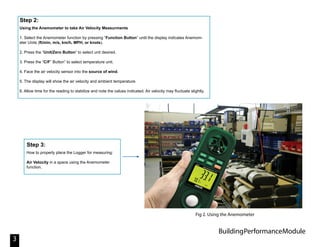
Using the Anemometer to take Air Velocity Measurments
1. Select the Anemometer function by pressing “Function Button” until the display indicates Anemom-
eter Units (ft/min, m/s, km/h, MPH, or knots).
2. Press the “Unit/Zero Button” to select unit desired.
3. Press the “C/F” Button” to select temperature unit.
4. Face the air velocity sensor into the source of wind.
5. The display will show the air velocity and ambient temperature.
6. Allow time for the reading to stabilize and note the values indicated. Air velocity may fluctuate slightly.
Step 2:
How to properly place the Logger for measuring:
Air Velocity in a space using the Anemometer
function.
Step 3:
Fig 2. Using the Anemometer
BuildingPerformanceModule
4
Using the Light meter to take Light Measurements
1. Select the Light Measurement function by pressing the “Function Button”
until a light unit (Lux or Ft-cd) is displayed.
2. Press the “Lux/Ft-cd Button” to switch between “Lux” or “Ft-cd”.
3. The Display will show the Light value.
Zero offset calibration of Light Function:
For best results, zero the light sensor prior to use in a dark environment. To accomplish this, completely
cover the light sensor and then press the “Unit/Zero Button”
The Zero point can drift due to environment temperature and battery power change. It is recommended
that the zero be checked frequently using the above procedure.
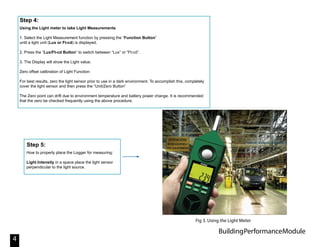
Step 4:
How to properly place the Logger for measuring:
Light Intensity in a space place the light sensor
perpendicular to the light source.
Step 5:
Fig 3. Using the Light Meter
BuildingPerformanceModule
5
Using the Sound meter to measure Sound Level.
1. Select the Sound Level function by pressing the “Function Button” until the Sound level unit (dB) is
displayed.
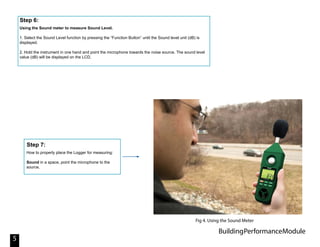
2. Hold the instrument in one hand and point the microphone towards the noise source. The sound level
value (dB) will be displayed on the LCD.
Step 6:
How to properly place the Logger for measuring:
Sound in a space, point the microphone to the
source.
Step 7:
Fig 4. Using the Sound Meter
BuildingPerformanceModule
6
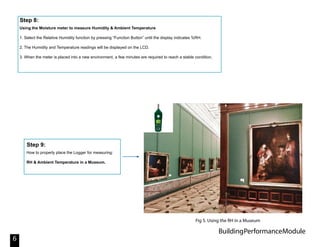
Using the Moisture meter to measure Humidity & Ambient Temperature
1. Select the Relative Humidity function by pressing “Function Button” until the display indicates %RH.
2. The Humidity and Temperature readings will be displayed on the LCD.
3. When the meter is placed into a new environment, a few minutes are required to reach a stable condition.
Step 8:
How to properly place the Logger for measuring:
RH & Ambient Temperature in a Museum.
Step 9:
Fig 5. Using the RH in a Museum

Building Performance Module Environmental Meter

  • 1.
    BuildingPerformanceModule The City Universityof New York New York City College Of Technology Architectural Technology Department written by Felix Rodriguez Environmental Meter - (EN-300) April 26, 2015
  • 2.
    BuildingPerformanceModule Environmental Meter -(EN-300) Definition: The Environmental Meter is a 5-in-1 meter which provides functions such as a Anemometer meter, Humidity meter, Light meter, Thermocouple meter and a Sound level meter. Applications: Measure the illumination level in a interior space. Measure the air velocity of a wind source. Measure the ambient temperature of a room. Verify the proper humidity in a museum room. Control noise pollution with the sound meter. 2 Powering the meter 1.Press the Power On button, to turn the instrument ON. 2. If the meter does not turn on or if the “Low battery symbol appears in the display, replace the batteries. 3. Press the function button to select the measurement needed and Press Hold when you want to record a measurement, Press Hold again to continue taking Measurements. Note: The display orientation rotates, depending on the function selected. Microphone up: Sound, Light, Temperature Air speed sensor up: Airspeed + Temperature, Humidity + Temperature Step 1: Fig 1. Powering on the meter
  • 3.
    BuildingPerformanceModule 3 Using the Anemometerto take Air Velocity Measurments 1. Select the Anemometer function by pressing “Function Button” until the display indicates Anemom- eter Units (ft/min, m/s, km/h, MPH, or knots). 2. Press the “Unit/Zero Button” to select unit desired. 3. Press the “C/F” Button” to select temperature unit. 4. Face the air velocity sensor into the source of wind. 5. The display will show the air velocity and ambient temperature. 6. Allow time for the reading to stabilize and note the values indicated. Air velocity may fluctuate slightly. Step 2: How to properly place the Logger for measuring: Air Velocity in a space using the Anemometer function. Step 3: Fig 2. Using the Anemometer
  • 4.
    BuildingPerformanceModule 4 Using the Lightmeter to take Light Measurements 1. Select the Light Measurement function by pressing the “Function Button” until a light unit (Lux or Ft-cd) is displayed. 2. Press the “Lux/Ft-cd Button” to switch between “Lux” or “Ft-cd”. 3. The Display will show the Light value. Zero offset calibration of Light Function: For best results, zero the light sensor prior to use in a dark environment. To accomplish this, completely cover the light sensor and then press the “Unit/Zero Button” The Zero point can drift due to environment temperature and battery power change. It is recommended that the zero be checked frequently using the above procedure. Step 4: How to properly place the Logger for measuring: Light Intensity in a space place the light sensor perpendicular to the light source. Step 5: Fig 3. Using the Light Meter
  • 5.
    BuildingPerformanceModule 5 Using the Soundmeter to measure Sound Level. 1. Select the Sound Level function by pressing the “Function Button” until the Sound level unit (dB) is displayed. 2. Hold the instrument in one hand and point the microphone towards the noise source. The sound level value (dB) will be displayed on the LCD. Step 6: How to properly place the Logger for measuring: Sound in a space, point the microphone to the source. Step 7: Fig 4. Using the Sound Meter
  • 6.
    BuildingPerformanceModule 6 Using the Moisturemeter to measure Humidity & Ambient Temperature 1. Select the Relative Humidity function by pressing “Function Button” until the display indicates %RH. 2. The Humidity and Temperature readings will be displayed on the LCD. 3. When the meter is placed into a new environment, a few minutes are required to reach a stable condition. Step 8: How to properly place the Logger for measuring: RH & Ambient Temperature in a Museum. Step 9: Fig 5. Using the RH in a Museum