



Nonprofits & Data
Process and Tools: How to Visualize Your Data


              340 N 12th St, Suite 402
              Philadelphia, PA 19107
                   215.925.2600
                info@azavea.com
                www.azavea.com
About Us


    Tamara Manik-Perlman
    Project Manager
    tmanik-perlman@azavea.com
    215.701.7687


   Jeremy Heffner
   Product Manager
   jheffner@azavea.com
   215.701.7712
About Azavea

• Founded in 2000
• 32 people
• Based in Philadelphia
   – Boston office
   – Minneapolis office
• Geospatial + web + mobile
   – Software development
   – Spatial analysis services
Clients & Industries

•   Arts & Culture
•   Elections & Politics
•   Public Health
                             Carnegie
•   Land Conservation        Mellon
•   Public Safety
•   Human Services
•   Municipal Services
•   Economic Development
B Corporation


•   10% Research Program
•   Pro Bono Program
•   Time-to-Give-Back Program
•   Employee-focused Culture
•   Projects with Social Value
How to Visualize Your Data
Agenda

• Cleaning & Preparing Data
• Assembling Data & Building Context
• Exploring, Presenting & Sharing Data Visualizations
• Q&A
Cleaning & Preparing Data
Data Cleaning: Your Questions

• At what point in the data maintenance process do you
  find yourself cleaning data?
• Are there ways that you would like to improve the
  workflow?
Cleaning & Preparing Data

• Making sense of data starts at the point of collection
   – Define what you want to measure / track
      • Clearly define schema and fields
          – Have a shared meaning for values
          – Data validation on entry

   – Collect your data
   – Examine results
      • Are there common mistakes you could prevent?
      • Are there different interpretations of fields?

   – Close the feedback loop & iterate
Cleaning & Preparing Data

• Common data quality issues
   – Combined fields
      • Address: “340 N 12th St, Suite 402 , Philadelphia, PA 19107”

   – Invalid entries
      • ZIP code: 1234 (length check, is number)
      • Age: 204 (reasonable range check, is number)

   – Format variations
      • State: PA vs. Pennsylvania (drop down or scrubbing rules)

   – Duplicates
      • CRM: John Smith with old and new addresses
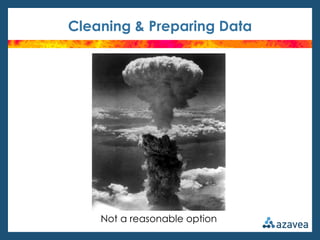
Cleaning & Preparing Data


    Not a reasonable option
Cleaning & Preparing Data

• Tools to clean tabular data
   – Excel (or open source equivalent)
      • Pros:
          – Broad features
          – Widely utilized / common skill
          – Formulas / sorting / flexible

      • Cons:
          – Doesn’t understand record concept
          – Mass changes can be tedious
Cleaning & Preparing Data

• Tools to clean tabular data
   – DataWrangler
      • http://vis.stanford.edu/wrangler/
      • Pros:
          – Focused on transforming data into relational format
          – Live previews

      • Cons:
          – Alpha quality version
          – Data size limits / online tool
          – Can be difficult to figure out what set of transforms are needed
Cleaning & Preparing Data

• Tools to clean tabular data
   – Google Refine
      • http://code.google.com/p/google-refine/
      • Pros:
          – Understands record concept
          – Formulas / Facets
          – Undo capability
          – Windows / Mac / Linux

      • Cons:
          – There is a learning curve
          – Unusual type of app
                » Download, unzip, run exe file, access through browser
Assembling Data & Building Context
Context: Your Questions

• What challenges have you faced putting your data in
  context?
• Are you struggling to identify what “context” means for
  your organization?
• Do you know what data you’d like to use, but have
  trouble finding it?
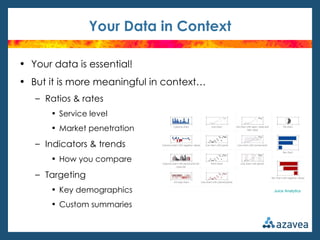
Your Data in Context

• Your data is essential!
• But it is more meaningful in context…
   – Ratios & rates
       • Service level
       • Market penetration

   – Indicators & trends
       • How you compare

   – Targeting
       • Key demographics                 Juice Analytics


       • Custom summaries
Making Sense of the Census

• American FactFinder
• http://factfinder2.census.gov
   – Decennial Census
      • Every 10 years
      • Full population survey
      • Just 10 questions

   – American Community Survey (ACS)
      • Monthly sample
      • Aggregated over different time periods (1-, 3- and 5-year)
      • Extremely detailed questions
      • Subject to sampling error
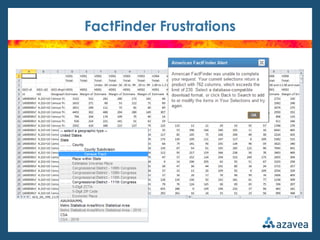
FactFinder Frustrations
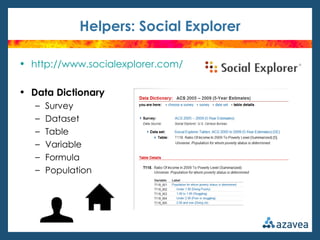
Helpers: Social Explorer

• http://www.socialexplorer.com/

• Data Dictionary
   –   Survey
   –   Dataset
   –   Table
   –   Variable
   –   Formula
   –   Population
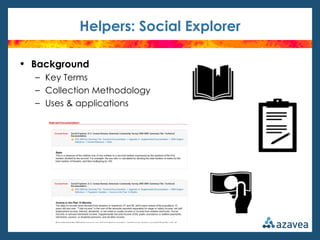
Helpers: Social Explorer

• Background
  – Key Terms
  – Collection Methodology
  – Uses & applications
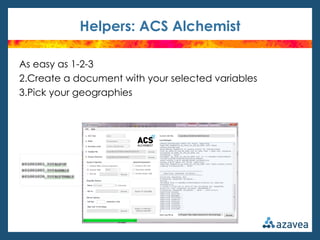
Helpers: ACS Alchemist

•   https://github.com/azavea/acs-alchemist 
•   Retrieval of block group-level data
•   Custom variable selection
•   Delivery in spatial data format ready for mapping


This tool was developed by Azavea in collaboration with Jerry Ratcliffe and Ralph Taylor of Temple
University Center for Security and Crime Science. This project was supported by Award No. 2010-DE-BX-
K004, awarded by the National Institute of Justice, Office of Justice Programs, U.S. Department of Justice.
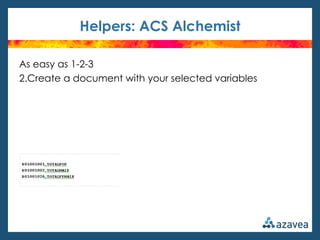
Helpers: ACS Alchemist

As easy as 1-2-3
2.Create a document with your selected variables
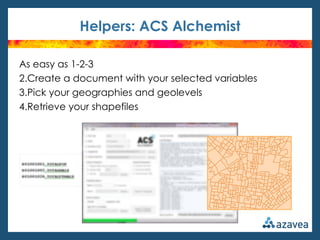
Helpers: ACS Alchemist

As easy as 1-2-3
2.Create a document with your selected variables
3.Pick your geographies
Helpers: ACS Alchemist

As easy as 1-2-3
2.Create a document with your selected variables
3.Pick your geographies and geolevels
4.Retrieve your shapefiles
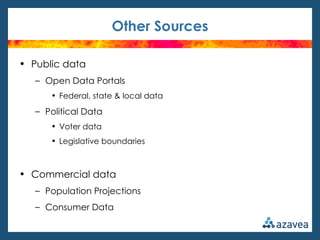
Other Sources

• Public data
   – Open Data Portals
      • Federal, state & local data

   – Political Data
      • Voter data
      • Legislative boundaries


• Commercial data
   – Population Projections
   – Consumer Data
Exploring, Presenting & Sharing Data Visualizations
Data Visualization: Your Questions

• Do you currently share data with your constituents?
• Where do you use data visualizations (e.g. annual report,
  embedded infographics, live data trackers)?
• Do you currently map your data?
Exploring Data

• Visualization tools
   – Tableau
       • http://www.tableausoftware.com/
       • Pros:
           – Flexible interface makes data exploration easy
           – Fast even on large data sets

       • Cons:
           – Easy to visualize something that doesn’t make sense to look at
           – Price (for desktop tool)
Exploring Data

• Visualization tools
   – ArcGIS Explorer online
       • http://www.arcgis.com/explorer/
       • Pros:
           – Supports many data formats
           – Online digitizing
           – Integration with other Esri services
           – Presentation view / mobile app

       • Cons:
           – Can’t export geocoded results
           – Geocoding limited to 250 records
Exploring Data

• Visualization tools
   – GeoCommons (GeoIQ)
       • http://geocommons.com/
       • Pros:
           – Intuitive interface
           – Analysis tools
           – Geocoding for up to 5,000 records
           – Supports KML (Google Maps) import & export

       • Cons:
           – US-only geocoding
Exploring Data

• Desktop GIS: Proprietary
   – Esri ArcGIS
      • Pros:
          – Industry standard
          – Many tools
          – Extensive training materials
          – Customer support

      • Cons:
          – Windows only
          – Potentially expensive *


            *
Exploring Data

• Desktop GIS: Open Source
– Quantum GIS (QGIS)
– GRASS
– uDig
         • Pros:
             – Free
             – Multi-platform (Windows, Mac OS, Linux)

         • Cons:
             – Limited functionality (for advanced users)
             – Community-based support
Q&A
Contact Us


     Tamara Manik-Perlman
     Project Manager
     tmanik-perlman@azavea.com
     215.701.7687


    Jeremy Heffner
    Product Manager
    jheffner@azavea.com
    215.701.7712

NTEN Webinar - Data Cleaning and Visualization Tools for Nonprofits

  • 1.
    Nonprofits & Data Processand Tools: How to Visualize Your Data 340 N 12th St, Suite 402 Philadelphia, PA 19107 215.925.2600 info@azavea.com www.azavea.com
  • 2.
    About Us Tamara Manik-Perlman Project Manager tmanik-perlman@azavea.com 215.701.7687 Jeremy Heffner Product Manager jheffner@azavea.com 215.701.7712
  • 3.
    About Azavea • Foundedin 2000 • 32 people • Based in Philadelphia – Boston office – Minneapolis office • Geospatial + web + mobile – Software development – Spatial analysis services
  • 4.
    Clients & Industries • Arts & Culture • Elections & Politics • Public Health Carnegie • Land Conservation Mellon • Public Safety • Human Services • Municipal Services • Economic Development
  • 5.
    B Corporation • 10% Research Program • Pro Bono Program • Time-to-Give-Back Program • Employee-focused Culture • Projects with Social Value
  • 6.
  • 7.
    Agenda • Cleaning &Preparing Data • Assembling Data & Building Context • Exploring, Presenting & Sharing Data Visualizations • Q&A
  • 8.
  • 9.
    Data Cleaning: YourQuestions • At what point in the data maintenance process do you find yourself cleaning data? • Are there ways that you would like to improve the workflow?
  • 11.
    Cleaning & PreparingData • Making sense of data starts at the point of collection – Define what you want to measure / track • Clearly define schema and fields – Have a shared meaning for values – Data validation on entry – Collect your data – Examine results • Are there common mistakes you could prevent? • Are there different interpretations of fields? – Close the feedback loop & iterate
  • 12.
    Cleaning & PreparingData • Common data quality issues – Combined fields • Address: “340 N 12th St, Suite 402 , Philadelphia, PA 19107” – Invalid entries • ZIP code: 1234 (length check, is number) • Age: 204 (reasonable range check, is number) – Format variations • State: PA vs. Pennsylvania (drop down or scrubbing rules) – Duplicates • CRM: John Smith with old and new addresses
  • 13.
    Cleaning & PreparingData Not a reasonable option
  • 14.
    Cleaning & PreparingData • Tools to clean tabular data – Excel (or open source equivalent) • Pros: – Broad features – Widely utilized / common skill – Formulas / sorting / flexible • Cons: – Doesn’t understand record concept – Mass changes can be tedious
  • 15.
    Cleaning & PreparingData • Tools to clean tabular data – DataWrangler • http://vis.stanford.edu/wrangler/ • Pros: – Focused on transforming data into relational format – Live previews • Cons: – Alpha quality version – Data size limits / online tool – Can be difficult to figure out what set of transforms are needed
  • 16.
    Cleaning & PreparingData • Tools to clean tabular data – Google Refine • http://code.google.com/p/google-refine/ • Pros: – Understands record concept – Formulas / Facets – Undo capability – Windows / Mac / Linux • Cons: – There is a learning curve – Unusual type of app » Download, unzip, run exe file, access through browser
  • 17.
    Assembling Data &Building Context
  • 18.
    Context: Your Questions •What challenges have you faced putting your data in context? • Are you struggling to identify what “context” means for your organization? • Do you know what data you’d like to use, but have trouble finding it?
  • 19.
    Your Data inContext • Your data is essential! • But it is more meaningful in context… – Ratios & rates • Service level • Market penetration – Indicators & trends • How you compare – Targeting • Key demographics Juice Analytics • Custom summaries
  • 20.
    Making Sense ofthe Census • American FactFinder • http://factfinder2.census.gov – Decennial Census • Every 10 years • Full population survey • Just 10 questions – American Community Survey (ACS) • Monthly sample • Aggregated over different time periods (1-, 3- and 5-year) • Extremely detailed questions • Subject to sampling error
  • 21.
  • 22.
    Helpers: Social Explorer •http://www.socialexplorer.com/ • Data Dictionary – Survey – Dataset – Table – Variable – Formula – Population
  • 23.
    Helpers: Social Explorer •Background – Key Terms – Collection Methodology – Uses & applications
  • 24.
    Helpers: ACS Alchemist • https://github.com/azavea/acs-alchemist  • Retrieval of block group-level data • Custom variable selection • Delivery in spatial data format ready for mapping This tool was developed by Azavea in collaboration with Jerry Ratcliffe and Ralph Taylor of Temple University Center for Security and Crime Science. This project was supported by Award No. 2010-DE-BX- K004, awarded by the National Institute of Justice, Office of Justice Programs, U.S. Department of Justice.
  • 25.
    Helpers: ACS Alchemist Aseasy as 1-2-3 2.Create a document with your selected variables
  • 26.
    Helpers: ACS Alchemist Aseasy as 1-2-3 2.Create a document with your selected variables 3.Pick your geographies
  • 27.
    Helpers: ACS Alchemist Aseasy as 1-2-3 2.Create a document with your selected variables 3.Pick your geographies and geolevels 4.Retrieve your shapefiles
  • 28.
    Other Sources • Publicdata – Open Data Portals • Federal, state & local data – Political Data • Voter data • Legislative boundaries • Commercial data – Population Projections – Consumer Data
  • 29.
    Exploring, Presenting &Sharing Data Visualizations
  • 30.
    Data Visualization: YourQuestions • Do you currently share data with your constituents? • Where do you use data visualizations (e.g. annual report, embedded infographics, live data trackers)? • Do you currently map your data?
  • 31.
    Exploring Data • Visualizationtools – Tableau • http://www.tableausoftware.com/ • Pros: – Flexible interface makes data exploration easy – Fast even on large data sets • Cons: – Easy to visualize something that doesn’t make sense to look at – Price (for desktop tool)
  • 32.
    Exploring Data • Visualizationtools – ArcGIS Explorer online • http://www.arcgis.com/explorer/ • Pros: – Supports many data formats – Online digitizing – Integration with other Esri services – Presentation view / mobile app • Cons: – Can’t export geocoded results – Geocoding limited to 250 records
  • 33.
    Exploring Data • Visualizationtools – GeoCommons (GeoIQ) • http://geocommons.com/ • Pros: – Intuitive interface – Analysis tools – Geocoding for up to 5,000 records – Supports KML (Google Maps) import & export • Cons: – US-only geocoding
  • 34.
    Exploring Data • DesktopGIS: Proprietary – Esri ArcGIS • Pros: – Industry standard – Many tools – Extensive training materials – Customer support • Cons: – Windows only – Potentially expensive * *
  • 35.
    Exploring Data • DesktopGIS: Open Source – Quantum GIS (QGIS) – GRASS – uDig • Pros: – Free – Multi-platform (Windows, Mac OS, Linux) • Cons: – Limited functionality (for advanced users) – Community-based support
  • 36.
  • 37.
    Contact Us Tamara Manik-Perlman Project Manager tmanik-perlman@azavea.com 215.701.7687 Jeremy Heffner Product Manager jheffner@azavea.com 215.701.7712