International Research Journal of Engineering and Technology (IRJET) e-ISSN: 2395-0056
Volume: 05 Issue: 06 | June-2018 www.irjet.net p-ISSN: 2395-0072
© 2018, IRJET | Impact Factor value: 6.171 | ISO 9001:2008 Certified Journal | Page 283
Finite Element analysis for stress analysis and Non-linear contact
analysis of Multi range load cell in ANSYS software
Shreyas Pandit1, Prof. Vijay Kamble2
1 PG student, Department of Mechanical Engineering, Textile and Engineering Institute, Ichalkaranji, India.
2 Professor, Department of Mechanical Engineering, Textile and Engineering Institute, Ichalkaranji, India.
---------------------------------------------------------------------***---------------------------------------------------------------------
Abstract - Contact problems are more often nonlinear and
require significant computer resourcestosolve. It isimportant
that you know about the physics of the problem and take the
time to set up your model to run as efficiently as possible.
Contact problems present two significant difficulties. First, we
generally do not know the regions where contact starts until
problem is simulated. Depending on the loads, material,
boundary conditions, and otherfactors, surfacescancomeinto
and go out of contact with each other can’tbepredictedeasily.
Second, most contact problems undergoes friction. There are
many of friction laws and problems to choose from which
mainly are nonlinear. Frictionalresponseofsuchproblemscan
be confusing, making solution convergence difficult. This
paper provides information on non-linear contact analysis
with an illustration of “Multi-range load cell” in ANSYS
software various tools required for analysis are also given but
many times differs according to problem physics.
Key Words: Non-linearcontactanalysis,loadcell,FEA,Ansys.
1. INTRODUCTION
Most of the contact problems in practice areofNon-
linear in nature. There is a need to analyze that problem in
analysis software packages with giving certain essential
commands and inputs to specific problems according to its
nature and geometry. Some of the basic cases include two
parallel cylinders, two spheres, cylinders on a flat plate,gear
teeth, roller bearings, etc. Theories and formulas for these
cases are discussed in standard design books. [1, 2]. Factors
that are to be taken into considerations are optimal mesh
size, boundary conditions, loading, connections commands
This paper illustrates Multi range load cell which
has small gap between contacting elements. Curved surface
contact with horizontal flat surface in non-linear manner as
the load goes on increasing.
While carrying FEA, care must be taken for giving
inputs in connection table.
Multi-stage load cell is another modification over
standard load cells based of strain gauge.
In the first range for light loading, there was no contact
between the two special components of the load cell. In the
second range for heavy loading, contact between the two
components occurred.
Difference contact elements are as follow:
 Point-to-point gap elements
 Point-to-line (or slide-line) contact elements
 Point-to-surface contact elements
 Surface-to-surface contact elements [3]
For this case Surface-to-surface contact elements
are chosen and steps on contact analysis are discussed
below in next section.
Fig - 1: Multi range Load cell
Fig 2:- Steps in FEA
International Research Journal of Engineering and Technology (IRJET) e-ISSN: 2395-0056
Volume: 05 Issue: 06 | June-2018 www.irjet.net p-ISSN: 2395-0072
© 2018, IRJET | Impact Factor value: 6.171 | ISO 9001:2008 Certified Journal | Page 284
Fig 2 shows steps steps involved in general finite
element analysis, while the step indicated by red colour
shows the topic of current interest i.e, contact analysis.
2. NON-LINEAR CONTACT ANALYSIS SETTINGS
There are number of settings that are required to be
carried out so that after analysis solution converges as
expected. Some of the contact settings are described in brief
below.
The ANSYS FEA software supports three types of
contactmodels:point-to-point,point-to-surface,andsurface-
to-surface.
 Steps in a Contact Analysis
The basic steps for performing a typical surface-to-
surface contact analysis are listed below. Each step is then
explained in detail in the following pages.
1. Create the model geometry and mesh.
2. Identify the contact pairs.
3. Choose contact and target surfaces.
4. Define the target surface.
5. Define the contact surface.
6. Set the element key options and real constants.
7. Define/control the motion of the target surface
(rigid-to-flexible only).
8. Apply necessary boundary conditions.
9. Define solution options and load steps.
10. Solve the contact problem.
11. Review the results.
These steps are discussed below with brief of every
stage in process,
1. First step is to mention contact method which may
be:
 Bonded type contact
 Non separation type contact
 Frictional contact
 Frictionless contact
 Forced Frictional contact
 Rough contact
At the same time, we have to select the contact pairs
which are usually called:
 Contact bodies.
 Target bodies.
2. Next step is selection of contact formulation:
The penalty method uses a contact “spring” to
establish a relationship between two contacting surfaces.
LaGrange method usually is considered for better
conditioning and is less sensitive to the magnitude of the
contact stiffness, compared to the penalty method [4,5].
However, in some special cases, the augmented LaGrange
method is required for analysiswithadditional iterations, eg.
especially if the deformed mesh gets too distorted [6].
3. Detection method and symmetrydefinitionContact
detection is made at
 Gauss Points.
- This contact detection is by default in
ANSYS software.
- Shows error at corner points.
 Nodal Points.
- This detection method reduces
convergence time.
- They show instability for certain shapes
like L shape.
 Nodal Projection from contact.
One more decision is to select an asymmetric or
symmetric contact. The asymmetric contact is defined as
having all contact elements on one surface and all target
elements on the other surface. This is usually the most
effective method to model the surface-to-surface contact
problem [7,8].
However, under some conditions the asymmetric contact
does not perform satisfactorily, i.e. each surface to be both a
target and a contact surface. That means generation of two
sets of contact pairs between the contacting surfaces. This is
known as the symmetric contact.
4. Contact Stiffness and Penetration
Default stiffnessvalueinANSYSworkbenchis1. The
use of 1.0 value for stiffness is recommended for general
bulk deformation dominated problems. For bending-
dominated situations, a smaller value of 0.1 may be useful if
convergence difficulties are encountered. If the contact
International Research Journal of Engineering and Technology (IRJET) e-ISSN: 2395-0056
Volume: 05 Issue: 06 | June-2018 www.irjet.net p-ISSN: 2395-0072
© 2018, IRJET | Impact Factor value: 6.171 | ISO 9001:2008 Certified Journal | Page 285
stiffness (which is by default condition) is too large, the
model may oscillate, with contactingsurfacesbouncingoffof
each other, leading problems so it is essential to keep the
option of “Updating stiffness each iteration” ON to take into
consideration increasing loading condition and of factors.
The lower the contact stiffness factor,thehigherthe
penetration. However, because of this solution convergence
often becomes faster/easier.
5. Pinball Region
A circular or spherical region near each contact
element or target element is used to make pinball region
determination. ANSYS has predefined values for the size of
this pinball region, but the user can use his own values
instead of the default to set specific levelsforthisparameter.
Much amount of computation time is spent on contact
elements in-contact or near-contact, as it is the area of
interest than on the elements determined far-from-contact
based on the pinball size.
6. Other settings that affect result are:
 Mesh Element
- Selecting proper mesh element according to
geometry is necessary.
- Smaller mesh element size and use of tools
like refinement and inflation helps in giving
good results
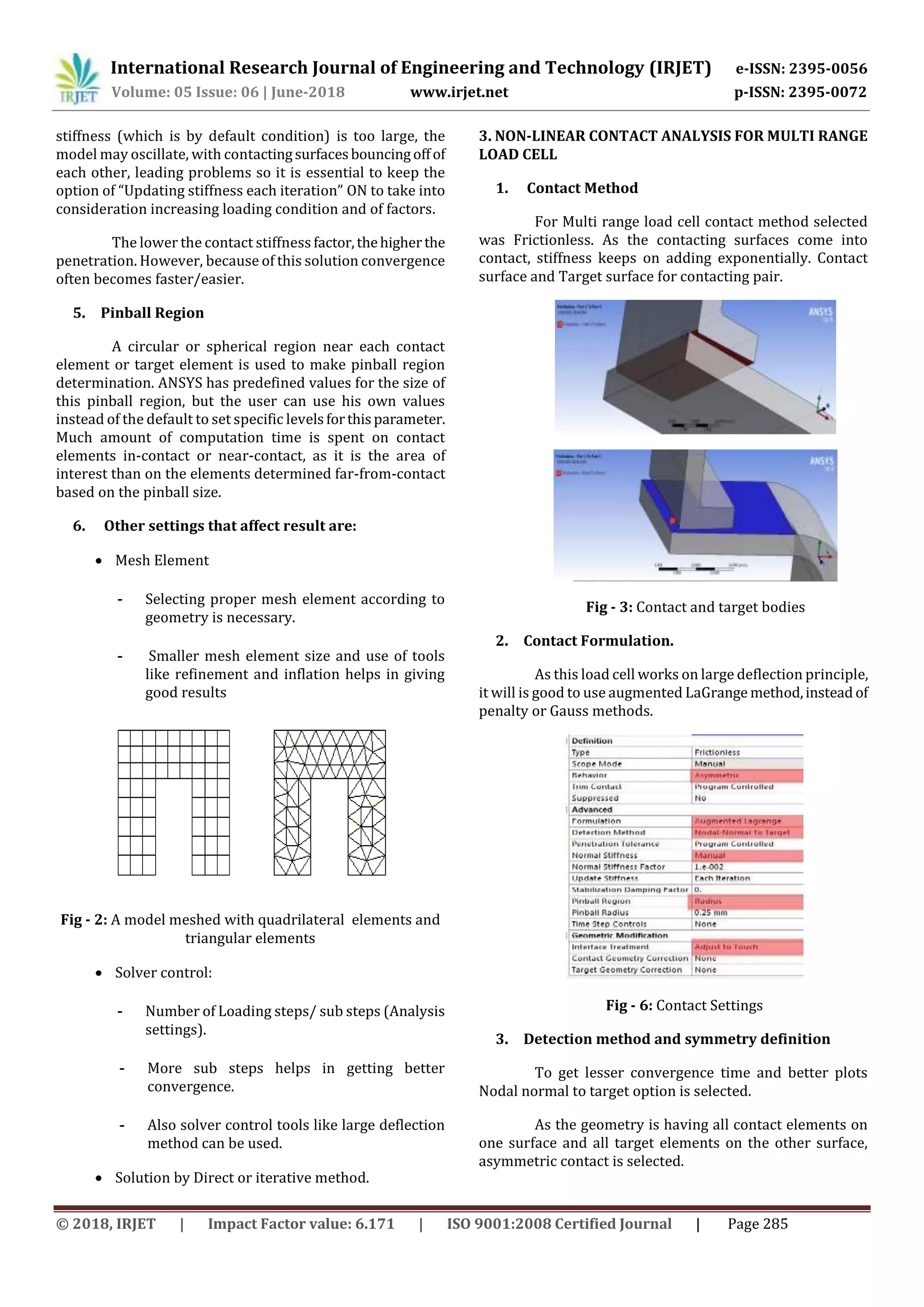
Fig - 2: A model meshed with quadrilateral elements and
triangular elements
 Solver control:
- Number of Loading steps/ sub steps (Analysis
settings).
- More sub steps helps in getting better
convergence.
- Also solver control tools like large deflection
method can be used.
 Solution by Direct or iterative method.
3. NON-LINEAR CONTACT ANALYSIS FOR MULTI RANGE
LOAD CELL
1. Contact Method
For Multi range load cell contact method selected
was Frictionless. As the contacting surfaces come into
contact, stiffness keeps on adding exponentially. Contact
surface and Target surface for contacting pair.
Fig - 3: Contact and target bodies
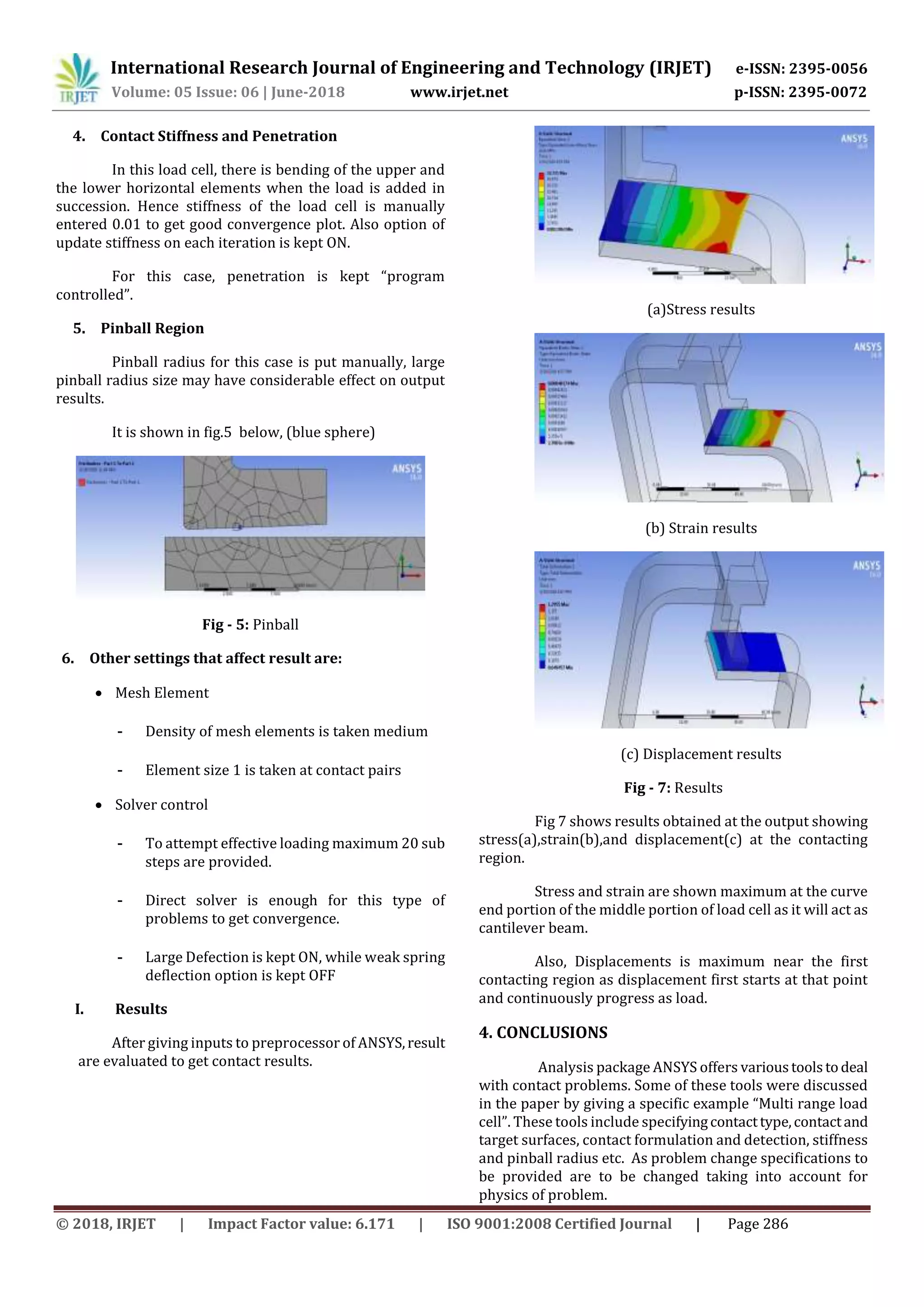
2. Contact Formulation.
As this load cell works on large deflection principle,
it will is good to use augmented LaGrange method,instead of
penalty or Gauss methods.
Fig - 6: Contact Settings
3. Detection method and symmetry definition
To get lesser convergence time and better plots
Nodal normal to target option is selected.
As the geometry is having all contact elements on
one surface and all target elements on the other surface,
asymmetric contact is selected.
International Research Journal of Engineering and Technology (IRJET) e-ISSN: 2395-0056
Volume: 05 Issue: 06 | June-2018 www.irjet.net p-ISSN: 2395-0072
© 2018, IRJET | Impact Factor value: 6.171 | ISO 9001:2008 Certified Journal | Page 286
4. Contact Stiffness and Penetration
In this load cell, there is bending of the upper and
the lower horizontal elements when the load is added in
succession. Hence stiffness of the load cell is manually
entered 0.01 to get good convergence plot. Also option of
update stiffness on each iteration is kept ON.
For this case, penetration is kept “program
controlled”.
5. Pinball Region
Pinball radius for this case is put manually, large
pinball radius size may have considerable effect on output
results.
It is shown in fig.5 below, (blue sphere)
Fig - 5: Pinball
6. Other settings that affect result are:
 Mesh Element
- Density of mesh elements is taken medium
- Element size 1 is taken at contact pairs
 Solver control
- To attempt effective loading maximum 20 sub
steps are provided.
- Direct solver is enough for this type of
problems to get convergence.
- Large Defection is kept ON, while weak spring
deflection option is kept OFF
I. Results
After giving inputs to preprocessor of ANSYS,result
are evaluated to get contact results.
(a)Stress results
(b) Strain results
(c) Displacement results
Fig - 7: Results
Fig 7 shows results obtained at the output showing
stress(a),strain(b),and displacement(c) at the contacting
region.
Stress and strain are shown maximum at the curve
end portion of the middle portion of load cell as it will act as
cantilever beam.
Also, Displacements is maximum near the first
contacting region as displacement first starts at that point
and continuously progress as load.
4. CONCLUSIONS
Analysis package ANSYS offers varioustoolstodeal
with contact problems. Some of these tools were discussed
in the paper by giving a specific example “Multi range load
cell”. These tools include specifyingcontacttype,contactand
target surfaces, contact formulation and detection, stiffness
and pinball radius etc. As problem change specifications to
be provided are to be changed taking into account for
physics of problem.
International Research Journal of Engineering and Technology (IRJET) e-ISSN: 2395-0056
Volume: 05 Issue: 06 | June-2018 www.irjet.net p-ISSN: 2395-0072
© 2018, IRJET | Impact Factor value: 6.171 | ISO 9001:2008 Certified Journal | Page 287
REFERENCES
[1] Shigley, J. E., Mechanical Engineering Design, second
edition, McGraw-Hill, Eighth Edition, pp. 117-120.
[2] Juvinall, R. C. and K. M. Marshek, Fundamentals of
Machine Component Design, second edition, John Wiley and
Sons, pp. 322-329.
[3] David H. Johnson, P.E. “Principles of simulating contact
between parts using ANSYS”, Penn State-Erie Erie,
Pennsylvania, USA.
[4] J. E. Mottershead, S. K. Pascoe and R. G. English, “A
General Finite Element Approach For Contact Stress
Analysis”, International Journal For Numerical Methods In
Engineering, Vol. 33, 765-779 (1992)
[5] Grama R. Bhashyam, “ANSYS Mechanical- A Powerful
Non-linear Simulation tool”, pp 20-21, 30-34.
[6] Anil B. Chaudhary, Klaus-Jurgen Bathe4 SolutionMethod
For Static And Dynamic Analysis Of Three-Dimensional
Contact Problems With Friction, Compwers & StrwrwesVol.
24. No. 6. Pp. M-873. 1986.
[7]http://www.ansys.stuba.sk/html/guide_55/g-
str/GSTR9.htm
[8] Ivana Atanasovska, Vera Nikolić-Stanojlović, Dejan
Dimitrijević, Dejan Momčilović; “Finite Element Model for
Stress Analysis and Nonlinear Contact Analysis of Helical
Gears”, Scientific Technical Review, Vol.L VIX,No.1,2009, pp.
63-65.

Non linear Contact analysis in Ansys analysis software

  • 1.
    International Research Journalof Engineering and Technology (IRJET) e-ISSN: 2395-0056 Volume: 05 Issue: 06 | June-2018 www.irjet.net p-ISSN: 2395-0072 © 2018, IRJET | Impact Factor value: 6.171 | ISO 9001:2008 Certified Journal | Page 283 Finite Element analysis for stress analysis and Non-linear contact analysis of Multi range load cell in ANSYS software Shreyas Pandit1, Prof. Vijay Kamble2 1 PG student, Department of Mechanical Engineering, Textile and Engineering Institute, Ichalkaranji, India. 2 Professor, Department of Mechanical Engineering, Textile and Engineering Institute, Ichalkaranji, India. ---------------------------------------------------------------------***--------------------------------------------------------------------- Abstract - Contact problems are more often nonlinear and require significant computer resourcestosolve. It isimportant that you know about the physics of the problem and take the time to set up your model to run as efficiently as possible. Contact problems present two significant difficulties. First, we generally do not know the regions where contact starts until problem is simulated. Depending on the loads, material, boundary conditions, and otherfactors, surfacescancomeinto and go out of contact with each other can’tbepredictedeasily. Second, most contact problems undergoes friction. There are many of friction laws and problems to choose from which mainly are nonlinear. Frictionalresponseofsuchproblemscan be confusing, making solution convergence difficult. This paper provides information on non-linear contact analysis with an illustration of “Multi-range load cell” in ANSYS software various tools required for analysis are also given but many times differs according to problem physics. Key Words: Non-linearcontactanalysis,loadcell,FEA,Ansys. 1. INTRODUCTION Most of the contact problems in practice areofNon- linear in nature. There is a need to analyze that problem in analysis software packages with giving certain essential commands and inputs to specific problems according to its nature and geometry. Some of the basic cases include two parallel cylinders, two spheres, cylinders on a flat plate,gear teeth, roller bearings, etc. Theories and formulas for these cases are discussed in standard design books. [1, 2]. Factors that are to be taken into considerations are optimal mesh size, boundary conditions, loading, connections commands This paper illustrates Multi range load cell which has small gap between contacting elements. Curved surface contact with horizontal flat surface in non-linear manner as the load goes on increasing. While carrying FEA, care must be taken for giving inputs in connection table. Multi-stage load cell is another modification over standard load cells based of strain gauge. In the first range for light loading, there was no contact between the two special components of the load cell. In the second range for heavy loading, contact between the two components occurred. Difference contact elements are as follow:  Point-to-point gap elements  Point-to-line (or slide-line) contact elements  Point-to-surface contact elements  Surface-to-surface contact elements [3] For this case Surface-to-surface contact elements are chosen and steps on contact analysis are discussed below in next section. Fig - 1: Multi range Load cell Fig 2:- Steps in FEA
  • 2.
    International Research Journalof Engineering and Technology (IRJET) e-ISSN: 2395-0056 Volume: 05 Issue: 06 | June-2018 www.irjet.net p-ISSN: 2395-0072 © 2018, IRJET | Impact Factor value: 6.171 | ISO 9001:2008 Certified Journal | Page 284 Fig 2 shows steps steps involved in general finite element analysis, while the step indicated by red colour shows the topic of current interest i.e, contact analysis. 2. NON-LINEAR CONTACT ANALYSIS SETTINGS There are number of settings that are required to be carried out so that after analysis solution converges as expected. Some of the contact settings are described in brief below. The ANSYS FEA software supports three types of contactmodels:point-to-point,point-to-surface,andsurface- to-surface.  Steps in a Contact Analysis The basic steps for performing a typical surface-to- surface contact analysis are listed below. Each step is then explained in detail in the following pages. 1. Create the model geometry and mesh. 2. Identify the contact pairs. 3. Choose contact and target surfaces. 4. Define the target surface. 5. Define the contact surface. 6. Set the element key options and real constants. 7. Define/control the motion of the target surface (rigid-to-flexible only). 8. Apply necessary boundary conditions. 9. Define solution options and load steps. 10. Solve the contact problem. 11. Review the results. These steps are discussed below with brief of every stage in process, 1. First step is to mention contact method which may be:  Bonded type contact  Non separation type contact  Frictional contact  Frictionless contact  Forced Frictional contact  Rough contact At the same time, we have to select the contact pairs which are usually called:  Contact bodies.  Target bodies. 2. Next step is selection of contact formulation: The penalty method uses a contact “spring” to establish a relationship between two contacting surfaces. LaGrange method usually is considered for better conditioning and is less sensitive to the magnitude of the contact stiffness, compared to the penalty method [4,5]. However, in some special cases, the augmented LaGrange method is required for analysiswithadditional iterations, eg. especially if the deformed mesh gets too distorted [6]. 3. Detection method and symmetrydefinitionContact detection is made at  Gauss Points. - This contact detection is by default in ANSYS software. - Shows error at corner points.  Nodal Points. - This detection method reduces convergence time. - They show instability for certain shapes like L shape.  Nodal Projection from contact. One more decision is to select an asymmetric or symmetric contact. The asymmetric contact is defined as having all contact elements on one surface and all target elements on the other surface. This is usually the most effective method to model the surface-to-surface contact problem [7,8]. However, under some conditions the asymmetric contact does not perform satisfactorily, i.e. each surface to be both a target and a contact surface. That means generation of two sets of contact pairs between the contacting surfaces. This is known as the symmetric contact. 4. Contact Stiffness and Penetration Default stiffnessvalueinANSYSworkbenchis1. The use of 1.0 value for stiffness is recommended for general bulk deformation dominated problems. For bending- dominated situations, a smaller value of 0.1 may be useful if convergence difficulties are encountered. If the contact
  • 3.
    International Research Journalof Engineering and Technology (IRJET) e-ISSN: 2395-0056 Volume: 05 Issue: 06 | June-2018 www.irjet.net p-ISSN: 2395-0072 © 2018, IRJET | Impact Factor value: 6.171 | ISO 9001:2008 Certified Journal | Page 285 stiffness (which is by default condition) is too large, the model may oscillate, with contactingsurfacesbouncingoffof each other, leading problems so it is essential to keep the option of “Updating stiffness each iteration” ON to take into consideration increasing loading condition and of factors. The lower the contact stiffness factor,thehigherthe penetration. However, because of this solution convergence often becomes faster/easier. 5. Pinball Region A circular or spherical region near each contact element or target element is used to make pinball region determination. ANSYS has predefined values for the size of this pinball region, but the user can use his own values instead of the default to set specific levelsforthisparameter. Much amount of computation time is spent on contact elements in-contact or near-contact, as it is the area of interest than on the elements determined far-from-contact based on the pinball size. 6. Other settings that affect result are:  Mesh Element - Selecting proper mesh element according to geometry is necessary. - Smaller mesh element size and use of tools like refinement and inflation helps in giving good results Fig - 2: A model meshed with quadrilateral elements and triangular elements  Solver control: - Number of Loading steps/ sub steps (Analysis settings). - More sub steps helps in getting better convergence. - Also solver control tools like large deflection method can be used.  Solution by Direct or iterative method. 3. NON-LINEAR CONTACT ANALYSIS FOR MULTI RANGE LOAD CELL 1. Contact Method For Multi range load cell contact method selected was Frictionless. As the contacting surfaces come into contact, stiffness keeps on adding exponentially. Contact surface and Target surface for contacting pair. Fig - 3: Contact and target bodies 2. Contact Formulation. As this load cell works on large deflection principle, it will is good to use augmented LaGrange method,instead of penalty or Gauss methods. Fig - 6: Contact Settings 3. Detection method and symmetry definition To get lesser convergence time and better plots Nodal normal to target option is selected. As the geometry is having all contact elements on one surface and all target elements on the other surface, asymmetric contact is selected.
  • 4.
    International Research Journalof Engineering and Technology (IRJET) e-ISSN: 2395-0056 Volume: 05 Issue: 06 | June-2018 www.irjet.net p-ISSN: 2395-0072 © 2018, IRJET | Impact Factor value: 6.171 | ISO 9001:2008 Certified Journal | Page 286 4. Contact Stiffness and Penetration In this load cell, there is bending of the upper and the lower horizontal elements when the load is added in succession. Hence stiffness of the load cell is manually entered 0.01 to get good convergence plot. Also option of update stiffness on each iteration is kept ON. For this case, penetration is kept “program controlled”. 5. Pinball Region Pinball radius for this case is put manually, large pinball radius size may have considerable effect on output results. It is shown in fig.5 below, (blue sphere) Fig - 5: Pinball 6. Other settings that affect result are:  Mesh Element - Density of mesh elements is taken medium - Element size 1 is taken at contact pairs  Solver control - To attempt effective loading maximum 20 sub steps are provided. - Direct solver is enough for this type of problems to get convergence. - Large Defection is kept ON, while weak spring deflection option is kept OFF I. Results After giving inputs to preprocessor of ANSYS,result are evaluated to get contact results. (a)Stress results (b) Strain results (c) Displacement results Fig - 7: Results Fig 7 shows results obtained at the output showing stress(a),strain(b),and displacement(c) at the contacting region. Stress and strain are shown maximum at the curve end portion of the middle portion of load cell as it will act as cantilever beam. Also, Displacements is maximum near the first contacting region as displacement first starts at that point and continuously progress as load. 4. CONCLUSIONS Analysis package ANSYS offers varioustoolstodeal with contact problems. Some of these tools were discussed in the paper by giving a specific example “Multi range load cell”. These tools include specifyingcontacttype,contactand target surfaces, contact formulation and detection, stiffness and pinball radius etc. As problem change specifications to be provided are to be changed taking into account for physics of problem.
  • 5.
    International Research Journalof Engineering and Technology (IRJET) e-ISSN: 2395-0056 Volume: 05 Issue: 06 | June-2018 www.irjet.net p-ISSN: 2395-0072 © 2018, IRJET | Impact Factor value: 6.171 | ISO 9001:2008 Certified Journal | Page 287 REFERENCES [1] Shigley, J. E., Mechanical Engineering Design, second edition, McGraw-Hill, Eighth Edition, pp. 117-120. [2] Juvinall, R. C. and K. M. Marshek, Fundamentals of Machine Component Design, second edition, John Wiley and Sons, pp. 322-329. [3] David H. Johnson, P.E. “Principles of simulating contact between parts using ANSYS”, Penn State-Erie Erie, Pennsylvania, USA. [4] J. E. Mottershead, S. K. Pascoe and R. G. English, “A General Finite Element Approach For Contact Stress Analysis”, International Journal For Numerical Methods In Engineering, Vol. 33, 765-779 (1992) [5] Grama R. Bhashyam, “ANSYS Mechanical- A Powerful Non-linear Simulation tool”, pp 20-21, 30-34. [6] Anil B. Chaudhary, Klaus-Jurgen Bathe4 SolutionMethod For Static And Dynamic Analysis Of Three-Dimensional Contact Problems With Friction, Compwers & StrwrwesVol. 24. No. 6. Pp. M-873. 1986. [7]http://www.ansys.stuba.sk/html/guide_55/g- str/GSTR9.htm [8] Ivana Atanasovska, Vera Nikolić-Stanojlović, Dejan Dimitrijević, Dejan Momčilović; “Finite Element Model for Stress Analysis and Nonlinear Contact Analysis of Helical Gears”, Scientific Technical Review, Vol.L VIX,No.1,2009, pp. 63-65.