HDFS
High Availability
Suresh Srinivas- Hortonworks
Aaron T. Myers - Cloudera
Overview
• Part 1 – Suresh Srinivas(Hortonworks)
  − HDFS Availability and Reliability – what is the record?
  − HA Use Cases
  − HA Design
• Part 2 – Aaron T. Myers (Cloudera)
  − NN HA Design Details
         Automatic failure detection and NN failover
         Client-NN connection failover
  − Operations and Admin of HA
  − Future Work


                                          2
Availability, Reliability and Maintainability
Reliability = MTBF/(1 + MTBF)
• Probability a system performs its functions without failure for
  a desired period of time
Maintainability = 1/(1+MTTR)
• Probability that a failed system can be restored within a given
  timeframe
Availability = MTTF/MTBF
• Probability that a system is up when requested for use
• Depends on both on Reliability and Maintainability

Mean Time To Failure (MTTF): Average time between successive failures
Mean Time To Repair/Restore (MTTR): Average time to repair failed system
Mean Time Between Failures (MTBF): Average time between successive failures = MTTR + MTTF

                                              3
Current HDFS Availability & Data Integrity
• Simple design for Higher Reliability
  − Storage: Rely on Native file system on the OS rather than use raw disk
  − Single NameNode master
          Entire file system state is in memory
  − DataNodes simply store and deliver blocks
          All sophisticated recovery mechanisms in NN
• Fault Tolerance
  − Design assumes disks, nodes and racks fail
  − Multiple replicas of blocks
          active monitoring and replication
          DN actively monitor for block deletion and corruption
  − Restart/migrate the NameNode on failure
          Persistent state: multiple copies + checkpoints
          Functions as Cold Standby
  − Restart/replace the DNs on failure
  − DNs tolerate individual disk failures

                                                4
How Well Did HDFS Work?

• Data Reliability
  − Lost 19 out of 329 Million blocks on 10 clusters with 20K nodes in 2009
  − 7-9’s of reliability
  − Related bugs fixed in 20 and 21.
• NameNode Availability
  − 18 months Study: 22 failures on 25 clusters - 0.58 failures per year per cluster
  − Only 8 would have benefitted from HA failover!! (0.23 failures per cluster year)
  − NN is very reliable
          Resilient against overload caused by misbehaving apps
• Maintainability
  − Large clusters see failure of one DataNode/day and more frequent disk failures
  − Maintenance once in 3 months to repair or replace DataNodes

                                             5
Why NameNode HA?
• NameNode is highly reliable (low MTTF)
  − But Availability is not the same as Reliability
• NameNode MTTR depends on
  − Restarting NameNode daemon on failure
          Operator restart – (failure detection + manual restore) time
          Automatic restart – 1-2 minutes
  − NameNode Startup time
          Small/medium cluster 1-2 minutes
          Very large cluster – 5-15 minutes
• Affects applications that have real time requirement
• For higher HDFS Availability
  − Need redundant NameNode to eliminate SPOF
  − Need automatic failover to reduce MTTR and improve Maintainability
  − Need Hot standby to reduce MTTR for very large clusters
          Cold standby is sufficient for small clusters


                                              6
NameNode HA – Initial Goals

• Support for Active and a single Standby
  − Active and Standby with manual failover
         Standby could be cold/warm/hot
         Addresses downtime during upgrades – main cause of unavailability
  − Active and Standby with automatic failover
         Hot standby
         Addresses downtime during upgrades and other failures
• Backward compatible configuration
• Standby performs checkpointing
  − Secondary NameNode not needed
• Management and monitoring tools
• Design philosophy – choose data integrity over service availability


                                         7
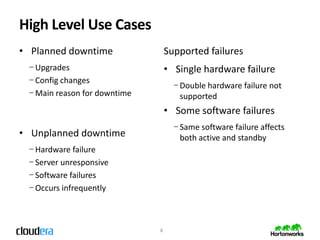
High Level Use Cases
• Planned downtime                Supported failures
 − Upgrades                       • Single hardware failure
 − Config changes
                                    − Double hardware failure not
 − Main reason for downtime           supported
                                  • Some software failures
                                    − Same software failure affects
• Unplanned downtime                  both active and standby
 − Hardware failure
 − Server unresponsive
 − Software failures
 − Occurs infrequently


                              8
High Level Design
• Service monitoring and leader election outside NN
  − Similar to industry standard HA frameworks
• Parallel Block reports to both Active and Standby NN
• Shared or non-shared NN file system state
• Fencing of shared resources/data
  − DataNodes
  − Shared NN state (if any)
• Client failover
  − Client side failover (based on configuration or ZooKeeper)
  − IP Failover


                                      9
Design Considerations
• Sharing state between Active and Hot Standby
  − File system state and Block locations
• Automatic Failover
  − Monitoring Active NN and performing failover on failure
• Making a NameNode active during startup
  − Reliable mechanism for choosing only one NN as active and the other as
    standby
• Prevent data corruption on split brain
  − Shared Resource Fencing
         DataNodes and shared storage for NN metadata
  − NameNode Fencing
         when shared resource cannot be fenced
• Client failover
  − Clients connect to the new Active NN during failover


                                        10
Failover Control Outside NN
                                                  • Similar to Industry Standard HA
                                                    frameworks
                                                  • HA daemon outside NameNode
                               ZooKeeper            − Simpler to build
                                                    − Immune to NN failures
                                                  • Daemon manages resources
                                     Resources
 Failover
                                                    − Resources – OS, HW, Network etc.
                                      Resources
                 Actions             Resources
Controller   start, stop,
             failover, monitor, …
                                                    − NameNode is just another resource
                                                  • Performs
                                Shared
                               Resources            − Active NN election during startup
                                                    − Automatic Failover
                                                    − Fencing
                                                           Shared resources
                                                           NameNode
Architecture
                         ZK       ZK            ZK

                              Leader election

     Failover                                                    Failover
    Controller                                                  Controller
      Active                                                      Standby
                 Cmds              editlog
Monitor Health                                                 Monitor Health
                                   editlogs
                    NN            (fencing)           NN
                    Active                           Standby


                               Block Reports


                   DN               DN                   DN
First Phase – Hot Standby

                                           Needs to be HA


                         editlogs
            NN      (Shared NFS storage)         NN
           Active                              Standby
                      Manual Failover


                       Block Reports
                       DN fencing


          DN               DN                       DN
HA Design Details


                    14
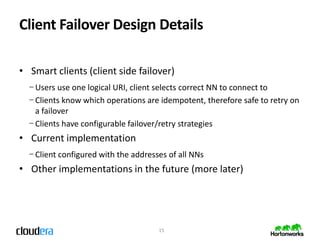
Client Failover Design Details

• Smart clients (client side failover)
  − Users use one logical URI, client selects correct NN to connect to
  − Clients know which operations are idempotent, therefore safe to retry on
    a failover
  − Clients have configurable failover/retry strategies
• Current implementation
  − Client configured with the addresses of all NNs
• Other implementations in the future (more later)


                                      15
Client Failover Configuration Example
...
<property>
 <name>dfs.namenode.rpc-address.name-service1.nn1</name>
 <value>host1.example.com:8020</value>
</property>
<property>
 <name>dfs.namenode.rpc-address.name-service1.nn2</name>
 <value>host2.example.com:8020</value>
</property>
<property>
 <name>dfs.namenode.http-address.name-service1.nn1</name>
 <value>host1.example.com:50070</value>
</property>
...


                                    16
Automatic Failover Design Details
• Automatic failover requires Zookeeper
  − Not required for manual failover
  − ZK makes it easy to:
         Detect failure of the active NN
         Determine which NN should become the Active NN
• On both NN machines, run another daemon
  − ZKFailoverController (Zookeeper Failover Controller)
• Each ZKFC is responsible for:
  − Health monitoring of its associated NameNode
  − ZK session management / ZK-based leader election
• See HDFS-2185 and HADOOP-8206 for more details


                                       17
Automatic Failover Design Details (cont)


                     18
Ops/Admin: Shared Storage

• To share NN state, need shared storage
  − Needs to be HA itself to avoid just shifting SPOF
  − Many come with IP fencing options
  − Recommended mount options:
         tcp,soft,intr,timeo=60,retrans=10
• Still configure local edits dirs, but shared dir is special
• Work is currently underway to do away with shared storage
  requirement (more later)


                                       19
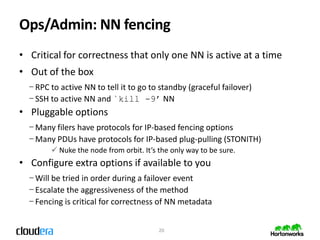
Ops/Admin: NN fencing
• Critical for correctness that only one NN is active at a time
• Out of the box
  − RPC to active NN to tell it to go to standby (graceful failover)
  − SSH to active NN and `kill -9’ NN
• Pluggable options
  − Many filers have protocols for IP-based fencing options
  − Many PDUs have protocols for IP-based plug-pulling (STONITH)
         Nuke the node from orbit. It’s the only way to be sure.
• Configure extra options if available to you
  − Will be tried in order during a failover event
  − Escalate the aggressiveness of the method
  − Fencing is critical for correctness of NN metadata


                                         20
Ops/Admin: Automatic Failover
• Deploy ZK as usual (3 or 5 nodes) or reuse existing ZK
  − ZK daemons have light resource requirement
  − OK to collocate 1 on each NN, many collocate 3rd on the YARN RM
  − Advisable to configure ZK daemons with dedicated disks for isolation
  − Fine to use the same ZK quorum as for HBase, etc.
• Fencing methods still required
  − The ZKFC that wins the election is responsible for performing fencing
  − Fencing script(s) must be configured and work from the NNs
• Admin commands which manually initiate failovers still work
  − But rather than coordinating the failover themselves, use the ZKFCs


                                      21
Ops/Admin: Monitoring
• New NN metrics
  − Size of pending DN message queues
  − Seconds since the standby NN last read from shared edit log
  − DN block report lag
  − All measurements of standby NN lag – monitor/alert on all of these
• Monitor shared storage solution
  − Volumes fill up, disks go bad, etc
  − Should configure paranoid edit log retention policy (default is 2)
• Canary-based monitoring of HDFS a good idea
  − Pinging both NNs not sufficient


                                       22
Ops/Admin: Hardware
• Active/Standby NNs should be on separate racks
• Shared storage system should be on separate rack
• Active/Standby NNs should have close to the same hardware
  − Same amount of RAM – need to store the same things
  − Same # of processors - need to serve same number of clients
• All the same recommendations still apply for NN
  − ECC memory, 48GB
  − Several separate disks for NN metadata directories
  − Redundant disks for OS drives, probably RAID 5 or mirroring
  − Redundant power


                                     23
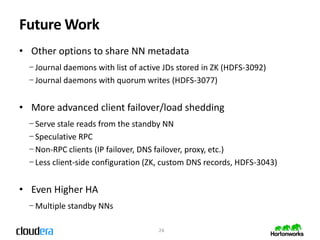
Future Work
• Other options to share NN metadata
  − Journal daemons with list of active JDs stored in ZK (HDFS-3092)
  − Journal daemons with quorum writes (HDFS-3077)


• More advanced client failover/load shedding
  − Serve stale reads from the standby NN
  − Speculative RPC
  − Non-RPC clients (IP failover, DNS failover, proxy, etc.)
  − Less client-side configuration (ZK, custom DNS records, HDFS-3043)


• Even Higher HA
  − Multiple standby NNs

                                      24
QA

• HA design: HDFS-1623
 −First released in Hadoop 2.0.0-alpha
• Auto failover design: HDFS-3042 / -2185
 −First released in Hadoop 2.0.1-alpha
• Community effort


                       25

Hadoop Summit 2012 | HDFS High Availability

  • 1.
    HDFS High Availability Suresh Srinivas-Hortonworks Aaron T. Myers - Cloudera
  • 2.
    Overview • Part 1– Suresh Srinivas(Hortonworks) − HDFS Availability and Reliability – what is the record? − HA Use Cases − HA Design • Part 2 – Aaron T. Myers (Cloudera) − NN HA Design Details  Automatic failure detection and NN failover  Client-NN connection failover − Operations and Admin of HA − Future Work 2
  • 3.
    Availability, Reliability andMaintainability Reliability = MTBF/(1 + MTBF) • Probability a system performs its functions without failure for a desired period of time Maintainability = 1/(1+MTTR) • Probability that a failed system can be restored within a given timeframe Availability = MTTF/MTBF • Probability that a system is up when requested for use • Depends on both on Reliability and Maintainability Mean Time To Failure (MTTF): Average time between successive failures Mean Time To Repair/Restore (MTTR): Average time to repair failed system Mean Time Between Failures (MTBF): Average time between successive failures = MTTR + MTTF 3
  • 4.
    Current HDFS Availability& Data Integrity • Simple design for Higher Reliability − Storage: Rely on Native file system on the OS rather than use raw disk − Single NameNode master  Entire file system state is in memory − DataNodes simply store and deliver blocks  All sophisticated recovery mechanisms in NN • Fault Tolerance − Design assumes disks, nodes and racks fail − Multiple replicas of blocks  active monitoring and replication  DN actively monitor for block deletion and corruption − Restart/migrate the NameNode on failure  Persistent state: multiple copies + checkpoints  Functions as Cold Standby − Restart/replace the DNs on failure − DNs tolerate individual disk failures 4
  • 5.
    How Well DidHDFS Work? • Data Reliability − Lost 19 out of 329 Million blocks on 10 clusters with 20K nodes in 2009 − 7-9’s of reliability − Related bugs fixed in 20 and 21. • NameNode Availability − 18 months Study: 22 failures on 25 clusters - 0.58 failures per year per cluster − Only 8 would have benefitted from HA failover!! (0.23 failures per cluster year) − NN is very reliable  Resilient against overload caused by misbehaving apps • Maintainability − Large clusters see failure of one DataNode/day and more frequent disk failures − Maintenance once in 3 months to repair or replace DataNodes 5
  • 6.
    Why NameNode HA? •NameNode is highly reliable (low MTTF) − But Availability is not the same as Reliability • NameNode MTTR depends on − Restarting NameNode daemon on failure  Operator restart – (failure detection + manual restore) time  Automatic restart – 1-2 minutes − NameNode Startup time  Small/medium cluster 1-2 minutes  Very large cluster – 5-15 minutes • Affects applications that have real time requirement • For higher HDFS Availability − Need redundant NameNode to eliminate SPOF − Need automatic failover to reduce MTTR and improve Maintainability − Need Hot standby to reduce MTTR for very large clusters  Cold standby is sufficient for small clusters 6
  • 7.
    NameNode HA –Initial Goals • Support for Active and a single Standby − Active and Standby with manual failover  Standby could be cold/warm/hot  Addresses downtime during upgrades – main cause of unavailability − Active and Standby with automatic failover  Hot standby  Addresses downtime during upgrades and other failures • Backward compatible configuration • Standby performs checkpointing − Secondary NameNode not needed • Management and monitoring tools • Design philosophy – choose data integrity over service availability 7
  • 8.
    High Level UseCases • Planned downtime Supported failures − Upgrades • Single hardware failure − Config changes − Double hardware failure not − Main reason for downtime supported • Some software failures − Same software failure affects • Unplanned downtime both active and standby − Hardware failure − Server unresponsive − Software failures − Occurs infrequently 8
  • 9.
    High Level Design •Service monitoring and leader election outside NN − Similar to industry standard HA frameworks • Parallel Block reports to both Active and Standby NN • Shared or non-shared NN file system state • Fencing of shared resources/data − DataNodes − Shared NN state (if any) • Client failover − Client side failover (based on configuration or ZooKeeper) − IP Failover 9
  • 10.
    Design Considerations • Sharingstate between Active and Hot Standby − File system state and Block locations • Automatic Failover − Monitoring Active NN and performing failover on failure • Making a NameNode active during startup − Reliable mechanism for choosing only one NN as active and the other as standby • Prevent data corruption on split brain − Shared Resource Fencing  DataNodes and shared storage for NN metadata − NameNode Fencing  when shared resource cannot be fenced • Client failover − Clients connect to the new Active NN during failover 10
  • 11.
    Failover Control OutsideNN • Similar to Industry Standard HA frameworks • HA daemon outside NameNode ZooKeeper − Simpler to build − Immune to NN failures • Daemon manages resources Resources Failover − Resources – OS, HW, Network etc. Resources Actions Resources Controller start, stop, failover, monitor, … − NameNode is just another resource • Performs Shared Resources − Active NN election during startup − Automatic Failover − Fencing  Shared resources  NameNode
  • 12.
    Architecture ZK ZK ZK Leader election Failover Failover Controller Controller Active Standby Cmds editlog Monitor Health Monitor Health editlogs NN (fencing) NN Active Standby Block Reports DN DN DN
  • 13.
    First Phase –Hot Standby Needs to be HA editlogs NN (Shared NFS storage) NN Active Standby Manual Failover Block Reports DN fencing DN DN DN
  • 14.
  • 15.
    Client Failover DesignDetails • Smart clients (client side failover) − Users use one logical URI, client selects correct NN to connect to − Clients know which operations are idempotent, therefore safe to retry on a failover − Clients have configurable failover/retry strategies • Current implementation − Client configured with the addresses of all NNs • Other implementations in the future (more later) 15
  • 16.
    Client Failover ConfigurationExample ... <property> <name>dfs.namenode.rpc-address.name-service1.nn1</name> <value>host1.example.com:8020</value> </property> <property> <name>dfs.namenode.rpc-address.name-service1.nn2</name> <value>host2.example.com:8020</value> </property> <property> <name>dfs.namenode.http-address.name-service1.nn1</name> <value>host1.example.com:50070</value> </property> ... 16
  • 17.
    Automatic Failover DesignDetails • Automatic failover requires Zookeeper − Not required for manual failover − ZK makes it easy to:  Detect failure of the active NN  Determine which NN should become the Active NN • On both NN machines, run another daemon − ZKFailoverController (Zookeeper Failover Controller) • Each ZKFC is responsible for: − Health monitoring of its associated NameNode − ZK session management / ZK-based leader election • See HDFS-2185 and HADOOP-8206 for more details 17
  • 18.
    Automatic Failover DesignDetails (cont) 18
  • 19.
    Ops/Admin: Shared Storage •To share NN state, need shared storage − Needs to be HA itself to avoid just shifting SPOF − Many come with IP fencing options − Recommended mount options:  tcp,soft,intr,timeo=60,retrans=10 • Still configure local edits dirs, but shared dir is special • Work is currently underway to do away with shared storage requirement (more later) 19
  • 20.
    Ops/Admin: NN fencing •Critical for correctness that only one NN is active at a time • Out of the box − RPC to active NN to tell it to go to standby (graceful failover) − SSH to active NN and `kill -9’ NN • Pluggable options − Many filers have protocols for IP-based fencing options − Many PDUs have protocols for IP-based plug-pulling (STONITH)  Nuke the node from orbit. It’s the only way to be sure. • Configure extra options if available to you − Will be tried in order during a failover event − Escalate the aggressiveness of the method − Fencing is critical for correctness of NN metadata 20
  • 21.
    Ops/Admin: Automatic Failover •Deploy ZK as usual (3 or 5 nodes) or reuse existing ZK − ZK daemons have light resource requirement − OK to collocate 1 on each NN, many collocate 3rd on the YARN RM − Advisable to configure ZK daemons with dedicated disks for isolation − Fine to use the same ZK quorum as for HBase, etc. • Fencing methods still required − The ZKFC that wins the election is responsible for performing fencing − Fencing script(s) must be configured and work from the NNs • Admin commands which manually initiate failovers still work − But rather than coordinating the failover themselves, use the ZKFCs 21
  • 22.
    Ops/Admin: Monitoring • NewNN metrics − Size of pending DN message queues − Seconds since the standby NN last read from shared edit log − DN block report lag − All measurements of standby NN lag – monitor/alert on all of these • Monitor shared storage solution − Volumes fill up, disks go bad, etc − Should configure paranoid edit log retention policy (default is 2) • Canary-based monitoring of HDFS a good idea − Pinging both NNs not sufficient 22
  • 23.
    Ops/Admin: Hardware • Active/StandbyNNs should be on separate racks • Shared storage system should be on separate rack • Active/Standby NNs should have close to the same hardware − Same amount of RAM – need to store the same things − Same # of processors - need to serve same number of clients • All the same recommendations still apply for NN − ECC memory, 48GB − Several separate disks for NN metadata directories − Redundant disks for OS drives, probably RAID 5 or mirroring − Redundant power 23
  • 24.
    Future Work • Otheroptions to share NN metadata − Journal daemons with list of active JDs stored in ZK (HDFS-3092) − Journal daemons with quorum writes (HDFS-3077) • More advanced client failover/load shedding − Serve stale reads from the standby NN − Speculative RPC − Non-RPC clients (IP failover, DNS failover, proxy, etc.) − Less client-side configuration (ZK, custom DNS records, HDFS-3043) • Even Higher HA − Multiple standby NNs 24
  • 25.
    QA • HA design:HDFS-1623 −First released in Hadoop 2.0.0-alpha • Auto failover design: HDFS-3042 / -2185 −First released in Hadoop 2.0.1-alpha • Community effort 25

Editor's Notes

  • #5 Data – can I read what I wrote, is the service availableWhen I asked one of the original authors of of GFS if there were any decisions they would revist – random writersSimplicity is keyRaw disk – fs take time to stabilize – we can take advantage of ext4, xfs or zfs
  • #6 Data – can I read what I wrote, is the service availableWhen I asked one of the original authors of of GFS if there were any decisions they would revist – random writersSimplicity is keyRaw disk – fs take time to stabilize – we can take advantage of ext4, xfs or zfs
  • #7 Data – can I read what I wrote, is the service availableWhen I asked one of the original authors of of GFS if there were any decisions they would revist – random writersSimplicity is keyRaw disk – fs take time to stabilize – we can take advantage of ext4, xfs or zfs
  • #8 Data – can I read what I wrote, is the service availableWhen I asked one of the original authors of of GFS if there were any decisions they would revist – random writersSimplicity is keyRaw disk – fs take time to stabilize – we can take advantage of ext4, xfs or zfs