NETWORK TELEMETRY
AUTHOR : AALOK SHAH
NETWORK TELEMETRY
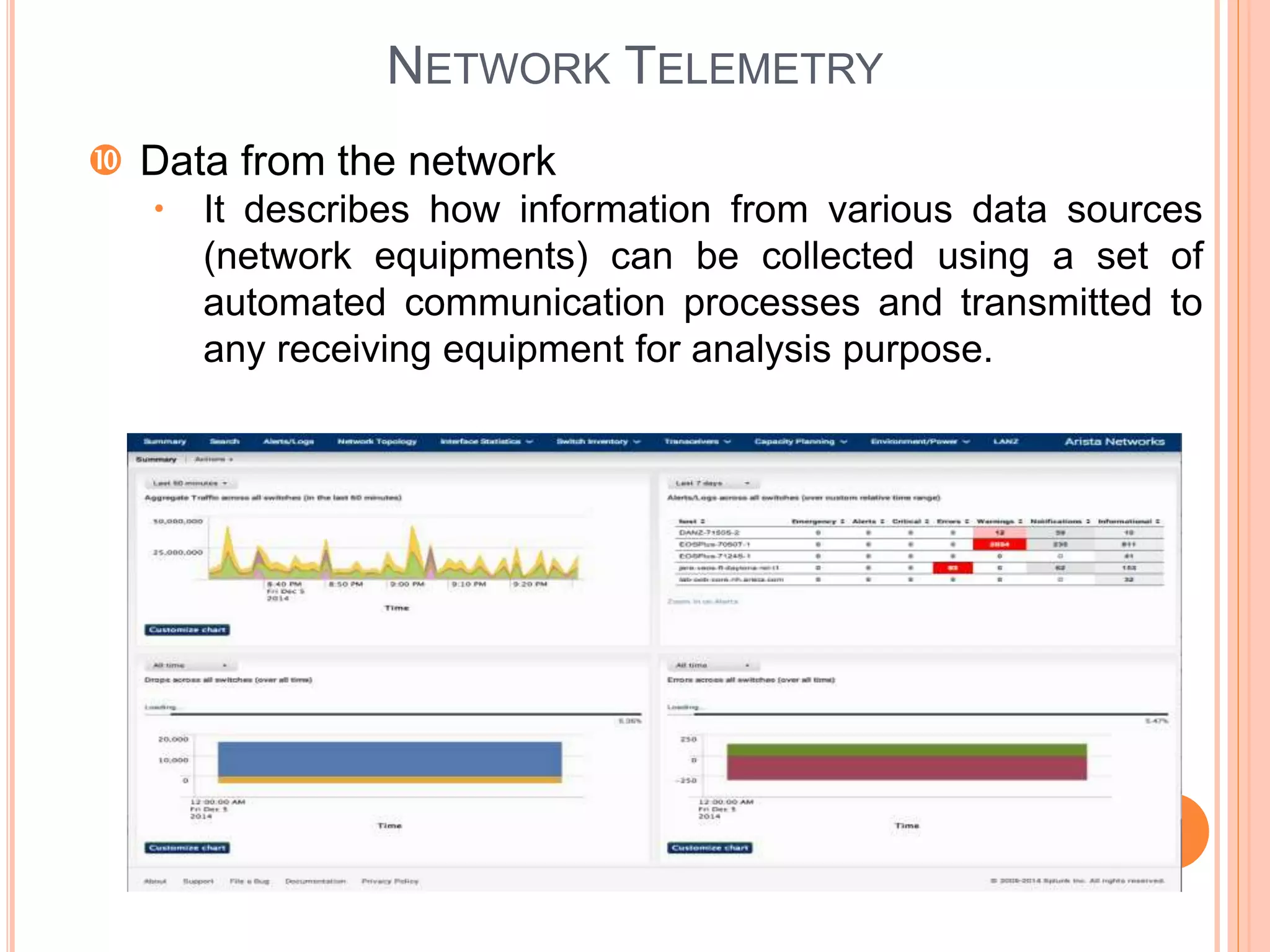
 Data from the network
 It describes how information from various data sources
(network equipments) can be collected using a set of
automated communication processes and transmitted to
any receiving equipment for analysis purpose.
NETWORK TELEMETRY - WHY?
• What is going on?
– Billions of devices connecting to internet and VPN
– Massive scale and highly dynamic nature of the IoT applications
• Vast amounts of data gathered from the network at varying
speeds, with different amounts of accuracy and patterns
 Where is the effect?
– Increased network incidents and unregulated network changes
– Lack of network visibility and awareness of available network
resources
– Congestion problems and compromised network security
 ‘Telemetry’ is the remedy:
– To overcome data center issues,
• Silent packet drops, Load imbalance
• Protocol bugs, Inflated latencies
– Schedules network resources to adapt to real-time service
demands
 Measures the network performance and assess network quality
– Provides quick network diagnosis and identifies network glitch
NETWORK TELEMETRY - BUILDING
BLOCKS
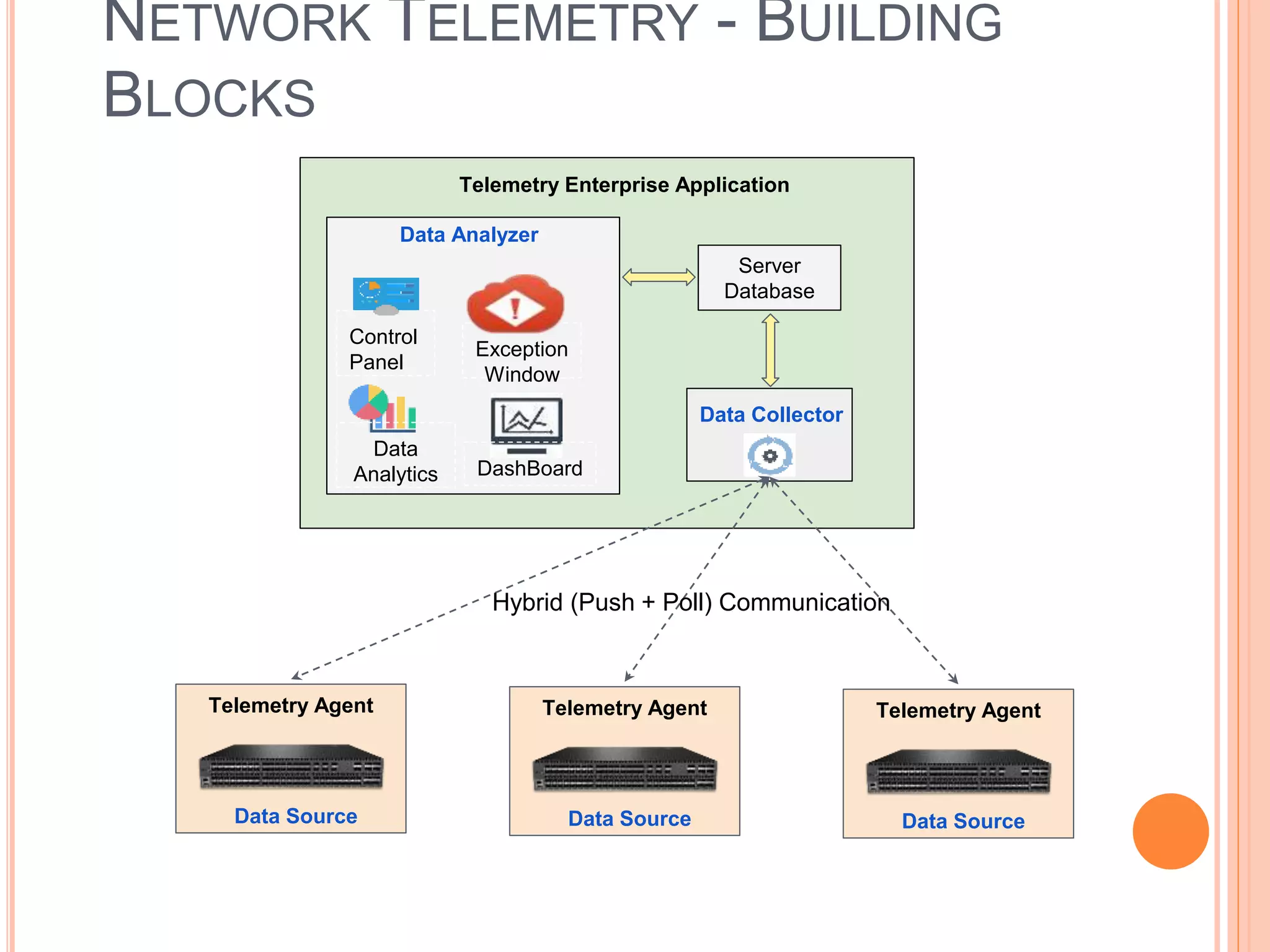
Telemetry Enterprise Application
Data Analyzer
Control
Panel
Data
Analytics
Exception
Window
DashBoard
Server
Database
Data Collector
Data Source
Telemetry Agent
Data Source
Telemetry Agent
Data Source
Telemetry Agent
Hybrid (Push + Poll) Communication
INSIGHTS ON BUILDING BLOCKS
The Network Telemetry architecture is made up of the following three
key functional components:
 Data Source: The Data Source can be any type of network
device that generates data.
 Data Collector: The Data Collector may be a part of a control
and/or management system and/or a dedicated set of entities. It
gathers data from various Data Sources, and performs processing
tasks to feed raw and/or processed data to the Data Analyzer.
 Data Analyzer: The Data Analyzer processes data from various
data collectors to provide actionable insight. This ranges from
generating simple statistical metrics to inferring problems to
recommending solutions to said problems.
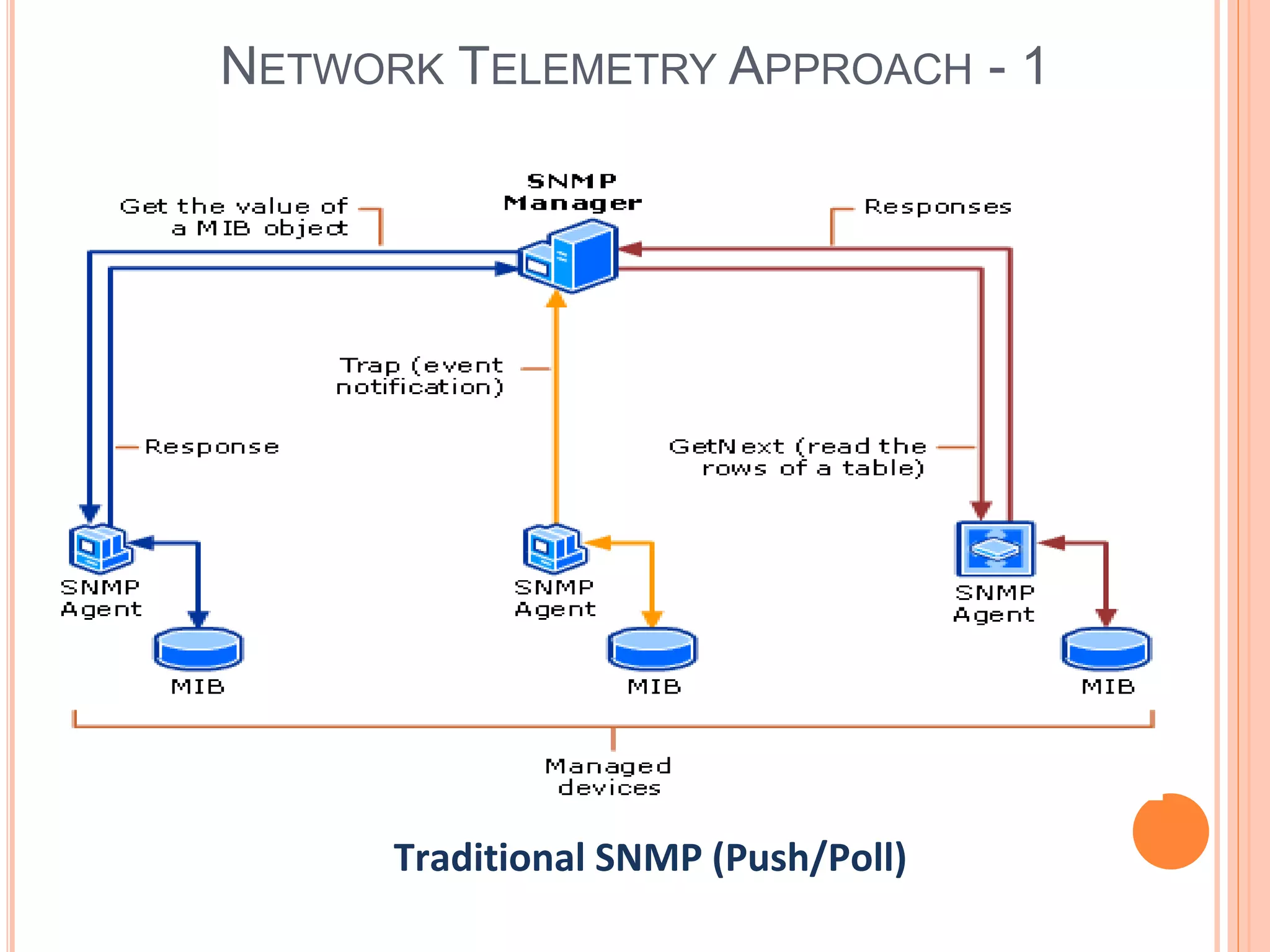
NETWORK TELEMETRY APPROACH - 1
Traditional SNMP (Push/Poll)
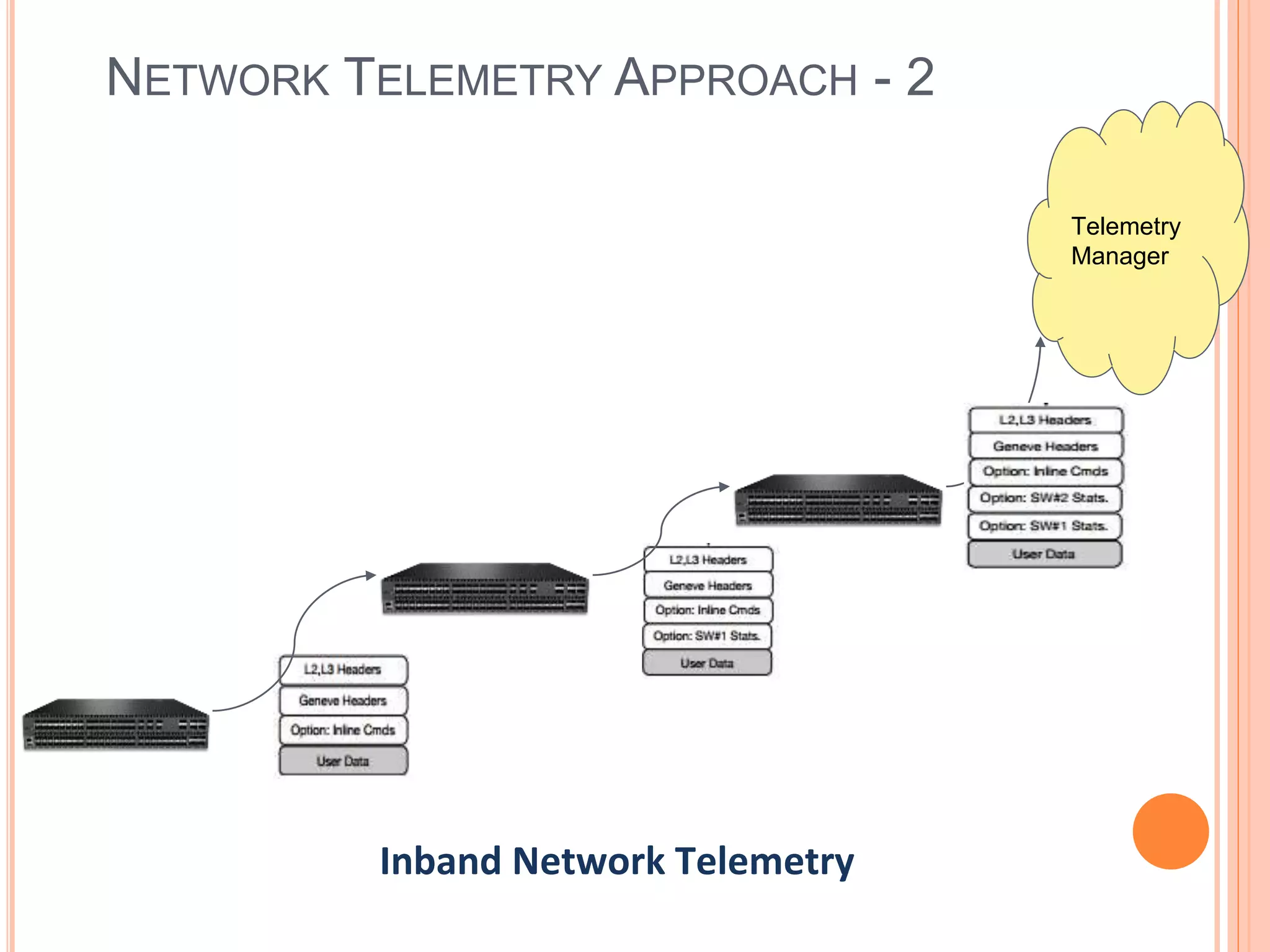
NETWORK TELEMETRY APPROACH - 2
Telemetry
Manager
Inband Network Telemetry
TELEMETRY - A LOOK AT MARKET
Inband Network Telemetry
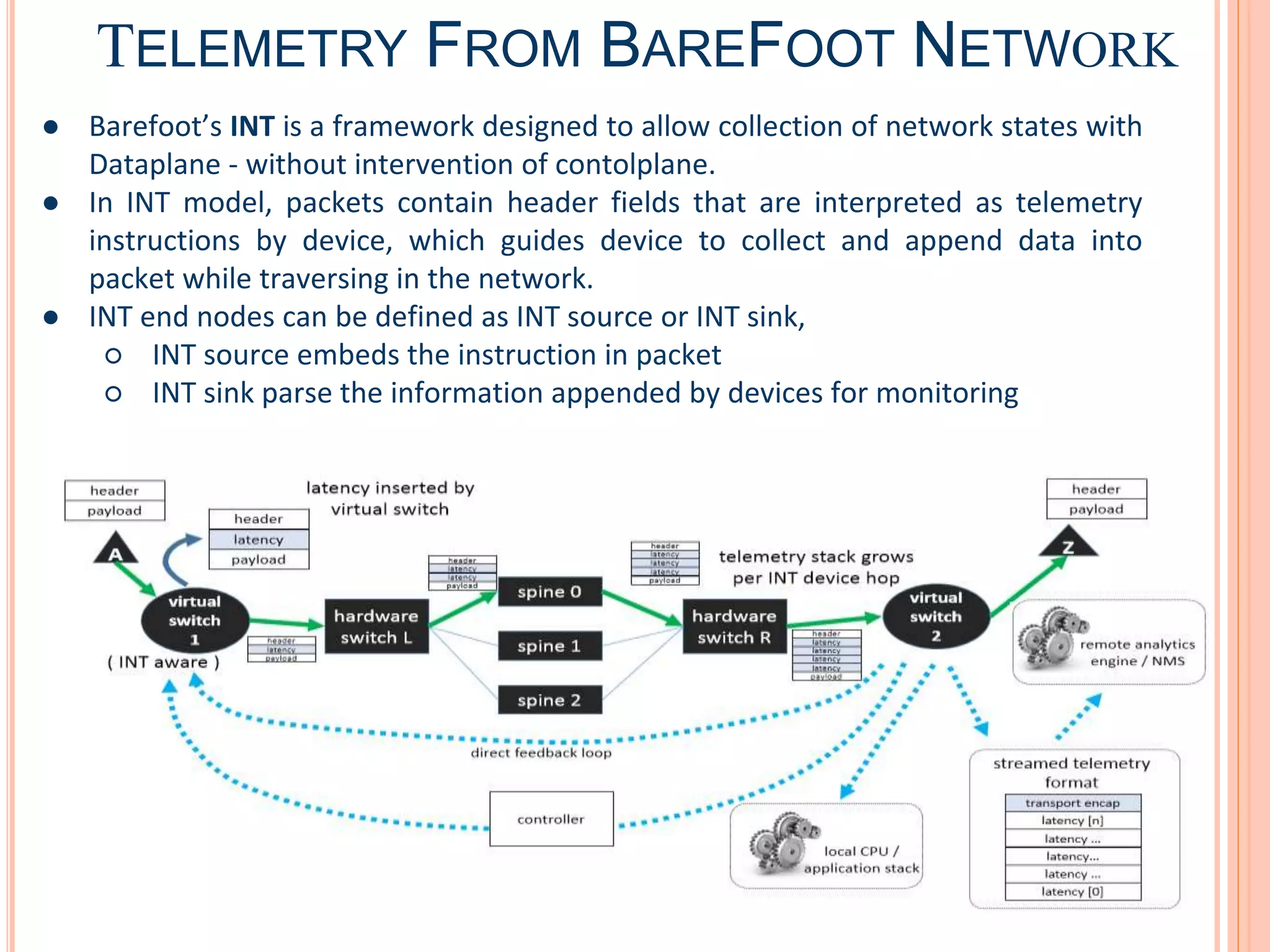
TELEMETRY FROM BAREFOOT NETWORK
● Barefoot’s INT is a framework designed to allow collection of network states with
Dataplane - without intervention of contolplane.
● In INT model, packets contain header fields that are interpreted as telemetry
instructions by device, which guides device to collect and append data into
packet while traversing in the network.
● INT end nodes can be defined as INT source or INT sink,
○ INT source embeds the instruction in packet
○ INT sink parse the information appended by devices for monitoring
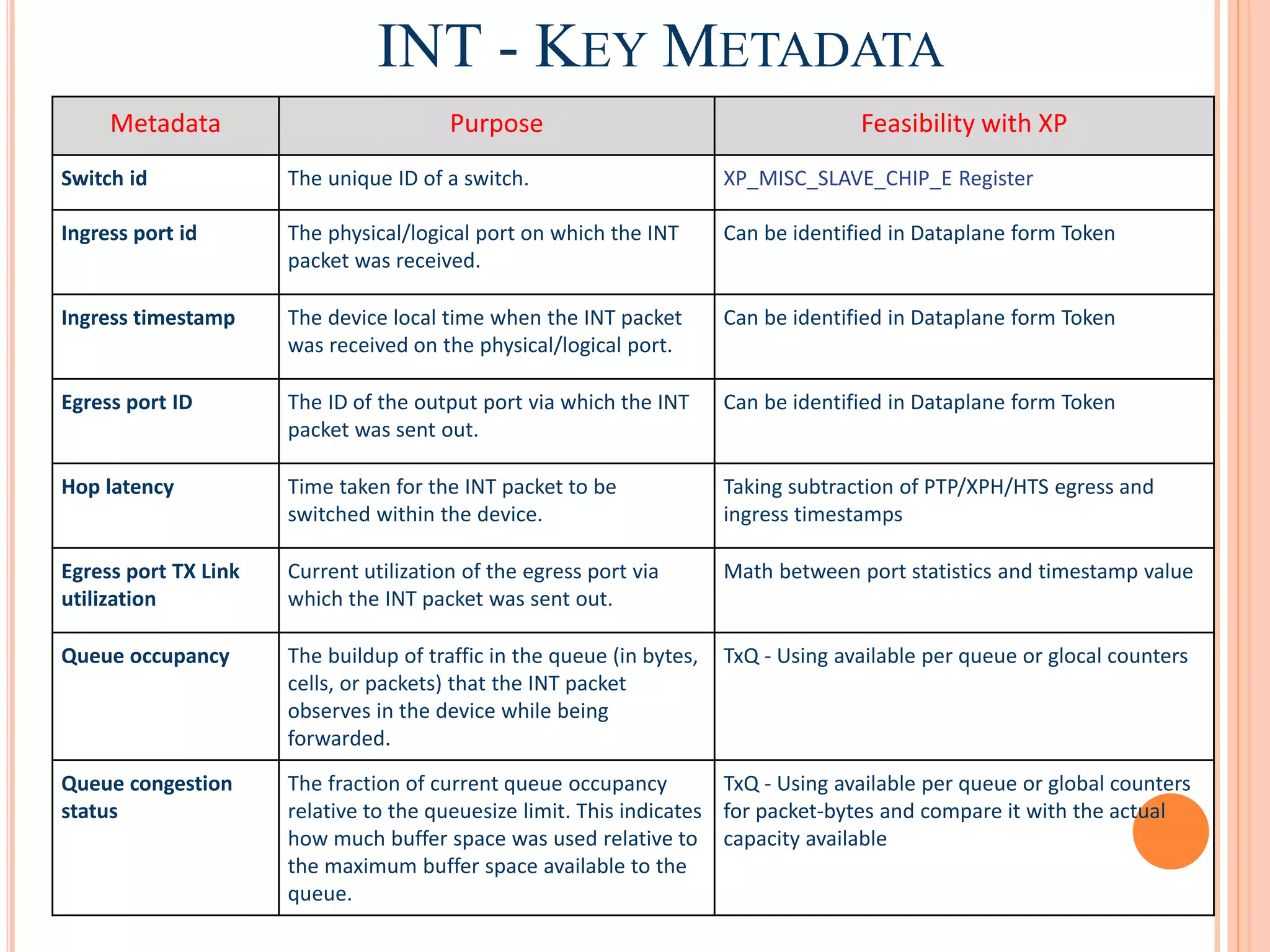
INT - KEY METADATA
Metadata Purpose Feasibility with XP
Switch id The unique ID of a switch. XP_MISC_SLAVE_CHIP_E Register
Ingress port id The physical/logical port on which the INT
packet was received.
Can be identified in Dataplane form Token
Ingress timestamp The device local time when the INT packet
was received on the physical/logical port.
Can be identified in Dataplane form Token
Egress port ID The ID of the output port via which the INT
packet was sent out.
Can be identified in Dataplane form Token
Hop latency Time taken for the INT packet to be
switched within the device.
Taking subtraction of PTP/XPH/HTS egress and
ingress timestamps
Egress port TX Link
utilization
Current utilization of the egress port via
which the INT packet was sent out.
Math between port statistics and timestamp value
Queue occupancy The buildup of traffic in the queue (in bytes,
cells, or packets) that the INT packet
observes in the device while being
forwarded.
TxQ - Using available per queue or glocal counters
Queue congestion
status
The fraction of current queue occupancy
relative to the queuesize limit. This indicates
how much buffer space was used relative to
the maximum buffer space available to the
queue.
TxQ - Using available per queue or global counters
for packet-bytes and compare it with the actual
capacity available
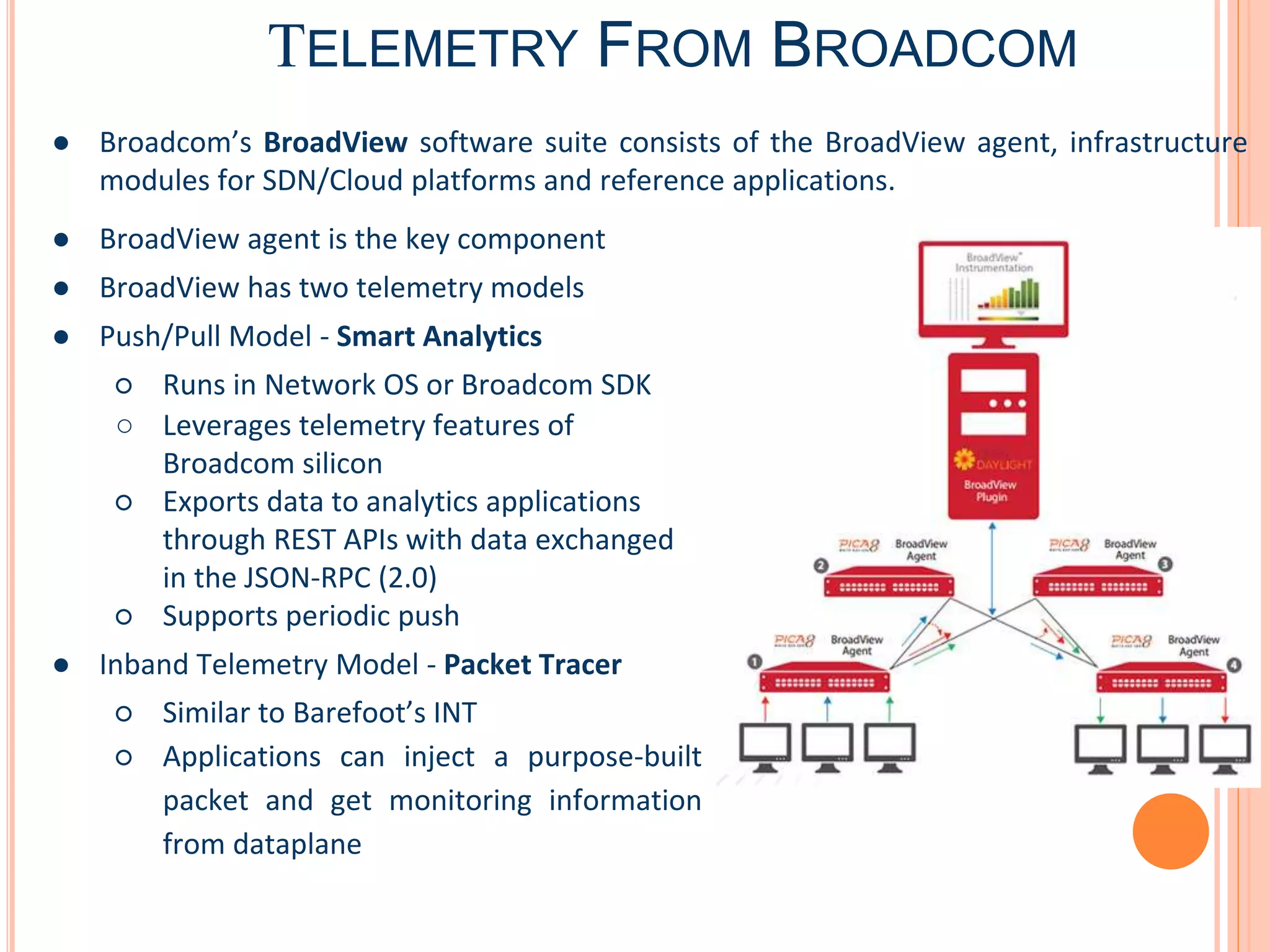
TELEMETRY FROM BROADCOM
● Broadcom’s BroadView software suite consists of the BroadView agent, infrastructure
modules for SDN/Cloud platforms and reference applications.
● BroadView agent is the key component
● BroadView has two telemetry models
● Push/Pull Model - Smart Analytics
○ Runs in Network OS or Broadcom SDK
○ Leverages telemetry features of
Broadcom silicon
○ Exports data to analytics applications
through REST APIs with data exchanged
in the JSON-RPC (2.0)
○ Supports periodic push
● Inband Telemetry Model - Packet Tracer
○ Similar to Barefoot’s INT
○ Applications can inject a purpose-built
packet and get monitoring information
from dataplane
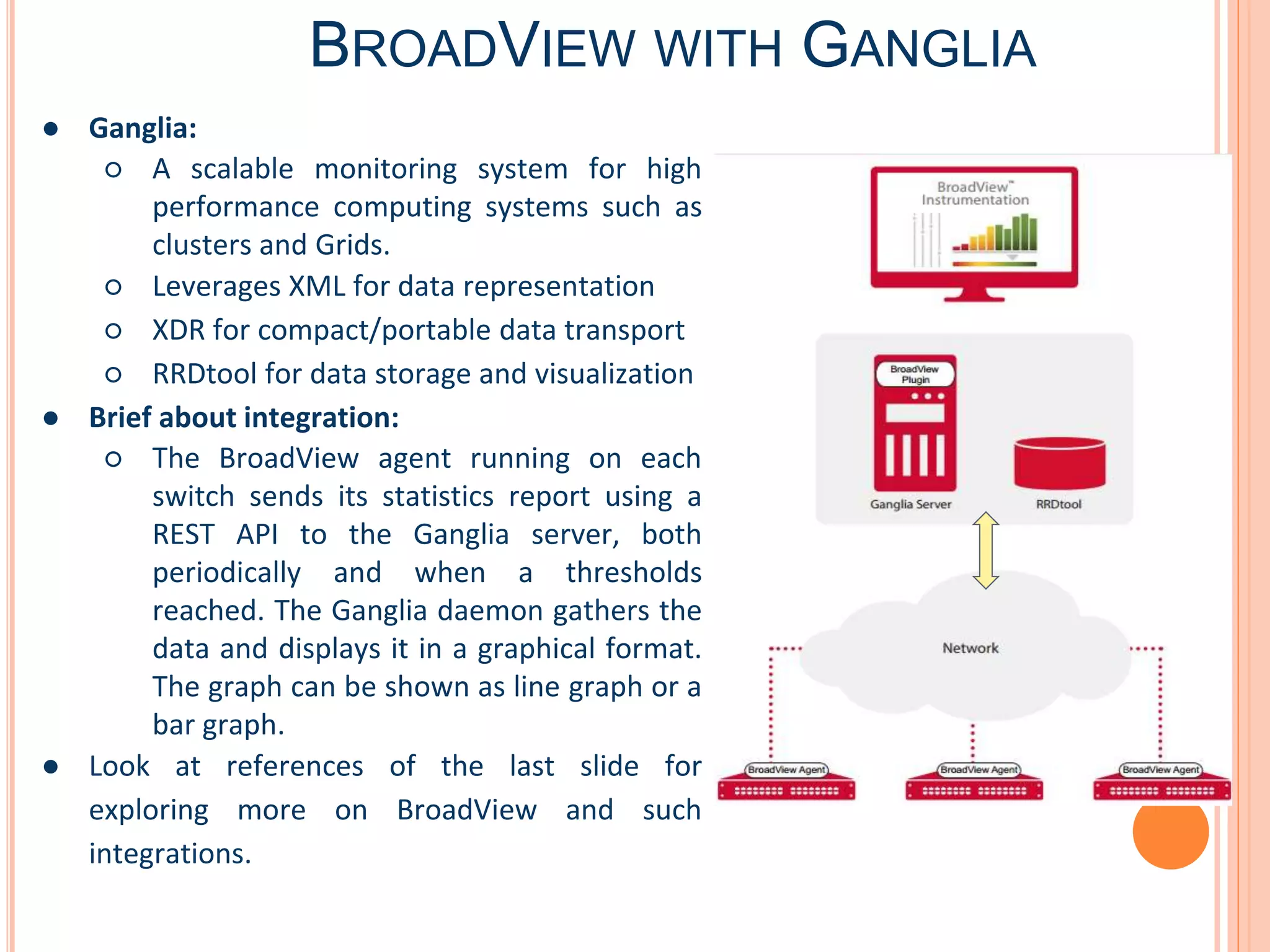
BROADVIEW WITH GANGLIA
● Ganglia:
○ A scalable monitoring system for high
performance computing systems such as
clusters and Grids.
○ Leverages XML for data representation
○ XDR for compact/portable data transport
○ RRDtool for data storage and visualization
● Brief about integration:
○ The BroadView agent running on each
switch sends its statistics report using a
REST API to the Ganglia server, both
periodically and when a thresholds
reached. The Ganglia daemon gathers the
data and displays it in a graphical format.
The graph can be shown as line graph or a
bar graph.
● Look at references of the last slide for
exploring more on BroadView and such
integrations.
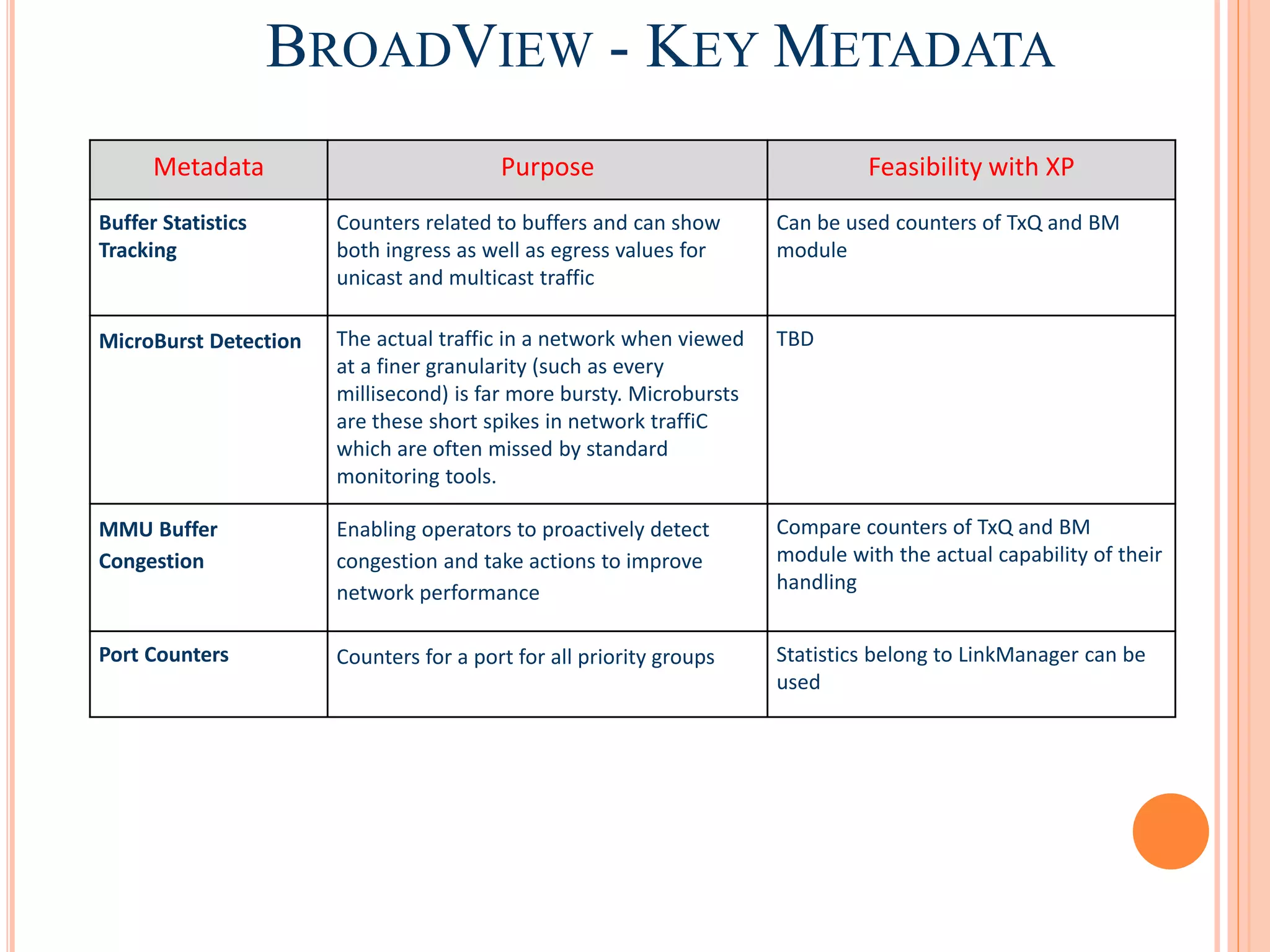
BROADVIEW - KEY METADATA
Metadata Purpose Feasibility with XP
Buffer Statistics
Tracking
Counters related to buffers and can show
both ingress as well as egress values for
unicast and multicast traffic
Can be used counters of TxQ and BM
module
MicroBurst Detection The actual traffic in a network when viewed
at a finer granularity (such as every
millisecond) is far more bursty. Microbursts
are these short spikes in network traffiC
which are often missed by standard
monitoring tools.
TBD
MMU Buffer
Congestion
Enabling operators to proactively detect
congestion and take actions to improve
network performance
Compare counters of TxQ and BM
module with the actual capability of their
handling
Port Counters Counters for a port for all priority groups Statistics belong to LinkManager can be
used
ARISTA’S STREAMING TELEMETRY
● The key is state based software architecture of Arista EOS
● Arista EOS (Extensible Operating System):
○ Use the streaming based approach to collect real-time data in granularity of micro-
second.
○ Each and every state changes are stored in real time in one common database - sysDB
○ Data base has historical state data which gives information what has happened at any
point of time
● NetDB (Network wide database)
○ Stays in sync with sysDB of various switches, and gets updated instantaneously when
sysDB changes
○ This real time sync is the true value addition for Arista’s solution.
● CloudVision Telemetry Suite:
○ Process raw stream data of netDB into actionable information
○ Gives graphical representation in the form of Cloudvision Dashboard
○ For integration with other framework gives API interface for integration with NetDB
○ API interface available over RestAPIs, WebSocket or gRPC.
REFERENCE LINKS
- RFC Telemetry:
https://tools.ietf.org/html/draft-wu-t2trg-network-telemetry-00
- Technical paper illustrating Telemetry:
https://www.cs.ucsb.edu/~ravenben/publications/pdf/everflow-sigcomm15.pdf
- INT specifications and way of implementation: http://p4.org/wp-content/uploads/fixed/INT/INT-
current-spec.pdf
- Application Notes related to Broadview https://www.broadcom.com/products/ethernet-
connectivity/software/broadview#documentation
- BroadView Open Source API Guide
http://broadcom-switch.github.io/BroadView-Instrumentation/doc/html/index.html
- Ganglia
http://www.ganglia.info
- Arista Telemetry Portal
https://www.arista.com/en/solutions/telemetry-analytics
- Arista Integration with Spunk
https://www.arista.com/en/products/eos/splunkapp
Thank You
16

Network Telemetry

  • 1.
  • 2.
    NETWORK TELEMETRY  Datafrom the network  It describes how information from various data sources (network equipments) can be collected using a set of automated communication processes and transmitted to any receiving equipment for analysis purpose.
  • 3.
    NETWORK TELEMETRY -WHY? • What is going on? – Billions of devices connecting to internet and VPN – Massive scale and highly dynamic nature of the IoT applications • Vast amounts of data gathered from the network at varying speeds, with different amounts of accuracy and patterns  Where is the effect? – Increased network incidents and unregulated network changes – Lack of network visibility and awareness of available network resources – Congestion problems and compromised network security  ‘Telemetry’ is the remedy: – To overcome data center issues, • Silent packet drops, Load imbalance • Protocol bugs, Inflated latencies – Schedules network resources to adapt to real-time service demands  Measures the network performance and assess network quality – Provides quick network diagnosis and identifies network glitch
  • 4.
    NETWORK TELEMETRY -BUILDING BLOCKS Telemetry Enterprise Application Data Analyzer Control Panel Data Analytics Exception Window DashBoard Server Database Data Collector Data Source Telemetry Agent Data Source Telemetry Agent Data Source Telemetry Agent Hybrid (Push + Poll) Communication
  • 5.
    INSIGHTS ON BUILDINGBLOCKS The Network Telemetry architecture is made up of the following three key functional components:  Data Source: The Data Source can be any type of network device that generates data.  Data Collector: The Data Collector may be a part of a control and/or management system and/or a dedicated set of entities. It gathers data from various Data Sources, and performs processing tasks to feed raw and/or processed data to the Data Analyzer.  Data Analyzer: The Data Analyzer processes data from various data collectors to provide actionable insight. This ranges from generating simple statistical metrics to inferring problems to recommending solutions to said problems.
  • 6.
    NETWORK TELEMETRY APPROACH- 1 Traditional SNMP (Push/Poll)
  • 7.
    NETWORK TELEMETRY APPROACH- 2 Telemetry Manager Inband Network Telemetry
  • 8.
    TELEMETRY - ALOOK AT MARKET
  • 9.
    Inband Network Telemetry TELEMETRYFROM BAREFOOT NETWORK ● Barefoot’s INT is a framework designed to allow collection of network states with Dataplane - without intervention of contolplane. ● In INT model, packets contain header fields that are interpreted as telemetry instructions by device, which guides device to collect and append data into packet while traversing in the network. ● INT end nodes can be defined as INT source or INT sink, ○ INT source embeds the instruction in packet ○ INT sink parse the information appended by devices for monitoring
  • 10.
    INT - KEYMETADATA Metadata Purpose Feasibility with XP Switch id The unique ID of a switch. XP_MISC_SLAVE_CHIP_E Register Ingress port id The physical/logical port on which the INT packet was received. Can be identified in Dataplane form Token Ingress timestamp The device local time when the INT packet was received on the physical/logical port. Can be identified in Dataplane form Token Egress port ID The ID of the output port via which the INT packet was sent out. Can be identified in Dataplane form Token Hop latency Time taken for the INT packet to be switched within the device. Taking subtraction of PTP/XPH/HTS egress and ingress timestamps Egress port TX Link utilization Current utilization of the egress port via which the INT packet was sent out. Math between port statistics and timestamp value Queue occupancy The buildup of traffic in the queue (in bytes, cells, or packets) that the INT packet observes in the device while being forwarded. TxQ - Using available per queue or glocal counters Queue congestion status The fraction of current queue occupancy relative to the queuesize limit. This indicates how much buffer space was used relative to the maximum buffer space available to the queue. TxQ - Using available per queue or global counters for packet-bytes and compare it with the actual capacity available
  • 11.
    TELEMETRY FROM BROADCOM ●Broadcom’s BroadView software suite consists of the BroadView agent, infrastructure modules for SDN/Cloud platforms and reference applications. ● BroadView agent is the key component ● BroadView has two telemetry models ● Push/Pull Model - Smart Analytics ○ Runs in Network OS or Broadcom SDK ○ Leverages telemetry features of Broadcom silicon ○ Exports data to analytics applications through REST APIs with data exchanged in the JSON-RPC (2.0) ○ Supports periodic push ● Inband Telemetry Model - Packet Tracer ○ Similar to Barefoot’s INT ○ Applications can inject a purpose-built packet and get monitoring information from dataplane
  • 12.
    BROADVIEW WITH GANGLIA ●Ganglia: ○ A scalable monitoring system for high performance computing systems such as clusters and Grids. ○ Leverages XML for data representation ○ XDR for compact/portable data transport ○ RRDtool for data storage and visualization ● Brief about integration: ○ The BroadView agent running on each switch sends its statistics report using a REST API to the Ganglia server, both periodically and when a thresholds reached. The Ganglia daemon gathers the data and displays it in a graphical format. The graph can be shown as line graph or a bar graph. ● Look at references of the last slide for exploring more on BroadView and such integrations.
  • 13.
    BROADVIEW - KEYMETADATA Metadata Purpose Feasibility with XP Buffer Statistics Tracking Counters related to buffers and can show both ingress as well as egress values for unicast and multicast traffic Can be used counters of TxQ and BM module MicroBurst Detection The actual traffic in a network when viewed at a finer granularity (such as every millisecond) is far more bursty. Microbursts are these short spikes in network traffiC which are often missed by standard monitoring tools. TBD MMU Buffer Congestion Enabling operators to proactively detect congestion and take actions to improve network performance Compare counters of TxQ and BM module with the actual capability of their handling Port Counters Counters for a port for all priority groups Statistics belong to LinkManager can be used
  • 14.
    ARISTA’S STREAMING TELEMETRY ●The key is state based software architecture of Arista EOS ● Arista EOS (Extensible Operating System): ○ Use the streaming based approach to collect real-time data in granularity of micro- second. ○ Each and every state changes are stored in real time in one common database - sysDB ○ Data base has historical state data which gives information what has happened at any point of time ● NetDB (Network wide database) ○ Stays in sync with sysDB of various switches, and gets updated instantaneously when sysDB changes ○ This real time sync is the true value addition for Arista’s solution. ● CloudVision Telemetry Suite: ○ Process raw stream data of netDB into actionable information ○ Gives graphical representation in the form of Cloudvision Dashboard ○ For integration with other framework gives API interface for integration with NetDB ○ API interface available over RestAPIs, WebSocket or gRPC.
  • 15.
    REFERENCE LINKS - RFCTelemetry: https://tools.ietf.org/html/draft-wu-t2trg-network-telemetry-00 - Technical paper illustrating Telemetry: https://www.cs.ucsb.edu/~ravenben/publications/pdf/everflow-sigcomm15.pdf - INT specifications and way of implementation: http://p4.org/wp-content/uploads/fixed/INT/INT- current-spec.pdf - Application Notes related to Broadview https://www.broadcom.com/products/ethernet- connectivity/software/broadview#documentation - BroadView Open Source API Guide http://broadcom-switch.github.io/BroadView-Instrumentation/doc/html/index.html - Ganglia http://www.ganglia.info - Arista Telemetry Portal https://www.arista.com/en/solutions/telemetry-analytics - Arista Integration with Spunk https://www.arista.com/en/products/eos/splunkapp
  • 16.

Editor's Notes