MPLS Traffic Engineering
PacNOG20 July 3, 2017. Suva, Fiji.
Jessica Wei
Why MPLS Traffic Engineering?
• Handling unexpected congestion
• Better utilization of available bandwidth
• Route around failed links/nodes
• Capacity planning
2
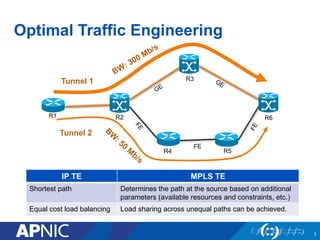
Optimal Traffic Engineering
3
Tunnel 1
Tunnel 2
R1 R2
R3
R4 R5
R6
IP TE MPLS TE
Shortest path Determines the path at the source based on additional
parameters (available resources and constraints, etc.)
Equal cost load balancing Load sharing across unequal paths can be achieved.
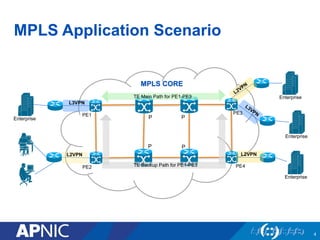
MPLS Application Scenario
4
MPLS CORE
Enterprise
Enterprise
Enterprise
L3VPN
L2VPN L2VPN
Enterprise
TE Backup Path for PE1-PE3
PE1 P
PE2
PE3
PE4
P
P P
TE Main Path for PE1-PE3
How MPLS TE Works
5
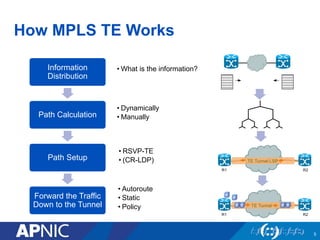
• What is the information?
• Dynamically
• Manually
• RSVP-TE
• (CR-LDP)
• Autoroute
• Static
• Policy
Information
Distribution
Path Calculation
Path Setup
Forward the Traffic
Down to the Tunnel
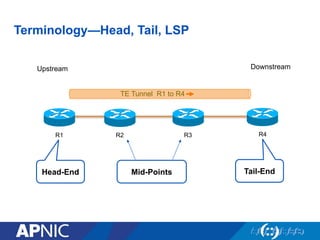
Terminology—Head, Tail, LSP
Upstream
R1 R2
Downstream
R3
TE Tunnel R1 to R4
R4
Head-End Tail-EndMid-Points
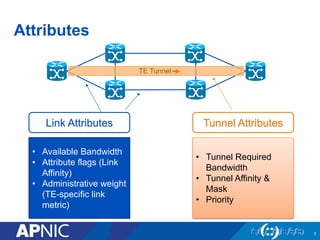
Attributes
7
Link Attributes
• Available Bandwidth
• Attribute flags (Link
Affinity)
• Administrative weight
(TE-specific link
metric)
Tunnel Attributes
• Tunnel Required
Bandwidth
• Tunnel Affinity &
Mask
• Priority
TE Tunnel
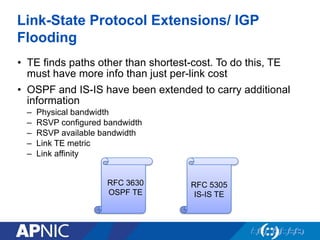
Link-State Protocol Extensions/ IGP
Flooding
• TE finds paths other than shortest-cost. To do this, TE
must have more info than just per-link cost
• OSPF and IS-IS have been extended to carry additional
information
– Physical bandwidth
– RSVP configured bandwidth
– RSVP available bandwidth
– Link TE metric
– Link affinity
RFC 3630
OSPF TE
RFC 5305
IS-IS TE
When to Flood the Information
• When a link goes up or down
• When a link’s configuration is changed
• Periodically reflood the router’s IGP information
• When link bandwidth changes significantly
9
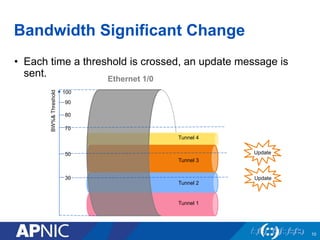
Bandwidth Significant Change
• Each time a threshold is crossed, an update message is
sent.
10
Ethernet 1/0
Tunnel 1
Tunnel 2
Tunnel 3
Tunnel 4
Update
Update
30
50
70
80
90
100
BW%&Threshold
Tunnel Path Selection
• Tunnel has two path options
1. Dynamic
2. Explicit
• Path is a set of next-hop addresses (physical or
loopbacks) to destination
• This set of next-hops is called Explicit Route
Object (ERO)
Dynamic Path Option
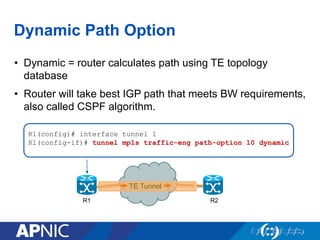
• Dynamic = router calculates path using TE topology
database
• Router will take best IGP path that meets BW requirements,
also called CSPF algorithm.
R1(config)# interface tunnel 1
R1(config-if)# tunnel mpls traffic-eng path-option 10 dynamic
R1 R2
TE Tunnel
C-SPF
• Shortest-cost path is found that meets administrative
constraints
• These constraints can be
– bandwidth
– link attribute (aka color, resource group)
– priority
• The addition of constraints is what allows MPLS-TE to
use paths other than just the shortest one
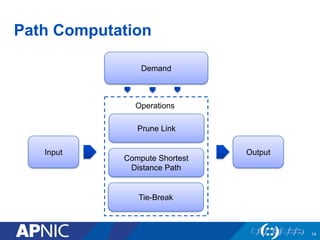
Path Computation
14
Demand
Input
Prune Link
Compute Shortest
Distance Path
Tie-Break
Output
Operations
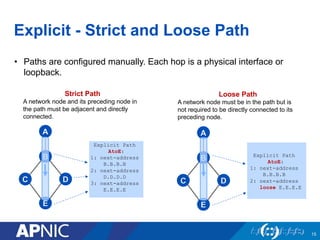
Explicit - Strict and Loose Path
15
A
B
C D
E
Explicit Path
AtoE:
1: next-address
B.B.B.B
2: next-address
D.D.D.D
3: next-address
E.E.E.E
A
B
C D
E
Explicit Path
AtoE:
1: next-address
B.B.B.B
2: next-address
loose E.E.E.E
Strict Path
A network node and its preceding node in
the path must be adjacent and directly
connected.
Loose Path
A network node must be in the path but is
not required to be directly connected to its
preceding node.
• Paths are configured manually. Each hop is a physical interface or
loopback.
RSVP-TE
• After calculating the path, tunnel will be set up by using
RSVP-TE.
• RSVP has three basic functions:
– Path setup and maintenance
– Path teardown
– Error signalling
16
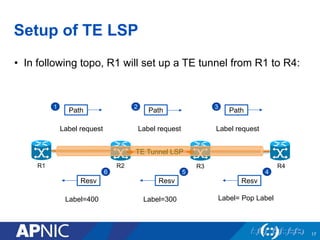
Setup of TE LSP
• In following topo, R1 will set up a TE tunnel from R1 to R4:
17
R1 R2 R3 R4
Path
1
Label request
Path
2
Label request
Path
3
Label request
Resv
4
Label= Pop Label
Resv
5
Label=300
Resv
6
Label=400
TE Tunnel LSP
18
Routing Traffic Down a Tunnel
• Once the tunnel is established and operational, it’s ready to
forward data traffic.
• However, no traffic will enter the tunnel unless the IP
routing tables and FIB tables are modified.
• How to get traffic down the tunnel?
1. Static route
2. Auto route
3. Policy routing
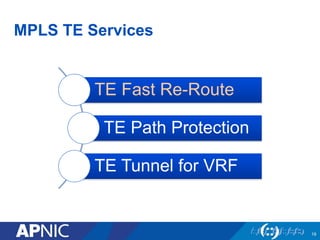
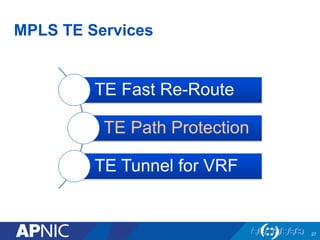
MPLS TE Services
TE Fast Re-Route
TE Path Protection
TE Tunnel for VRF
19
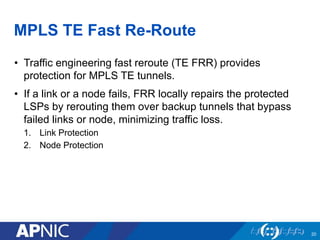
MPLS TE Fast Re-Route
• Traffic engineering fast reroute (TE FRR) provides
protection for MPLS TE tunnels.
• If a link or a node fails, FRR locally repairs the protected
LSPs by rerouting them over backup tunnels that bypass
failed links or node, minimizing traffic loss.
1. Link Protection
2. Node Protection
20
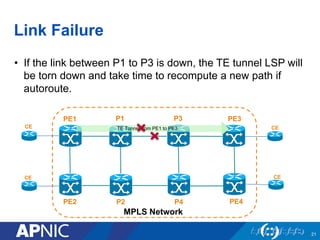
Link Failure
• If the link between P1 to P3 is down, the TE tunnel LSP will
be torn down and take time to recompute a new path if
autoroute.
21
PE1
PE2
MPLS Network
PE3
PE4
P1
P2
CE
CE
CE
CE
TE Tunnel from PE1 to PE3
P3
P4
Fast Re-Route ---- Link Protection
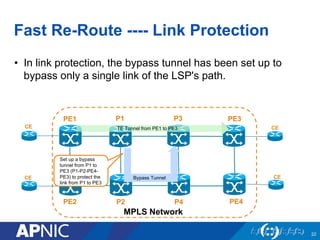
• In link protection, the bypass tunnel has been set up to
bypass only a single link of the LSP's path.
22
PE1
PE2
MPLS Network
PE3
PE4
P1
P2
CE
CE
CE
CE
TE Tunnel from PE1 to PE3
P3
P4
Bypass Tunnel
Set up a bypass
tunnel from P1 to
PE3 (P1-P2-PE4-
PE3) to protect the
link from P1 to PE3
Fast Re-Route ---- Link Protection
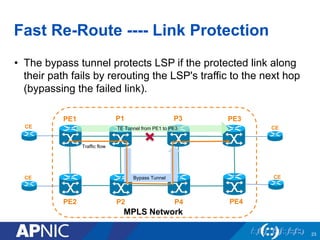
• The bypass tunnel protects LSP if the protected link along
their path fails by rerouting the LSP's traffic to the next hop
(bypassing the failed link).
23
PE1
PE2
MPLS Network
PE3
PE4
P1
P2
CE
CE
CE
CE
TE Tunnel from PE1 to PE3
P3
P4
Bypass Tunnel
Traffic flow
Node Failure
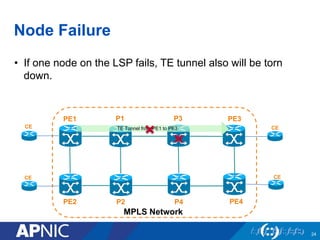
• If one node on the LSP fails, TE tunnel also will be torn
down.
24
PE1
PE2
MPLS Network
PE3
PE4
P1
P2
CE
CE
CE
CE
TE Tunnel from PE1 to PE3
P3
P4
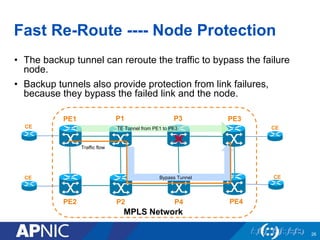
Fast Re-Route ---- Node Protection
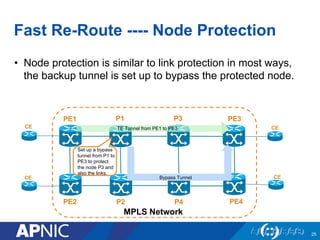
• Node protection is similar to link protection in most ways,
the backup tunnel is set up to bypass the protected node.
25
PE1
PE2
MPLS Network
PE3
PE4
P1
P2
CE
CE
CE
CE
TE Tunnel from PE1 to PE3
P3
P4
Bypass Tunnel
Set up a bypass
tunnel from P1 to
PE3 to protect
the node P3 and
also the links.
Fast Re-Route ---- Node Protection
• The backup tunnel can reroute the traffic to bypass the failure
node.
• Backup tunnels also provide protection from link failures,
because they bypass the failed link and the node.
26
PE1
PE2
MPLS Network
PE3
PE4
P1
P2
CE
CE
CE
CE
TE Tunnel from PE1 to PE3
P3
P4
Bypass Tunnel
Traffic flow
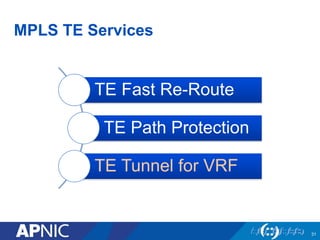
MPLS TE Services
TE Fast Re-Route
TE Path Protection
TE Tunnel for VRF
27
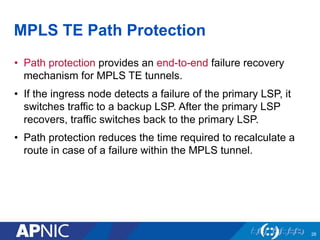
MPLS TE Path Protection
• Path protection provides an end-to-end failure recovery
mechanism for MPLS TE tunnels.
• If the ingress node detects a failure of the primary LSP, it
switches traffic to a backup LSP. After the primary LSP
recovers, traffic switches back to the primary LSP.
• Path protection reduces the time required to recalculate a
route in case of a failure within the MPLS tunnel.
28
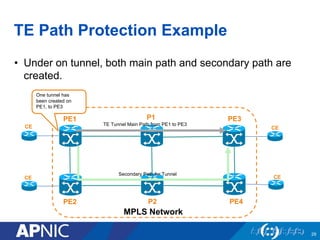
TE Path Protection Example
• Under on tunnel, both main path and secondary path are
created.
29
PE1
PE2
MPLS Network
PE3
PE4
P1
P2
TE Tunnel Main Path from PE1 to PE3
CE
CE
CE
CE
Secondary Path for Tunnel
One tunnel has
been created on
PE1, to PE3
TE Path Protection Example
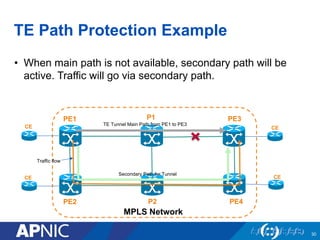
• When main path is not available, secondary path will be
active. Traffic will go via secondary path.
30
PE1
PE2
MPLS Network
PE3
PE4
P1
P2
TE Tunnel Main Path from PE1 to PE3
CE
CE
CE
CE
Secondary Path for Tunnel
Traffic flow
MPLS TE Services
TE Fast Re-Route
TE Path Protection
TE Tunnel for VRF
31
LDP for VPN Tunnel LSP
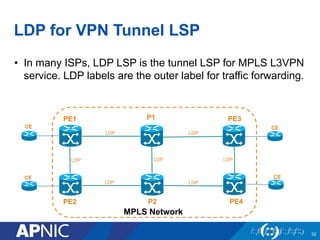
• In many ISPs, LDP LSP is the tunnel LSP for MPLS L3VPN
service. LDP labels are the outer label for traffic forwarding.
32
LDPLDP
LDP
LDP LDP
LDP LDP
PE1
PE2
MPLS Network
PE3
PE4
P1
P2
CE
CE
CE
CE
TE Tunnel for VPN Tunnel LSP
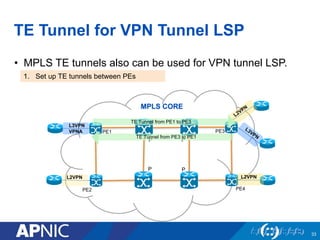
• MPLS TE tunnels also can be used for VPN tunnel LSP.
33
MPLS CORE
L3VPN
VPNA
L2VPN L2VPN
PE1
P
PE2
PE3
PE4
P
P P
TE Tunnel from PE1 to PE3
TE Tunnel from PE3 to PE1
1. Set up TE tunnels between PEs
TE Tunnel for VPN Tunnel LSP
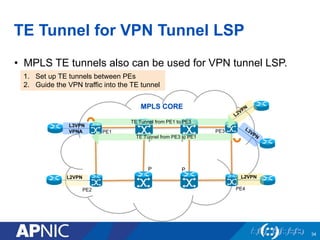
• MPLS TE tunnels also can be used for VPN tunnel LSP.
34
MPLS CORE
L3VPN
VPNA
L2VPN L2VPN
PE1
P
PE2
PE3
PE4
P
P P
TE Tunnel from PE1 to PE3
TE Tunnel from PE3 to PE1
1. Set up TE tunnels between PEs
2. Guide the VPN traffic into the TE tunnel
Thank You!

MPLS Traffic Engineering

  • 1.
    MPLS Traffic Engineering PacNOG20July 3, 2017. Suva, Fiji. Jessica Wei
  • 2.
    Why MPLS TrafficEngineering? • Handling unexpected congestion • Better utilization of available bandwidth • Route around failed links/nodes • Capacity planning 2
  • 3.
    Optimal Traffic Engineering 3 Tunnel1 Tunnel 2 R1 R2 R3 R4 R5 R6 IP TE MPLS TE Shortest path Determines the path at the source based on additional parameters (available resources and constraints, etc.) Equal cost load balancing Load sharing across unequal paths can be achieved.
  • 4.
    MPLS Application Scenario 4 MPLSCORE Enterprise Enterprise Enterprise L3VPN L2VPN L2VPN Enterprise TE Backup Path for PE1-PE3 PE1 P PE2 PE3 PE4 P P P TE Main Path for PE1-PE3
  • 5.
    How MPLS TEWorks 5 • What is the information? • Dynamically • Manually • RSVP-TE • (CR-LDP) • Autoroute • Static • Policy Information Distribution Path Calculation Path Setup Forward the Traffic Down to the Tunnel
  • 6.
    Terminology—Head, Tail, LSP Upstream R1R2 Downstream R3 TE Tunnel R1 to R4 R4 Head-End Tail-EndMid-Points
  • 7.
    Attributes 7 Link Attributes • AvailableBandwidth • Attribute flags (Link Affinity) • Administrative weight (TE-specific link metric) Tunnel Attributes • Tunnel Required Bandwidth • Tunnel Affinity & Mask • Priority TE Tunnel
  • 8.
    Link-State Protocol Extensions/IGP Flooding • TE finds paths other than shortest-cost. To do this, TE must have more info than just per-link cost • OSPF and IS-IS have been extended to carry additional information – Physical bandwidth – RSVP configured bandwidth – RSVP available bandwidth – Link TE metric – Link affinity RFC 3630 OSPF TE RFC 5305 IS-IS TE
  • 9.
    When to Floodthe Information • When a link goes up or down • When a link’s configuration is changed • Periodically reflood the router’s IGP information • When link bandwidth changes significantly 9
  • 10.
    Bandwidth Significant Change •Each time a threshold is crossed, an update message is sent. 10 Ethernet 1/0 Tunnel 1 Tunnel 2 Tunnel 3 Tunnel 4 Update Update 30 50 70 80 90 100 BW%&Threshold
  • 11.
    Tunnel Path Selection •Tunnel has two path options 1. Dynamic 2. Explicit • Path is a set of next-hop addresses (physical or loopbacks) to destination • This set of next-hops is called Explicit Route Object (ERO)
  • 12.
    Dynamic Path Option •Dynamic = router calculates path using TE topology database • Router will take best IGP path that meets BW requirements, also called CSPF algorithm. R1(config)# interface tunnel 1 R1(config-if)# tunnel mpls traffic-eng path-option 10 dynamic R1 R2 TE Tunnel
  • 13.
    C-SPF • Shortest-cost pathis found that meets administrative constraints • These constraints can be – bandwidth – link attribute (aka color, resource group) – priority • The addition of constraints is what allows MPLS-TE to use paths other than just the shortest one
  • 14.
    Path Computation 14 Demand Input Prune Link ComputeShortest Distance Path Tie-Break Output Operations
  • 15.
    Explicit - Strictand Loose Path 15 A B C D E Explicit Path AtoE: 1: next-address B.B.B.B 2: next-address D.D.D.D 3: next-address E.E.E.E A B C D E Explicit Path AtoE: 1: next-address B.B.B.B 2: next-address loose E.E.E.E Strict Path A network node and its preceding node in the path must be adjacent and directly connected. Loose Path A network node must be in the path but is not required to be directly connected to its preceding node. • Paths are configured manually. Each hop is a physical interface or loopback.
  • 16.
    RSVP-TE • After calculatingthe path, tunnel will be set up by using RSVP-TE. • RSVP has three basic functions: – Path setup and maintenance – Path teardown – Error signalling 16
  • 17.
    Setup of TELSP • In following topo, R1 will set up a TE tunnel from R1 to R4: 17 R1 R2 R3 R4 Path 1 Label request Path 2 Label request Path 3 Label request Resv 4 Label= Pop Label Resv 5 Label=300 Resv 6 Label=400 TE Tunnel LSP
  • 18.
    18 Routing Traffic Downa Tunnel • Once the tunnel is established and operational, it’s ready to forward data traffic. • However, no traffic will enter the tunnel unless the IP routing tables and FIB tables are modified. • How to get traffic down the tunnel? 1. Static route 2. Auto route 3. Policy routing
  • 19.
    MPLS TE Services TEFast Re-Route TE Path Protection TE Tunnel for VRF 19
  • 20.
    MPLS TE FastRe-Route • Traffic engineering fast reroute (TE FRR) provides protection for MPLS TE tunnels. • If a link or a node fails, FRR locally repairs the protected LSPs by rerouting them over backup tunnels that bypass failed links or node, minimizing traffic loss. 1. Link Protection 2. Node Protection 20
  • 21.
    Link Failure • Ifthe link between P1 to P3 is down, the TE tunnel LSP will be torn down and take time to recompute a new path if autoroute. 21 PE1 PE2 MPLS Network PE3 PE4 P1 P2 CE CE CE CE TE Tunnel from PE1 to PE3 P3 P4
  • 22.
    Fast Re-Route ----Link Protection • In link protection, the bypass tunnel has been set up to bypass only a single link of the LSP's path. 22 PE1 PE2 MPLS Network PE3 PE4 P1 P2 CE CE CE CE TE Tunnel from PE1 to PE3 P3 P4 Bypass Tunnel Set up a bypass tunnel from P1 to PE3 (P1-P2-PE4- PE3) to protect the link from P1 to PE3
  • 23.
    Fast Re-Route ----Link Protection • The bypass tunnel protects LSP if the protected link along their path fails by rerouting the LSP's traffic to the next hop (bypassing the failed link). 23 PE1 PE2 MPLS Network PE3 PE4 P1 P2 CE CE CE CE TE Tunnel from PE1 to PE3 P3 P4 Bypass Tunnel Traffic flow
  • 24.
    Node Failure • Ifone node on the LSP fails, TE tunnel also will be torn down. 24 PE1 PE2 MPLS Network PE3 PE4 P1 P2 CE CE CE CE TE Tunnel from PE1 to PE3 P3 P4
  • 25.
    Fast Re-Route ----Node Protection • Node protection is similar to link protection in most ways, the backup tunnel is set up to bypass the protected node. 25 PE1 PE2 MPLS Network PE3 PE4 P1 P2 CE CE CE CE TE Tunnel from PE1 to PE3 P3 P4 Bypass Tunnel Set up a bypass tunnel from P1 to PE3 to protect the node P3 and also the links.
  • 26.
    Fast Re-Route ----Node Protection • The backup tunnel can reroute the traffic to bypass the failure node. • Backup tunnels also provide protection from link failures, because they bypass the failed link and the node. 26 PE1 PE2 MPLS Network PE3 PE4 P1 P2 CE CE CE CE TE Tunnel from PE1 to PE3 P3 P4 Bypass Tunnel Traffic flow
  • 27.
    MPLS TE Services TEFast Re-Route TE Path Protection TE Tunnel for VRF 27
  • 28.
    MPLS TE PathProtection • Path protection provides an end-to-end failure recovery mechanism for MPLS TE tunnels. • If the ingress node detects a failure of the primary LSP, it switches traffic to a backup LSP. After the primary LSP recovers, traffic switches back to the primary LSP. • Path protection reduces the time required to recalculate a route in case of a failure within the MPLS tunnel. 28
  • 29.
    TE Path ProtectionExample • Under on tunnel, both main path and secondary path are created. 29 PE1 PE2 MPLS Network PE3 PE4 P1 P2 TE Tunnel Main Path from PE1 to PE3 CE CE CE CE Secondary Path for Tunnel One tunnel has been created on PE1, to PE3
  • 30.
    TE Path ProtectionExample • When main path is not available, secondary path will be active. Traffic will go via secondary path. 30 PE1 PE2 MPLS Network PE3 PE4 P1 P2 TE Tunnel Main Path from PE1 to PE3 CE CE CE CE Secondary Path for Tunnel Traffic flow
  • 31.
    MPLS TE Services TEFast Re-Route TE Path Protection TE Tunnel for VRF 31
  • 32.
    LDP for VPNTunnel LSP • In many ISPs, LDP LSP is the tunnel LSP for MPLS L3VPN service. LDP labels are the outer label for traffic forwarding. 32 LDPLDP LDP LDP LDP LDP LDP PE1 PE2 MPLS Network PE3 PE4 P1 P2 CE CE CE CE
  • 33.
    TE Tunnel forVPN Tunnel LSP • MPLS TE tunnels also can be used for VPN tunnel LSP. 33 MPLS CORE L3VPN VPNA L2VPN L2VPN PE1 P PE2 PE3 PE4 P P P TE Tunnel from PE1 to PE3 TE Tunnel from PE3 to PE1 1. Set up TE tunnels between PEs
  • 34.
    TE Tunnel forVPN Tunnel LSP • MPLS TE tunnels also can be used for VPN tunnel LSP. 34 MPLS CORE L3VPN VPNA L2VPN L2VPN PE1 P PE2 PE3 PE4 P P P TE Tunnel from PE1 to PE3 TE Tunnel from PE3 to PE1 1. Set up TE tunnels between PEs 2. Guide the VPN traffic into the TE tunnel
  • 35.