
Deborah Dotson
September 12, 2010
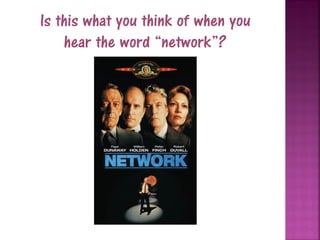
Is this what you think of when you
    hear the word “network”?
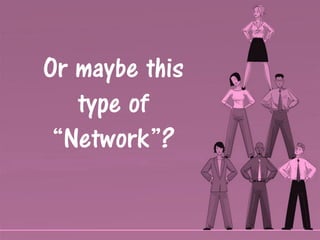
Or maybe this
   type of
 “Network”?
Glossary
                 Networks
      Infrastructure

   Switches
            Devices    Protocol
      Hardware

      Topology         Routers
Internet
                 OSI
A simple explanation is that a Network is two computers connected to
share information, but of course we know it is often much more.

All networks start from this basic concept. Any device connected to the
network is called a “network device”. When several devices are
connected, they need a “hub”. When many devices are connected they
need routers and switches to handle the communication.

Each device is given an “address” usually called an “IP” address. This
is a numerical label. The IP Address serves two functions -host or
network interface identification and location addressing


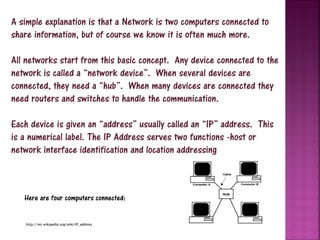
   Here are four computers connected:


   http://en.wikipedia.org/wiki/IP_address
When considering a Network, you probably
                     think about the Internet….
Definitions of internet on the Web:

•A computer network consisting of a worldwide network of computer networks
that use the TCP/IP network protocols to facilitate data transmission and
exchange
wordnetweb.princeton.edu/perl/webwn
•The Internet is a global system of interconnected computer networks that use
the standard Internet Protocol Suite (TCP/IP) to serve billions of users
worldwide. ...
en.wikipedia.org/wiki/Internet
•Any set of computer networks that communicate using the Internet Protocol. (An
intranet.); The Internet, the largest global internet
en.wiktionary.org/wiki/internet
•Often confused with the World Wide Web, the term Internet actually refers to
the combined collection of academic, commercial, and government networks
connected over international telecommunication backbones and routed using IP
addressing.
nsit.uchicago.edu/docs/glossary/
A more in depth explanation of
       determining the scope of a
     Network involves the following:
 Size
 Protocol
 Topography
 Hardware
 Cabling/Infrastucture
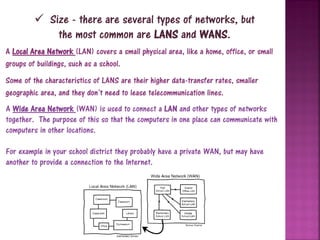
 Size - there are several types of networks, but
             the most common are LANS and WANS.
A Local Area Network (LAN) covers a small physical area, like a home, office, or small
groups of buildings, such as a school.
Some of the characteristics of LANS are their higher data-transfer rates, smaller
geographic area, and they don’t need to lease telecommunication lines.
A Wide Area Network (WAN) is used to connect a LAN and other types of networks
together. The purpose of this so that the computers in one place can communicate with
computers in other locations.

For example in your school district they probably have a private WAN, but may have
another to provide a connection to the Internet.
What is Protocol?

Rules about appearance, speaking, listening and understanding
are considered the protocols of conversation. They represent
  different layers of communication and together they help
              people communicate successfully.
       Protocols also apply to computers. Network
     engineers have written rules for communication
      that must be strictly followed for successful
              host-to-host communication.


 http://en.wikipedia.org/wiki/Protocol_(computing   )
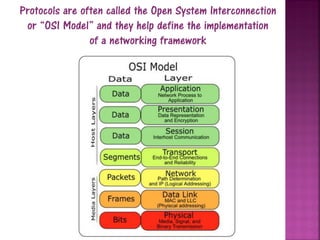
Protocols are often called the Open System Interconnection
 or “OSI Model” and they help define the implementation
                of a networking framework
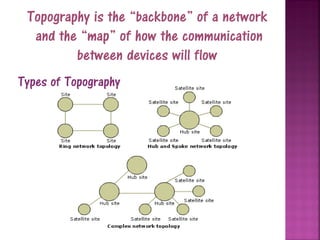
Topography is the “backbone” of a network
  and the “map” of how the communication
         between devices will flow
Types of Topography
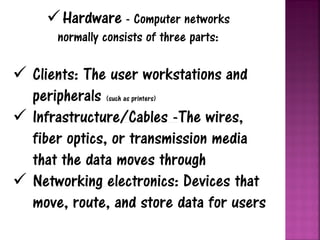
 Hardware - Computer networks
      normally consists of three parts:

 Clients: The user workstations and
  peripherals (such as printers)
 Infrastructure/Cables -The wires,
  fiber optics, or transmission media
  that the data moves through
 Networking electronics: Devices that
  move, route, and store data for users
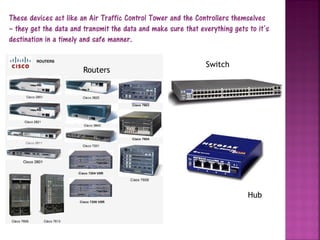
These devices act like an Air Traffic Control Tower and the Controllers themselves
– they get the data and transmit the data and make sure that everything gets to it’s
destination in a timely and safe manner.

                                                               Switch
                       Routers


                                                                             Hub
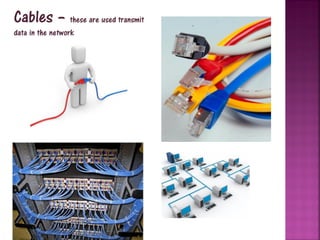
Cables – these are used transmit
data in the network
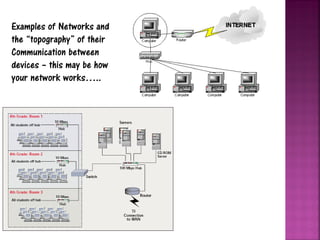
Examples of Networks and
the “topography” of their
Communication between
devices – this may be how
your network works…..
Computer networks can be used for several purposes:
 Facilitating communications. Using a network, people can communicate
  efficiently and easily via email, instant messaging, chat rooms, telephone,
  video telephone calls, and video conferencing.
 Sharing hardware. In a networked environment, each computer on a
  network may access and use hardware resources on the network, such
  as printing a document on a shared network printer.
 Sharing files, data, and information. In a network environment,
  authorized user may access data and information stored on other
  computers on the network. The capability of providing access to data and
  information on shared storage devices is an important feature of many
  networks.
 Sharing software. Users connected to a network may run application
  programs on remote computers.
                                         http://en.wikipedia.org/wiki/Computer_network
References
      http://searchnetworking.techtarget.com/generic/0,295582,sid7_gci1166812,00.html

      http://www.cisco.com/en/US/prod/collateral/switches/ps9441/ps9402/ps9512/brochure_panduit_DC_i
      nfrastructur_topologies.pdf

      http://www.netc.org/network_guide/

      http://www.lpdatafiles.com/supplements/Networks.pdf

      http://en.wikipedia.org/wiki/IP_address

      http://www.engineer.ucla.edu/stories/2004/Internet35.htm

      www.webopedia.com. http://www.webopedia.com/TERM/s/switch.html

      http://networkbits.net/lan-components/local-area-network-lan-basic-components/

      http://madeit.co.cc/computer-network-part-23/

      http://madeit.co.cc/computer-network-part-23/

      http://fcit.usf.edu/network/

      http://www.lpdatafiles.com/supplements/Networks.pdf

      http://www.netc.org/network_guide/

      http://www.tech-soup.com/learn...ge4774.cfm

      http://www.tech-soup.com/learn...ge4772.cfm

      http://www.tech-soup.com/learn...ge4773.cfm

      http://whatis.techtarget.com/
Picture References
 Page 2 - network1.jpg
 www.trickledown.wordpress.com
 Page 6
 Pictures of Computers
 http://jfcablinginc.com/ESW/Images/ComputerNetwork.jpg?xcache=9519
 Page 8
 http://madeit.co.cc/computer-network-part-23/
  Page 13
 Switch Box http://www.garyolsonassoc.com/hp_procurve_2650.jpg
 Cisco Routers - http://www.afsat.net/Products/Page%207%20=%20CiscoRouters.png
 Netgear Hub http://www.ssos.com/hubs.jpg
 Page 14
 pictures of blue cables http://www.intellisec.co.za/images/network%20cabling%202.jpg -
 Ethernet cables - http://www.jotechcommunications.com/wp-
 content/uploads/2008/12/cabling.jpg
 Little Guy - http://www.icsnet.co.uk/images/network.jpg
 Page 15
 Basic Network pic http://www.netafull.com.ar/netservicios/images/router.jpg
 Large Network http://support.novell.com/techcenter/articles/img/nc200205fFig1.gif

Network Notes

  • 1.
  • 2.
    Is this whatyou think of when you hear the word “network”?
  • 3.
    Or maybe this type of “Network”?
  • 5.
    Glossary Networks Infrastructure Switches Devices Protocol Hardware Topology Routers Internet OSI
  • 6.
    A simple explanationis that a Network is two computers connected to share information, but of course we know it is often much more. All networks start from this basic concept. Any device connected to the network is called a “network device”. When several devices are connected, they need a “hub”. When many devices are connected they need routers and switches to handle the communication. Each device is given an “address” usually called an “IP” address. This is a numerical label. The IP Address serves two functions -host or network interface identification and location addressing Here are four computers connected: http://en.wikipedia.org/wiki/IP_address
  • 7.
    When considering aNetwork, you probably think about the Internet…. Definitions of internet on the Web: •A computer network consisting of a worldwide network of computer networks that use the TCP/IP network protocols to facilitate data transmission and exchange wordnetweb.princeton.edu/perl/webwn •The Internet is a global system of interconnected computer networks that use the standard Internet Protocol Suite (TCP/IP) to serve billions of users worldwide. ... en.wikipedia.org/wiki/Internet •Any set of computer networks that communicate using the Internet Protocol. (An intranet.); The Internet, the largest global internet en.wiktionary.org/wiki/internet •Often confused with the World Wide Web, the term Internet actually refers to the combined collection of academic, commercial, and government networks connected over international telecommunication backbones and routed using IP addressing. nsit.uchicago.edu/docs/glossary/
  • 8.
    A more indepth explanation of determining the scope of a Network involves the following:  Size  Protocol  Topography  Hardware  Cabling/Infrastucture
  • 9.
     Size -there are several types of networks, but the most common are LANS and WANS. A Local Area Network (LAN) covers a small physical area, like a home, office, or small groups of buildings, such as a school. Some of the characteristics of LANS are their higher data-transfer rates, smaller geographic area, and they don’t need to lease telecommunication lines. A Wide Area Network (WAN) is used to connect a LAN and other types of networks together. The purpose of this so that the computers in one place can communicate with computers in other locations. For example in your school district they probably have a private WAN, but may have another to provide a connection to the Internet.
  • 10.
    What is Protocol? Rulesabout appearance, speaking, listening and understanding are considered the protocols of conversation. They represent different layers of communication and together they help people communicate successfully. Protocols also apply to computers. Network engineers have written rules for communication that must be strictly followed for successful host-to-host communication. http://en.wikipedia.org/wiki/Protocol_(computing )
  • 11.
    Protocols are oftencalled the Open System Interconnection or “OSI Model” and they help define the implementation of a networking framework
  • 12.
    Topography is the“backbone” of a network and the “map” of how the communication between devices will flow Types of Topography
  • 13.
     Hardware -Computer networks normally consists of three parts:  Clients: The user workstations and peripherals (such as printers)  Infrastructure/Cables -The wires, fiber optics, or transmission media that the data moves through  Networking electronics: Devices that move, route, and store data for users
  • 14.
    These devices actlike an Air Traffic Control Tower and the Controllers themselves – they get the data and transmit the data and make sure that everything gets to it’s destination in a timely and safe manner. Switch Routers Hub
  • 15.
    Cables – theseare used transmit data in the network
  • 16.
    Examples of Networksand the “topography” of their Communication between devices – this may be how your network works…..
  • 17.
    Computer networks canbe used for several purposes:  Facilitating communications. Using a network, people can communicate efficiently and easily via email, instant messaging, chat rooms, telephone, video telephone calls, and video conferencing.  Sharing hardware. In a networked environment, each computer on a network may access and use hardware resources on the network, such as printing a document on a shared network printer.  Sharing files, data, and information. In a network environment, authorized user may access data and information stored on other computers on the network. The capability of providing access to data and information on shared storage devices is an important feature of many networks.  Sharing software. Users connected to a network may run application programs on remote computers. http://en.wikipedia.org/wiki/Computer_network
  • 19.
    References http://searchnetworking.techtarget.com/generic/0,295582,sid7_gci1166812,00.html http://www.cisco.com/en/US/prod/collateral/switches/ps9441/ps9402/ps9512/brochure_panduit_DC_i nfrastructur_topologies.pdf http://www.netc.org/network_guide/ http://www.lpdatafiles.com/supplements/Networks.pdf http://en.wikipedia.org/wiki/IP_address http://www.engineer.ucla.edu/stories/2004/Internet35.htm www.webopedia.com. http://www.webopedia.com/TERM/s/switch.html http://networkbits.net/lan-components/local-area-network-lan-basic-components/ http://madeit.co.cc/computer-network-part-23/ http://madeit.co.cc/computer-network-part-23/ http://fcit.usf.edu/network/ http://www.lpdatafiles.com/supplements/Networks.pdf http://www.netc.org/network_guide/ http://www.tech-soup.com/learn...ge4774.cfm http://www.tech-soup.com/learn...ge4772.cfm http://www.tech-soup.com/learn...ge4773.cfm http://whatis.techtarget.com/
  • 20.
    Picture References Page2 - network1.jpg www.trickledown.wordpress.com Page 6 Pictures of Computers http://jfcablinginc.com/ESW/Images/ComputerNetwork.jpg?xcache=9519 Page 8 http://madeit.co.cc/computer-network-part-23/ Page 13 Switch Box http://www.garyolsonassoc.com/hp_procurve_2650.jpg Cisco Routers - http://www.afsat.net/Products/Page%207%20=%20CiscoRouters.png Netgear Hub http://www.ssos.com/hubs.jpg Page 14 pictures of blue cables http://www.intellisec.co.za/images/network%20cabling%202.jpg - Ethernet cables - http://www.jotechcommunications.com/wp- content/uploads/2008/12/cabling.jpg Little Guy - http://www.icsnet.co.uk/images/network.jpg Page 15 Basic Network pic http://www.netafull.com.ar/netservicios/images/router.jpg Large Network http://support.novell.com/techcenter/articles/img/nc200205fFig1.gif