COMPUTER
NETWORK
BY:- DHAIRYA SAINI
COMMUNICATION
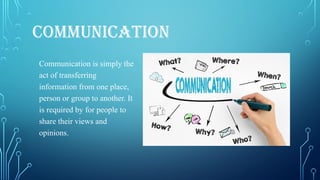
Communication is simply the
act of transferring
information from one place,
person or group to another. It
is required by for people to
share their views and
opinions.
COMPUTER COMMUNICATION
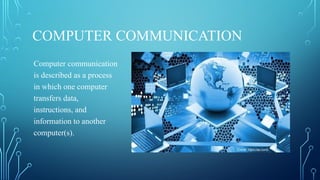
Computer communication
is described as a process
in which one computer
transfers data,
instructions, and
information to another
computer(s).
COMPONENTS OF COMPUTER
COMMUNICATION
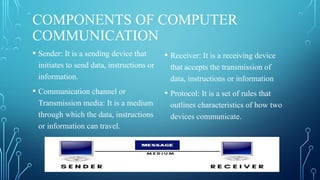
• Sender: It is a sending device that
initiates to send data, instructions or
information.
• Communication channel or
Transmission media: It is a medium
through which the data, instructions
or information can travel.
• Receiver: It is a receiving device
that accepts the transmission of
data, instructions or information
• Protocol: It is a set of rules that
outlines characteristics of how two
devices communicate.
COMPUTER NETWORK
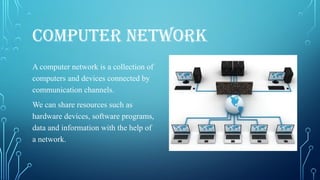
A computer network is a collection of
computers and devices connected by
communication channels.
We can share resources such as
hardware devices, software programs,
data and information with the help of
a network.
TYPES OF SHARING
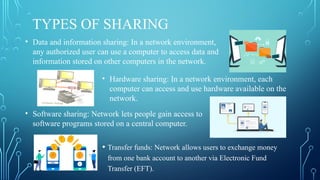
• Transfer funds: Network allows users to exchange money
from one bank account to another via Electronic Fund
Transfer (EFT).
• Data and information sharing: In a network environment,
any authorized user can use a computer to access data and
information stored on other computers in the network.
• Hardware sharing: In a network environment, each
computer can access and use hardware available on the
network.
• Software sharing: Network lets people gain access to
software programs stored on a central computer.
TYPES OF NETWORK
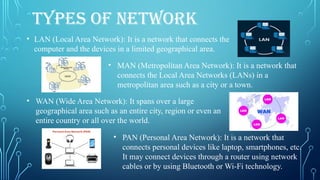
• LAN (Local Area Network): It is a network that connects the
computer and the devices in a limited geographical area.
• MAN (Metropolitan Area Network): It is a network that
connects the Local Area Networks (LANs) in a
metropolitan area such as a city or a town.
• WAN (Wide Area Network): It spans over a large
geographical area such as an entire city, region or even an
entire country or all over the world.
• PAN (Personal Area Network): It is a network that
connects personal devices like laptop, smartphones, etc.
It may connect devices through a router using network
cables or by using Bluetooth or Wi-Fi technology.
NETWORK HARDWARE
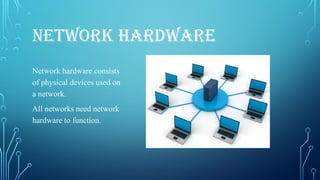
Network hardware consists
of physical devices used on
a network.
All networks need network
hardware to function.
TYPES OF NETWORK HARDWARE
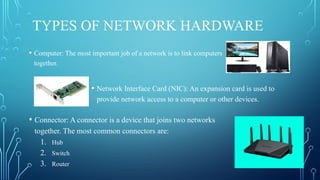
• Computer: The most important job of a network is to link computers
together.
• Network Interface Card (NIC): An expansion card is used to
provide network access to a computer or other devices.
• Connector: A connector is a device that joins two networks
together. The most common connectors are:
1. Hub
2. Switch
3. Router
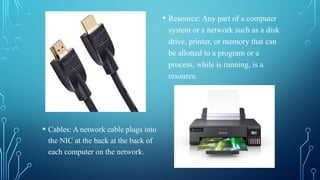
• Cables: A network cable plugs into
the NIC at the back at the back of
each computer on the network.
• Resource: Any part of a computer
system or a network such as a disk
drive, printer, or memory that can
be allotted to a program or a
process, while is running, is a
resource.
COMMUNICATION CHANNELS
All networks are linked to each
other through communication
channels. These are medium on
which the data, instructions, or
information travel. Most
commonly used media are –
physical and wireless.
PHYSICAL TRANSMISSION MEDIA
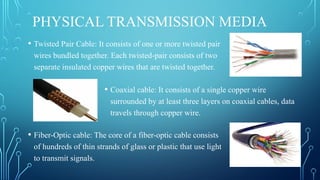
• Twisted Pair Cable: It consists of one or more twisted pair
wires bundled together. Each twisted-pair consists of two
separate insulated copper wires that are twisted together.
• Coaxial cable: It consists of a single copper wire
surrounded by at least three layers on coaxial cables, data
travels through copper wire.
• Fiber-Optic cable: The core of a fiber-optic cable consists
of hundreds of thin strands of glass or plastic that use light
to transmit signals.
WIRELESS TRANSMISSION MEDIA
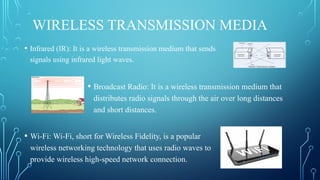
• Infrared (IR): It is a wireless transmission medium that sends
signals using infrared light waves.
• Wi-Fi: Wi-Fi, short for Wireless Fidelity, is a popular
wireless networking technology that uses radio waves to
provide wireless high-speed network connection.
• Broadcast Radio: It is a wireless transmission medium that
distributes radio signals through the air over long distances
and short distances.
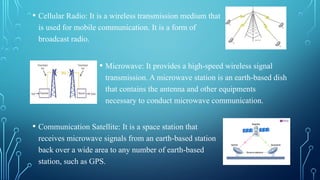
• Microwave: It provides a high-speed wireless signal
transmission. A microwave station is an earth-based dish
that contains the antenna and other equipments
necessary to conduct microwave communication.
• Communication Satellite: It is a space station that
receives microwave signals from an earth-based station
back over a wide area to any number of earth-based
station, such as GPS.
• Cellular Radio: It is a wireless transmission medium that
is used for mobile communication. It is a form of
broadcast radio.
NETWORK ARCHITECTURE
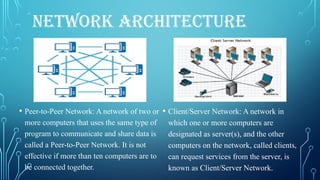
• Peer-to-Peer Network: A network of two or
more computers that uses the same type of
program to communicate and share data is
called a Peer-to-Peer Network. It is not
effective if more than ten computers are to
be connected together.
• Client/Server Network: A network in
which one or more computers are
designated as server(s), and the other
computers on the network, called clients,
can request services from the server, is
known as Client/Server Network.
NETWORK TOPOLOGY
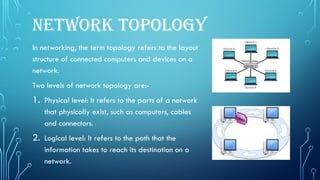
In networking, the term topology refers to the layout
structure of connected computers and devices on a
network.
Two levels of network topology are:-
1. Physical level: It refers to the parts of a network
that physically exist, such as computers, cables
and connectors.
2. Logical level: It refers to the path that the
information takes to reach its destination on a
network.
TYPES OF NETWORK TOPOLOGIES
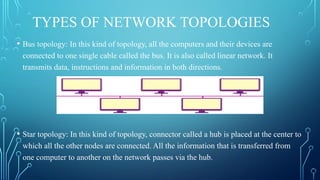
• Bus topology: In this kind of topology, all the computers and their devices are
connected to one single cable called the bus. It is also called linear network. It
transmits data, instructions and information in both directions.
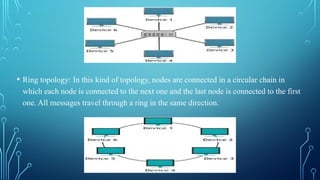
• Star topology: In this kind of topology, connector called a hub is placed at the center to
which all the other nodes are connected. All the information that is transferred from
one computer to another on the network passes via the hub.
• Ring topology: In this kind of topology, nodes are connected in a circular chain in
which each node is connected to the next one and the last node is connected to the first
one. All messages travel through a ring in the same direction.
THANKYOU

Computer Network class 8 chapter 1 powerpoint presentation

  • 1.
  • 2.
    COMMUNICATION Communication is simplythe act of transferring information from one place, person or group to another. It is required by for people to share their views and opinions.
  • 3.
    COMPUTER COMMUNICATION Computer communication isdescribed as a process in which one computer transfers data, instructions, and information to another computer(s).
  • 4.
    COMPONENTS OF COMPUTER COMMUNICATION •Sender: It is a sending device that initiates to send data, instructions or information. • Communication channel or Transmission media: It is a medium through which the data, instructions or information can travel. • Receiver: It is a receiving device that accepts the transmission of data, instructions or information • Protocol: It is a set of rules that outlines characteristics of how two devices communicate.
  • 5.
    COMPUTER NETWORK A computernetwork is a collection of computers and devices connected by communication channels. We can share resources such as hardware devices, software programs, data and information with the help of a network.
  • 6.
    TYPES OF SHARING •Transfer funds: Network allows users to exchange money from one bank account to another via Electronic Fund Transfer (EFT). • Data and information sharing: In a network environment, any authorized user can use a computer to access data and information stored on other computers in the network. • Hardware sharing: In a network environment, each computer can access and use hardware available on the network. • Software sharing: Network lets people gain access to software programs stored on a central computer.
  • 7.
    TYPES OF NETWORK •LAN (Local Area Network): It is a network that connects the computer and the devices in a limited geographical area. • MAN (Metropolitan Area Network): It is a network that connects the Local Area Networks (LANs) in a metropolitan area such as a city or a town. • WAN (Wide Area Network): It spans over a large geographical area such as an entire city, region or even an entire country or all over the world. • PAN (Personal Area Network): It is a network that connects personal devices like laptop, smartphones, etc. It may connect devices through a router using network cables or by using Bluetooth or Wi-Fi technology.
  • 8.
    NETWORK HARDWARE Network hardwareconsists of physical devices used on a network. All networks need network hardware to function.
  • 9.
    TYPES OF NETWORKHARDWARE • Computer: The most important job of a network is to link computers together. • Network Interface Card (NIC): An expansion card is used to provide network access to a computer or other devices. • Connector: A connector is a device that joins two networks together. The most common connectors are: 1. Hub 2. Switch 3. Router
  • 10.
    • Cables: Anetwork cable plugs into the NIC at the back at the back of each computer on the network. • Resource: Any part of a computer system or a network such as a disk drive, printer, or memory that can be allotted to a program or a process, while is running, is a resource.
  • 11.
    COMMUNICATION CHANNELS All networksare linked to each other through communication channels. These are medium on which the data, instructions, or information travel. Most commonly used media are – physical and wireless.
  • 12.
    PHYSICAL TRANSMISSION MEDIA •Twisted Pair Cable: It consists of one or more twisted pair wires bundled together. Each twisted-pair consists of two separate insulated copper wires that are twisted together. • Coaxial cable: It consists of a single copper wire surrounded by at least three layers on coaxial cables, data travels through copper wire. • Fiber-Optic cable: The core of a fiber-optic cable consists of hundreds of thin strands of glass or plastic that use light to transmit signals.
  • 13.
    WIRELESS TRANSMISSION MEDIA •Infrared (IR): It is a wireless transmission medium that sends signals using infrared light waves. • Wi-Fi: Wi-Fi, short for Wireless Fidelity, is a popular wireless networking technology that uses radio waves to provide wireless high-speed network connection. • Broadcast Radio: It is a wireless transmission medium that distributes radio signals through the air over long distances and short distances.
  • 14.
    • Microwave: Itprovides a high-speed wireless signal transmission. A microwave station is an earth-based dish that contains the antenna and other equipments necessary to conduct microwave communication. • Communication Satellite: It is a space station that receives microwave signals from an earth-based station back over a wide area to any number of earth-based station, such as GPS. • Cellular Radio: It is a wireless transmission medium that is used for mobile communication. It is a form of broadcast radio.
  • 15.
    NETWORK ARCHITECTURE • Peer-to-PeerNetwork: A network of two or more computers that uses the same type of program to communicate and share data is called a Peer-to-Peer Network. It is not effective if more than ten computers are to be connected together. • Client/Server Network: A network in which one or more computers are designated as server(s), and the other computers on the network, called clients, can request services from the server, is known as Client/Server Network.
  • 16.
    NETWORK TOPOLOGY In networking,the term topology refers to the layout structure of connected computers and devices on a network. Two levels of network topology are:- 1. Physical level: It refers to the parts of a network that physically exist, such as computers, cables and connectors. 2. Logical level: It refers to the path that the information takes to reach its destination on a network.
  • 17.
    TYPES OF NETWORKTOPOLOGIES • Bus topology: In this kind of topology, all the computers and their devices are connected to one single cable called the bus. It is also called linear network. It transmits data, instructions and information in both directions. • Star topology: In this kind of topology, connector called a hub is placed at the center to which all the other nodes are connected. All the information that is transferred from one computer to another on the network passes via the hub.
  • 18.
    • Ring topology:In this kind of topology, nodes are connected in a circular chain in which each node is connected to the next one and the last node is connected to the first one. All messages travel through a ring in the same direction.
  • 19.