University of Liège
Faculty of Applied Sciences
Montefiore Institute
Department of Electrical Engineering & Computer Science
U S I N G S E RV I C E D I S C O V E RY
TO A P P LY P O L I C I E S I N N E T W O R K S
by Amaury Van Bemten
Master thesis submitted in partial fulfillment of the requirements for the
degree of MSc in Computer Science and Engineering.
Advisor: Prof. Guy Leduc
Academic Year 2014-2015
L G
L G
An electronic version of this document is available at
http: // amaury. vanbemten. com/ master-thesis/ thesis. pdf .
The code is, for its part, available in the GitHub repository
http: // github. com/ amovanb/ master-thesis
and in an archive at
http: // amaury. vanbemten. com/ master-thesis/ thesis. tar. gz .
A B S T R A C T
The goal of this thesis is to enable the sharing of resources spread
over several distinct subnets, resources that are initially accessible
only locally. Besides, we want to be able to define global access control
rules in the system, so that access to the shared resources can be
limited.
At present, the Bonjour technology, a combination of the Multi-
cast DNS (mDNS) and the DNS-Based Service Discovery (DNS-SD)
protocols, allows machines to announce and discover services on the
local link. The technology relies on the cooperation of the hosts and
on multicast to establish unique machine and service names valid
only locally. All the resources are established in the form of classical
DNS records and can then be used by other local machines to access
services without having the user to deal with IP addresses.
The thesis is divided into two parts.
The first goal is to extend service discovery across routers. More
specifically, we want to be able to discover services from anywhere in
the Internet, possibly based on preferences of the user which might
want to share only particular services. As Bonjour is based on DNS
records, the taken approach is to publish the desired services on a
public DNS server that can then be queried by any user connected
to the Internet and wanting to discover and/or use a given service.
Particular attention has to be paid to possible collisions due to several
subnets publishing services on the same DNS server and to constantly
maintaining the public DNS content up-to-date with the local link
mDNS state.
The second part of the thesis consists in implementing a Graphi-
cal User Interface (GUI) allowing an administrator to define security
policies in the network. More precisely, the user should be able to de-
fine security rules allowing or denying access for particular sources
to particular service types or names. Based on the user input, the GUI
will have to generate rules for each router active in the system. Par-
ticular attention has to be paid to keeping the rules up-to-date with
the user preferences and the public DNS server content and to gener-
ating specific rules for each individual router based on the particular
services existing on the local link(s) defined by the given router.
i
A C K N O W L E D G M E N T S
By this short premise, I would like to thank all the people who
helped me in the realization of this work.
First of all, as this thesis is somehow the achievement of five years
of study at the University of Liège, I would really like to thank the
professors who contributed to my education during those five years
and which have had a great influence on who I am now. Mainly, I
would like to thank Guy Leduc, which is probably the instigator of
my passion for networking and without whom I would probably not
have chosen such a direction in the wide computer science field. I also
thank Louis Wehenkel, Pierre Geurts, Pierre Wolper, Bernard Boigelot,
Benoit Donnet and Laurent Mathy whose teaching was passionating
and from whom I learned much more than their respective courses.
Finally, I would like to thank Eric Delhez for having inculcated me a
rigorous way of working. I am sincerely grateful to all of them.
I am again grateful to Guy Leduc, my advisor, for his wise ad-
vice and for pinpointing me excerpts from the text that had to be
improved.
Then, I would like to sincerely thank Eric Vyncke for having smartly
indicated me directions and ideas that were worth following and in-
vestigating. I also thank him for having given me the opportunity to
test my work on his amo.vyncke.org domain.
Also, I thank Gilles Louppe whose nice PhD thesis style greatly
inspired me for this document.
Last but not least, I am thankful to Justine for her unconditional
support. I also thank her for having reviewed several parts of the text,
including the acknowledgment part, which is probably why I had to
mention her...
iii
C O N T E N T S
1 introduction 1
1.1 Background: Zero Configuration Networking . . . . . . 1
1.2 Thesis Motivation and Outline . . . . . . . . . . . . . . 2
2 the zeroconf technology 5
2.1 Link-Local Addressing . . . . . . . . . . . . . . . . . . . 6
2.2 Domain Name System . . . . . . . . . . . . . . . . . . . 7
2.2.1 The Name Space . . . . . . . . . . . . . . . . . . 7
2.2.2 The Resource Records . . . . . . . . . . . . . . . 7
2.2.3 Name Servers . . . . . . . . . . . . . . . . . . . . 7
2.2.4 DNS Messages . . . . . . . . . . . . . . . . . . . 8
2.3 Multicast DNS . . . . . . . . . . . . . . . . . . . . . . . . 9
2.4 DNS-Based Service Discovery . . . . . . . . . . . . . . . 10
3 solution architecture 13
3.1 Extending Service Discovery Across Routers . . . . . . 13
3.1.1 Where to Implement the Application? . . . . . . 13
3.1.2 Outline of Implementation Schemes . . . . . . . 14
3.1.2.1 mDNS Tunneling . . . . . . . . . . . . 14
3.1.2.2 State Exchange . . . . . . . . . . . . . . 15
3.1.2.3 Using the Public DNS . . . . . . . . . . 18
3.1.3 Comparison . . . . . . . . . . . . . . . . . . . . . 19
3.2 Security and Access Policies . . . . . . . . . . . . . . . . 20
4 extending service discovery across routers 23
4.1 Enabling User Configuration . . . . . . . . . . . . . . . 23
4.2 Observing the Services . . . . . . . . . . . . . . . . . . . 24
4.2.1 Avahi . . . . . . . . . . . . . . . . . . . . . . . . . 24
4.2.2 D-Bus . . . . . . . . . . . . . . . . . . . . . . . . . 25
4.2.2.1 Buses, Objects and Proxies . . . . . . . 25
4.2.2.2 Messages . . . . . . . . . . . . . . . . . 25
4.2.3 From Avahi Towards an Observing Daemon . . 26
4.2.3.1 Avahi Configuration . . . . . . . . . . . 27
4.2.3.2 D-Bus Configuration . . . . . . . . . . 28
4.2.3.3 Logging . . . . . . . . . . . . . . . . . . 28
4.2.3.4 PID File . . . . . . . . . . . . . . . . . . 29
4.2.3.5 Signals Handling . . . . . . . . . . . . . 29
4.2.3.6 Privileges . . . . . . . . . . . . . . . . . 30
4.2.3.7 Observation of the Bonjour Traffic . . . 31
4.3 Keeping the Registered Services in Memory . . . . . . 33
4.3.1 Database Definition . . . . . . . . . . . . . . . . 35
4.3.2 Coherency of the State . . . . . . . . . . . . . . . 36
4.4 Defining Announcement Preferences . . . . . . . . . . . 37
v
vi contents
4.5 Announcing the Registered Services on the Public Do-
main . . . . . . . . . . . . . . . . . . . . . . . . . . . . . 39
4.5.1 DNS Dynamic Update . . . . . . . . . . . . . . . 39
4.5.1.1 SIG(0) . . . . . . . . . . . . . . . . . . . 40
4.5.1.2 TSIG . . . . . . . . . . . . . . . . . . . . 41
4.5.2 Domain Declaration . . . . . . . . . . . . . . . . 41
4.5.3 Collision Problems . . . . . . . . . . . . . . . . . 42
4.5.3.1 The Lazy Solution . . . . . . . . . . . . 43
4.5.3.2 The Reflector Solution . . . . . . . . . . 43
4.5.3.3 The Renaming Solution . . . . . . . . . 44
4.5.3.4 The Subdomain Solution . . . . . . . . 47
4.5.4 Implementation of the Publication . . . . . . . . 48
4.5.5 Coherency of the State . . . . . . . . . . . . . . . 49
4.6 Graphical User Interface . . . . . . . . . . . . . . . . . . 49
4.6.1 A Web Server . . . . . . . . . . . . . . . . . . . . 49
4.6.2 Authentication . . . . . . . . . . . . . . . . . . . 50
4.6.3 Bootstrap . . . . . . . . . . . . . . . . . . . . . . . 51
4.6.4 Structure . . . . . . . . . . . . . . . . . . . . . . . 53
4.6.4.1 List of Services . . . . . . . . . . . . . . 53
4.6.4.2 Basic Configuration . . . . . . . . . . . 54
4.6.4.3 Announcement Preferences . . . . . . 54
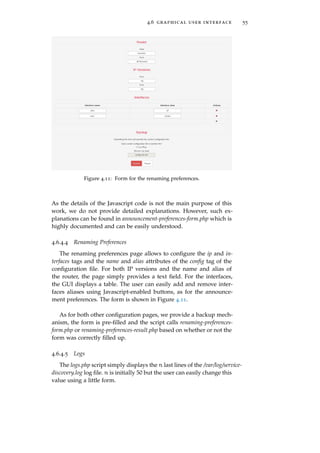
4.6.4.4 Renaming Preferences . . . . . . . . . . 55
4.6.4.5 Logs . . . . . . . . . . . . . . . . . . . . 55
5 security and access policies 57
5.1 Daemon . . . . . . . . . . . . . . . . . . . . . . . . . . . 57
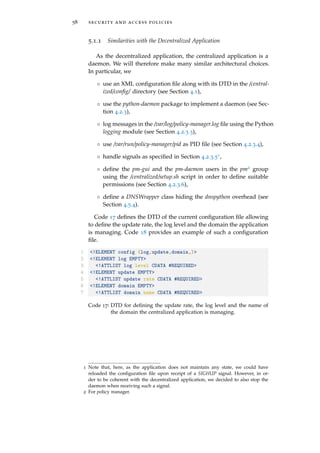
5.1.1 Similarities with the Decentralized Application 58
5.1.2 Detecting Changes in the System . . . . . . . . . 59
5.1.2.1 Preferences of the User . . . . . . . . . 59
5.1.2.2 Content of the DNS Zone . . . . . . . . 59
5.1.3 Defining Security Preferences . . . . . . . . . . . 60
5.1.4 Generating the Firewall Rules . . . . . . . . . . . 61
5.1.4.1 iptables . . . . . . . . . . . . . . . . . . 61
5.1.4.2 Retrieving Input Interfaces . . . . . . . 63
5.1.4.3 Algorithm . . . . . . . . . . . . . . . . . 63
5.2 Graphical User Interface . . . . . . . . . . . . . . . . . . 65
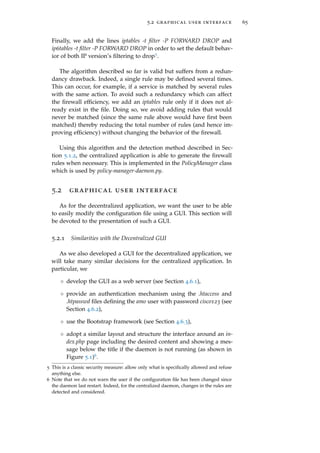
5.2.1 Similarities with the Decentralized GUI . . . . . 65
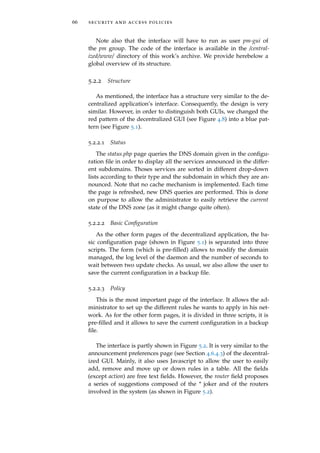
5.2.2 Structure . . . . . . . . . . . . . . . . . . . . . . . 66
5.2.2.1 Status . . . . . . . . . . . . . . . . . . . 66
5.2.2.2 Basic Configuration . . . . . . . . . . . 66
5.2.2.3 Policy . . . . . . . . . . . . . . . . . . . 66
5.2.2.4 Logs . . . . . . . . . . . . . . . . . . . . 68
6 related work and conclusions 69
6.1 Related Work . . . . . . . . . . . . . . . . . . . . . . . . 69
6.2 Conclusions . . . . . . . . . . . . . . . . . . . . . . . . . 70
contents vii
appendix 73
a deployment 75
b bibliography 77
1I N T R O D U C T I O N
1.1 background: zero configuration net-
working
Connected devices become ubiquitous in our everyday life. One
generally attaches a device to a subnet in order to request a service,
such as printing, or to offer a service, such as a printer. Indeed, there
are nowadays more and more sorts of electronical devices that can be
connected thanks to an outstanding number of communication tech-
nologies (Ethernet, 802.11 wireless, USB, Bluetooth and so on) allow-
ing them to communicate together. Unfortunately, back in the early
2000’s, getting those devices to do anything useful required to get
hands dirty in a configuration process. The problem was that the un-
derlying connection technologies required a dedicated software (e.g.,
a software that allows to exchange files between two computers via a
direct USB connection).
When communicating across the planet, we use the Internet Pro-
tocol (IP), whose functioning is independent of how all the devices
involved in the communication are physically connected. In the early
2000’s, Stuart Cheshire, employed by Apple, introduced the Zero Con-
figured Networking (Zeroconf) technology, a technology based on IP
to solve the problem. Thanks to it, plugging the devices together is
the only thing we need to do in order to get them to communicate,
independently of the manufacturer of the devices or of the operating
system they are running, as long as the IP protocol is supported both
by the devices and by the communication medium.
Let us take a simple example. Without Zeroconf, getting a file from
an FTP server to which we are locally connected requires an unhandy
configuration process: getting the IP address and port number (and
possibly other parameters) on which the FTP server is running and
introducing these in an FTP client to try to establish the connection.
The difficulty of such a process, added to the dependency on an op-
erational DHCP infrastructure for address assignment, led the users
to resort to USB sticks to perform the transfer. The situation with Ze-
roconf is totally different. Once both devices are connected, the user
simply has to open his FTP client. The latter will display a Zeroconf
list in which the FTP server will appear, just like magic. A simple click
1
2 introduction
Router1
LAN1 Wireless Access Point
Computer
Laptop
Internet
Mobile Phone
PrinterHTTP Server
User
Router2
LAN2
FTP Server
mDNS
mDNS
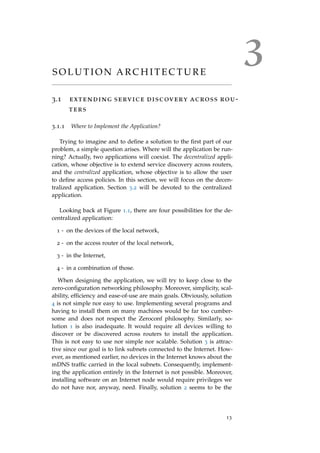
Figure 1.1: Each individual LAN has its own mDNS traffic.
then connects the user to the desired FTP server, without having to
consider IP addresses or other configuration parameters. Those are
handled by Zeroconf. As its name attests, Zeroconf tries to allow net-
working without any configuration. The devices on the network can
automatically communicate, advertise, and discover services by them-
selves.
In brief, the goal of the Zeroconf technology is to allow networked
devices to be set up simply by plugging them in and turning them
on.
1.2 thesis motivation and outline
At present, the Bonjour protocol1 enables service discovery and an-
nouncement in a single layer-two domain. Devices connected to the
same local link can fight for the ownership of names and then defend
and announce them on the local link. The situation is as depicted in
Figure 1.1. All the devices inside the same local area network (LAN)
may fight together to establish services valid only inside this given
LAN. For example, if Printer announces that it is able to print doc-
uments and that it wishes to make this service available to others,
Laptop, Mobile Phone, Router1, HTTP Server and Computer will be able
to discover this service. On the other hand, User, FTP Server, Router2
and any other device connected to the Internet (but outside the local
1 Bonjour, previously Rendezvous, is the commercial name used by Apple to refer to
the Zeroconf technology.
1.2 thesis motivation and outline 3
network in which Printer is) will not be able to discover this service.
Similarly, FTP Server will perhaps annouce that it provides an FTP
service. User will be able to see this service but none of the devices in
LAN1 will, as the service belongs exclusively to LAN2.
All in all, each subnet is able to perform service discovery in its
own local domain. The first goal of this thesis is to allow service
discovery across routers. We want User or any other user connected
to the Internet to be able to discover the services announced in LAN1
and/or LAN2. Of course, we also want the administrator of a subnet
to be able to configure which of his services will be visible to external
users. After having discussed the possible solutions and chosen one
of them in Chapter 3, Chapter 4 will provide an in-depth description
of the implemented solution.
The second goal of this thesis is to restrict access to the shared
services based on user-defined policies. Indeed, the administrator of
the system, of which several subnets may be part, probably does not
want his services to be used by anybody. Hence, we would like the
administrator to be able to define general rules specifying which user
can access which (type of) service. Those rules will have to be trans-
lated in firewall rules for each router involved in the system based on
the particular services announced in the subnets they define. The ad-
ministrator must be able to provide those rules using a user-friendly
Graphical User Interface (GUI). Chapter 5 will be devoted to this
problem.
Before delving into the heart of the matter, Chapter 2 presents
the details of the Zeroconf technology required to go further in the
reading of the text.
2T H E Z E R O C O N F T E C H N O L O G Y
This chapter describing the Bonjour protocol is based on [RFC3927],
[RFC4862], [RFC6760], [RFC6762], [RFC6763], the talk [Che05] of Stu-
art Cheshire, co-author of the four former RFCs, at Google TechTalks,
and on the Zeroconf guide co-authored by Stuart Cheshire and Daniel
Steinberg [CS06]. The reader can refer to those documents to find fur-
ther information.
To reach its desired plug-and-play feature, Zeroconf is made up of
three parts.
◦ An addressing mechanism to allow a device to easily and auto-
matically get an IP address. Indeed, communicating over an IP
network requires an address. This is provided by the dynamic
IPv4 link-local addresses configuration mechanism and its ver-
sion six counterpart embedded in the IPv6 protocol, both de-
scribed in Section 2.1.
◦ A naming mechanism to allow human beings not to deal directly
with the obtained IPv4 addresses or, even worse, IPv6 addresses.
On the public Internet, this is provided by the Domain Name
System (DNS), roughly described in Section 2.2. Multicast DNS
(mDNS), described in Section 2.3, achieves a similar result on
the local link with no need for a DNS infrastructure.
◦ A browsing mechanism to display a list of available services, so
that there is no need to remember names and type them. DNS-
Based Service Discovery (DNS-SD), described in Section 2.4,
provides such a mechanism.
Note that an important facet of the Zeroconf technology is
that it allows to browse for services, not hardware. For example,
a PDF reader which wants to print a file via the Internet Printing
Protocol (IPP) does not want to discover printers. Indeed, print-
ers that do not implement the IPP protocol are useless for it. The
PDF reader rather wants to discover any application making
IPP printing available to it, would it be a printer or a computer
which relays the job to a classical USB-connected printer.
Let us see how these mechanisms achieve their individual goals,
which together provide zero configuration networking.
5
6 the zeroconf technology
2.1 link-local addressing
To do any IP networking, a device needs an IP address. Today,
this is usually done using the Dynamic Host Configuration Protocol
(DHCP) or, less commonly, manually. DHCP allows a host to get host-
specific configuration parameters (particularly an IP address) from a
DHCP server [RFC2131]. Obviously, for this to work, a DHCP server
must be accessible. This is not necessarily the case in a local network.
Link-local addressing provides a safety net when DHCP is failing or
unavailable, allowing the host to still get an IP address. The obtained
address will only be valid for communications on the local link.
[RFC3927] describes the process for IPv4 addresses configuration.
The address obtained by such a process will be part of the 169.254/16
subset which is defined only on the local link. This means that the
address will have no significance outside the local subnet (beyond
any router).
A host willing to get an address simply selects one randomly in the
defined subset. The host then broadcasts an ARP1 request for the cho-
sen address. If the host does not receive any ARP reply nor sees any
conflicting ARP request, it has successfully claimed the desired IPv4
address and has now to announce it via ARP announcements in order
to update possible old stale ARP cache entries. In case of conflict, the
host simply chooses another address and restarts the process. Note
however that, as computed in [RFC3927], conflicts should be rare: “A
host connecting to a link that already has 1300 hosts, selecting an IPv4 Link-
Local address at random, has a 98% chance of selecting an unused IPv4
Link-Local address on the first try.”
IPv6 provides a similar functionality [RFC4862]. IPv6 hosts form
link-local addresses by appending an interface identifier to the well-
known fe80:: link-local prefix. The host then verifies that the built
address is not yet used by multicasting an NDP2 neighbor solicitation
message. This kind of message is used to verify that a neighbor is
(still) reachable [RFC4861]. If someone answers, the host has to use
another (if any) interface identifier and restart the process. Otherwise,
the IPv6 link-local address is successfully claimed.
1 The Address Resolution Protocol (ARP) provides a mechanism to translate an IP
address to the MAC address of the host using it on the local link.
2 The Neighbor Discovery Protocol (NDP) is specific to IPv6. Among other function-
alities, it provides a service similar to ARP for IPv4.
2.2 domain name system 7
2.2 domain name system
Before diving into the DNS-based Zeroconf technology, let us briefly
review the vanilla DNS protocol. The reader already familiar with the
protocol may easily skip this section.
2.2.1 The Name Space
The Domain Name System (DNS) [RFC1034; RFC1035] is used to
translate a name into some data, usually an IP address. The name
space defined by DNS is a tree structure. Each node has a label,
unique among its brothers. The complete domain name of a node
is the list of the labels on the path from the node to the root of the
tree, separated by dots. The root name is the null character, which
means that a fully qualified DNS name always ends with a dot.
2.2.2 The Resource Records
A domain name thus identifies a node. Each node has a set of
data associated to it. This data is collected in a list of resource records
(RRs). A record is composed of five parts.
◦ The name of the node concerned by the record.
◦ The type of information that is stored in the record.
◦ A class. Usually, and in this work, the class is Internet. It is the
only class that is widespreadly used nowadays.
◦ A Time-To-Live (TTL) which defines how long (in seconds) the
record can be stored in a cache before having to be discarded.
◦ The data, whose structure depends on the type of the record.
A great number of record types have been defined. The most com-
monly known goal of DNS is to store IP addresses. This is done
thanks to A and AAAA records. The former maps a name to an IPv4
address while the latter maps a name to an IPv6 address.
2.2.3 Name Servers
Rather than relying on a central authority, DNS uses a database
distributed among name servers. The name space is divided into zones
which are subtrees of the global tree rooted at the . node. Name
servers are responsible, or authoritative, for a particular zone. Orga-
nizations may register a name through a registrar in order to control
it as a new zone [Int03]. Within a zone, an NS record is defined for
8 the zeroconf technology
each subzone. This record points to the name of the name server re-
sponsible for the given subzone. Requests for particular records must
hence be addressed to a name server responsible for the zone or a
parent zone of the requested name. Indeed, the NS records will then
be used to forward the request to the authoritative server. As . is par-
ent of any registered domain name, any request can be issued to the
name servers responsible for the root domain, which are well-known.
For example, a request for an A record for laptop.vyncke.org. to the
root servers will be processed as follows.
1 - The root server will find, in its database, an NS record corre-
sponding to the org. subdomain and forward the request to the
server specified by the record.
2 - The server responsible for the org. domain will have a similar
behavior, forwarding the request to the name server responsible
for the vyncke.org. domain.
3 - The final server will then have the requested A record in its
database and will finally return it to the user.
Of course, this process relies on the correct configuration of the
name servers, which must contain NS records for each of the defined
subzones.
2.2.4 DNS Messages
Every DNS message, be it a response or a query, is divided in
five parts: a header, a question, an answer, an authority and an addi-
tional section. The header gives information on the message content,
type and purpose. The four latter sections are simply composed of
resource records. The question section carries the records that are
wanted. The answer section carries answers to the query. In a DNS
query, this can contain partial answers the querier knows so that
name servers do not waste bandwidth for information the querier
already knows. The authority section carries records which describe
other authoritative servers for the asked records. The additional sec-
tion is used to carry records that could be useful when using the
records of other sections. For example, if a section provides the name
of a server via an NS record, the additional section could carry the
AAAA record corresponding to this name.
For further information on DNS, Kurose and Ross provide a nice,
comprehensive and pedagogical introduction to the protocol in their
networking book [KR13].
2.3 multicast dns 9
2.3 multicast dns
For the DNS to work, one must run DNS servers and assign, al-
locate and manage the globally unique names. The Multicast DNS
(mDNS) protocol [RFC6762] allows to use a DNS-like service in a
LAN without these requirements. The DNS names concerned by this
local service are those falling in the local. domain, which is reserved
for link-local name resolution. This use of a carved subtree of the DNS
namespace is similar to link-local addresses which are also valid only
on the local link. Note that mappings may be done with addresses
obtained differently than as explained in Section 2.1.
Instead of relying on a centralized authority, mDNS requires each
host to answer itself, as a conventional DNS server would have done.
Queries are sent to the IPv4 multicast address 224.0.0.251 or to the
IPv6 multicast address ff02::fb on UDP port 5353. Because those ad-
dresses are in the link-local multicast ranges of IPv4 and IPv6, mDNS
packets are never forwarded outside the local link. The payload of
these packets are classical DNS queries. Each device listens and, when
it sees a query for its name or other mDNS data it knows, it answers
with a standard DNS response.
When a host wants to announce a unique3 record on the LAN, it
must first send three queries (called probes) for this record in order to
ensure that it does not already exist. If a response is received, the host
cannot use the given record and should choose a new name before try-
ing again. If no response is received, the host must then announce its
newly obtained record thanks to a gratuitous mDNS response with
the new record in the answer section. The TTL field of the mDNS
packets is used by the hosts to determine when a record must be dis-
carded. Note that if a host knows some of its data is becoming invalid
(e.g., during a proper shutdown) it multicasts a goodbye packet, which
is a packet with a TTL field of 0. This will result in the other hosts
removing the entry from their cache.
A continuous query of the network to display a live list of records
would impose an unreasonable burden on the network. Therefore,
mDNS uses very aggressive techniques to limit the traffic:
◦ Known answer suppression. The querier includes a list of known
answers in the answer section of the mDNS query. This allows
to avoid wasting network capacity with useless repeated trans-
mission of those answers.
3 We distinguish unique records from shared records. With shared records, different
responders may own records with the same name, type and class. Those do not
require to perform the described probing process.
10 the zeroconf technology
◦ Exponential backoff for queries. A querier must, at least, dou-
ble the time interval between two successive queries, the initial
interval being of at least one second. Once the querier reaches
one query per hour, it may continue at this constant polling
rate. Note that this does not mean that it could require one hour
to discover a record. Indeed, the announcement procedure de-
scribed above allows devices observing the network to discover
new records without having to issue any query.
◦ Caching using the TTL field.
◦ Responses are, most of the time, also sent via multicast. Thanks
to this, each device on the LAN witnesses all the mDNS ex-
changes and can update its cache accordingly, without issuing
any request.
mDNS requires the devices on the network to collaborate. Conse-
quently, mDNS is not a good solution in a hostile environment.
2.4 dns-based service discovery
With the current link-local addressing and mDNS mechanisms,
one can do useful networking quite easily. However, Zeroconf does
not stop there. So far, we still need to know, remember and type host-
names correctly. We would like a list to appear so that we only have
to click on a name to communicate with it. That is the purpose of
Zeroconf’s DNS-Based Service Discovery (DNS-SD) protocol.
DNS-SD is simply a way of using DNS records to facilitate service
discovery. It is accomplished by building on the standard DNS, not
by defining new resource records or messages formats. The protocol
uses DNS’ PTR, SRV and TXT records to define a service. Let us see
what these are initially used for.
◦ A PTR record simply carries a pointer to another part of the
domain name space [RFC1034].
◦ An SRV record specifies the location of a service. The data as-
sociated to such a record contains an integer priority, an inte-
ger weight, a port number and a target hostname specifying on
which port and host the service runs. The fact that the port num-
ber is provided removes the limitation of having only a single
service of a given type on a machine. One can now run several
identical services on different ports of a single machine and
does not have to rely on well-known ports anymore [RFC2782].
◦ A TXT record is used to hold descriptive text. The data associ-
ated to such a record is simply a string of bytes whose significa-
tion depends on the context [RFC1035].
2.4 dns-based service discovery 11
In vanilla SRV records, the priority and weight values are used to
provide applications a means to choose between several instances of
a particular service type. These values will not be important anymore
with Zeroconf since the goal is to present the user with the complete
list of services and to let him choose which one he wants to use, rather
than letting the application choose randomly or based on the priority
and weight.
In order to completely define a new service, one needs five records4.
1 - A PTR record for the name _services._dns-sd._udp.<domain> point-
ing to <service>.<domain> to announce a service type on the
domain. The <service> field defines the particular service type
announced. It is of the form _<type>._<prot> which generally
represents the application and transport layer protocols used by
the service. For example, _http._tcp advertises an HTTP server.
The <domain> field specifies the subdomain in which the service
is registered. In the case of mDNS, it is local..
2 - A PTR record for the name <service>.<domain> pointing to the
name <instance>.<service>.<domain> where the <instance> field
is an arbitrary name for the service. It is not restricted to hy-
phens and alphanumerical characters. DNS hostnames are tradi-
tionally restricted to this because they are intended to be typed
often, but the DNS protocol itself does not impose any restric-
tion. Hence, as the names are to be chosen from a list and not
typed regularly, one can use any UTF-8 encoded string (e.g., 3rd
Floor Printer).
3 - An SRV record for the name <instance>.<service>.<domain> giv-
ing the hostname and port number on which the service runs.
4 - A TXT record for the name <instance>.<service>.<domain> giv-
ing additional information about the service. The data is in the
form of key/value pairs in ASCII code. In order to be able to
separate the pairs from one another, they are all preceded by
their length coded on one byte.
5 - An A and/or AAAA record(s) to translate the hostname given
by the SRV record into an IPv4 and/or IPv6 address.
Browsing can then be performed as follows.
4 Strictly speaking, record number 1 is necessary only for browsers to know all the
service types that are announced on the domain. Browsing of a particular service
type is still possible without this record, but the type will have to be manually en-
tered by the programmer or the user. Similarly, although the record(s) number 5 are
necessary for a service to be used, it could be defined without such records.
12 the zeroconf technology
Firstly, requesting a PTR record for _services._dns-sd._udp.<domain>
yields a set of records giving the service types advertized on the do-
main.
Secondly, requesting a PTR record for those service types allows to
get the names of all the instances of these types.
Thirdly, requesting an SRV and a TXT record for a particular in-
stance name allows to get the hostname and port on which the in-
stance runs, and possibly additional information in the TXT record.
Finally, requesting an A or AAAA record for the hostname allows
to get the address on which the service runs.
All these steps can easily be performed by a computer program,
which is thus able to display to the user a list of all the services an-
nounced on the LAN, without any user configuration. Of course, the
program can choose to display or browse only a particular service
type, depending on the application.
Services must be resolved (i.e., get hostname, port and address)
only at use time. This is called late binding. Indeed, DNS-SD advertises
logical services, not hardware. Consequently, a service’s IP address,
port number or even hostname could change while the service does
not. If the service was resolved before the change, the client would
try to reach a host which does not run the service anymore.
DNS-SD works with both Unicast and Multicast DNS. The only
configuration detail that must be worked out when using Unicast
DNS is which domain(s) to browse. New PTR records are defined for
this purpose: b._dns-sd._udp, db._dns-sd._udp, r._dns-sd._udp, dr._dns-
sd._udp and lb._dns-sd._udp. These point respectively towards interest-
ing domains to browse, the recommended default domain to browse,
interesting domains to register services5, the recommended domain
to register services and the domain for automatic browsing for legacy
client applications that do not specify any particular domain to browse.
5 Of course, advertizing services may require authorization.
3S O L U T I O N A R C H I T E C T U R E
3.1 extending service discovery across rou-
ters
3.1.1 Where to Implement the Application?
Trying to imagine and to define a solution to the first part of our
problem, a simple question arises. Where will the application be run-
ning? Actually, two applications will coexist. The decentralized appli-
cation, whose objective is to extend service discovery across routers,
and the centralized application, whose objective is to allow the user
to define access policies. In this section, we will focus on the decen-
tralized application. Section 3.2 will be devoted to the centralized
application.
Looking back at Figure 1.1, there are four possibilities for the de-
centralized application:
1 - on the devices of the local network,
2 - on the access router of the local network,
3 - in the Internet,
4 - in a combination of those.
When designing the application, we will try to keep close to the
zero-configuration networking philosophy. Moreover, simplicity, scal-
ability, efficiency and ease-of-use are main goals. Obviously, solution
4 is not simple nor easy to use. Implementing several programs and
having to install them on many machines would be far too cumber-
some and does not respect the Zeroconf philosophy. Similarly, so-
lution 1 is also inadequate. It would require all devices willing to
discover or be discovered across routers to install the application.
This is not easy to use nor simple nor scalable. Solution 3 is attrac-
tive since our goal is to link subnets connected to the Internet. How-
ever, as mentioned earlier, no devices in the Internet knows about the
mDNS traffic carried in the local subnets. Consequently, implement-
ing the application entirely in the Internet is not possible. Moreover,
installing software on an Internet node would require privileges we
do not have nor, anyway, need. Finally, solution 2 seems to be the
13
14 solution architecture
Router1
LAN1 Wireless Access Point
Computer
Laptop
Internet
Mobile Phone
PrinterHTTP Server
User
Router2
LAN2
FTP Server
mDNS
Tunnel mDNS
mDNS
Figure 3.1: Routers sharing their services via an mDNS tunnel.
best. Indeed, having to install the application only on access routers
of subnets willing to enjoy the service would be simple. Moreover,
routers are witnessing all mDNS traffic in their subnet and are thus
able to collect all the locally announced services.
Following the choice hereabove, each router willing to benefit from
the service and to be part of the system will run our decentralized
application. Let us now see how we can solve our problem in this
way.
3.1.2 Outline of Implementation Schemes
After having decided where the application will be running, we
must now address the problem of making the access routers involved
in the system communicate their1 services to users somewhere else
in the Internet. Let us explore several possible solutions where the
new application only runs on the access router(s). Evaluating our so-
lutions, we will have to keep in mind that the system must scale well
to several subnets willing to share their services. For example, a com-
pany might want to share its services from different departments (in
different subnets) to traveling employees spread around the world.
3.1.2.1 mDNS Tunneling
A first and seemingly simple solution is to forward all the mDNS
traffic from a router to the other(s). The idea is illustrated, for the
case of two routers, in Figure 3.1. A router seeing an mDNS packet
1 We will say that the services of a given access router consists in the services an-
nounced in the subnet(s) it is delimiting.
3.1 extending service discovery across routers 15
on its LAN will simply encapsulate the packet in an IPv4 or IPv6
datagram which it will then transmit to the other router(s). Despite
looking simple, this scheme introduces the following complications.
◦ Routers would have to be manually configured to know to which
IP addresses they have to send their mDNS traffic. In the case of
IPv6, addresses may be valid only for hours or days [RFC4862;
RFC3041; RFC3315] before changing. Even if the router chang-
ing address could avertise the other router of its new address,
this adds a non-negligible overhead.
◦ DNS records transmitted over mDNS will most of the time point
to a link-local address. Hence, address conflicts could occur be-
tween the subnets, since the link-local address assignment is
made separately. To circumvent this problem, we can logically
merge the two subnets. In this way, no address conflict will
occur and devices from initially separate subnets will be able
to communicate with each other using their link-local address.
However, logically merging the two subnets only for service dis-
covery would induce a big overhead and a security flaw since
devices in different subnets are not supposed to communicate
with each other (except for the potential services of course). Rou-
ters could filter the packets but this becomes somewhat too cum-
bersome.
◦ Devices would not be able to distinguish a local from a remote
service as they would all appear in classical mDNS packets.
◦ So far, we have only considered two subnets communicating. In
the case of n subnets, the situation becomes even more complex.
Connecting each subnet with all the others would result in n2
communications. A master router could be designated to be on
top of all others, receiving all the traffic and forwarding it to the
appropriate subnets. However, it represents a single point-of-
failure and the solution becomes rather complicated. Therefore,
the solution is not scalable.
◦ Last but not least, such a solution requires to configure the dis-
covering router to be part of the system. This is a tight constraint
as traveling employees are not likely to be able to configure the
router of the institution they are visiting.
3.1.2.2 State Exchange
Rather than simply forwarding all the mDNS traffic, each router
could maintain a state of its subnet, i.e. all the resource records an-
nounced on its LAN. This is in line with the concept of zone in the
16 solution architecture
Router1
LAN1 Wireless Access Point
Computer
Laptop
Internet
Mobile Phone
PrinterHTTP Server
User
Router2
LAN2
FTP Server
mDNS
State Exchange
mDNS
Figure 3.2: Routers sharing their services by keeping a state of the mDNS
traffic on their respective local links.
DNS specification. Recall from Section 2.2 that DNS organizes the au-
thoritative information into zones for which different name servers
are responsible.
Each LAN could be represented by a zone, with the records an-
nounced on the LAN describing (partially) the zone. Since a zone
corresponds to a subset of the namespace, each subnet should be
assigned a name. To be consistent with mDNS, each subnet can be as-
signed a single-label subdomain below the local. domain. [RFC6762]
says that “any fully qualified name ending in ".local." is link-local, and
names within this domain are meaningful only on the link where they origi-
nate.” Even though our idea extends the local. domain to several sub-
nets where this quote states that the names are not valid anymore, it is
not problematic since implicated subnets are aware of this extension.
The mechanism would be the following.
1 - In Figure 3.2, let us suppose that User wants to discover IPP
printers in LAN1 which has been assigned the domain home.local..
To do so, User issues an mDNS query on the local-link for a PTR
record with the name _ipp._tcp.home.local.. The mDNS specifica-
tion [RFC6762] requests that “Any DNS query for a name ending
with ".local." MUST be sent to the mDNS IPv4 link-local multicast
address 224.0.0.251 (or its IPv6 equivalent FF02::FB).” Hence, we
are sure that the request will be sent using mDNS and not Uni-
cast DNS.
2 - As the device (FTP Server) on the LAN has no information about
this domain, it does not answer.
3.1 extending service discovery across routers 17
Figure 3.3: Domain hierarchy and zone authorities. The names in parenthe-
sis designate the name server authoritative for a subdomain.
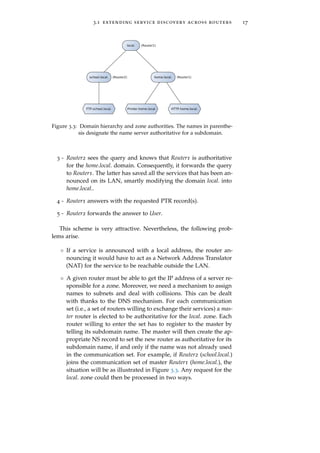
3 - Router2 sees the query and knows that Router1 is authoritative
for the home.local. domain. Consequently, it forwards the query
to Router1. The latter has saved all the services that has been an-
nounced on its LAN, smartly modifying the domain local. into
home.local..
4 - Router1 answers with the requested PTR record(s).
5 - Router2 forwards the answer to User.
This scheme is very attractive. Nevertheless, the following prob-
lems arise.
◦ If a service is announced with a local address, the router an-
nouncing it would have to act as a Network Address Translator
(NAT) for the service to be reachable outside the LAN.
◦ A given router must be able to get the IP address of a server re-
sponsible for a zone. Moreover, we need a mechanism to assign
names to subnets and deal with collisions. This can be dealt
with thanks to the DNS mechanism. For each communication
set (i.e., a set of routers willing to exchange their services) a mas-
ter router is elected to be authoritative for the local. zone. Each
router willing to enter the set has to register to the master by
telling its subdomain name. The master will then create the ap-
propriate NS record to set the new router as authoritative for its
subdomain name, if and only if the name was not already used
in the communication set. For example, if Router2 (school.local.)
joins the communication set of master Router1 (home.local.), the
situation will be as illustrated in Figure 3.3. Any request for the
local. zone could then be processed in two ways.
18 solution architecture
Router1
LAN1 Wireless Access Point
Computer
Laptop
Internet
Mobile Phone
PrinterHTTP Server
User
Router2
LAN2
FTP Server
Authoritative
DNS Server
Local
DNS Server
mDNS
mDNS
DNS Update
DNS Query
DNS
Figure 3.4: Routers sharing their services via public DNS servers.
– If the domain is local., the answer will be provided by the
classical mDNS mechanism. Indeed, devices still announce
themselves on the single label local. domain.
– If the domain is <sub-d>.local., the access router will for-
ward the request to the master router which will delegate
the request to the router authoritative for the given subdo-
main, as in classical DNS. The latter will then be able to
answer the request to the access router, which will finally
forward the answer back to the initial client. This is, to
some extent, a parallel DNS hierarchy separated from the
public one.
Although this solution nicely overcomes the scalability problem of
the tunneling method, it still requires the discovering routers to be
configured as part of the system.
3.1.2.3 Using the Public DNS
Rather than a direct communication between the routers, it is also
possible to communicate via an intermediate. Since Zeroconf is based
on DNS, the public DNS infrastructure seems to jump out for this job.
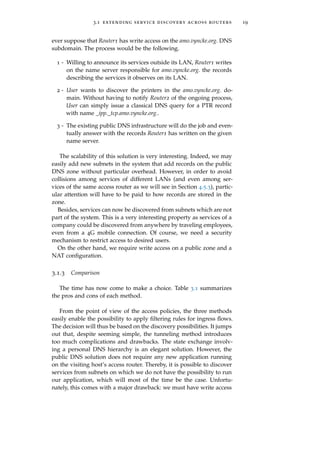
The situation is depicted in Figure 3.4.
As DNS-SD specifies how a service can be announced using classi-
cal DNS records, sharing the services announced in the different sub-
nets using the existing public DNS infrastructure is perfectly suited
to our problem. The big drawback of such a method is that we must
have write access to the public DNS in order to insert the desired
records. Unfortunately, this access is seldom free [Int03]. Let us how-
3.1 extending service discovery across routers 19
ever suppose that Router1 has write access on the amo.vyncke.org. DNS
subdomain. The process would be the following.
1 - Willing to announce its services outside its LAN, Router1 writes
on the name server responsible for amo.vyncke.org. the records
describing the services it observes on its LAN.
2 - User wants to discover the printers in the amo.vyncke.org. do-
main. Without having to notify Router2 of the ongoing process,
User can simply issue a classical DNS query for a PTR record
with name _ipp._tcp.amo.vyncke.org..
3 - The existing public DNS infrastructure will do the job and even-
tually answer with the records Router1 has written on the given
name server.
The scalability of this solution is very interesting. Indeed, we may
easily add new subnets in the system that add records on the public
DNS zone without particular overhead. However, in order to avoid
collisions among services of different LANs (and even among ser-
vices of the same access router as we will see in Section 4.5.3), partic-
ular attention will have to be paid to how records are stored in the
zone.
Besides, services can now be discovered from subnets which are not
part of the system. This is a very interesting property as services of a
company could be discovered from anywhere by traveling employees,
even from a 4G mobile connection. Of course, we need a security
mechanism to restrict access to desired users.
On the other hand, we require write access on a public zone and a
NAT configuration.
3.1.3 Comparison
The time has now come to make a choice. Table 3.1 summarizes
the pros and cons of each method.
From the point of view of the access policies, the three methods
easily enable the possibility to apply filtering rules for ingress flows.
The decision will thus be based on the discovery possibilities. It jumps
out that, despite seeming simple, the tunneling method introduces
too much complications and drawbacks. The state exchange involv-
ing a personal DNS hierarchy is an elegant solution. However, the
public DNS solution does not require any new application running
on the visiting host’s access router. Thereby, it is possible to discover
services from subnets on which we do not have the possibility to run
our application, which will most of the time be the case. Unfortu-
nately, this comes with a major drawback: we must have write access
20 solution architecture
Solution + -
mDNS tunneling ◦ Seems simple ◦ Requires to manually con-
figure participants
◦ Deal with temporary IPv6
addresses of routers
◦ Security flaw
◦ Remote and local services
indistinguishable
◦ Not scalable
State exchange ◦ Takes advantage of DNS
mechanisms
◦ Requires a NAT configura-
tion
◦ Nicely scalable ◦ Requires to run DNS
servers
◦ Requires a registering pro-
cess to the master router
Public DNS ◦ Takes advantage of DNS
mechanisms
◦ Requires write access on a
public DNS server
◦ Complexity pushed on pub-
lic DNS servers
◦ Requires a NAT configura-
tion
◦ Discovering router bliss-
fully unaware of the
process
Table 3.1: Advantages and drawbacks of the three proposed solutions.
on a DNS zone. Nevertheless, the public DNS solution still wins the
contest. It is simpler, more oriented towards the zero configuration
goal and the possibility to discover a service from any subnet is a
very nice convenience.
Consequently, we will implement the public DNS solution. Through-
out the rest of this work, we will therefore postulate that the announc-
ing router has write access on a public DNS zone. Moreover, for sim-
plification, we will solve the NAT configuration requirement problem
by only considering services advertizing public addresses. Therefore,
to make it possible to announce services from behind a NAT, those
services should announce themselves using IPv6 rather than IPv4 ad-
dresses... as IPv6 adoption is trendy, let’s be part of it!
3.2 security and access policies
Based on the solution chosen for the extension of service discovery
across routers, we must now imagine how we can enable the possi-
bility for the network administrator to apply policies in the network.
From the point of view of the administrator, these policies are general
rules that he wants to apply in the global system in order to restrict
3.2 security and access policies 21
Figure 3.5: Global structure of our solution to the problem.
access of particular sources to a particular service, service type, on a
particular subnet or on all subnets. We want the administrator to be
able to specify the target services only with names and strings rather
than IP addresses. On the other hand, as there is no other way of do-
ing it, the sources of the rules will have to be specified as IP address
ranges.
In Belgium, real Internet Service Provider (ISP) routers such as
those from Proximus or Voo refer to unknown proprietary configu-
ration processes. Consequently, for simplicity, the centralized appli-
cation will, based on the rules defined by the administrator via a
user-friendly GUI, output one file for each router. Each file will con-
sist of iptables and ip6tables rules to configure a particular router. The
application will not explicitly configure the routers.
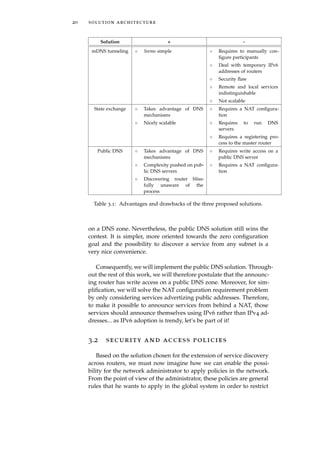
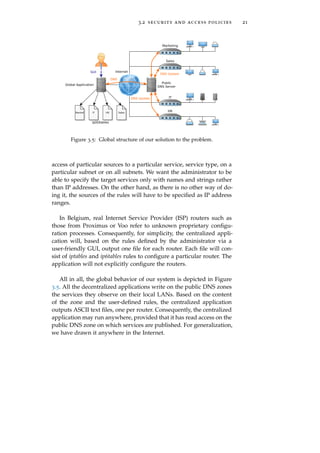
All in all, the global behavior of our system is depicted in Figure
3.5. All the decentralized applications write on the public DNS zones
the services they observe on their local LANs. Based on the content
of the zone and the user-defined rules, the centralized application
outputs ASCII text files, one per router. Consequently, the centralized
application may run anywhere, provided that it has read access on the
public DNS zone on which services are published. For generalization,
we have drawn it anywhere in the Internet.
4E X T E N D I N G S E RV I C E
D I S C O V E RY A C R O S S R O U T E R S
In this chapter, we address the first part of the thesis, i.e. we try
to extend the service discovery mechanism outside the subnet where
services were initially announced. Next chapter will, for its part, be
devoted to the second part of the thesis, i.e. allowing the administra-
tor to apply an access policy in the network.
4.1 enabling user configuration
Besides security preferences considered in the next chapter, we
would also like to allow the user to configure the decentralized appli-
cation (e.g., in order to announce only particular services). Indeed, the
next chapter will allow to restrict access to certain users, but everyone
will still be able to discover the services. It would therefore be comfort-
able for the administrator of the system to be able to hide some of the
services he does not want to be visible to anyone. For convenience,
this decentralized configuration1 should be possible through a GUI.
Consequently, the configuration parameters must be generated by the
GUI based on the user input and then read by the application. How-
ever, it would also be convenient for the user to be able to configure
the application using the command-line interface (CLI). Hence, the
configuration parameters should be specified in a text file. This file
would then be generated by the GUI or the user via a simple text
editor and read by the application when starting. Rather than defin-
ing our own syntax for the file, we will use the Extensible Markup
Language (XML) which is perfectly suited for our case, as it is both
human- and machine-readable.
In order to define how the parameters can be tweaked, we will
provide a Document Type Definition (DTD) defining which tags and
attributes may and must be used in the configuration file. The con-
figuration file and its DTD are both supposed to be saved in the
/etc/service-discovery/ directory under the names config.xml and con-
fig.dtd2 on the host on which the decentralized application is running.
1 It is worth insisting on the fact that the configuration we are talking about is decen-
tralized, in contrast to the centralized configuration of policies common to all subnets.
2 In this work’s archive, these files are located in the /decentralized/config/ directory.
23
24 extending service discovery across routers
The application will parse and validate the XML file against its DTD
at startup in order to check that it is suitably configured.
4.2 observing the services
4.2.1 Avahi
The first job of the application is to observe the services announced
on the LAN. Although the Zeroconf protocols are simple, implement-
ing all the cache and traffic reduction mechanisms from scratch would
be far too long and cumbersome for the sake of this work. Moreover,
there exist several open-source implementations of the Bonjour pro-
tocol that run on Linux. The probably most popular of them is Avahi.
Back in 2005, Stuart Cheshire, one of the Bonjour protocol co-authors,
mentioned the high quality of Avahi [Che05]:
“Avahi is absolutely great. [...] They know the protocols inside
out, [...] we are working together with them. [...] Avahi is the
best one [Bonjour implementation] I know. [...] It really does
challenge Apple in terms of its completeness and its robustness.”
— Stuart Cheshire
In addition, Avahi is now part of major Linux distributions such
as Debian, Fedora, Mandriva, FreeBSD, openSUSE, ArchLinux and
Ubuntu [Tea10].
Avahi uses D-Bus for communication between applications and
the Avahi daemon which implements the Bonjour architecture. An
application may, using D-Bus, ask the daemon to be notified when
new services arrive, to resolve a service, to publish a service, and
many other possibilities. How Avahi behaves can be modified via a
configuration file. Section 4.2.3.1 addresses the Avahi daemon config-
uration step. Our upcoming tests have been made using the 0.6.31
version of the Avahi daemon.
As D-Bus is not necessarily a well-known technology, Section 4.2.2
provides an overview of what it is and how it works. Any program-
ming language with D-Bus support can access the Avahi daemon
[Tea02]. Among the language bindings available for D-Bus, Python
seems to be the best choice [Dbua]. Indeed, it is high-level and pro-
vides an outstanding number of libraries which will facilitate our
coding and allow us to focus on the algorithmic part of the code. The
application has been tested and coded for Python 2.7.5.
4.2 observing the services 25
4.2.2 D-Bus
This section provides an introduction to D-Bus. It is based on a
document by the freedesktop.org project [Dbuc].
4.2.2.1 Buses, Objects and Proxies
D-Bus is developed as part of the freedesktop.org project, which
builds a base platform for open source and open discussion desk-
top software projects on Linux and UNIX [Fre]. D-Bus is an inter-
process communication (IPC) mechanism allowing processes on the
same host to communicate with each other.
D-Bus provides a logical bus between applications. It is based on
a daemon which forwards the messages. Any number of applications
may connect to this daemon to participate to the communication. The
daemon provides two kinds of buses: a system bus for system-wide
communications and session buses used by a single ongoing user
session. Each bus can be connected to thanks to an address, which is
typically the filename of a Unix-domain socket. Each connection to a
bus is assigned a bus name. This can be a unique name automatically
assigned by the bus, in which case it starts with a colon, or it can be
chosen by the application connecting to the bus in order to offer a
service under a well-known name, in which case the name consists of
two or more dot-separated elements.
In the D-Bus jargon, an object is a communication endpoint at one
end of any exchange. It is a way for a process to offer its services
on the bus. An object has a name, called a path composed of slash-
separated elements. An object is part of a connection and may be
accessed through a proxy, which is a local representation in a program
of a remote object.
4.2.2.2 Messages
There are two ways of communicating on the bus with another
process.
◦ 1:1 request-reply. Requests are sent from a client to an object and
the latter answers back to the requesting process. This is, from
the querier point of view, seen as the invocation of a method on
the object or proxy. Both asynchronous and synchronous calls
are possible.
◦ 1:n publish-subscribe. Messages emanating from an object are
broadcasted to any connected client that have registered an in-
terest in the given object. The messages sent by the object are
called signals. Like methods, signals can carry parameters. They
are generally used to publish the occurence of an event.
26 extending service discovery across routers
System bus address
Connection well-known name
Object name (path)
Figure 4.1: The d-feet software running on a Linux machine. The figure is
annotated in order to highlight some concepts introduced in Sec-
tion 4.2.2.
The methods and signals supported by a particular object are called
its members. All of an object’s members are specified in interfaces. An
interface is a set of signals and methods. An object is implementing
an interface if it supports all the declarations in the interface (along
with the types of the input and output parameters). When invoking
a method or listening to a signal of an object, it may be necessary
to specify in which interface that member was specified (in the case
an object implements several interfaces with member with identical
names).
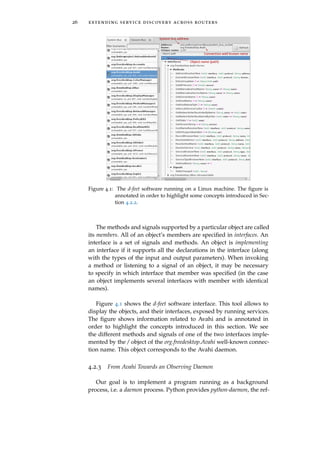
Figure 4.1 shows the d-feet software interface. This tool allows to
display the objects, and their interfaces, exposed by running services.
The figure shows information related to Avahi and is annotated in
order to highlight the concepts introduced in this section. We see
the different methods and signals of one of the two interfaces imple-
mented by the / object of the org.freedesktop.Avahi well-known connec-
tion name. This object corresponds to the Avahi daemon.
4.2.3 From Avahi Towards an Observing Daemon
Our goal is to implement a program running as a background
process, i.e. a daemon process. Python provides python-daemon, the ref-
4.2 observing the services 27
erence library implementing the well-behaved daemon specification
of [PEP3143]3.
Our application thus uses python-daemon version 1.5.7 to imple-
ment a daemon. The code is available in /decentralized/python/service-
discovery-daemon.py in this work’s archive. The daemon can be started,
stopped and restarted with the command
$ ./service-discovery-daemon.py cmd
where cmd is respectively start, stop or restart. Let us explore several
aspects of our daemon.
4.2.3.1 Avahi Configuration
/etc/avahi/avahi-daemon.conf is the configuration file for the Avahi
daemon [man]. Its syntax simply consists of a series of key=value lines
allowing to define the value of several parameters. We will here go
only through interesting parameters.
use-ipv4. This must be set to yes in order to allow Avahi to use IPv4
sockets. Of course, the user may disable this option if he does
not want the software to consider services announced on IPv4.
Note that “announced on IPv4” means that the service has been
announced using the IPv4 protocol. Nothing guarantees that the
IP address associated to the service is either IPv4 or IPv6.
use-ipv6. Similarly to IPv4, this option should be enabled but the
user could decide to disable it.
deny-interfaces. This parameter allows to set a list of comma sepa-
rated network interfaces that should be ignored by the Avahi
daemon, which means that the services announced on those
interfaces will not be considered. Interfaces that are not speci-
fied will be used, unless allow-interfaces is set, which takes prece-
dence over deny-interfaces. It is up to the user to determine whether
or not some interfaces should be ignored but we, by default, ig-
nore no interfaces.
allow-interfaces. Interfaces that are not specified here will be ignored
by the Avahi daemon. If set to an empty list, all local interfaces
except loopback and point-to-point will be observed. By default,
we set this parameter to an empty list.
enable-dbus. Must be set to yes in order to allow the application to
communicate with the Avahi daemon.
3 A PEP is a Python Enhancement Proposal. These documents are intended to provide
concise technical specifications of new Python features [PEP0001].
28 extending service discovery across routers
enable-reflector. If set to yes the Avahi daemon will reflect all the
mDNS traffic to all local interfaces. This must be set to no and
will be justified in Section 4.5.3.
reflect-ipv. If set to yes the Avahi daemon will forward traffic between
IPv4 and IPv6. It can be set only if enable-reflector is enabled. This
must be set to no and will also be justified in Section 4.5.3.
Other parameters may be tweaked as wanted by the user. Note
that not mentioning these in this section does not mean they will not
influence the behavior of the application, but rather that they will
not affect the correct behavior of the daemon. A valid configuration
file is provided in /decentralized/config/avahi-daemon.conf in this work’s
archive.
4.2.3.2 D-Bus Configuration
In most of the cases, the D-Bus daemon requires no particular
configuration. However, D-Bus imposes several resource limitations
related to the connections made to the bus [Dbub]. In case of big
networks with many services announced, those limits can impede
the operations of our daemon. For example, when operating in the
University of Liège (ULg) network (B31 building), the daemon was
connecting to too many signals from D-Bus. The initial configuration
of the D-Bus daemon prevented our daemon to operate properly. To
solve this problem, we had to add a rule in the configuration file in
order to increase the maximum number of match rules allowed per
connection. The exact parameters to tweak and the values highly de-
pend on the network. Fortunately, configuration is most of the time
not required. If it is, the /decentralized/config/system-local.conf configu-
ration file we used should be most of the time sufficient4.
4.2.3.3 Logging
Our program is intended to be launched at a router startup. The
program output is then supposed to be monitored remotely, possi-
bly from different hosts, or along different ssh sessions. The standard
output and error streams are thus not convenient for such a situa-
tion. Consequently, we use a logger for information and error logging.
This object is part of the logging Python package. It allows to easily
print different types of messages in a log file rather than on the stan-
dard stdout and stderr streams. The logger can then be configured to
only print several message types and format them appropriately and
4 Note that, on Linux machines, modifying the configuration file of D-Bus must be
done with care. Indeed, some Linux desktop environments such as Gnome or KDE
use D-Bus and an invalid configuration could prevent the graphical environment
from operating properly or even from being launched. If we mention this, it might
be because we experienced such a problem...
4.2 observing the services 29
easily [Py-Doc]. The module defines five message levels: critical, er-
ror, warning, info and debug. We will only use the latter four. Using
the configuration file, the user will be able to specify a level below
which messages are not printed (e.g., specifying info will print all
messages except debug). The DTD defining the current config.xml for-
mat is shown in Code 1 and a corresponding XML example5 in Code
2.
1 <!ELEMENT config (log)>
2 <!ELEMENT log EMPTY>
3 <!ATTLIST log level CDATA #REQUIRED>
Code 1: DTD for defining the logging verbosity level.
1 <?xml version="1.0"?>
2 <!DOCTYPE config SYSTEM "config.dtd">
3 <config>
4 <log level="info" />
5 </config>
Code 2: Example of config.xml for setting the logging verbosity level to info.
As, on Linux, the /var/log/ directory is used to store various log
files [Nem+10], the log file used by our daemon will be /var/log/service-
discovery.log. Any message from the daemon will thus be written in
this file6.
4.2.3.4 PID File
The python-daemon package allows to use a PID file created on the
daemon startup and containing the process ID (PID) of the daemon.
This file may be used to kill the daemon (as it allows to fetch the PID
and then issue a kill command) or to see if it is running or not. PID
files are usually stored in the /var/run/ directory [Nem+10]. Conse-
quently, the daemon will use /var/run/service-discovery/pid as its PID
file.
4.2.3.5 Signals Handling
The python-daemon package allows to provide callback methods
that will be called when receiving particular signals from the operat-
ing system. Defined signals depend on the operating system. Among
5 The xmllint tool can be used with the option --dtdvalid to check whether an XML file
is a valid instance of a DTD or not.
6 A simple
tail -f /var/log/service-discovery.log
command can be issued in order to monitor the instantaneous progress of the dae-
mon.
30 extending service discovery across routers
the signals that should be supported on all Unix implementations and
that can be caught [IG04], SIGABRT, SIGINT, SIGQUIT and SIGTERM
should lead to a clean daemon shutdown procedure. We will hence
call a stop procedure upon reception of these signals, which will
cause the daemon to clear its state and then exit. Note that the python-
daemon package uses SIGTERM to stop the daemon when called with
the stop argument.
Furthermore, the SIGHUP signal is commonly interpreted by dae-
mons as a reset request, i.e. daemons usually reload their configura-
tion file when receiving a SIGHUP signal [Nem+10]. Indeed, among
others, the D-Bus daemon dbus-daemon, the OpenSSH daemon sshd
and the Avahi daemon avahi-daemon reload their configuration file
when receiving a SIGHUP signal [man]. However, our daemon is un-
able to reload its configuration file without a complete restart (See
Section 4.3.2). Hence, it will simply terminate when receiving a SIGHUP
signal, as this is the default action that should be taken [IG04]. In
order to reload the configuration file, the daemon will have to be
completely restarted thanks to the restart command.
4.2.3.6 Privileges
Until now, we did not consider permissions and access rights re-
quired by the Linux operating system to perform certain operations.
Our daemon has to interact with several files on the system:
1 - The log file in order to log events. The daemon must have write
access on this file. A GUI must have read access on this file in
order to display the logs.
2 - The configuration file in order to adapt its behavior based on
user-defined preferences. The daemon must have read access
on this file. A GUI must have write access on this file.
3 - The DTD of the configuration file in order to check that it is
valid. The daemon and the GUI must have read access on this
file.
A nice solution is to create a group (which we will name sd for
service discovery) containing two users: sd-daemon and sd-gui. The
daemon will run as sd-daemon and the GUI as sd-gui. Based on this,
appropriate permissions must be set on the desired files and direc-
tories. For this purpose, we provide the /decentralized/setup.sh script
which must be run as root. It creates the sd group and the sd-daemon
and sd-gui users and the necessary directories and files with the ap-
propriate permissions. Note that the config.xml and config.dtd files are
taken from the /decentralized/config/ directory. In addition, the script
4.2 observing the services 31
sets the /decentralized/config/avahi-daemon.conf file as the Avahi config-
uration file and the /decentralized/config/system-local.conf file as the D-
Bus additional system-wide configuration file.
Besides, the daemon commands will now only be allowed as root
so that the daemon process can then be forked with the user ID and
group ID corresponding to sd-daemon and sd respectively, in order to
be allowed to perform the required operations, no more, no less.
4.2.3.7 Observation of the Bonjour Traffic
Among the several Python D-Bus bindings, we used dbus-python
version 1.2.0. This choice has been motivated by its simplicity of use
and the fact that it is the reference implementation of D-Bus [Dbua].
The Avahi D-Bus API is not documented. However, the D-Bus in-
trospection data7 is provided on the Avahi website [Tea08]. Despite
this poor amount of documentation, it was enough to use the API.
Let us see the objects made available by Avahi. In the list below, all
the names begin with org.freedesktop.Avahi. but this part has been trun-
cated for presentation reasons.
Server. It represents the Avahi daemon. Initially, this is the only ob-
ject made available by Avahi. The methods and signals it im-
plements are shown in Figure 4.1. Most importantly, it provides
methods to create each of the eight following objects.
EntryGroup. Allows to publish records and/or services.
DomainBrowser. Allows to browse for browsable domains.
ServiceTypeBrowser. Allows to browse for announced service types
on a given domain.
ServiceBrowser. Allows to browse for announced services of a given
type on a given domain.
RecordBrowser. Allows to browse for resource records of a given type,
class and name.
ServiceResolver. Allows to resolve a given service.
HostnameResolver. Allows to resolve a given hostname.
AddressResolver. Allows to resolve a given address.
We will not use EntryGroup, as we are only looking to observe the
LAN, not to publish on it. We will not use DomainBrowser either as
we are only looking to browse the local. domain.
7 This means the interfaces, methods and signals that objects implement.
32 extending service discovery across routers
Figure 4.2: The high-level overview of how the daemon observes the net-
work.
All the browser objects provide an ItemNew and an ItemRemove
signal to notify the apparition or deletion of a given, respectively,
domain, service type, service or record. The resolver objects, for their
part, provide a Found signal to notify that a result has been found.
The difference between the resolver objects and the methods pro-
vided by Server to resolve is that the resolver objects continuously
monitor the network. If the given answer disappears and another one
is published, the objects will issue a new Found signal while the meth-
ods of the Server object will not do anything, as they are only called
once.
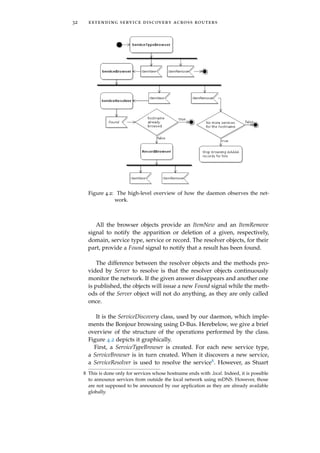
It is the ServiceDiscovery class, used by our daemon, which imple-
ments the Bonjour browsing using D-Bus. Herebelow, we give a brief
overview of the structure of the operations performed by the class.
Figure 4.2 depicts it graphically.
First, a ServiceTypeBrowser is created. For each new service type,
a ServiceBrowser is in turn created. When it discovers a new service,
a ServiceResolver is used to resolve the service8. However, as Stuart
8 This is done only for services whose hostname ends with .local. Indeed, it is possible
to announce services from outside the local network using mDNS. However, those
are not supposed to be announced by our application as they are already available
globally.
4.3 keeping the registered services in memory 33
$ tail -f /var/log/service-discovery.log &
[1] 6258
$ sudo ./service-discovery-daemon.py start
12-11-2014 13:55:15 CEST - INFO - Command start issued.
12-11-2014 13:55:15 CEST - INFO - Service discovery daemon startup.
12-11-2014 13:55:15 CEST - DEBUG - Browsing for services types.
12-11-2014 13:55:15 CEST - DEBUG - Browsing type _printer._tcp on wlp4s0 (IPv4).
12-11-2014 13:55:15 CEST - DEBUG - Browsing type _http._tcp on wlp4s0 (IPv4).
12-11-2014 13:55:15 CEST - DEBUG - + DCP-1510 @ MacBookPro_BobK._printer._tcp on (IPv4).
12-11-2014 13:55:15 CEST - DEBUG - + iPhone de Guillaume._http._tcp on wlp4s0 (IPv4).
12-11-2014 13:55:15 CEST - DEBUG - + CodeMeter WebAdmin._http._tcp on wlp4s0 (IPv4).
12-11-2014 13:55:16 CEST - DEBUG - = Resolved CodeMeter WebAdmin._http._tcp to
MacBook-Pro-de-Louis.local on wlp4s0 (IPv4).
12-11-2014 13:55:16 CEST - DEBUG - New IPv4 address (10.9.141.79) for
MacBook-Pro-de-Louis.local on wlp4s0 (IPv4).
12-11-2014 13:55:17 CEST - DEBUG - = Resolved iPhone de Guillaume._http._tcp to
iPhone-de-Guillaume.local on wlp4s0 (IPv4).
12-11-2014 13:55:17 CEST - DEBUG - New IPv4 address (10.9.139.93) for
iPhone-de-Guillaume.local on wlp4s0 (IPv4).
...
Figure 4.3: Hypothetical service-discovery-daemon.py logs.
Cheshire mentions it in its Google Talk [Che05] and in its guide
[CS06], services are to be resolved at using time9, as their hostname,
address, port or TXT could change during their lifetime. Nonethe-
less, this is not a problem since, as Section 8.4 of [RFC6762] men-
tions it, “if the rdata of any of a host’s Multicast DNS records changes, the
host MUST repeat the Announcing step [...] to update neighboring caches.”.
Consequently, in case of change, the ServiceResolver object will issue
a new Found signal. Such a method allows only for one address per
host. Indeed, the Found signal only gives one single address. This is
not practical for services that are announced over IPv4 and IPv6 and
that can hence have several addresses. Consequently, we will not con-
sider the address returned by the Found signal of the ServiceResolver
object but rather use two RecordBrowser objects to browse for IPv4 and
IPv6 addresses of the hostname returned by the Found signal. This
method allows to continuously resolve a service, thereby performing
the required late binding.
The daemon logs the observed services as debug messages. Figure
4.3 shows the obtained logs when connected to the ULg network10.
4.3 keeping the registered services in mem-
ory
The daemon is now able to monitor the Bonjour traffic. However,
in order to know the current state of the network, we need to store
9 This is called late binding, as mentioned in Section 2.4.
10 Names have been changed and output truncated for privacy and presentation rea-
sons.
34 extending service discovery across routers
the registered services in memory. The simplest way to achieve this
is to store the services in a Python data structure. Nonetheless, this
does not allow an external GUI to access the services. This possibil-
ity can although be achieved using shared memory or by having the
Python application printing the services in a file. This communica-
tion between the daemon and the GUI is not easy to implement. A
much more easier method is to store the services in a database, which
the GUI will access to retrieve the wanted information. In addition,
as Section 4.6 will describe it more precisely, our GUI will be imple-
mented as an HTTP server, which can easily access and modify a
database.
For its popularity, rich documentation and access facilities from
Python and PHP code (used respectively for the daemon and the
GUI), MySQL has been chosen to be the database management sys-
tem used in this work. Chapter 2 of the MySQL Connector/Python
Developer Guide, part of the MySQL documentation [MySQL-Doc],
recommends not to hardcode the values needed to connect to the
database into the main script. This is a place for our config.xml file.
We therefore now add a new element database to our DTD to allow
the user to specify the connection parameters. The updated DTD is
shown in Code 3 and a corresponding configuration example in Code
4.
1 <!ELEMENT config (log,database)>
2 <!ELEMENT log EMPTY>
3 <!ATTLIST log level CDATA #REQUIRED>
4 <!ELEMENT database EMPTY>
5 <!ATTLIST database user CDATA #REQUIRED>
6 <!ATTLIST database password CDATA #REQUIRED>
7 <!ATTLIST database name CDATA #REQUIRED>
8 <!ATTLIST database host CDATA #REQUIRED>
9 <!ATTLIST database socket CDATA #REQUIRED>
10 <!ATTLIST database port CDATA #REQUIRED>
Code 3: DTD for defining the database connection parameters.
The user, password, name, host, socket and port attributes correspond
respectively to the user, password, database, host, unix_socket and port
connection arguments referenced in Chapter 7 of the MySQL Con-
nector/Python Developer Guide. Note that all attributes are set to be
mandatory. It is up to the user to insert values which will match its
MySQL server configuration.
We defined a new MySQLWrapper class allowing to easily perform
MySQL requests and queries. It uses MySQL Connector/Python, the
default Python connector [MySQL-Doc]. Version 2.0.2 has been used
4.3 keeping the registered services in memory 35
1 <?xml version="1.0"?>
2 <!DOCTYPE config SYSTEM "config.dtd">
3 <config>
4 <log level="info" />
5 <database user="amo"
6 password="cisco123"
7 name="service_discovery"
8 host="localhost"
9 socket="/opt/lampp/var/mysql/mysql.sock"
10 port="3306"/>
11 </config>
Code 4: Example of configuration file for defining the database connection
parameters.
Figure 4.4: Tables defined in our database. Bold attributes are part of the
key of the corresponding table.
for the tests, along with a MySQL server version 5.6.20 installed via
XAMPP (X Apache MySQL Perl PHP).
4.3.1 Database Definition
It is necessary to preconfigure a database by defining a relational
model and initializing the database. The database will contain two
tables, shown in Figure 4.4:
1 - a services table containing all the services announced on the net-
work,
2 - an addresses table containing all the addresses. These cannot be
held as a field of the services table as a service can have several
addresses. This also allows to store only once the addresses of
a host, even if it advertizes several services.
The if_name and if_ip fields of both tables hold the interface name
and IP version on which the entry is valid. In the services table:
◦ The name, type, hostname, port and TXT define the services as
defined by DNS-SD.
36 extending service discovery across routers
◦ The resolved field is true only if we have found the hostname
hosting the service and at least one address for it.
◦ The announced field is true if the service has been announced on
the public DNS (see Section 4.5).
◦ As two services of the same type cannot have the same name,
the key of the table consists of the service name (and type)
and the interface on which it has been discovered (since ser-
vices with identical names could be discovered on different in-
terfaces).
In the addresses table:
◦ The ip field holds the IP version of the stored address.
◦ The key consists of the entire set of fields because a host could
have several addresses of the same IP version.
We provide the /decentralized/sql/user_init.sql script which creates
the two tables11. For this script to work, a service_discovery table must
exist. To simplify things, we also provide a /decentralized/sql/root_init.sql
script creating a user amo with password cisco123 with all privileges
on a service_discovery database. Consequently,
$ mysql -u root -p < root_init.sql
$ mysql -u amo -p < user_init.sql
may be used to properly initialize the MySQL database. This is done
by the setup.sh script12.
Figure 4.5 shows part of the content of both databases when run-
ning the application connected to the ULg network. The figure is
taken from the phpMyAdmin interface of XAMPP.
Note that, as mentioned in Section 3.1.3, for simplification, we only
consider public addresses. To do so, we use the is_private() method
of the netaddr Python package. If a private address is observed, the
daemon will act as if it had not seen it.
4.3.2 Coherency of the State
The daemon cannot operate properly if the database content is not
valid. Indeed, actions it will perform will depend on the database
content. For this reason, any MySQL request which fails will cause
the daemon to stop.
11 As recommended by Oracle [MySQL-Doc], we use the InnoDB storage engine.
12 As we use XAMPP for our tests, setup.sh uses /opt/lampp/lampp start to start the
MySQL server and /opt/lampp/bin/mysql to run MySQL. These must be changed to
be valid for other MySQL installations.
4.4 defining announcement preferences 37
Figure 4.5: Part of the content of the services and addresses tables when run-
ning the application.
Also, the database has to be cleared on daemon shutdown so that
the state remains valid when the daemon is not running or when it
starts running. For robustness reasons, we will also clear the database
at startup since the daemon might have been closed unproperly, leav-
ing stall entries in the database.
As the evolution of the state depends on the configuration file,
it is not possible to reload the configuration file without completely
rebuilding the state, i.e. without a complete restart. This is why we
stop the daemon upon receipt of a SIGHUP signal.
4.4 defining announcement preferences
Before implementing the announcement procedure, we will first
enable the possibility for the user to define which services he wants
the daemon to announce publicly. This is different from the central-
ized configuration. Here, we allow the administrator to configure
which services are announced. On the other hand, the centralized
configuration allows to modify the access policy of those announced
services. This means that the administrator may refuse access to a ser-
vice for some users, but those will still be able to discover the service.
It is this observability property of the services with which we deal
here.
We will publish only resolved services. Indeed, publishing an un-
resolved service is senseless since the user will never be able to use
it. The publishing procedure for a service will thus occur after resolv-
ing its hostname or immediately after having found the hostname if
the latter’s address is already known13. The daemon is in front of
the following problem: it faces a resolved service and has to decide
13 On the other hand, the withdrawal of an announced service can occur when no more
addresses are available for the hostname of the service or when the service itself
38 extending service discovery across routers
whether to announce it or not. This is somehow similar to the situa-
tion a firewall experiences: it faces a packet and has to decide whether
to forward it or not. The solution adopted by firewalls is to navigate
into an access control list and perform the action specified by the first
rule matching the incoming packet [KR13]. We will here implement
a similar approach. The daemon will navigate through a list of rules
and as soon as a rule’s criteria are matched by the service, the dae-
mon will perform the action specified by the rule. If no matching rule
is found, the daemon default action will be not to publish the service.
For the sake of simplicity, for each rule, the user will have to spec-
ify a value for each attribute of the services table except resolved, an-
nounced and TXT. Indeed, the latter is a byte array, which is quite
cumbersome to compare with a user input string. The time needed to
implement such a feature is not worth it, as it is unlikely a user will
want to filter services based on their TXT record content. The value
specified by the user for an attribute should be a regular expression.
The Python re module is used to check if the regular expressions en-
tered by the user matches the given service. The regular expressions
syntax is described in the official re package documentation [Py-Doc].
Note that we do not allow to filter services based on their IP ad-
dress. There are two reasons for this. Firstly, addresses announcement
handling would be a far too troublesome task. Secondly, filtering a
service based on its address is supposed foolish. Indeed, addresses
are not supposed to be known in advance and hostnames are there to
serve a similar task on a long-term and more human-readable way.
As expected, the user will be able to configure the publication
rules in the configuration file14. The DTD lines defining such a possi-
bility are available in Code 5 with a companion example in Code 6.
The latter asks the application to publish only _http._tcp and _ftp._tcp
services. We see that the user can specify an optional rules tag which
must contain one or several service tags, each of them defining a rule.
The service tag attributes define the service and the content of the tag
defines the action to be performed. The DTD does not specify it, but
only allow and deny are allowed. Rules with another action will be
ignored. Note that, similarly to firewall ACLs, the order of the rules
is relevant.
This configuration facility is a very elegant solution. It allows the
user to apply fine filtering while keeping the configuration and the
implementation simple. It is indeed easy for the user to write an XML
file15 and so is it too for the program to parse an XML file and then go
disappears. Further information may be obtained in the fully documented code in
/decentralized/python/ServiceDiscovery.py.
14 Note that this will be also possible, and that is an important part, later via the GUI.
15 And it will even be easier when he will be able to edit the XML file using the GUI.
4.5 announcing the registered services on the public domain 39
1 <!ELEMENT config (log,database,rules?)>
2 <!ELEMENT rules (service+)>
3 <!ELEMENT service (#PCDATA)>
4 <!ATTLIST service name CDATA #REQUIRED>
5 <!ATTLIST service type CDATA #REQUIRED>
6 <!ATTLIST service interface-name CDATA #REQUIRED>
7 <!ATTLIST service interface-ip CDATA #REQUIRED>
8 <!ATTLIST service hostname CDATA #REQUIRED>
9 <!ATTLIST service port CDATA #REQUIRED>
Code 5: DTD for defining the publication preferences.
1 <rules>
2 <service name=".*"
3 type="_((http)|(ftp))._tcp"
4 interface-name=".*"
5 interface-ip=".*"
6 hostname=".*"
7 port=".*">
8 allow
9 </service>
10 </rules>
Code 6: Example of rules tag for publishing only HTTP and FTP services.
through the list of rules when having to decide whether to announce
a service or not.
4.5 announcing the registered services on
the public domain
Before getting into practical considerations, let us introduce the
mechanisms available for updating a public DNS zone.
4.5.1 DNS Dynamic Update
[RFC1034], defining concepts and facilities of DNS, makes the as-
sumption that most of the data in the system will change very slowly
but says however that “the system should be able to deal with subsets
that change more rapidly”. Initially, all updates were indeed made as
edits to a zone’s master file [RFC2136]. In the DNS message format
header, a four bits OPCODE field is reserved to specify the kind of
query contained in the message (or the kind of query the message
answers). Initially, three values were possible: a standard query, an
inverse query and a server status request [RFC1035]. In order to al-
low dynamic DNS update, [RFC2136] specifies a new OPCODE value,
UPDATE, allowing to easily add or delete records from a specified
zone.
40 extending service discovery across routers
This opcode uses the same sections formats as DNS but changes
the naming and uses of these (see Section 2.2). A DNS UPDATE mes-
sage is divided into five parts: a header, a zone section, a prerequi-
site section, an update section and an additional section. The header
section has the same role as in a classical DNS message. The zone
section specifies the zone to be updated. The three last sections con-
tain records and respectively specify the prerequisites which must be
satisfied, the update to be made if the prerequisites are satisfied and
possible additional data. The prerequisite section allows to ask for a
RRset16 to exist (value dependent or not), for a RRset not to exist, for
a name to be in use or for a name not to be in use. The update section
allows to add RRs to an RRset, delete an RRset, delete an RR from an
RRset or delete all RRsets from a name. The update is only performed
by the server if all prerequisites are verified.
This vanilla protocol exposes the system to corruption and poi-
soning if no precautions are taken to prevent anybody from editing
the zone. [RFC2136] recommends the protocol to be used with an au-
thentication technology such as IPsec or the mechanism defined in
[RFC2137] and which has been obsoleted by [RFC3007]. The latter
proposes to use TSIG or SIG(0) records (simply added to the DNS
message) to authenticate DNS requests. In this way, the server will
be able to identify who wants to edit the zone, and thereupon decide
whether or not to apply the changes, based on security preferences
defined by the administrator of the zone. The two following sections
describe how these security mechanisms actually work.
4.5.1.1 SIG(0)
SIG(0), defined in [RFC2931], is based on DNSsec. DNSsec is the
project launched by the IETF in 1994 to make DNS secure [Tan02].
It is based on public-key cryptography. Every zone has a public/pri-
vate key pair and signs the RRset it sends using its private key. This
signature is sent in a newly defined SIG record. Another new record
type, KEY, allows to store (inter alia) the public key and the algo-
rithm used for signing. The KEY records are supposed to be retrieved
securely (e.g., thanks to IPsec).
SIG(0) provides protection for DNS transactions and requests that
is not provided by DNSsec. Indeed, as mentioned in [RFC2931], the
latter provides “no protection for [...] DNS requests, no protection for mes-
sage headers on requests or responses, [...]”, which is what is required by
dynamic updates. To achieve requests authentication, a SIG(0) record
(similar to SIG) containing the signature of the request using the re-
quester private key is added to the message. The server, using the
16 A RRset is the name given to all the RRs having the same name, class and type
[RFC2136].
4.5 announcing the registered services on the public domain 41
corresponding public key (correspondance based on a name), is then
able to check the authenticity and integrity of the message.
4.5.1.2 TSIG
Similarly, TSIG (Transaction Signature) can be used to “authenticate
DNS update requests as well as transaction responses” [RFC2845]. TSIG
is a lightweight alternative to SIG(0) since it is based on symmetric
cryptography which is faster than public-key cryptography. A TSIG
record is added at the end of the DNS request. This record contains,
inter alia, a key name, the message authentication code (MAC) and
the algorithm used to hash. Based on this, the recipient can verify the
integrity and authenticity of the message if it knows the key corre-
sponding to the given name.
BIND is the most widely used software for running DNS servers
[Conb]. The BIND latest version’s (9.10.1) reference manual [Cona]
mentions that BIND only partially supports SIG(0) while it provides
a full description of TSIG functionalities. As a consequence, we will
focus on TSIG which seems to be much more widely deployed.
4.5.2 Domain Declaration
The user of our application will have to provide the necessary in-
formation for the daemon to be able to publish the services on a
public DNS zone. This information includes:
◦ The name of the zone to update.
◦ The name of the name server to which the dynamic DNS up-
dates must be sent. It is up to the user to ensure that this server
is able to process the TSIG DNS update for the given zone.
◦ The key (the key value and the key name) and algorithm to be
used for signing update messages. Once more, it is up to the
user to ensure that the provided key and algorithm will be al-
lowed to fully update the zone. Indeed, [RFC3007] specifies that
servers should be able to restrict updates by RR types or do-
main names. The user must hence ensure that the provided key
will be allowed to update the specified zone and the necessary
record types. [RFC4635] specifies the algorithms that implemen-
tations supporting TSIG must or may implement. The possible
algorithms are hmac-md5, gss-tsig, hmac-sha1, hmac-sha224, hmac-
sha256, hamc-sha384 and hmac-sha512. In Section 4.5.4, we will
choose to use the dnspython package. The latter supports all of
the above algorithms except gss-tsig. We will thus allow any of
these except gss-tsig, which is not a problem since it is specified
as optional.
42 extending service discovery across routers
◦ The TTL value to set to the records that will be published. See
Section 2.2 for the meaning of this field.
With all this information, the application will be able to publish the
desired records on the public DNS. The DTD defining the new tag in
the configuration file is available in Code 7 with a companion exam-
ple in Code 8.
1 <!ELEMENT domain EMPTY>
2 <!ATTLIST domain server CDATA #REQUIRED>
3 <!ATTLIST domain zone CDATA #REQUIRED>
4 <!ATTLIST domain keyname CDATA #REQUIRED>
5 <!ATTLIST domain keyvalue CDATA #REQUIRED>
6 <!ATTLIST domain algorithm CDATA #REQUIRED>
7 <!ATTLIST domain ttl CDATA #REQUIRED>
Code 7: DTD for defining the zone, the server and the key for dynamic DNS
update.
1 <domain server="ks.vyncke.org"
2 zone="amo.vyncke.org"
3 keyname="amoupdate."
4 keyvalue="AB4rSfAsFyTRETlKIaTFbv=="
5 algorithm="HMAC_MD5"
6 ttl="60" />
Code 8: Example of domain tag for the configuration file.
4.5.3 Collision Problems
Let us consider the scenario depicted in Figure 4.6. Suppose a com-
pany has two distinct departments, IT and Sales, located at different
floors in the company’s building. From a network point of view, the
two departments define two distinct subnets connected to the access
router of the company. The IT department hosts two IPP printers that
are announced on the local domain via Bonjour. These printers are lo-
cated at the Reception Desk and in the Meeting Room and are hence
respectively named Reception Desk Printer and Meeting Room Printer.
The Sales department, organizing its network independently of the
IT department, hosts only a single printer, in its Meeting Room. Un-
surprisingly, the administrator elected Meeting Room Printer as the
printer’s name for announcement on the local domain. As both iden-
tically named printers are not on the same local subnet, no collision
occurs in the mDNS protocol and everything goes fine.
Now, the company administrator (considering both departments)
wants traveling employees to be able to access services remotely. The
administrator hence installs and runs our application on its access
4.5 announcing the registered services on the public domain 43
Figure 4.6: Part of a hypothetical company network which could lead to a
collision for the two Meeting Room Printers if no precautions are
taken.
router. Let us suppose that the administrator configures the appli-
cation to announce services on the company.com domain. Thought-
lessly, the application would simply announce Printer 2 as Meeting
Room Printer._ipp._tcp.company.com and Printer 3 as... Meeting Room
Printer._ipp._tcp.company.com. Aigh, an unexpected collision occurs.
To handle this kind of collisions, several solutions are possible. Let
us explore them in the following sections.
4.5.3.1 The Lazy Solution
What a lazy network administrator would do is to call the Sales
department administrator and ask him to choose another name for its
meeting room printer because the IT department already uses such a
printer name. The single good point of this solution is that it gives the
IT department priority over the Sales department. More seriously, the
solution is not appropriate as it requires human expertise, which is
what the Zeroconf technology wants to avoid. Such a solution would
indeed ruin the nice collision mechanisms of the mDNS protocol.
4.5.3.2 The Reflector Solution
A less foolish solution would be to merge the two local domains by
having the access router reflecting mDNS traffic from one interface
44 extending service discovery across routers
to the other. Avahi provides such a mechanism thanks to its enable-
reflector option (See Section 4.2.3.1).
Reflecting the traffic on all interfaces would solve the problem be-
cause the mDNS protocol would automatically take care of the colli-
sion, forcing one of the printers to rename itself. However, this is not
appropriate either. Let us suppose that, by the mDNS collision han-
dling mechanisms, Printer 3 announces itself as Meeting Room Printer
#217 while Printer 2 does not change its name. The S1 user in the
Sales department would see two Meeting Room printers. How could
he know which printer is indeed in the Sales department’s meeting
room? How could he even know that one of the printer is actually
not in the Sales department? Similarly, how could he know that the
Reception Desk Printer he sees is not in the Sales department?
Such a solution would not allow the users to distinguish services
from different subnets, which can be quite problematic as this sim-
ple18 example shows.
4.5.3.3 The Renaming Solution
Another solution would be for our application to rename the ser-
vices it announces publicly to reflect the subnet to which they belong.
The router could then announce Printer 2 and Printer 3 respectively as
Meeting Room Printer (eth2)._ipp._tcp.company.com and Meeting Room
Printer (eth1)._ipp._tcp.company.com. Such a solution would leave no
room for any collision while still keeping both subnets completely
separated and distinguishable. Several problems however arise.
Firstly, the service name length is increased. Indeed, we append
the name of an interface to it. [RFC1035] limits the total length of a
DNS name to 255 octets, with up to 63 octets per label. Depending
on the initial service name, appending an interface name to it could
lead to an invalid name’s length19. A solution would be to remove
the trailing octets of the service name in order to reduce the size of
the name, but this could lead to collisions and is not, at least for
presentation reasons, a good idea. As it is impossible to handle such
a problem automatically, the application can simply log an error and
not announce the service if the new name is not valid anymore. It
will then be up to the administrator or user to fix the problem.
17 IT still has priority over Sales.
18 Imagine a scenario with more than two different subnets.
19 Note that this could have occurred even without renaming the service. Indeed, as
we always convert the local domain to the public one (company.com for example), the
total length of the DNS name can change, and hence increase, possibly leading to an
invalid name.
4.5 announcing the registered services on the public domain 45
Secondly, the new name, consisting of the concatenation of the ser-
vice name and the corresponding interface name, is not very nice
and comprehensible. Indeed, the remote employee would need to
know that eth2 corresponds to the IT department and eth1 to the
Sales department. Therefore, via the configuration file, we can allow
the user to choose, for each interface, the string to append to the ser-
vice name. The DTD defining the new tag is available in Code 9. The
example of configuration in Code 10 would lead to the names Meet-
ing Room Printer (IT)._ipp._tcp.company.com and Meeting Room Printer
(Sales)._ipp._tcp.company.com which are much more comprehensible.
1 <!ELEMENT interface EMPTY>
2 <!ATTLIST interface name CDATA #REQUIRED>
3 <!ATTLIST interface alias CDATA #REQUIRED>
Code 9: DTD for defining the alias of an interface.
1 <interface name="eth2" alias=" (IT)" />
2 <interface name="eth1" alias=" (Sales)" />
Code 10: Example of tags to rename interfaces.
Thirdly, we include the name of the interface (or an alias of it) be-
cause the mDNS traffic on each interface are completely independent.
However, within a single interface, there also exist two independent
mDNS traffics: one on IPv4 and one on IPv6. Indeed, services an-
nounced using the IPv6 mDNS multicast address will not be seen
by hosts observing only the IPv4 multicast address, and vice-versa.
Consequently, two services with the same names could be defined on
the same interface, but using different IP versions. In order to avoid
such collisions, the daemon can hence also add the IP version to the
service name. As for the interface name, we can give the possibility
to the user to choose an alias for both IP versions. The DTD defining
the new tag is available in Code 11. The new name of the service will
consist in the initial name to which we append the interface name
and then the IP version. Code 12 could thus lead to names such as
Meeting Room Printer [IT:v6] and Meeting Room Printer [Sales:v6].
1 <!ELEMENT ip EMPTY>
2 <!ATTLIST ip version CDATA #REQUIRED>
3 <!ATTLIST ip alias CDATA #REQUIRED>
Code 11: DTD for renaming the IP versions.
Fourthly, let us consider that Printer 2 announces itself both on
IPv4 and IPv6. The solution would lead to two services announced
46 extending service discovery across routers
1 <ip version="4" alias=":v4]" />
2 <ip version="6" alias=":v6]" />
3 <interface name="eth2" alias=" [IT" />
4 <interface name="eth1" alias=" [Sales" />
Code 12: Example of tags to rename interfaces and IP versions.
on the public DNS, whereas only one really exists. Is there a solution
to avoid this? No. In fact, from a Bonjour point of view, there are
indeed two distinct services. It is impossible to, generically, check if
the services are in fact the same or not. Indeed, even the IP address
cannot be used, as two different services could be hosted by the same
IP address. Moreover, when browsing locally using the vanilla DNS-
SD protocol, the service would also appear twice, so this problem is
inherent to the Bonjour technology.
Fifthly, we have only talked about the renaming of the service
names but exactly the same collision problem arises for hostnames.
Nevertheless, hostnames cannot be changed freely as can be services
names. However, the hostnames are less subject to presentation crite-
rion. Consequently, hostnames can be renamed as follows: hostname +
"-" + if_name + "-v" + if_ip, leading for example to printer2-eth2-v6.
Finally and foremostly, in the case of a system with multiple rou-
ters (which is not the case in our simple scenario) collisions can also
occur between those different routers. We must hence also append
the router name to the service name and to the hostname and allow
the administrator to configure the appended strings. This information
can be added to the config tag, as shown in Codes 13 and 14. The name
attribute is used for hostname renaming and the alias attribute for ser-
vice name renaming. Such a configuration could lead to names such
as Meeting Room Printer @ Brussels [IT:v6]20 and Meeting Room Printer
@ London [IT:v6], and to hostnames such as printer2-brussels-eth2-v6.
However, several instances of the application will manage the com-
pany.com zone. Such a situation is unaffordable. Indeed, an instance of
the application must always know all the services announced on the
zone in order to know when to remove records announcing service
types. Are there still printers in the domain? The application could
lookup the DNS zone to obtain the answer but this is a bit heavy
and could lead to concurrency problems. Indeed, let us consider the
following scenario.
◦ Router 1 deletes its last printer. It sees that there is no more
printers in the zone.
◦ In the meantime, Router 2 adds a new printer.
20 The router alias name is added between the initial name and the interface alias.
4.5 announcing the registered services on the public domain 47
◦ Router 1 deletes the record saying that there are printers in the
zone. The service just added by Router 2 will then be hidden.
1 <!ELEMENT config (log,database,domain,ip*,interface*,rules?)>
2 <!ATTLIST config name CDATA #REQUIRED>
3 <!ATTLIST config alias CDATA #REQUIRED>
Code 13: DTD for giving a name and alias to the router running the decen-
tralized application.
1 <config name="brussels" alias=" @ Brussels">
Code 14: Tag defining the name and alias of a router that could be part of
the Brussels branch of a company.
4.5.3.4 The Subdomain Solution
To elegantly solve the last problem described in the section here-
above, we can have each router publishing in a unique zone, this
unique zone being a subdomain of the initial global domain. In this
manner, each router publishes services in its own subdomain and
does not have to consider the behavior of other routers.
This is the solution we will adopt. However, the renaming mecha-
nism proposed in section 4.5.3.3 is still necessary for collisions among
different interfaces. Consequently, we will combine this solution with
the renaming solution. The administrator will still be able to rename
services but those will be published in individual subdomains, whose
name correspond to the name attribute of the config tag. For presenta-
tion reasons, the renaming scheme of service names will not change.
However, adding the router name to the hostname is useless as it is
not used by a classical user and as the publication in subdomains will
handle possible conflicts.
The configuration in Codes 12 and 14 applied in the company’s
Brussels branch and Codes 12 and 15 in the company’s London branch
could lead to the result shown in Figure 4.7, where both branches an-
nounce similar services. This shows that our solution is quite elegant.
Indeed, the distinction is easy and no conflict may occur, even though
the same names are used several times. In order for a classical DNS-
SD browser to discover the subdomains, each router will also publish
the b._dns-sd._udp, db._dns-sd._udp and lb._dns-sd._udp PTR records
pointing towards the subdomain it defines (see Section 2.4).
Note that the application will only accept strings of lower-case
letters and numbers for the subdomain name. If several tags are pro-
48 extending service discovery across routers
1 <config name="london" alias=" @ London">
Code 15: Tag to mention that the router is part of the company’s London
branch.
Figure 4.7: Our renaming solution as observed by Bonjour Browser running
on Mac OS X Yosemite 10.10.1.
vided for the same IP version or interface name, only the last one will
be considered. Also, we do not check the aliases assigned to the IP
versions or the interfaces. Even though this allows for collisions21 we
do so in order to allow the user to remove all the interface informa-
tion from the announced names. This can for example be useful when
routers only defines one subnet, case in which the added information
concerning interfaces is useless. If no aliases are provided, " @ " +
if_name will be used for the interface name and " (IPv" + if_ip + ")"
for the IP version.
4.5.4 Implementation of the Publication
Several Python libraries are available to deal with DNS and, more
specifically, Dynamic DNS. For this work, we chose dnspython22 as it
provided the necessary functionalities in a simple and elegant way.
In order to easily perform the DNS updates, we defined a new
DNSWrapper class hiding the dnspython overhead. It provides meth-
21 The user is however supposed to choose cleverly its aliases.
22 Version 1.12.
4.6 graphical user interface 49
ods to add and remove records and services and to clear all the ser-
vices from a zone.
4.5.5 Coherency of the State
As with the MySQL database, the daemon cannot operate prop-
erly if the public DNS content is not valid. To ensure this, we will
hence use TCP for our Dynamic DNS updates. Indeed, DNS is usu-
ally used with UDP, but it does not guarantee that all our requests
will finally reach the name server. Moreover, the use of TCP is ad-
vised by [RFC2136] and [RFC5966] obliges any DNS implementation
to support TCP.
Besides, as coherency of the DNS content must be maintained, the
daemon will stop at any DNS update failure.
4.6 graphical user interface
In this section, we will develop the graphical user interface (GUI)
that will allow an administrator to easily configure the daemon. As
the daemon is to be run on a router, it will most probably be config-
ured remotely. Currently, this configuration is possible by manually
editing the /etc/service-discovery/config.xml, which can be done using
the vim tool in an ssh session. This however requires to be able to deal
with the XML syntax and to be familiar with the Linux CLI. The goal
of this section is somewhat to hide the details of the config.xml file
with a user-friendly interface so that the average Joe can still easily
configure the application.
4.6.1 A Web Server
The basic approach to providing a remotely accessible GUI is a
web interface consisting of pages accessible using the Hypertext Trans-
fer Protocol (HTTP). The HTTP protocol is implemented by web brow-
sers such as Google Chrome, Internet Explorer, Mozilla Firefox, Opera
or Safari. Nowadays, such browsers are available on almost any com-
puting device (smartphone, tablet, laptop, desktop computer). Hence,
implementing the GUI as a web interface allows the application to be
configurable by numerous different devices as long as they are able to
reach the server and interact with it using a web browser. This choice
is nicely summarized in the following quote: “web-based applications
have actually simplified sysadmins’ jobs. [...] features like AJAX [...] and
dynamic HTML bring users the functionality and responsiveness of locally
installed applications but relieve sysadmins of a multitude of deployment
50 extending service discovery across routers
headaches: the only software required on the client side is a web browser.”
[Nem+10].
The router running the daemon must hence also run an HTTP
server hosting the interface pages. Several HTTP servers are available,
but as advised by Nemeth et al. [Nem+10], we will use an Apache
server, which, as of January 2015, is the leading HTTP server on the
Web [Neta]. For our tests, we used Apache 2.4.10 installed via XAMPP.
Following the discussion of Section 4.2.3.6, the server must run as the
user sd-gui of the group sd. This can be configured by adding Code
16 in the Apache httpd.conf file.
1 User sd-gui
2 Group sd
Code 16: Configuration of an Apache server to run as the user sd-gui of the
group sd.
The interface pages are available in the /decentralized/www/ direc-
tory of this work’s archive. All the files are sufficiently commented
but we will still, herebelow, sketch a portrait of the interface struc-
ture.
4.6.2 Authentication
An astute reader will have probably be astonished reading the in-
troduction hereabove in which we mention that the application can
be configured by any device able to connect to the HTTP server. This
feature gives the administrator the freedom to configure the daemon
from any web browser but, as you are currently thinking, we must
ensure that only the administrator, or another authorized people, is
actually able to configure the application. The Apache server config-
uration file allows to define a security policy determining who can
access which files. However, we rather provide .htaccess and .htpasswd
files that achieve exactly the same goal. Using those files rather than
the usual configuration of the Apache web server ensures that, when
getting the interface files from the archive, the interface will already
be secured. Once settled, the content of .htaccess can be inserted into a
Directory clause in the httpd.conf configuration file of Apache in order
to achieve the same security goal. Note however that, in the .htaccess
file, the password file path must be absolute. Hence, the latter must
be changed based on where the web pages are stored on the machine.
Thus, we provide the /decentralized/www/.htaccess and /decentralized/
www/.htpasswd files which will require the user to enter a username
4.6 graphical user interface 51
Figure 4.8: Layout of the GUI on a tablet browser.
and a password when connecting to the GUI. The .htpasswd file de-
fines a single amo user with cisco123 password.
4.6.3 Bootstrap
After having suitably configured Apache, let us now take a look at
the implementation of the interface. The interface has been developed
using HTML, CSS, PHP and Javascript languages. In order to facili-
tate the development of the visual aspect of the interface, we used
Bootstrap23, “a framework for developing responsive, mobile first projects
on the web” [Boo]. Bootstrap comes as CSS, Javascript and font files.
Those are included in the /decentralized/www/style/bootstrap/ directory.
The main advantage of using Bootstrap is that it allows to easily
develop responsive websites. That is, the layout is adapted depend-
ing on the screen size on which it is displayed, as shown with the
navigation bar and stats boxes in Figures 4.8 and 4.9. As our GUI is
accessible from any computing device (see Section 4.6.1), using Boot-
strap ensures that all these devices will get a nice layout tailored to
their screen size.
23 Version 3.3.2.
52 extending service discovery across routers
Figure 4.9: Layout of the GUI on a desktop browser.
4.6 graphical user interface 53
In order to include a personal touch on the GUI design, we added
the /decentralized/www/style/style.css for specific CSS instructions.
4.6.4 Structure
The main page of the interface is the index.php page. It defines the
global structure of all the pages of the website. A header, a naviga-
tion menu, a body and a footer are defined. When navigating on the
interface, one is always on this page.
The header of the page contains a simple title. Besides, based on
the existence and the last modification time of the /var/run/service-
discovery/pid and /etc/service-discovery/config.xml files, a warning mes-
sage can be printed below the title in order to warn the user that the
daemon is not running, and/or that the configuration file has been
modified since the last daemon startup.
The navigation menu contains the links to the different pages of
the interface.
In the body section is included a different page depending on the
value of the page URL variable. If the value of this variable is valid,
the PHP script of the same name is included. Otherwise, welcome.php
is included. The latter simply displays a welcome message. If the
included page requires to connect to the MySQL database, the con-
nect.php script is called before. This script simply tries to connect to
the database. In case of failure, an error message is printed.
The footer contains a little description of the academic purpose of
this interface.
4.6.4.1 List of Services
The list.php script displays a list of the services discovered on the
local. domain. Actually, it is the content of the services database that
is displayed. Colours are used to differentiate resolved, unresolved
and announced services. The services can be sorted in any order by
clicking on the column titles.
Along with this list, several statistics are provided. Those are ini-
tially hidden to avoid page overload but can be shown (and hidden
back again) using a simple button. Figure 4.9 shows this page on a
desktop browser.
54 extending service discovery across routers
Figure 4.10: Form for the definition of filtering rules.
4.6.4.2 Basic Configuration
The basic-configuration.php script displays a form allowing to change
the parameters corresponding to the log, database and domain tags of
the configuration file. The form is initially filled with the values ob-
tained from the configuration file. Before submitting the new config-
uration, the user can ask to save a backup of the current configura-
tion file. Once submitted, the configuration file is updated with the
specified values, and, if asked, the previous configuration is saved in
another file.
From a PHP point of view, the basic-configuration.php script calls
basic-configuration-result.php if the form has been completely and cor-
rectly filled. The latter script is in charge of updating the configura-
tion file and possibly of saving the previous configuration in a backup
file. If the form has not been correctly filled or not filled at all, the
script calls basic-configuration-form.php, which displays the form de-
scribed hereabove.
4.6.4.3 Announcement Preferences
The announcement preferences page allows the user to configure
the announcement filtering. In order to provide an easy way to define
rules, we used Javascript. Figure 4.10 shows a part of the interface. As
for the basic configuration, we provide a backup mechanism, the form
is pre-filled and the script calls announcement-preferences-form.php or
announcement-preferences-result.php based on whether or not the form
was correctly filled up.
We provide the user with a table of rules. The columns correspond
to the action and to the attributes of the service tag of the configura-
tion file. To easily manage rules, we provide buttons to create a new
rule, delete an existing one, or move a rule up or down in the list.
4.6 graphical user interface 55
Figure 4.11: Form for the renaming preferences.
As the details of the Javascript code is not the main purpose of this
work, we do not provide detailed explanations. However, such ex-
planations can be found in announcement-preferences-form.php which is
highly documented and can be easily understood.
4.6.4.4 Renaming Preferences
The renaming preferences page allows to configure the ip and in-
terfaces tags and the name and alias attributes of the config tag of the
configuration file. For both IP versions and the name and alias of
the router, the page simply provides a text field. For the interfaces,
the GUI displays a table. The user can easily add and remove inter-
faces aliases using Javascript-enabled buttons, as for the announce-
ment preferences. The form is shown in Figure 4.11.
As for both other configuration pages, we provide a backup mech-
anism, the form is pre-filled and the script calls renaming-preferences-
form.php or renaming-preferences-result.php based on whether or not the
form was correctly filled up.
4.6.4.5 Logs
The logs.php script simply displays the n last lines of the /var/log/service-
discovery.log log file. n is initially 50 but the user can easily change this
value using a little form.
5S E C U R I T Y A N D A C C E S S
P O L I C I E S
In this chapter, we will focus on the second part of the work. The
first part’s goal, considered in Chapter 4, was to extend the discovery
of initially local services across routers. We reached such a goal using
a decentralized application publishing the services it observes on the
local link on a public DNS server. However, such an extension may
raise an important security issue depending on how the access router
of the subnet is initially configured. On the one hand, if the latter is
configured to block all the connections, there is no security issue, but
none of the services announced publicly can be accessed nor used.
On the other hand, if it is configured to accept all connections, any-
one will have access to the services announced publicly, which is not
desired. Indeed, we do not want an unknown user to print his docu-
ments on our printer. In either cases, we need to configure the access
router to apply the desired policy.
The goal of the centralized application, introduced in Chapter 3 and
developed in the current chapter, is hence to generate a list of firewall
rules for each router involved in the system as a function of the ser-
vices in each subnet and of the preferences of the administrator.
5.1 daemon
Upon any change in the DNS content or in the preferences of the
administrator, we want the centralized application to react and up-
date the configuration of the routers. Consequently, similarly to the
decentralized application, the centralized application will run as a
daemon. It will continuously (every n seconds, n being configurable
with an update tag with a rate attribute in the configuration file) ob-
serve the content of the DNS zone concerned by the system and the
general rules defined by the administrator. Once a change is detected,
it will regenerate the firewall rules based on the new state of the sys-
tem.
57
58 security and access policies
5.1.1 Similarities with the Decentralized Application
As the decentralized application, the centralized application is a
daemon. We will therefore make many similar architectural choices.
In particular, we
◦ use an XML configuration file along with its DTD in the /central-
ized/config/ directory (see Section 4.1),
◦ use the python-daemon package to implement a daemon (see Sec-
tion 4.2.3),
◦ log messages in the /var/log/policy-manager.log file using the Python
logging module (see Section 4.2.3.3),
◦ use /var/run/policy-manager/pid as PID file (see Section 4.2.3.4),
◦ handle signals as specified in Section 4.2.3.51,
◦ define the pm-gui and the pm-daemon users in the pm2 group
using the /centralized/setup.sh script in order to define suitable
permissions (see Section 4.2.3.6),
◦ define a DNSWrapper class hiding the dnspython overhead (see
Section 4.5.4).
Code 17 defines the DTD of the current configuration file allowing
to define the update rate, the log level and the domain the application
is managing. Code 18 provides an example of such a configuration
file.
1 <!ELEMENT config (log,update,domain,)>
2 <!ELEMENT log EMPTY>
3 <!ATTLIST log level CDATA #REQUIRED>
4 <!ELEMENT update EMPTY>
5 <!ATTLIST update rate CDATA #REQUIRED>
6 <!ELEMENT domain EMPTY>
7 <!ATTLIST domain name CDATA #REQUIRED>
Code 17: DTD for defining the update rate, the log level and the name of
the domain the centralized application is managing.
1 Note that, here, as the application does not maintain any state, we could have
reloaded the configuration file upon receipt of a SIGHUP signal. However, in or-
der to be coherent with the decentralized application, we decided to also stop the
daemon when receiving such a signal.
2 For policy manager.
5.1 daemon 59
1 <?xml version="1.0"?>
2 <!DOCTYPE config SYSTEM "config.dtd">
3 <config>
4 <log level="debug"/>
5 <update rate="30"/>
6 <domain name="amo.vyncke.org"/>
7 </config>
Code 18: Configuration file of the centralized application to log messages
for the amo.vyncke.org domain and to check for a change in the
system every 30 seconds.
5.1.2 Detecting Changes in the System
5.1.2.1 Preferences of the User
As the preferences of the user are specified in a configuration file,
in order to detect a change in the configuration, we can compare the
content of the file between two iterations. However, this process is
too tedious. A more efficient solution is to compare the modification
time of the file from one iteration to the other. If the file has been
modified since the last generation of the firewall rules, we consider
that a change has occurred and we regenerate the rules3.
5.1.2.2 Content of the DNS Zone
How will a change in the DNS zone be detected without having
to fetch all the records and compare them to the ones fetched at the
previous iteration? We will use the DNS SOA record.
The SOA record is presented in [RFC1034] as an identifier of the
start of a zone of authority. Each zone (see Section 2.2) must own
a single SOA RR that describes zone management parameters. The
data associated to an SOA record is composed of several fields. Those
specify authoritative information about the zone including the pri-
mary name server, the email of the administrator, a version number
of the zone content, and several timers relating to refreshing the zone
[RFC1035].
In order to detect a change in the zone content, we will use the
serial field of the SOA record, which contains a version number of
the zone content. As mentioned in [RFC1034], “[...] the SERIAL field
in the SOA of the zone is always advanced whenever any change is made
to the zone.” Thus, if we observe that the value of the serial field has
increased, we may conclude that a change has occurred in the zone.
3 Note that the configuration file does not consist only of the security preferences of
the user. Hence, the daemon might consider that a change occurred while the rules
are still the same. However, this is not a major issue.
60 security and access policies
However, [RFC1982] highlights the fact that the serial number can
wrap and defines a serial number arithmetic, i.e. an addition and a
comparison operator. The latter operator allows, from two different
serial numbers, to infer which one corresponds to the newest version
of the zone. Nevertheless, we will infer that a change has occurred
in the zone if the serial number is simply different from the one ob-
served in the previous iteration. Hence, we will not rely on the op-
erators defined in [RFC1982]. Indeed, this operator is to be used to
compare two serial numbers of the zone and to know which one pre-
dates the other. Here, we simply want to know if the content of the
zone is different or not from the content used to generate the current
firewall rules. Consequently, simply checking if the serial number is
the same or not is sufficient.
5.1.3 Defining Security Preferences
We want the administrator of the system to be able to define pref-
erences as easily and as generally as possible. Easily means that the
interface should be user-friendly and that the user should not have
to deal with IP addresses, port numbers and technical stuff. Gener-
ally means that the user should be allowed to define global rules for
the entire system that would be automatically particularized to each
router (if necessary).
To do so, the administrator will be asked to provide an ordered
list of rules defining who (the subject) can or cannot access what (the
object). Let us see how he will be asked to specify the subject and the
object of the rules.
Subject. Unfortunately, the single way to identify sources in the Inter-
net is to use IP addresses. Consequently, the user will have to
provide an IP address range (an IP address and a prefix length)
defining which source IP addresses will be concerned by the
rule.
Object. The services concerned by a rule will have to be identified us-
ing regular expressions for the name and the type of the service.
Moreover, we will allow the administrator to specify if the rule
must be applied only to a given router or to all routers (then
using the * joker) involved in the system.
The DTD defining the tags allowing to define such rules is shown
in Code 19. An example of security preferences is shown in Code 20.
5.1 daemon 61
1 <!ELEMENT rules (rule+)>
2 <!ELEMENT rule (#PCDATA)>
3 <!ATTLIST rule src-address CDATA #REQUIRED>
4 <!ATTLIST rule src-prefix-length CDATA #REQUIRED>
5 <!ATTLIST rule router CDATA #REQUIRED>
6 <!ATTLIST rule name CDATA #REQUIRED>
7 <!ATTLIST rule type CDATA #REQUIRED>
Code 19: DTD for defining the security rules.
1 <rules>
2 <rule src-address="2001:db8:0:85a3::ac1f:8001"
3 src-prefix-length="32"
4 name=".*Room.*" type=".*" router="london">
5 allow
6 </rule>
7 <rule src-address="2015:db8:0:85a3::ac1f:8001"
8 src-prefix-length="64"
9 name=".*Desk.*" type=".*" router="brussels">
10 allow
11 </rule>
12 <rule src-address="1993:db8:0:85a3::ac1f:8001"
13 src-prefix-length="96"
14 name=".*" type=".*" router="*">
15 deny
16 </rule>
17 </rules>
Code 20: Example of security rules.
5.1.4 Generating the Firewall Rules
Based on the list of rules and on the content of the DNS zone, the
centralized application will have to generate a list of firewall rules.
As mentioned in Section 3.2, we will simply generate ip[6]tables rules
in one file per router involved in the system. Let us first review the
iptables tool.
5.1.4.1 iptables
iptables [Netb] is a userspace command line program that can be
used to configure the packet filtering ruleset on the Linux 2.4 and
later kernels. More specifically, it allows a system administrator to
configure a firewall, a NAT, or modify the content of the packets on
the system. The iptables tool comes with its ip6tables counterpart used
to handle IPv6 packets.
In order to perform those tasks, network packets go through three
tables in the following order [Nem+10]:
◦ mangle. It is used to modify or alter the content of packets.
62 security and access policies
◦ nat. It used for network address translation.
◦ filter. It is used for firewalling.
Each table consists of a set of chains of rules. For example, the filter
tables contains three default chains:
◦ FORWARD. Rules in this chain are applied to packets that are
forwarded by the kernel (the machine is neither the source nor
the destination of the packet).
◦ INPUT. Rules in this chain are applied to packets addressed to
the local host.
◦ OUTPUT. Rules in this chain are applied to packets originating
from the local host.
Each rule has a target clause which determines what must be the
behavior of iptables when a packet matches the rule. In each table, the
rules are checked in the order they appear in the chain corresponding
to the considered packet. Once a rule matches the processed packet,
iptables jumps to the target specified in the rule. The target may be
another chain or predefined targets such as ACCEPT (any further
processing is stopped and packet is transmitted), DROP (packet is
dropped) or REJECT (packet is dropped and a message is sent to the
sender).
One can issue iptables commands in order to define the rules in a
specific chain from a specific table. We will here focus on the filtering
job of iptables. Filtering is mainly performed in the FORWARD chain
of the filter table. The -t parameter allows to specify the table, -A the
chain in which to add a rule and -j the target of the rule. The matching
of a rule by a packet is based on a set of clauses defined when adding
the rule. Table 5.1 shows the main possible clauses. ! can be used to
negate a clause.
Clause Meaning
-p Protocol used (tcp, udp or icmp)
-s Source address (a mask can be specified)
-d Destination address (a mask can be specified)
--sport Source port
--dport Destination port
-i Input interface
Table 5.1: Some of the flags used to define a rule with iptables.
The iptables -t table -P chain -j target command may be used to define
a default policy if a packet matches no rule.
5.1 daemon 63
5.1.4.2 Retrieving Input Interfaces
As shown in Table 5.1, when adding a rule, we may specify an
input interface. If this option is not specified, the rule will be applied
to all the interfaces of the machine [man]. This is not efficient. Indeed,
we do not want rules to be applied to all interfaces. In particular,
it is useless to apply rules to the private interface(s) of the access
router. Consequently, we have to specify the -i option. However, the
centralized application does not know the interfaces of the routers
involved in the system. To solve this problem, we will slightly modify
the decentralized application and ask the user of it to specify the
interfaces on which he wants the rules to be applied. As expected,
this information will have to be specified in the configuration file.
To do so, we add a public-interfaces attribute to the config tag of the
configuration file of the decentralized application. For example, Code
21 can be used to specify that the rules have to be applied to interfaces
eth0 and eth1. This can be useful in case of multi-homing for example.
The decentralized application will then publish a TXT record to tell
the centralized application which interfaces have to be configured.
The source of the TXT record will be the subdomain of the router and
the data public=X where X is a list of the comma-separated interfaces
to be considered. Thanks to this, the centralized application will be
able to retrieve the interfaces on which to apply the rules by issuing
a classical DNS query.
1 <config name="brussels" alias=" @ Brussels"
2 public-interfaces="eth0,eth1">
3 ...
4 </config>
Code 21: Configuring the decentralized application to announce to the cen-
tralized application that rules must be applied on eth0 and eth1
interfaces.
5.1.4.3 Algorithm
In this section, we present the algorithm used to translate the
DNS content and the user preferences into iptables rules. Algorithm
1 shows a pseudo-code of the algorithm. For each router, we create
a file named iptables_router.sh where router is the name (subdomain
label) of the router. For simplicity, we save this file in the /etc/policy-
manager/ directory because we already have the necessary permis-
sions. We start by removing from the rules those that do not concern
the current router. To do so, we keep only the rules with * or the name
of the router as router attribute. Once this is done, we go through the
remaining rules. For each one of them, we keep a list of the services
64 security and access policies
rules ← List of rules from the configuration file
services ← List of the services in the DNS zone
for each router do
interfaces ← Public interfaces from DNS TXT record
Create iptables file
rules ← rules without rules specifically for another router
for each rule in rules do
for each service matching rule do
for each interface in interfaces do
for each address in service.addresses do
Add iptables rule to file if not duplicate
Set default forwarding behavior to DROP
Algorithm 1: Translating the DNS subdomain content and the user prefer-
ences into iptables rules.
matching the rule4. For each service in this list, we establish an ipt-
ables rule for each interface and for each address of the service. The
rule is built as follows.
◦ iptables or ip6tables will be chosen based on the IP version of the
source of the rule and of the address of the service.
◦ -t filter and -A FORWARD will always be specified to add the
rule to the FORWARD chain of the filter table.
◦ The protocol after the -p clause will be tcp for service types
ending in _tcp and !tcp for service types ending in _udp. Indeed,
[RFC6763] mentions that “The second label is either "_tcp" (for
application protocols that run over TCP) or "_udp" (for all others).”
Hence, _udp does not mean UDP but rather not TCP.
◦ The source of the rule after the -s clause will consist of the ad-
dress and the prefix length specified by the administrator in the
rule.
◦ -i will be followed by the current input interface considered.
◦ -d will be followed by the address of the service (if the service
has several addresses, we must create one rule for each address)
and --dport by the port of the service.
◦ The action after the -j clause will be ACCEPT or DROP depend-
ing on whether the action in the rule is allow or deny.
4 To match a rule, beyond matching the attributes of the rule, the IP version of the
service’s address must be the same as the IP version of the source’s address in the
rule.
5.2 graphical user interface 65
Finally, we add the lines iptables -t filter -P FORWARD DROP and
ip6tables -t filter -P FORWARD DROP in order to set the default behav-
ior of both IP version’s filtering to drop5.
The algorithm described so far is valid but suffers from a redun-
dancy drawback. Indeed, a single rule may be defined several times.
This can occur, for example, if a service is matched by several rules
with the same action. To avoid such a redundancy which can affect
the firewall efficiency, we add an iptables rule only if it does not al-
ready exist in the file. Doing so, we avoid adding rules that would
never be matched (since the same rule above would have first been
matched) thereby reducing the total number of rules (and hence im-
proving efficiency) without changing the behavior of the firewall.
Using this algorithm and the detection method described in Sec-
tion 5.1.2, the centralized application is able to generate the firewall
rules when necessary. This is implemented in the PolicyManager class
which is used by policy-manager-daemon.py.
5.2 graphical user interface
As for the decentralized application, we want the user to be able
to easily modify the configuration file using a GUI. This section will
be devoted to the presentation of such a GUI.
5.2.1 Similarities with the Decentralized GUI
As we also developed a GUI for the decentralized application, we
will take many similar decisions for the centralized application. In
particular, we
◦ develop the GUI as a web server (see Section 4.6.1),
◦ provide an authentication mechanism using the .htaccess and
.htpasswd files defining the amo user with password cisco123 (see
Section 4.6.2),
◦ use the Bootstrap framework (see Section 4.6.3),
◦ adopt a similar layout and structure the interface around an in-
dex.php page including the desired content and showing a mes-
sage below the title if the daemon is not running (as shown in
Figure 5.1)6.
5 This is a classic security measure: allow only what is specifically allowed and refuse
anything else.
6 Note that we do not warn the user if the configuration file has been changed since
the daemon last restart. Indeed, for the centralized daemon, changes in the rules are
detected and considered.
66 security and access policies
Note also that the interface will have to run as user pm-gui of
the pm group. The code of the interface is available in the /central-
ized/www/ directory of this work’s archive. We provide herebelow a
global overview of its structure.
5.2.2 Structure
As mentioned, the interface has a structure very similar to the de-
centralized application’s interface. Consequently, the design is very
similar. However, in order to distinguish both GUIs, we changed the
red pattern of the decentralized GUI (see Figure 4.8) into a blue pat-
tern (see Figure 5.1).
5.2.2.1 Status
The status.php page queries the DNS domain given in the configu-
ration file in order to display all the services announced in the differ-
ent subdomains. Thoses services are sorted in different drop-down
lists according to their type and the subdomain in which they are an-
nounced. Note that no cache mechanism is implemented. Each time
the page is refreshed, new DNS queries are performed. This is done
on purpose to allow the administrator to easily retrieve the current
state of the DNS zone (as it might change quite often).
5.2.2.2 Basic Configuration
As the other form pages of the decentralized application, the ba-
sic configuration page (shown in Figure 5.1) is separated into three
scripts. The form (which is pre-filled) allows to modify the domain
managed, the log level of the daemon and the number of seconds to
wait between two update checks. As usual, we also allow the user to
save the current configuration in a backup file.
5.2.2.3 Policy
This is the most important page of the interface. It allows the ad-
ministrator to set up the different rules he wants to apply in his net-
work. As for the other form pages, it is divided in three scripts, it is
pre-filled and it allows to save the current configuration in a backup
file.
The interface is partly shown in Figure 5.2. It is very similar to the
announcement preferences page (see Section 4.6.4.3) of the decentral-
ized GUI. Mainly, it also uses Javascript to allow the user to easily
add, remove and move up or down rules in a table. All the fields
(except action) are free text fields. However, the router field proposes
a series of suggestions composed of the * joker and of the routers
involved in the system (as shown in Figure 5.2).
5.2 graphical user interface 67
Figure 5.1: Interface for the basic configuration of the centralized applica-
tion.
68 security and access policies
Figure 5.2: Interface for configuration of the rules of the centralized appli-
cation.
5.2.2.4 Logs
As for the decentralized application, the logs.php script displays
the n last lines of the /var/log/policy-manager.log file, n being editable
with a simple form.
6R E L AT E D W O R K A N D
C O N C L U S I O N S
In order to emphasize the contributions of this work, we will first
introduce related work conducted by the Internet Engineering Task
Force (IETF) on extensions to DNS-SD. Then, in a final section, we
will summarize the achievements and limitations of our application.
6.1 related work
At the IETF, the dnssd working group [dnssd-wg] is working on
extensions for providing a scalable DNS-SD protocol. They noticed
that people wanted to use the service provided by mDNS/DNS-SD
for service discovery across routers.
In a first document [Lyn+15], they define the requirements for en-
abling service discovery beyond the local link. They call such an ex-
tension scalable DNS-SD (SSD). They highlight the possibility of con-
flicts among several subnets (as we have done in Section 4.5.3) and
they mention but do not tackle the access control problem we covered
in Chapter 5.
In a second document [Che14], they describe a solution to the prob-
lem. This solution specifies a type of proxy, called a Hybrid Proxy,
using mDNS to discover records on the local link and then making
those records visible in the unicast DNS namespace. Their solution
is conceptually different from ours. They assume that each link has
its own unique DNS domain name (which solves the confict problem
of Section 4.5.3 similarly to our state exchange solution of Section
3.1.2.2) and that the Hybrid Proxy is the authoritative name server
for that domain. This requires NS records to be used in order to del-
egate ownership of each defined subdomain to the corresponding
Hybrid Proxy. To answer a unicast DNS request, the proxy queries
the local link using mDNS. Such a mechanism allows to easily pro-
vide late binding but it unveils many complications. Indeed, as they
say: “it raises the question of how long the Hybrid Proxy should wait to be
sure that it has received all the Multicast DNS answers it needs to form a
complete Unicast DNS response.” To solve the problem, they consider
the usage of DNS long-lived queries. However, those must be speci-
fied on the client-side. Hence, the document must consider the case
69
70 related work and conclusions
when this type of query is not used. Compared to their work, the so-
lution described in this thesis tackles the problem differently and the
solutions are complementary as they might be used in different cases.
However, we think that our solution is ligther as we do not require
to run a complete DNS server and to configure it as authoritative
for its zone. They mention using DNS Updates but they think that
this is too onerous. However, they consider configuring every device
with the DNS Update credentials to permit automatic updates. They
do not mention our solution, which simply consists in configuring a
single device, the access router, observing the local link. They also
mention that IPv4 and IPv6 local links can be different and lead to
conflicts. To solve this problem, they plan to have a mechanism “to
’stitch’ together these two unrelated ".local." zones so that they appear as
one. Such mechanism will need to be able to differentiate between a dual-
stack (v4/v6) host participating in both ".local." zones.” To do so, they
could leverage the work of Beverly and Berger [BB15] trying to know
whether two IPv4 and IPv6 addresses belong to the same machine or
not. In our work, we developed an already well functioning solution
(the renaming and subdomain solutions) for this problem.
Compared to us, they allow subdomains to contain other charac-
ters than simply letters, digits and hyphens. However, as hostnames
cannot include such characters, the Hybrid Proxy must support two
subdomains delegated to it: one for hostnames and the other for the
PTR, SRV and TXT records. Although this enables the usage of much
more elegant names for subdomains, the way of solving the problem
is, for us, not very elegant.
6.2 conclusions
In the first part of this work, we tried to allow local services to
be discovered from anywhere in the Internet. Those services are ini-
tially announced using the Zeroconf technology, i.e. the mDNS and
DNS-SD protocols. As those protocols are based on DNS, we chose to
extend service discovery across routers by using the public DNS in-
frastructure. More precisely, the so-called decentralized application1,
which runs on the access router of a network willing to enjoy the ser-
vice, observes the local services using Avahi and publishes them on
a public DNS domain as DNS-SD services. This way, any user able
to contact the DNS infrastructure will be able to discover the services
using a DNS-SD browser. Doing so, we had to pay particular atten-
tion to collisions among services defined by different routers, or even
among services from different local links defined by a single access
router. To do so, we implemented an elegant subdivision of services
into subdomains corresponding to the different access routers, along
1 2098 lines of Python code.
6.2 conclusions 71
with a mechanism allowing the administrator to rename services pub-
lished on the public DNS.
The second part of the thesis was devoted to the development of
a so-called centralized application2 configuring routers involved in
the system in order to implement a global security policy defined by
the administrator. For simplicity, we did not implement the complete
configuration process and the application simply outputs files con-
taining iptables rules. To do so, we developed an algorithm producing
those rules based on the user preferences and on the content of the
DNS domain. Every x seconds, we look for changes in one of the lat-
ter two and execute the algorithm only if a change has been detected.
This detection is performed looking at the serial of the SOA record of
the zone and at the modification time of the configuration file. Con-
sequently, the check is efficient. However, we could have improved
this mechanism. The idea would be to be notified of a change of the
DNS content, rather than looking for one. To do so, we could have
exploited the DNS notify mechanism defined in [RFC1996] by which
a master server is asked to advise other machines when the content
of the zone changes.
Finally, for both the centralized and the decentralized applications,
we developed a user-friendly GUI3 allowing the administrator to eas-
ily configure its application.
To test and validate our system, we deployed the application on
a Fedora Core 20 (Heisenbug) 64 bits Linux distribution in the Uni-
versity the Liège network in different buildings and during entire
days. Due to the high number of Bonjour services announced4 and
due to their high variability5, this network provides an ideal testbed
to confront our application to many special scenarios and race con-
ditions. Such a testing methodology allowed us to discover several
minor bugs unveiled in rare cases. Now that both the decentralized
and the centralized applications operate faultlessly on such a network
for several days, we can confidently consider that they will also oper-
ate properly on any other network. Note that the correctness of the
iptables rules generated has only been checked manually. Indeed, as
mentioned in Section 3.2, we are not able to implement them on real-
life access routers. A more thorough testing procedure could have
2 619 lines of Python code.
3 1699 lines of PHP, HTML and CSS code for the decentralized GUI and 955 lines of
PHP, HTML and CSS code for the centralized GUI.
4 Indeed, ULg LANs are populated with a huge number of services (418 when ob-
served on 11th February 2015 at 15:19 in the B31 building, and 503 when observed
on 13th May 2015 at 11:26 in the same B31 building).
5 Most of the services are announced by students laptops. As students often connect
and disconnect from the network (when entering or leaving a course or the library),
we observe many Bonjour services coming and going.
72 related work and conclusions
been conducted by deploying the application on netkit, a virtual net-
work emulator [PR08]. In such a virtual environment, access routers
are Linux machines and we could have installed the iptables rules in
order to test them.
A P P E N D I X
AD E P L O Y M E N T
In this appendix, we describe the steps to perform in order to de-
ploy and test the application. When installing the dependencies and
software mentioned herebelow, always make sure that the installed
versions are compatible with those mentioned in the text. Indeed, in-
stalling a version incompatible with the one used for our tests may
prevent the application from operating properly.
For each subnet willing to enjoy the service discovery extension,
install the decentralized application on a machine connected to the
subnet. In Chapter 3, we mentioned that the application has to run
on the access router. However, it may also operate properly on any de-
vice of the LAN provided that the access router does not implement a
firewall blocking some of the required traffic towards the Internet. To
install the decentralized application, several steps are required and
explained herebelow.
◦ Install Python 2, Avahi and a MySQL server on the machine.
◦ Extract this work’s archive in any directory.
◦ Run the /decentralized/setup.sh script as a sudoer. Note that in the
file, we use the /opt/lampp/lampp and /opt/lampp/bin/mysql com-
mands to start the MySQL process and perform SQL queries.
Those commands have to be changed to the corresponding com-
mands depending on the particular MySQL server installed on
the machine. Note also that the arguments to specify to the
groupadd and adduser commands may differ from one operating
system to the other. The script will first ask for the password of
the root user of the MySQL installation, and then for the pass-
word of the newly created amo user (which is cisco123).
◦ Install an HTTP server with PHP and configure it to run as the
sd-gui user of the sd group and to display the web pages from
the /decentralized/www/ directory.
◦ Update the absolute path of the .htpasswd file in /decentralized/
www/.htaccess based on the location where /decentralized/www/ is
saved on the machine.
◦ Connect to the newly installed HTTP server to configure the
application as wanted.
75
76 deployment
◦ Install the Python dependencies for the daemon to run: avahi,
gobject, python-dbus, python-daemon, dnspython, netaddr, lxml and
Python/MySQL Connector.
◦ Run the service-discovery-daemon.py script as a sudoer with the
start argument. The daemon will now start and operate based
on the user-defined preferences.
Then, on a single machine, connected anywhere in the Internet,
install the centralized application following the steps herebelow.
◦ Install Python 2 on the machine.
◦ Extract this work’s archive in any directory.
◦ Run the /centralized/setup.sh script as a sudoer. As for the decen-
tralized application, the arguments to specify to the groupadd
and adduser commands may differ from one operating system
to the other.
◦ Install an HTTP server with PHP and configure it to run as the
pm-gui user of the pm group and to display the web pages from
the /centralized/www/ directory.
◦ Update the absolute path of the .htpasswd file in /centralized/www/
.htaccess based on the location where /centralized/www/ is saved
on the machine.
◦ Connect to the newly installed HTTP server to configure the
application as wanted.
◦ Install the Python dependencies for the daemon to run: python-
daemon, dnspython, netaddr and lxml.
◦ Run the policy-manager-daemon.py script as a sudoer with the
start argument. The daemon will now start and generate the dif-
ferent lists of firewall rules in the /etc/policy-manager/ directory.
Note that the centralized application may run on a machine which
also runs a decentralized instance of the application. However, in this
case, the machine has to run two different HTTP servers, one as sd-gui
for the /decentralized/www/ directory and the other one as pm-gui for
the /centralized/www/ directory.
BB I B L I O G R A P H Y
[BB15] R. Beverly and A. Berger. “Server Siblings: Identify-
ing Shared IPv4/IPv6 Infrastructure via Active Fin-
gerprinting.” In: Proc. Passive and Active Measurement
Conference (PAM) (May 2015).
[Boo] Bootstrap Web Page. url: http://getbootstrap.com/
(visited on Jan. 31, 2015).
[CS06] S. Cheshire and D. Steinberg. Zero Configuration Net-
working: The Definitive Guide. 1st ed. O’Reilly Media,
Inc., 2006.
[Che05] S. Cheshire. Zero Configuration Networking with Bon-
jour. Google Tech-Talks. Nov. 2005. url: http : / /
www.youtube.com/watch?v=ZhtZJ6EsCXo (visited
on Nov. 8, 2014).
[Che14] S. Cheshire. Hybrid Unicast/Multicast DNS-Based Ser-
vice Discovery. Internet-Draft draft-ietf-dnssd-hybrid-
00. IETF Secretariat, 2014. url: http://www.ietf.
org/internet-drafts/draft-ietf-dnssd-hybrid-
00.txt.
[Cona] Internet Systems Consortium. BIND 9 Administrator
Reference Manual. url: ftp://ftp.isc.org/isc/
bind9/cur/9.10/doc/arm/Bv9ARM.pdf (visited on
Nov. 20, 2014).
[Conb] Internet Systems Consortium. BIND. url: http://
www.isc.org/downloads/bind/ (visited on Nov. 20,
2014).
[Dbua] D-Bus Bindings. Aug. 2014. url: http://www.freedesktop.
org/wiki/Software/DBusBindings/ (visited on Dec. 29,
2014).
[Dbub] D-Bus Documentation. Feb. 2015. url: http://dbus.
freedesktop.org/doc/ (visited on Mar. 18, 2015).
[Dbuc] Introduction to D-Bus. July 2013. url: http://www.
freedesktop.org/wiki/IntroductionToDBus/ (vis-
ited on Dec. 29, 2014).
[Fre] freedesktop.org Project Home Page. May 2013. url: http:
//www.freedesktop.org/ (visited on Dec. 29, 2014).
77
78 bibliography
[IG04] The IEEE and The Open Group. IEEE Std 1003.1. The
Open Group Base Specifications Issue 6. The Open
Group Base Specifications, 2004. url: http://pubs.
opengroup.org/onlinepubs/009695399/basedefs/
signal.h.html.
[Int03] InterNIC. InterNIC FAQs on the Domain Names, Regis-
trars, and Registration. Sept. 2003. url: http://www.
internic.net/faqs/domain-names.html (visited on
Oct. 23, 2014).
[KR13] J. Kurose and K. Ross. Computer Networking: A Top-
Down Approach. 6th ed. Pearson Education, Inc., 2013.
[Lyn+15] K. Lynn et al. Requirements for Scalable DNS-SD/mDNS
Extensions. Internet-Draft draft-ietf-dnssd-requirements-
06. IETF Secretariat, 2015. url: http://www.ietf.
org/internet-drafts/draft-ietf-dnssd-requirements-
06.txt.
[MySQL-Doc] Oracle Corporation and/or its affiliates. MySQL 5.6
Reference Manual. url: http://dev.mysql.com/doc/
refman/5.6/en/index.html (visited on Nov. 17,
2014).
[Nem+10] E. Nemeth et al. UNIX and Linux System Administra-
tion Handbook. 4th ed. Prentice Hall, 2010.
[Neta] Netcraft. January 2015 Web Server Survey. url: http:
//news.netcraft.com/archives/category/web-
server-survey/ (visited on Jan. 31, 2015).
[Netb] Netfilter. The Netfilter.org iptables Project. url: http:
//www.netfilter.org/projects/iptables/ (visited
on Apr. 13, 2015).
[PEP0001] B. Warsaw et al. PEP Purpose and Guidelines. PEP 0001.
PEP Editors, Apr. 2013. url: http://legacy.python.
org/dev/peps/pep-0001.
[PEP3143] B. Finney. Standard daemon process library. PEP 3143.
PEP Editors, Jan. 2009. url: http://legacy.python.
org/dev/peps/pep-3143.
[PR08] M. Pizzonia and M. Rimondini. “Easy Emulation of
Complex Networks on Inexpensive Hardware.” In:
Proc. 4th International Conference on Testbeds and Re-
search Infrastructures for the Development of Networks
& Communities (TRIDENTCOM) (May 2008).
[Py-Doc] Python Software Foundation. Python 2.7.8 documenta-
tion. url: https://docs.python.org/2/.
bibliography 79
[RFC1034] P. Mockapetris. Domain Names - Concepts and Facilities.
RFC 1034. RFC Editor, Nov. 1987. url: http://www.
rfc-editor.org/rfc/rfc1034.txt.
[RFC1035] P. Mockapetris. Domain Names - Implementation and
Specification. RFC 1035. RFC Editor, Nov. 1987. url:
http://www.rfc-editor.org/rfc/rfc1035.txt.
[RFC1982] R. Elz and R. Bush. Serial Number Arithmetic. RFC
1982. RFC Editor, Aug. 1996. url: http://www.rfc-
editor.org/rfc/rfc1982.txt.
[RFC1996] P. Vixie. A Mechanism for Prompt Notification of Zone
Changes (DNS NOTIFY). RFC 1996. RFC Editor, Aug.
1996. url: http : / / www . rfc - editor . org / rfc /
rfc1996.txt.
[RFC2131] R. Droms. Dynamic Host Configuration Protocol. RFC
2131. RFC Editor, Mar. 1997. url: http://www.rfc-
editor.org/rfc/rfc2131.txt.
[RFC2136] P. Vixie et al. Dynamic Updates in the Domain Name Sys-
tem (DNS UPDATE). RFC 2136. RFC Editor, Apr. 1997.
url: http://www.rfc-editor.org/rfc/rfc2136.
txt.
[RFC2137] D. Eastlake 3rd. Secure Domain Name System Dynamic
Update. RFC 2137. RFC Editor, Apr. 1997. url: http:
//www.rfc-editor.org/rfc/rfc2137.txt.
[RFC2782] A. Gulbrandsen, P. Vixie, and L. Esibov. A DNS RR
for specifying the location of services (DNS SRV). RFC
2782. RFC Editor, Feb. 2000. url: http://www.rfc-
editor.org/rfc/rfc2782.txt.
[RFC2845] P. Vixie et al. Secret Key Transaction Authentication for
DNS (TSIG). RFC 2845. RFC Editor, May 2000. url:
http://www.rfc-editor.org/rfc/rfc2845.txt.
[RFC2931] D. Eastlake 3rd. DNS Request and Transaction Signa-
tures (SIG(0)s). RFC 2931. RFC Editor, Sept. 2000. url:
http://www.rfc-editor.org/rfc/rfc2931.txt.
[RFC3007] B. Wellington. Secure Domain Name System (DNS) Dy-
namic Update. RFC 3007. RFC Editor, Nov. 2000. url:
http://www.rfc-editor.org/rfc/rfc3007.txt.
[RFC3041] T. Narten and R. Draves. Privacy Extensions for State-
less Address Autoconfiguration in IPv6. RFC 3041. RFC
Editor, Jan. 2001. url: http://www.rfc-editor.org/
rfc/rfc3041.txt.
[RFC3315] R. Droms et al. Dynamic Host Configuration Protocol for
IPv6 (DHCPv6). RFC 3315. RFC Editor, July 2003. url:
http://www.rfc-editor.org/rfc/rfc3315.txt.
80 bibliography
[RFC3927] S. Cheshire, B. Aboba, and E. Guttman. Dynamic Con-
figuration of IPv4 Link-Local Addresses. RFC 3927. RFC
Editor, May 2005. url: http : / / www . rfc - editor .
org/rfc/rfc3927.txt.
[RFC4635] D. Eastlake 3rd. HMAC SHA TSIG Algorithm Identi-
fiers. RFC 4635. RFC Editor, Aug. 2006. url: http :
//www.rfc-editor.org/rfc/rfc4635.txt.
[RFC4861] T. Narten et al. Neighbor Discovery for IP version 6
(IPv6). RFC 4861. RFC Editor, Sept. 2007. url: http:
//www.rfc-editor.org/rfc/rfc4861.txt.
[RFC4862] S. Thomson, T. Narten, and T. Jinmei. IPv6 Stateless
Address Autoconfiguration. RFC 4862. RFC Editor, Sept.
2007. url: http : / / www . rfc - editor . org / rfc /
rfc4862.txt.
[RFC5966] R. Bellis. DNS Transport over TCP - Implementation Re-
quirements. RFC 5966. RFC Editor, Aug. 2010. url:
http://www.rfc-editor.org/rfc/rfc5966.txt.
[RFC6760] S. Cheshire and M. Krochmal. Requirements for a Proto-
col to Replace the AppleTalk Name Binding Protocol (NBP).
RFC 6760. RFC Editor, Feb. 2013. url: http://www.
rfc-editor.org/rfc/rfc6760.txt.
[RFC6762] S. Cheshire and M. Krochmal. Multicast DNS. RFC
6762. RFC Editor, Feb. 2013. url: http://www.rfc-
editor.org/rfc/rfc6762.txt.
[RFC6763] S. Cheshire and M. Krochmal. DNS-Based Service Dis-
covery. RFC 6763. RFC Editor, Feb. 2013. url: http:
//www.rfc-editor.org/rfc/rfc6763.txt.
[Tan02] A. Tanenbaum. Computer Networks. 4th ed. Prentice
Hall, 2002.
[Tea02] The Avahi Team. Avahi Bindings. Mar. 2002. url: http:
//avahi.org/wiki/Bindings (visited on Dec. 29,
2014).
[Tea08] The Avahi Team. Programming with Avahi. June 2008.
url: http : / / avahi . org / wiki / ProgrammingDocs
(visited on Dec. 29, 2014).
[Tea10] The Avahi Team. About Avahi. June 2010. url: http:
//avahi.org/wiki/AboutAvahi (visited on Nov. 9,
2014).
[dnssd-wg] IETF. Extensions for Scalable DNS Service Discovery (dnssd).
url: https://datatracker.ietf.org/wg/dnssd.
[man] die.net. Linux man pages.

thesis

  • 1.
    University of Liège Facultyof Applied Sciences Montefiore Institute Department of Electrical Engineering & Computer Science U S I N G S E RV I C E D I S C O V E RY TO A P P LY P O L I C I E S I N N E T W O R K S by Amaury Van Bemten Master thesis submitted in partial fulfillment of the requirements for the degree of MSc in Computer Science and Engineering. Advisor: Prof. Guy Leduc Academic Year 2014-2015 L G L G
  • 3.
    An electronic versionof this document is available at http: // amaury. vanbemten. com/ master-thesis/ thesis. pdf . The code is, for its part, available in the GitHub repository http: // github. com/ amovanb/ master-thesis and in an archive at http: // amaury. vanbemten. com/ master-thesis/ thesis. tar. gz .
  • 5.
    A B ST R A C T The goal of this thesis is to enable the sharing of resources spread over several distinct subnets, resources that are initially accessible only locally. Besides, we want to be able to define global access control rules in the system, so that access to the shared resources can be limited. At present, the Bonjour technology, a combination of the Multi- cast DNS (mDNS) and the DNS-Based Service Discovery (DNS-SD) protocols, allows machines to announce and discover services on the local link. The technology relies on the cooperation of the hosts and on multicast to establish unique machine and service names valid only locally. All the resources are established in the form of classical DNS records and can then be used by other local machines to access services without having the user to deal with IP addresses. The thesis is divided into two parts. The first goal is to extend service discovery across routers. More specifically, we want to be able to discover services from anywhere in the Internet, possibly based on preferences of the user which might want to share only particular services. As Bonjour is based on DNS records, the taken approach is to publish the desired services on a public DNS server that can then be queried by any user connected to the Internet and wanting to discover and/or use a given service. Particular attention has to be paid to possible collisions due to several subnets publishing services on the same DNS server and to constantly maintaining the public DNS content up-to-date with the local link mDNS state. The second part of the thesis consists in implementing a Graphi- cal User Interface (GUI) allowing an administrator to define security policies in the network. More precisely, the user should be able to de- fine security rules allowing or denying access for particular sources to particular service types or names. Based on the user input, the GUI will have to generate rules for each router active in the system. Par- ticular attention has to be paid to keeping the rules up-to-date with the user preferences and the public DNS server content and to gener- ating specific rules for each individual router based on the particular services existing on the local link(s) defined by the given router. i
  • 7.
    A C KN O W L E D G M E N T S By this short premise, I would like to thank all the people who helped me in the realization of this work. First of all, as this thesis is somehow the achievement of five years of study at the University of Liège, I would really like to thank the professors who contributed to my education during those five years and which have had a great influence on who I am now. Mainly, I would like to thank Guy Leduc, which is probably the instigator of my passion for networking and without whom I would probably not have chosen such a direction in the wide computer science field. I also thank Louis Wehenkel, Pierre Geurts, Pierre Wolper, Bernard Boigelot, Benoit Donnet and Laurent Mathy whose teaching was passionating and from whom I learned much more than their respective courses. Finally, I would like to thank Eric Delhez for having inculcated me a rigorous way of working. I am sincerely grateful to all of them. I am again grateful to Guy Leduc, my advisor, for his wise ad- vice and for pinpointing me excerpts from the text that had to be improved. Then, I would like to sincerely thank Eric Vyncke for having smartly indicated me directions and ideas that were worth following and in- vestigating. I also thank him for having given me the opportunity to test my work on his amo.vyncke.org domain. Also, I thank Gilles Louppe whose nice PhD thesis style greatly inspired me for this document. Last but not least, I am thankful to Justine for her unconditional support. I also thank her for having reviewed several parts of the text, including the acknowledgment part, which is probably why I had to mention her... iii
  • 9.
    C O NT E N T S 1 introduction 1 1.1 Background: Zero Configuration Networking . . . . . . 1 1.2 Thesis Motivation and Outline . . . . . . . . . . . . . . 2 2 the zeroconf technology 5 2.1 Link-Local Addressing . . . . . . . . . . . . . . . . . . . 6 2.2 Domain Name System . . . . . . . . . . . . . . . . . . . 7 2.2.1 The Name Space . . . . . . . . . . . . . . . . . . 7 2.2.2 The Resource Records . . . . . . . . . . . . . . . 7 2.2.3 Name Servers . . . . . . . . . . . . . . . . . . . . 7 2.2.4 DNS Messages . . . . . . . . . . . . . . . . . . . 8 2.3 Multicast DNS . . . . . . . . . . . . . . . . . . . . . . . . 9 2.4 DNS-Based Service Discovery . . . . . . . . . . . . . . . 10 3 solution architecture 13 3.1 Extending Service Discovery Across Routers . . . . . . 13 3.1.1 Where to Implement the Application? . . . . . . 13 3.1.2 Outline of Implementation Schemes . . . . . . . 14 3.1.2.1 mDNS Tunneling . . . . . . . . . . . . 14 3.1.2.2 State Exchange . . . . . . . . . . . . . . 15 3.1.2.3 Using the Public DNS . . . . . . . . . . 18 3.1.3 Comparison . . . . . . . . . . . . . . . . . . . . . 19 3.2 Security and Access Policies . . . . . . . . . . . . . . . . 20 4 extending service discovery across routers 23 4.1 Enabling User Configuration . . . . . . . . . . . . . . . 23 4.2 Observing the Services . . . . . . . . . . . . . . . . . . . 24 4.2.1 Avahi . . . . . . . . . . . . . . . . . . . . . . . . . 24 4.2.2 D-Bus . . . . . . . . . . . . . . . . . . . . . . . . . 25 4.2.2.1 Buses, Objects and Proxies . . . . . . . 25 4.2.2.2 Messages . . . . . . . . . . . . . . . . . 25 4.2.3 From Avahi Towards an Observing Daemon . . 26 4.2.3.1 Avahi Configuration . . . . . . . . . . . 27 4.2.3.2 D-Bus Configuration . . . . . . . . . . 28 4.2.3.3 Logging . . . . . . . . . . . . . . . . . . 28 4.2.3.4 PID File . . . . . . . . . . . . . . . . . . 29 4.2.3.5 Signals Handling . . . . . . . . . . . . . 29 4.2.3.6 Privileges . . . . . . . . . . . . . . . . . 30 4.2.3.7 Observation of the Bonjour Traffic . . . 31 4.3 Keeping the Registered Services in Memory . . . . . . 33 4.3.1 Database Definition . . . . . . . . . . . . . . . . 35 4.3.2 Coherency of the State . . . . . . . . . . . . . . . 36 4.4 Defining Announcement Preferences . . . . . . . . . . . 37 v
  • 10.
    vi contents 4.5 Announcingthe Registered Services on the Public Do- main . . . . . . . . . . . . . . . . . . . . . . . . . . . . . 39 4.5.1 DNS Dynamic Update . . . . . . . . . . . . . . . 39 4.5.1.1 SIG(0) . . . . . . . . . . . . . . . . . . . 40 4.5.1.2 TSIG . . . . . . . . . . . . . . . . . . . . 41 4.5.2 Domain Declaration . . . . . . . . . . . . . . . . 41 4.5.3 Collision Problems . . . . . . . . . . . . . . . . . 42 4.5.3.1 The Lazy Solution . . . . . . . . . . . . 43 4.5.3.2 The Reflector Solution . . . . . . . . . . 43 4.5.3.3 The Renaming Solution . . . . . . . . . 44 4.5.3.4 The Subdomain Solution . . . . . . . . 47 4.5.4 Implementation of the Publication . . . . . . . . 48 4.5.5 Coherency of the State . . . . . . . . . . . . . . . 49 4.6 Graphical User Interface . . . . . . . . . . . . . . . . . . 49 4.6.1 A Web Server . . . . . . . . . . . . . . . . . . . . 49 4.6.2 Authentication . . . . . . . . . . . . . . . . . . . 50 4.6.3 Bootstrap . . . . . . . . . . . . . . . . . . . . . . . 51 4.6.4 Structure . . . . . . . . . . . . . . . . . . . . . . . 53 4.6.4.1 List of Services . . . . . . . . . . . . . . 53 4.6.4.2 Basic Configuration . . . . . . . . . . . 54 4.6.4.3 Announcement Preferences . . . . . . 54 4.6.4.4 Renaming Preferences . . . . . . . . . . 55 4.6.4.5 Logs . . . . . . . . . . . . . . . . . . . . 55 5 security and access policies 57 5.1 Daemon . . . . . . . . . . . . . . . . . . . . . . . . . . . 57 5.1.1 Similarities with the Decentralized Application 58 5.1.2 Detecting Changes in the System . . . . . . . . . 59 5.1.2.1 Preferences of the User . . . . . . . . . 59 5.1.2.2 Content of the DNS Zone . . . . . . . . 59 5.1.3 Defining Security Preferences . . . . . . . . . . . 60 5.1.4 Generating the Firewall Rules . . . . . . . . . . . 61 5.1.4.1 iptables . . . . . . . . . . . . . . . . . . 61 5.1.4.2 Retrieving Input Interfaces . . . . . . . 63 5.1.4.3 Algorithm . . . . . . . . . . . . . . . . . 63 5.2 Graphical User Interface . . . . . . . . . . . . . . . . . . 65 5.2.1 Similarities with the Decentralized GUI . . . . . 65 5.2.2 Structure . . . . . . . . . . . . . . . . . . . . . . . 66 5.2.2.1 Status . . . . . . . . . . . . . . . . . . . 66 5.2.2.2 Basic Configuration . . . . . . . . . . . 66 5.2.2.3 Policy . . . . . . . . . . . . . . . . . . . 66 5.2.2.4 Logs . . . . . . . . . . . . . . . . . . . . 68 6 related work and conclusions 69 6.1 Related Work . . . . . . . . . . . . . . . . . . . . . . . . 69 6.2 Conclusions . . . . . . . . . . . . . . . . . . . . . . . . . 70
  • 11.
    contents vii appendix 73 adeployment 75 b bibliography 77
  • 13.
    1I N TR O D U C T I O N 1.1 background: zero configuration net- working Connected devices become ubiquitous in our everyday life. One generally attaches a device to a subnet in order to request a service, such as printing, or to offer a service, such as a printer. Indeed, there are nowadays more and more sorts of electronical devices that can be connected thanks to an outstanding number of communication tech- nologies (Ethernet, 802.11 wireless, USB, Bluetooth and so on) allow- ing them to communicate together. Unfortunately, back in the early 2000’s, getting those devices to do anything useful required to get hands dirty in a configuration process. The problem was that the un- derlying connection technologies required a dedicated software (e.g., a software that allows to exchange files between two computers via a direct USB connection). When communicating across the planet, we use the Internet Pro- tocol (IP), whose functioning is independent of how all the devices involved in the communication are physically connected. In the early 2000’s, Stuart Cheshire, employed by Apple, introduced the Zero Con- figured Networking (Zeroconf) technology, a technology based on IP to solve the problem. Thanks to it, plugging the devices together is the only thing we need to do in order to get them to communicate, independently of the manufacturer of the devices or of the operating system they are running, as long as the IP protocol is supported both by the devices and by the communication medium. Let us take a simple example. Without Zeroconf, getting a file from an FTP server to which we are locally connected requires an unhandy configuration process: getting the IP address and port number (and possibly other parameters) on which the FTP server is running and introducing these in an FTP client to try to establish the connection. The difficulty of such a process, added to the dependency on an op- erational DHCP infrastructure for address assignment, led the users to resort to USB sticks to perform the transfer. The situation with Ze- roconf is totally different. Once both devices are connected, the user simply has to open his FTP client. The latter will display a Zeroconf list in which the FTP server will appear, just like magic. A simple click 1
  • 14.
    2 introduction Router1 LAN1 WirelessAccess Point Computer Laptop Internet Mobile Phone PrinterHTTP Server User Router2 LAN2 FTP Server mDNS mDNS Figure 1.1: Each individual LAN has its own mDNS traffic. then connects the user to the desired FTP server, without having to consider IP addresses or other configuration parameters. Those are handled by Zeroconf. As its name attests, Zeroconf tries to allow net- working without any configuration. The devices on the network can automatically communicate, advertise, and discover services by them- selves. In brief, the goal of the Zeroconf technology is to allow networked devices to be set up simply by plugging them in and turning them on. 1.2 thesis motivation and outline At present, the Bonjour protocol1 enables service discovery and an- nouncement in a single layer-two domain. Devices connected to the same local link can fight for the ownership of names and then defend and announce them on the local link. The situation is as depicted in Figure 1.1. All the devices inside the same local area network (LAN) may fight together to establish services valid only inside this given LAN. For example, if Printer announces that it is able to print doc- uments and that it wishes to make this service available to others, Laptop, Mobile Phone, Router1, HTTP Server and Computer will be able to discover this service. On the other hand, User, FTP Server, Router2 and any other device connected to the Internet (but outside the local 1 Bonjour, previously Rendezvous, is the commercial name used by Apple to refer to the Zeroconf technology.
  • 15.
    1.2 thesis motivationand outline 3 network in which Printer is) will not be able to discover this service. Similarly, FTP Server will perhaps annouce that it provides an FTP service. User will be able to see this service but none of the devices in LAN1 will, as the service belongs exclusively to LAN2. All in all, each subnet is able to perform service discovery in its own local domain. The first goal of this thesis is to allow service discovery across routers. We want User or any other user connected to the Internet to be able to discover the services announced in LAN1 and/or LAN2. Of course, we also want the administrator of a subnet to be able to configure which of his services will be visible to external users. After having discussed the possible solutions and chosen one of them in Chapter 3, Chapter 4 will provide an in-depth description of the implemented solution. The second goal of this thesis is to restrict access to the shared services based on user-defined policies. Indeed, the administrator of the system, of which several subnets may be part, probably does not want his services to be used by anybody. Hence, we would like the administrator to be able to define general rules specifying which user can access which (type of) service. Those rules will have to be trans- lated in firewall rules for each router involved in the system based on the particular services announced in the subnets they define. The ad- ministrator must be able to provide those rules using a user-friendly Graphical User Interface (GUI). Chapter 5 will be devoted to this problem. Before delving into the heart of the matter, Chapter 2 presents the details of the Zeroconf technology required to go further in the reading of the text.
  • 17.
    2T H EZ E R O C O N F T E C H N O L O G Y This chapter describing the Bonjour protocol is based on [RFC3927], [RFC4862], [RFC6760], [RFC6762], [RFC6763], the talk [Che05] of Stu- art Cheshire, co-author of the four former RFCs, at Google TechTalks, and on the Zeroconf guide co-authored by Stuart Cheshire and Daniel Steinberg [CS06]. The reader can refer to those documents to find fur- ther information. To reach its desired plug-and-play feature, Zeroconf is made up of three parts. ◦ An addressing mechanism to allow a device to easily and auto- matically get an IP address. Indeed, communicating over an IP network requires an address. This is provided by the dynamic IPv4 link-local addresses configuration mechanism and its ver- sion six counterpart embedded in the IPv6 protocol, both de- scribed in Section 2.1. ◦ A naming mechanism to allow human beings not to deal directly with the obtained IPv4 addresses or, even worse, IPv6 addresses. On the public Internet, this is provided by the Domain Name System (DNS), roughly described in Section 2.2. Multicast DNS (mDNS), described in Section 2.3, achieves a similar result on the local link with no need for a DNS infrastructure. ◦ A browsing mechanism to display a list of available services, so that there is no need to remember names and type them. DNS- Based Service Discovery (DNS-SD), described in Section 2.4, provides such a mechanism. Note that an important facet of the Zeroconf technology is that it allows to browse for services, not hardware. For example, a PDF reader which wants to print a file via the Internet Printing Protocol (IPP) does not want to discover printers. Indeed, print- ers that do not implement the IPP protocol are useless for it. The PDF reader rather wants to discover any application making IPP printing available to it, would it be a printer or a computer which relays the job to a classical USB-connected printer. Let us see how these mechanisms achieve their individual goals, which together provide zero configuration networking. 5
  • 18.
    6 the zeroconftechnology 2.1 link-local addressing To do any IP networking, a device needs an IP address. Today, this is usually done using the Dynamic Host Configuration Protocol (DHCP) or, less commonly, manually. DHCP allows a host to get host- specific configuration parameters (particularly an IP address) from a DHCP server [RFC2131]. Obviously, for this to work, a DHCP server must be accessible. This is not necessarily the case in a local network. Link-local addressing provides a safety net when DHCP is failing or unavailable, allowing the host to still get an IP address. The obtained address will only be valid for communications on the local link. [RFC3927] describes the process for IPv4 addresses configuration. The address obtained by such a process will be part of the 169.254/16 subset which is defined only on the local link. This means that the address will have no significance outside the local subnet (beyond any router). A host willing to get an address simply selects one randomly in the defined subset. The host then broadcasts an ARP1 request for the cho- sen address. If the host does not receive any ARP reply nor sees any conflicting ARP request, it has successfully claimed the desired IPv4 address and has now to announce it via ARP announcements in order to update possible old stale ARP cache entries. In case of conflict, the host simply chooses another address and restarts the process. Note however that, as computed in [RFC3927], conflicts should be rare: “A host connecting to a link that already has 1300 hosts, selecting an IPv4 Link- Local address at random, has a 98% chance of selecting an unused IPv4 Link-Local address on the first try.” IPv6 provides a similar functionality [RFC4862]. IPv6 hosts form link-local addresses by appending an interface identifier to the well- known fe80:: link-local prefix. The host then verifies that the built address is not yet used by multicasting an NDP2 neighbor solicitation message. This kind of message is used to verify that a neighbor is (still) reachable [RFC4861]. If someone answers, the host has to use another (if any) interface identifier and restart the process. Otherwise, the IPv6 link-local address is successfully claimed. 1 The Address Resolution Protocol (ARP) provides a mechanism to translate an IP address to the MAC address of the host using it on the local link. 2 The Neighbor Discovery Protocol (NDP) is specific to IPv6. Among other function- alities, it provides a service similar to ARP for IPv4.
  • 19.
    2.2 domain namesystem 7 2.2 domain name system Before diving into the DNS-based Zeroconf technology, let us briefly review the vanilla DNS protocol. The reader already familiar with the protocol may easily skip this section. 2.2.1 The Name Space The Domain Name System (DNS) [RFC1034; RFC1035] is used to translate a name into some data, usually an IP address. The name space defined by DNS is a tree structure. Each node has a label, unique among its brothers. The complete domain name of a node is the list of the labels on the path from the node to the root of the tree, separated by dots. The root name is the null character, which means that a fully qualified DNS name always ends with a dot. 2.2.2 The Resource Records A domain name thus identifies a node. Each node has a set of data associated to it. This data is collected in a list of resource records (RRs). A record is composed of five parts. ◦ The name of the node concerned by the record. ◦ The type of information that is stored in the record. ◦ A class. Usually, and in this work, the class is Internet. It is the only class that is widespreadly used nowadays. ◦ A Time-To-Live (TTL) which defines how long (in seconds) the record can be stored in a cache before having to be discarded. ◦ The data, whose structure depends on the type of the record. A great number of record types have been defined. The most com- monly known goal of DNS is to store IP addresses. This is done thanks to A and AAAA records. The former maps a name to an IPv4 address while the latter maps a name to an IPv6 address. 2.2.3 Name Servers Rather than relying on a central authority, DNS uses a database distributed among name servers. The name space is divided into zones which are subtrees of the global tree rooted at the . node. Name servers are responsible, or authoritative, for a particular zone. Orga- nizations may register a name through a registrar in order to control it as a new zone [Int03]. Within a zone, an NS record is defined for
  • 20.
    8 the zeroconftechnology each subzone. This record points to the name of the name server re- sponsible for the given subzone. Requests for particular records must hence be addressed to a name server responsible for the zone or a parent zone of the requested name. Indeed, the NS records will then be used to forward the request to the authoritative server. As . is par- ent of any registered domain name, any request can be issued to the name servers responsible for the root domain, which are well-known. For example, a request for an A record for laptop.vyncke.org. to the root servers will be processed as follows. 1 - The root server will find, in its database, an NS record corre- sponding to the org. subdomain and forward the request to the server specified by the record. 2 - The server responsible for the org. domain will have a similar behavior, forwarding the request to the name server responsible for the vyncke.org. domain. 3 - The final server will then have the requested A record in its database and will finally return it to the user. Of course, this process relies on the correct configuration of the name servers, which must contain NS records for each of the defined subzones. 2.2.4 DNS Messages Every DNS message, be it a response or a query, is divided in five parts: a header, a question, an answer, an authority and an addi- tional section. The header gives information on the message content, type and purpose. The four latter sections are simply composed of resource records. The question section carries the records that are wanted. The answer section carries answers to the query. In a DNS query, this can contain partial answers the querier knows so that name servers do not waste bandwidth for information the querier already knows. The authority section carries records which describe other authoritative servers for the asked records. The additional sec- tion is used to carry records that could be useful when using the records of other sections. For example, if a section provides the name of a server via an NS record, the additional section could carry the AAAA record corresponding to this name. For further information on DNS, Kurose and Ross provide a nice, comprehensive and pedagogical introduction to the protocol in their networking book [KR13].
  • 21.
    2.3 multicast dns9 2.3 multicast dns For the DNS to work, one must run DNS servers and assign, al- locate and manage the globally unique names. The Multicast DNS (mDNS) protocol [RFC6762] allows to use a DNS-like service in a LAN without these requirements. The DNS names concerned by this local service are those falling in the local. domain, which is reserved for link-local name resolution. This use of a carved subtree of the DNS namespace is similar to link-local addresses which are also valid only on the local link. Note that mappings may be done with addresses obtained differently than as explained in Section 2.1. Instead of relying on a centralized authority, mDNS requires each host to answer itself, as a conventional DNS server would have done. Queries are sent to the IPv4 multicast address 224.0.0.251 or to the IPv6 multicast address ff02::fb on UDP port 5353. Because those ad- dresses are in the link-local multicast ranges of IPv4 and IPv6, mDNS packets are never forwarded outside the local link. The payload of these packets are classical DNS queries. Each device listens and, when it sees a query for its name or other mDNS data it knows, it answers with a standard DNS response. When a host wants to announce a unique3 record on the LAN, it must first send three queries (called probes) for this record in order to ensure that it does not already exist. If a response is received, the host cannot use the given record and should choose a new name before try- ing again. If no response is received, the host must then announce its newly obtained record thanks to a gratuitous mDNS response with the new record in the answer section. The TTL field of the mDNS packets is used by the hosts to determine when a record must be dis- carded. Note that if a host knows some of its data is becoming invalid (e.g., during a proper shutdown) it multicasts a goodbye packet, which is a packet with a TTL field of 0. This will result in the other hosts removing the entry from their cache. A continuous query of the network to display a live list of records would impose an unreasonable burden on the network. Therefore, mDNS uses very aggressive techniques to limit the traffic: ◦ Known answer suppression. The querier includes a list of known answers in the answer section of the mDNS query. This allows to avoid wasting network capacity with useless repeated trans- mission of those answers. 3 We distinguish unique records from shared records. With shared records, different responders may own records with the same name, type and class. Those do not require to perform the described probing process.
  • 22.
    10 the zeroconftechnology ◦ Exponential backoff for queries. A querier must, at least, dou- ble the time interval between two successive queries, the initial interval being of at least one second. Once the querier reaches one query per hour, it may continue at this constant polling rate. Note that this does not mean that it could require one hour to discover a record. Indeed, the announcement procedure de- scribed above allows devices observing the network to discover new records without having to issue any query. ◦ Caching using the TTL field. ◦ Responses are, most of the time, also sent via multicast. Thanks to this, each device on the LAN witnesses all the mDNS ex- changes and can update its cache accordingly, without issuing any request. mDNS requires the devices on the network to collaborate. Conse- quently, mDNS is not a good solution in a hostile environment. 2.4 dns-based service discovery With the current link-local addressing and mDNS mechanisms, one can do useful networking quite easily. However, Zeroconf does not stop there. So far, we still need to know, remember and type host- names correctly. We would like a list to appear so that we only have to click on a name to communicate with it. That is the purpose of Zeroconf’s DNS-Based Service Discovery (DNS-SD) protocol. DNS-SD is simply a way of using DNS records to facilitate service discovery. It is accomplished by building on the standard DNS, not by defining new resource records or messages formats. The protocol uses DNS’ PTR, SRV and TXT records to define a service. Let us see what these are initially used for. ◦ A PTR record simply carries a pointer to another part of the domain name space [RFC1034]. ◦ An SRV record specifies the location of a service. The data as- sociated to such a record contains an integer priority, an inte- ger weight, a port number and a target hostname specifying on which port and host the service runs. The fact that the port num- ber is provided removes the limitation of having only a single service of a given type on a machine. One can now run several identical services on different ports of a single machine and does not have to rely on well-known ports anymore [RFC2782]. ◦ A TXT record is used to hold descriptive text. The data associ- ated to such a record is simply a string of bytes whose significa- tion depends on the context [RFC1035].
  • 23.
    2.4 dns-based servicediscovery 11 In vanilla SRV records, the priority and weight values are used to provide applications a means to choose between several instances of a particular service type. These values will not be important anymore with Zeroconf since the goal is to present the user with the complete list of services and to let him choose which one he wants to use, rather than letting the application choose randomly or based on the priority and weight. In order to completely define a new service, one needs five records4. 1 - A PTR record for the name _services._dns-sd._udp.<domain> point- ing to <service>.<domain> to announce a service type on the domain. The <service> field defines the particular service type announced. It is of the form _<type>._<prot> which generally represents the application and transport layer protocols used by the service. For example, _http._tcp advertises an HTTP server. The <domain> field specifies the subdomain in which the service is registered. In the case of mDNS, it is local.. 2 - A PTR record for the name <service>.<domain> pointing to the name <instance>.<service>.<domain> where the <instance> field is an arbitrary name for the service. It is not restricted to hy- phens and alphanumerical characters. DNS hostnames are tradi- tionally restricted to this because they are intended to be typed often, but the DNS protocol itself does not impose any restric- tion. Hence, as the names are to be chosen from a list and not typed regularly, one can use any UTF-8 encoded string (e.g., 3rd Floor Printer). 3 - An SRV record for the name <instance>.<service>.<domain> giv- ing the hostname and port number on which the service runs. 4 - A TXT record for the name <instance>.<service>.<domain> giv- ing additional information about the service. The data is in the form of key/value pairs in ASCII code. In order to be able to separate the pairs from one another, they are all preceded by their length coded on one byte. 5 - An A and/or AAAA record(s) to translate the hostname given by the SRV record into an IPv4 and/or IPv6 address. Browsing can then be performed as follows. 4 Strictly speaking, record number 1 is necessary only for browsers to know all the service types that are announced on the domain. Browsing of a particular service type is still possible without this record, but the type will have to be manually en- tered by the programmer or the user. Similarly, although the record(s) number 5 are necessary for a service to be used, it could be defined without such records.
  • 24.
    12 the zeroconftechnology Firstly, requesting a PTR record for _services._dns-sd._udp.<domain> yields a set of records giving the service types advertized on the do- main. Secondly, requesting a PTR record for those service types allows to get the names of all the instances of these types. Thirdly, requesting an SRV and a TXT record for a particular in- stance name allows to get the hostname and port on which the in- stance runs, and possibly additional information in the TXT record. Finally, requesting an A or AAAA record for the hostname allows to get the address on which the service runs. All these steps can easily be performed by a computer program, which is thus able to display to the user a list of all the services an- nounced on the LAN, without any user configuration. Of course, the program can choose to display or browse only a particular service type, depending on the application. Services must be resolved (i.e., get hostname, port and address) only at use time. This is called late binding. Indeed, DNS-SD advertises logical services, not hardware. Consequently, a service’s IP address, port number or even hostname could change while the service does not. If the service was resolved before the change, the client would try to reach a host which does not run the service anymore. DNS-SD works with both Unicast and Multicast DNS. The only configuration detail that must be worked out when using Unicast DNS is which domain(s) to browse. New PTR records are defined for this purpose: b._dns-sd._udp, db._dns-sd._udp, r._dns-sd._udp, dr._dns- sd._udp and lb._dns-sd._udp. These point respectively towards interest- ing domains to browse, the recommended default domain to browse, interesting domains to register services5, the recommended domain to register services and the domain for automatic browsing for legacy client applications that do not specify any particular domain to browse. 5 Of course, advertizing services may require authorization.
  • 25.
    3S O LU T I O N A R C H I T E C T U R E 3.1 extending service discovery across rou- ters 3.1.1 Where to Implement the Application? Trying to imagine and to define a solution to the first part of our problem, a simple question arises. Where will the application be run- ning? Actually, two applications will coexist. The decentralized appli- cation, whose objective is to extend service discovery across routers, and the centralized application, whose objective is to allow the user to define access policies. In this section, we will focus on the decen- tralized application. Section 3.2 will be devoted to the centralized application. Looking back at Figure 1.1, there are four possibilities for the de- centralized application: 1 - on the devices of the local network, 2 - on the access router of the local network, 3 - in the Internet, 4 - in a combination of those. When designing the application, we will try to keep close to the zero-configuration networking philosophy. Moreover, simplicity, scal- ability, efficiency and ease-of-use are main goals. Obviously, solution 4 is not simple nor easy to use. Implementing several programs and having to install them on many machines would be far too cumber- some and does not respect the Zeroconf philosophy. Similarly, so- lution 1 is also inadequate. It would require all devices willing to discover or be discovered across routers to install the application. This is not easy to use nor simple nor scalable. Solution 3 is attrac- tive since our goal is to link subnets connected to the Internet. How- ever, as mentioned earlier, no devices in the Internet knows about the mDNS traffic carried in the local subnets. Consequently, implement- ing the application entirely in the Internet is not possible. Moreover, installing software on an Internet node would require privileges we do not have nor, anyway, need. Finally, solution 2 seems to be the 13
  • 26.
    14 solution architecture Router1 LAN1Wireless Access Point Computer Laptop Internet Mobile Phone PrinterHTTP Server User Router2 LAN2 FTP Server mDNS Tunnel mDNS mDNS Figure 3.1: Routers sharing their services via an mDNS tunnel. best. Indeed, having to install the application only on access routers of subnets willing to enjoy the service would be simple. Moreover, routers are witnessing all mDNS traffic in their subnet and are thus able to collect all the locally announced services. Following the choice hereabove, each router willing to benefit from the service and to be part of the system will run our decentralized application. Let us now see how we can solve our problem in this way. 3.1.2 Outline of Implementation Schemes After having decided where the application will be running, we must now address the problem of making the access routers involved in the system communicate their1 services to users somewhere else in the Internet. Let us explore several possible solutions where the new application only runs on the access router(s). Evaluating our so- lutions, we will have to keep in mind that the system must scale well to several subnets willing to share their services. For example, a com- pany might want to share its services from different departments (in different subnets) to traveling employees spread around the world. 3.1.2.1 mDNS Tunneling A first and seemingly simple solution is to forward all the mDNS traffic from a router to the other(s). The idea is illustrated, for the case of two routers, in Figure 3.1. A router seeing an mDNS packet 1 We will say that the services of a given access router consists in the services an- nounced in the subnet(s) it is delimiting.
  • 27.
    3.1 extending servicediscovery across routers 15 on its LAN will simply encapsulate the packet in an IPv4 or IPv6 datagram which it will then transmit to the other router(s). Despite looking simple, this scheme introduces the following complications. ◦ Routers would have to be manually configured to know to which IP addresses they have to send their mDNS traffic. In the case of IPv6, addresses may be valid only for hours or days [RFC4862; RFC3041; RFC3315] before changing. Even if the router chang- ing address could avertise the other router of its new address, this adds a non-negligible overhead. ◦ DNS records transmitted over mDNS will most of the time point to a link-local address. Hence, address conflicts could occur be- tween the subnets, since the link-local address assignment is made separately. To circumvent this problem, we can logically merge the two subnets. In this way, no address conflict will occur and devices from initially separate subnets will be able to communicate with each other using their link-local address. However, logically merging the two subnets only for service dis- covery would induce a big overhead and a security flaw since devices in different subnets are not supposed to communicate with each other (except for the potential services of course). Rou- ters could filter the packets but this becomes somewhat too cum- bersome. ◦ Devices would not be able to distinguish a local from a remote service as they would all appear in classical mDNS packets. ◦ So far, we have only considered two subnets communicating. In the case of n subnets, the situation becomes even more complex. Connecting each subnet with all the others would result in n2 communications. A master router could be designated to be on top of all others, receiving all the traffic and forwarding it to the appropriate subnets. However, it represents a single point-of- failure and the solution becomes rather complicated. Therefore, the solution is not scalable. ◦ Last but not least, such a solution requires to configure the dis- covering router to be part of the system. This is a tight constraint as traveling employees are not likely to be able to configure the router of the institution they are visiting. 3.1.2.2 State Exchange Rather than simply forwarding all the mDNS traffic, each router could maintain a state of its subnet, i.e. all the resource records an- nounced on its LAN. This is in line with the concept of zone in the
  • 28.
    16 solution architecture Router1 LAN1Wireless Access Point Computer Laptop Internet Mobile Phone PrinterHTTP Server User Router2 LAN2 FTP Server mDNS State Exchange mDNS Figure 3.2: Routers sharing their services by keeping a state of the mDNS traffic on their respective local links. DNS specification. Recall from Section 2.2 that DNS organizes the au- thoritative information into zones for which different name servers are responsible. Each LAN could be represented by a zone, with the records an- nounced on the LAN describing (partially) the zone. Since a zone corresponds to a subset of the namespace, each subnet should be assigned a name. To be consistent with mDNS, each subnet can be as- signed a single-label subdomain below the local. domain. [RFC6762] says that “any fully qualified name ending in ".local." is link-local, and names within this domain are meaningful only on the link where they origi- nate.” Even though our idea extends the local. domain to several sub- nets where this quote states that the names are not valid anymore, it is not problematic since implicated subnets are aware of this extension. The mechanism would be the following. 1 - In Figure 3.2, let us suppose that User wants to discover IPP printers in LAN1 which has been assigned the domain home.local.. To do so, User issues an mDNS query on the local-link for a PTR record with the name _ipp._tcp.home.local.. The mDNS specifica- tion [RFC6762] requests that “Any DNS query for a name ending with ".local." MUST be sent to the mDNS IPv4 link-local multicast address 224.0.0.251 (or its IPv6 equivalent FF02::FB).” Hence, we are sure that the request will be sent using mDNS and not Uni- cast DNS. 2 - As the device (FTP Server) on the LAN has no information about this domain, it does not answer.
  • 29.
    3.1 extending servicediscovery across routers 17 Figure 3.3: Domain hierarchy and zone authorities. The names in parenthe- sis designate the name server authoritative for a subdomain. 3 - Router2 sees the query and knows that Router1 is authoritative for the home.local. domain. Consequently, it forwards the query to Router1. The latter has saved all the services that has been an- nounced on its LAN, smartly modifying the domain local. into home.local.. 4 - Router1 answers with the requested PTR record(s). 5 - Router2 forwards the answer to User. This scheme is very attractive. Nevertheless, the following prob- lems arise. ◦ If a service is announced with a local address, the router an- nouncing it would have to act as a Network Address Translator (NAT) for the service to be reachable outside the LAN. ◦ A given router must be able to get the IP address of a server re- sponsible for a zone. Moreover, we need a mechanism to assign names to subnets and deal with collisions. This can be dealt with thanks to the DNS mechanism. For each communication set (i.e., a set of routers willing to exchange their services) a mas- ter router is elected to be authoritative for the local. zone. Each router willing to enter the set has to register to the master by telling its subdomain name. The master will then create the ap- propriate NS record to set the new router as authoritative for its subdomain name, if and only if the name was not already used in the communication set. For example, if Router2 (school.local.) joins the communication set of master Router1 (home.local.), the situation will be as illustrated in Figure 3.3. Any request for the local. zone could then be processed in two ways.
  • 30.
    18 solution architecture Router1 LAN1Wireless Access Point Computer Laptop Internet Mobile Phone PrinterHTTP Server User Router2 LAN2 FTP Server Authoritative DNS Server Local DNS Server mDNS mDNS DNS Update DNS Query DNS Figure 3.4: Routers sharing their services via public DNS servers. – If the domain is local., the answer will be provided by the classical mDNS mechanism. Indeed, devices still announce themselves on the single label local. domain. – If the domain is <sub-d>.local., the access router will for- ward the request to the master router which will delegate the request to the router authoritative for the given subdo- main, as in classical DNS. The latter will then be able to answer the request to the access router, which will finally forward the answer back to the initial client. This is, to some extent, a parallel DNS hierarchy separated from the public one. Although this solution nicely overcomes the scalability problem of the tunneling method, it still requires the discovering routers to be configured as part of the system. 3.1.2.3 Using the Public DNS Rather than a direct communication between the routers, it is also possible to communicate via an intermediate. Since Zeroconf is based on DNS, the public DNS infrastructure seems to jump out for this job. The situation is depicted in Figure 3.4. As DNS-SD specifies how a service can be announced using classi- cal DNS records, sharing the services announced in the different sub- nets using the existing public DNS infrastructure is perfectly suited to our problem. The big drawback of such a method is that we must have write access to the public DNS in order to insert the desired records. Unfortunately, this access is seldom free [Int03]. Let us how-
  • 31.
    3.1 extending servicediscovery across routers 19 ever suppose that Router1 has write access on the amo.vyncke.org. DNS subdomain. The process would be the following. 1 - Willing to announce its services outside its LAN, Router1 writes on the name server responsible for amo.vyncke.org. the records describing the services it observes on its LAN. 2 - User wants to discover the printers in the amo.vyncke.org. do- main. Without having to notify Router2 of the ongoing process, User can simply issue a classical DNS query for a PTR record with name _ipp._tcp.amo.vyncke.org.. 3 - The existing public DNS infrastructure will do the job and even- tually answer with the records Router1 has written on the given name server. The scalability of this solution is very interesting. Indeed, we may easily add new subnets in the system that add records on the public DNS zone without particular overhead. However, in order to avoid collisions among services of different LANs (and even among ser- vices of the same access router as we will see in Section 4.5.3), partic- ular attention will have to be paid to how records are stored in the zone. Besides, services can now be discovered from subnets which are not part of the system. This is a very interesting property as services of a company could be discovered from anywhere by traveling employees, even from a 4G mobile connection. Of course, we need a security mechanism to restrict access to desired users. On the other hand, we require write access on a public zone and a NAT configuration. 3.1.3 Comparison The time has now come to make a choice. Table 3.1 summarizes the pros and cons of each method. From the point of view of the access policies, the three methods easily enable the possibility to apply filtering rules for ingress flows. The decision will thus be based on the discovery possibilities. It jumps out that, despite seeming simple, the tunneling method introduces too much complications and drawbacks. The state exchange involv- ing a personal DNS hierarchy is an elegant solution. However, the public DNS solution does not require any new application running on the visiting host’s access router. Thereby, it is possible to discover services from subnets on which we do not have the possibility to run our application, which will most of the time be the case. Unfortu- nately, this comes with a major drawback: we must have write access
  • 32.
    20 solution architecture Solution+ - mDNS tunneling ◦ Seems simple ◦ Requires to manually con- figure participants ◦ Deal with temporary IPv6 addresses of routers ◦ Security flaw ◦ Remote and local services indistinguishable ◦ Not scalable State exchange ◦ Takes advantage of DNS mechanisms ◦ Requires a NAT configura- tion ◦ Nicely scalable ◦ Requires to run DNS servers ◦ Requires a registering pro- cess to the master router Public DNS ◦ Takes advantage of DNS mechanisms ◦ Requires write access on a public DNS server ◦ Complexity pushed on pub- lic DNS servers ◦ Requires a NAT configura- tion ◦ Discovering router bliss- fully unaware of the process Table 3.1: Advantages and drawbacks of the three proposed solutions. on a DNS zone. Nevertheless, the public DNS solution still wins the contest. It is simpler, more oriented towards the zero configuration goal and the possibility to discover a service from any subnet is a very nice convenience. Consequently, we will implement the public DNS solution. Through- out the rest of this work, we will therefore postulate that the announc- ing router has write access on a public DNS zone. Moreover, for sim- plification, we will solve the NAT configuration requirement problem by only considering services advertizing public addresses. Therefore, to make it possible to announce services from behind a NAT, those services should announce themselves using IPv6 rather than IPv4 ad- dresses... as IPv6 adoption is trendy, let’s be part of it! 3.2 security and access policies Based on the solution chosen for the extension of service discovery across routers, we must now imagine how we can enable the possi- bility for the network administrator to apply policies in the network. From the point of view of the administrator, these policies are general rules that he wants to apply in the global system in order to restrict
  • 33.
    3.2 security andaccess policies 21 Figure 3.5: Global structure of our solution to the problem. access of particular sources to a particular service, service type, on a particular subnet or on all subnets. We want the administrator to be able to specify the target services only with names and strings rather than IP addresses. On the other hand, as there is no other way of do- ing it, the sources of the rules will have to be specified as IP address ranges. In Belgium, real Internet Service Provider (ISP) routers such as those from Proximus or Voo refer to unknown proprietary configu- ration processes. Consequently, for simplicity, the centralized appli- cation will, based on the rules defined by the administrator via a user-friendly GUI, output one file for each router. Each file will con- sist of iptables and ip6tables rules to configure a particular router. The application will not explicitly configure the routers. All in all, the global behavior of our system is depicted in Figure 3.5. All the decentralized applications write on the public DNS zones the services they observe on their local LANs. Based on the content of the zone and the user-defined rules, the centralized application outputs ASCII text files, one per router. Consequently, the centralized application may run anywhere, provided that it has read access on the public DNS zone on which services are published. For generalization, we have drawn it anywhere in the Internet.
  • 35.
    4E X TE N D I N G S E RV I C E D I S C O V E RY A C R O S S R O U T E R S In this chapter, we address the first part of the thesis, i.e. we try to extend the service discovery mechanism outside the subnet where services were initially announced. Next chapter will, for its part, be devoted to the second part of the thesis, i.e. allowing the administra- tor to apply an access policy in the network. 4.1 enabling user configuration Besides security preferences considered in the next chapter, we would also like to allow the user to configure the decentralized appli- cation (e.g., in order to announce only particular services). Indeed, the next chapter will allow to restrict access to certain users, but everyone will still be able to discover the services. It would therefore be comfort- able for the administrator of the system to be able to hide some of the services he does not want to be visible to anyone. For convenience, this decentralized configuration1 should be possible through a GUI. Consequently, the configuration parameters must be generated by the GUI based on the user input and then read by the application. How- ever, it would also be convenient for the user to be able to configure the application using the command-line interface (CLI). Hence, the configuration parameters should be specified in a text file. This file would then be generated by the GUI or the user via a simple text editor and read by the application when starting. Rather than defin- ing our own syntax for the file, we will use the Extensible Markup Language (XML) which is perfectly suited for our case, as it is both human- and machine-readable. In order to define how the parameters can be tweaked, we will provide a Document Type Definition (DTD) defining which tags and attributes may and must be used in the configuration file. The con- figuration file and its DTD are both supposed to be saved in the /etc/service-discovery/ directory under the names config.xml and con- fig.dtd2 on the host on which the decentralized application is running. 1 It is worth insisting on the fact that the configuration we are talking about is decen- tralized, in contrast to the centralized configuration of policies common to all subnets. 2 In this work’s archive, these files are located in the /decentralized/config/ directory. 23
  • 36.
    24 extending servicediscovery across routers The application will parse and validate the XML file against its DTD at startup in order to check that it is suitably configured. 4.2 observing the services 4.2.1 Avahi The first job of the application is to observe the services announced on the LAN. Although the Zeroconf protocols are simple, implement- ing all the cache and traffic reduction mechanisms from scratch would be far too long and cumbersome for the sake of this work. Moreover, there exist several open-source implementations of the Bonjour pro- tocol that run on Linux. The probably most popular of them is Avahi. Back in 2005, Stuart Cheshire, one of the Bonjour protocol co-authors, mentioned the high quality of Avahi [Che05]: “Avahi is absolutely great. [...] They know the protocols inside out, [...] we are working together with them. [...] Avahi is the best one [Bonjour implementation] I know. [...] It really does challenge Apple in terms of its completeness and its robustness.” — Stuart Cheshire In addition, Avahi is now part of major Linux distributions such as Debian, Fedora, Mandriva, FreeBSD, openSUSE, ArchLinux and Ubuntu [Tea10]. Avahi uses D-Bus for communication between applications and the Avahi daemon which implements the Bonjour architecture. An application may, using D-Bus, ask the daemon to be notified when new services arrive, to resolve a service, to publish a service, and many other possibilities. How Avahi behaves can be modified via a configuration file. Section 4.2.3.1 addresses the Avahi daemon config- uration step. Our upcoming tests have been made using the 0.6.31 version of the Avahi daemon. As D-Bus is not necessarily a well-known technology, Section 4.2.2 provides an overview of what it is and how it works. Any program- ming language with D-Bus support can access the Avahi daemon [Tea02]. Among the language bindings available for D-Bus, Python seems to be the best choice [Dbua]. Indeed, it is high-level and pro- vides an outstanding number of libraries which will facilitate our coding and allow us to focus on the algorithmic part of the code. The application has been tested and coded for Python 2.7.5.
  • 37.
    4.2 observing theservices 25 4.2.2 D-Bus This section provides an introduction to D-Bus. It is based on a document by the freedesktop.org project [Dbuc]. 4.2.2.1 Buses, Objects and Proxies D-Bus is developed as part of the freedesktop.org project, which builds a base platform for open source and open discussion desk- top software projects on Linux and UNIX [Fre]. D-Bus is an inter- process communication (IPC) mechanism allowing processes on the same host to communicate with each other. D-Bus provides a logical bus between applications. It is based on a daemon which forwards the messages. Any number of applications may connect to this daemon to participate to the communication. The daemon provides two kinds of buses: a system bus for system-wide communications and session buses used by a single ongoing user session. Each bus can be connected to thanks to an address, which is typically the filename of a Unix-domain socket. Each connection to a bus is assigned a bus name. This can be a unique name automatically assigned by the bus, in which case it starts with a colon, or it can be chosen by the application connecting to the bus in order to offer a service under a well-known name, in which case the name consists of two or more dot-separated elements. In the D-Bus jargon, an object is a communication endpoint at one end of any exchange. It is a way for a process to offer its services on the bus. An object has a name, called a path composed of slash- separated elements. An object is part of a connection and may be accessed through a proxy, which is a local representation in a program of a remote object. 4.2.2.2 Messages There are two ways of communicating on the bus with another process. ◦ 1:1 request-reply. Requests are sent from a client to an object and the latter answers back to the requesting process. This is, from the querier point of view, seen as the invocation of a method on the object or proxy. Both asynchronous and synchronous calls are possible. ◦ 1:n publish-subscribe. Messages emanating from an object are broadcasted to any connected client that have registered an in- terest in the given object. The messages sent by the object are called signals. Like methods, signals can carry parameters. They are generally used to publish the occurence of an event.
  • 38.
    26 extending servicediscovery across routers System bus address Connection well-known name Object name (path) Figure 4.1: The d-feet software running on a Linux machine. The figure is annotated in order to highlight some concepts introduced in Sec- tion 4.2.2. The methods and signals supported by a particular object are called its members. All of an object’s members are specified in interfaces. An interface is a set of signals and methods. An object is implementing an interface if it supports all the declarations in the interface (along with the types of the input and output parameters). When invoking a method or listening to a signal of an object, it may be necessary to specify in which interface that member was specified (in the case an object implements several interfaces with member with identical names). Figure 4.1 shows the d-feet software interface. This tool allows to display the objects, and their interfaces, exposed by running services. The figure shows information related to Avahi and is annotated in order to highlight the concepts introduced in this section. We see the different methods and signals of one of the two interfaces imple- mented by the / object of the org.freedesktop.Avahi well-known connec- tion name. This object corresponds to the Avahi daemon. 4.2.3 From Avahi Towards an Observing Daemon Our goal is to implement a program running as a background process, i.e. a daemon process. Python provides python-daemon, the ref-
  • 39.
    4.2 observing theservices 27 erence library implementing the well-behaved daemon specification of [PEP3143]3. Our application thus uses python-daemon version 1.5.7 to imple- ment a daemon. The code is available in /decentralized/python/service- discovery-daemon.py in this work’s archive. The daemon can be started, stopped and restarted with the command $ ./service-discovery-daemon.py cmd where cmd is respectively start, stop or restart. Let us explore several aspects of our daemon. 4.2.3.1 Avahi Configuration /etc/avahi/avahi-daemon.conf is the configuration file for the Avahi daemon [man]. Its syntax simply consists of a series of key=value lines allowing to define the value of several parameters. We will here go only through interesting parameters. use-ipv4. This must be set to yes in order to allow Avahi to use IPv4 sockets. Of course, the user may disable this option if he does not want the software to consider services announced on IPv4. Note that “announced on IPv4” means that the service has been announced using the IPv4 protocol. Nothing guarantees that the IP address associated to the service is either IPv4 or IPv6. use-ipv6. Similarly to IPv4, this option should be enabled but the user could decide to disable it. deny-interfaces. This parameter allows to set a list of comma sepa- rated network interfaces that should be ignored by the Avahi daemon, which means that the services announced on those interfaces will not be considered. Interfaces that are not speci- fied will be used, unless allow-interfaces is set, which takes prece- dence over deny-interfaces. It is up to the user to determine whether or not some interfaces should be ignored but we, by default, ig- nore no interfaces. allow-interfaces. Interfaces that are not specified here will be ignored by the Avahi daemon. If set to an empty list, all local interfaces except loopback and point-to-point will be observed. By default, we set this parameter to an empty list. enable-dbus. Must be set to yes in order to allow the application to communicate with the Avahi daemon. 3 A PEP is a Python Enhancement Proposal. These documents are intended to provide concise technical specifications of new Python features [PEP0001].
  • 40.
    28 extending servicediscovery across routers enable-reflector. If set to yes the Avahi daemon will reflect all the mDNS traffic to all local interfaces. This must be set to no and will be justified in Section 4.5.3. reflect-ipv. If set to yes the Avahi daemon will forward traffic between IPv4 and IPv6. It can be set only if enable-reflector is enabled. This must be set to no and will also be justified in Section 4.5.3. Other parameters may be tweaked as wanted by the user. Note that not mentioning these in this section does not mean they will not influence the behavior of the application, but rather that they will not affect the correct behavior of the daemon. A valid configuration file is provided in /decentralized/config/avahi-daemon.conf in this work’s archive. 4.2.3.2 D-Bus Configuration In most of the cases, the D-Bus daemon requires no particular configuration. However, D-Bus imposes several resource limitations related to the connections made to the bus [Dbub]. In case of big networks with many services announced, those limits can impede the operations of our daemon. For example, when operating in the University of Liège (ULg) network (B31 building), the daemon was connecting to too many signals from D-Bus. The initial configuration of the D-Bus daemon prevented our daemon to operate properly. To solve this problem, we had to add a rule in the configuration file in order to increase the maximum number of match rules allowed per connection. The exact parameters to tweak and the values highly de- pend on the network. Fortunately, configuration is most of the time not required. If it is, the /decentralized/config/system-local.conf configu- ration file we used should be most of the time sufficient4. 4.2.3.3 Logging Our program is intended to be launched at a router startup. The program output is then supposed to be monitored remotely, possi- bly from different hosts, or along different ssh sessions. The standard output and error streams are thus not convenient for such a situa- tion. Consequently, we use a logger for information and error logging. This object is part of the logging Python package. It allows to easily print different types of messages in a log file rather than on the stan- dard stdout and stderr streams. The logger can then be configured to only print several message types and format them appropriately and 4 Note that, on Linux machines, modifying the configuration file of D-Bus must be done with care. Indeed, some Linux desktop environments such as Gnome or KDE use D-Bus and an invalid configuration could prevent the graphical environment from operating properly or even from being launched. If we mention this, it might be because we experienced such a problem...
  • 41.
    4.2 observing theservices 29 easily [Py-Doc]. The module defines five message levels: critical, er- ror, warning, info and debug. We will only use the latter four. Using the configuration file, the user will be able to specify a level below which messages are not printed (e.g., specifying info will print all messages except debug). The DTD defining the current config.xml for- mat is shown in Code 1 and a corresponding XML example5 in Code 2. 1 <!ELEMENT config (log)> 2 <!ELEMENT log EMPTY> 3 <!ATTLIST log level CDATA #REQUIRED> Code 1: DTD for defining the logging verbosity level. 1 <?xml version="1.0"?> 2 <!DOCTYPE config SYSTEM "config.dtd"> 3 <config> 4 <log level="info" /> 5 </config> Code 2: Example of config.xml for setting the logging verbosity level to info. As, on Linux, the /var/log/ directory is used to store various log files [Nem+10], the log file used by our daemon will be /var/log/service- discovery.log. Any message from the daemon will thus be written in this file6. 4.2.3.4 PID File The python-daemon package allows to use a PID file created on the daemon startup and containing the process ID (PID) of the daemon. This file may be used to kill the daemon (as it allows to fetch the PID and then issue a kill command) or to see if it is running or not. PID files are usually stored in the /var/run/ directory [Nem+10]. Conse- quently, the daemon will use /var/run/service-discovery/pid as its PID file. 4.2.3.5 Signals Handling The python-daemon package allows to provide callback methods that will be called when receiving particular signals from the operat- ing system. Defined signals depend on the operating system. Among 5 The xmllint tool can be used with the option --dtdvalid to check whether an XML file is a valid instance of a DTD or not. 6 A simple tail -f /var/log/service-discovery.log command can be issued in order to monitor the instantaneous progress of the dae- mon.
  • 42.
    30 extending servicediscovery across routers the signals that should be supported on all Unix implementations and that can be caught [IG04], SIGABRT, SIGINT, SIGQUIT and SIGTERM should lead to a clean daemon shutdown procedure. We will hence call a stop procedure upon reception of these signals, which will cause the daemon to clear its state and then exit. Note that the python- daemon package uses SIGTERM to stop the daemon when called with the stop argument. Furthermore, the SIGHUP signal is commonly interpreted by dae- mons as a reset request, i.e. daemons usually reload their configura- tion file when receiving a SIGHUP signal [Nem+10]. Indeed, among others, the D-Bus daemon dbus-daemon, the OpenSSH daemon sshd and the Avahi daemon avahi-daemon reload their configuration file when receiving a SIGHUP signal [man]. However, our daemon is un- able to reload its configuration file without a complete restart (See Section 4.3.2). Hence, it will simply terminate when receiving a SIGHUP signal, as this is the default action that should be taken [IG04]. In order to reload the configuration file, the daemon will have to be completely restarted thanks to the restart command. 4.2.3.6 Privileges Until now, we did not consider permissions and access rights re- quired by the Linux operating system to perform certain operations. Our daemon has to interact with several files on the system: 1 - The log file in order to log events. The daemon must have write access on this file. A GUI must have read access on this file in order to display the logs. 2 - The configuration file in order to adapt its behavior based on user-defined preferences. The daemon must have read access on this file. A GUI must have write access on this file. 3 - The DTD of the configuration file in order to check that it is valid. The daemon and the GUI must have read access on this file. A nice solution is to create a group (which we will name sd for service discovery) containing two users: sd-daemon and sd-gui. The daemon will run as sd-daemon and the GUI as sd-gui. Based on this, appropriate permissions must be set on the desired files and direc- tories. For this purpose, we provide the /decentralized/setup.sh script which must be run as root. It creates the sd group and the sd-daemon and sd-gui users and the necessary directories and files with the ap- propriate permissions. Note that the config.xml and config.dtd files are taken from the /decentralized/config/ directory. In addition, the script
  • 43.
    4.2 observing theservices 31 sets the /decentralized/config/avahi-daemon.conf file as the Avahi config- uration file and the /decentralized/config/system-local.conf file as the D- Bus additional system-wide configuration file. Besides, the daemon commands will now only be allowed as root so that the daemon process can then be forked with the user ID and group ID corresponding to sd-daemon and sd respectively, in order to be allowed to perform the required operations, no more, no less. 4.2.3.7 Observation of the Bonjour Traffic Among the several Python D-Bus bindings, we used dbus-python version 1.2.0. This choice has been motivated by its simplicity of use and the fact that it is the reference implementation of D-Bus [Dbua]. The Avahi D-Bus API is not documented. However, the D-Bus in- trospection data7 is provided on the Avahi website [Tea08]. Despite this poor amount of documentation, it was enough to use the API. Let us see the objects made available by Avahi. In the list below, all the names begin with org.freedesktop.Avahi. but this part has been trun- cated for presentation reasons. Server. It represents the Avahi daemon. Initially, this is the only ob- ject made available by Avahi. The methods and signals it im- plements are shown in Figure 4.1. Most importantly, it provides methods to create each of the eight following objects. EntryGroup. Allows to publish records and/or services. DomainBrowser. Allows to browse for browsable domains. ServiceTypeBrowser. Allows to browse for announced service types on a given domain. ServiceBrowser. Allows to browse for announced services of a given type on a given domain. RecordBrowser. Allows to browse for resource records of a given type, class and name. ServiceResolver. Allows to resolve a given service. HostnameResolver. Allows to resolve a given hostname. AddressResolver. Allows to resolve a given address. We will not use EntryGroup, as we are only looking to observe the LAN, not to publish on it. We will not use DomainBrowser either as we are only looking to browse the local. domain. 7 This means the interfaces, methods and signals that objects implement.
  • 44.
    32 extending servicediscovery across routers Figure 4.2: The high-level overview of how the daemon observes the net- work. All the browser objects provide an ItemNew and an ItemRemove signal to notify the apparition or deletion of a given, respectively, domain, service type, service or record. The resolver objects, for their part, provide a Found signal to notify that a result has been found. The difference between the resolver objects and the methods pro- vided by Server to resolve is that the resolver objects continuously monitor the network. If the given answer disappears and another one is published, the objects will issue a new Found signal while the meth- ods of the Server object will not do anything, as they are only called once. It is the ServiceDiscovery class, used by our daemon, which imple- ments the Bonjour browsing using D-Bus. Herebelow, we give a brief overview of the structure of the operations performed by the class. Figure 4.2 depicts it graphically. First, a ServiceTypeBrowser is created. For each new service type, a ServiceBrowser is in turn created. When it discovers a new service, a ServiceResolver is used to resolve the service8. However, as Stuart 8 This is done only for services whose hostname ends with .local. Indeed, it is possible to announce services from outside the local network using mDNS. However, those are not supposed to be announced by our application as they are already available globally.
  • 45.
    4.3 keeping theregistered services in memory 33 $ tail -f /var/log/service-discovery.log & [1] 6258 $ sudo ./service-discovery-daemon.py start 12-11-2014 13:55:15 CEST - INFO - Command start issued. 12-11-2014 13:55:15 CEST - INFO - Service discovery daemon startup. 12-11-2014 13:55:15 CEST - DEBUG - Browsing for services types. 12-11-2014 13:55:15 CEST - DEBUG - Browsing type _printer._tcp on wlp4s0 (IPv4). 12-11-2014 13:55:15 CEST - DEBUG - Browsing type _http._tcp on wlp4s0 (IPv4). 12-11-2014 13:55:15 CEST - DEBUG - + DCP-1510 @ MacBookPro_BobK._printer._tcp on (IPv4). 12-11-2014 13:55:15 CEST - DEBUG - + iPhone de Guillaume._http._tcp on wlp4s0 (IPv4). 12-11-2014 13:55:15 CEST - DEBUG - + CodeMeter WebAdmin._http._tcp on wlp4s0 (IPv4). 12-11-2014 13:55:16 CEST - DEBUG - = Resolved CodeMeter WebAdmin._http._tcp to MacBook-Pro-de-Louis.local on wlp4s0 (IPv4). 12-11-2014 13:55:16 CEST - DEBUG - New IPv4 address (10.9.141.79) for MacBook-Pro-de-Louis.local on wlp4s0 (IPv4). 12-11-2014 13:55:17 CEST - DEBUG - = Resolved iPhone de Guillaume._http._tcp to iPhone-de-Guillaume.local on wlp4s0 (IPv4). 12-11-2014 13:55:17 CEST - DEBUG - New IPv4 address (10.9.139.93) for iPhone-de-Guillaume.local on wlp4s0 (IPv4). ... Figure 4.3: Hypothetical service-discovery-daemon.py logs. Cheshire mentions it in its Google Talk [Che05] and in its guide [CS06], services are to be resolved at using time9, as their hostname, address, port or TXT could change during their lifetime. Nonethe- less, this is not a problem since, as Section 8.4 of [RFC6762] men- tions it, “if the rdata of any of a host’s Multicast DNS records changes, the host MUST repeat the Announcing step [...] to update neighboring caches.”. Consequently, in case of change, the ServiceResolver object will issue a new Found signal. Such a method allows only for one address per host. Indeed, the Found signal only gives one single address. This is not practical for services that are announced over IPv4 and IPv6 and that can hence have several addresses. Consequently, we will not con- sider the address returned by the Found signal of the ServiceResolver object but rather use two RecordBrowser objects to browse for IPv4 and IPv6 addresses of the hostname returned by the Found signal. This method allows to continuously resolve a service, thereby performing the required late binding. The daemon logs the observed services as debug messages. Figure 4.3 shows the obtained logs when connected to the ULg network10. 4.3 keeping the registered services in mem- ory The daemon is now able to monitor the Bonjour traffic. However, in order to know the current state of the network, we need to store 9 This is called late binding, as mentioned in Section 2.4. 10 Names have been changed and output truncated for privacy and presentation rea- sons.
  • 46.
    34 extending servicediscovery across routers the registered services in memory. The simplest way to achieve this is to store the services in a Python data structure. Nonetheless, this does not allow an external GUI to access the services. This possibil- ity can although be achieved using shared memory or by having the Python application printing the services in a file. This communica- tion between the daemon and the GUI is not easy to implement. A much more easier method is to store the services in a database, which the GUI will access to retrieve the wanted information. In addition, as Section 4.6 will describe it more precisely, our GUI will be imple- mented as an HTTP server, which can easily access and modify a database. For its popularity, rich documentation and access facilities from Python and PHP code (used respectively for the daemon and the GUI), MySQL has been chosen to be the database management sys- tem used in this work. Chapter 2 of the MySQL Connector/Python Developer Guide, part of the MySQL documentation [MySQL-Doc], recommends not to hardcode the values needed to connect to the database into the main script. This is a place for our config.xml file. We therefore now add a new element database to our DTD to allow the user to specify the connection parameters. The updated DTD is shown in Code 3 and a corresponding configuration example in Code 4. 1 <!ELEMENT config (log,database)> 2 <!ELEMENT log EMPTY> 3 <!ATTLIST log level CDATA #REQUIRED> 4 <!ELEMENT database EMPTY> 5 <!ATTLIST database user CDATA #REQUIRED> 6 <!ATTLIST database password CDATA #REQUIRED> 7 <!ATTLIST database name CDATA #REQUIRED> 8 <!ATTLIST database host CDATA #REQUIRED> 9 <!ATTLIST database socket CDATA #REQUIRED> 10 <!ATTLIST database port CDATA #REQUIRED> Code 3: DTD for defining the database connection parameters. The user, password, name, host, socket and port attributes correspond respectively to the user, password, database, host, unix_socket and port connection arguments referenced in Chapter 7 of the MySQL Con- nector/Python Developer Guide. Note that all attributes are set to be mandatory. It is up to the user to insert values which will match its MySQL server configuration. We defined a new MySQLWrapper class allowing to easily perform MySQL requests and queries. It uses MySQL Connector/Python, the default Python connector [MySQL-Doc]. Version 2.0.2 has been used
  • 47.
    4.3 keeping theregistered services in memory 35 1 <?xml version="1.0"?> 2 <!DOCTYPE config SYSTEM "config.dtd"> 3 <config> 4 <log level="info" /> 5 <database user="amo" 6 password="cisco123" 7 name="service_discovery" 8 host="localhost" 9 socket="/opt/lampp/var/mysql/mysql.sock" 10 port="3306"/> 11 </config> Code 4: Example of configuration file for defining the database connection parameters. Figure 4.4: Tables defined in our database. Bold attributes are part of the key of the corresponding table. for the tests, along with a MySQL server version 5.6.20 installed via XAMPP (X Apache MySQL Perl PHP). 4.3.1 Database Definition It is necessary to preconfigure a database by defining a relational model and initializing the database. The database will contain two tables, shown in Figure 4.4: 1 - a services table containing all the services announced on the net- work, 2 - an addresses table containing all the addresses. These cannot be held as a field of the services table as a service can have several addresses. This also allows to store only once the addresses of a host, even if it advertizes several services. The if_name and if_ip fields of both tables hold the interface name and IP version on which the entry is valid. In the services table: ◦ The name, type, hostname, port and TXT define the services as defined by DNS-SD.
  • 48.
    36 extending servicediscovery across routers ◦ The resolved field is true only if we have found the hostname hosting the service and at least one address for it. ◦ The announced field is true if the service has been announced on the public DNS (see Section 4.5). ◦ As two services of the same type cannot have the same name, the key of the table consists of the service name (and type) and the interface on which it has been discovered (since ser- vices with identical names could be discovered on different in- terfaces). In the addresses table: ◦ The ip field holds the IP version of the stored address. ◦ The key consists of the entire set of fields because a host could have several addresses of the same IP version. We provide the /decentralized/sql/user_init.sql script which creates the two tables11. For this script to work, a service_discovery table must exist. To simplify things, we also provide a /decentralized/sql/root_init.sql script creating a user amo with password cisco123 with all privileges on a service_discovery database. Consequently, $ mysql -u root -p < root_init.sql $ mysql -u amo -p < user_init.sql may be used to properly initialize the MySQL database. This is done by the setup.sh script12. Figure 4.5 shows part of the content of both databases when run- ning the application connected to the ULg network. The figure is taken from the phpMyAdmin interface of XAMPP. Note that, as mentioned in Section 3.1.3, for simplification, we only consider public addresses. To do so, we use the is_private() method of the netaddr Python package. If a private address is observed, the daemon will act as if it had not seen it. 4.3.2 Coherency of the State The daemon cannot operate properly if the database content is not valid. Indeed, actions it will perform will depend on the database content. For this reason, any MySQL request which fails will cause the daemon to stop. 11 As recommended by Oracle [MySQL-Doc], we use the InnoDB storage engine. 12 As we use XAMPP for our tests, setup.sh uses /opt/lampp/lampp start to start the MySQL server and /opt/lampp/bin/mysql to run MySQL. These must be changed to be valid for other MySQL installations.
  • 49.
    4.4 defining announcementpreferences 37 Figure 4.5: Part of the content of the services and addresses tables when run- ning the application. Also, the database has to be cleared on daemon shutdown so that the state remains valid when the daemon is not running or when it starts running. For robustness reasons, we will also clear the database at startup since the daemon might have been closed unproperly, leav- ing stall entries in the database. As the evolution of the state depends on the configuration file, it is not possible to reload the configuration file without completely rebuilding the state, i.e. without a complete restart. This is why we stop the daemon upon receipt of a SIGHUP signal. 4.4 defining announcement preferences Before implementing the announcement procedure, we will first enable the possibility for the user to define which services he wants the daemon to announce publicly. This is different from the central- ized configuration. Here, we allow the administrator to configure which services are announced. On the other hand, the centralized configuration allows to modify the access policy of those announced services. This means that the administrator may refuse access to a ser- vice for some users, but those will still be able to discover the service. It is this observability property of the services with which we deal here. We will publish only resolved services. Indeed, publishing an un- resolved service is senseless since the user will never be able to use it. The publishing procedure for a service will thus occur after resolv- ing its hostname or immediately after having found the hostname if the latter’s address is already known13. The daemon is in front of the following problem: it faces a resolved service and has to decide 13 On the other hand, the withdrawal of an announced service can occur when no more addresses are available for the hostname of the service or when the service itself
  • 50.
    38 extending servicediscovery across routers whether to announce it or not. This is somehow similar to the situa- tion a firewall experiences: it faces a packet and has to decide whether to forward it or not. The solution adopted by firewalls is to navigate into an access control list and perform the action specified by the first rule matching the incoming packet [KR13]. We will here implement a similar approach. The daemon will navigate through a list of rules and as soon as a rule’s criteria are matched by the service, the dae- mon will perform the action specified by the rule. If no matching rule is found, the daemon default action will be not to publish the service. For the sake of simplicity, for each rule, the user will have to spec- ify a value for each attribute of the services table except resolved, an- nounced and TXT. Indeed, the latter is a byte array, which is quite cumbersome to compare with a user input string. The time needed to implement such a feature is not worth it, as it is unlikely a user will want to filter services based on their TXT record content. The value specified by the user for an attribute should be a regular expression. The Python re module is used to check if the regular expressions en- tered by the user matches the given service. The regular expressions syntax is described in the official re package documentation [Py-Doc]. Note that we do not allow to filter services based on their IP ad- dress. There are two reasons for this. Firstly, addresses announcement handling would be a far too troublesome task. Secondly, filtering a service based on its address is supposed foolish. Indeed, addresses are not supposed to be known in advance and hostnames are there to serve a similar task on a long-term and more human-readable way. As expected, the user will be able to configure the publication rules in the configuration file14. The DTD lines defining such a possi- bility are available in Code 5 with a companion example in Code 6. The latter asks the application to publish only _http._tcp and _ftp._tcp services. We see that the user can specify an optional rules tag which must contain one or several service tags, each of them defining a rule. The service tag attributes define the service and the content of the tag defines the action to be performed. The DTD does not specify it, but only allow and deny are allowed. Rules with another action will be ignored. Note that, similarly to firewall ACLs, the order of the rules is relevant. This configuration facility is a very elegant solution. It allows the user to apply fine filtering while keeping the configuration and the implementation simple. It is indeed easy for the user to write an XML file15 and so is it too for the program to parse an XML file and then go disappears. Further information may be obtained in the fully documented code in /decentralized/python/ServiceDiscovery.py. 14 Note that this will be also possible, and that is an important part, later via the GUI. 15 And it will even be easier when he will be able to edit the XML file using the GUI.
  • 51.
    4.5 announcing theregistered services on the public domain 39 1 <!ELEMENT config (log,database,rules?)> 2 <!ELEMENT rules (service+)> 3 <!ELEMENT service (#PCDATA)> 4 <!ATTLIST service name CDATA #REQUIRED> 5 <!ATTLIST service type CDATA #REQUIRED> 6 <!ATTLIST service interface-name CDATA #REQUIRED> 7 <!ATTLIST service interface-ip CDATA #REQUIRED> 8 <!ATTLIST service hostname CDATA #REQUIRED> 9 <!ATTLIST service port CDATA #REQUIRED> Code 5: DTD for defining the publication preferences. 1 <rules> 2 <service name=".*" 3 type="_((http)|(ftp))._tcp" 4 interface-name=".*" 5 interface-ip=".*" 6 hostname=".*" 7 port=".*"> 8 allow 9 </service> 10 </rules> Code 6: Example of rules tag for publishing only HTTP and FTP services. through the list of rules when having to decide whether to announce a service or not. 4.5 announcing the registered services on the public domain Before getting into practical considerations, let us introduce the mechanisms available for updating a public DNS zone. 4.5.1 DNS Dynamic Update [RFC1034], defining concepts and facilities of DNS, makes the as- sumption that most of the data in the system will change very slowly but says however that “the system should be able to deal with subsets that change more rapidly”. Initially, all updates were indeed made as edits to a zone’s master file [RFC2136]. In the DNS message format header, a four bits OPCODE field is reserved to specify the kind of query contained in the message (or the kind of query the message answers). Initially, three values were possible: a standard query, an inverse query and a server status request [RFC1035]. In order to al- low dynamic DNS update, [RFC2136] specifies a new OPCODE value, UPDATE, allowing to easily add or delete records from a specified zone.
  • 52.
    40 extending servicediscovery across routers This opcode uses the same sections formats as DNS but changes the naming and uses of these (see Section 2.2). A DNS UPDATE mes- sage is divided into five parts: a header, a zone section, a prerequi- site section, an update section and an additional section. The header section has the same role as in a classical DNS message. The zone section specifies the zone to be updated. The three last sections con- tain records and respectively specify the prerequisites which must be satisfied, the update to be made if the prerequisites are satisfied and possible additional data. The prerequisite section allows to ask for a RRset16 to exist (value dependent or not), for a RRset not to exist, for a name to be in use or for a name not to be in use. The update section allows to add RRs to an RRset, delete an RRset, delete an RR from an RRset or delete all RRsets from a name. The update is only performed by the server if all prerequisites are verified. This vanilla protocol exposes the system to corruption and poi- soning if no precautions are taken to prevent anybody from editing the zone. [RFC2136] recommends the protocol to be used with an au- thentication technology such as IPsec or the mechanism defined in [RFC2137] and which has been obsoleted by [RFC3007]. The latter proposes to use TSIG or SIG(0) records (simply added to the DNS message) to authenticate DNS requests. In this way, the server will be able to identify who wants to edit the zone, and thereupon decide whether or not to apply the changes, based on security preferences defined by the administrator of the zone. The two following sections describe how these security mechanisms actually work. 4.5.1.1 SIG(0) SIG(0), defined in [RFC2931], is based on DNSsec. DNSsec is the project launched by the IETF in 1994 to make DNS secure [Tan02]. It is based on public-key cryptography. Every zone has a public/pri- vate key pair and signs the RRset it sends using its private key. This signature is sent in a newly defined SIG record. Another new record type, KEY, allows to store (inter alia) the public key and the algo- rithm used for signing. The KEY records are supposed to be retrieved securely (e.g., thanks to IPsec). SIG(0) provides protection for DNS transactions and requests that is not provided by DNSsec. Indeed, as mentioned in [RFC2931], the latter provides “no protection for [...] DNS requests, no protection for mes- sage headers on requests or responses, [...]”, which is what is required by dynamic updates. To achieve requests authentication, a SIG(0) record (similar to SIG) containing the signature of the request using the re- quester private key is added to the message. The server, using the 16 A RRset is the name given to all the RRs having the same name, class and type [RFC2136].
  • 53.
    4.5 announcing theregistered services on the public domain 41 corresponding public key (correspondance based on a name), is then able to check the authenticity and integrity of the message. 4.5.1.2 TSIG Similarly, TSIG (Transaction Signature) can be used to “authenticate DNS update requests as well as transaction responses” [RFC2845]. TSIG is a lightweight alternative to SIG(0) since it is based on symmetric cryptography which is faster than public-key cryptography. A TSIG record is added at the end of the DNS request. This record contains, inter alia, a key name, the message authentication code (MAC) and the algorithm used to hash. Based on this, the recipient can verify the integrity and authenticity of the message if it knows the key corre- sponding to the given name. BIND is the most widely used software for running DNS servers [Conb]. The BIND latest version’s (9.10.1) reference manual [Cona] mentions that BIND only partially supports SIG(0) while it provides a full description of TSIG functionalities. As a consequence, we will focus on TSIG which seems to be much more widely deployed. 4.5.2 Domain Declaration The user of our application will have to provide the necessary in- formation for the daemon to be able to publish the services on a public DNS zone. This information includes: ◦ The name of the zone to update. ◦ The name of the name server to which the dynamic DNS up- dates must be sent. It is up to the user to ensure that this server is able to process the TSIG DNS update for the given zone. ◦ The key (the key value and the key name) and algorithm to be used for signing update messages. Once more, it is up to the user to ensure that the provided key and algorithm will be al- lowed to fully update the zone. Indeed, [RFC3007] specifies that servers should be able to restrict updates by RR types or do- main names. The user must hence ensure that the provided key will be allowed to update the specified zone and the necessary record types. [RFC4635] specifies the algorithms that implemen- tations supporting TSIG must or may implement. The possible algorithms are hmac-md5, gss-tsig, hmac-sha1, hmac-sha224, hmac- sha256, hamc-sha384 and hmac-sha512. In Section 4.5.4, we will choose to use the dnspython package. The latter supports all of the above algorithms except gss-tsig. We will thus allow any of these except gss-tsig, which is not a problem since it is specified as optional.
  • 54.
    42 extending servicediscovery across routers ◦ The TTL value to set to the records that will be published. See Section 2.2 for the meaning of this field. With all this information, the application will be able to publish the desired records on the public DNS. The DTD defining the new tag in the configuration file is available in Code 7 with a companion exam- ple in Code 8. 1 <!ELEMENT domain EMPTY> 2 <!ATTLIST domain server CDATA #REQUIRED> 3 <!ATTLIST domain zone CDATA #REQUIRED> 4 <!ATTLIST domain keyname CDATA #REQUIRED> 5 <!ATTLIST domain keyvalue CDATA #REQUIRED> 6 <!ATTLIST domain algorithm CDATA #REQUIRED> 7 <!ATTLIST domain ttl CDATA #REQUIRED> Code 7: DTD for defining the zone, the server and the key for dynamic DNS update. 1 <domain server="ks.vyncke.org" 2 zone="amo.vyncke.org" 3 keyname="amoupdate." 4 keyvalue="AB4rSfAsFyTRETlKIaTFbv==" 5 algorithm="HMAC_MD5" 6 ttl="60" /> Code 8: Example of domain tag for the configuration file. 4.5.3 Collision Problems Let us consider the scenario depicted in Figure 4.6. Suppose a com- pany has two distinct departments, IT and Sales, located at different floors in the company’s building. From a network point of view, the two departments define two distinct subnets connected to the access router of the company. The IT department hosts two IPP printers that are announced on the local domain via Bonjour. These printers are lo- cated at the Reception Desk and in the Meeting Room and are hence respectively named Reception Desk Printer and Meeting Room Printer. The Sales department, organizing its network independently of the IT department, hosts only a single printer, in its Meeting Room. Un- surprisingly, the administrator elected Meeting Room Printer as the printer’s name for announcement on the local domain. As both iden- tically named printers are not on the same local subnet, no collision occurs in the mDNS protocol and everything goes fine. Now, the company administrator (considering both departments) wants traveling employees to be able to access services remotely. The administrator hence installs and runs our application on its access
  • 55.
    4.5 announcing theregistered services on the public domain 43 Figure 4.6: Part of a hypothetical company network which could lead to a collision for the two Meeting Room Printers if no precautions are taken. router. Let us suppose that the administrator configures the appli- cation to announce services on the company.com domain. Thought- lessly, the application would simply announce Printer 2 as Meeting Room Printer._ipp._tcp.company.com and Printer 3 as... Meeting Room Printer._ipp._tcp.company.com. Aigh, an unexpected collision occurs. To handle this kind of collisions, several solutions are possible. Let us explore them in the following sections. 4.5.3.1 The Lazy Solution What a lazy network administrator would do is to call the Sales department administrator and ask him to choose another name for its meeting room printer because the IT department already uses such a printer name. The single good point of this solution is that it gives the IT department priority over the Sales department. More seriously, the solution is not appropriate as it requires human expertise, which is what the Zeroconf technology wants to avoid. Such a solution would indeed ruin the nice collision mechanisms of the mDNS protocol. 4.5.3.2 The Reflector Solution A less foolish solution would be to merge the two local domains by having the access router reflecting mDNS traffic from one interface
  • 56.
    44 extending servicediscovery across routers to the other. Avahi provides such a mechanism thanks to its enable- reflector option (See Section 4.2.3.1). Reflecting the traffic on all interfaces would solve the problem be- cause the mDNS protocol would automatically take care of the colli- sion, forcing one of the printers to rename itself. However, this is not appropriate either. Let us suppose that, by the mDNS collision han- dling mechanisms, Printer 3 announces itself as Meeting Room Printer #217 while Printer 2 does not change its name. The S1 user in the Sales department would see two Meeting Room printers. How could he know which printer is indeed in the Sales department’s meeting room? How could he even know that one of the printer is actually not in the Sales department? Similarly, how could he know that the Reception Desk Printer he sees is not in the Sales department? Such a solution would not allow the users to distinguish services from different subnets, which can be quite problematic as this sim- ple18 example shows. 4.5.3.3 The Renaming Solution Another solution would be for our application to rename the ser- vices it announces publicly to reflect the subnet to which they belong. The router could then announce Printer 2 and Printer 3 respectively as Meeting Room Printer (eth2)._ipp._tcp.company.com and Meeting Room Printer (eth1)._ipp._tcp.company.com. Such a solution would leave no room for any collision while still keeping both subnets completely separated and distinguishable. Several problems however arise. Firstly, the service name length is increased. Indeed, we append the name of an interface to it. [RFC1035] limits the total length of a DNS name to 255 octets, with up to 63 octets per label. Depending on the initial service name, appending an interface name to it could lead to an invalid name’s length19. A solution would be to remove the trailing octets of the service name in order to reduce the size of the name, but this could lead to collisions and is not, at least for presentation reasons, a good idea. As it is impossible to handle such a problem automatically, the application can simply log an error and not announce the service if the new name is not valid anymore. It will then be up to the administrator or user to fix the problem. 17 IT still has priority over Sales. 18 Imagine a scenario with more than two different subnets. 19 Note that this could have occurred even without renaming the service. Indeed, as we always convert the local domain to the public one (company.com for example), the total length of the DNS name can change, and hence increase, possibly leading to an invalid name.
  • 57.
    4.5 announcing theregistered services on the public domain 45 Secondly, the new name, consisting of the concatenation of the ser- vice name and the corresponding interface name, is not very nice and comprehensible. Indeed, the remote employee would need to know that eth2 corresponds to the IT department and eth1 to the Sales department. Therefore, via the configuration file, we can allow the user to choose, for each interface, the string to append to the ser- vice name. The DTD defining the new tag is available in Code 9. The example of configuration in Code 10 would lead to the names Meet- ing Room Printer (IT)._ipp._tcp.company.com and Meeting Room Printer (Sales)._ipp._tcp.company.com which are much more comprehensible. 1 <!ELEMENT interface EMPTY> 2 <!ATTLIST interface name CDATA #REQUIRED> 3 <!ATTLIST interface alias CDATA #REQUIRED> Code 9: DTD for defining the alias of an interface. 1 <interface name="eth2" alias=" (IT)" /> 2 <interface name="eth1" alias=" (Sales)" /> Code 10: Example of tags to rename interfaces. Thirdly, we include the name of the interface (or an alias of it) be- cause the mDNS traffic on each interface are completely independent. However, within a single interface, there also exist two independent mDNS traffics: one on IPv4 and one on IPv6. Indeed, services an- nounced using the IPv6 mDNS multicast address will not be seen by hosts observing only the IPv4 multicast address, and vice-versa. Consequently, two services with the same names could be defined on the same interface, but using different IP versions. In order to avoid such collisions, the daemon can hence also add the IP version to the service name. As for the interface name, we can give the possibility to the user to choose an alias for both IP versions. The DTD defining the new tag is available in Code 11. The new name of the service will consist in the initial name to which we append the interface name and then the IP version. Code 12 could thus lead to names such as Meeting Room Printer [IT:v6] and Meeting Room Printer [Sales:v6]. 1 <!ELEMENT ip EMPTY> 2 <!ATTLIST ip version CDATA #REQUIRED> 3 <!ATTLIST ip alias CDATA #REQUIRED> Code 11: DTD for renaming the IP versions. Fourthly, let us consider that Printer 2 announces itself both on IPv4 and IPv6. The solution would lead to two services announced
  • 58.
    46 extending servicediscovery across routers 1 <ip version="4" alias=":v4]" /> 2 <ip version="6" alias=":v6]" /> 3 <interface name="eth2" alias=" [IT" /> 4 <interface name="eth1" alias=" [Sales" /> Code 12: Example of tags to rename interfaces and IP versions. on the public DNS, whereas only one really exists. Is there a solution to avoid this? No. In fact, from a Bonjour point of view, there are indeed two distinct services. It is impossible to, generically, check if the services are in fact the same or not. Indeed, even the IP address cannot be used, as two different services could be hosted by the same IP address. Moreover, when browsing locally using the vanilla DNS- SD protocol, the service would also appear twice, so this problem is inherent to the Bonjour technology. Fifthly, we have only talked about the renaming of the service names but exactly the same collision problem arises for hostnames. Nevertheless, hostnames cannot be changed freely as can be services names. However, the hostnames are less subject to presentation crite- rion. Consequently, hostnames can be renamed as follows: hostname + "-" + if_name + "-v" + if_ip, leading for example to printer2-eth2-v6. Finally and foremostly, in the case of a system with multiple rou- ters (which is not the case in our simple scenario) collisions can also occur between those different routers. We must hence also append the router name to the service name and to the hostname and allow the administrator to configure the appended strings. This information can be added to the config tag, as shown in Codes 13 and 14. The name attribute is used for hostname renaming and the alias attribute for ser- vice name renaming. Such a configuration could lead to names such as Meeting Room Printer @ Brussels [IT:v6]20 and Meeting Room Printer @ London [IT:v6], and to hostnames such as printer2-brussels-eth2-v6. However, several instances of the application will manage the com- pany.com zone. Such a situation is unaffordable. Indeed, an instance of the application must always know all the services announced on the zone in order to know when to remove records announcing service types. Are there still printers in the domain? The application could lookup the DNS zone to obtain the answer but this is a bit heavy and could lead to concurrency problems. Indeed, let us consider the following scenario. ◦ Router 1 deletes its last printer. It sees that there is no more printers in the zone. ◦ In the meantime, Router 2 adds a new printer. 20 The router alias name is added between the initial name and the interface alias.
  • 59.
    4.5 announcing theregistered services on the public domain 47 ◦ Router 1 deletes the record saying that there are printers in the zone. The service just added by Router 2 will then be hidden. 1 <!ELEMENT config (log,database,domain,ip*,interface*,rules?)> 2 <!ATTLIST config name CDATA #REQUIRED> 3 <!ATTLIST config alias CDATA #REQUIRED> Code 13: DTD for giving a name and alias to the router running the decen- tralized application. 1 <config name="brussels" alias=" @ Brussels"> Code 14: Tag defining the name and alias of a router that could be part of the Brussels branch of a company. 4.5.3.4 The Subdomain Solution To elegantly solve the last problem described in the section here- above, we can have each router publishing in a unique zone, this unique zone being a subdomain of the initial global domain. In this manner, each router publishes services in its own subdomain and does not have to consider the behavior of other routers. This is the solution we will adopt. However, the renaming mecha- nism proposed in section 4.5.3.3 is still necessary for collisions among different interfaces. Consequently, we will combine this solution with the renaming solution. The administrator will still be able to rename services but those will be published in individual subdomains, whose name correspond to the name attribute of the config tag. For presenta- tion reasons, the renaming scheme of service names will not change. However, adding the router name to the hostname is useless as it is not used by a classical user and as the publication in subdomains will handle possible conflicts. The configuration in Codes 12 and 14 applied in the company’s Brussels branch and Codes 12 and 15 in the company’s London branch could lead to the result shown in Figure 4.7, where both branches an- nounce similar services. This shows that our solution is quite elegant. Indeed, the distinction is easy and no conflict may occur, even though the same names are used several times. In order for a classical DNS- SD browser to discover the subdomains, each router will also publish the b._dns-sd._udp, db._dns-sd._udp and lb._dns-sd._udp PTR records pointing towards the subdomain it defines (see Section 2.4). Note that the application will only accept strings of lower-case letters and numbers for the subdomain name. If several tags are pro-
  • 60.
    48 extending servicediscovery across routers 1 <config name="london" alias=" @ London"> Code 15: Tag to mention that the router is part of the company’s London branch. Figure 4.7: Our renaming solution as observed by Bonjour Browser running on Mac OS X Yosemite 10.10.1. vided for the same IP version or interface name, only the last one will be considered. Also, we do not check the aliases assigned to the IP versions or the interfaces. Even though this allows for collisions21 we do so in order to allow the user to remove all the interface informa- tion from the announced names. This can for example be useful when routers only defines one subnet, case in which the added information concerning interfaces is useless. If no aliases are provided, " @ " + if_name will be used for the interface name and " (IPv" + if_ip + ")" for the IP version. 4.5.4 Implementation of the Publication Several Python libraries are available to deal with DNS and, more specifically, Dynamic DNS. For this work, we chose dnspython22 as it provided the necessary functionalities in a simple and elegant way. In order to easily perform the DNS updates, we defined a new DNSWrapper class hiding the dnspython overhead. It provides meth- 21 The user is however supposed to choose cleverly its aliases. 22 Version 1.12.
  • 61.
    4.6 graphical userinterface 49 ods to add and remove records and services and to clear all the ser- vices from a zone. 4.5.5 Coherency of the State As with the MySQL database, the daemon cannot operate prop- erly if the public DNS content is not valid. To ensure this, we will hence use TCP for our Dynamic DNS updates. Indeed, DNS is usu- ally used with UDP, but it does not guarantee that all our requests will finally reach the name server. Moreover, the use of TCP is ad- vised by [RFC2136] and [RFC5966] obliges any DNS implementation to support TCP. Besides, as coherency of the DNS content must be maintained, the daemon will stop at any DNS update failure. 4.6 graphical user interface In this section, we will develop the graphical user interface (GUI) that will allow an administrator to easily configure the daemon. As the daemon is to be run on a router, it will most probably be config- ured remotely. Currently, this configuration is possible by manually editing the /etc/service-discovery/config.xml, which can be done using the vim tool in an ssh session. This however requires to be able to deal with the XML syntax and to be familiar with the Linux CLI. The goal of this section is somewhat to hide the details of the config.xml file with a user-friendly interface so that the average Joe can still easily configure the application. 4.6.1 A Web Server The basic approach to providing a remotely accessible GUI is a web interface consisting of pages accessible using the Hypertext Trans- fer Protocol (HTTP). The HTTP protocol is implemented by web brow- sers such as Google Chrome, Internet Explorer, Mozilla Firefox, Opera or Safari. Nowadays, such browsers are available on almost any com- puting device (smartphone, tablet, laptop, desktop computer). Hence, implementing the GUI as a web interface allows the application to be configurable by numerous different devices as long as they are able to reach the server and interact with it using a web browser. This choice is nicely summarized in the following quote: “web-based applications have actually simplified sysadmins’ jobs. [...] features like AJAX [...] and dynamic HTML bring users the functionality and responsiveness of locally installed applications but relieve sysadmins of a multitude of deployment
  • 62.
    50 extending servicediscovery across routers headaches: the only software required on the client side is a web browser.” [Nem+10]. The router running the daemon must hence also run an HTTP server hosting the interface pages. Several HTTP servers are available, but as advised by Nemeth et al. [Nem+10], we will use an Apache server, which, as of January 2015, is the leading HTTP server on the Web [Neta]. For our tests, we used Apache 2.4.10 installed via XAMPP. Following the discussion of Section 4.2.3.6, the server must run as the user sd-gui of the group sd. This can be configured by adding Code 16 in the Apache httpd.conf file. 1 User sd-gui 2 Group sd Code 16: Configuration of an Apache server to run as the user sd-gui of the group sd. The interface pages are available in the /decentralized/www/ direc- tory of this work’s archive. All the files are sufficiently commented but we will still, herebelow, sketch a portrait of the interface struc- ture. 4.6.2 Authentication An astute reader will have probably be astonished reading the in- troduction hereabove in which we mention that the application can be configured by any device able to connect to the HTTP server. This feature gives the administrator the freedom to configure the daemon from any web browser but, as you are currently thinking, we must ensure that only the administrator, or another authorized people, is actually able to configure the application. The Apache server config- uration file allows to define a security policy determining who can access which files. However, we rather provide .htaccess and .htpasswd files that achieve exactly the same goal. Using those files rather than the usual configuration of the Apache web server ensures that, when getting the interface files from the archive, the interface will already be secured. Once settled, the content of .htaccess can be inserted into a Directory clause in the httpd.conf configuration file of Apache in order to achieve the same security goal. Note however that, in the .htaccess file, the password file path must be absolute. Hence, the latter must be changed based on where the web pages are stored on the machine. Thus, we provide the /decentralized/www/.htaccess and /decentralized/ www/.htpasswd files which will require the user to enter a username
  • 63.
    4.6 graphical userinterface 51 Figure 4.8: Layout of the GUI on a tablet browser. and a password when connecting to the GUI. The .htpasswd file de- fines a single amo user with cisco123 password. 4.6.3 Bootstrap After having suitably configured Apache, let us now take a look at the implementation of the interface. The interface has been developed using HTML, CSS, PHP and Javascript languages. In order to facili- tate the development of the visual aspect of the interface, we used Bootstrap23, “a framework for developing responsive, mobile first projects on the web” [Boo]. Bootstrap comes as CSS, Javascript and font files. Those are included in the /decentralized/www/style/bootstrap/ directory. The main advantage of using Bootstrap is that it allows to easily develop responsive websites. That is, the layout is adapted depend- ing on the screen size on which it is displayed, as shown with the navigation bar and stats boxes in Figures 4.8 and 4.9. As our GUI is accessible from any computing device (see Section 4.6.1), using Boot- strap ensures that all these devices will get a nice layout tailored to their screen size. 23 Version 3.3.2.
  • 64.
    52 extending servicediscovery across routers Figure 4.9: Layout of the GUI on a desktop browser.
  • 65.
    4.6 graphical userinterface 53 In order to include a personal touch on the GUI design, we added the /decentralized/www/style/style.css for specific CSS instructions. 4.6.4 Structure The main page of the interface is the index.php page. It defines the global structure of all the pages of the website. A header, a naviga- tion menu, a body and a footer are defined. When navigating on the interface, one is always on this page. The header of the page contains a simple title. Besides, based on the existence and the last modification time of the /var/run/service- discovery/pid and /etc/service-discovery/config.xml files, a warning mes- sage can be printed below the title in order to warn the user that the daemon is not running, and/or that the configuration file has been modified since the last daemon startup. The navigation menu contains the links to the different pages of the interface. In the body section is included a different page depending on the value of the page URL variable. If the value of this variable is valid, the PHP script of the same name is included. Otherwise, welcome.php is included. The latter simply displays a welcome message. If the included page requires to connect to the MySQL database, the con- nect.php script is called before. This script simply tries to connect to the database. In case of failure, an error message is printed. The footer contains a little description of the academic purpose of this interface. 4.6.4.1 List of Services The list.php script displays a list of the services discovered on the local. domain. Actually, it is the content of the services database that is displayed. Colours are used to differentiate resolved, unresolved and announced services. The services can be sorted in any order by clicking on the column titles. Along with this list, several statistics are provided. Those are ini- tially hidden to avoid page overload but can be shown (and hidden back again) using a simple button. Figure 4.9 shows this page on a desktop browser.
  • 66.
    54 extending servicediscovery across routers Figure 4.10: Form for the definition of filtering rules. 4.6.4.2 Basic Configuration The basic-configuration.php script displays a form allowing to change the parameters corresponding to the log, database and domain tags of the configuration file. The form is initially filled with the values ob- tained from the configuration file. Before submitting the new config- uration, the user can ask to save a backup of the current configura- tion file. Once submitted, the configuration file is updated with the specified values, and, if asked, the previous configuration is saved in another file. From a PHP point of view, the basic-configuration.php script calls basic-configuration-result.php if the form has been completely and cor- rectly filled. The latter script is in charge of updating the configura- tion file and possibly of saving the previous configuration in a backup file. If the form has not been correctly filled or not filled at all, the script calls basic-configuration-form.php, which displays the form de- scribed hereabove. 4.6.4.3 Announcement Preferences The announcement preferences page allows the user to configure the announcement filtering. In order to provide an easy way to define rules, we used Javascript. Figure 4.10 shows a part of the interface. As for the basic configuration, we provide a backup mechanism, the form is pre-filled and the script calls announcement-preferences-form.php or announcement-preferences-result.php based on whether or not the form was correctly filled up. We provide the user with a table of rules. The columns correspond to the action and to the attributes of the service tag of the configura- tion file. To easily manage rules, we provide buttons to create a new rule, delete an existing one, or move a rule up or down in the list.
  • 67.
    4.6 graphical userinterface 55 Figure 4.11: Form for the renaming preferences. As the details of the Javascript code is not the main purpose of this work, we do not provide detailed explanations. However, such ex- planations can be found in announcement-preferences-form.php which is highly documented and can be easily understood. 4.6.4.4 Renaming Preferences The renaming preferences page allows to configure the ip and in- terfaces tags and the name and alias attributes of the config tag of the configuration file. For both IP versions and the name and alias of the router, the page simply provides a text field. For the interfaces, the GUI displays a table. The user can easily add and remove inter- faces aliases using Javascript-enabled buttons, as for the announce- ment preferences. The form is shown in Figure 4.11. As for both other configuration pages, we provide a backup mech- anism, the form is pre-filled and the script calls renaming-preferences- form.php or renaming-preferences-result.php based on whether or not the form was correctly filled up. 4.6.4.5 Logs The logs.php script simply displays the n last lines of the /var/log/service- discovery.log log file. n is initially 50 but the user can easily change this value using a little form.
  • 69.
    5S E CU R I T Y A N D A C C E S S P O L I C I E S In this chapter, we will focus on the second part of the work. The first part’s goal, considered in Chapter 4, was to extend the discovery of initially local services across routers. We reached such a goal using a decentralized application publishing the services it observes on the local link on a public DNS server. However, such an extension may raise an important security issue depending on how the access router of the subnet is initially configured. On the one hand, if the latter is configured to block all the connections, there is no security issue, but none of the services announced publicly can be accessed nor used. On the other hand, if it is configured to accept all connections, any- one will have access to the services announced publicly, which is not desired. Indeed, we do not want an unknown user to print his docu- ments on our printer. In either cases, we need to configure the access router to apply the desired policy. The goal of the centralized application, introduced in Chapter 3 and developed in the current chapter, is hence to generate a list of firewall rules for each router involved in the system as a function of the ser- vices in each subnet and of the preferences of the administrator. 5.1 daemon Upon any change in the DNS content or in the preferences of the administrator, we want the centralized application to react and up- date the configuration of the routers. Consequently, similarly to the decentralized application, the centralized application will run as a daemon. It will continuously (every n seconds, n being configurable with an update tag with a rate attribute in the configuration file) ob- serve the content of the DNS zone concerned by the system and the general rules defined by the administrator. Once a change is detected, it will regenerate the firewall rules based on the new state of the sys- tem. 57
  • 70.
    58 security andaccess policies 5.1.1 Similarities with the Decentralized Application As the decentralized application, the centralized application is a daemon. We will therefore make many similar architectural choices. In particular, we ◦ use an XML configuration file along with its DTD in the /central- ized/config/ directory (see Section 4.1), ◦ use the python-daemon package to implement a daemon (see Sec- tion 4.2.3), ◦ log messages in the /var/log/policy-manager.log file using the Python logging module (see Section 4.2.3.3), ◦ use /var/run/policy-manager/pid as PID file (see Section 4.2.3.4), ◦ handle signals as specified in Section 4.2.3.51, ◦ define the pm-gui and the pm-daemon users in the pm2 group using the /centralized/setup.sh script in order to define suitable permissions (see Section 4.2.3.6), ◦ define a DNSWrapper class hiding the dnspython overhead (see Section 4.5.4). Code 17 defines the DTD of the current configuration file allowing to define the update rate, the log level and the domain the application is managing. Code 18 provides an example of such a configuration file. 1 <!ELEMENT config (log,update,domain,)> 2 <!ELEMENT log EMPTY> 3 <!ATTLIST log level CDATA #REQUIRED> 4 <!ELEMENT update EMPTY> 5 <!ATTLIST update rate CDATA #REQUIRED> 6 <!ELEMENT domain EMPTY> 7 <!ATTLIST domain name CDATA #REQUIRED> Code 17: DTD for defining the update rate, the log level and the name of the domain the centralized application is managing. 1 Note that, here, as the application does not maintain any state, we could have reloaded the configuration file upon receipt of a SIGHUP signal. However, in or- der to be coherent with the decentralized application, we decided to also stop the daemon when receiving such a signal. 2 For policy manager.
  • 71.
    5.1 daemon 59 1<?xml version="1.0"?> 2 <!DOCTYPE config SYSTEM "config.dtd"> 3 <config> 4 <log level="debug"/> 5 <update rate="30"/> 6 <domain name="amo.vyncke.org"/> 7 </config> Code 18: Configuration file of the centralized application to log messages for the amo.vyncke.org domain and to check for a change in the system every 30 seconds. 5.1.2 Detecting Changes in the System 5.1.2.1 Preferences of the User As the preferences of the user are specified in a configuration file, in order to detect a change in the configuration, we can compare the content of the file between two iterations. However, this process is too tedious. A more efficient solution is to compare the modification time of the file from one iteration to the other. If the file has been modified since the last generation of the firewall rules, we consider that a change has occurred and we regenerate the rules3. 5.1.2.2 Content of the DNS Zone How will a change in the DNS zone be detected without having to fetch all the records and compare them to the ones fetched at the previous iteration? We will use the DNS SOA record. The SOA record is presented in [RFC1034] as an identifier of the start of a zone of authority. Each zone (see Section 2.2) must own a single SOA RR that describes zone management parameters. The data associated to an SOA record is composed of several fields. Those specify authoritative information about the zone including the pri- mary name server, the email of the administrator, a version number of the zone content, and several timers relating to refreshing the zone [RFC1035]. In order to detect a change in the zone content, we will use the serial field of the SOA record, which contains a version number of the zone content. As mentioned in [RFC1034], “[...] the SERIAL field in the SOA of the zone is always advanced whenever any change is made to the zone.” Thus, if we observe that the value of the serial field has increased, we may conclude that a change has occurred in the zone. 3 Note that the configuration file does not consist only of the security preferences of the user. Hence, the daemon might consider that a change occurred while the rules are still the same. However, this is not a major issue.
  • 72.
    60 security andaccess policies However, [RFC1982] highlights the fact that the serial number can wrap and defines a serial number arithmetic, i.e. an addition and a comparison operator. The latter operator allows, from two different serial numbers, to infer which one corresponds to the newest version of the zone. Nevertheless, we will infer that a change has occurred in the zone if the serial number is simply different from the one ob- served in the previous iteration. Hence, we will not rely on the op- erators defined in [RFC1982]. Indeed, this operator is to be used to compare two serial numbers of the zone and to know which one pre- dates the other. Here, we simply want to know if the content of the zone is different or not from the content used to generate the current firewall rules. Consequently, simply checking if the serial number is the same or not is sufficient. 5.1.3 Defining Security Preferences We want the administrator of the system to be able to define pref- erences as easily and as generally as possible. Easily means that the interface should be user-friendly and that the user should not have to deal with IP addresses, port numbers and technical stuff. Gener- ally means that the user should be allowed to define global rules for the entire system that would be automatically particularized to each router (if necessary). To do so, the administrator will be asked to provide an ordered list of rules defining who (the subject) can or cannot access what (the object). Let us see how he will be asked to specify the subject and the object of the rules. Subject. Unfortunately, the single way to identify sources in the Inter- net is to use IP addresses. Consequently, the user will have to provide an IP address range (an IP address and a prefix length) defining which source IP addresses will be concerned by the rule. Object. The services concerned by a rule will have to be identified us- ing regular expressions for the name and the type of the service. Moreover, we will allow the administrator to specify if the rule must be applied only to a given router or to all routers (then using the * joker) involved in the system. The DTD defining the tags allowing to define such rules is shown in Code 19. An example of security preferences is shown in Code 20.
  • 73.
    5.1 daemon 61 1<!ELEMENT rules (rule+)> 2 <!ELEMENT rule (#PCDATA)> 3 <!ATTLIST rule src-address CDATA #REQUIRED> 4 <!ATTLIST rule src-prefix-length CDATA #REQUIRED> 5 <!ATTLIST rule router CDATA #REQUIRED> 6 <!ATTLIST rule name CDATA #REQUIRED> 7 <!ATTLIST rule type CDATA #REQUIRED> Code 19: DTD for defining the security rules. 1 <rules> 2 <rule src-address="2001:db8:0:85a3::ac1f:8001" 3 src-prefix-length="32" 4 name=".*Room.*" type=".*" router="london"> 5 allow 6 </rule> 7 <rule src-address="2015:db8:0:85a3::ac1f:8001" 8 src-prefix-length="64" 9 name=".*Desk.*" type=".*" router="brussels"> 10 allow 11 </rule> 12 <rule src-address="1993:db8:0:85a3::ac1f:8001" 13 src-prefix-length="96" 14 name=".*" type=".*" router="*"> 15 deny 16 </rule> 17 </rules> Code 20: Example of security rules. 5.1.4 Generating the Firewall Rules Based on the list of rules and on the content of the DNS zone, the centralized application will have to generate a list of firewall rules. As mentioned in Section 3.2, we will simply generate ip[6]tables rules in one file per router involved in the system. Let us first review the iptables tool. 5.1.4.1 iptables iptables [Netb] is a userspace command line program that can be used to configure the packet filtering ruleset on the Linux 2.4 and later kernels. More specifically, it allows a system administrator to configure a firewall, a NAT, or modify the content of the packets on the system. The iptables tool comes with its ip6tables counterpart used to handle IPv6 packets. In order to perform those tasks, network packets go through three tables in the following order [Nem+10]: ◦ mangle. It is used to modify or alter the content of packets.
  • 74.
    62 security andaccess policies ◦ nat. It used for network address translation. ◦ filter. It is used for firewalling. Each table consists of a set of chains of rules. For example, the filter tables contains three default chains: ◦ FORWARD. Rules in this chain are applied to packets that are forwarded by the kernel (the machine is neither the source nor the destination of the packet). ◦ INPUT. Rules in this chain are applied to packets addressed to the local host. ◦ OUTPUT. Rules in this chain are applied to packets originating from the local host. Each rule has a target clause which determines what must be the behavior of iptables when a packet matches the rule. In each table, the rules are checked in the order they appear in the chain corresponding to the considered packet. Once a rule matches the processed packet, iptables jumps to the target specified in the rule. The target may be another chain or predefined targets such as ACCEPT (any further processing is stopped and packet is transmitted), DROP (packet is dropped) or REJECT (packet is dropped and a message is sent to the sender). One can issue iptables commands in order to define the rules in a specific chain from a specific table. We will here focus on the filtering job of iptables. Filtering is mainly performed in the FORWARD chain of the filter table. The -t parameter allows to specify the table, -A the chain in which to add a rule and -j the target of the rule. The matching of a rule by a packet is based on a set of clauses defined when adding the rule. Table 5.1 shows the main possible clauses. ! can be used to negate a clause. Clause Meaning -p Protocol used (tcp, udp or icmp) -s Source address (a mask can be specified) -d Destination address (a mask can be specified) --sport Source port --dport Destination port -i Input interface Table 5.1: Some of the flags used to define a rule with iptables. The iptables -t table -P chain -j target command may be used to define a default policy if a packet matches no rule.
  • 75.
    5.1 daemon 63 5.1.4.2Retrieving Input Interfaces As shown in Table 5.1, when adding a rule, we may specify an input interface. If this option is not specified, the rule will be applied to all the interfaces of the machine [man]. This is not efficient. Indeed, we do not want rules to be applied to all interfaces. In particular, it is useless to apply rules to the private interface(s) of the access router. Consequently, we have to specify the -i option. However, the centralized application does not know the interfaces of the routers involved in the system. To solve this problem, we will slightly modify the decentralized application and ask the user of it to specify the interfaces on which he wants the rules to be applied. As expected, this information will have to be specified in the configuration file. To do so, we add a public-interfaces attribute to the config tag of the configuration file of the decentralized application. For example, Code 21 can be used to specify that the rules have to be applied to interfaces eth0 and eth1. This can be useful in case of multi-homing for example. The decentralized application will then publish a TXT record to tell the centralized application which interfaces have to be configured. The source of the TXT record will be the subdomain of the router and the data public=X where X is a list of the comma-separated interfaces to be considered. Thanks to this, the centralized application will be able to retrieve the interfaces on which to apply the rules by issuing a classical DNS query. 1 <config name="brussels" alias=" @ Brussels" 2 public-interfaces="eth0,eth1"> 3 ... 4 </config> Code 21: Configuring the decentralized application to announce to the cen- tralized application that rules must be applied on eth0 and eth1 interfaces. 5.1.4.3 Algorithm In this section, we present the algorithm used to translate the DNS content and the user preferences into iptables rules. Algorithm 1 shows a pseudo-code of the algorithm. For each router, we create a file named iptables_router.sh where router is the name (subdomain label) of the router. For simplicity, we save this file in the /etc/policy- manager/ directory because we already have the necessary permis- sions. We start by removing from the rules those that do not concern the current router. To do so, we keep only the rules with * or the name of the router as router attribute. Once this is done, we go through the remaining rules. For each one of them, we keep a list of the services
  • 76.
    64 security andaccess policies rules ← List of rules from the configuration file services ← List of the services in the DNS zone for each router do interfaces ← Public interfaces from DNS TXT record Create iptables file rules ← rules without rules specifically for another router for each rule in rules do for each service matching rule do for each interface in interfaces do for each address in service.addresses do Add iptables rule to file if not duplicate Set default forwarding behavior to DROP Algorithm 1: Translating the DNS subdomain content and the user prefer- ences into iptables rules. matching the rule4. For each service in this list, we establish an ipt- ables rule for each interface and for each address of the service. The rule is built as follows. ◦ iptables or ip6tables will be chosen based on the IP version of the source of the rule and of the address of the service. ◦ -t filter and -A FORWARD will always be specified to add the rule to the FORWARD chain of the filter table. ◦ The protocol after the -p clause will be tcp for service types ending in _tcp and !tcp for service types ending in _udp. Indeed, [RFC6763] mentions that “The second label is either "_tcp" (for application protocols that run over TCP) or "_udp" (for all others).” Hence, _udp does not mean UDP but rather not TCP. ◦ The source of the rule after the -s clause will consist of the ad- dress and the prefix length specified by the administrator in the rule. ◦ -i will be followed by the current input interface considered. ◦ -d will be followed by the address of the service (if the service has several addresses, we must create one rule for each address) and --dport by the port of the service. ◦ The action after the -j clause will be ACCEPT or DROP depend- ing on whether the action in the rule is allow or deny. 4 To match a rule, beyond matching the attributes of the rule, the IP version of the service’s address must be the same as the IP version of the source’s address in the rule.
  • 77.
    5.2 graphical userinterface 65 Finally, we add the lines iptables -t filter -P FORWARD DROP and ip6tables -t filter -P FORWARD DROP in order to set the default behav- ior of both IP version’s filtering to drop5. The algorithm described so far is valid but suffers from a redun- dancy drawback. Indeed, a single rule may be defined several times. This can occur, for example, if a service is matched by several rules with the same action. To avoid such a redundancy which can affect the firewall efficiency, we add an iptables rule only if it does not al- ready exist in the file. Doing so, we avoid adding rules that would never be matched (since the same rule above would have first been matched) thereby reducing the total number of rules (and hence im- proving efficiency) without changing the behavior of the firewall. Using this algorithm and the detection method described in Sec- tion 5.1.2, the centralized application is able to generate the firewall rules when necessary. This is implemented in the PolicyManager class which is used by policy-manager-daemon.py. 5.2 graphical user interface As for the decentralized application, we want the user to be able to easily modify the configuration file using a GUI. This section will be devoted to the presentation of such a GUI. 5.2.1 Similarities with the Decentralized GUI As we also developed a GUI for the decentralized application, we will take many similar decisions for the centralized application. In particular, we ◦ develop the GUI as a web server (see Section 4.6.1), ◦ provide an authentication mechanism using the .htaccess and .htpasswd files defining the amo user with password cisco123 (see Section 4.6.2), ◦ use the Bootstrap framework (see Section 4.6.3), ◦ adopt a similar layout and structure the interface around an in- dex.php page including the desired content and showing a mes- sage below the title if the daemon is not running (as shown in Figure 5.1)6. 5 This is a classic security measure: allow only what is specifically allowed and refuse anything else. 6 Note that we do not warn the user if the configuration file has been changed since the daemon last restart. Indeed, for the centralized daemon, changes in the rules are detected and considered.
  • 78.
    66 security andaccess policies Note also that the interface will have to run as user pm-gui of the pm group. The code of the interface is available in the /central- ized/www/ directory of this work’s archive. We provide herebelow a global overview of its structure. 5.2.2 Structure As mentioned, the interface has a structure very similar to the de- centralized application’s interface. Consequently, the design is very similar. However, in order to distinguish both GUIs, we changed the red pattern of the decentralized GUI (see Figure 4.8) into a blue pat- tern (see Figure 5.1). 5.2.2.1 Status The status.php page queries the DNS domain given in the configu- ration file in order to display all the services announced in the differ- ent subdomains. Thoses services are sorted in different drop-down lists according to their type and the subdomain in which they are an- nounced. Note that no cache mechanism is implemented. Each time the page is refreshed, new DNS queries are performed. This is done on purpose to allow the administrator to easily retrieve the current state of the DNS zone (as it might change quite often). 5.2.2.2 Basic Configuration As the other form pages of the decentralized application, the ba- sic configuration page (shown in Figure 5.1) is separated into three scripts. The form (which is pre-filled) allows to modify the domain managed, the log level of the daemon and the number of seconds to wait between two update checks. As usual, we also allow the user to save the current configuration in a backup file. 5.2.2.3 Policy This is the most important page of the interface. It allows the ad- ministrator to set up the different rules he wants to apply in his net- work. As for the other form pages, it is divided in three scripts, it is pre-filled and it allows to save the current configuration in a backup file. The interface is partly shown in Figure 5.2. It is very similar to the announcement preferences page (see Section 4.6.4.3) of the decentral- ized GUI. Mainly, it also uses Javascript to allow the user to easily add, remove and move up or down rules in a table. All the fields (except action) are free text fields. However, the router field proposes a series of suggestions composed of the * joker and of the routers involved in the system (as shown in Figure 5.2).
  • 79.
    5.2 graphical userinterface 67 Figure 5.1: Interface for the basic configuration of the centralized applica- tion.
  • 80.
    68 security andaccess policies Figure 5.2: Interface for configuration of the rules of the centralized appli- cation. 5.2.2.4 Logs As for the decentralized application, the logs.php script displays the n last lines of the /var/log/policy-manager.log file, n being editable with a simple form.
  • 81.
    6R E LAT E D W O R K A N D C O N C L U S I O N S In order to emphasize the contributions of this work, we will first introduce related work conducted by the Internet Engineering Task Force (IETF) on extensions to DNS-SD. Then, in a final section, we will summarize the achievements and limitations of our application. 6.1 related work At the IETF, the dnssd working group [dnssd-wg] is working on extensions for providing a scalable DNS-SD protocol. They noticed that people wanted to use the service provided by mDNS/DNS-SD for service discovery across routers. In a first document [Lyn+15], they define the requirements for en- abling service discovery beyond the local link. They call such an ex- tension scalable DNS-SD (SSD). They highlight the possibility of con- flicts among several subnets (as we have done in Section 4.5.3) and they mention but do not tackle the access control problem we covered in Chapter 5. In a second document [Che14], they describe a solution to the prob- lem. This solution specifies a type of proxy, called a Hybrid Proxy, using mDNS to discover records on the local link and then making those records visible in the unicast DNS namespace. Their solution is conceptually different from ours. They assume that each link has its own unique DNS domain name (which solves the confict problem of Section 4.5.3 similarly to our state exchange solution of Section 3.1.2.2) and that the Hybrid Proxy is the authoritative name server for that domain. This requires NS records to be used in order to del- egate ownership of each defined subdomain to the corresponding Hybrid Proxy. To answer a unicast DNS request, the proxy queries the local link using mDNS. Such a mechanism allows to easily pro- vide late binding but it unveils many complications. Indeed, as they say: “it raises the question of how long the Hybrid Proxy should wait to be sure that it has received all the Multicast DNS answers it needs to form a complete Unicast DNS response.” To solve the problem, they consider the usage of DNS long-lived queries. However, those must be speci- fied on the client-side. Hence, the document must consider the case 69
  • 82.
    70 related workand conclusions when this type of query is not used. Compared to their work, the so- lution described in this thesis tackles the problem differently and the solutions are complementary as they might be used in different cases. However, we think that our solution is ligther as we do not require to run a complete DNS server and to configure it as authoritative for its zone. They mention using DNS Updates but they think that this is too onerous. However, they consider configuring every device with the DNS Update credentials to permit automatic updates. They do not mention our solution, which simply consists in configuring a single device, the access router, observing the local link. They also mention that IPv4 and IPv6 local links can be different and lead to conflicts. To solve this problem, they plan to have a mechanism “to ’stitch’ together these two unrelated ".local." zones so that they appear as one. Such mechanism will need to be able to differentiate between a dual- stack (v4/v6) host participating in both ".local." zones.” To do so, they could leverage the work of Beverly and Berger [BB15] trying to know whether two IPv4 and IPv6 addresses belong to the same machine or not. In our work, we developed an already well functioning solution (the renaming and subdomain solutions) for this problem. Compared to us, they allow subdomains to contain other charac- ters than simply letters, digits and hyphens. However, as hostnames cannot include such characters, the Hybrid Proxy must support two subdomains delegated to it: one for hostnames and the other for the PTR, SRV and TXT records. Although this enables the usage of much more elegant names for subdomains, the way of solving the problem is, for us, not very elegant. 6.2 conclusions In the first part of this work, we tried to allow local services to be discovered from anywhere in the Internet. Those services are ini- tially announced using the Zeroconf technology, i.e. the mDNS and DNS-SD protocols. As those protocols are based on DNS, we chose to extend service discovery across routers by using the public DNS in- frastructure. More precisely, the so-called decentralized application1, which runs on the access router of a network willing to enjoy the ser- vice, observes the local services using Avahi and publishes them on a public DNS domain as DNS-SD services. This way, any user able to contact the DNS infrastructure will be able to discover the services using a DNS-SD browser. Doing so, we had to pay particular atten- tion to collisions among services defined by different routers, or even among services from different local links defined by a single access router. To do so, we implemented an elegant subdivision of services into subdomains corresponding to the different access routers, along 1 2098 lines of Python code.
  • 83.
    6.2 conclusions 71 witha mechanism allowing the administrator to rename services pub- lished on the public DNS. The second part of the thesis was devoted to the development of a so-called centralized application2 configuring routers involved in the system in order to implement a global security policy defined by the administrator. For simplicity, we did not implement the complete configuration process and the application simply outputs files con- taining iptables rules. To do so, we developed an algorithm producing those rules based on the user preferences and on the content of the DNS domain. Every x seconds, we look for changes in one of the lat- ter two and execute the algorithm only if a change has been detected. This detection is performed looking at the serial of the SOA record of the zone and at the modification time of the configuration file. Con- sequently, the check is efficient. However, we could have improved this mechanism. The idea would be to be notified of a change of the DNS content, rather than looking for one. To do so, we could have exploited the DNS notify mechanism defined in [RFC1996] by which a master server is asked to advise other machines when the content of the zone changes. Finally, for both the centralized and the decentralized applications, we developed a user-friendly GUI3 allowing the administrator to eas- ily configure its application. To test and validate our system, we deployed the application on a Fedora Core 20 (Heisenbug) 64 bits Linux distribution in the Uni- versity the Liège network in different buildings and during entire days. Due to the high number of Bonjour services announced4 and due to their high variability5, this network provides an ideal testbed to confront our application to many special scenarios and race con- ditions. Such a testing methodology allowed us to discover several minor bugs unveiled in rare cases. Now that both the decentralized and the centralized applications operate faultlessly on such a network for several days, we can confidently consider that they will also oper- ate properly on any other network. Note that the correctness of the iptables rules generated has only been checked manually. Indeed, as mentioned in Section 3.2, we are not able to implement them on real- life access routers. A more thorough testing procedure could have 2 619 lines of Python code. 3 1699 lines of PHP, HTML and CSS code for the decentralized GUI and 955 lines of PHP, HTML and CSS code for the centralized GUI. 4 Indeed, ULg LANs are populated with a huge number of services (418 when ob- served on 11th February 2015 at 15:19 in the B31 building, and 503 when observed on 13th May 2015 at 11:26 in the same B31 building). 5 Most of the services are announced by students laptops. As students often connect and disconnect from the network (when entering or leaving a course or the library), we observe many Bonjour services coming and going.
  • 84.
    72 related workand conclusions been conducted by deploying the application on netkit, a virtual net- work emulator [PR08]. In such a virtual environment, access routers are Linux machines and we could have installed the iptables rules in order to test them.
  • 85.
    A P PE N D I X
  • 87.
    AD E PL O Y M E N T In this appendix, we describe the steps to perform in order to de- ploy and test the application. When installing the dependencies and software mentioned herebelow, always make sure that the installed versions are compatible with those mentioned in the text. Indeed, in- stalling a version incompatible with the one used for our tests may prevent the application from operating properly. For each subnet willing to enjoy the service discovery extension, install the decentralized application on a machine connected to the subnet. In Chapter 3, we mentioned that the application has to run on the access router. However, it may also operate properly on any de- vice of the LAN provided that the access router does not implement a firewall blocking some of the required traffic towards the Internet. To install the decentralized application, several steps are required and explained herebelow. ◦ Install Python 2, Avahi and a MySQL server on the machine. ◦ Extract this work’s archive in any directory. ◦ Run the /decentralized/setup.sh script as a sudoer. Note that in the file, we use the /opt/lampp/lampp and /opt/lampp/bin/mysql com- mands to start the MySQL process and perform SQL queries. Those commands have to be changed to the corresponding com- mands depending on the particular MySQL server installed on the machine. Note also that the arguments to specify to the groupadd and adduser commands may differ from one operating system to the other. The script will first ask for the password of the root user of the MySQL installation, and then for the pass- word of the newly created amo user (which is cisco123). ◦ Install an HTTP server with PHP and configure it to run as the sd-gui user of the sd group and to display the web pages from the /decentralized/www/ directory. ◦ Update the absolute path of the .htpasswd file in /decentralized/ www/.htaccess based on the location where /decentralized/www/ is saved on the machine. ◦ Connect to the newly installed HTTP server to configure the application as wanted. 75
  • 88.
    76 deployment ◦ Installthe Python dependencies for the daemon to run: avahi, gobject, python-dbus, python-daemon, dnspython, netaddr, lxml and Python/MySQL Connector. ◦ Run the service-discovery-daemon.py script as a sudoer with the start argument. The daemon will now start and operate based on the user-defined preferences. Then, on a single machine, connected anywhere in the Internet, install the centralized application following the steps herebelow. ◦ Install Python 2 on the machine. ◦ Extract this work’s archive in any directory. ◦ Run the /centralized/setup.sh script as a sudoer. As for the decen- tralized application, the arguments to specify to the groupadd and adduser commands may differ from one operating system to the other. ◦ Install an HTTP server with PHP and configure it to run as the pm-gui user of the pm group and to display the web pages from the /centralized/www/ directory. ◦ Update the absolute path of the .htpasswd file in /centralized/www/ .htaccess based on the location where /centralized/www/ is saved on the machine. ◦ Connect to the newly installed HTTP server to configure the application as wanted. ◦ Install the Python dependencies for the daemon to run: python- daemon, dnspython, netaddr and lxml. ◦ Run the policy-manager-daemon.py script as a sudoer with the start argument. The daemon will now start and generate the dif- ferent lists of firewall rules in the /etc/policy-manager/ directory. Note that the centralized application may run on a machine which also runs a decentralized instance of the application. However, in this case, the machine has to run two different HTTP servers, one as sd-gui for the /decentralized/www/ directory and the other one as pm-gui for the /centralized/www/ directory.
  • 89.
    BB I BL I O G R A P H Y [BB15] R. Beverly and A. Berger. “Server Siblings: Identify- ing Shared IPv4/IPv6 Infrastructure via Active Fin- gerprinting.” In: Proc. Passive and Active Measurement Conference (PAM) (May 2015). [Boo] Bootstrap Web Page. url: http://getbootstrap.com/ (visited on Jan. 31, 2015). [CS06] S. Cheshire and D. Steinberg. Zero Configuration Net- working: The Definitive Guide. 1st ed. O’Reilly Media, Inc., 2006. [Che05] S. Cheshire. Zero Configuration Networking with Bon- jour. Google Tech-Talks. Nov. 2005. url: http : / / www.youtube.com/watch?v=ZhtZJ6EsCXo (visited on Nov. 8, 2014). [Che14] S. Cheshire. Hybrid Unicast/Multicast DNS-Based Ser- vice Discovery. Internet-Draft draft-ietf-dnssd-hybrid- 00. IETF Secretariat, 2014. url: http://www.ietf. org/internet-drafts/draft-ietf-dnssd-hybrid- 00.txt. [Cona] Internet Systems Consortium. BIND 9 Administrator Reference Manual. url: ftp://ftp.isc.org/isc/ bind9/cur/9.10/doc/arm/Bv9ARM.pdf (visited on Nov. 20, 2014). [Conb] Internet Systems Consortium. BIND. url: http:// www.isc.org/downloads/bind/ (visited on Nov. 20, 2014). [Dbua] D-Bus Bindings. Aug. 2014. url: http://www.freedesktop. org/wiki/Software/DBusBindings/ (visited on Dec. 29, 2014). [Dbub] D-Bus Documentation. Feb. 2015. url: http://dbus. freedesktop.org/doc/ (visited on Mar. 18, 2015). [Dbuc] Introduction to D-Bus. July 2013. url: http://www. freedesktop.org/wiki/IntroductionToDBus/ (vis- ited on Dec. 29, 2014). [Fre] freedesktop.org Project Home Page. May 2013. url: http: //www.freedesktop.org/ (visited on Dec. 29, 2014). 77
  • 90.
    78 bibliography [IG04] TheIEEE and The Open Group. IEEE Std 1003.1. The Open Group Base Specifications Issue 6. The Open Group Base Specifications, 2004. url: http://pubs. opengroup.org/onlinepubs/009695399/basedefs/ signal.h.html. [Int03] InterNIC. InterNIC FAQs on the Domain Names, Regis- trars, and Registration. Sept. 2003. url: http://www. internic.net/faqs/domain-names.html (visited on Oct. 23, 2014). [KR13] J. Kurose and K. Ross. Computer Networking: A Top- Down Approach. 6th ed. Pearson Education, Inc., 2013. [Lyn+15] K. Lynn et al. Requirements for Scalable DNS-SD/mDNS Extensions. Internet-Draft draft-ietf-dnssd-requirements- 06. IETF Secretariat, 2015. url: http://www.ietf. org/internet-drafts/draft-ietf-dnssd-requirements- 06.txt. [MySQL-Doc] Oracle Corporation and/or its affiliates. MySQL 5.6 Reference Manual. url: http://dev.mysql.com/doc/ refman/5.6/en/index.html (visited on Nov. 17, 2014). [Nem+10] E. Nemeth et al. UNIX and Linux System Administra- tion Handbook. 4th ed. Prentice Hall, 2010. [Neta] Netcraft. January 2015 Web Server Survey. url: http: //news.netcraft.com/archives/category/web- server-survey/ (visited on Jan. 31, 2015). [Netb] Netfilter. The Netfilter.org iptables Project. url: http: //www.netfilter.org/projects/iptables/ (visited on Apr. 13, 2015). [PEP0001] B. Warsaw et al. PEP Purpose and Guidelines. PEP 0001. PEP Editors, Apr. 2013. url: http://legacy.python. org/dev/peps/pep-0001. [PEP3143] B. Finney. Standard daemon process library. PEP 3143. PEP Editors, Jan. 2009. url: http://legacy.python. org/dev/peps/pep-3143. [PR08] M. Pizzonia and M. Rimondini. “Easy Emulation of Complex Networks on Inexpensive Hardware.” In: Proc. 4th International Conference on Testbeds and Re- search Infrastructures for the Development of Networks & Communities (TRIDENTCOM) (May 2008). [Py-Doc] Python Software Foundation. Python 2.7.8 documenta- tion. url: https://docs.python.org/2/.
  • 91.
    bibliography 79 [RFC1034] P.Mockapetris. Domain Names - Concepts and Facilities. RFC 1034. RFC Editor, Nov. 1987. url: http://www. rfc-editor.org/rfc/rfc1034.txt. [RFC1035] P. Mockapetris. Domain Names - Implementation and Specification. RFC 1035. RFC Editor, Nov. 1987. url: http://www.rfc-editor.org/rfc/rfc1035.txt. [RFC1982] R. Elz and R. Bush. Serial Number Arithmetic. RFC 1982. RFC Editor, Aug. 1996. url: http://www.rfc- editor.org/rfc/rfc1982.txt. [RFC1996] P. Vixie. A Mechanism for Prompt Notification of Zone Changes (DNS NOTIFY). RFC 1996. RFC Editor, Aug. 1996. url: http : / / www . rfc - editor . org / rfc / rfc1996.txt. [RFC2131] R. Droms. Dynamic Host Configuration Protocol. RFC 2131. RFC Editor, Mar. 1997. url: http://www.rfc- editor.org/rfc/rfc2131.txt. [RFC2136] P. Vixie et al. Dynamic Updates in the Domain Name Sys- tem (DNS UPDATE). RFC 2136. RFC Editor, Apr. 1997. url: http://www.rfc-editor.org/rfc/rfc2136. txt. [RFC2137] D. Eastlake 3rd. Secure Domain Name System Dynamic Update. RFC 2137. RFC Editor, Apr. 1997. url: http: //www.rfc-editor.org/rfc/rfc2137.txt. [RFC2782] A. Gulbrandsen, P. Vixie, and L. Esibov. A DNS RR for specifying the location of services (DNS SRV). RFC 2782. RFC Editor, Feb. 2000. url: http://www.rfc- editor.org/rfc/rfc2782.txt. [RFC2845] P. Vixie et al. Secret Key Transaction Authentication for DNS (TSIG). RFC 2845. RFC Editor, May 2000. url: http://www.rfc-editor.org/rfc/rfc2845.txt. [RFC2931] D. Eastlake 3rd. DNS Request and Transaction Signa- tures (SIG(0)s). RFC 2931. RFC Editor, Sept. 2000. url: http://www.rfc-editor.org/rfc/rfc2931.txt. [RFC3007] B. Wellington. Secure Domain Name System (DNS) Dy- namic Update. RFC 3007. RFC Editor, Nov. 2000. url: http://www.rfc-editor.org/rfc/rfc3007.txt. [RFC3041] T. Narten and R. Draves. Privacy Extensions for State- less Address Autoconfiguration in IPv6. RFC 3041. RFC Editor, Jan. 2001. url: http://www.rfc-editor.org/ rfc/rfc3041.txt. [RFC3315] R. Droms et al. Dynamic Host Configuration Protocol for IPv6 (DHCPv6). RFC 3315. RFC Editor, July 2003. url: http://www.rfc-editor.org/rfc/rfc3315.txt.
  • 92.
    80 bibliography [RFC3927] S.Cheshire, B. Aboba, and E. Guttman. Dynamic Con- figuration of IPv4 Link-Local Addresses. RFC 3927. RFC Editor, May 2005. url: http : / / www . rfc - editor . org/rfc/rfc3927.txt. [RFC4635] D. Eastlake 3rd. HMAC SHA TSIG Algorithm Identi- fiers. RFC 4635. RFC Editor, Aug. 2006. url: http : //www.rfc-editor.org/rfc/rfc4635.txt. [RFC4861] T. Narten et al. Neighbor Discovery for IP version 6 (IPv6). RFC 4861. RFC Editor, Sept. 2007. url: http: //www.rfc-editor.org/rfc/rfc4861.txt. [RFC4862] S. Thomson, T. Narten, and T. Jinmei. IPv6 Stateless Address Autoconfiguration. RFC 4862. RFC Editor, Sept. 2007. url: http : / / www . rfc - editor . org / rfc / rfc4862.txt. [RFC5966] R. Bellis. DNS Transport over TCP - Implementation Re- quirements. RFC 5966. RFC Editor, Aug. 2010. url: http://www.rfc-editor.org/rfc/rfc5966.txt. [RFC6760] S. Cheshire and M. Krochmal. Requirements for a Proto- col to Replace the AppleTalk Name Binding Protocol (NBP). RFC 6760. RFC Editor, Feb. 2013. url: http://www. rfc-editor.org/rfc/rfc6760.txt. [RFC6762] S. Cheshire and M. Krochmal. Multicast DNS. RFC 6762. RFC Editor, Feb. 2013. url: http://www.rfc- editor.org/rfc/rfc6762.txt. [RFC6763] S. Cheshire and M. Krochmal. DNS-Based Service Dis- covery. RFC 6763. RFC Editor, Feb. 2013. url: http: //www.rfc-editor.org/rfc/rfc6763.txt. [Tan02] A. Tanenbaum. Computer Networks. 4th ed. Prentice Hall, 2002. [Tea02] The Avahi Team. Avahi Bindings. Mar. 2002. url: http: //avahi.org/wiki/Bindings (visited on Dec. 29, 2014). [Tea08] The Avahi Team. Programming with Avahi. June 2008. url: http : / / avahi . org / wiki / ProgrammingDocs (visited on Dec. 29, 2014). [Tea10] The Avahi Team. About Avahi. June 2010. url: http: //avahi.org/wiki/AboutAvahi (visited on Nov. 9, 2014). [dnssd-wg] IETF. Extensions for Scalable DNS Service Discovery (dnssd). url: https://datatracker.ietf.org/wg/dnssd. [man] die.net. Linux man pages.