Networking
Concepts
Mind Map
SRITOMA MAJUMDER
Class 8 (The Newtown School)
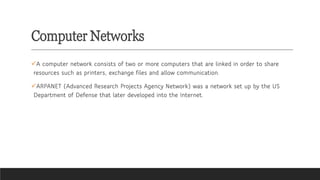
Computer Networks
✓A computer network consists of two or more computers that are linked in order to share
resources such as printers, exchange files and allow communication.
✓ARPANET (Advanced Research Projects Agency Network) was a network set up by the US
Department of Defense that later developed into the Internet.
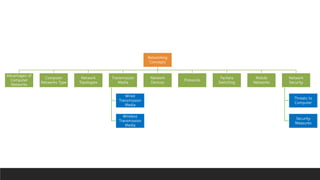
Networking
Concepts
Advantages of
Computer
Networks
Computer
Networks Type
Network
Topologies
Transmission
Media
Wired
Transmission
Media
Wireless
Transmission
Media
Network
Devices
Protocols
Packets
Switching
Mobile
Networks
Network
Security
Threats to
Computer
Security
Measures
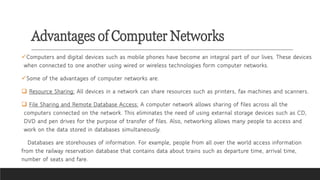
Advantages of Computer Networks
✓Computers and digital devices such as mobile phones have become an integral part of our lives. These devices
when connected to one another using wired or wireless technologies form computer networks.
✓Some of the advantages of computer networks are:
❑ Resource Sharing: All devices in a network can share resources such as printers, fax machines and scanners.
❑ File Sharing and Remote Database Access: A computer network allows sharing of files across all the
computers connected on the network. This eliminates the need of using external storage devices such as CD,
DVD and pen drives for the purpose of transfer of files. Also, networking allows many people to access and
work on the data stored in databases simultaneously.
Databases are storehouses of information. For example, people from all over the world access information
from the railway reservation database that contains data about trains such as departure time, arrival time,
number of seats and fare.
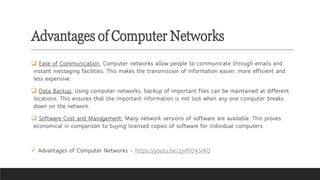
Advantages of Computer Networks
❑ Ease of Communication: Computer networks allow people to communicate through emails and
instant messaging facilities. This makes the transmission of information easier, more efficient and
less expensive.
❑ Data Backup: Using computer networks, backup of important files can be maintained at different
locations. This ensures that the important information is not lost when any one computer breaks
down on the network.
❑ Software Cost and Management: Many network versions of software are available. This proves
economical in comparison to buying licensed copies of software for individual computers.
✓ Advantages of Computer Networks - https://youtu.be/zjvRI04SrkQ
Types of Computer Networks
Types of Computer Networks -
https://youtu.be/rtTWABrbUVQ
✓The following are the types of networks based on the
geographical area covered.
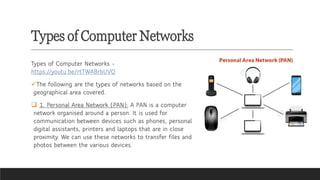
❑ 1. Personal Area Network (PAN): A PAN is a computer
network organised around a person. It is used for
communication between devices such as phones, personal
digital assistants, printers and laptops that are in close
proximity. We can use these networks to transfer files and
photos between the various devices.
Types of Computer Networks
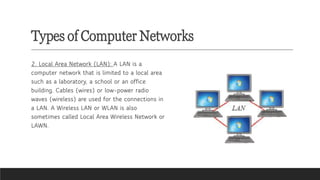
2. Local Area Network (LAN): A LAN is a
computer network that is limited to a local area
such as a laboratory, a school or an office
building. Cables (wires) or low-power radio
waves (wireless) are used for the connections in
a LAN. A Wireless LAN or WLAN is also
sometimes called Local Area Wireless Network or
LAWN.
Types of Computer Networks
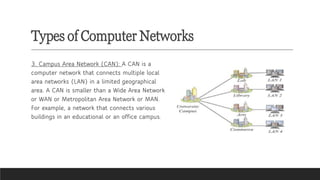
3. Campus Area Network (CAN): A CAN is a
computer network that connects multiple local
area networks (LAN) in a limited geographical
area. A CAN is smaller than a Wide Area Network
or WAN or Metropolitan Area Network or MAN.
For example, a network that connects various
buildings in an educational or an office campus.
Types of Computer Networks
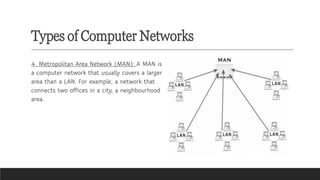
4. Metropolitan Area Network (MAN): A MAN is
a computer network that usually covers a larger
area than a LAN. For example, a network that
connects two offices in a city, a neighbourhood
area.
Types of Computer Networks
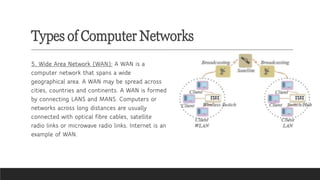
5. Wide Area Network (WAN): A WAN is a
computer network that spans a wide
geographical area. A WAN may be spread across
cities, countries and continents. A WAN is formed
by connecting LANS and MANS. Computers or
networks across long distances are usually
connected with optical fibre cables, satellite
radio links or microwave radio links. Internet is an
example of WAN.
Network Topologies
Topology refers to the layout pattern in
which various computers are connected
to one another to form a network. The
computers on a network are also referred
to as nodes.
There are four main types of topologies.
They are:
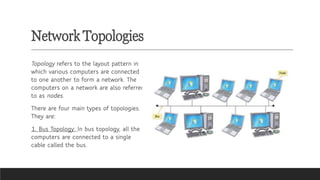
1. Bus Topology: In bus topology, all the
computers are connected to a single
cable called the bus.
Network Topologies
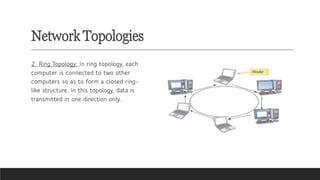
2. Ring Topology: In ring topology, each
computer is connected to two other
computers so as to form a closed ring-
like structure. In this topology, data is
transmitted in one direction only.
Network Topologies
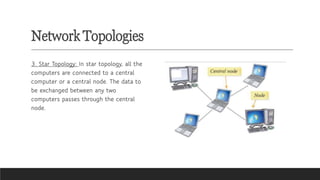
3. Star Topology: In star topology, all the
computers are connected to a central
computer or a central node. The data to
be exchanged between any two
computers passes through the central
node.
Network Topologies
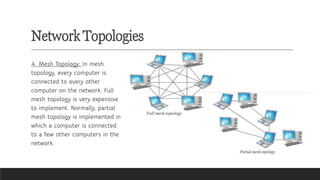
4. Mesh Topology: In mesh
topology, every computer is
connected to every other
computer on the network. Full
mesh topology is very expensive
to implement. Normally, partial
mesh topology is implemented in
which a computer is connected
to a few other computers in the
network.
Transmission Media
Computers must be connected to each other to form a network. Computers can be connected using
wires/cables or they can be connected in a wireless manner.
Wired Transmission Media
There are various types of cables that can be used for setting up a network. Some of them are
discussed here.
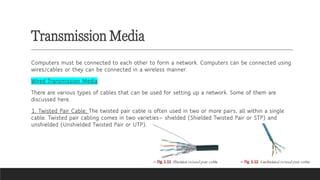
1. Twisted Pair Cable: The twisted pair cable is often used in two or more pairs, all within a single
cable. Twisted pair cabling comes in two varieties— shielded (Shielded Twisted Pair or STP) and
unshielded (Unshielded Twisted Pair or UTP).
Transmission Media
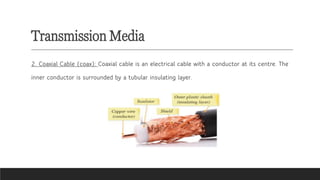
2. Coaxial Cable (coax): Coaxial cable is an electrical cable with a conductor at its centre. The
inner conductor is surrounded by a tubular insulating layer.
Transmission Media
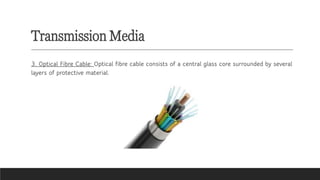
3. Optical Fibre Cable: Optical fibre cable consists of a central glass core surrounded by several
layers of protective material.
Transmission Media
Wireless Transmission Media
In wireless networks, data is transmitted without wires. Some of the ways in which wireless networks
may be set up are as follows.
1. Infrared: The infrared communication range of the devices communicating through infrared
waves is very limited. The communication between a TV set and a remote control happens
through infrared waves.
2. Microwave Transmission: They are unidirectional and used for terrestrial communication (on the
surface of the earth) or for satellite communication.
3. Radiowave Transmission: Radio waves are easy to generate, can travel long distances and
penetrate through buildings easily. So they are widely used for communication both indoors and
outdoors.
Transmission Media
4. Bluetooth technology: It is used for exchanging data over short distances using radio waves.
This technology uses low power, has a short range [30 feet (approx.)] and medium
transmission speed.
5. WiFi technology: WiFi technology also makes use of radio waves to transmit and receive data.
This technology requires more energy but enables the signal to go farther (300 feet approx.)
with a faster rate of transmission.
6. WiMAX (Worldwide Interoperability for Microwave Access): Its technology is similar to WiFi,
but it operates at higher speeds and can cover greater distances and greater number of users
as compared to WiFi.
Network Devices
Various devices used for setting up a computer network are:
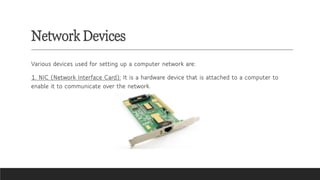
1. NIC (Network Interface Card): It is a hardware device that is attached to a computer to
enable it to communicate over the network.
Network Devices
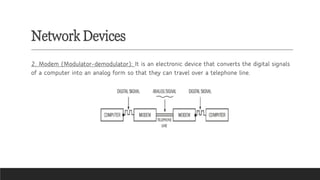
2. Modem (Modulator-demodulator): It is an electronic device that converts the digital signals
of a computer into an analog form so that they can travel over a telephone line.
Network Devices
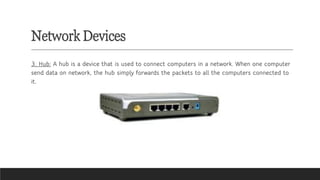
3. Hub: A hub is a device that is used to connect computers in a network. When one computer
send data on network, the hub simply forwards the packets to all the computers connected to
it.
Network Devices
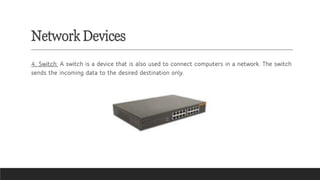
4. Switch: A switch is a device that is also used to connect computers in a network. The switch
sends the incoming data to the desired destination only.
Network Devices
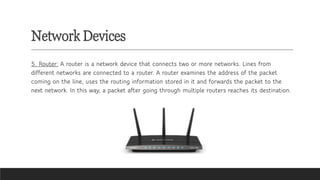
5. Router: A router is a network device that connects two or more networks. Lines from
different networks are connected to a router. A router examines the address of the packet
coming on the line, uses the routing information stored in it and forwards the packet to the
next network. In this way, a packet after going through multiple routers reaches its destination.
Protocols
Protocol is a set of rules used by computers on a network to communicate with each other. Some
examples of protocols are:
1. TCP/IP (Transmission Control Protocol/Internet Protocol): TCP is a protocol that is used along with
the IP to send data over the Internet. The information is transmitted across the Internet in the form
of bundles called packets. TCP is responsible for dividing the data into packets before they send and
for reassembling the packets when they arrive at the destination. IP is the set of specification that
determine the best route for the packets.
2. HTTP (Hyper Text Transfer Protocol): It is a protocol used between a web server and a web browser
for transferring HTML pages.
3. HTTPS (Hypertext Transfer Protocol Secure): Hypertext Transfer Protocol Secure is an extension of
the Hypertext Transfer Protocol. It is encrypted to ensure secure communication over a computer
network. This protocol is used whenever users want to transmit sensitive data such as accessing
email service, performing an e-commerce transaction.
Packet Switching in Networks
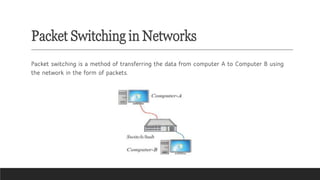
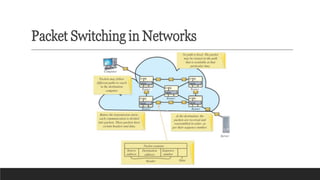
Packet switching is a method of transferring the data from computer A to Computer B using
the network in the form of packets.
Packet Switching in Networks
Let us understand the process of packet switching in a LAN. Suppose data has to be sent from
Computer A to Computer B. The data at Computer A is split into small chunks, called packets.
A header is added to every packet. The address of sender, i.e., Computer A and address of
receiver, i.e., Computer B are put in the header. Then Computer A sends the packets to the
switch. The switch has built-in software that reads the header of each packet, determines the
port at which the receiver is connected and forwards the packet accordingly. Such a type of
communication in which small units of data or packets are routed through a network, based on
the destination address contained within each packet, is called packet switching.
When packets have to be sent to a computer on a different network, they pass through a
number of routers. Every packet is numbered and may follow different paths to reach the
destination.
Packet Switching in Networks
Mobile Networks
The mobile wireless communication technology has seen a lot of changes in the past few years.
Starting with the 1G (First Generation) networks in the 1980s that used analog technology
and offered only voice-based services, the wireless communication technology has evolved to
4G (Fourth Generation) and 5G (Fifth Generation) networks that offer stable connectivity with
extremely high speeds.
4G networks provide HD quality video calls, streaming and gaming options to the customers.
5G networks will offer faster speeds than 4G and will support a massive number of Internet of
Things (IoT) devices.
Network Security
A computer on a network can be accessed by many users. Security measures have to be taken to protect
networks from unauthorised access and to prevent data or information theft.
Threats to Computer
1. Virus: A computer virus spreads itself from one computer to another and interferes with the normal
operations of a computer.
2. Worm: A worm is a computer program that uses computer networks to send copies of itself to other
computers on a network. A worm can spread without any human action too.
3. Trojan Horse: A computer program that appears to be a useful software but actually causes damage once
installed or executed onto your computer system is known as a Trojan horse or a Trojan.
4. Data Theft: It is a very serious problem for computer networks. People break into computer networks to
either disrupt their functioning or to steal confidential information. Hackers are the computer experts who
can break into computer systems and networks.
Network Security
Security Measures
1. Antivirus Software: Antivirus software can be used to
protect the computer from various types of malware.
Antivirus software can detect viruses, worms and so on,
and warn you of their presence in your computer.
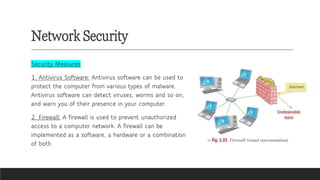
2. Firewall: A firewall is used to prevent unauthorized
access to a computer network. A firewall can be
implemented as a software, a hardware or a combination
of both.
Please subscribe to
my channel for
more videos
PDF of this content is available in
description box.
@sritomamajumder8823

CBSE Grade 8 Computer Science Ch 1 Networking Concepts Mind Map

  • 1.
  • 2.
    Computer Networks ✓A computernetwork consists of two or more computers that are linked in order to share resources such as printers, exchange files and allow communication. ✓ARPANET (Advanced Research Projects Agency Network) was a network set up by the US Department of Defense that later developed into the Internet.
  • 3.
  • 4.
    Advantages of ComputerNetworks ✓Computers and digital devices such as mobile phones have become an integral part of our lives. These devices when connected to one another using wired or wireless technologies form computer networks. ✓Some of the advantages of computer networks are: ❑ Resource Sharing: All devices in a network can share resources such as printers, fax machines and scanners. ❑ File Sharing and Remote Database Access: A computer network allows sharing of files across all the computers connected on the network. This eliminates the need of using external storage devices such as CD, DVD and pen drives for the purpose of transfer of files. Also, networking allows many people to access and work on the data stored in databases simultaneously. Databases are storehouses of information. For example, people from all over the world access information from the railway reservation database that contains data about trains such as departure time, arrival time, number of seats and fare.
  • 5.
    Advantages of ComputerNetworks ❑ Ease of Communication: Computer networks allow people to communicate through emails and instant messaging facilities. This makes the transmission of information easier, more efficient and less expensive. ❑ Data Backup: Using computer networks, backup of important files can be maintained at different locations. This ensures that the important information is not lost when any one computer breaks down on the network. ❑ Software Cost and Management: Many network versions of software are available. This proves economical in comparison to buying licensed copies of software for individual computers. ✓ Advantages of Computer Networks - https://youtu.be/zjvRI04SrkQ
  • 6.
    Types of ComputerNetworks Types of Computer Networks - https://youtu.be/rtTWABrbUVQ ✓The following are the types of networks based on the geographical area covered. ❑ 1. Personal Area Network (PAN): A PAN is a computer network organised around a person. It is used for communication between devices such as phones, personal digital assistants, printers and laptops that are in close proximity. We can use these networks to transfer files and photos between the various devices.
  • 7.
    Types of ComputerNetworks 2. Local Area Network (LAN): A LAN is a computer network that is limited to a local area such as a laboratory, a school or an office building. Cables (wires) or low-power radio waves (wireless) are used for the connections in a LAN. A Wireless LAN or WLAN is also sometimes called Local Area Wireless Network or LAWN.
  • 8.
    Types of ComputerNetworks 3. Campus Area Network (CAN): A CAN is a computer network that connects multiple local area networks (LAN) in a limited geographical area. A CAN is smaller than a Wide Area Network or WAN or Metropolitan Area Network or MAN. For example, a network that connects various buildings in an educational or an office campus.
  • 9.
    Types of ComputerNetworks 4. Metropolitan Area Network (MAN): A MAN is a computer network that usually covers a larger area than a LAN. For example, a network that connects two offices in a city, a neighbourhood area.
  • 10.
    Types of ComputerNetworks 5. Wide Area Network (WAN): A WAN is a computer network that spans a wide geographical area. A WAN may be spread across cities, countries and continents. A WAN is formed by connecting LANS and MANS. Computers or networks across long distances are usually connected with optical fibre cables, satellite radio links or microwave radio links. Internet is an example of WAN.
  • 11.
    Network Topologies Topology refersto the layout pattern in which various computers are connected to one another to form a network. The computers on a network are also referred to as nodes. There are four main types of topologies. They are: 1. Bus Topology: In bus topology, all the computers are connected to a single cable called the bus.
  • 12.
    Network Topologies 2. RingTopology: In ring topology, each computer is connected to two other computers so as to form a closed ring- like structure. In this topology, data is transmitted in one direction only.
  • 13.
    Network Topologies 3. StarTopology: In star topology, all the computers are connected to a central computer or a central node. The data to be exchanged between any two computers passes through the central node.
  • 14.
    Network Topologies 4. MeshTopology: In mesh topology, every computer is connected to every other computer on the network. Full mesh topology is very expensive to implement. Normally, partial mesh topology is implemented in which a computer is connected to a few other computers in the network.
  • 15.
    Transmission Media Computers mustbe connected to each other to form a network. Computers can be connected using wires/cables or they can be connected in a wireless manner. Wired Transmission Media There are various types of cables that can be used for setting up a network. Some of them are discussed here. 1. Twisted Pair Cable: The twisted pair cable is often used in two or more pairs, all within a single cable. Twisted pair cabling comes in two varieties— shielded (Shielded Twisted Pair or STP) and unshielded (Unshielded Twisted Pair or UTP).
  • 16.
    Transmission Media 2. CoaxialCable (coax): Coaxial cable is an electrical cable with a conductor at its centre. The inner conductor is surrounded by a tubular insulating layer.
  • 17.
    Transmission Media 3. OpticalFibre Cable: Optical fibre cable consists of a central glass core surrounded by several layers of protective material.
  • 18.
    Transmission Media Wireless TransmissionMedia In wireless networks, data is transmitted without wires. Some of the ways in which wireless networks may be set up are as follows. 1. Infrared: The infrared communication range of the devices communicating through infrared waves is very limited. The communication between a TV set and a remote control happens through infrared waves. 2. Microwave Transmission: They are unidirectional and used for terrestrial communication (on the surface of the earth) or for satellite communication. 3. Radiowave Transmission: Radio waves are easy to generate, can travel long distances and penetrate through buildings easily. So they are widely used for communication both indoors and outdoors.
  • 19.
    Transmission Media 4. Bluetoothtechnology: It is used for exchanging data over short distances using radio waves. This technology uses low power, has a short range [30 feet (approx.)] and medium transmission speed. 5. WiFi technology: WiFi technology also makes use of radio waves to transmit and receive data. This technology requires more energy but enables the signal to go farther (300 feet approx.) with a faster rate of transmission. 6. WiMAX (Worldwide Interoperability for Microwave Access): Its technology is similar to WiFi, but it operates at higher speeds and can cover greater distances and greater number of users as compared to WiFi.
  • 20.
    Network Devices Various devicesused for setting up a computer network are: 1. NIC (Network Interface Card): It is a hardware device that is attached to a computer to enable it to communicate over the network.
  • 21.
    Network Devices 2. Modem(Modulator-demodulator): It is an electronic device that converts the digital signals of a computer into an analog form so that they can travel over a telephone line.
  • 22.
    Network Devices 3. Hub:A hub is a device that is used to connect computers in a network. When one computer send data on network, the hub simply forwards the packets to all the computers connected to it.
  • 23.
    Network Devices 4. Switch:A switch is a device that is also used to connect computers in a network. The switch sends the incoming data to the desired destination only.
  • 24.
    Network Devices 5. Router:A router is a network device that connects two or more networks. Lines from different networks are connected to a router. A router examines the address of the packet coming on the line, uses the routing information stored in it and forwards the packet to the next network. In this way, a packet after going through multiple routers reaches its destination.
  • 25.
    Protocols Protocol is aset of rules used by computers on a network to communicate with each other. Some examples of protocols are: 1. TCP/IP (Transmission Control Protocol/Internet Protocol): TCP is a protocol that is used along with the IP to send data over the Internet. The information is transmitted across the Internet in the form of bundles called packets. TCP is responsible for dividing the data into packets before they send and for reassembling the packets when they arrive at the destination. IP is the set of specification that determine the best route for the packets. 2. HTTP (Hyper Text Transfer Protocol): It is a protocol used between a web server and a web browser for transferring HTML pages. 3. HTTPS (Hypertext Transfer Protocol Secure): Hypertext Transfer Protocol Secure is an extension of the Hypertext Transfer Protocol. It is encrypted to ensure secure communication over a computer network. This protocol is used whenever users want to transmit sensitive data such as accessing email service, performing an e-commerce transaction.
  • 26.
    Packet Switching inNetworks Packet switching is a method of transferring the data from computer A to Computer B using the network in the form of packets.
  • 27.
    Packet Switching inNetworks Let us understand the process of packet switching in a LAN. Suppose data has to be sent from Computer A to Computer B. The data at Computer A is split into small chunks, called packets. A header is added to every packet. The address of sender, i.e., Computer A and address of receiver, i.e., Computer B are put in the header. Then Computer A sends the packets to the switch. The switch has built-in software that reads the header of each packet, determines the port at which the receiver is connected and forwards the packet accordingly. Such a type of communication in which small units of data or packets are routed through a network, based on the destination address contained within each packet, is called packet switching. When packets have to be sent to a computer on a different network, they pass through a number of routers. Every packet is numbered and may follow different paths to reach the destination.
  • 28.
  • 29.
    Mobile Networks The mobilewireless communication technology has seen a lot of changes in the past few years. Starting with the 1G (First Generation) networks in the 1980s that used analog technology and offered only voice-based services, the wireless communication technology has evolved to 4G (Fourth Generation) and 5G (Fifth Generation) networks that offer stable connectivity with extremely high speeds. 4G networks provide HD quality video calls, streaming and gaming options to the customers. 5G networks will offer faster speeds than 4G and will support a massive number of Internet of Things (IoT) devices.
  • 30.
    Network Security A computeron a network can be accessed by many users. Security measures have to be taken to protect networks from unauthorised access and to prevent data or information theft. Threats to Computer 1. Virus: A computer virus spreads itself from one computer to another and interferes with the normal operations of a computer. 2. Worm: A worm is a computer program that uses computer networks to send copies of itself to other computers on a network. A worm can spread without any human action too. 3. Trojan Horse: A computer program that appears to be a useful software but actually causes damage once installed or executed onto your computer system is known as a Trojan horse or a Trojan. 4. Data Theft: It is a very serious problem for computer networks. People break into computer networks to either disrupt their functioning or to steal confidential information. Hackers are the computer experts who can break into computer systems and networks.
  • 31.
    Network Security Security Measures 1.Antivirus Software: Antivirus software can be used to protect the computer from various types of malware. Antivirus software can detect viruses, worms and so on, and warn you of their presence in your computer. 2. Firewall: A firewall is used to prevent unauthorized access to a computer network. A firewall can be implemented as a software, a hardware or a combination of both.
  • 32.
    Please subscribe to mychannel for more videos PDF of this content is available in description box. @sritomamajumder8823