BRIDGING THE DIGITAL DIVIDE  WITH SUSTAINABILITY www.softprixsarl.com May 2010 Presenter : Emmanuel Kijem Managing Director Softprix Sarl
SUMMARY Digital Divide (DD) Issues Access to Computing Resources Sustainability Issues The nComputing Solution How nComputing helps in bridging the Digital Divide
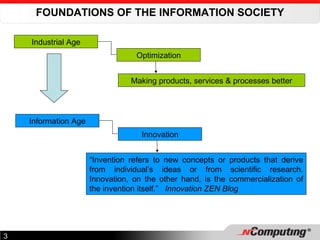
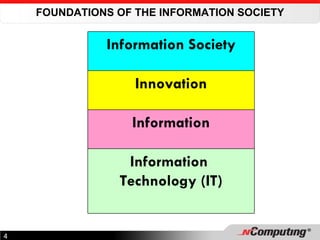
FOUNDATIONS OF THE INFORMATION SOCIETY Industrial Age Optimization Making products, services & processes better Information Age Innovation “ Invention refers to new concepts or products that derive from individual’s ideas or from scientific research. Innovation, on the other hand, is the commercialization of the invention itself.”  Innovation ZEN Blog
FOUNDATIONS OF THE INFORMATION SOCIETY Information Society Innovation Information Information  Technology (IT)
THE INFORMATION SOCIETY "The number one benefit of information technology is that it empowers people to do what they want to do. It lets people be creative. It lets people be productive. It lets people learn things they didn't think they could learn before, and so in a sense it is all about  potential ."  Steve Ballmer, CEO Microsoft The POTENTIAL to Innovate Unequal distribution within countries (e.g. USA) Unequal distribution worldwide This has been called the Digital Divide
WHAT IS THE DIGITAL DIVIDE? The gap between people who possess regular access to technology and those who do not have this access.  By technology, we mean computers, computer resources and Information Technology (IT) functions like the ability to get on the Internet Term originated in the 1990s and was much used in the early days by the Clinton Administration (USA) to discuss what could be done about bridging this gap.  There are many ways to look at or consider the digital divide. For people like President Clinton, the divide separated the “haves and have-nots” within the US An International issue that is one of the main drivers of the World Summit on the Information Society (WSIS)  held in Geneva (December 2003) and in Tunis (November 2005)
"It is dangerously destabilizing to have half the world on the cutting edge of technology while the other half struggles on the bare edge of survival."  Bill Clinton
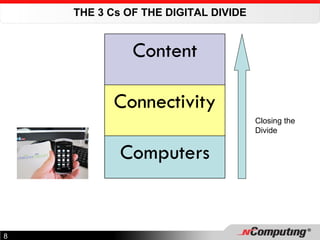
THE 3 Cs OF THE DIGITAL DIVIDE Closing the Divide Content Connectivity Computers
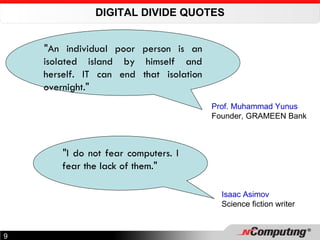
DIGITAL DIVIDE QUOTES "An individual poor person is an isolated island by himself and herself. IT can end that isolation overnight." Prof. Muhammad Yunus Founder, GRAMEEN Bank "I do not fear computers. I fear the lack of them." Isaac Asimov Science fiction writer
ACCESS TO COMPUTING RESOURCES Access to computer resources is at the heart of the fight to close the Digital Divide Major priority for most countries and the United Nations (WSIS) President Paul Biya’ speech at Lycée Général le Clerc in Nov. 2001 President’s vision: Cameroon prepares youth for Information Society Introduction of IT training in schools (Multimedia Centres) Many other Digital Divide Initiatives ongoing
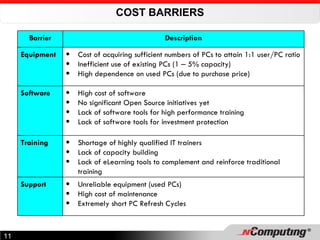
COST BARRIERS Barrier Description Equipment Cost of acquiring sufficient numbers of PCs to attain 1:1 user/PC ratio Inefficient use of existing PCs (1  –  5% capacity) High dependence on used PCs (due to purchase price) Software High cost of software No significant Open Source initiatives yet Lack of software tools for high performance training Lack of software tools for investment protection Training Shortage of highly qualified IT trainers Lack of capacity building Lack of eLearning tools to complement and reinforce traditional training Support Unreliable equipment (used PCs) High cost of maintenance Extremely short PC Refresh Cycles
SUSTAINABILITY ISSUES TCO vs Purchase Price Technology Obsolesence Green Computing
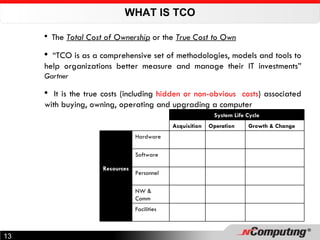
WHAT IS TCO The  Total Cost of Ownership  or the  True Cost to Own “ TCO is as a comprehensive set of methodologies, models and tools to help organizations better measure and manage their IT investments”  Gartner It is the true costs (including  hidden or non-obvious  costs ) associated with buying, owning, operating and upgrading a computer   System Life Cycle Acquisition Operation Growth & Change Resources Hardware Software Personnel NW & Comm Facilities
TCO (CONT’D) Price  of a computer vs  Cost  of a computer Typically over 5 yr period for IT capital investments The 5-yr TCO of major computer systems can be 5-8 times the purchase price For PC’s, it can be up to 2-3 times the original purchase price Analogy choice to buy one of 2 shirts A & B Price of A 10,000 F CFA more than Price of B; so you buy B But B requires dry-cleaning using special process Each time you dry-clean, you spend 2,000 F CFA After 5 washes, your initial saving is completely gone The cheaper shirt to  buy  is actually more expensive to  own
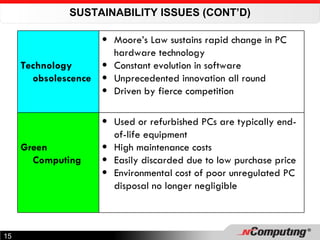
SUSTAINABILITY ISSUES (CONT’D) Technology obsolescence Moore’s Law sustains rapid change in PC hardware technology Constant evolution in software Unprecedented innovation all round Driven by fierce competition Green Computing Used or refurbished PCs are typically end-of-life equipment High maintenance costs Easily discarded due to low purchase price Environmental cost of poor unregulated PC disposal no longer negligible
RESOLVING THE COMPUTING ACCESS PROBLEM One Laptop per Child (OLPC) NEWDEAL – Recycling Computers Refurbished PCs  (Computer Aid Int’l) Multi-user Computing  (NComputing) or Shared Resource Computing (SRC)
THE NCOMPUTING SOLUTION Vision Approach How it works Solutions  Advantages Lowering computing costs
NCOMPUTING VISION Expand Access & Dramatically Lower Computing Costs through Multi-User Computing   Currently there are about  850 million  people in the world who have computer access.  Researchers say that another billion people want access to computing, but simply cannot afford it because the cost of computer hardware and management is too high. NComputing's vision is to bring affordable computing to the  next billion people  so they can join the  digital economy . Manish Sharma Vice President, Asia Pacific, NComputing.
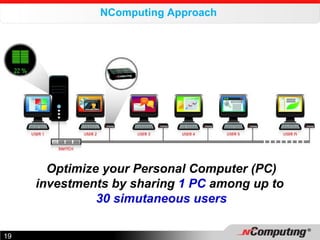
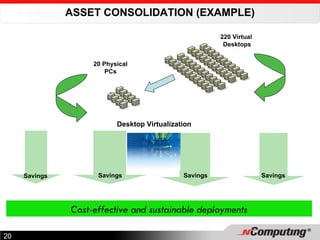
NComputing Approach  Optimize your Personal Computer (PC) investments by sharing  1 PC  among up to  30 simutaneous users
ASSET CONSOLIDATION (EXAMPLE) Cost-effective and sustainable deployments Desktop Virtualization Savings Savings 20 Physical PCs 220 Virtual  Desktops Savings Savings
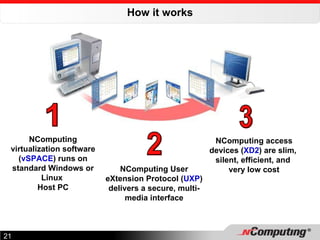
How it works 1 NComputing virtualization software ( vSPACE ) runs on standard Windows or Linux  Host PC 2 NComputing User eXtension Protocol ( UXP ) delivers a secure, multi-media interface 3 NComputing access devices ( XD2 ) are slim,  silent, efficient, and  very low cost
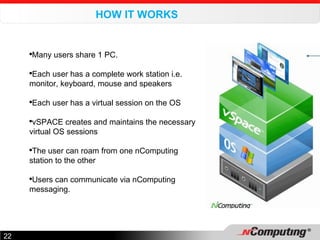
HOW IT WORKS Many users share 1 PC. Each user has a complete work station i.e. monitor, keyboard, mouse and speakers Each user has a virtual session on the OS vSPACE creates and maintains the necessary virtual OS sessions The user can roam from one nComputing station to the other Users can communicate via nComputing messaging.
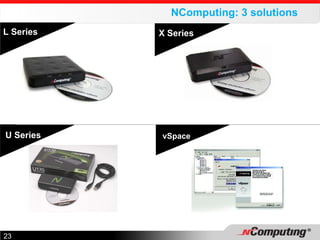
NComputing:  3  solutions  U Series L Series X Series vSpace
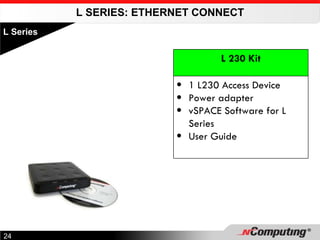
L SERIES: ETHERNET CONNECT L Series L 230 Kit 1 L230 Access Device Power adapter vSPACE Software for L Series User Guide
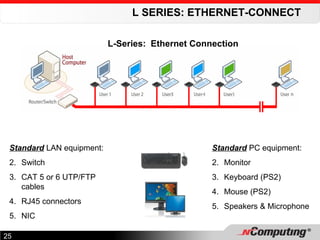
L SERIES: ETHERNET-CONNECT Standard  LAN equipment: Switch CAT 5 or 6 UTP/FTP cables RJ45 connectors NIC Standard  PC equipment: Monitor Keyboard (PS2) Mouse (PS2) Speakers & Microphone L-Series:  Ethernet Connection
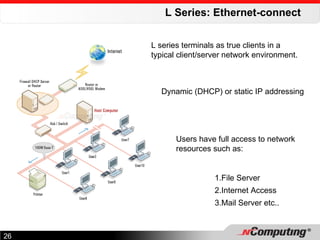
L Series: Ethernet-connect Users have full access to network resources such as: File Server Internet Access Mail Server etc.. L series terminals as true clients in a typical client/server network environment. Dynamic (DHCP) or static IP addressing
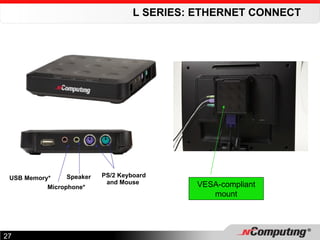
L SERIES: ETHERNET CONNECT VESA-compliant mount Speaker  USB Memory* Microphone*  PS/2 Keyboard and Mouse
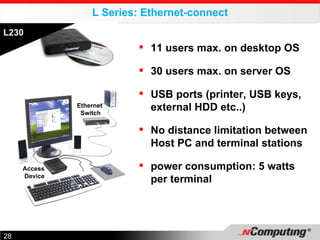
L Series: Ethernet-connect L230 11 users max. on desktop OS 30 users max. on server OS USB ports (printer, USB keys, external HDD etc..) No distance limitation between Host PC and terminal stations power consumption: 5 watts per terminal Ethernet  Switch Access  Device
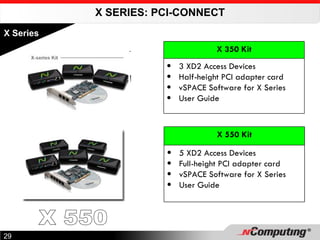
X SERIES: PCI-CONNECT X Series X 350 Kit 3 XD2 Access Devices Half-height PCI adapter card vSPACE Software for X Series User Guide X 550 Kit 5 XD2 Access Devices Full-height PCI adapter card vSPACE Software for X Series User Guide X 550
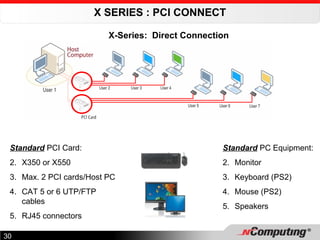
X SERIES : PCI CONNECT Standard  PCI Card: X350 or X550 Max. 2 PCI cards/Host PC CAT 5 or 6 UTP/FTP cables RJ45 connectors Standard  PC Equipment: Monitor Keyboard (PS2) Mouse (PS2) Speakers X-Series:  Direct Connection
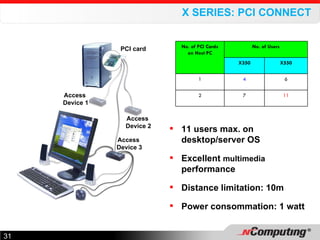
X SERIES: PCI CONNECT 11 users max. on desktop/server OS Excellent  multimedia   performance Distance limitation: 10m Power consommation: 1 watt Access  Device 1 Access  Device 2 Access  Device 3 PCI card No. of PCI Cards on Host PC No. of Users X350 X550 1 4 6 2 7 11
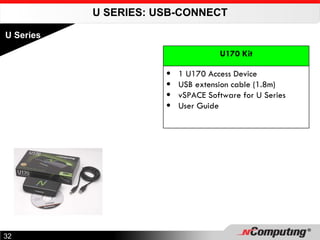
U SERIES: USB-CONNECT U Series U170 Kit 1 U170 Access Device USB extension cable (1.8m) vSPACE Software for U Series User Guide
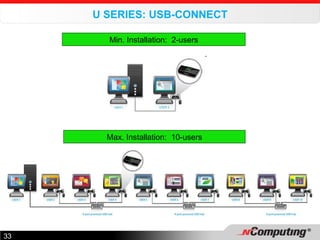
U SERIES: USB-CONNECT Max. Installation:  10-users Min. Installation:  2-users
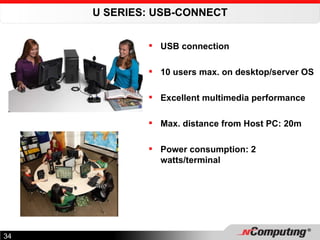
U SERIES: USB-CONNECT USB connection 10 users max. on desktop/server OS Excellent multimedia performance Max. distance from Host PC: 20m Power consumption: 2 watts/terminal
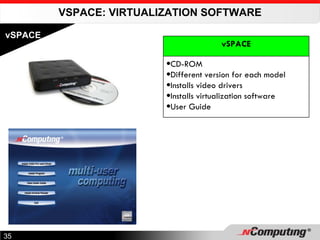
VSPACE: VIRTUALIZATION SOFTWARE vSPACE vSPACE CD-ROM Different version for each model Installs video drivers Installs virtualization software User Guide
vSPACE Creates virtual Windows sessions for all users when they login Dynamically attributes PC resources (hardware/software) to users Manages communications between terminal stations and the Host PC via the nComputing User eXtension Protocol (UXP) Incorporates an Administration Console that enables several functionalities including: Configure terminal work stations from the Host PC  Remotely stop or restart terminal stations  See applications running on an L series terminal station See the user connected to an L Series station and their connection status Monitor the IP address of each station Send messages to users Observe what users do on their L230 stations
NCOMPUTING BENEFITS SUMMARY Compatible Affordable Simple Efficient
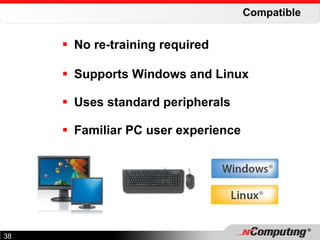
Compatible No re-training required  Supports Windows and Linux Uses standard peripherals Familiar PC user experience
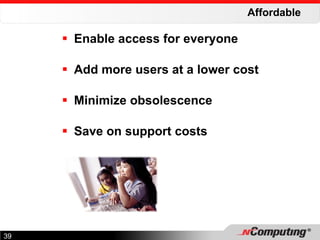
Affordable Enable access for everyone  Add more users at a lower cost Minimize obsolescence Save on support costs
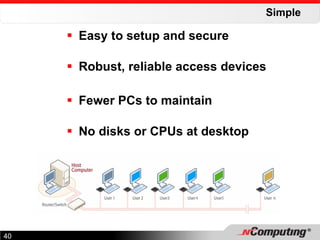
Simple Easy to setup and secure Robust, reliable access devices Fewer PCs to maintain No disks or CPUs at desktop
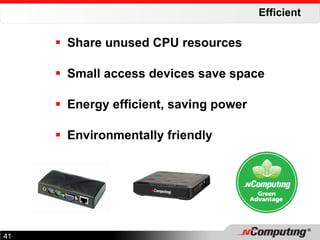
Efficient Share unused CPU resources Small access devices save space Energy efficient, saving power Environmentally friendly
OTHER BENEFITS     Centralized administration of data and applications   Improved collaboration through file-sharing, instant messaging and remote desktop access   Enhanced security as NComputing workstations cannot be attacked by viruses and systems administrators can disable USB key access  Minimization of the impact of obsolescence’ .
TIPS FOR COST REDUCTION Analyse computer usage modes and match tasks to computing resources to cut out waste NComputing much more suited to hostile environments than PCs Some activities just lend themselves naturally to multi-user computing e.g. schools, training centres, data input halls, call centres, offices etc.. Replace PCs with nComputing in next PC Refresh Cycle The best strategy, once nComputing is adopted, is to: Start with small deployment e.g. in an organisation unit Once satisfied with solution, expand the deployment to cover the whole organisation
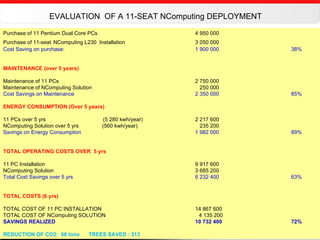
Purchase of 11 Pentium Dual Core PCs  4 950 000 Purchase of 11-seat   NComputing L230  Installation 3 050 000 Cost Saving on purchase:    1 900 000  38% MAINTENANCE (over 5 years) Maintenance of 11 PCs   2 750 000 Maintenance of NComputing Solution     250 000 Cost Savings on Maintenance 2 350 000  85% ENERGY CONSUMPTION (Over 5 years) 11 PCs over 5 yrs   (5 280 kwh/year) 2 217 600  NComputing Solution over 5 yrs   (560 kwh/year)   235 200 Savings on Energy Consumption 1 982 000  89% TOTAL OPERATING COSTS OVER  5 yrs 11 PC Installation  9 917 600  NComputing Solution 3 685 200 Total Cost Savings over 5 yrs 6 232 400   63% TOTAL COSTS (6 yrs) TOTAL COST OF 11 PC INSTALLATION 14 867 600 TOTAL COST OF NComputing SOLUTION   4 135 200 SAVINGS REALIZED 10 732 400  72% REDUCTION OF CO2:  66 tons  TREES SAVED : 313 EVALUATION  OF A 11-SEAT NComputing DEPLOYMENT
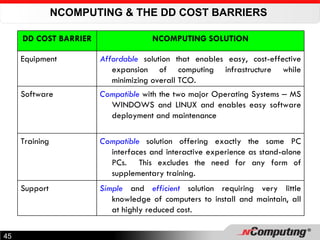
NCOMPUTING & THE DD COST BARRIERS  DD COST BARRIER NCOMPUTING SOLUTION Equipment Affordable  solution that enables easy, cost-effective expansion of computing infrastructure while minimizing overall TCO. Software Compatible  with the two major Operating Systems  –  MS WINDOWS and LINUX and enables easy software deployment and maintenance Training Compatible  solution offering exactly the same PC interfaces and interactive experience as stand-alone PCs.  This excludes the need for any form of supplementary training. Support Simple  and  efficient  solution requiring very little knowledge of computers to install and maintain, all at highly reduced cost.
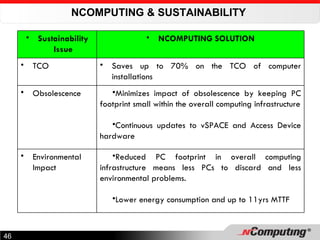
NCOMPUTING & SUSTAINABILITY  Sustainability Issue NCOMPUTING SOLUTION TCO Saves up to 70% on the TCO of computer installations Obsolescence Minimizes impact of obsolescence by keeping PC footprint small within the overall computing infrastructure Continuous updates to vSPACE and Access Device hardware Environmental Impact Reduced PC footprint in overall computing infrastructure means less PCs to discard and less environmental problems.  Lower energy consumption and up to 11yrs MTTF
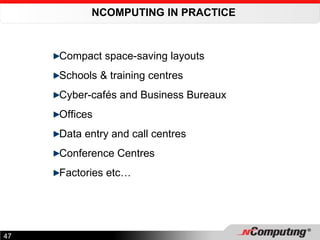
NCOMPUTING IN PRACTICE  Compact space-saving layouts Schools & training centres Cyber-cafés and Business Bureaux Offices Data entry and call centres Conference Centres Factories etc…
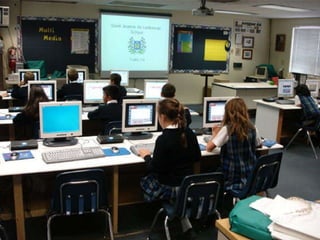
USA
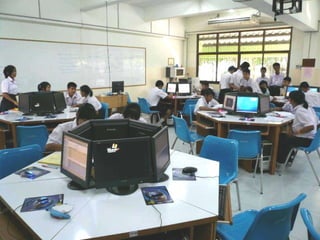
Thailand
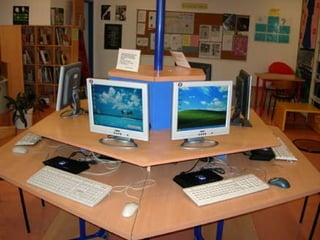
Turkey
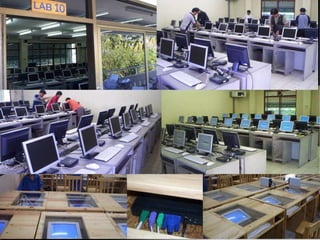
Computer Labs
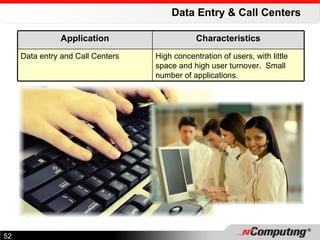
Data Entry & Call Centers Application Characteristics Data entry and Call Centers High concentration of users, with little space and high user turnover.  Small number of applications.
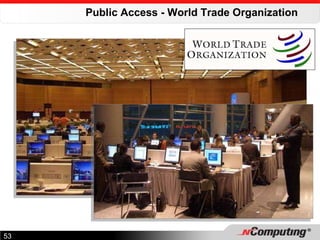
Public Access - World Trade Organization
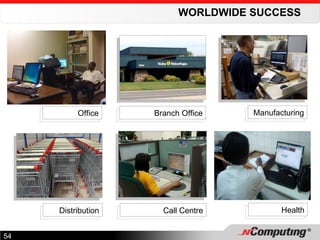
WORLDWIDE SUCCESS Office Branch Office Manufacturing Distribution Call Centre Health
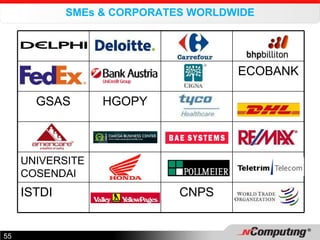
SMEs & CORPORATES WORLDWIDE ECOBANK GSAS HGOPY UNIVERSITE COSENDAI ISTDI CNPS
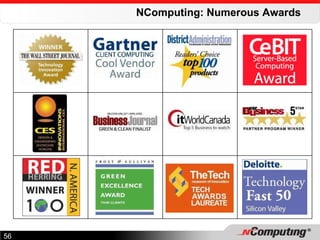
NComputing: Numerous Awards
CONTACT US: Soft prix  Sarl B.P. 15158 Douala Cameroon Office Tel: +237 3341 3443 / 3303 2482 / 7949 0711 Email:  [email_address]   Web Site:  http://www.softprixsarl.com Knowledge Centre:  http://www.flexknowledge.com   Web Portal:   http://www.softprix.com   THANK YOU!

NetSquared Camp Cameroon - N Computing Presentation

  • 1.
    BRIDGING THE DIGITALDIVIDE WITH SUSTAINABILITY www.softprixsarl.com May 2010 Presenter : Emmanuel Kijem Managing Director Softprix Sarl
  • 2.
    SUMMARY Digital Divide(DD) Issues Access to Computing Resources Sustainability Issues The nComputing Solution How nComputing helps in bridging the Digital Divide
  • 3.
    FOUNDATIONS OF THEINFORMATION SOCIETY Industrial Age Optimization Making products, services & processes better Information Age Innovation “ Invention refers to new concepts or products that derive from individual’s ideas or from scientific research. Innovation, on the other hand, is the commercialization of the invention itself.” Innovation ZEN Blog
  • 4.
    FOUNDATIONS OF THEINFORMATION SOCIETY Information Society Innovation Information Information Technology (IT)
  • 5.
    THE INFORMATION SOCIETY"The number one benefit of information technology is that it empowers people to do what they want to do. It lets people be creative. It lets people be productive. It lets people learn things they didn't think they could learn before, and so in a sense it is all about potential ." Steve Ballmer, CEO Microsoft The POTENTIAL to Innovate Unequal distribution within countries (e.g. USA) Unequal distribution worldwide This has been called the Digital Divide
  • 6.
    WHAT IS THEDIGITAL DIVIDE? The gap between people who possess regular access to technology and those who do not have this access. By technology, we mean computers, computer resources and Information Technology (IT) functions like the ability to get on the Internet Term originated in the 1990s and was much used in the early days by the Clinton Administration (USA) to discuss what could be done about bridging this gap. There are many ways to look at or consider the digital divide. For people like President Clinton, the divide separated the “haves and have-nots” within the US An International issue that is one of the main drivers of the World Summit on the Information Society (WSIS) held in Geneva (December 2003) and in Tunis (November 2005)
  • 7.
    "It is dangerouslydestabilizing to have half the world on the cutting edge of technology while the other half struggles on the bare edge of survival." Bill Clinton
  • 8.
    THE 3 CsOF THE DIGITAL DIVIDE Closing the Divide Content Connectivity Computers
  • 9.
    DIGITAL DIVIDE QUOTES"An individual poor person is an isolated island by himself and herself. IT can end that isolation overnight." Prof. Muhammad Yunus Founder, GRAMEEN Bank "I do not fear computers. I fear the lack of them." Isaac Asimov Science fiction writer
  • 10.
    ACCESS TO COMPUTINGRESOURCES Access to computer resources is at the heart of the fight to close the Digital Divide Major priority for most countries and the United Nations (WSIS) President Paul Biya’ speech at Lycée Général le Clerc in Nov. 2001 President’s vision: Cameroon prepares youth for Information Society Introduction of IT training in schools (Multimedia Centres) Many other Digital Divide Initiatives ongoing
  • 11.
    COST BARRIERS BarrierDescription Equipment Cost of acquiring sufficient numbers of PCs to attain 1:1 user/PC ratio Inefficient use of existing PCs (1 – 5% capacity) High dependence on used PCs (due to purchase price) Software High cost of software No significant Open Source initiatives yet Lack of software tools for high performance training Lack of software tools for investment protection Training Shortage of highly qualified IT trainers Lack of capacity building Lack of eLearning tools to complement and reinforce traditional training Support Unreliable equipment (used PCs) High cost of maintenance Extremely short PC Refresh Cycles
  • 12.
    SUSTAINABILITY ISSUES TCOvs Purchase Price Technology Obsolesence Green Computing
  • 13.
    WHAT IS TCOThe Total Cost of Ownership or the True Cost to Own “ TCO is as a comprehensive set of methodologies, models and tools to help organizations better measure and manage their IT investments” Gartner It is the true costs (including hidden or non-obvious costs ) associated with buying, owning, operating and upgrading a computer System Life Cycle Acquisition Operation Growth & Change Resources Hardware Software Personnel NW & Comm Facilities
  • 14.
    TCO (CONT’D) Price of a computer vs Cost of a computer Typically over 5 yr period for IT capital investments The 5-yr TCO of major computer systems can be 5-8 times the purchase price For PC’s, it can be up to 2-3 times the original purchase price Analogy choice to buy one of 2 shirts A & B Price of A 10,000 F CFA more than Price of B; so you buy B But B requires dry-cleaning using special process Each time you dry-clean, you spend 2,000 F CFA After 5 washes, your initial saving is completely gone The cheaper shirt to buy is actually more expensive to own
  • 15.
    SUSTAINABILITY ISSUES (CONT’D)Technology obsolescence Moore’s Law sustains rapid change in PC hardware technology Constant evolution in software Unprecedented innovation all round Driven by fierce competition Green Computing Used or refurbished PCs are typically end-of-life equipment High maintenance costs Easily discarded due to low purchase price Environmental cost of poor unregulated PC disposal no longer negligible
  • 16.
    RESOLVING THE COMPUTINGACCESS PROBLEM One Laptop per Child (OLPC) NEWDEAL – Recycling Computers Refurbished PCs (Computer Aid Int’l) Multi-user Computing (NComputing) or Shared Resource Computing (SRC)
  • 17.
    THE NCOMPUTING SOLUTIONVision Approach How it works Solutions Advantages Lowering computing costs
  • 18.
    NCOMPUTING VISION ExpandAccess & Dramatically Lower Computing Costs through Multi-User Computing Currently there are about 850 million people in the world who have computer access.  Researchers say that another billion people want access to computing, but simply cannot afford it because the cost of computer hardware and management is too high. NComputing's vision is to bring affordable computing to the next billion people so they can join the digital economy . Manish Sharma Vice President, Asia Pacific, NComputing.
  • 19.
    NComputing Approach Optimize your Personal Computer (PC) investments by sharing 1 PC among up to 30 simutaneous users
  • 20.
    ASSET CONSOLIDATION (EXAMPLE)Cost-effective and sustainable deployments Desktop Virtualization Savings Savings 20 Physical PCs 220 Virtual Desktops Savings Savings
  • 21.
    How it works1 NComputing virtualization software ( vSPACE ) runs on standard Windows or Linux Host PC 2 NComputing User eXtension Protocol ( UXP ) delivers a secure, multi-media interface 3 NComputing access devices ( XD2 ) are slim, silent, efficient, and very low cost
  • 22.
    HOW IT WORKSMany users share 1 PC. Each user has a complete work station i.e. monitor, keyboard, mouse and speakers Each user has a virtual session on the OS vSPACE creates and maintains the necessary virtual OS sessions The user can roam from one nComputing station to the other Users can communicate via nComputing messaging.
  • 23.
    NComputing: 3 solutions U Series L Series X Series vSpace
  • 24.
    L SERIES: ETHERNETCONNECT L Series L 230 Kit 1 L230 Access Device Power adapter vSPACE Software for L Series User Guide
  • 25.
    L SERIES: ETHERNET-CONNECTStandard LAN equipment: Switch CAT 5 or 6 UTP/FTP cables RJ45 connectors NIC Standard PC equipment: Monitor Keyboard (PS2) Mouse (PS2) Speakers & Microphone L-Series: Ethernet Connection
  • 26.
    L Series: Ethernet-connectUsers have full access to network resources such as: File Server Internet Access Mail Server etc.. L series terminals as true clients in a typical client/server network environment. Dynamic (DHCP) or static IP addressing
  • 27.
    L SERIES: ETHERNETCONNECT VESA-compliant mount Speaker USB Memory* Microphone* PS/2 Keyboard and Mouse
  • 28.
    L Series: Ethernet-connectL230 11 users max. on desktop OS 30 users max. on server OS USB ports (printer, USB keys, external HDD etc..) No distance limitation between Host PC and terminal stations power consumption: 5 watts per terminal Ethernet Switch Access Device
  • 29.
    X SERIES: PCI-CONNECTX Series X 350 Kit 3 XD2 Access Devices Half-height PCI adapter card vSPACE Software for X Series User Guide X 550 Kit 5 XD2 Access Devices Full-height PCI adapter card vSPACE Software for X Series User Guide X 550
  • 30.
    X SERIES :PCI CONNECT Standard PCI Card: X350 or X550 Max. 2 PCI cards/Host PC CAT 5 or 6 UTP/FTP cables RJ45 connectors Standard PC Equipment: Monitor Keyboard (PS2) Mouse (PS2) Speakers X-Series: Direct Connection
  • 31.
    X SERIES: PCICONNECT 11 users max. on desktop/server OS Excellent multimedia performance Distance limitation: 10m Power consommation: 1 watt Access Device 1 Access Device 2 Access Device 3 PCI card No. of PCI Cards on Host PC No. of Users X350 X550 1 4 6 2 7 11
  • 32.
    U SERIES: USB-CONNECTU Series U170 Kit 1 U170 Access Device USB extension cable (1.8m) vSPACE Software for U Series User Guide
  • 33.
    U SERIES: USB-CONNECTMax. Installation: 10-users Min. Installation: 2-users
  • 34.
    U SERIES: USB-CONNECTUSB connection 10 users max. on desktop/server OS Excellent multimedia performance Max. distance from Host PC: 20m Power consumption: 2 watts/terminal
  • 35.
    VSPACE: VIRTUALIZATION SOFTWAREvSPACE vSPACE CD-ROM Different version for each model Installs video drivers Installs virtualization software User Guide
  • 36.
    vSPACE Creates virtualWindows sessions for all users when they login Dynamically attributes PC resources (hardware/software) to users Manages communications between terminal stations and the Host PC via the nComputing User eXtension Protocol (UXP) Incorporates an Administration Console that enables several functionalities including: Configure terminal work stations from the Host PC Remotely stop or restart terminal stations See applications running on an L series terminal station See the user connected to an L Series station and their connection status Monitor the IP address of each station Send messages to users Observe what users do on their L230 stations
  • 37.
    NCOMPUTING BENEFITS SUMMARYCompatible Affordable Simple Efficient
  • 38.
    Compatible No re-trainingrequired Supports Windows and Linux Uses standard peripherals Familiar PC user experience
  • 39.
    Affordable Enable accessfor everyone Add more users at a lower cost Minimize obsolescence Save on support costs
  • 40.
    Simple Easy tosetup and secure Robust, reliable access devices Fewer PCs to maintain No disks or CPUs at desktop
  • 41.
    Efficient Share unusedCPU resources Small access devices save space Energy efficient, saving power Environmentally friendly
  • 42.
    OTHER BENEFITS    Centralized administration of data and applications   Improved collaboration through file-sharing, instant messaging and remote desktop access   Enhanced security as NComputing workstations cannot be attacked by viruses and systems administrators can disable USB key access Minimization of the impact of obsolescence’ .
  • 43.
    TIPS FOR COSTREDUCTION Analyse computer usage modes and match tasks to computing resources to cut out waste NComputing much more suited to hostile environments than PCs Some activities just lend themselves naturally to multi-user computing e.g. schools, training centres, data input halls, call centres, offices etc.. Replace PCs with nComputing in next PC Refresh Cycle The best strategy, once nComputing is adopted, is to: Start with small deployment e.g. in an organisation unit Once satisfied with solution, expand the deployment to cover the whole organisation
  • 44.
    Purchase of 11Pentium Dual Core PCs 4 950 000 Purchase of 11-seat NComputing L230 Installation 3 050 000 Cost Saving on purchase: 1 900 000 38% MAINTENANCE (over 5 years) Maintenance of 11 PCs 2 750 000 Maintenance of NComputing Solution 250 000 Cost Savings on Maintenance 2 350 000 85% ENERGY CONSUMPTION (Over 5 years) 11 PCs over 5 yrs (5 280 kwh/year) 2 217 600 NComputing Solution over 5 yrs (560 kwh/year) 235 200 Savings on Energy Consumption 1 982 000 89% TOTAL OPERATING COSTS OVER 5 yrs 11 PC Installation 9 917 600 NComputing Solution 3 685 200 Total Cost Savings over 5 yrs 6 232 400 63% TOTAL COSTS (6 yrs) TOTAL COST OF 11 PC INSTALLATION 14 867 600 TOTAL COST OF NComputing SOLUTION 4 135 200 SAVINGS REALIZED 10 732 400 72% REDUCTION OF CO2: 66 tons TREES SAVED : 313 EVALUATION OF A 11-SEAT NComputing DEPLOYMENT
  • 45.
    NCOMPUTING & THEDD COST BARRIERS DD COST BARRIER NCOMPUTING SOLUTION Equipment Affordable solution that enables easy, cost-effective expansion of computing infrastructure while minimizing overall TCO. Software Compatible with the two major Operating Systems – MS WINDOWS and LINUX and enables easy software deployment and maintenance Training Compatible solution offering exactly the same PC interfaces and interactive experience as stand-alone PCs. This excludes the need for any form of supplementary training. Support Simple and efficient solution requiring very little knowledge of computers to install and maintain, all at highly reduced cost.
  • 46.
    NCOMPUTING & SUSTAINABILITY Sustainability Issue NCOMPUTING SOLUTION TCO Saves up to 70% on the TCO of computer installations Obsolescence Minimizes impact of obsolescence by keeping PC footprint small within the overall computing infrastructure Continuous updates to vSPACE and Access Device hardware Environmental Impact Reduced PC footprint in overall computing infrastructure means less PCs to discard and less environmental problems. Lower energy consumption and up to 11yrs MTTF
  • 47.
    NCOMPUTING IN PRACTICE Compact space-saving layouts Schools & training centres Cyber-cafés and Business Bureaux Offices Data entry and call centres Conference Centres Factories etc…
  • 48.
  • 49.
  • 50.
  • 51.
  • 52.
    Data Entry &Call Centers Application Characteristics Data entry and Call Centers High concentration of users, with little space and high user turnover. Small number of applications.
  • 53.
    Public Access -World Trade Organization
  • 54.
    WORLDWIDE SUCCESS OfficeBranch Office Manufacturing Distribution Call Centre Health
  • 55.
    SMEs & CORPORATESWORLDWIDE ECOBANK GSAS HGOPY UNIVERSITE COSENDAI ISTDI CNPS
  • 56.
  • 57.
    CONTACT US: Softprix Sarl B.P. 15158 Douala Cameroon Office Tel: +237 3341 3443 / 3303 2482 / 7949 0711 Email: [email_address] Web Site: http://www.softprixsarl.com Knowledge Centre: http://www.flexknowledge.com Web Portal:  http://www.softprix.com THANK YOU!

Editor's Notes

  • #2 My name is Emmanuel Kijem I am the Managing Director of Softprix Sarl, an IT and Internet solutions company based in Douala. It is a great pleasure for me to present one of solutions today and I would like to welcome all to this seminar.
  • #3 We’ll start this presentation with a brief discussion of the Digital Divide – what it is and how it affects us in Cameroon We’ll take a look at some of the Sustainability Issues involved in the Digital Divide Our presentation will also introduce the problem of Access to Computing resources Then we’ll present the nComputing Solution And show how the solution helps in bridging the Digital Divide
  • #4 During the Industrial Age, the key word was OPTIMIZATION Then we transitioned into the Information Age and the key word became INNOVATION The Information Age has created the Information Society
  • #5 We hear constant reference being made to the Information Society and some may even wonder what it is about. WE ALL LIVE IN THE INFORMATION AGE but whether we live in an information society is not automatic. Information Society powered by innovation Countries and organisations that fail to innovate, cannot develop or survive in the long run Innovation is enabled by information Access to information depends on Information Technology (IT) Access to IT tools is therefore an imperative for progress in the Information Society
  • #9 The Digital Divide is really about access to information i.e. Content. Computers and Connectivity are enablers to that end. Computers remain the foundation on which the other two items are built. Without computers, you can’t even begin to talk connectivity or content. It is true that mobile technology is rapidly becoming a major new digital universe and top-end mobile phones (smartphones) are, for all intends and purposes, computers in themselves. So I’ll lump mobiles under computers to make things easy To close the divide you must follow the arrow and work upwards systematically. So our presentation will focus on access to computers and computer resources.
  • #11 Acces to computers remains at the heart of the fight to close the Digital Divide. It is a major priority for most countries and the UN. President Paul Biya set the stage for Cameroon’s campaign in his seminal speech at Lycée Général le Clerc in Nov. 2001. The president laid out his vision of a Cameroon preparing its youth for the Information Society. That led to concerted efforts to introduce IT training in schools and the implementation of Multimedia Centres. Several Digital Divide Initiatives are currently ongoing but all face similar obstacles. The biggest obstacles seem to fall under the Traditional Digital Divide Cost barriers.
  • #12 There are several barriers hampering all these efforts
  • #14 Gartner, a leading information technology research firm Hidden (non-obvious) costs reveal complete picture of PC-ownership costs TCO analysis begins with the design of a comprehensive cost model that completely covers the subject of the case. The model helps assure everyone that every important cost item is included and that everything irrelevant is excluded.
  • #15 "You are choosing between two shirts and you finally decide to buy the one that is $20 less. But later, you discover that it has to be dry-cleaned using a special process. Each time you get it dry-cleaned, it costs $4 plus the hassle of taking it to the cleaners. After five washes, the savings on the shirt you bought have disappeared, and you probably wish you had bought the more expensive one in the first place." The cheaper shirt to buy is actually more expensive to own
  • #24 NComputing is 3 product lines – the L, X and U series Each is tailored to meet the needs of specific user segments All product lines are powered by vSPACE virtualization software Let’s take a look at each one in turn.
  • #37 Each version of vSpace includes a console that lets an administrator setup, configure, and manage host systems and access devices. For the L-series access devices, the administration console allows an administrator to remotely monitor and if necessary, control a user’s session. Access device settings can be configured centrally from the administrator console including the ability to lock-out connection of USB devices. For the X-series, the vSpace console lets you assign host computer USB ports to individual users. Best of all, the vSpace administration console is easy to use and requires no special training.
  • #39 NComputing solutions are compatible with existing PC environments. Neither you nor your customers need special technical training to work with NComputing products. Our solution supports standard desktop and server operating systems including Microsoft Windows and Linux. This means customers can use standard software applications and leverage all of the training they already have. Similarly, NComputing access devices use standard VGA, PS/2, audio, and USB flash drive peripherals. The result is a completely familiar end user experience.
  • #40 NComputing makes PC access affordable to everyone. Customers can add users to existing PCs for a fraction of the cost of an individual PC. Breaking this price threshold enables schools and developing countries to give everyone affordable access to computing and the Digital Age. Businesses and government organizations can also benefit from lower acquisition costs, minimized obsolescence and lower ongoing support costs.
  • #41 All of the NComputing software and hardware products are designed to be as simple as possible to setup, secure and maintain by those with basic PC skills. Our robust, solid-state access devices need no maintenance and contain no sensitive components such as hard drives, fans and power-hungry processors. With less overall PCs to manage, customers enjoy reduced support calls saving IT staff time and saving money.
  • #42 The efficiency of the NComputing solution stems from the fact that we are putting to use processing resources that would otherwise be wasted. More efficient use of the CPU translates into a number of other benefits that have an impact on the environment.
  • #45 HYPOTHESES 1.HP Dual core à 450.000 fcfa ; fonctionnement 8h/j pendant 260 j/an ; Maintenance à 50.000 fcfa/PC/an; Coût électricité 84 fcfa TTC 2. Nos terminaux sont fabriqués pour fonctionner 11 ans sans maintenance. Donc, la 6 e année seul l’ordinateur hôte est renouvelé. 3. En considérant que vous achetiez des Pentium 4 d’occasion, Ncomputing vous fera faire des économies de 65% au total sur 6 ans. 4. En considérant que vous achetiez des Pentium 3 d’occasion, Ncomputing vous fera faire des économies de 61% au total sur 6 ans. 5. Sur les ordinateurs neufs Dual Core HP, Ncomputing vous fera faire des économies de 72% au total sur 6 ans.
  • #49 Saint Jeanne’s is a private school in Southern California, but that doesn’t mean it has IT funds for student computers. In fact, St. Jeanne’s only had 6 PCs in the computer lab and wanted 30 students to have simultaneous access. So the school installed 25 L-Series device to connect to the 5 PCs. Now all 30 students have access to computing at the same time.
  • #50 This school in Thailand deployed their NComputing systems in circular pods which encourage collaboration between students and result in a more open environment. Only one PC is required per pod – it easy to see that if six PCs were required for each pod – space, noise, power and ventilation would be significant problems.
  • #51 Here we see a similar circular installation in a totally different part of the world namely Turkey. In this case the single PC is located in the center of the “pod” – out of the way and out of reach by students who might otherwise be tempted to tamper.
  • #52 Here we see more examples of computer lab installations. While most new computer labs use flat panel LCDs to save space, some customers still use CRT displays as shown at bottom. The unique furniture built for this installation in Southeast Asia, conceals the CRT under a glass pane to free up desktop space.
  • #53 Data entry is another ideal segment for NComputing, because PCs are clearly overkill for these types of single-function applications. Medical transcription, insurance claim entry, and financial transaction processing are a few examples of where users simply need a monitor, mouse and keyboard. These functional areas tend to be considered cost-centers rather than profit centers and thus must run on very tight operational budgets. However, due to the large amounts of data that need processing, there can be high seat counts in these applications. Another area similar to data entry is call centers, where large concentrations of users make outbound or take inbound calls. During these calls, agents need to enter information into a CRM or database application. Some very large professional call centers use sophisticated software that may require individual PCs for each user. This is driven by needed integration with automatic call distribution and computer telephony systems. However, many call centers run very basic software applications that are easily supported by NComputing -- especially in-house call centers that are a segment of a larger business. These areas are also a good fit for NComputing, due to the basic nature of the application and the demand for very low cost solutions.
  • #54 At the World trade Organization conference in Hong Kong, over 500 internet access stations had to be deployed quickly and also removed quickly at the end of the conference. PCs were too expensive and bulky, so the WTO chose NComputing.
  • #55 The NComputing solution has been deployed by over 40,000 organizations around the world. The deployments are in almost every industry segment and every type of end-user environment. We are the ideal fit for task-workers who are in a structured environment like offices, branches, factories, retail, call centers and hospitals. Lets take a look at a few examples.
  • #57 In addition to tens of thousands of customers, many prestigious newspapers, magazines, analysts and consulting firms have given us numerous awards. For example, The Wall Street Journal gave us their Technology Innovation Award – it’s the most prestigious tech award in the U.S. Gartner, the most respected technology analyst in the country, gave us the “Cool Vendor” award Frost & Sullivan, a leading consulting firm, recognized the Green impact of our solution And the list of awards goes on…
  • #58 Thank you for your time and we look forward to working with you in helping bring ultra low-cost desktop virtualization to your organization.