Ver 11.1 1
Cognitive Radio - 802.22
Contents
1 Introduction..........................................................................................................................2
2 Simulation GUI......................................................................................................................2
2.1 Create Scenario..........................................................................................................................2
2.2 Set Node, Link and Application Properties................................................................................3
2.3 Enable Packet Trace, Event Trace & Plots (Optional)................................................................6
2.4 Run Simulation...........................................................................................................................6
3 Model Features.....................................................................................................................7
3.1 Spectrum Sensing ......................................................................................................................7
3.2 Channel Switching .....................................................................................................................7
3.3 Operational Time and Operational Interval ..............................................................................8
3.4 PHY Rate ....................................................................................................................................8
3.5 Modifying Spectrum sensing time.............................................................................................9
3.6 Modifying Device Parameters in Run time................................................................................9
3.7 Additional Notes......................................................................................................................10
4 Featured Examples..............................................................................................................10
4.1 CR Keepout Distance ...............................................................................................................10
4.2 PU SU Spectrum Usage............................................................................................................11
4.3 Effect of Downlink-Uplink Ratio ..............................................................................................13
4.4 Effect of Coding Rate ...............................................................................................................14
5 Reference Documents .........................................................................................................16
6 Latest FAQs.........................................................................................................................16
Ver 11.1 2
1 Introduction
Cognitive Radio Network simulation is available from v7 of NetSim. Cognitive Radio Networks
allows you to connect, if required, with Ethernet, Wireless LAN, IP Routing, TCP / UDP and
allows users to log packet and event traces.
2 Simulation GUI
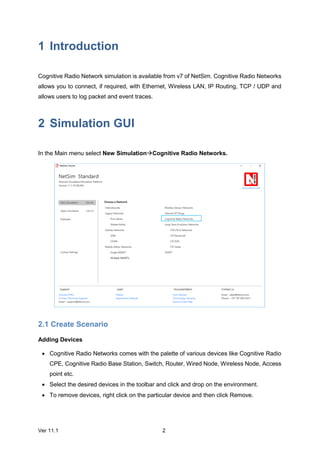
In the Main menu select New SimulationCognitive Radio Networks.
2.1 Create Scenario
Adding Devices
 Cognitive Radio Networks comes with the palette of various devices like Cognitive Radio
CPE, Cognitive Radio Base Station, Switch, Router, Wired Node, Wireless Node, Access
point etc.
 Select the desired devices in the toolbar and click and drop on the environment.
 To remove devices, right click on the particular device and then click Remove.
Ver 11.1 3
Connect the devices
Select the appropriate link in the toolbar and connect the devices by clicking on the device 1
and device 2.
2.2 Set Node, Link and Application Properties
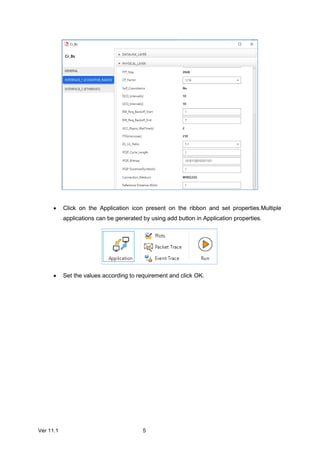
Right click on the appropriate node or link and select Properties. Then modify the parameters
according to the requirements. Routing Protocol in Application Layer of router and all user
editable properties in DataLink Layer and Physical Layer of Access Point and Wireless devices
are Global i.e. changing properties in one node will automatically reflect in the others in that
network.
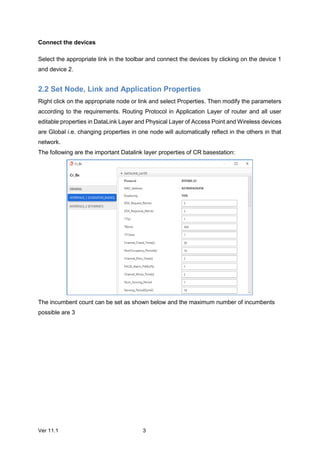
The following are the important Datalink layer properties of CR basestation:
The incumbent count can be set as shown below and the maximum number of incumbents
possible are 3
Ver 11.1 4
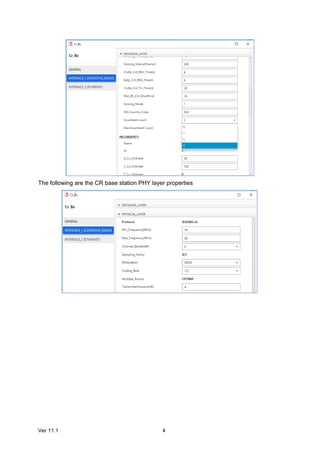
The following are the CR base station PHY layer properties
Ver 11.1 5
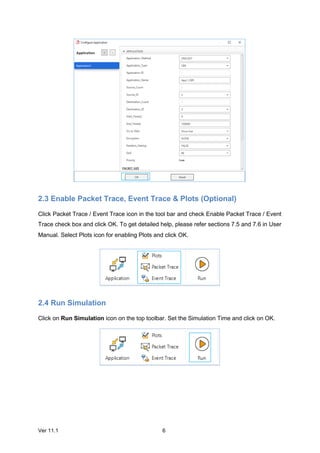
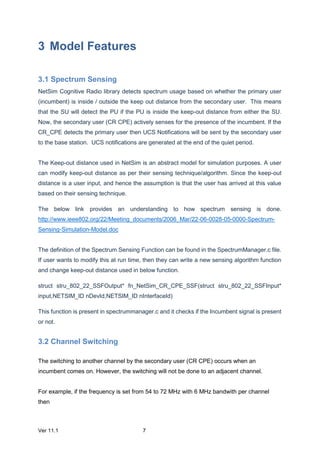
 Click on the Application icon present on the ribbon and set properties.Multiple
applications can be generated by using add button in Application properties.
 Set the values according to requirement and click OK.
Ver 11.1 6
2.3 Enable Packet Trace, Event Trace & Plots (Optional)
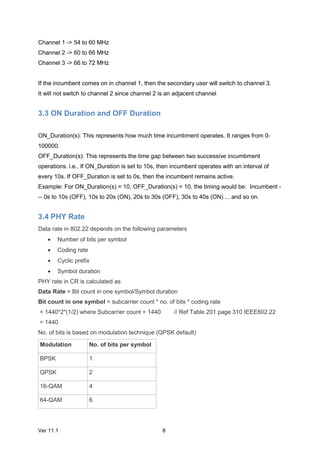
Click Packet Trace / Event Trace icon in the tool bar and check Enable Packet Trace / Event
Trace check box and click OK. To get detailed help, please refer sections 7.5 and 7.6 in User
Manual. Select Plots icon for enabling Plots and click OK.
2.4 Run Simulation
Click on Run Simulation icon on the top toolbar. Set the Simulation Time and click on OK.
Ver 11.1 7
3 Model Features
3.1 Spectrum Sensing
NetSim Cognitive Radio library detects spectrum usage based on whether the primary user
(incumbent) is inside / outside the keep out distance from the secondary user. This means
that the SU will detect the PU if the PU is inside the keep-out distance from either the SU.
Now, the secondary user (CR CPE) actively senses for the presence of the incumbent. If the
CR_CPE detects the primary user then UCS Notifications will be sent by the secondary user
to the base station. UCS notifications are generated at the end of the quiet period.
The Keep-out distance used in NetSim is an abstract model for simulation purposes. A user
can modify keep-out distance as per their sensing technique/algorithm. Since the keep-out
distance is a user input, and hence the assumption is that the user has arrived at this value
based on their sensing technique.
The below link provides an understanding to how spectrum sensing is done.
http://www.ieee802.org/22/Meeting_documents/2006_Mar/22-06-0028-05-0000-Spectrum-
Sensing-Simulation-Model.doc
The definition of the Spectrum Sensing Function can be found in the SpectrumManager.c file.
If user wants to modify this at run time, then they can write a new sensing algorithm function
and change keep-out distance used in below function.
struct stru_802_22_SSFOutput* fn_NetSim_CR_CPE_SSF(struct stru_802_22_SSFInput*
input,NETSIM_ID nDevId,NETSIM_ID nInterfaceId)
This function is present in spectrummanager.c and it checks if the Incumbent signal is present
or not.
3.2 Channel Switching
The switching to another channel by the secondary user (CR CPE) occurs when an
incumbent comes on. However, the switching will not be done to an adjacent channel.
For example, if the frequency is set from 54 to 72 MHz with 6 MHz bandwith per channel
then
Ver 11.1 8
Channel 1 -> 54 to 60 MHz
Channel 2 -> 60 to 66 MHz
Channel 3 -> 66 to 72 MHz
If the incumbent comes on in channel 1, then the secondary user will switch to channel 3.
It will not switch to channel 2 since channel 2 is an adjacent channel
3.3 ON Duration and OFF Duration
ON_Duration(s): This represents how much time incumbment operates. It ranges from 0-
100000.
OFF_Duration(s): This represents the time gap between two successive incumbment
operations. i.e., If ON_Duration is set to 10s, then incumbent operates with an interval of
every 10s. If OFF_Duration is set to 0s, then the incumbent remains active.
Example: For ON_Duration(s) = 10, OFF_Duration(s) = 10, the timing would be: Incumbent -
-- 0s to 10s (OFF), 10s to 20s (ON), 20s to 30s (OFF), 30s to 40s (ON) ... and so on.
3.4 PHY Rate
Data rate in 802.22 depends on the following parameters
 Number of bits per symbol
 Coding rate
 Cyclic prefix
 Symbol duration
PHY rate in CR is calculated as
Data Rate = Bit count in one symbol/Symbol duration
Bit count in one symbol = subcarrier count * no. of bits * coding rate
= 1440*2*(1/2) where Subcarrier count = 1440 // Ref Table 201 page 310 IEEE802.22
= 1440
No. of bits is based on modulation technique (QPSK default)
Modulation No. of bits per symbol
BPSK 1
QPSK 2
16-QAM 4
64-QAM 6
Ver 11.1 9
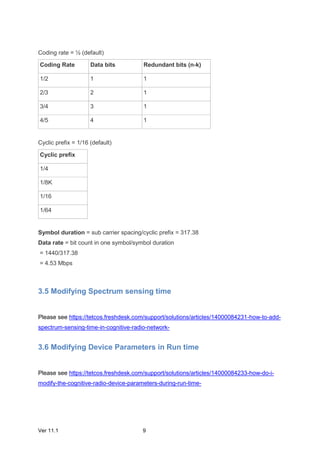
Coding rate = ½ (default)
Coding Rate Data bits Redundant bits (n-k)
1/2 1 1
2/3 2 1
3/4 3 1
4/5 4 1
Cyclic prefix = 1/16 (default)
Cyclic prefix
1/4
1/8K
1/16
1/64
Symbol duration = sub carrier spacing/cyclic prefix = 317.38
Data rate = bit count in one symbol/symbol duration
= 1440/317.38
= 4.53 Mbps
3.5 Modifying Spectrum sensing time
Please see https://tetcos.freshdesk.com/support/solutions/articles/14000084231-how-to-add-
spectrum-sensing-time-in-cognitive-radio-network-
3.6 Modifying Device Parameters in Run time
Please see https://tetcos.freshdesk.com/support/solutions/articles/14000084233-how-do-i-
modify-the-cognitive-radio-device-parameters-during-run-time-
Ver 11.1 10
3.7 Additional Notes
NetSim outputs App layer throughput which is lesser than that of MAC layer throughput
because of
 TCP connection establishment
 ARP set-up
 Service flow creation CPE-BS and BS-CPE
 BW request
To avoid the above effects
 Set application traffic model as Custom
 Set DL/UL Ratio as 1:1 so that the BS transmits whatever it receives
 Run UDP in transport layer
 Use static ARP
 Run Simulation for more than 100 sec
4 Featured Examples
Sample configuration files for all networks are available in Examples Menu in NetSim Home
Screen. These files provide examples on how NetSim can be used – the parameters that can
be changed and the typical effect it has on performance.
Cognitive Radio – Example Simulations
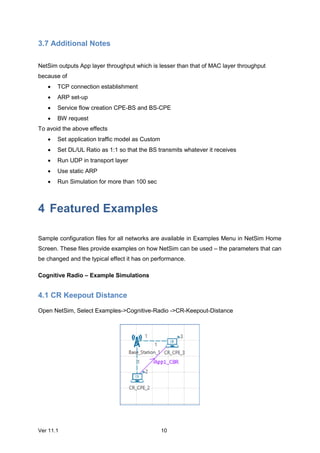
4.1 CR Keepout Distance
Open NetSim, Select Examples->Cognitive-Radio ->CR-Keepout-Distance
Ver 11.1 11
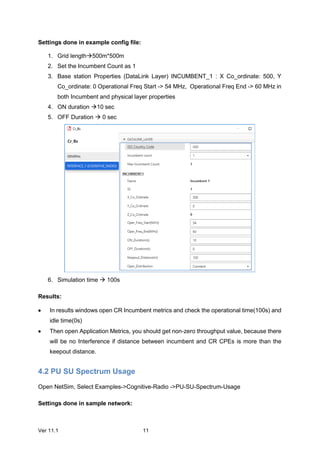
Settings done in example config file:
1. Grid length500m*500m
2. Set the Incumbent Count as 1
3. Base station Properties (DataLink Layer) INCUMBENT_1 : X Co_ordinate: 500, Y
Co_ordinate: 0 Operational Freq Start -> 54 MHz, Operational Freq End -> 60 MHz in
both Incumbent and physical layer properties
4. ON duration 10 sec
5. OFF Duration  0 sec
6. Simulation time  100s
Results:
 In results windows open CR Incumbent metrics and check the operational time(100s) and
idle time(0s)
 Then open Application Metrics, you should get non-zero throughput value, because there
will be no Interference if distance between incumbent and CR CPEs is more than the
keepout distance.
4.2 PU SU Spectrum Usage
Open NetSim, Select Examples->Cognitive-Radio ->PU-SU-Spectrum-Usage
Settings done in sample network:
Ver 11.1 12
1. Grid length500m*500m
2. Set the Incumbent Count as 1
3. Base station Properties (DataLink Layer) INCUMBENT_1 : X Co_ordinate: 500, Y
Co_ordinate: 0 Operational Freq Start  54 MHz, Operational Freq End  60 MHz in
both Incumbent and physical layer properties
4. ON duration  10 sec
5. OFF Duration  10 sec
6. Ensure that the distance between incumbent and CR CPEs should be less than 100m
(keepout distance)
7. Enable packet Trace and Simulate for 100s
Results:
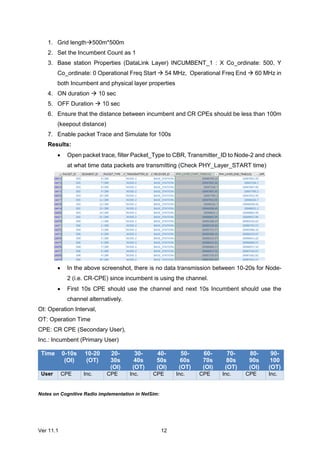
 Open packet trace, filter Packet_Type to CBR, Transmitter_ID to Node-2 and check
at what time data packets are transmitting (Check PHY_Layer_START time)
 In the above screenshot, there is no data transmission between 10-20s for Node-
2 (i.e. CR-CPE) since incumbent is using the channel.
 First 10s CPE should use the channel and next 10s Incumbent should use the
channel alternatively.
OI: Operation Interval,
OT: Operation Time
CPE: CR CPE (Secondary User),
Inc.: Incumbent (Primary User)
Time 0-10s
(OI)
10-20
(OT)
20-
30s
(OI)
30-
40s
(OT)
40-
50s
(OI)
50-
60s
(OT)
60-
70s
(OI)
70-
80s
(OT)
80-
90s
(OI)
90-
100
(OT)
User CPE Inc. CPE Inc. CPE Inc. CPE Inc. CPE Inc.
Notes on Cognitive Radio implementation in NetSim:
Ver 11.1 13
 CR BS allocates max one symbol per CPE. If the generation rate is more than the
data filled in one symbol then allocation fails and it results in zero throughput.
 The first symbol is reserved for CR control frames or any broadcast PDU
 Operational frequency: It is the frequency band at which the incumbent operates.
It ranges from 54 MHz to 862 MHz.
 ON_Duration(s): This represents how much time incumbment operates. It ranges
from 0-100000.
 OFF_Duration(s): This represents the time gap between two successive
incumbment operations. i.e., If ON_Duration is set to 10s, then incumbent operates
with an interval of every 10s. If the OFF_Duration is set to 0s, then the incumbent
remains active.
For ON_Duration(s) = 10, OFF_Duration(s) = 10
The timing is Incumbent --- 0s to 10s (OFF), 10s to 20s (ON), 20s to 30s (OFF), 30s to 40s
(ON) ... and so on.
NetSim provides App layer throughput which is lesser than that of MAC layer throughput
because of
 TCP connection establishment
 ARP set-up
 Service flow creation CPE-BS and BS-CPE
 BW request
To avoid the above effects
 Generate custom traffic
 Set DL/UL Ratio as 1:1 so that the BS transmits whatever it receives
 Run UDP in transport layer
 Use static ARP
 Run Simulation for more than 100 sec
4.3 Effect of Downlink-Uplink Ratio
Open NetSim, Select Examples->Cognitive-Radio ->Effect-of-DL-UL-Ratio
Ver 11.1 14
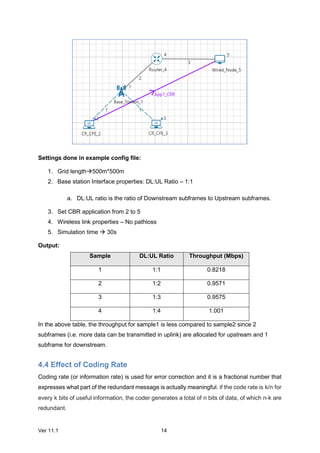
Settings done in example config file:
1. Grid length500m*500m
2. Base station Interface properties: DL:UL Ratio – 1:1
a. DL:UL ratio is the ratio of Downstream subframes to Upstream subframes.
3. Set CBR application from 2 to 5
4. Wireless link properties – No pathloss
5. Simulation time  30s
Output:
Sample DL:UL Ratio Throughput (Mbps)
1 1:1 0.8218
2 1:2 0.9571
3 1:3 0.9575
4 1:4 1.001
In the above table, the throughput for sample1 is less compared to sample2 since 2
subframes (i.e. more data can be transmitted in uplink) are allocated for upstream and 1
subframe for downstream.
4.4 Effect of Coding Rate
Coding rate (or information rate) is used for error correction and it is a fractional number that
expresses what part of the redundant message is actually meaningful. If the code rate is k/n for
every k bits of useful information, the coder generates a total of n bits of data, of which n-k are
redundant.
Ver 11.1 15
Open NetSim, Select Examples->Cognitive-Radio ->Effect-of-Coding-Rate
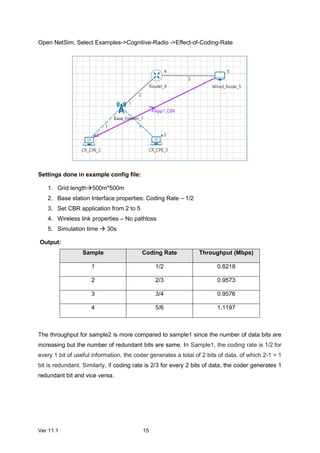
Settings done in example config file:
1. Grid length500m*500m
2. Base station Interface properties: Coding Rate – 1/2
3. Set CBR application from 2 to 5
4. Wireless link properties – No pathloss
5. Simulation time  30s
Output:
Sample Coding Rate Throughput (Mbps)
1 1/2 0.8218
2 2/3 0.9573
3 3/4 0.9576
4 5/6 1.1197
The throughput for sample2 is more compared to sample1 since the number of data bits are
increasing but the number of redundant bits are same. In Sample1, the coding rate is 1/2 for
every 1 bit of useful information, the coder generates a total of 2 bits of data, of which 2-1 = 1
bit is redundant. Similarly, if coding rate is 2/3 for every 2 bits of data, the coder generates 1
redundant bit and vice versa.
Ver 11.1 16
5 Reference Documents
IEEE 802.22 - 2011 Standard for Wireless Regional Area Network (WRAN)
6 Latest FAQs
Up to date FAQs on NetSim’s Cognitive Radio library is available at
https://tetcos.freshdesk.com/support/solutions/folders/14000105116

NetSIm Technology Library- Cognitive radio

  • 1.
    Ver 11.1 1 CognitiveRadio - 802.22 Contents 1 Introduction..........................................................................................................................2 2 Simulation GUI......................................................................................................................2 2.1 Create Scenario..........................................................................................................................2 2.2 Set Node, Link and Application Properties................................................................................3 2.3 Enable Packet Trace, Event Trace & Plots (Optional)................................................................6 2.4 Run Simulation...........................................................................................................................6 3 Model Features.....................................................................................................................7 3.1 Spectrum Sensing ......................................................................................................................7 3.2 Channel Switching .....................................................................................................................7 3.3 Operational Time and Operational Interval ..............................................................................8 3.4 PHY Rate ....................................................................................................................................8 3.5 Modifying Spectrum sensing time.............................................................................................9 3.6 Modifying Device Parameters in Run time................................................................................9 3.7 Additional Notes......................................................................................................................10 4 Featured Examples..............................................................................................................10 4.1 CR Keepout Distance ...............................................................................................................10 4.2 PU SU Spectrum Usage............................................................................................................11 4.3 Effect of Downlink-Uplink Ratio ..............................................................................................13 4.4 Effect of Coding Rate ...............................................................................................................14 5 Reference Documents .........................................................................................................16 6 Latest FAQs.........................................................................................................................16
  • 2.
    Ver 11.1 2 1Introduction Cognitive Radio Network simulation is available from v7 of NetSim. Cognitive Radio Networks allows you to connect, if required, with Ethernet, Wireless LAN, IP Routing, TCP / UDP and allows users to log packet and event traces. 2 Simulation GUI In the Main menu select New SimulationCognitive Radio Networks. 2.1 Create Scenario Adding Devices  Cognitive Radio Networks comes with the palette of various devices like Cognitive Radio CPE, Cognitive Radio Base Station, Switch, Router, Wired Node, Wireless Node, Access point etc.  Select the desired devices in the toolbar and click and drop on the environment.  To remove devices, right click on the particular device and then click Remove.
  • 3.
    Ver 11.1 3 Connectthe devices Select the appropriate link in the toolbar and connect the devices by clicking on the device 1 and device 2. 2.2 Set Node, Link and Application Properties Right click on the appropriate node or link and select Properties. Then modify the parameters according to the requirements. Routing Protocol in Application Layer of router and all user editable properties in DataLink Layer and Physical Layer of Access Point and Wireless devices are Global i.e. changing properties in one node will automatically reflect in the others in that network. The following are the important Datalink layer properties of CR basestation: The incumbent count can be set as shown below and the maximum number of incumbents possible are 3
  • 4.
    Ver 11.1 4 Thefollowing are the CR base station PHY layer properties
  • 5.
    Ver 11.1 5 Click on the Application icon present on the ribbon and set properties.Multiple applications can be generated by using add button in Application properties.  Set the values according to requirement and click OK.
  • 6.
    Ver 11.1 6 2.3Enable Packet Trace, Event Trace & Plots (Optional) Click Packet Trace / Event Trace icon in the tool bar and check Enable Packet Trace / Event Trace check box and click OK. To get detailed help, please refer sections 7.5 and 7.6 in User Manual. Select Plots icon for enabling Plots and click OK. 2.4 Run Simulation Click on Run Simulation icon on the top toolbar. Set the Simulation Time and click on OK.
  • 7.
    Ver 11.1 7 3Model Features 3.1 Spectrum Sensing NetSim Cognitive Radio library detects spectrum usage based on whether the primary user (incumbent) is inside / outside the keep out distance from the secondary user. This means that the SU will detect the PU if the PU is inside the keep-out distance from either the SU. Now, the secondary user (CR CPE) actively senses for the presence of the incumbent. If the CR_CPE detects the primary user then UCS Notifications will be sent by the secondary user to the base station. UCS notifications are generated at the end of the quiet period. The Keep-out distance used in NetSim is an abstract model for simulation purposes. A user can modify keep-out distance as per their sensing technique/algorithm. Since the keep-out distance is a user input, and hence the assumption is that the user has arrived at this value based on their sensing technique. The below link provides an understanding to how spectrum sensing is done. http://www.ieee802.org/22/Meeting_documents/2006_Mar/22-06-0028-05-0000-Spectrum- Sensing-Simulation-Model.doc The definition of the Spectrum Sensing Function can be found in the SpectrumManager.c file. If user wants to modify this at run time, then they can write a new sensing algorithm function and change keep-out distance used in below function. struct stru_802_22_SSFOutput* fn_NetSim_CR_CPE_SSF(struct stru_802_22_SSFInput* input,NETSIM_ID nDevId,NETSIM_ID nInterfaceId) This function is present in spectrummanager.c and it checks if the Incumbent signal is present or not. 3.2 Channel Switching The switching to another channel by the secondary user (CR CPE) occurs when an incumbent comes on. However, the switching will not be done to an adjacent channel. For example, if the frequency is set from 54 to 72 MHz with 6 MHz bandwith per channel then
  • 8.
    Ver 11.1 8 Channel1 -> 54 to 60 MHz Channel 2 -> 60 to 66 MHz Channel 3 -> 66 to 72 MHz If the incumbent comes on in channel 1, then the secondary user will switch to channel 3. It will not switch to channel 2 since channel 2 is an adjacent channel 3.3 ON Duration and OFF Duration ON_Duration(s): This represents how much time incumbment operates. It ranges from 0- 100000. OFF_Duration(s): This represents the time gap between two successive incumbment operations. i.e., If ON_Duration is set to 10s, then incumbent operates with an interval of every 10s. If OFF_Duration is set to 0s, then the incumbent remains active. Example: For ON_Duration(s) = 10, OFF_Duration(s) = 10, the timing would be: Incumbent - -- 0s to 10s (OFF), 10s to 20s (ON), 20s to 30s (OFF), 30s to 40s (ON) ... and so on. 3.4 PHY Rate Data rate in 802.22 depends on the following parameters  Number of bits per symbol  Coding rate  Cyclic prefix  Symbol duration PHY rate in CR is calculated as Data Rate = Bit count in one symbol/Symbol duration Bit count in one symbol = subcarrier count * no. of bits * coding rate = 1440*2*(1/2) where Subcarrier count = 1440 // Ref Table 201 page 310 IEEE802.22 = 1440 No. of bits is based on modulation technique (QPSK default) Modulation No. of bits per symbol BPSK 1 QPSK 2 16-QAM 4 64-QAM 6
  • 9.
    Ver 11.1 9 Codingrate = ½ (default) Coding Rate Data bits Redundant bits (n-k) 1/2 1 1 2/3 2 1 3/4 3 1 4/5 4 1 Cyclic prefix = 1/16 (default) Cyclic prefix 1/4 1/8K 1/16 1/64 Symbol duration = sub carrier spacing/cyclic prefix = 317.38 Data rate = bit count in one symbol/symbol duration = 1440/317.38 = 4.53 Mbps 3.5 Modifying Spectrum sensing time Please see https://tetcos.freshdesk.com/support/solutions/articles/14000084231-how-to-add- spectrum-sensing-time-in-cognitive-radio-network- 3.6 Modifying Device Parameters in Run time Please see https://tetcos.freshdesk.com/support/solutions/articles/14000084233-how-do-i- modify-the-cognitive-radio-device-parameters-during-run-time-
  • 10.
    Ver 11.1 10 3.7Additional Notes NetSim outputs App layer throughput which is lesser than that of MAC layer throughput because of  TCP connection establishment  ARP set-up  Service flow creation CPE-BS and BS-CPE  BW request To avoid the above effects  Set application traffic model as Custom  Set DL/UL Ratio as 1:1 so that the BS transmits whatever it receives  Run UDP in transport layer  Use static ARP  Run Simulation for more than 100 sec 4 Featured Examples Sample configuration files for all networks are available in Examples Menu in NetSim Home Screen. These files provide examples on how NetSim can be used – the parameters that can be changed and the typical effect it has on performance. Cognitive Radio – Example Simulations 4.1 CR Keepout Distance Open NetSim, Select Examples->Cognitive-Radio ->CR-Keepout-Distance
  • 11.
    Ver 11.1 11 Settingsdone in example config file: 1. Grid length500m*500m 2. Set the Incumbent Count as 1 3. Base station Properties (DataLink Layer) INCUMBENT_1 : X Co_ordinate: 500, Y Co_ordinate: 0 Operational Freq Start -> 54 MHz, Operational Freq End -> 60 MHz in both Incumbent and physical layer properties 4. ON duration 10 sec 5. OFF Duration  0 sec 6. Simulation time  100s Results:  In results windows open CR Incumbent metrics and check the operational time(100s) and idle time(0s)  Then open Application Metrics, you should get non-zero throughput value, because there will be no Interference if distance between incumbent and CR CPEs is more than the keepout distance. 4.2 PU SU Spectrum Usage Open NetSim, Select Examples->Cognitive-Radio ->PU-SU-Spectrum-Usage Settings done in sample network:
  • 12.
    Ver 11.1 12 1.Grid length500m*500m 2. Set the Incumbent Count as 1 3. Base station Properties (DataLink Layer) INCUMBENT_1 : X Co_ordinate: 500, Y Co_ordinate: 0 Operational Freq Start  54 MHz, Operational Freq End  60 MHz in both Incumbent and physical layer properties 4. ON duration  10 sec 5. OFF Duration  10 sec 6. Ensure that the distance between incumbent and CR CPEs should be less than 100m (keepout distance) 7. Enable packet Trace and Simulate for 100s Results:  Open packet trace, filter Packet_Type to CBR, Transmitter_ID to Node-2 and check at what time data packets are transmitting (Check PHY_Layer_START time)  In the above screenshot, there is no data transmission between 10-20s for Node- 2 (i.e. CR-CPE) since incumbent is using the channel.  First 10s CPE should use the channel and next 10s Incumbent should use the channel alternatively. OI: Operation Interval, OT: Operation Time CPE: CR CPE (Secondary User), Inc.: Incumbent (Primary User) Time 0-10s (OI) 10-20 (OT) 20- 30s (OI) 30- 40s (OT) 40- 50s (OI) 50- 60s (OT) 60- 70s (OI) 70- 80s (OT) 80- 90s (OI) 90- 100 (OT) User CPE Inc. CPE Inc. CPE Inc. CPE Inc. CPE Inc. Notes on Cognitive Radio implementation in NetSim:
  • 13.
    Ver 11.1 13 CR BS allocates max one symbol per CPE. If the generation rate is more than the data filled in one symbol then allocation fails and it results in zero throughput.  The first symbol is reserved for CR control frames or any broadcast PDU  Operational frequency: It is the frequency band at which the incumbent operates. It ranges from 54 MHz to 862 MHz.  ON_Duration(s): This represents how much time incumbment operates. It ranges from 0-100000.  OFF_Duration(s): This represents the time gap between two successive incumbment operations. i.e., If ON_Duration is set to 10s, then incumbent operates with an interval of every 10s. If the OFF_Duration is set to 0s, then the incumbent remains active. For ON_Duration(s) = 10, OFF_Duration(s) = 10 The timing is Incumbent --- 0s to 10s (OFF), 10s to 20s (ON), 20s to 30s (OFF), 30s to 40s (ON) ... and so on. NetSim provides App layer throughput which is lesser than that of MAC layer throughput because of  TCP connection establishment  ARP set-up  Service flow creation CPE-BS and BS-CPE  BW request To avoid the above effects  Generate custom traffic  Set DL/UL Ratio as 1:1 so that the BS transmits whatever it receives  Run UDP in transport layer  Use static ARP  Run Simulation for more than 100 sec 4.3 Effect of Downlink-Uplink Ratio Open NetSim, Select Examples->Cognitive-Radio ->Effect-of-DL-UL-Ratio
  • 14.
    Ver 11.1 14 Settingsdone in example config file: 1. Grid length500m*500m 2. Base station Interface properties: DL:UL Ratio – 1:1 a. DL:UL ratio is the ratio of Downstream subframes to Upstream subframes. 3. Set CBR application from 2 to 5 4. Wireless link properties – No pathloss 5. Simulation time  30s Output: Sample DL:UL Ratio Throughput (Mbps) 1 1:1 0.8218 2 1:2 0.9571 3 1:3 0.9575 4 1:4 1.001 In the above table, the throughput for sample1 is less compared to sample2 since 2 subframes (i.e. more data can be transmitted in uplink) are allocated for upstream and 1 subframe for downstream. 4.4 Effect of Coding Rate Coding rate (or information rate) is used for error correction and it is a fractional number that expresses what part of the redundant message is actually meaningful. If the code rate is k/n for every k bits of useful information, the coder generates a total of n bits of data, of which n-k are redundant.
  • 15.
    Ver 11.1 15 OpenNetSim, Select Examples->Cognitive-Radio ->Effect-of-Coding-Rate Settings done in example config file: 1. Grid length500m*500m 2. Base station Interface properties: Coding Rate – 1/2 3. Set CBR application from 2 to 5 4. Wireless link properties – No pathloss 5. Simulation time  30s Output: Sample Coding Rate Throughput (Mbps) 1 1/2 0.8218 2 2/3 0.9573 3 3/4 0.9576 4 5/6 1.1197 The throughput for sample2 is more compared to sample1 since the number of data bits are increasing but the number of redundant bits are same. In Sample1, the coding rate is 1/2 for every 1 bit of useful information, the coder generates a total of 2 bits of data, of which 2-1 = 1 bit is redundant. Similarly, if coding rate is 2/3 for every 2 bits of data, the coder generates 1 redundant bit and vice versa.
  • 16.
    Ver 11.1 16 5Reference Documents IEEE 802.22 - 2011 Standard for Wireless Regional Area Network (WRAN) 6 Latest FAQs Up to date FAQs on NetSim’s Cognitive Radio library is available at https://tetcos.freshdesk.com/support/solutions/folders/14000105116