Native Client

http://code.google.com/p/nativeclient/
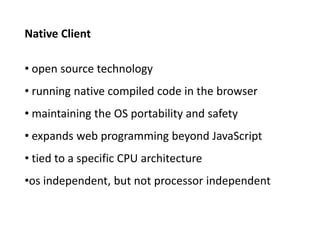
Native Client

• open source technology
• running native compiled code in the browser
• maintaining the OS portability and safety
• expands web programming beyond JavaScript
• tied to a specific CPU architecture
•os independent, but not processor independent
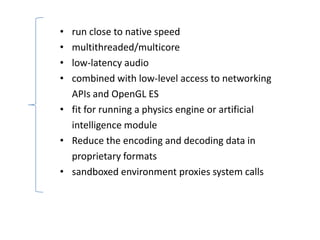
• run close to native speed
• multithreaded/multicore
• low-latency audio
• combined with low-level access to networking
  APIs and OpenGL ES
• fit for running a physics engine or artificial
  intelligence module
• Reduce the encoding and decoding data in
  proprietary formats
• sandboxed environment proxies system calls
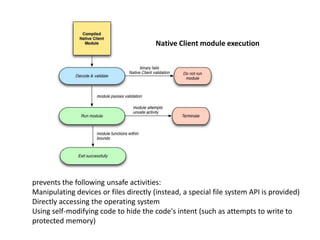
Native Client module execution


prevents the following unsafe activities:
Manipulating devices or files directly (instead, a special file system API is provided)
Directly accessing the operating system
Using self-modifying code to hide the code's intent (such as attempts to write to
protected memory)
Native Client SDK


  The Native Client SDK includes the following:
  GNU-based toolchain: gcc, as, ld, gdb, and other tools
  API libraries (Pepper, POSIX)
  SCons build scripts and configuration files for building Native Client applications


  The Pepper Plug-in API (PPAPI), a library is written in C, and the SDK also
  provides a set of C++ bindings for it. Native Client modules use the Pepper API
  to communicate with JavaScript and resources managed by the browser. The
  Pepper Library also provides a platform-independent multimedia API that
  Native Client modules can use for audio, video, and 2D graphics (support for 3D
  graphics is coming soon).
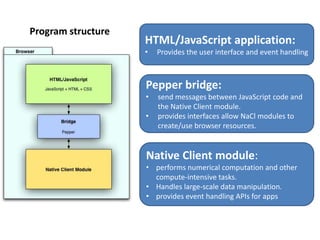
Program structure
                    HTML/JavaScript application:
                    •   Provides the user interface and event handling


                    Pepper bridge:
                    •   send messages between JavaScript code and
                        the Native Client module.
                    •   provides interfaces allow NaCl modules to
                        create/use browser resources.


                    Native Client module:
                    • performs numerical computation and other
                      compute-intensive tasks.
                    • Handles large-scale data manipulation.
                    • provides event handling APIs for apps
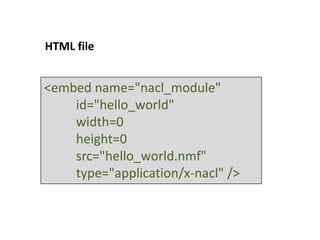
HTML file


<embed name="nacl_module"
    id="hello_world"
    width=0
    height=0
    src="hello_world.nmf"
    type="application/x-nacl" />
Creating a Native Client web app


     C++ Tutorial: Getting Started
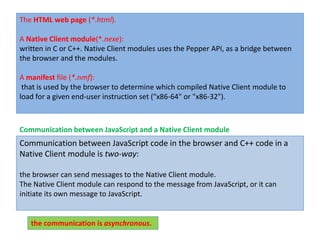
The HTML web page (*.html).

A Native Client module(*.nexe):
written in C or C++. Native Client modules uses the Pepper API, as a bridge between
the browser and the modules.

A manifest file (*.nmf):
 that is used by the browser to determine which compiled Native Client module to
load for a given end-user instruction set ("x86-64" or "x86-32").


Communication between JavaScript and a Native Client module
Communication between JavaScript code in the browser and C++ code in a
Native Client module is two-way:

the browser can send messages to the Native Client module.
The Native Client module can respond to the message from JavaScript, or it can
initiate its own message to JavaScript.


   the communication is asynchronous.
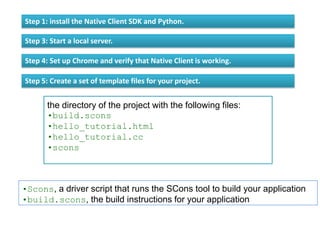
Step 1: install the Native Client SDK and Python.

Step 3: Start a local server.

Step 4: Set up Chrome and verify that Native Client is working.

Step 5: Create a set of template files for your project.


       the directory of the project with the following files:
       •build.scons
       •hello_tutorial.html
       •hello_tutorial.cc
       •scons


•Scons, a driver script that runs the SCons tool to build your application
•build.scons, the build instructions for your application
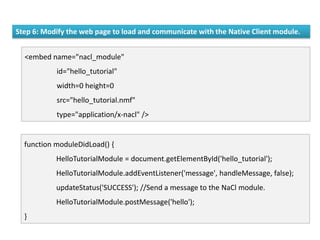
Step 6: Modify the web page to load and communicate with the Native Client module.


  <embed name="nacl_module"
           id="hello_tutorial"
           width=0 height=0
           src="hello_tutorial.nmf"
           type="application/x-nacl" />


  function moduleDidLoad() {
           HelloTutorialModule = document.getElementById('hello_tutorial');
           HelloTutorialModule.addEventListener('message', handleMessage, false);
           updateStatus('SUCCESS'); //Send a message to the NaCl module.
           HelloTutorialModule.postMessage('hello');
  }
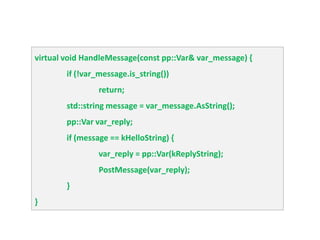
Step 7: Implement a message handler in the Native Client module.


•Implement the HandleMessage() function for the module instance
     (pp::Instance.HandleMessage, in the Pepper Library)

•Use the PostMessage() function to send a message to JavaScript.
    (pp::Instance.PostMessage, in the Pepper Library)


namespace {
         // The expected string sent by the browser.
         const char* const kHelloString = "hello";
         // The string sent back to the browser upon receipt of a message
         // containing "hello".
         const char* const kReplyString = "hello from NaCl";
} // namespace
virtual void HandleMessage(const pp::Var& var_message) {
        if (!var_message.is_string())
                 return;
        std::string message = var_message.AsString();
        pp::Var var_reply;
        if (message == kHelloString) {
                 var_reply = pp::Var(kReplyString);
                 PostMessage(var_reply);
        }
}
Step 8: Compile the Native Client module.

be sure you are still in the project directory.
run the scons script (orscons.bat on Windows).

cd examples/hello_tutorial ./scons


•hello_tutorial_x86_32.nexe
•hello_tutorial_x86_32_dbg.nexe
•hello_tutorial_x86_64.nexe
•hello_tutorial_x86_64_dbg.nexe
•hello_tutorial.nmf

    {
          "program": {
               "x86-64": {"url":"hello_tutorial_x86_64.nexe"},
              "x86-32": {"url": "hello_tutorial_x86_32.nexe"}
          }
     }
Thanks

Native client

  • 1.
  • 2.
    Native Client • opensource technology • running native compiled code in the browser • maintaining the OS portability and safety • expands web programming beyond JavaScript • tied to a specific CPU architecture •os independent, but not processor independent
  • 3.
    • run closeto native speed • multithreaded/multicore • low-latency audio • combined with low-level access to networking APIs and OpenGL ES • fit for running a physics engine or artificial intelligence module • Reduce the encoding and decoding data in proprietary formats • sandboxed environment proxies system calls
  • 4.
    Native Client moduleexecution prevents the following unsafe activities: Manipulating devices or files directly (instead, a special file system API is provided) Directly accessing the operating system Using self-modifying code to hide the code's intent (such as attempts to write to protected memory)
  • 5.
    Native Client SDK The Native Client SDK includes the following: GNU-based toolchain: gcc, as, ld, gdb, and other tools API libraries (Pepper, POSIX) SCons build scripts and configuration files for building Native Client applications The Pepper Plug-in API (PPAPI), a library is written in C, and the SDK also provides a set of C++ bindings for it. Native Client modules use the Pepper API to communicate with JavaScript and resources managed by the browser. The Pepper Library also provides a platform-independent multimedia API that Native Client modules can use for audio, video, and 2D graphics (support for 3D graphics is coming soon).
  • 6.
    Program structure HTML/JavaScript application: • Provides the user interface and event handling Pepper bridge: • send messages between JavaScript code and the Native Client module. • provides interfaces allow NaCl modules to create/use browser resources. Native Client module: • performs numerical computation and other compute-intensive tasks. • Handles large-scale data manipulation. • provides event handling APIs for apps
  • 7.
    HTML file <embed name="nacl_module" id="hello_world" width=0 height=0 src="hello_world.nmf" type="application/x-nacl" />
  • 8.
    Creating a NativeClient web app C++ Tutorial: Getting Started
  • 9.
    The HTML webpage (*.html). A Native Client module(*.nexe): written in C or C++. Native Client modules uses the Pepper API, as a bridge between the browser and the modules. A manifest file (*.nmf): that is used by the browser to determine which compiled Native Client module to load for a given end-user instruction set ("x86-64" or "x86-32"). Communication between JavaScript and a Native Client module Communication between JavaScript code in the browser and C++ code in a Native Client module is two-way: the browser can send messages to the Native Client module. The Native Client module can respond to the message from JavaScript, or it can initiate its own message to JavaScript. the communication is asynchronous.
  • 10.
    Step 1: installthe Native Client SDK and Python. Step 3: Start a local server. Step 4: Set up Chrome and verify that Native Client is working. Step 5: Create a set of template files for your project. the directory of the project with the following files: •build.scons •hello_tutorial.html •hello_tutorial.cc •scons •Scons, a driver script that runs the SCons tool to build your application •build.scons, the build instructions for your application
  • 11.
    Step 6: Modifythe web page to load and communicate with the Native Client module. <embed name="nacl_module" id="hello_tutorial" width=0 height=0 src="hello_tutorial.nmf" type="application/x-nacl" /> function moduleDidLoad() { HelloTutorialModule = document.getElementById('hello_tutorial'); HelloTutorialModule.addEventListener('message', handleMessage, false); updateStatus('SUCCESS'); //Send a message to the NaCl module. HelloTutorialModule.postMessage('hello'); }
  • 12.
    Step 7: Implementa message handler in the Native Client module. •Implement the HandleMessage() function for the module instance (pp::Instance.HandleMessage, in the Pepper Library) •Use the PostMessage() function to send a message to JavaScript. (pp::Instance.PostMessage, in the Pepper Library) namespace { // The expected string sent by the browser. const char* const kHelloString = "hello"; // The string sent back to the browser upon receipt of a message // containing "hello". const char* const kReplyString = "hello from NaCl"; } // namespace
  • 13.
    virtual void HandleMessage(constpp::Var& var_message) { if (!var_message.is_string()) return; std::string message = var_message.AsString(); pp::Var var_reply; if (message == kHelloString) { var_reply = pp::Var(kReplyString); PostMessage(var_reply); } }
  • 14.
    Step 8: Compilethe Native Client module. be sure you are still in the project directory. run the scons script (orscons.bat on Windows). cd examples/hello_tutorial ./scons •hello_tutorial_x86_32.nexe •hello_tutorial_x86_32_dbg.nexe •hello_tutorial_x86_64.nexe •hello_tutorial_x86_64_dbg.nexe •hello_tutorial.nmf { "program": { "x86-64": {"url":"hello_tutorial_x86_64.nexe"}, "x86-32": {"url": "hello_tutorial_x86_32.nexe"} } }
  • 15.