With a Chrome Extension and Chrome Native Messaging
How to connect 1980 and
2018
Matthieu KERN
matthieu.kern@doctolib.com
@MatthieuKern
Quentin MÉNORET
quentin.menoret@doctolib.com
@QuentinMenoret
Goal
Make our users feel like they have
only one software
A chrome extension
Our solution
Connecting 2000
What we’re building
● A chrome extension that allow to exchange messages between
Doctolib and the PMS
● Three topics should be addressed:
○ Have buttons into each software to trigger actions in the other
○ Allow to switch the focus
○ Synchronise data
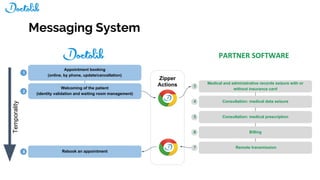
Zipper
Actions
Temporality
Appointment booking
(online, by phone, update/cancellation)
1
Welcoming of the patient
(identity validation and waiting room management)
2
Rebook an appointment8
Billing6
Remote transmission7
Consultation: medical prescription5
Consultation: medical data seizure4
Medical and administrative records seizure with or
without insurance card
3
Messaging System
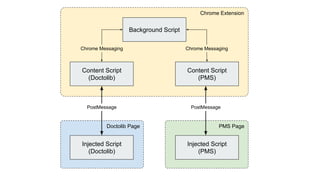
Background Script
Content Script
(Doctolib)
Content Script
(PMS)
Injected Script
(Doctolib)
Injected Script
(PMS)
Chrome Extension
PMS PageDoctolib Page
PostMessage PostMessage
Chrome Messaging Chrome Messaging
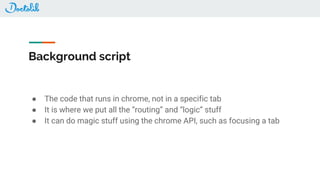
Background script
● The code that runs in chrome, not in a specific tab
● It is where we put all the “routing” and “logic” stuff
● It can do magic stuff using the chrome API, such as focusing a tab
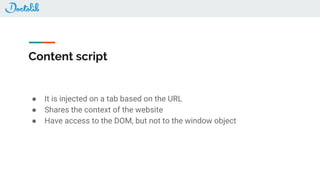
Content script
● It is injected on a tab based on the URL
● Shares the context of the website
● Have access to the DOM, but not to the window object
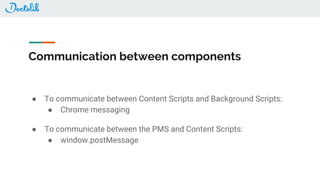
Communication between components
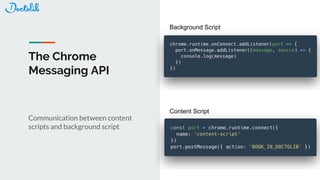
● To communicate between Content Scripts and Background Scripts:
● Chrome messaging
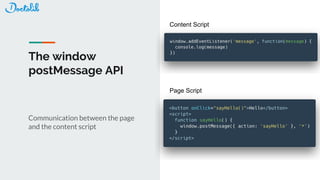
● To communicate between the PMS and Content Scripts:
● window.postMessage
The window
postMessage API
Communication between the page
and the content script
Content Script
Page Script
The Chrome
Messaging API
Communication between content
scripts and background script
Background Script
Content Script
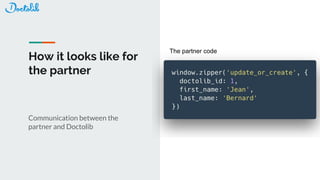
How it looks like for
the partner
Communication between the
partner and Doctolib
The partner code
Plug&Play API vs REST API
● Focus switches
● Frontend synchronization
● No need for a specific backend API
How to test ?
● No possibility for Headless
● But you can use a platform such as Browserstack
● Selenium or puppeteer would work just fine
Connecting 1980
Context: The Case of Desktop Softwares
● Half of our customers are using a desktop software (the Internet did not exist in
1980)
● We need to connect them as well
● Most of desktop softwares are old and bloated, we need a simple API
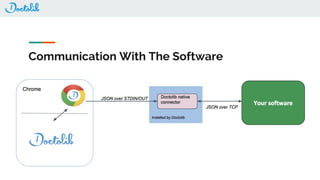
Communication With The Software
Chrome Native Messaging
● API provided by Google Chrome and implemented by most browsers
● A way to exchange messages with a program installed on the user computer
● API similar to other message passing APIs provided by Chrome
● Chrome starts the native host on a separate process
● It communicates using standard input and standard output, sending and
receiving serialized JSON preceded by the length of the message (using a 32-bit
native integer)
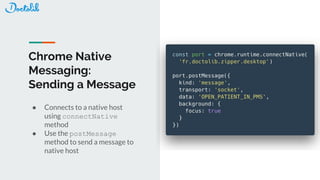
Chrome Native
Messaging:
Sending a Message
● Connects to a native host
using connectNative
method
● Use the postMessage
method to send a message to
native host
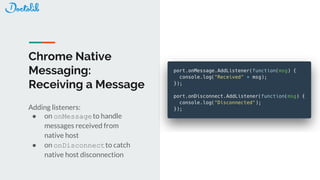
Chrome Native
Messaging:
Receiving a Message
Adding listeners:
● on onMessageto handle
messages received from
native host
● on onDisconnectto catch
native host disconnection
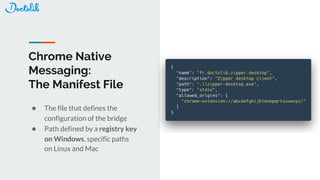
Chrome Native
Messaging:
The Manifest File
● The file that defines the
configuration of the bridge
● Path defined by a registry key
on Windows, specific paths
on Linux and Mac
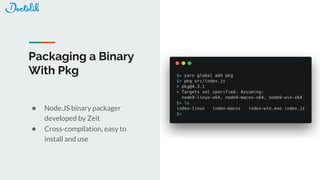
Packaging a Binary
With Pkg
● Node.JS binary packager
developed by Zeit
● Cross-compilation, easy to
install and use
Packaging a Binary With Pkg: How it Works
● Uses pre-compiled base node binaries with some patches applied
● Transforms javascript code into bytecode
● Snapshot filesystem: all files are embedded in the binary and prefixed by
/snapshot/, the program have access to the snapshot file system during runtime
● Targets:
○ node version
○ platform: windows, mac, linux or bsd
○ architecture: x64, x86, armv6 or armv7
○ all targets available in the pkg-fetch last release:
https://github.com/zeit/pkg-fetch/releases/tag/v2.5
Testing
● Using Jest for unit and integration tests
○ All the code is unit tested
○ Integration tests fakes the PMS and Chrome to assert an output when an
input is given
○ Installer tests runs installers on Windows to check that all files are
correctly deployed
● A lot of snapshot testing
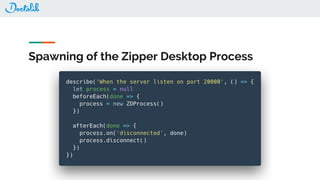
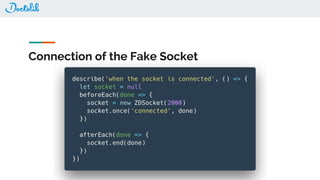
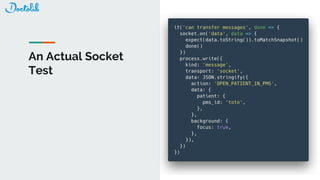
An Example of Integration Test
Spawning of the Zipper Desktop Process
Connection of the Fake Socket
An Actual Socket
Test
Resources
● https://developer.mozilla.org/fr/docs/Web/API/Window/postMessage: window postMessage documentation
● https://developer.chrome.com/apps/messaging: Chrome messaging documentation
● https://developer.chrome.com/extensions/content_scripts: Content scripts documentation
● https://www.browserstack.com/: Platform for running e2e tests on VM
● https://developer.chrome.com/extensions/background_pages: Background scripts
● https://developer.chrome.com/apps/nativeMessaging: Chrome Native Messaging documentation
● https://github.com/zeit/pkg: Pkg documentation
● http://nsis.sourceforge.net/Main_Page: NSIS documentation
● http://www.grivet-tools.com/blog/2014/build-simple-pkg-pkgbuild/: How to use pkgbuild
● https://jestjs.io/: Jest test framework
Matthieu KERN
matthieu.kern@doctolib.com
@MatthieuKern
Quentin MÉNORET
quentin.menoret@doctolib.com
@QuentinMenoret
We are hiring! https://careers.doctolib.fr/engineering/

How to connect 1980 and 2018

  • 1.
    With a ChromeExtension and Chrome Native Messaging How to connect 1980 and 2018
  • 2.
  • 3.
    Goal Make our usersfeel like they have only one software
  • 4.
  • 5.
  • 6.
    What we’re building ●A chrome extension that allow to exchange messages between Doctolib and the PMS ● Three topics should be addressed: ○ Have buttons into each software to trigger actions in the other ○ Allow to switch the focus ○ Synchronise data
  • 8.
    Zipper Actions Temporality Appointment booking (online, byphone, update/cancellation) 1 Welcoming of the patient (identity validation and waiting room management) 2 Rebook an appointment8 Billing6 Remote transmission7 Consultation: medical prescription5 Consultation: medical data seizure4 Medical and administrative records seizure with or without insurance card 3 Messaging System
  • 9.
    Background Script Content Script (Doctolib) ContentScript (PMS) Injected Script (Doctolib) Injected Script (PMS) Chrome Extension PMS PageDoctolib Page PostMessage PostMessage Chrome Messaging Chrome Messaging
  • 10.
    Background script ● Thecode that runs in chrome, not in a specific tab ● It is where we put all the “routing” and “logic” stuff ● It can do magic stuff using the chrome API, such as focusing a tab
  • 11.
    Content script ● Itis injected on a tab based on the URL ● Shares the context of the website ● Have access to the DOM, but not to the window object
  • 12.
    Communication between components ●To communicate between Content Scripts and Background Scripts: ● Chrome messaging ● To communicate between the PMS and Content Scripts: ● window.postMessage
  • 13.
    The window postMessage API Communicationbetween the page and the content script Content Script Page Script
  • 14.
    The Chrome Messaging API Communicationbetween content scripts and background script Background Script Content Script
  • 15.
    How it lookslike for the partner Communication between the partner and Doctolib The partner code
  • 16.
    Plug&Play API vsREST API ● Focus switches ● Frontend synchronization ● No need for a specific backend API
  • 17.
    How to test? ● No possibility for Headless ● But you can use a platform such as Browserstack ● Selenium or puppeteer would work just fine
  • 18.
  • 19.
    Context: The Caseof Desktop Softwares ● Half of our customers are using a desktop software (the Internet did not exist in 1980) ● We need to connect them as well ● Most of desktop softwares are old and bloated, we need a simple API
  • 20.
  • 21.
    Chrome Native Messaging ●API provided by Google Chrome and implemented by most browsers ● A way to exchange messages with a program installed on the user computer ● API similar to other message passing APIs provided by Chrome ● Chrome starts the native host on a separate process ● It communicates using standard input and standard output, sending and receiving serialized JSON preceded by the length of the message (using a 32-bit native integer)
  • 22.
    Chrome Native Messaging: Sending aMessage ● Connects to a native host using connectNative method ● Use the postMessage method to send a message to native host
  • 23.
    Chrome Native Messaging: Receiving aMessage Adding listeners: ● on onMessageto handle messages received from native host ● on onDisconnectto catch native host disconnection
  • 24.
    Chrome Native Messaging: The ManifestFile ● The file that defines the configuration of the bridge ● Path defined by a registry key on Windows, specific paths on Linux and Mac
  • 25.
    Packaging a Binary WithPkg ● Node.JS binary packager developed by Zeit ● Cross-compilation, easy to install and use
  • 26.
    Packaging a BinaryWith Pkg: How it Works ● Uses pre-compiled base node binaries with some patches applied ● Transforms javascript code into bytecode ● Snapshot filesystem: all files are embedded in the binary and prefixed by /snapshot/, the program have access to the snapshot file system during runtime ● Targets: ○ node version ○ platform: windows, mac, linux or bsd ○ architecture: x64, x86, armv6 or armv7 ○ all targets available in the pkg-fetch last release: https://github.com/zeit/pkg-fetch/releases/tag/v2.5
  • 27.
    Testing ● Using Jestfor unit and integration tests ○ All the code is unit tested ○ Integration tests fakes the PMS and Chrome to assert an output when an input is given ○ Installer tests runs installers on Windows to check that all files are correctly deployed ● A lot of snapshot testing
  • 28.
    An Example ofIntegration Test
  • 29.
    Spawning of theZipper Desktop Process
  • 30.
    Connection of theFake Socket
  • 31.
  • 32.
    Resources ● https://developer.mozilla.org/fr/docs/Web/API/Window/postMessage: windowpostMessage documentation ● https://developer.chrome.com/apps/messaging: Chrome messaging documentation ● https://developer.chrome.com/extensions/content_scripts: Content scripts documentation ● https://www.browserstack.com/: Platform for running e2e tests on VM ● https://developer.chrome.com/extensions/background_pages: Background scripts ● https://developer.chrome.com/apps/nativeMessaging: Chrome Native Messaging documentation ● https://github.com/zeit/pkg: Pkg documentation ● http://nsis.sourceforge.net/Main_Page: NSIS documentation ● http://www.grivet-tools.com/blog/2014/build-simple-pkg-pkgbuild/: How to use pkgbuild ● https://jestjs.io/: Jest test framework
  • 33.