Hybrid Application
Development

             Engin Yağız Hatay
                     Software Developer
Who am I ?


Engin Yağız Hatay
yagizhatay@gmail.com
• Computer Engineer
• Full-Time software developer
• Hybrid application developer
Outline
•   Ways of building an App…
•   Hybrid Application ?
•   Pros & Cons (Native/Web/Hybrid Apps)
•   JS – Native Communication & Websocket
•   Hybrid Frameworks / PhoneGap
•   How to debug ?
•   Who tried ?
•   The Future
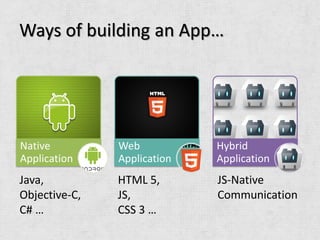
Ways of building an App…


Native         Web           Hybrid
Application    Application   Application
Java,          HTML 5,       JS-Native
Objective-C,   JS,           Communication
C# …           CSS 3 …
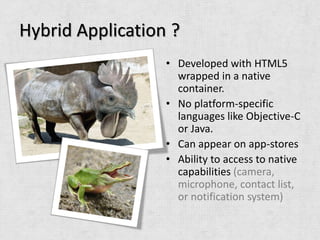
Hybrid Application ?
                  • Developed with HTML5
                    wrapped in a native
                    container.
                  • No platform-specific
                    languages like Objective-C
                    or Java.
                  • Can appear on app-stores
                  • Ability to access to native
                    capabilities (camera,
                    microphone, contact list,
                    or notification system)
Pros & Cons – (Native Application)
•   Better performance                    •   More expensive to build, even for
•   Snappier /Smooth animations,              a single platform.
    transitions, and faster load times.   •   AppStore submission/Approval
•   Can store more data offline               Process
•   Can be featured and searched for      •   You must share a percentage with
    in the app store                          the store (30% for Apple’s App
•   Full access to the device’s               Store, including in-app
    hardware and OS features                  purchases).
•   The App Store handles purchase        •    App updates must go through a
    transactions on your behalf               new approval process each time.
Pros & Cons – (Web Application)
•   A single codebase which can be accessed      •   Interpreted code (opposed to
    by any browser-enabled mobile device.
                                                     compiled code for native apps)
•   HTML/CSS/Javascript : Easier to learn than
    native languages like Objective-C or Java.   •   Don’t have full access to all the
•   Performance issues are becoming less of          methods exposed by the device’s
    an issue as mobile browsers become               operating system
    faster and their Javascript engines keep
    improving
                                                 •   Can’t be found on the app store.
•   No approval process needed, and updates      •   If you are looking to generate
    to the app can happen instantaneously            revenue, it’s up to you to build a
•   No revenue sharing with an app store             commerce model.
Pros & Cons – (Hybrid Application)
•   Market your app in each of the        •   Still subject to the store’s
    major mobile app stores.                  approval process and revenue
•   Gives you APIs to access some, if         sharing. No instant updating.
    not all, of the features locked out   •   The app’s performance is still
    of the browser, such as camera,           dependant on the device’s
    compass, contacts. Purchases are          browser capabilities.
    managed by the App Store.
JS – Native Communication
•   “native bridge”
•   Different in every platform
•   Accomplished via WebView object on Android
•   Using Websocket(HTML5) is another
    approach.
    (Websocket Server : native / Websocket Client : web)
JS - Native Comm. On Android
Calling native from js
//Make sure that javascript is enabled in webview
WebView webView = new WebView();
webView.getSettings().setJavaScriptEnabled(true);


//Control android from javascript
//addJavascriptInterface method adds androidControl
//variable into js
webView.addJavascriptInterface(
                        new AndroidController(),
                        "androidControl"
                        );
JS - Native Comm. On Android
Calling native from js (cont.)
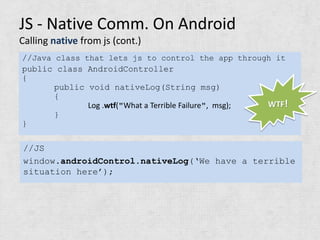
//Java class that lets js to control the app through it
public class AndroidController
{
       public void nativeLog(String msg)
       {
              Log .wtf("What a Terrible Failure", msg); WTF!
       }
}

//JS
window.androidControl.nativeLog(‘We have a terrible
situation here’);
JS - Native Comm. On Android
Calling js from native (cont.)


//Just as simple as
webView.loadUrl(
"javascript:jsmethodname()");
Websocket
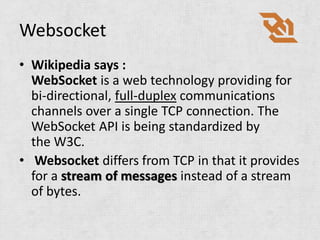
• Wikipedia says :
  WebSocket is a web technology providing for
  bi-directional, full-duplex communications
  channels over a single TCP connection. The
  WebSocket API is being standardized by
  the W3C.
• Websocket differs from TCP in that it provides
  for a stream of messages instead of a stream
  of bytes.
Using websocket
var webSocketClient;

function connectToWebSocketServer() {
   webSocketClient = new WebSocket('ws://localhost:1111/some/resource/');
   webSocketClient.onopen = function() { alert('connection opened'); };
   webSocketClient.onerror = function() { alert('connection error'); };
   webSocketClient.onclose = function() { alert('connection closed'); };
   webSocketClient.onmessage = function(msg) { alert('msg: '+msg.data);
};
}
connectToWebSocketServer();


if(webSocketClient && webSocketClient.readyState == 1) {
  webSocketClient.send("Hello world!");
}
Advantages of Websocket
• WebSockets can communicate asynchronously
  from JavaScript to native.
• WebSockets don't have a payload limit
• WebSockets don't require encoding JSON
  strings as URL parameters
• WebSockets should be faster than URL
  scheme navigation
Hybrid Frameworks
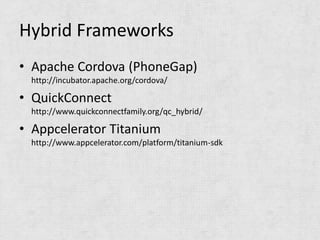
• Apache Cordova (PhoneGap)
 http://incubator.apache.org/cordova/

• QuickConnect
 http://www.quickconnectfamily.org/qc_hybrid/

• Appcelerator Titanium
 http://www.appcelerator.com/platform/titanium-sdk
PhoneGap
                             ACCELEROMETER
• Developed by Nitobi        CAMERA
• Nitobi acquired by Adobe   COMPASS
                             CONTACTS
• Now it is under Apache     FILE
  Software Foundation        GEOLOCATION
                             MEDIA
• Called Apache Cordova      NETWORK
                             NOTIFICATION(ALERT)(SOUND)(VIBRATION)
                             STORAGE
                             + PLUG-INs
PhoneGap – Examples
<body onload="init();">

function init() {
         document.addEventListener("deviceready", check_network, true);
}


function check_network() {
    var networkState = navigator.network.connection.type;
    var states = {};
    states[Connection.UNKNOWN] = 'Unknown connection';
    states[Connection.ETHERNET] = 'Ethernet connection';
    states[Connection.WIFI]     = 'WiFi connection';
    states[Connection.CELL_2G] = 'Cell 2G connection';
    states[Connection.CELL_3G] = 'Cell 3G connection';
    states[Connection.CELL_4G] = 'Cell 4G connection';
    states[Connection.NONE]     = 'No network connection';
    confirm('Connection type:n ' + states[networkState]);
}
PhoneGap – Examples
function onSuccess(acceleration) {
    alert('Acceleration X: ' + acceleration.x + 'n' +
          'Acceleration Y: ' + acceleration.y + 'n' +
          'Acceleration Z: ' + acceleration.z + 'n' +
          'Timestamp: '      + acceleration.timestamp + 'n');
};

function onError() {
    alert('onError!');
};

navigator.accelerometer.getCurrentAcceleration(onSuccess, onError);


 navigator.camera.getPicture(dump_pic, fail, {
         quality : 50
});
Creating PhoneGap Plug-in
Java

public class MyPhoneGapPlugin extends Plugin {

@Override public PluginResult execute
                  (String action, JSONArray data, String callbackId)
{
         PluginResult result = null;

        if (action.equals("getInfo")){
                 Log.d("MyPhoneGapPlugin ", "Plugin Called");
                 JSONObject jsonToReturn= create a JSONOBJECT
                 result = new PluginResult(Status.OK, jsonToReturn);
        }
        return result;
}
res/xml/plugins.xml
<plugins>
<plugin name="App" value="org.apache.cordova.App"/>
<plugin name="Geolocation" value="org.apache.cordova.GeoBroker"/>
<plugin name="Device" value="org.apache.cordova.Device"/>
<plugin name="Accelerometer" value="org.apache.cordova.AccelListener"/>
<plugin name="Compass" value="org.apache.cordova.CompassListener"/>
<plugin name="Media" value="org.apache.cordova.AudioHandler"/>
<plugin name="Camera" value="org.apache.cordova.CameraLauncher"/>
<plugin name="Contacts" value="org.apache.cordova.ContactManager"/>
<plugin name="File" value="org.apache.cordova.FileUtils"/>
<plugin name="NetworkStatus" value="org.apache.cordova.NetworkManager"/>
<plugin name="Notification" value="org.apache.cordova.Notification"/>
<plugin name="Storage" value="org.apache.cordova.Storage"/>
<plugin name="Temperature" value="org.apache.cordova.TempListener"/>
<plugin name="FileTransfer" value="org.apache.cordova.FileTransfer"/>
<plugin name="Capture" value="org.apache.cordova.Capture"/>
<plugin name="Battery" value="org.apache.cordova.BatteryListener"/>
<plugin name="MyPhoneGapPlugin" value="com.myplugin.plugin"/>
 <plugin name="SplashScreen" value="org.apache.cordova.SplashScreen"/>
</plugins>
Creating PhoneGap Plug-in
Javascript

var CustomPlugin= function() { };

CustomPlugin.prototype.getInfo = function(param,successCallback,
failureCallback)
{
         return PhoneGap.exec(
         successCallback,    //Success callback from the plugin
         failureCallback,      //Error callback from the plugin
         'MyPhoneGapPlugin ', //Tell PhoneGap to run which plugin
         'getInfo',     //Tell plugin, which action we want to perform
         [param]);        //Passing list of args to the plugin
};
Creating PhoneGap Plug-in
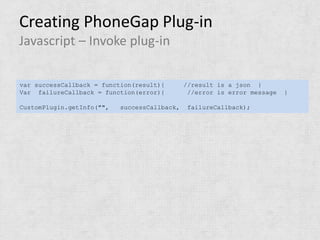
Javascript – Invoke plug-in

var successCallback = function(result){       //result is a json }
Var failureCallback = function(error){         //error is error message   }

CustomPlugin.getInfo("",   successCallback,    failureCallback);
How to debug?
• WEINRE - WEb INspector Remote
• Now weinre is a part of Apache Cordova
  Project (PhoneGap)
• iOS 5 - Enabling Remote Debugging via Private
  APIs in Mobile Safari
WEINRE   • Debug Client is a traditional
           webkit browser. Familiar
           debugger view (like Web
           Inspector
         • Debug Target is the webkit-
           browser.
         • It consists of a javascript
           library which runs in your
           mobile browser along with
           your app.
         • With a little linkage to your
           code, this library exposes
           your javascript to the server
           for inspection and
           modification.
Debugging via debug.phonegap.com
• http://debug.phonegap.com/ (weinre)


Documentation for running weinre on your own pc :
http://people.apache.org/~pmuellr/weinre/docs/latest/
iOS - Enabling Remote Debugging
//in the didFinishLaunchingWithOptions method
(BOOL)application:(UIApplication *)application
didFinishLaunchingWithOptions:(NSDictionary
*)launchOptions


// Enable Safari's Web Inspector for                    iOS 5

[NSClassFromString(@"WebView")_enableRemoteInspector];


Start debugging at http://localhost:9999 in safari
       Warning! – Do not forget to remove the remote inspector enabling code
       line before submitting your app into the app-store unless you want to get
       your app rejected. (Reason: Non-public API usage)
Who tried ?
• Linkedin - http://engineering.linkedin.com/
  95% Web – WS/Url Scheme
  Lightweight libs (backbone.js-underscore.js)
  smooth infinite scrolling
  offline storage

• Facebook
• Cnet
• HistoryCalls 
The Future
•   Better Support for HTML5
•   More optimized js engines
•   Better rendering
•   More powerful mobile devices
•   Ease of development
•   Cross-Platform
•   Games
Thank You!


             Engin Yağız Hatay

       yagizhatay@gmail.com
    http://tr.linkedin.com/in/yagizhatay
References
•   http://www.worth1000.com/entries/146286/frogodile
•   http://blog.techno-barje.fr/post/2010/10/06/UIWebView-secrets-part3-How-to-
    properly-call-ObjectiveC-from-Javascript/
•   http://engineering.linkedin.com/mobile/linkedin-ipad-nativeweb-messaging-
    bridge-and-websockets
•   http://www.w3.org/html/logo/
•   http://people.apache.org/~pmuellr/weinre/docs/latest/Running.html
•   https://www.ibm.com/developerworks/mydeveloperworks/blogs/94e7fded-7162-
    445e-8ceb-
    97a2140866a9/entry/debugging_mobile_javascript_with_weinre?lang=en
•   http://www.iconfinder.com/icondetails/17857/128/animal_bug_insect_ladybird_i
    con

Hybrid application development

  • 1.
    Hybrid Application Development Engin Yağız Hatay Software Developer
  • 2.
    Who am I? Engin Yağız Hatay yagizhatay@gmail.com • Computer Engineer • Full-Time software developer • Hybrid application developer
  • 3.
    Outline • Ways of building an App… • Hybrid Application ? • Pros & Cons (Native/Web/Hybrid Apps) • JS – Native Communication & Websocket • Hybrid Frameworks / PhoneGap • How to debug ? • Who tried ? • The Future
  • 4.
    Ways of buildingan App… Native Web Hybrid Application Application Application Java, HTML 5, JS-Native Objective-C, JS, Communication C# … CSS 3 …
  • 5.
    Hybrid Application ? • Developed with HTML5 wrapped in a native container. • No platform-specific languages like Objective-C or Java. • Can appear on app-stores • Ability to access to native capabilities (camera, microphone, contact list, or notification system)
  • 6.
    Pros & Cons– (Native Application) • Better performance • More expensive to build, even for • Snappier /Smooth animations, a single platform. transitions, and faster load times. • AppStore submission/Approval • Can store more data offline Process • Can be featured and searched for • You must share a percentage with in the app store the store (30% for Apple’s App • Full access to the device’s Store, including in-app hardware and OS features purchases). • The App Store handles purchase • App updates must go through a transactions on your behalf new approval process each time.
  • 7.
    Pros & Cons– (Web Application) • A single codebase which can be accessed • Interpreted code (opposed to by any browser-enabled mobile device. compiled code for native apps) • HTML/CSS/Javascript : Easier to learn than native languages like Objective-C or Java. • Don’t have full access to all the • Performance issues are becoming less of methods exposed by the device’s an issue as mobile browsers become operating system faster and their Javascript engines keep improving • Can’t be found on the app store. • No approval process needed, and updates • If you are looking to generate to the app can happen instantaneously revenue, it’s up to you to build a • No revenue sharing with an app store commerce model.
  • 8.
    Pros & Cons– (Hybrid Application) • Market your app in each of the • Still subject to the store’s major mobile app stores. approval process and revenue • Gives you APIs to access some, if sharing. No instant updating. not all, of the features locked out • The app’s performance is still of the browser, such as camera, dependant on the device’s compass, contacts. Purchases are browser capabilities. managed by the App Store.
  • 9.
    JS – NativeCommunication • “native bridge” • Different in every platform • Accomplished via WebView object on Android • Using Websocket(HTML5) is another approach. (Websocket Server : native / Websocket Client : web)
  • 10.
    JS - NativeComm. On Android Calling native from js //Make sure that javascript is enabled in webview WebView webView = new WebView(); webView.getSettings().setJavaScriptEnabled(true); //Control android from javascript //addJavascriptInterface method adds androidControl //variable into js webView.addJavascriptInterface( new AndroidController(), "androidControl" );
  • 11.
    JS - NativeComm. On Android Calling native from js (cont.) //Java class that lets js to control the app through it public class AndroidController { public void nativeLog(String msg) { Log .wtf("What a Terrible Failure", msg); WTF! } } //JS window.androidControl.nativeLog(‘We have a terrible situation here’);
  • 12.
    JS - NativeComm. On Android Calling js from native (cont.) //Just as simple as webView.loadUrl( "javascript:jsmethodname()");
  • 13.
    Websocket • Wikipedia says: WebSocket is a web technology providing for bi-directional, full-duplex communications channels over a single TCP connection. The WebSocket API is being standardized by the W3C. • Websocket differs from TCP in that it provides for a stream of messages instead of a stream of bytes.
  • 14.
    Using websocket var webSocketClient; functionconnectToWebSocketServer() { webSocketClient = new WebSocket('ws://localhost:1111/some/resource/'); webSocketClient.onopen = function() { alert('connection opened'); }; webSocketClient.onerror = function() { alert('connection error'); }; webSocketClient.onclose = function() { alert('connection closed'); }; webSocketClient.onmessage = function(msg) { alert('msg: '+msg.data); }; } connectToWebSocketServer(); if(webSocketClient && webSocketClient.readyState == 1) { webSocketClient.send("Hello world!"); }
  • 15.
    Advantages of Websocket •WebSockets can communicate asynchronously from JavaScript to native. • WebSockets don't have a payload limit • WebSockets don't require encoding JSON strings as URL parameters • WebSockets should be faster than URL scheme navigation
  • 16.
    Hybrid Frameworks • ApacheCordova (PhoneGap) http://incubator.apache.org/cordova/ • QuickConnect http://www.quickconnectfamily.org/qc_hybrid/ • Appcelerator Titanium http://www.appcelerator.com/platform/titanium-sdk
  • 17.
    PhoneGap ACCELEROMETER • Developed by Nitobi CAMERA • Nitobi acquired by Adobe COMPASS CONTACTS • Now it is under Apache FILE Software Foundation GEOLOCATION MEDIA • Called Apache Cordova NETWORK NOTIFICATION(ALERT)(SOUND)(VIBRATION) STORAGE + PLUG-INs
  • 18.
    PhoneGap – Examples <bodyonload="init();"> function init() { document.addEventListener("deviceready", check_network, true); } function check_network() { var networkState = navigator.network.connection.type; var states = {}; states[Connection.UNKNOWN] = 'Unknown connection'; states[Connection.ETHERNET] = 'Ethernet connection'; states[Connection.WIFI] = 'WiFi connection'; states[Connection.CELL_2G] = 'Cell 2G connection'; states[Connection.CELL_3G] = 'Cell 3G connection'; states[Connection.CELL_4G] = 'Cell 4G connection'; states[Connection.NONE] = 'No network connection'; confirm('Connection type:n ' + states[networkState]); }
  • 19.
    PhoneGap – Examples functiononSuccess(acceleration) { alert('Acceleration X: ' + acceleration.x + 'n' + 'Acceleration Y: ' + acceleration.y + 'n' + 'Acceleration Z: ' + acceleration.z + 'n' + 'Timestamp: ' + acceleration.timestamp + 'n'); }; function onError() { alert('onError!'); }; navigator.accelerometer.getCurrentAcceleration(onSuccess, onError); navigator.camera.getPicture(dump_pic, fail, { quality : 50 });
  • 20.
    Creating PhoneGap Plug-in Java publicclass MyPhoneGapPlugin extends Plugin { @Override public PluginResult execute (String action, JSONArray data, String callbackId) { PluginResult result = null; if (action.equals("getInfo")){ Log.d("MyPhoneGapPlugin ", "Plugin Called"); JSONObject jsonToReturn= create a JSONOBJECT result = new PluginResult(Status.OK, jsonToReturn); } return result; }
  • 21.
    res/xml/plugins.xml <plugins> <plugin name="App" value="org.apache.cordova.App"/> <pluginname="Geolocation" value="org.apache.cordova.GeoBroker"/> <plugin name="Device" value="org.apache.cordova.Device"/> <plugin name="Accelerometer" value="org.apache.cordova.AccelListener"/> <plugin name="Compass" value="org.apache.cordova.CompassListener"/> <plugin name="Media" value="org.apache.cordova.AudioHandler"/> <plugin name="Camera" value="org.apache.cordova.CameraLauncher"/> <plugin name="Contacts" value="org.apache.cordova.ContactManager"/> <plugin name="File" value="org.apache.cordova.FileUtils"/> <plugin name="NetworkStatus" value="org.apache.cordova.NetworkManager"/> <plugin name="Notification" value="org.apache.cordova.Notification"/> <plugin name="Storage" value="org.apache.cordova.Storage"/> <plugin name="Temperature" value="org.apache.cordova.TempListener"/> <plugin name="FileTransfer" value="org.apache.cordova.FileTransfer"/> <plugin name="Capture" value="org.apache.cordova.Capture"/> <plugin name="Battery" value="org.apache.cordova.BatteryListener"/> <plugin name="MyPhoneGapPlugin" value="com.myplugin.plugin"/> <plugin name="SplashScreen" value="org.apache.cordova.SplashScreen"/> </plugins>
  • 22.
    Creating PhoneGap Plug-in Javascript varCustomPlugin= function() { }; CustomPlugin.prototype.getInfo = function(param,successCallback, failureCallback) { return PhoneGap.exec( successCallback, //Success callback from the plugin failureCallback, //Error callback from the plugin 'MyPhoneGapPlugin ', //Tell PhoneGap to run which plugin 'getInfo', //Tell plugin, which action we want to perform [param]); //Passing list of args to the plugin };
  • 23.
    Creating PhoneGap Plug-in Javascript– Invoke plug-in var successCallback = function(result){ //result is a json } Var failureCallback = function(error){ //error is error message } CustomPlugin.getInfo("", successCallback, failureCallback);
  • 24.
    How to debug? •WEINRE - WEb INspector Remote • Now weinre is a part of Apache Cordova Project (PhoneGap) • iOS 5 - Enabling Remote Debugging via Private APIs in Mobile Safari
  • 25.
    WEINRE • Debug Client is a traditional webkit browser. Familiar debugger view (like Web Inspector • Debug Target is the webkit- browser. • It consists of a javascript library which runs in your mobile browser along with your app. • With a little linkage to your code, this library exposes your javascript to the server for inspection and modification.
  • 26.
    Debugging via debug.phonegap.com •http://debug.phonegap.com/ (weinre) Documentation for running weinre on your own pc : http://people.apache.org/~pmuellr/weinre/docs/latest/
  • 27.
    iOS - EnablingRemote Debugging //in the didFinishLaunchingWithOptions method (BOOL)application:(UIApplication *)application didFinishLaunchingWithOptions:(NSDictionary *)launchOptions // Enable Safari's Web Inspector for iOS 5 [NSClassFromString(@"WebView")_enableRemoteInspector]; Start debugging at http://localhost:9999 in safari Warning! – Do not forget to remove the remote inspector enabling code line before submitting your app into the app-store unless you want to get your app rejected. (Reason: Non-public API usage)
  • 28.
    Who tried ? •Linkedin - http://engineering.linkedin.com/ 95% Web – WS/Url Scheme Lightweight libs (backbone.js-underscore.js) smooth infinite scrolling offline storage • Facebook • Cnet • HistoryCalls 
  • 29.
    The Future • Better Support for HTML5 • More optimized js engines • Better rendering • More powerful mobile devices • Ease of development • Cross-Platform • Games
  • 30.
    Thank You! Engin Yağız Hatay yagizhatay@gmail.com http://tr.linkedin.com/in/yagizhatay
  • 31.
    References • http://www.worth1000.com/entries/146286/frogodile • http://blog.techno-barje.fr/post/2010/10/06/UIWebView-secrets-part3-How-to- properly-call-ObjectiveC-from-Javascript/ • http://engineering.linkedin.com/mobile/linkedin-ipad-nativeweb-messaging- bridge-and-websockets • http://www.w3.org/html/logo/ • http://people.apache.org/~pmuellr/weinre/docs/latest/Running.html • https://www.ibm.com/developerworks/mydeveloperworks/blogs/94e7fded-7162- 445e-8ceb- 97a2140866a9/entry/debugging_mobile_javascript_with_weinre?lang=en • http://www.iconfinder.com/icondetails/17857/128/animal_bug_insect_ladybird_i con