MySQL
Document Store -
A NoSQL JSON
Document Database
Dave Stokes
@stoker
david.stokes@oracle.com
Elephantdolphin.blogger.com
OpensourceDBA.wordpress.com
2
Safe Harbor Agreement
THE FOLLOWING IS INTENDED TO OUTLINE OUR GENERAL PRODUCT
DIRECTION. IT IS INTENDED FOR INFORMATION PURPOSES ONLY, AND MAY
NOT BE INCORPORATED INTO ANY CONTRACT. IT IS NOT A COMMITMENT TO
DELIVER ANY MATERIAL, CODE, OR FUNCTIONALITY, AND SHOULD NOT BE
RELIED UPON IN MAKING PURCHASING DECISIONS. THE DEVELOPMENT,
RELEASE, AND TIMING OF ANY FEATURES OR FUNCTIONALITY DESCRIBED
FOR ORACLE'S PRODUCTS REMAINS AT THE SOLE DISCRETION OF ORACLE.
3
MySQL Community Edition
4
NoSQL & SQL
5
Together!
MySQL
Document
Store
Relational Databases
6
Relational Databases
● Data Integrity
○ Normalization
○ constraints (foreign keys, ...)
● Atomicity, Consistency, Isolation, Durability
○ ACID compliant
○ transactions
● SQL
○ powerful query language 7
Relational Databases
● Need to set up tables BEFORE use
● Relations, indexes, data normalization, query optimizations
● Hard to change on the fly
● Need a DBA or someone who has DBA skills
8
NoSQL or Document Store
9
NoSQL or Document Store
● Schemaless
○ No schema design, no normalization, no foreign keys, no data types, …
○ Very quick initial development
● Flexible data structure
○ Embedded arrays or objects
○ Valid solution when natural data can not be modelized optimally into a
relational model
○ Objects persistence without the use of any ORM - *mapping
object-oriented*
10
NoSQL or Document Store
● JSON
● close to frontend
● native in JS
● easy to learn
11
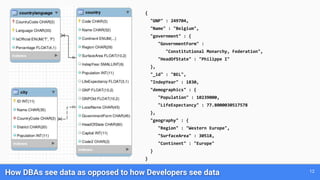
How DBAs see data as opposed to how Developers see data
{
"GNP" : 249704,
"Name" : "Belgium",
"government" : {
"GovernmentForm" :
"Constitutional Monarchy, Federation",
"HeadOfState" : "Philippe I"
},
"_id" : "BEL",
"IndepYear" : 1830,
"demographics" : {
"Population" : 10239000,
"LifeExpectancy" : 77.8000030517578
},
"geography" : {
"Region" : "Western Europe",
"SurfaceArea" : 30518,
"Continent" : "Europe"
}
}
12
What if there was a way to provide both SQL
and NoSQL on one stable platform that has
proven stability on well know technology
with a large Community and a diverse
ecosystem ?
With the MySQL Document
Store it is now an option!
13
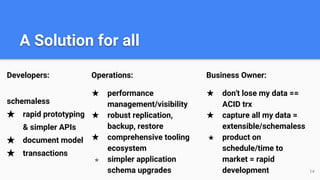
A Solution for all
Developers:
schemaless
★ rapid prototyping
& simpler APIs
★ document model
★ transactions
Operations:
★ performance
management/visibility
★ robust replication,
backup, restore
★ comprehensive tooling
ecosystem
★ simpler application
schema upgrades 14
Business Owner:
★ don't lose my data ==
ACID trx
★ capture all my data =
extensible/schemaless
★ product on
schedule/time to
market = rapid
development
Built on the MySQL JSON Data type and Proven MySQL Server Technology 15
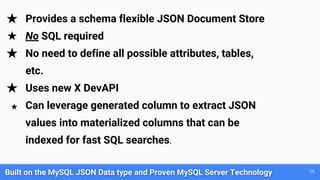
★ Provides a schema flexible JSON Document Store
★ No SQL required
★ No need to define all possible attributes, tables,
etc.
★ Uses new X DevAPI
★ Can leverage generated column to extract JSON
values into materialized columns that can be
indexed for fast SQL searches.
Built on the MySQL JSON Data type and Proven MySQL Server Technology 16
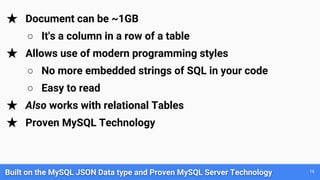
★ Document can be ~1GB
○ It's a column in a row of a table
★ Allows use of modern programming styles
○ No more embedded strings of SQL in your code
○ Easy to read
★ Also works with relational Tables
★ Proven MySQL Technology
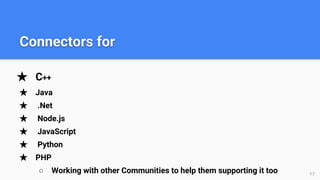
★ C++
★ Java
★ .Net
★ Node.js
★ JavaScript
★ Python
★ PHP
○ Working with other Communities to help them supporting it too 17
Connectors for
★ Command Completion
★ Python, JavaScripts & SQL modes
★ Admin functions
★ New Util object
★ A new high-level session concept that can scale from single MySQL
Server to a multiple server environment
18
New MySQL Shell
★ Non-blocking, asynchronous calls follow common language patterns
★ Supports CRUD operations
19
New Model
20
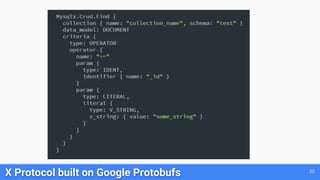
X Protocol built on Google Protobufs
21
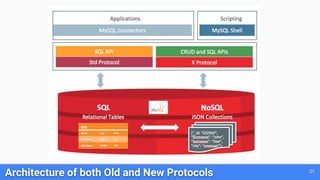
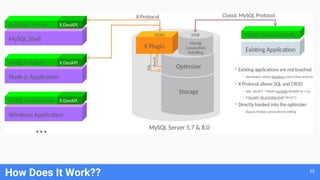
Architecture of both Old and New Protocols
22
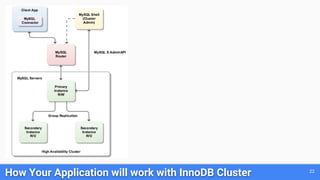
How Your Application will work with InnoDB Cluster
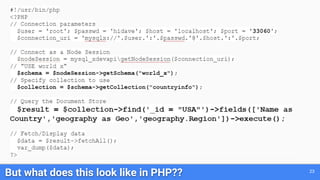
But what does this look like in PHP?? 23
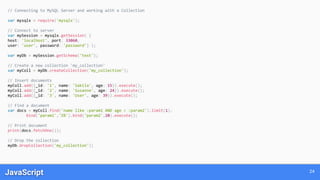
JavaScript 24
// Connecting to MySQL Server and working with a Collection
var mysqlx = require('mysqlx');
// Connect to server
var mySession = mysqlx.getSession( {
host: 'localhost', port: 33060,
user: 'user', password: 'password'} );
var myDb = mySession.getSchema('test');
// Create a new collection 'my_collection'
var myColl = myDb.createCollection('my_collection');
// Insert documents
myColl.add({_id: '1', name: 'Sakila', age: 15}).execute();
myColl.add({_id: '2', name: 'Susanne', age: 24}).execute();
myColl.add({_id: '3', name: 'User', age: 39}).execute();
// Find a document
var docs = myColl.find('name like :param1 AND age < :param2').limit(1).
bind('param1','S%').bind('param2',20).execute();
// Print document
print(docs.fetchOne());
// Drop the collection
myDb.dropCollection('my_collection');
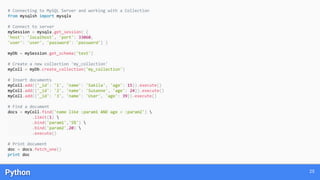
Python 25
# Connecting to MySQL Server and working with a Collection
from mysqlsh import mysqlx
# Connect to server
mySession = mysqlx.get_session( {
'host': 'localhost', 'port': 33060,
'user': 'user', 'password': 'password'} )
myDb = mySession.get_schema('test')
# Create a new collection 'my_collection'
myColl = myDb.create_collection('my_collection')
# Insert documents
myColl.add({'_id': '1', 'name': 'Sakila', 'age': 15}).execute()
myColl.add({'_id': '2', 'name': 'Susanne', 'age': 24}).execute()
myColl.add({'_id': '3', 'name': 'User', 'age': 39}).execute()
# Find a document
docs = myColl.find('name like :param1 AND age < :param2') 
.limit(1) 
.bind('param1','S%') 
.bind('param2',20) 
.execute()
# Print document
doc = docs.fetch_one()
print doc
Node.JS 26
// Connecting to MySQL Server and working with a Collection
var mysqlx = require('@mysql/xdevapi');
var db;
// Connect to server
mysqlx
.getSession({
user: 'user',
password: 'password',
host: 'localhost',
port: '33060',
})
.then(function (session) {
db = session.getSchema('test');
// Create a new collection 'my_collection'
return db.createCollection('my_collection');
})
.then(function (myColl) {
// Insert documents
return Promise
.all([
myColl.add({ name: 'Sakila', age: 15 }).execute(),
myColl.add({ name: 'Susanne', age: 24 }).execute(),
myColl.add({ name: 'User', age: 39 }).execute()
])
.then(function () {
// Find a document
return myColl
.find('name like :name && age < :age')
.bind({ name: 'S%', age: 20 })
.limit(1)
.execute(function (doc) {
// Print document
console.log(doc);
});
});
})
.then(function(docs) {
// Drop the collection
return db.dropCollection('my_collection');
})
.catch(function(err) {
// Handle error
});
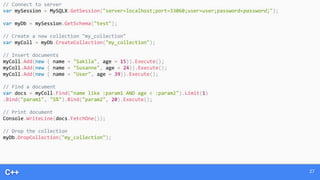
C++ 27
// Connect to server
var mySession = MySQLX.GetSession("server=localhost;port=33060;user=user;password=password;");
var myDb = mySession.GetSchema("test");
// Create a new collection "my_collection"
var myColl = myDb.CreateCollection("my_collection");
// Insert documents
myColl.Add(new { name = "Sakila", age = 15}).Execute();
myColl.Add(new { name = "Susanne", age = 24}).Execute();
myColl.Add(new { name = "User", age = 39}).Execute();
// Find a document
var docs = myColl.Find("name like :param1 AND age < :param2").Limit(1)
.Bind("param1", "S%").Bind("param2", 20).Execute();
// Print document
Console.WriteLine(docs.FetchOne());
// Drop the collection
myDb.DropCollection("my_collection");
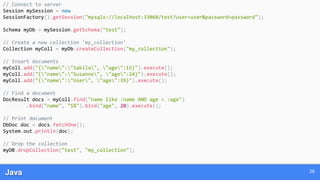
Java 28
// Connect to server
Session mySession = new
SessionFactory().getSession("mysqlx://localhost:33060/test?user=user&password=password");
Schema myDb = mySession.getSchema("test");
// Create a new collection 'my_collection'
Collection myColl = myDb.createCollection("my_collection");
// Insert documents
myColl.add("{"name":"Sakila", "age":15}").execute();
myColl.add("{"name":"Susanne", "age":24}").execute();
myColl.add("{"name":"User", "age":39}").execute();
// Find a document
DocResult docs = myColl.find("name like :name AND age < :age")
.bind("name", "S%").bind("age", 20).execute();
// Print document
DbDoc doc = docs.fetchOne();
System.out.println(doc);
// Drop the collection
myDB.dropCollection("test", "my_collection");
29
New Shell
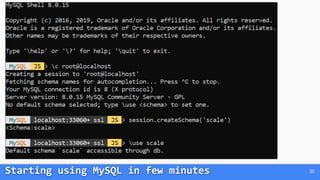
Starting using MySQL in few minutes 30
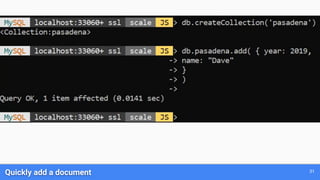
Quickly add a document 31
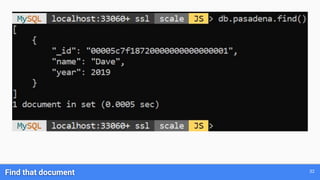
Find that document 32
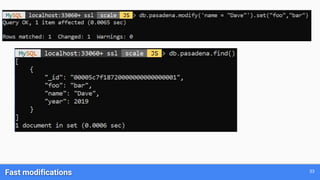
Fast modifications 33
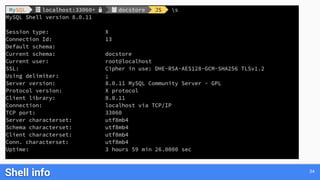
Shell info 34
For this example, I will use the well known restaurants collection:
We need to dump the data to a file and
we will use the MySQL Shell
with the Python interpreter to load the data.
Migration from MongoDB to MySQL Document Store
35
Dump and load using MySQL Shell & Python
This example is inspired by @datacharmer's work: https://www.slideshare.net/datacharmer/mysql-documentstore
$ mongo quiet eval 'DBQuery.shellBatchSize=30000;
db.restaurants.find().shellPrint()' 
| perl -pe 's/(?:ObjectId|ISODate)(("[^"]+"))/ $1/g' > all_recs.json
36
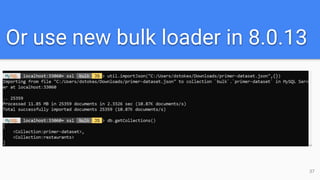
Or use new bulk loader in 8.0.13
37
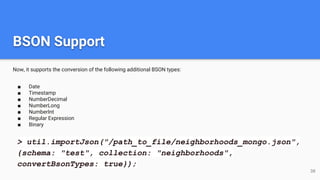
BSON Support
Now, it supports the conversion of the following additional BSON types:
■ Date
■ Timestamp
■ NumberDecimal
■ NumberLong
■ NumberInt
■ Regular Expression
■ Binary
38
> util.importJson("/path_to_file/neighborhoods_mongo.json",
{schema: "test", collection: "neighborhoods",
convertBsonTypes: true});
39
40
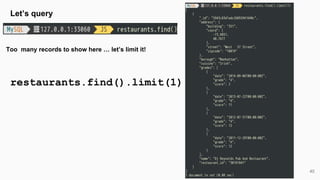
Let’s query
Too many records to show here … let’s limit it!
restaurants.find().limit(1)
41
More Examples!
restaurants.find().fields([“name”,”cuisine”]).limit(2)
42
Comparing Syntax: MongoDB vs MYSQL
MongoDB:
> db.restaurants.find({"cuisine": "French",
"borough": { $not: /^Manhattan/} },
{"_id":0, "name": 1,"cuisine": 1, "borough": 1}).limit(2)
MySQL:
>restaurants.find(“cuisine=’French’ AND
borough!=’Manhattan’”).fields([“name”,”cuisine”,”borough”
]).limit(2)
43
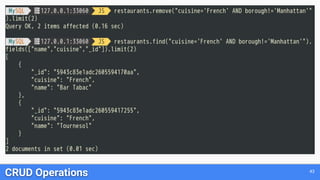
CRUD Operations
44
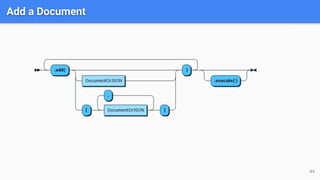
Add a Document
45
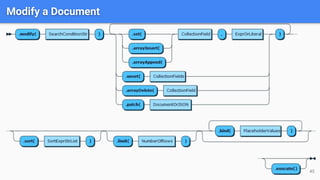
Modify a Document
46
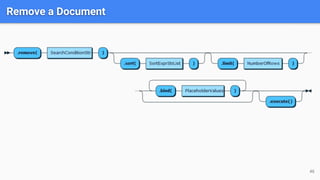
Remove a Document
47
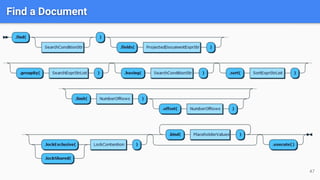
Find a Document
48
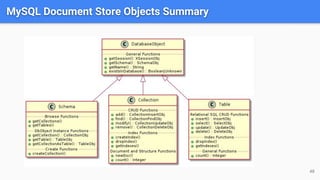
MySQL Document Store Objects Summary
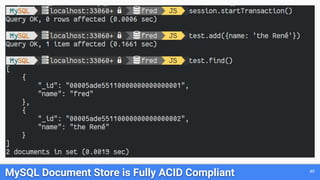
MySQL Document Store is Fully ACID Compliant 49
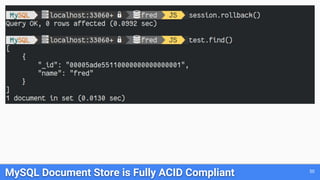
MySQL Document Store is Fully ACID Compliant 50
What about old SQL? The Hidden Part of the Iceberg 51
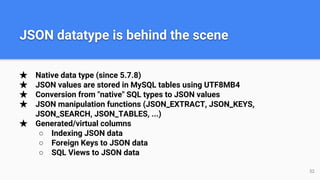
★ Native data type (since 5.7.8)
★ JSON values are stored in MySQL tables using UTF8MB4
★ Conversion from "native" SQL types to JSON values
★ JSON manipulation functions (JSON_EXTRACT, JSON_KEYS,
JSON_SEARCH, JSON_TABLES, ...)
★ Generated/virtual columns
○ Indexing JSON data
○ Foreign Keys to JSON data
○ SQL Views to JSON data
JSON datatype is behind the scene
52
How Does It Work?? 53
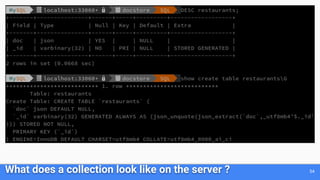
What does a collection look like on the server ? 54
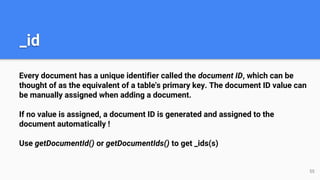
Every document has a unique identifier called the document ID, which can be
thought of as the equivalent of a table's primary key. The document ID value can
be manually assigned when adding a document.
If no value is assigned, a document ID is generated and assigned to the
document automatically !
Use getDocumentId() or getDocumentIds() to get _ids(s)
_id
55
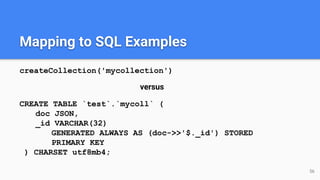
Mapping to SQL Examples
createCollection('mycollection')
versus
CREATE TABLE `test`.`mycoll` (
doc JSON,
_id VARCHAR(32)
GENERATED ALWAYS AS (doc->>'$._id') STORED
PRIMARY KEY
) CHARSET utf8mb4;
56
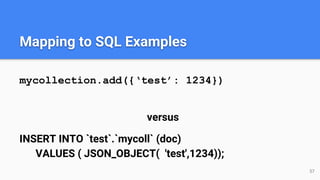
Mapping to SQL Examples
mycollection.add({‘test’: 1234})
versus
INSERT INTO `test`.`mycoll` (doc)
VALUES ( JSON_OBJECT( 'test',1234));
57
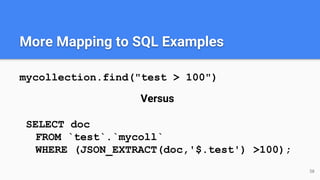
More Mapping to SQL Examples
mycollection.find("test > 100")
Versus
SELECT doc
FROM `test`.`mycoll`
WHERE (JSON_EXTRACT(doc,'$.test') >100);
58
59
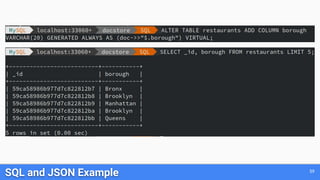
SQL and JSON Example
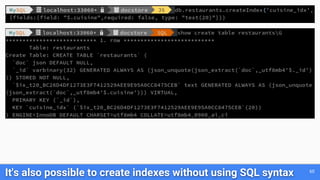
It's also possible to create indexes without using SQL syntax 60
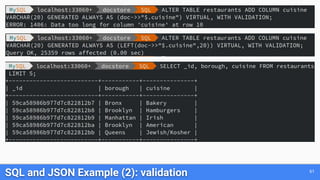
SQL and JSON Example (2): validation 61
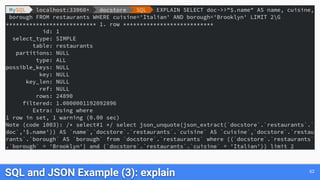
SQL and JSON Example (3): explain 62
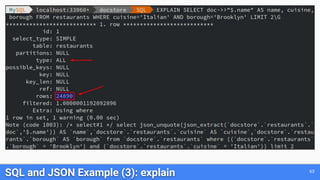
SQL and JSON Example (3): explain 63
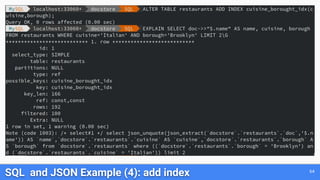
SQL and JSON Example (4): add index 64
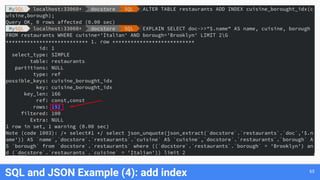
SQL and JSON Example (4): add index 65
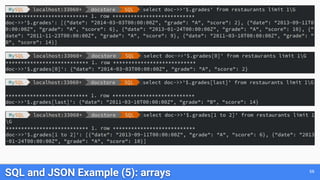
SQL and JSON Example (5): arrays 66
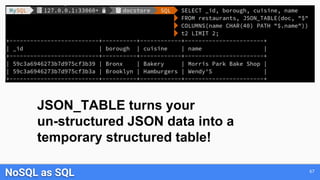
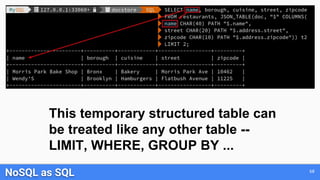
NoSQL as SQL 67
JSON_TABLE turns your
un-structured JSON data into a
temporary structured table!
NoSQL as SQL 68
This temporary structured table can
be treated like any other table --
LIMIT, WHERE, GROUP BY ...
69
More Sophisticated Analysis
Find the top 10 restaurants by grade for each cuisine 70
WITH cte1 AS
(SELECT doc->>"$.name" AS name,
doc->>"$.cuisine" AS cuisine,
(SELECT AVG(score) FROM
JSON_TABLE(doc, "$.grades[*]" COLUMNS
(score INT PATH "$.score")) AS r) AS avg_score
FROM restaurants)
SELECT *, RANK() OVER
(PARTITION BY cuisine ORDER BY avg_score DESC) AS `rank`
FROM cte1
ORDER BY `rank`, avg_score DESC LIMIT 10;
This query uses a Common Table Expression (CTE) and a Windowing Function to rank the
average scores of each restaurant, by each cuisine assembled in a JSON_TABLE
Conclusion: What Do I Gain?
71
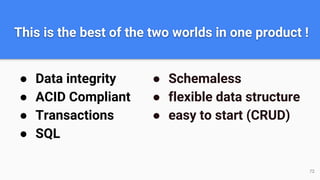
This is the best of the two worlds in one product !
● Data integrity
● ACID Compliant
● Transactions
● SQL
● Schemaless
● flexible data structure
● easy to start (CRUD)
72
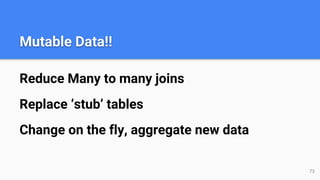
Mutable Data!!
Reduce Many to many joins
Replace ‘stub’ tables
Change on the fly, aggregate new data
73
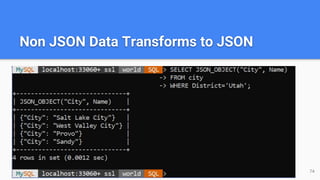
Non JSON Data Transforms to JSON
74
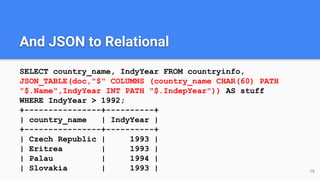
And JSON to Relational
SELECT country_name, IndyYear FROM countryinfo,
JSON_TABLE(doc,"$" COLUMNS (country_name CHAR(60) PATH
"$.Name",IndyYear INT PATH "$.IndepYear")) AS stuff
WHERE IndyYear > 1992;
+----------------+----------+
| country_name | IndyYear |
+----------------+----------+
| Czech Republic | 1993 |
| Eritrea | 1993 |
| Palau | 1994 |
| Slovakia | 1993 | 75
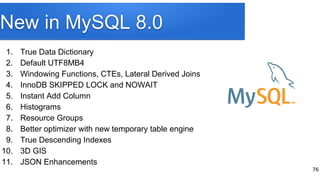
New in MySQL 8.0
1. True Data Dictionary
2. Default UTF8MB4
3. Windowing Functions, CTEs, Lateral Derived Joins
4. InnoDB SKIPPED LOCK and NOWAIT
5. Instant Add Column
6. Histograms
7. Resource Groups
8. Better optimizer with new temporary table engine
9. True Descending Indexes
10. 3D GIS
11. JSON Enhancements
76
Thanks!
Contact info:
Dave Stokes
David.Stokes@Oracle.com
@Stoker
slideshare.net/davidmstokes
Elepantdolphin.blogger.com
opensourcedba.Wordpress.com
77
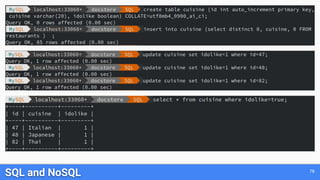
SQL and NoSQL 78
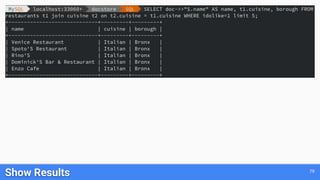
Show Results 79
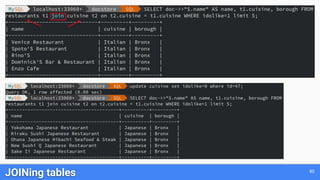
JOINing tables 80

MySQL Document Store -- SCaLE 17x Presentation

  • 1.
    MySQL Document Store - ANoSQL JSON Document Database Dave Stokes @stoker david.stokes@oracle.com Elephantdolphin.blogger.com OpensourceDBA.wordpress.com
  • 2.
  • 3.
    Safe Harbor Agreement THEFOLLOWING IS INTENDED TO OUTLINE OUR GENERAL PRODUCT DIRECTION. IT IS INTENDED FOR INFORMATION PURPOSES ONLY, AND MAY NOT BE INCORPORATED INTO ANY CONTRACT. IT IS NOT A COMMITMENT TO DELIVER ANY MATERIAL, CODE, OR FUNCTIONALITY, AND SHOULD NOT BE RELIED UPON IN MAKING PURCHASING DECISIONS. THE DEVELOPMENT, RELEASE, AND TIMING OF ANY FEATURES OR FUNCTIONALITY DESCRIBED FOR ORACLE'S PRODUCTS REMAINS AT THE SOLE DISCRETION OF ORACLE. 3
  • 4.
  • 5.
  • 6.
  • 7.
    Relational Databases ● DataIntegrity ○ Normalization ○ constraints (foreign keys, ...) ● Atomicity, Consistency, Isolation, Durability ○ ACID compliant ○ transactions ● SQL ○ powerful query language 7
  • 8.
    Relational Databases ● Needto set up tables BEFORE use ● Relations, indexes, data normalization, query optimizations ● Hard to change on the fly ● Need a DBA or someone who has DBA skills 8
  • 9.
  • 10.
    NoSQL or DocumentStore ● Schemaless ○ No schema design, no normalization, no foreign keys, no data types, … ○ Very quick initial development ● Flexible data structure ○ Embedded arrays or objects ○ Valid solution when natural data can not be modelized optimally into a relational model ○ Objects persistence without the use of any ORM - *mapping object-oriented* 10
  • 11.
    NoSQL or DocumentStore ● JSON ● close to frontend ● native in JS ● easy to learn 11
  • 12.
    How DBAs seedata as opposed to how Developers see data { "GNP" : 249704, "Name" : "Belgium", "government" : { "GovernmentForm" : "Constitutional Monarchy, Federation", "HeadOfState" : "Philippe I" }, "_id" : "BEL", "IndepYear" : 1830, "demographics" : { "Population" : 10239000, "LifeExpectancy" : 77.8000030517578 }, "geography" : { "Region" : "Western Europe", "SurfaceArea" : 30518, "Continent" : "Europe" } } 12
  • 13.
    What if therewas a way to provide both SQL and NoSQL on one stable platform that has proven stability on well know technology with a large Community and a diverse ecosystem ? With the MySQL Document Store it is now an option! 13
  • 14.
    A Solution forall Developers: schemaless ★ rapid prototyping & simpler APIs ★ document model ★ transactions Operations: ★ performance management/visibility ★ robust replication, backup, restore ★ comprehensive tooling ecosystem ★ simpler application schema upgrades 14 Business Owner: ★ don't lose my data == ACID trx ★ capture all my data = extensible/schemaless ★ product on schedule/time to market = rapid development
  • 15.
    Built on theMySQL JSON Data type and Proven MySQL Server Technology 15 ★ Provides a schema flexible JSON Document Store ★ No SQL required ★ No need to define all possible attributes, tables, etc. ★ Uses new X DevAPI ★ Can leverage generated column to extract JSON values into materialized columns that can be indexed for fast SQL searches.
  • 16.
    Built on theMySQL JSON Data type and Proven MySQL Server Technology 16 ★ Document can be ~1GB ○ It's a column in a row of a table ★ Allows use of modern programming styles ○ No more embedded strings of SQL in your code ○ Easy to read ★ Also works with relational Tables ★ Proven MySQL Technology
  • 17.
    ★ C++ ★ Java ★.Net ★ Node.js ★ JavaScript ★ Python ★ PHP ○ Working with other Communities to help them supporting it too 17 Connectors for
  • 18.
    ★ Command Completion ★Python, JavaScripts & SQL modes ★ Admin functions ★ New Util object ★ A new high-level session concept that can scale from single MySQL Server to a multiple server environment 18 New MySQL Shell
  • 19.
    ★ Non-blocking, asynchronouscalls follow common language patterns ★ Supports CRUD operations 19 New Model
  • 20.
    20 X Protocol builton Google Protobufs
  • 21.
    21 Architecture of bothOld and New Protocols
  • 22.
    22 How Your Applicationwill work with InnoDB Cluster
  • 23.
    But what doesthis look like in PHP?? 23
  • 24.
    JavaScript 24 // Connectingto MySQL Server and working with a Collection var mysqlx = require('mysqlx'); // Connect to server var mySession = mysqlx.getSession( { host: 'localhost', port: 33060, user: 'user', password: 'password'} ); var myDb = mySession.getSchema('test'); // Create a new collection 'my_collection' var myColl = myDb.createCollection('my_collection'); // Insert documents myColl.add({_id: '1', name: 'Sakila', age: 15}).execute(); myColl.add({_id: '2', name: 'Susanne', age: 24}).execute(); myColl.add({_id: '3', name: 'User', age: 39}).execute(); // Find a document var docs = myColl.find('name like :param1 AND age < :param2').limit(1). bind('param1','S%').bind('param2',20).execute(); // Print document print(docs.fetchOne()); // Drop the collection myDb.dropCollection('my_collection');
  • 25.
    Python 25 # Connectingto MySQL Server and working with a Collection from mysqlsh import mysqlx # Connect to server mySession = mysqlx.get_session( { 'host': 'localhost', 'port': 33060, 'user': 'user', 'password': 'password'} ) myDb = mySession.get_schema('test') # Create a new collection 'my_collection' myColl = myDb.create_collection('my_collection') # Insert documents myColl.add({'_id': '1', 'name': 'Sakila', 'age': 15}).execute() myColl.add({'_id': '2', 'name': 'Susanne', 'age': 24}).execute() myColl.add({'_id': '3', 'name': 'User', 'age': 39}).execute() # Find a document docs = myColl.find('name like :param1 AND age < :param2') .limit(1) .bind('param1','S%') .bind('param2',20) .execute() # Print document doc = docs.fetch_one() print doc
  • 26.
    Node.JS 26 // Connectingto MySQL Server and working with a Collection var mysqlx = require('@mysql/xdevapi'); var db; // Connect to server mysqlx .getSession({ user: 'user', password: 'password', host: 'localhost', port: '33060', }) .then(function (session) { db = session.getSchema('test'); // Create a new collection 'my_collection' return db.createCollection('my_collection'); }) .then(function (myColl) { // Insert documents return Promise .all([ myColl.add({ name: 'Sakila', age: 15 }).execute(), myColl.add({ name: 'Susanne', age: 24 }).execute(), myColl.add({ name: 'User', age: 39 }).execute() ]) .then(function () { // Find a document return myColl .find('name like :name && age < :age') .bind({ name: 'S%', age: 20 }) .limit(1) .execute(function (doc) { // Print document console.log(doc); }); }); }) .then(function(docs) { // Drop the collection return db.dropCollection('my_collection'); }) .catch(function(err) { // Handle error });
  • 27.
    C++ 27 // Connectto server var mySession = MySQLX.GetSession("server=localhost;port=33060;user=user;password=password;"); var myDb = mySession.GetSchema("test"); // Create a new collection "my_collection" var myColl = myDb.CreateCollection("my_collection"); // Insert documents myColl.Add(new { name = "Sakila", age = 15}).Execute(); myColl.Add(new { name = "Susanne", age = 24}).Execute(); myColl.Add(new { name = "User", age = 39}).Execute(); // Find a document var docs = myColl.Find("name like :param1 AND age < :param2").Limit(1) .Bind("param1", "S%").Bind("param2", 20).Execute(); // Print document Console.WriteLine(docs.FetchOne()); // Drop the collection myDb.DropCollection("my_collection");
  • 28.
    Java 28 // Connectto server Session mySession = new SessionFactory().getSession("mysqlx://localhost:33060/test?user=user&password=password"); Schema myDb = mySession.getSchema("test"); // Create a new collection 'my_collection' Collection myColl = myDb.createCollection("my_collection"); // Insert documents myColl.add("{"name":"Sakila", "age":15}").execute(); myColl.add("{"name":"Susanne", "age":24}").execute(); myColl.add("{"name":"User", "age":39}").execute(); // Find a document DocResult docs = myColl.find("name like :name AND age < :age") .bind("name", "S%").bind("age", 20).execute(); // Print document DbDoc doc = docs.fetchOne(); System.out.println(doc); // Drop the collection myDB.dropCollection("test", "my_collection");
  • 29.
  • 30.
    Starting using MySQLin few minutes 30
  • 31.
    Quickly add adocument 31
  • 32.
  • 33.
  • 34.
  • 35.
    For this example,I will use the well known restaurants collection: We need to dump the data to a file and we will use the MySQL Shell with the Python interpreter to load the data. Migration from MongoDB to MySQL Document Store 35
  • 36.
    Dump and loadusing MySQL Shell & Python This example is inspired by @datacharmer's work: https://www.slideshare.net/datacharmer/mysql-documentstore $ mongo quiet eval 'DBQuery.shellBatchSize=30000; db.restaurants.find().shellPrint()' | perl -pe 's/(?:ObjectId|ISODate)(("[^"]+"))/ $1/g' > all_recs.json 36
  • 37.
    Or use newbulk loader in 8.0.13 37
  • 38.
    BSON Support Now, itsupports the conversion of the following additional BSON types: ■ Date ■ Timestamp ■ NumberDecimal ■ NumberLong ■ NumberInt ■ Regular Expression ■ Binary 38 > util.importJson("/path_to_file/neighborhoods_mongo.json", {schema: "test", collection: "neighborhoods", convertBsonTypes: true});
  • 39.
  • 40.
    40 Let’s query Too manyrecords to show here … let’s limit it! restaurants.find().limit(1)
  • 41.
  • 42.
    42 Comparing Syntax: MongoDBvs MYSQL MongoDB: > db.restaurants.find({"cuisine": "French", "borough": { $not: /^Manhattan/} }, {"_id":0, "name": 1,"cuisine": 1, "borough": 1}).limit(2) MySQL: >restaurants.find(“cuisine=’French’ AND borough!=’Manhattan’”).fields([“name”,”cuisine”,”borough” ]).limit(2)
  • 43.
  • 44.
  • 45.
  • 46.
  • 47.
  • 48.
    48 MySQL Document StoreObjects Summary
  • 49.
    MySQL Document Storeis Fully ACID Compliant 49
  • 50.
    MySQL Document Storeis Fully ACID Compliant 50
  • 51.
    What about oldSQL? The Hidden Part of the Iceberg 51
  • 52.
    ★ Native datatype (since 5.7.8) ★ JSON values are stored in MySQL tables using UTF8MB4 ★ Conversion from "native" SQL types to JSON values ★ JSON manipulation functions (JSON_EXTRACT, JSON_KEYS, JSON_SEARCH, JSON_TABLES, ...) ★ Generated/virtual columns ○ Indexing JSON data ○ Foreign Keys to JSON data ○ SQL Views to JSON data JSON datatype is behind the scene 52
  • 53.
    How Does ItWork?? 53
  • 54.
    What does acollection look like on the server ? 54
  • 55.
    Every document hasa unique identifier called the document ID, which can be thought of as the equivalent of a table's primary key. The document ID value can be manually assigned when adding a document. If no value is assigned, a document ID is generated and assigned to the document automatically ! Use getDocumentId() or getDocumentIds() to get _ids(s) _id 55
  • 56.
    Mapping to SQLExamples createCollection('mycollection') versus CREATE TABLE `test`.`mycoll` ( doc JSON, _id VARCHAR(32) GENERATED ALWAYS AS (doc->>'$._id') STORED PRIMARY KEY ) CHARSET utf8mb4; 56
  • 57.
    Mapping to SQLExamples mycollection.add({‘test’: 1234}) versus INSERT INTO `test`.`mycoll` (doc) VALUES ( JSON_OBJECT( 'test',1234)); 57
  • 58.
    More Mapping toSQL Examples mycollection.find("test > 100") Versus SELECT doc FROM `test`.`mycoll` WHERE (JSON_EXTRACT(doc,'$.test') >100); 58
  • 59.
  • 60.
    It's also possibleto create indexes without using SQL syntax 60
  • 61.
    SQL and JSONExample (2): validation 61
  • 62.
    SQL and JSONExample (3): explain 62
  • 63.
    SQL and JSONExample (3): explain 63
  • 64.
    SQL and JSONExample (4): add index 64
  • 65.
    SQL and JSONExample (4): add index 65
  • 66.
    SQL and JSONExample (5): arrays 66
  • 67.
    NoSQL as SQL67 JSON_TABLE turns your un-structured JSON data into a temporary structured table!
  • 68.
    NoSQL as SQL68 This temporary structured table can be treated like any other table -- LIMIT, WHERE, GROUP BY ...
  • 69.
  • 70.
    Find the top10 restaurants by grade for each cuisine 70 WITH cte1 AS (SELECT doc->>"$.name" AS name, doc->>"$.cuisine" AS cuisine, (SELECT AVG(score) FROM JSON_TABLE(doc, "$.grades[*]" COLUMNS (score INT PATH "$.score")) AS r) AS avg_score FROM restaurants) SELECT *, RANK() OVER (PARTITION BY cuisine ORDER BY avg_score DESC) AS `rank` FROM cte1 ORDER BY `rank`, avg_score DESC LIMIT 10; This query uses a Common Table Expression (CTE) and a Windowing Function to rank the average scores of each restaurant, by each cuisine assembled in a JSON_TABLE
  • 71.
  • 72.
    This is thebest of the two worlds in one product ! ● Data integrity ● ACID Compliant ● Transactions ● SQL ● Schemaless ● flexible data structure ● easy to start (CRUD) 72
  • 73.
    Mutable Data!! Reduce Manyto many joins Replace ‘stub’ tables Change on the fly, aggregate new data 73
  • 74.
    Non JSON DataTransforms to JSON 74
  • 75.
    And JSON toRelational SELECT country_name, IndyYear FROM countryinfo, JSON_TABLE(doc,"$" COLUMNS (country_name CHAR(60) PATH "$.Name",IndyYear INT PATH "$.IndepYear")) AS stuff WHERE IndyYear > 1992; +----------------+----------+ | country_name | IndyYear | +----------------+----------+ | Czech Republic | 1993 | | Eritrea | 1993 | | Palau | 1994 | | Slovakia | 1993 | 75
  • 76.
    New in MySQL8.0 1. True Data Dictionary 2. Default UTF8MB4 3. Windowing Functions, CTEs, Lateral Derived Joins 4. InnoDB SKIPPED LOCK and NOWAIT 5. Instant Add Column 6. Histograms 7. Resource Groups 8. Better optimizer with new temporary table engine 9. True Descending Indexes 10. 3D GIS 11. JSON Enhancements 76
  • 77.
  • 78.
  • 79.
  • 80.