MongoDB Performance
      Tuning
       MongoSV 2012
       Kenny Gorman
    Founder, ObjectRocket
       @objectrocket @kennygorman
MongoDB performance tuning
Obsession
● Performance planning
● Order matters:
  1. Schema design
  2. Statement tuning
  3. Instance tuning

●   Single server performance
●   Not a single thing you do, it's an obsession
●   Rinse and repeat
●   Understand your database workload
Statement Tuning
●   Profiler
     ○ Tuning tool/process to capture statements against db into a collection
     ○ Use regular queries to mine and prioritize tuning opportunities
     ○ Sometimes you can understand what to tune from this output alone,
         sometimes you need to explain it.

●   Explain
     ○ Take statement from profiler, explain it
     ○ Gives detailed execution data on the query or statement
     ○ Interpret output, make changes
     ○ Rinse/Repeat
The MongoDB Profiler
●   Data is saved in capped collections, 1 per shard
     ○ db.system.profile
●   Turn it on, gather data, later analyze for tuning opportunities
     ○ db.setProfilingLevel(1,20)
     ○ db.getProfilingStatus()
     ○ 1 document per statement
     ○ show profile
     ○ db.system.profile.find()
     ○ leave it on, don't be scared.
●   Use new Aggregation Framework
     ○ Allows for aggregated queries from loads of data
     ○ Examples: https://gist.github.com/995a3aa5b35e92e5ab57
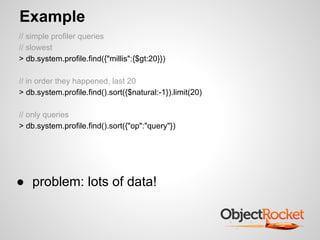
Example
// simple profiler queries
// slowest
> db.system.profile.find({"millis":{$gt:20}})

// in order they happened, last 20
> db.system.profile.find().sort({$natural:-1}).limit(20)

// only queries
> db.system.profile.find().sort({"op":"query"})


● problem: lots of data!
Example
// use aggregation to differentiate ops
> db.system.profile.aggregate({ $group : { _id :"$op",
      count:{$sum:1},
      "max response time":{$max:"$millis"},
      "avg response time":{$avg:"$millis"}
}});
{
      "result" : [
             { "_id" : "command", "count" : 1, "max response time" : 0, "avg response time" : 0 },
             { "_id" : "query", "count" : 12, "max response time" : 571, "avg response time" : 5 },
             { "_id" : "update", "count" : 842, "max response time" : 111, "avg response time" : 40 },
             { "_id" : "insert", "count" : 1633, "max response time" : 2, "avg response time" : 1 }
      ],
      "ok" : 1
}


●    contrast how many of an item vs response time
●    contrast average response time vs max
●    prioritize op type
Example
// use aggregation to differentiate collections
>db.system.profile.aggregate(
   {$group : { _id :"$ns", count:{$sum:1}, "max response time":{$max:"$millis"},
                  "avg response time":{$avg:"$millis"} }},
    {$sort: { "max response time":-1}}
 );
{
    "result" : [
       { "_id" : "game.players","count" : 787, "max response time" : 111, "avg response time" : 0},
       {"_id" : "game.games","count" : 1681,"max response time" : 71, "avg response time" : 60},
       {"_id" : "game.events","count" : 841,"max response time" : 1,"avg response time" : 0},
       ....
],
        "ok" : 1
}


●   keep this data over time!
●   contrast how many of an item vs response time
●   contrast average response time vs max
●   more examples: https://gist.github.
    com/995a3aa5b35e92e5ab57
Profiler Attributes
●   fastMod
     ○ Good! Fastest possible update. In-place atomic operator ($inc,$set)
●   nretunred vs nscanned
     ○ If nscanned != nscannedObjects, you may have opportunity to tune.
     ○ Add index
●   key updates
     ○ Secondary indexes. Minimize them
     ○ 10% reduction in performance for each secondary index
●   moved
     ○ Documents grow > padding factor
     ○ You can't fix it other than to pad yourself manually
     ○ Has to update indexes too!
     ○ db.collection.stats() shows padding
     ○ https://jira.mongodb.org/browse/SERVER-1810 <-- vote for me!
     ○ ^---- 2.3.1+ usePowerOf2Sizes
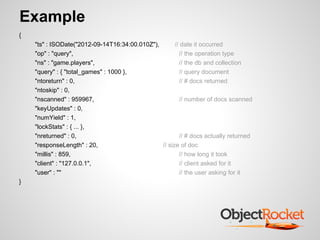
Example
{
    "ts" : ISODate("2012-09-14T16:34:00.010Z"),       // date it occurred
    "op" : "query",                                     // the operation type
    "ns" : "game.players",                              // the db and collection
    "query" : { "total_games" : 1000 },                 // query document
    "ntoreturn" : 0,                                    // # docs returned
    "ntoskip" : 0,
    "nscanned" : 959967,                                // number of docs scanned
    "keyUpdates" : 0,
    "numYield" : 1,
    "lockStats" : { ... },
    "nreturned" : 0,                                    // # docs actually returned
    "responseLength" : 20,                      // size of doc
    "millis" : 859,                                     // how long it took
    "client" : "127.0.0.1",                             // client asked for it
    "user" : ""                                         // the user asking for it
}
Example
{   "ts" : ISODate("2012-09-12T18:13:25.508Z"),
      "op" : "update",                                           // this is an update
      "ns" : "game.players",
      "query" : {"_id" : { "$in" : [ 37013, 13355 ] } },         // the query for the update
      "updateobj" : { "$inc" : { "games_started" : 1 }},         // the update being performed
      "nscanned" : 1,
      "moved" : true,                                            // document is moved
      "nmoved" : 1,
      "nupdated" : 1,
      "keyUpdates" : 0,                                  // at least no secondary indexes
      "numYield" : 0,
      "lockStats" : { "timeLockedMicros" : { "r" : NumberLong(0),"w" : NumberLong(206)},
             "timeAcquiringMicros" : {"r" : NumberLong(0),"w" : NumberLong(163)}},
      "millis" : 0,
      "client" : "127.0.0.1",
      "user" : ""
}
Example
{
    "ts" : ISODate("2012-09-12T18:13:26.562Z"),
    "op" : "update",
    "ns" : "game.players",
    "query" : {"_id" : { "$in" : [ 27258, 4904 ] } },
    "updateobj" : { "$inc" : { "games_started" : 1}},
    "nscanned" : 40002,                                     // opportunity
    "moved" : true,                                         // opportunity
    "nmoved" : 1,
    "nupdated" : 1,
    "keyUpdates" : 2,                                 // opportunity
    "numYield" : 0,
    ....
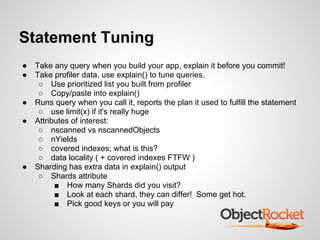
Statement Tuning
●   Take any query when you build your app, explain it before you commit!
●   Take profiler data, use explain() to tune queries.
     ○ Use prioritized list you built from profiler
     ○ Copy/paste into explain()
●   Runs query when you call it, reports the plan it used to fulfill the statement
     ○ use limit(x) if it's really huge
●   Attributes of interest:
     ○ nscanned vs nscannedObjects
     ○ nYields
     ○ covered indexes; what is this?
     ○ data locality ( + covered indexes FTFW )
●   Sharding has extra data in explain() output
     ○ Shards attribute
          ■ How many Shards did you visit?
          ■ Look at each shard, they can differ! Some get hot.
          ■ Pick good keys or you will pay
Example
> db.games.find({ "players" : 32071 }).explain()
{
      "cursor" : "BtreeCursor players_1",
      "isMultiKey" : true,                                   // multikey type indexed array
      "n" : 1,                                               // 1 doc
      "nscannedObjects" : 1,
      "nscanned" : 1,                                        // visited index
      "nscannedObjectsAllPlans" : 1,
      "nscannedAllPlans" : 1,
      "scanAndOrder" : false,
      "indexOnly" : false,
      "nYields" : 0,                                         // didn't have to yield
      "nChunkSkips" : 0,
      "millis" : 2,                                          // fast
      "indexBounds" : {"players" : [ [ 32071, 32071 ] ] },   // good, used index
}
Example
// index only query
>db.events.find({ "user_id":35891},{"_id":0,"user_id":1}).explain()
{
       "cursor" : "BtreeCursor user_id_1",
       "isMultiKey" : false,
       "n" : 2,                                                   // number of docs
       "nscannedObjects" : 2,
       "nscanned" : 2,
       "nscannedObjectsAllPlans" : 2,
       "nscannedAllPlans" : 2,
       "scanAndOrder" : false,                                    // if sorting, can index be used?
       "indexOnly" : true,                                        // Index only query
       "nYields" : 0,
       "nChunkSkips" : 0,
       "millis" : 0,
       "indexBounds" : { "user_id" : [ [ 35891, 35891 ] ] },
}
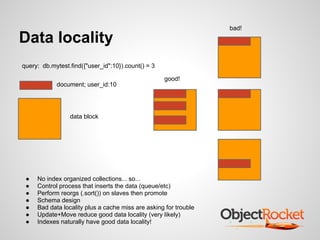
bad!

Data locality
query: db.mytest.find({"user_id":10}).count() = 3

                                                    good!
            document; user_id:10


                 data block


 ●   No index organized collections... so...
 ●   Control process that inserts the data (queue/etc)
 ●   Perform reorgs (.sort()) on slaves then promote
 ●   Schema design
 ●   Bad data locality plus a cache miss are asking for trouble
 ●   Update+Move reduce good data locality (very likely)
 ●   Indexes naturally have good data locality!
Example;
Data Locality
> var arr=db.events.find(
     {"user_id":35891},
     {'$diskLoc':1, 'user_id':1}).limit(20).showDiskLoc()
> for(var i=0; i<arr.length(); i++) {
     var b=Math.round(arr[i].$diskLoc.offset/512);
     printjson(arr[i].user_id+" "+b);
     }

"35891 354"
"35891 55674"                    // what is this stuff?


examples at:
https://gist.github.com/977336
Instance tuning;
Write performance
●   Overall system performance function of write performance
●   Partition systems, functional split first. Group by common workloads.
●   Writes
     ○ Tune your writes!
          ■ fastMods where we can
          ■ Turn updates into inserts?
          ■ Secondary indexes checked?
     ○ Single writer lock in mongodb
          ■ Modified in 2.0+ for yield on fault
          ■ Modified in 2.2+ for lock scope per DB
          ■ All databases mutex; get over it.
          ■ Minimize time that writes take; you win
     ○ Lock %, write queues
     ○ Use bench.py to test your write performance (https://github.
         com/memsql/bench)
     ○ Write tuned I/O; Caches, SSD, etc
     ○ Sharding? Split then Shard
          ■ Balancer induces I/O and writes!
Instance tuning;
Read performance
●   Overall system performance function of write performance
●   Reads scale well as long as writes are tuned
●   Partition systems, split first. Group by common workloads.
●   Reads scale nicely, especially against slaves
     ○ inconsistency OK?
     ○ Know your workload!
●   Statements tuned
     ○ Using indexes
     ○ Covered indexes
     ○ Data locality
●   Sharding
     ○ See how I mentioned that last?
Contact
@kennygorman
@objectrocket
kgorman@objectrocket.com

https://www.objectrocket.com
https://github.com/kgorman/rocketstat

MongoDB Performance Tuning

  • 1.
    MongoDB Performance Tuning MongoSV 2012 Kenny Gorman Founder, ObjectRocket @objectrocket @kennygorman
  • 2.
    MongoDB performance tuning Obsession ●Performance planning ● Order matters: 1. Schema design 2. Statement tuning 3. Instance tuning ● Single server performance ● Not a single thing you do, it's an obsession ● Rinse and repeat ● Understand your database workload
  • 3.
    Statement Tuning ● Profiler ○ Tuning tool/process to capture statements against db into a collection ○ Use regular queries to mine and prioritize tuning opportunities ○ Sometimes you can understand what to tune from this output alone, sometimes you need to explain it. ● Explain ○ Take statement from profiler, explain it ○ Gives detailed execution data on the query or statement ○ Interpret output, make changes ○ Rinse/Repeat
  • 4.
    The MongoDB Profiler ● Data is saved in capped collections, 1 per shard ○ db.system.profile ● Turn it on, gather data, later analyze for tuning opportunities ○ db.setProfilingLevel(1,20) ○ db.getProfilingStatus() ○ 1 document per statement ○ show profile ○ db.system.profile.find() ○ leave it on, don't be scared. ● Use new Aggregation Framework ○ Allows for aggregated queries from loads of data ○ Examples: https://gist.github.com/995a3aa5b35e92e5ab57
  • 5.
    Example // simple profilerqueries // slowest > db.system.profile.find({"millis":{$gt:20}}) // in order they happened, last 20 > db.system.profile.find().sort({$natural:-1}).limit(20) // only queries > db.system.profile.find().sort({"op":"query"}) ● problem: lots of data!
  • 6.
    Example // use aggregationto differentiate ops > db.system.profile.aggregate({ $group : { _id :"$op", count:{$sum:1}, "max response time":{$max:"$millis"}, "avg response time":{$avg:"$millis"} }}); { "result" : [ { "_id" : "command", "count" : 1, "max response time" : 0, "avg response time" : 0 }, { "_id" : "query", "count" : 12, "max response time" : 571, "avg response time" : 5 }, { "_id" : "update", "count" : 842, "max response time" : 111, "avg response time" : 40 }, { "_id" : "insert", "count" : 1633, "max response time" : 2, "avg response time" : 1 } ], "ok" : 1 } ● contrast how many of an item vs response time ● contrast average response time vs max ● prioritize op type
  • 7.
    Example // use aggregationto differentiate collections >db.system.profile.aggregate( {$group : { _id :"$ns", count:{$sum:1}, "max response time":{$max:"$millis"}, "avg response time":{$avg:"$millis"} }}, {$sort: { "max response time":-1}} ); { "result" : [ { "_id" : "game.players","count" : 787, "max response time" : 111, "avg response time" : 0}, {"_id" : "game.games","count" : 1681,"max response time" : 71, "avg response time" : 60}, {"_id" : "game.events","count" : 841,"max response time" : 1,"avg response time" : 0}, .... ], "ok" : 1 } ● keep this data over time! ● contrast how many of an item vs response time ● contrast average response time vs max ● more examples: https://gist.github. com/995a3aa5b35e92e5ab57
  • 8.
    Profiler Attributes ● fastMod ○ Good! Fastest possible update. In-place atomic operator ($inc,$set) ● nretunred vs nscanned ○ If nscanned != nscannedObjects, you may have opportunity to tune. ○ Add index ● key updates ○ Secondary indexes. Minimize them ○ 10% reduction in performance for each secondary index ● moved ○ Documents grow > padding factor ○ You can't fix it other than to pad yourself manually ○ Has to update indexes too! ○ db.collection.stats() shows padding ○ https://jira.mongodb.org/browse/SERVER-1810 <-- vote for me! ○ ^---- 2.3.1+ usePowerOf2Sizes
  • 9.
    Example { "ts" : ISODate("2012-09-14T16:34:00.010Z"), // date it occurred "op" : "query", // the operation type "ns" : "game.players", // the db and collection "query" : { "total_games" : 1000 }, // query document "ntoreturn" : 0, // # docs returned "ntoskip" : 0, "nscanned" : 959967, // number of docs scanned "keyUpdates" : 0, "numYield" : 1, "lockStats" : { ... }, "nreturned" : 0, // # docs actually returned "responseLength" : 20, // size of doc "millis" : 859, // how long it took "client" : "127.0.0.1", // client asked for it "user" : "" // the user asking for it }
  • 10.
    Example { "ts" : ISODate("2012-09-12T18:13:25.508Z"), "op" : "update", // this is an update "ns" : "game.players", "query" : {"_id" : { "$in" : [ 37013, 13355 ] } }, // the query for the update "updateobj" : { "$inc" : { "games_started" : 1 }}, // the update being performed "nscanned" : 1, "moved" : true, // document is moved "nmoved" : 1, "nupdated" : 1, "keyUpdates" : 0, // at least no secondary indexes "numYield" : 0, "lockStats" : { "timeLockedMicros" : { "r" : NumberLong(0),"w" : NumberLong(206)}, "timeAcquiringMicros" : {"r" : NumberLong(0),"w" : NumberLong(163)}}, "millis" : 0, "client" : "127.0.0.1", "user" : "" }
  • 11.
    Example { "ts" : ISODate("2012-09-12T18:13:26.562Z"), "op" : "update", "ns" : "game.players", "query" : {"_id" : { "$in" : [ 27258, 4904 ] } }, "updateobj" : { "$inc" : { "games_started" : 1}}, "nscanned" : 40002, // opportunity "moved" : true, // opportunity "nmoved" : 1, "nupdated" : 1, "keyUpdates" : 2, // opportunity "numYield" : 0, ....
  • 12.
    Statement Tuning ● Take any query when you build your app, explain it before you commit! ● Take profiler data, use explain() to tune queries. ○ Use prioritized list you built from profiler ○ Copy/paste into explain() ● Runs query when you call it, reports the plan it used to fulfill the statement ○ use limit(x) if it's really huge ● Attributes of interest: ○ nscanned vs nscannedObjects ○ nYields ○ covered indexes; what is this? ○ data locality ( + covered indexes FTFW ) ● Sharding has extra data in explain() output ○ Shards attribute ■ How many Shards did you visit? ■ Look at each shard, they can differ! Some get hot. ■ Pick good keys or you will pay
  • 13.
    Example > db.games.find({ "players": 32071 }).explain() { "cursor" : "BtreeCursor players_1", "isMultiKey" : true, // multikey type indexed array "n" : 1, // 1 doc "nscannedObjects" : 1, "nscanned" : 1, // visited index "nscannedObjectsAllPlans" : 1, "nscannedAllPlans" : 1, "scanAndOrder" : false, "indexOnly" : false, "nYields" : 0, // didn't have to yield "nChunkSkips" : 0, "millis" : 2, // fast "indexBounds" : {"players" : [ [ 32071, 32071 ] ] }, // good, used index }
  • 14.
    Example // index onlyquery >db.events.find({ "user_id":35891},{"_id":0,"user_id":1}).explain() { "cursor" : "BtreeCursor user_id_1", "isMultiKey" : false, "n" : 2, // number of docs "nscannedObjects" : 2, "nscanned" : 2, "nscannedObjectsAllPlans" : 2, "nscannedAllPlans" : 2, "scanAndOrder" : false, // if sorting, can index be used? "indexOnly" : true, // Index only query "nYields" : 0, "nChunkSkips" : 0, "millis" : 0, "indexBounds" : { "user_id" : [ [ 35891, 35891 ] ] }, }
  • 15.
    bad! Data locality query: db.mytest.find({"user_id":10}).count()= 3 good! document; user_id:10 data block ● No index organized collections... so... ● Control process that inserts the data (queue/etc) ● Perform reorgs (.sort()) on slaves then promote ● Schema design ● Bad data locality plus a cache miss are asking for trouble ● Update+Move reduce good data locality (very likely) ● Indexes naturally have good data locality!
  • 16.
    Example; Data Locality > vararr=db.events.find( {"user_id":35891}, {'$diskLoc':1, 'user_id':1}).limit(20).showDiskLoc() > for(var i=0; i<arr.length(); i++) { var b=Math.round(arr[i].$diskLoc.offset/512); printjson(arr[i].user_id+" "+b); } "35891 354" "35891 55674" // what is this stuff? examples at: https://gist.github.com/977336
  • 17.
    Instance tuning; Write performance ● Overall system performance function of write performance ● Partition systems, functional split first. Group by common workloads. ● Writes ○ Tune your writes! ■ fastMods where we can ■ Turn updates into inserts? ■ Secondary indexes checked? ○ Single writer lock in mongodb ■ Modified in 2.0+ for yield on fault ■ Modified in 2.2+ for lock scope per DB ■ All databases mutex; get over it. ■ Minimize time that writes take; you win ○ Lock %, write queues ○ Use bench.py to test your write performance (https://github. com/memsql/bench) ○ Write tuned I/O; Caches, SSD, etc ○ Sharding? Split then Shard ■ Balancer induces I/O and writes!
  • 18.
    Instance tuning; Read performance ● Overall system performance function of write performance ● Reads scale well as long as writes are tuned ● Partition systems, split first. Group by common workloads. ● Reads scale nicely, especially against slaves ○ inconsistency OK? ○ Know your workload! ● Statements tuned ○ Using indexes ○ Covered indexes ○ Data locality ● Sharding ○ See how I mentioned that last?
  • 19.