Operation of MySQL
by Hideo
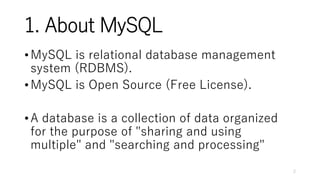
1. About MySQL
•MySQL is relational database management
system (RDBMS).
•MySQL is Open Source (Free License).
•A database is a collection of data organized
for the purpose of "sharing and using
multiple" and "searching and processing"
2
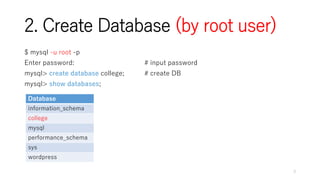
2. Create Database (by root user)
$ mysql -u root -p
Enter password: # input password
mysql> create database college; # create DB
mysql> show databases;
3
Database
information_schema
college
mysql
performance_schema
sys
wordpress
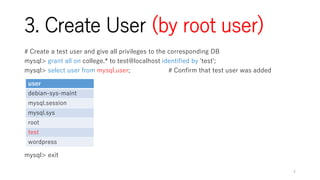
3. Create User (by root user)
# Create a test user and give all privileges to the corresponding DB
mysql> grant all on college.* to test@localhost identified by 'test';
mysql> select user from mysql.user; # Confirm that test user was added
mysql> exit
4
user
debian-sys-maint
mysql.session
mysql.sys
root
test
wordpress
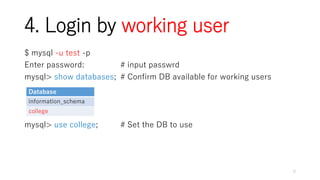
4. Login by working user
$ mysql -u test -p
Enter password: # input passwrd
mysql> show databases; # Confirm DB available for working users
mysql> use college; # Set the DB to use
5
Database
information_schema
college
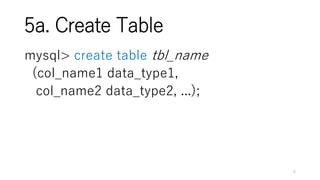
5a. Create Table
mysql> create table tbl_name
(col_name1 data_type1,
col_name2 data_type2, ...);
6
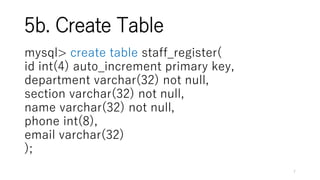
5b. Create Table
mysql> create table staff_register(
id int(4) auto_increment primary key,
department varchar(32) not null,
section varchar(32) not null,
name varchar(32) not null,
phone int(8),
email varchar(32)
);
7
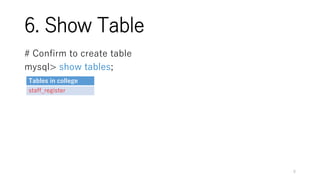
6. Show Table
# Confirm to create table
mysql> show tables;
8
Tables in college
staff_register
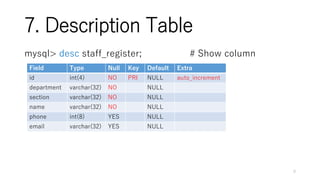
7. Description Table
mysql> desc staff_register; # Show column
9
Field Type Null Key Default Extra
id int(4) NO PRI NULL auto_increment
department varchar(32) NO NULL
section varchar(32) NO NULL
name varchar(32) NO NULL
phone int(8) YES NULL
email varchar(32) YES NULL
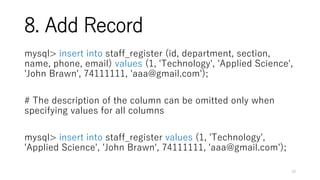
8. Add Record
mysql> insert into staff_register (id, department, section,
name, phone, email) values (1, 'Technology', 'Applied Science',
'John Brawn', 74111111, 'aaa@gmail.com');
# The description of the column can be omitted only when
specifying values for all columns
mysql> insert into staff_register values (1, 'Technology',
'Applied Science', 'John Brawn', 74111111, 'aaa@gmail.com');
10
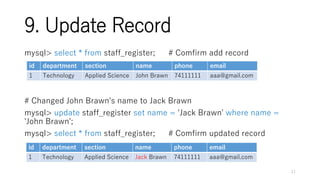
9. Update Record
mysql> select * from staff_register; # Comfirm add record
# Changed John Brawn's name to Jack Brawn
mysql> update staff_register set name = 'Jack Brawn' where name =
'John Brawn';
mysql> select * from staff_register; # Comfirm updated record
11
id department section name phone email
1 Technology Applied Science John Brawn 74111111 aaa@gmail.com
id department section name phone email
1 Technology Applied Science Jack Brawn 74111111 aaa@gmail.com
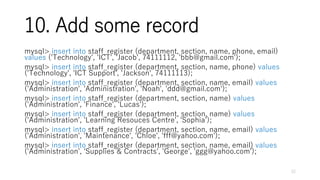
10. Add some record
mysql> insert into staff_register (department, section, name, phone, email)
values ('Technology', 'ICT', 'Jacob', 74111112, 'bbb@gmail.com');
mysql> insert into staff_register (department, section, name, phone) values
('Technology', 'ICT Support', 'Jackson', 74111113);
mysql> insert into staff_register (department, section, name, email) values
('Administration', 'Administration', 'Noah', 'ddd@gmail.com');
mysql> insert into staff_register (department, section, name) values
('Administration', 'Finance', 'Lucas');
mysql> insert into staff_register (department, section, name) values
('Administration', 'Learning Resouces Centre', 'Sophia');
mysql> insert into staff_register (department, section, name, email) values
('Administration', 'Maintenance', 'Chloe', 'fff@yahoo.com');
mysql> insert into staff_register (department, section, name, email) values
('Administration', 'Supplies & Contracts', 'George', 'ggg@yahoo.com');
12
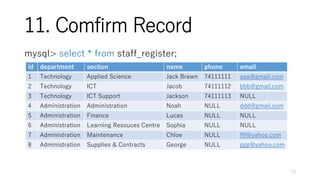
11. Comfirm Record
mysql> select * from staff_register;
13
id department section name phone email
1 Technology Applied Science Jack Brawn 74111111 aaa@gmail.com
2 Technology ICT Jacob 74111112 bbb@gmail.com
3 Technology ICT Support Jackson 74111113 NULL
4 Administration Administration Noah NULL ddd@gmail.com
5 Administration Finance Lucas NULL NULL
6 Administration Learning Resouces Centre Sophia NULL NULL
7 Administration Maintenance Chloe NULL fff@yahoo.com
8 Administration Supplies & Contracts George NULL ggg@yahoo.com
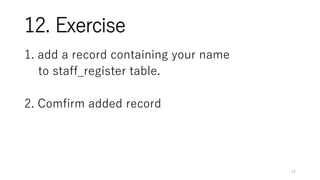
12. Exercise
1. add a record containing your name
to staff_register table.
2. Comfirm added record
14
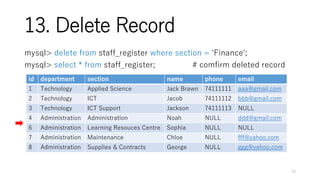
13. Delete Record
mysql> delete from staff_register where section = 'Finance';
mysql> select * from staff_register; # comfirm deleted record
15
id department section name phone email
1 Technology Applied Science Jack Brawn 74111111 aaa@gmail.com
2 Technology ICT Jacob 74111112 bbb@gmail.com
3 Technology ICT Support Jackson 74111113 NULL
4 Administration Administration Noah NULL ddd@gmail.com
6 Administration Learning Resouces Centre Sophia NULL NULL
7 Administration Maintenance Chloe NULL fff@yahoo.com
8 Administration Supplies & Contracts George NULL ggg@yahoo.com
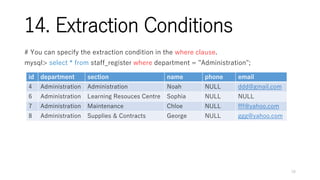
14. Extraction Conditions
# You can specify the extraction condition in the where clause.
mysql> select * from staff_register where department = "Administration";
16
id department section name phone email
4 Administration Administration Noah NULL ddd@gmail.com
6 Administration Learning Resouces Centre Sophia NULL NULL
7 Administration Maintenance Chloe NULL fff@yahoo.com
8 Administration Supplies & Contracts George NULL ggg@yahoo.com
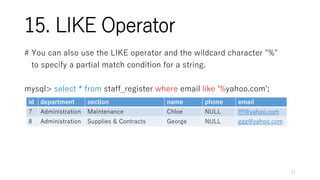
15. LIKE Operator
# You can also use the LIKE operator and the wildcard character "%"
to specify a partial match condition for a string.
mysql> select * from staff_register where email like '%yahoo.com';
17
id department section name phone email
7 Administration Maintenance Chloe NULL fff@yahoo.com
8 Administration Supplies & Contracts George NULL ggg@yahoo.com
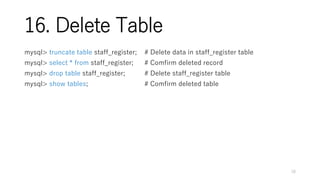
16. Delete Table
mysql> truncate table staff_register; # Delete data in staff_register table
mysql> select * from staff_register; # Comfirm deleted record
mysql> drop table staff_register; # Delete staff_register table
mysql> show tables; # Comfirm deleted table
18
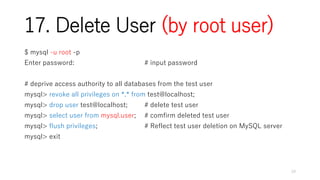
17. Delete User (by root user)
$ mysql -u root -p
Enter password: # input password
# deprive access authority to all databases from the test user
mysql> revoke all privileges on *.* from test@localhost;
mysql> drop user test@localhost; # delete test user
mysql> select user from mysql.user; # comfirm deleted test user
mysql> flush privileges; # Reflect test user deletion on MySQL server
mysql> exit
19

MySQL

  • 1.
  • 2.
    1. About MySQL •MySQLis relational database management system (RDBMS). •MySQL is Open Source (Free License). •A database is a collection of data organized for the purpose of "sharing and using multiple" and "searching and processing" 2
  • 3.
    2. Create Database(by root user) $ mysql -u root -p Enter password: # input password mysql> create database college; # create DB mysql> show databases; 3 Database information_schema college mysql performance_schema sys wordpress
  • 4.
    3. Create User(by root user) # Create a test user and give all privileges to the corresponding DB mysql> grant all on college.* to test@localhost identified by 'test'; mysql> select user from mysql.user; # Confirm that test user was added mysql> exit 4 user debian-sys-maint mysql.session mysql.sys root test wordpress
  • 5.
    4. Login byworking user $ mysql -u test -p Enter password: # input passwrd mysql> show databases; # Confirm DB available for working users mysql> use college; # Set the DB to use 5 Database information_schema college
  • 6.
    5a. Create Table mysql>create table tbl_name (col_name1 data_type1, col_name2 data_type2, ...); 6
  • 7.
    5b. Create Table mysql>create table staff_register( id int(4) auto_increment primary key, department varchar(32) not null, section varchar(32) not null, name varchar(32) not null, phone int(8), email varchar(32) ); 7
  • 8.
    6. Show Table #Confirm to create table mysql> show tables; 8 Tables in college staff_register
  • 9.
    7. Description Table mysql>desc staff_register; # Show column 9 Field Type Null Key Default Extra id int(4) NO PRI NULL auto_increment department varchar(32) NO NULL section varchar(32) NO NULL name varchar(32) NO NULL phone int(8) YES NULL email varchar(32) YES NULL
  • 10.
    8. Add Record mysql>insert into staff_register (id, department, section, name, phone, email) values (1, 'Technology', 'Applied Science', 'John Brawn', 74111111, 'aaa@gmail.com'); # The description of the column can be omitted only when specifying values for all columns mysql> insert into staff_register values (1, 'Technology', 'Applied Science', 'John Brawn', 74111111, 'aaa@gmail.com'); 10
  • 11.
    9. Update Record mysql>select * from staff_register; # Comfirm add record # Changed John Brawn's name to Jack Brawn mysql> update staff_register set name = 'Jack Brawn' where name = 'John Brawn'; mysql> select * from staff_register; # Comfirm updated record 11 id department section name phone email 1 Technology Applied Science John Brawn 74111111 aaa@gmail.com id department section name phone email 1 Technology Applied Science Jack Brawn 74111111 aaa@gmail.com
  • 12.
    10. Add somerecord mysql> insert into staff_register (department, section, name, phone, email) values ('Technology', 'ICT', 'Jacob', 74111112, 'bbb@gmail.com'); mysql> insert into staff_register (department, section, name, phone) values ('Technology', 'ICT Support', 'Jackson', 74111113); mysql> insert into staff_register (department, section, name, email) values ('Administration', 'Administration', 'Noah', 'ddd@gmail.com'); mysql> insert into staff_register (department, section, name) values ('Administration', 'Finance', 'Lucas'); mysql> insert into staff_register (department, section, name) values ('Administration', 'Learning Resouces Centre', 'Sophia'); mysql> insert into staff_register (department, section, name, email) values ('Administration', 'Maintenance', 'Chloe', 'fff@yahoo.com'); mysql> insert into staff_register (department, section, name, email) values ('Administration', 'Supplies & Contracts', 'George', 'ggg@yahoo.com'); 12
  • 13.
    11. Comfirm Record mysql>select * from staff_register; 13 id department section name phone email 1 Technology Applied Science Jack Brawn 74111111 aaa@gmail.com 2 Technology ICT Jacob 74111112 bbb@gmail.com 3 Technology ICT Support Jackson 74111113 NULL 4 Administration Administration Noah NULL ddd@gmail.com 5 Administration Finance Lucas NULL NULL 6 Administration Learning Resouces Centre Sophia NULL NULL 7 Administration Maintenance Chloe NULL fff@yahoo.com 8 Administration Supplies & Contracts George NULL ggg@yahoo.com
  • 14.
    12. Exercise 1. adda record containing your name to staff_register table. 2. Comfirm added record 14
  • 15.
    13. Delete Record mysql>delete from staff_register where section = 'Finance'; mysql> select * from staff_register; # comfirm deleted record 15 id department section name phone email 1 Technology Applied Science Jack Brawn 74111111 aaa@gmail.com 2 Technology ICT Jacob 74111112 bbb@gmail.com 3 Technology ICT Support Jackson 74111113 NULL 4 Administration Administration Noah NULL ddd@gmail.com 6 Administration Learning Resouces Centre Sophia NULL NULL 7 Administration Maintenance Chloe NULL fff@yahoo.com 8 Administration Supplies & Contracts George NULL ggg@yahoo.com
  • 16.
    14. Extraction Conditions #You can specify the extraction condition in the where clause. mysql> select * from staff_register where department = "Administration"; 16 id department section name phone email 4 Administration Administration Noah NULL ddd@gmail.com 6 Administration Learning Resouces Centre Sophia NULL NULL 7 Administration Maintenance Chloe NULL fff@yahoo.com 8 Administration Supplies & Contracts George NULL ggg@yahoo.com
  • 17.
    15. LIKE Operator #You can also use the LIKE operator and the wildcard character "%" to specify a partial match condition for a string. mysql> select * from staff_register where email like '%yahoo.com'; 17 id department section name phone email 7 Administration Maintenance Chloe NULL fff@yahoo.com 8 Administration Supplies & Contracts George NULL ggg@yahoo.com
  • 18.
    16. Delete Table mysql>truncate table staff_register; # Delete data in staff_register table mysql> select * from staff_register; # Comfirm deleted record mysql> drop table staff_register; # Delete staff_register table mysql> show tables; # Comfirm deleted table 18
  • 19.
    17. Delete User(by root user) $ mysql -u root -p Enter password: # input password # deprive access authority to all databases from the test user mysql> revoke all privileges on *.* from test@localhost; mysql> drop user test@localhost; # delete test user mysql> select user from mysql.user; # comfirm deleted test user mysql> flush privileges; # Reflect test user deletion on MySQL server mysql> exit 19

Editor's Notes

  • #2 タイトル : 60px content : 40px
  • #3 タイトル : 60px content : 40px
  • #8 int: Integer type varchar: Variable length character string
  • #15 mysql> insert into staff_register (department, section, name, phone, email) values ('Technology', 'ICT', 'Jacob', 74111112, 'bbb@gmail.com'); mysql> select * from staff_register;
  • #20 deprive : 取り上げる、剥奪する reflect : 反映する