Linux basic 1&2
by Hideo
login/logout
•login : input user account and password
•logout : input exit
2
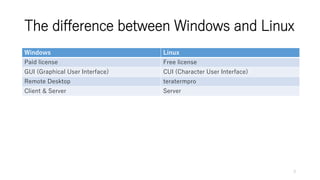
The difference between Windows and Linux
Windows Linux
Paid license Free license
GUI (Graphical User Interface) CUI (Character User Interface)
Remote Desktop teratermpro
Client & Server Server
3
Directory Structure
•Directory is a hierarchical structure in
which an apex "/" (the root directory)).
/
usr
local
bin
home var etc
user1 user2
4
Basic Command
•pwd : print working directory
•ls : list
•ls -l : list detail
•ls -a : list (include hidden file)
•cd : change directory
5
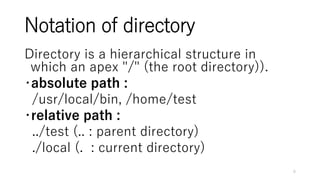
Notation of directory
Directory is a hierarchical structure in
which an apex "/" (the root directory)).
・absolute path :
/usr/local/bin, /home/test
・relative path :
../test (.. : parent directory)
./local (. : current directory)
6
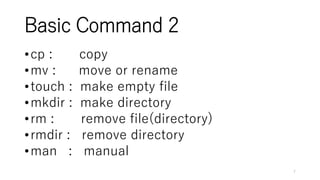
Basic Command 2
•cp : copy
•mv : move or rename
•touch : make empty file
•mkdir : make directory
•rm : remove file(directory)
•rmdir : remove directory
•man : manual
7
Basic Command 3
•cat : display the contents of a file
•cat -n : grant the line number
•head : display the first ten lines of a file
•tail : display the last ten lines of a file
•grep : searches files for specified words
•wc : word count
8
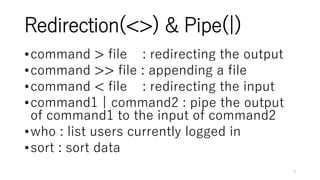
Redirection(<>) & Pipe(|)
•command > file : redirecting the output
•command >> file : appending a file
•command < file : redirecting the input
•command1 | command2 : pipe the output
of command1 to the input of command2
•who : list users currently logged in
•sort : sort data
9
vi command (text editor)
vi launches in command mode.
Press i to enter insert mode.
Press escape to exit insert mode.
Type :wq and press enter to save the file and quit.
command mode
insert mode
Esc
i
(a,o)
:wq : save file & quit
10
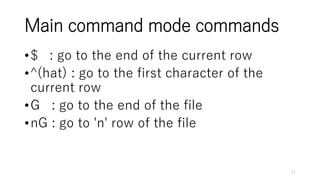
Main command mode commands
•$ : go to the end of the current row
•^(hat) : go to the first character of the
current row
•G : go to the end of the file
•nG : go to 'n' row of the file
11
Main command mode commands2
•i : insert mode (before the cursor)
•a : insert mode (after the cursor)
•o : insert mode (under the current row)
•x : delete one character
•nx : delete 'n' characters
•r : replace character
12
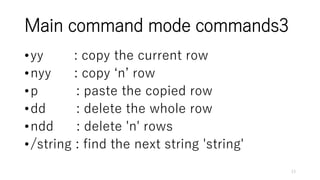
Main command mode commands3
•yy : copy the current row
•nyy : copy ‘n’ row
•p : paste the copied row
•dd : delete the whole row
•ndd : delete 'n' rows
•/string : find the next string 'string'
13
Confirmation Test
• 1. move to /home/test using absolute path.
• 2. move to your homedir using relative path.
14
Confirmation Test 2
• 1. copy /etc/passwd to under your homedir.
• 2. modify copy file
- find next word “operator”
- replace “operator” to “test”
- save & quit
15
Reference
• UNIX Tutorial for Beginners
• vi tutorial for beginners
16

Linux basic1&amp;2

  • 1.
  • 2.
    login/logout •login : inputuser account and password •logout : input exit 2
  • 3.
    The difference betweenWindows and Linux Windows Linux Paid license Free license GUI (Graphical User Interface) CUI (Character User Interface) Remote Desktop teratermpro Client & Server Server 3
  • 4.
    Directory Structure •Directory isa hierarchical structure in which an apex "/" (the root directory)). / usr local bin home var etc user1 user2 4
  • 5.
    Basic Command •pwd :print working directory •ls : list •ls -l : list detail •ls -a : list (include hidden file) •cd : change directory 5
  • 6.
    Notation of directory Directoryis a hierarchical structure in which an apex "/" (the root directory)). ・absolute path : /usr/local/bin, /home/test ・relative path : ../test (.. : parent directory) ./local (. : current directory) 6
  • 7.
    Basic Command 2 •cp: copy •mv : move or rename •touch : make empty file •mkdir : make directory •rm : remove file(directory) •rmdir : remove directory •man : manual 7
  • 8.
    Basic Command 3 •cat: display the contents of a file •cat -n : grant the line number •head : display the first ten lines of a file •tail : display the last ten lines of a file •grep : searches files for specified words •wc : word count 8
  • 9.
    Redirection(<>) & Pipe(|) •command> file : redirecting the output •command >> file : appending a file •command < file : redirecting the input •command1 | command2 : pipe the output of command1 to the input of command2 •who : list users currently logged in •sort : sort data 9
  • 10.
    vi command (texteditor) vi launches in command mode. Press i to enter insert mode. Press escape to exit insert mode. Type :wq and press enter to save the file and quit. command mode insert mode Esc i (a,o) :wq : save file & quit 10
  • 11.
    Main command modecommands •$ : go to the end of the current row •^(hat) : go to the first character of the current row •G : go to the end of the file •nG : go to 'n' row of the file 11
  • 12.
    Main command modecommands2 •i : insert mode (before the cursor) •a : insert mode (after the cursor) •o : insert mode (under the current row) •x : delete one character •nx : delete 'n' characters •r : replace character 12
  • 13.
    Main command modecommands3 •yy : copy the current row •nyy : copy ‘n’ row •p : paste the copied row •dd : delete the whole row •ndd : delete 'n' rows •/string : find the next string 'string' 13
  • 14.
    Confirmation Test • 1.move to /home/test using absolute path. • 2. move to your homedir using relative path. 14
  • 15.
    Confirmation Test 2 •1. copy /etc/passwd to under your homedir. • 2. modify copy file - find next word “operator” - replace “operator” to “test” - save & quit 15
  • 16.
    Reference • UNIX Tutorialfor Beginners • vi tutorial for beginners 16

Editor's Notes

  • #3 タイトル : 60px content : 40px
  • #5 Directory = folder Hierarchical structure:階層構造 Apex:頂点
  • #9 grant:付与
  • #11 launche:起動する
  • #12 $ cp /etc/group $HOME/ $ vi group
  • #15 # mkdir /home/test