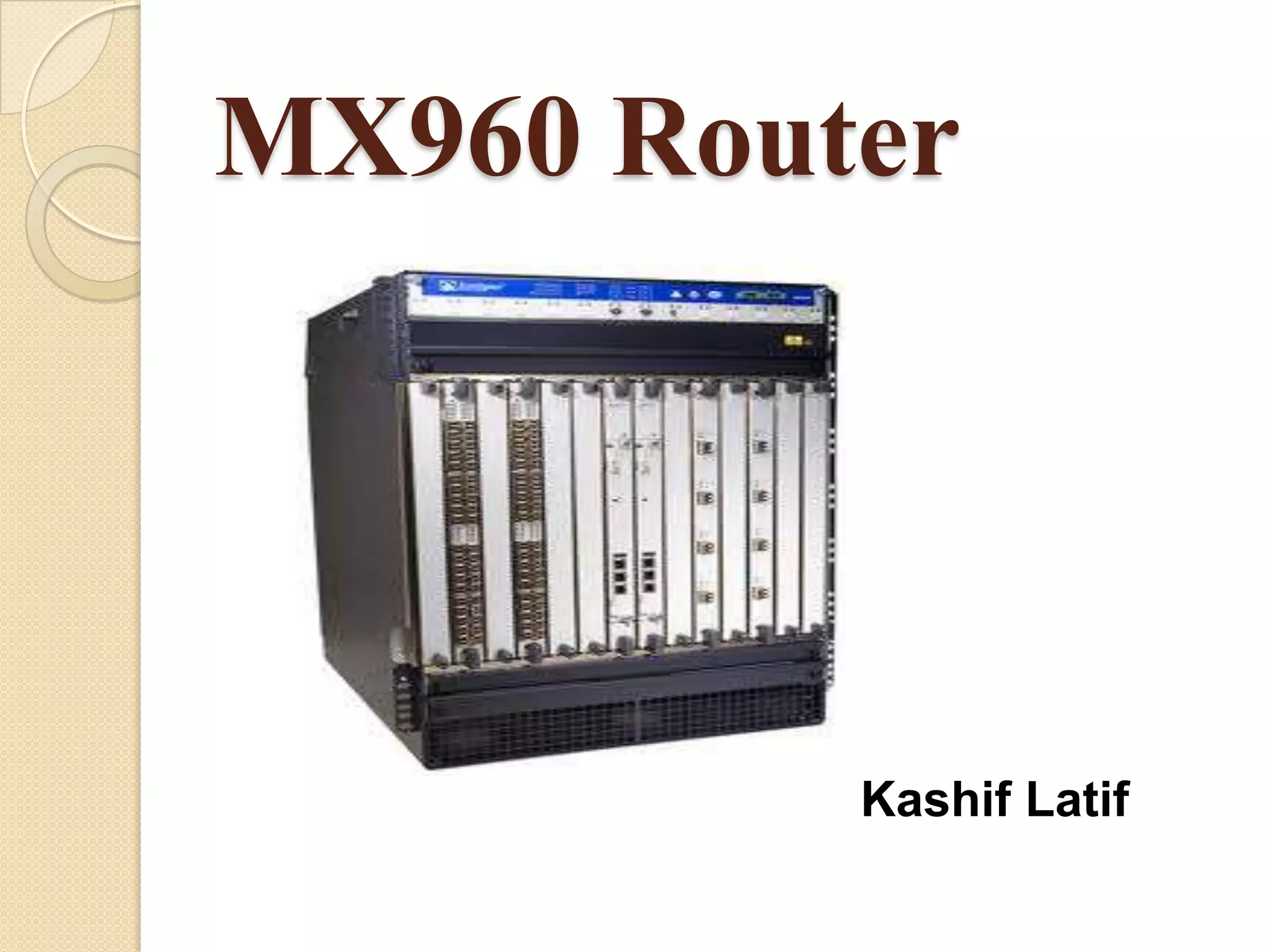
MX960 Router


          Kashif Latif
MX960 Router Overview

The MX960 3D Universal Edge Router is an
Ethernet-optimized edge router that provides

both switching and carrier-class Ethernet routing.
   The MX960 router has a capacity of up to
    1,320 gigabits per second (Gbps), full duplex.
Count…
The MX960 router enables a wide range of
business and residential applications and
services, including high-speed transport and
VPN services, next-generation broadband
multiply services, and high-volume Internet data
center internetworking.

   The MX960 chassis provides redundancy and
    resiliency. The hardware system is fully
    redundant, including power supplies, fan
    trays, Routing Engines, and Switch Control
    Boards.
Count…
The MX960 router is 16 rack units (U) tall. Three
routers can be stacked in a single floor-to-ceiling
rack, for increased port density per unit of floor
space.

   The router provides 14 slots that can be
    populated with up to 12 Dense Port
    Concentrators (DPCs) or Modular Port
    Concentrators (MPCs), six Flexible PIC
    Concentrators (FPCs), and two Switch Control
    Boards (SCBs) in nonredundant fabric
    configurations.
MX960 Hardware
Components
   MX960 Chassis Description
   MX960 Rack-Mounting Hardware
   MX960 Midplane Description
   MX960 Dense Port Concentrator (DPC)
   MX960 Modular Port Concentrator (MPC)
   MX960 Modular Interface Card
   MX960 Switched Fabric (SF)
   MX960 Flexible PIC
Count…
 MX960 PIC
   MX960 Host Subsystem
   MX960 Switch Control Board (SCB)
   MX960 Routing Engine (RE)
   MX960 Craft Interface Description
   MX960 Power System Description
   MX960 Cooling System
   MX960 Cable Manager
MX960 Chassis Description

The router chassis is a rigid sheet metal
structure that houses all the other router. The
chassis installs in many types of racks, including
800-mm deep (or larger) enclosed cabinets,
standard19-in. equipment racks, or telco open-
frame racks.
MX960 Rack-Mounting
Hardware
The rack-mounting hardware for the MX960 router
includes:
 The large mounting shelf for mounting in four-
    post racks, cabinets, and open-frame racks.
 The small mounting shelf for front-mounting in a
    four-post rack or cabinet.
 Front-mounting flanges on the front of the chassis
    for front-mounting in a four-post rack or cabinet.
 Two center-mounting brackets attached to the
    center of the chassis for center-mounting in an
    open-frame rack. For an open-frame rack, center-
    mounting is preferable because of the more even
    distribution of weight.
MX960 Midplane Description
The midplane is located toward the rear of the
chassis and forms the rear of the card cage.
The midplane performs the following major functions:
 Data Path—Data packets are transferred across
the midplane between the line cards through the
fabric ASICs on the SCBs.
 Power Distribution—The router power supplies
connect to the midplane, which distributes power to
all the router components.
 Signal Path—The midplane provides the signal
path to the line cards, SCBs, Routing Engines, and
other system components for monitoring and control
of the system.
MX960 Dense Port
Concentrator
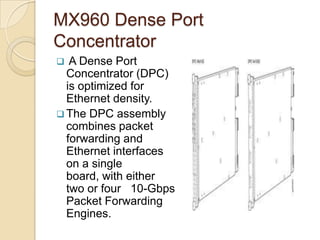
  A Dense Port
  Concentrator (DPC)
  is optimized for
  Ethernet density.
 The DPC assembly
  combines packet
  forwarding and
  Ethernet interfaces
  on a single
  board, with either
  two or four 10-Gbps
  Packet Forwarding
  Engines.
Count…
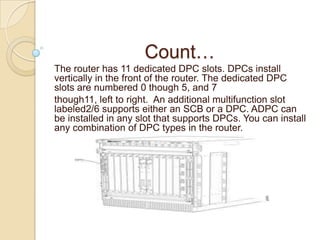
The router has 11 dedicated DPC slots. DPCs install
vertically in the front of the router. The dedicated DPC
slots are numbered 0 though 5, and 7
though11, left to right. An additional multifunction slot
labeled2/6 supports either an SCB or a DPC. ADPC can
be installed in any slot that supports DPCs. You can install
any combination of DPC types in the router.
DPC Components
Each DPC consists of the following components:
 DPC cover, which functions as a ground plane and a
   stiffener
 Fabric interfaces
 Two Giga bit Ethernet interfaces that allow control
   information, route information, and Statistics to be sent
   between the Routing Engine and the CPU on the DPCs
 Two interfaces from the SCBs that enable the DPCs to be
   powered on and controlled
 Physical DPC connectors
 Two or four Packet Forwarding Engines
 Mid plane connectors and power circuitry
 Process or sub system, which includes a1.2-GHz CPU,
   system controller, and1GB of SDRAM
 Online button—Takes the DPC online or offline when
   pressed
 LEDs on the DPC face plate.
MX960 Modular Port Concentrator
Modular Port Concentrators (MPCs) provide packet
forwarding services. The MPCs are inserted into a
slot in a router.

   Modular Interface Cards (MICs) provide the
    physical interfaces and install into the MPCs. You
    can install up to two MICs of different media types
    on the same MPC as long as the MPC supports
    those MICs. The MX960 router supports up to 12
    MPCs.
Count…
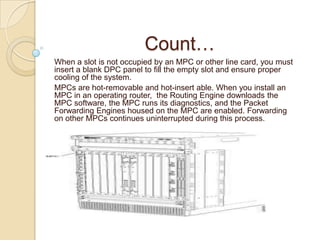
When a slot is not occupied by an MPC or other line card, you must
insert a blank DPC panel to fill the empty slot and ensure proper
cooling of the system.
MPCs are hot-removable and hot-insert able. When you install an
MPC in an operating router, the Routing Engine downloads the
MPC software, the MPC runs its diagnostics, and the Packet
Forwarding Engines housed on the MPC are enabled. Forwarding
on other MPCs continues uninterrupted during this process.
MPC Components
Each MPC consists of the following components:
   MPC card carrier, which includes two MIC slots (excludes the fixed
    configuration MPC)
   Fabric interfaces
   Two Giga bit Ethernet interfaces that allow control information, route
    information, and statistics to be sent between the Routing Engine and
    the CPU on the MPCs
   Two interfaces from the SCBs that enable the MPCs to be powered on
    and controlled
   Physical MPC connectors
   Up to four Junos Trio chipsets, which perform control functions tailored to
    the MPC’s media type.
   Mid plane connector sand power circuitry
   Process or subsystem, which includes a1.5-GHz CPU, system controller,
    and1GB of SDRAM.
   Online button which takes the MPC online or offline when pressed
   OK/Fail LED on the MPC face plate.
MX960 Modular Interface
Card
Modular Interface Cards (MICs) install into
Modular Port Concentrators (MPCs) and provide
the physical connections to various network
media types. MICs allow different physical
interfaces to be supported on a single line card.

MICs are hot-removable and hot-insertable. You
can install up to two MICs in the slots in each
MPC.
MX960 Switched Fabric (SF)
Switched Fabric is a network topology where
network nodes connect with each other via one
or more network switches.
Count…
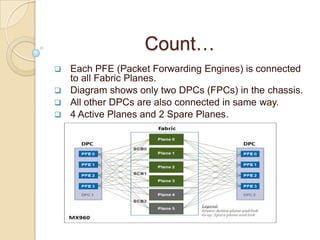
 Each PFE (Packet Forwarding Engines) is connected
  to all Fabric Planes.
 Diagram shows only two DPCs (FPCs) in the chassis.
 All other DPCs are also connected in same way.
 4 Active Planes and 2 Spare Planes.
MX960 Flexible PIC Concentrator
A Flexible PIC Concentrator (FPC) occupies two
Dense Port Concentrator (DPC) slots on an MX
Series router. The MX960 router has 11 dedicated
DPCs lots and one multi functions lot that supports
either a DPC, FPC, or Switch Control Board (SCB).
The dedicated DPC slots are numbered 0 though
5, and 7 though 11, left to right. The multi functions
lot is labeled 2/6.

Up to six FPC scan be installed vertically in any two
slots that support FPCs. The interface corresponds
to the lowest numbered DPC slot for which the FPC
is installed.
FPC Components
Each FPC consists of the following components:
 FPC card carrier, which includes two PIC slots
 Up to two Packet Forwarding Engines, each
   consisting of one I-chip for Layer 3 processing and
   one Layer 2 network processor
 Mid plane connectors and power circuitry
 Process or subsystem (PMB), which includes a1.2-
   GHz CPU, system controller, 1GB of SDRAM, and two
   Giga bit Ethernet interfaces
 Two LEDs, located on the craft interface above the
   FPC, that display the status of the FPC and are
   labeled OK and FAIL
 FPC online/offline button, located on the craft
   interface above the FPC
MX960 PIC
PICs provide the physical connection to various network
media types, receiving incoming packets from the
network and transmitting out going packets to the
network. During this process, each PIC performs framing
and line-speed signaling for its media type. Before
transmitting out going data packets, the PICs
encapsulate the packets received from the FPCs. Each
PIC is equipped with an ASIC that performs control
functions specific to the media type of that PIC.

PICs are hot-removable and hot-insert able. Up to two
PICs can be installed in the slots in each FPC. Up to six
FPCs can be installed in an MX960 router. PICs used in
an FPC2 have captive screws at their upper and lower
corners. PICs used in a Type 3 FPC have an upper eject
or handle and a lower captive screw.
MX960 Host Subsystem

The host subsystem provides the routing and
system management functions of the router. You
can install one or two host subsystems on the
router. Each host subsystem functions as a unit;
the Routing Engine must be installed directly into
the Switch Control
Board.
MX960 Switch Control Board
The Switch Control Board (SCB) provides the
following functions:
 Powers on and powers off DPCs, FPCs, and
    MPCs
 Controls clocking, system resets, and booting
 Monitor sand controls system functions,
    including fan speed, board power status,
    PDM status and control, and the craft
    interface
 Provides inter connections to all the DPCs,
    FPCs, and MPCs with in the chassis through
    the switch fabrics integrated into the SCB
SCB Components
Each SCB consists of the following components:
 Chassis management Ethernet switch
 I2C bus logic, used for low-level
  communication with each component
 Component redundancy circuitry
 Control Board/Routing Engine master ship
  mechanism
 Gigabit Ethernet switch that is connected to
  the embedded CPU complex on all
  components
Count…
 Switch fabric—Provides the switching functions
  for the DPCs, FPCs, and MPCs
 Control FPGA—Provides the Peripheral
  Component Interconnect (PCI) interface to the
  Routing Engine
 1000Base-T Ethernet controller—Provides a 1-
  Gbps Ethernet link between the Routing Engines
 Ethernet switch—Provides 1-Gbps link speeds
  between the Routing Engine and the DPCs,
  FPCs, and MPCs
 Circuits for chassis management and control
 Power circuits for the Routing Engine and SCB
 LEDs—Provide status
MX960 Routing Engine

If the host system is redundant, the backup
Routing Engine is hot-removable and hot-
insertable, but the master Routing Engine is hot-
pluggable.

   A Routing Engine that is not redundant is hot-
    pluggable.
Supported Routing Engines
The MX960 router supports the following Routing
Engines:
 RE-S-1300-2048 supported for Junos OS
   Release 8.2 and later.
 RE-S-2000-4096 supported for Junos OS
   Release 8.2 and later.
 RE-S-1800x2 supported for Junos OS Release
   10.4 and later.
 RE-S-1800x4 supported for Junos OS Release
   10.4 and later.
Routing Engine Function
The Routing Engine runs the Junos OS.
Software processes that run on the Routing
Engine maintain the routing tables, manage the
routing protocols used on the router, control the
router interfaces, control some chassis
components, and provide the interface for
system management and user access to the
router.
Routing Engine Slots
You can install one or two Routing Engines in the
router. Each Routing Engine must be installed
directly in to an SCB. A USB port on the Routing
Engine accepts a USB memory device that
allows you to load Junos OS.

   The Routing Engines install in to the front of
    the chassis in vertical slots directly into the
    SCBs labeled 0 and1.
Count…
   If two Routing Engines are installed, one
    functions as the master and the other acts as
    the backup. If the master Routing Engine fails or
    is removed and the backup is configured
    appropriately, the backup takes over as the
    master.

   On the MX960 router, a Routing Engine installed
    in SCB slot 2/6 receives no power and supplies
    no additional routing functions. If no SCB is
    installed in slot2/6, install a blank panel in the
    slot.
Routing Engine Interface
Ports
Three ports, located on the right side of the
routing engine, connect the Routing Engine to
one or more external devices on which system
administrators can issue Junos OS command-
line interface (CLI) commands to manage the
router.
The ports with the indicated labels function as
follows:
1. AUX
2. CONSOLE
3. ETHERNET
Count…
 AUX—Connects the Routing Engine to a laptop,
  modem, or other auxiliary device through a serial
  cable with an RJ-45 connector.
 CONSOLE—Connects the Routing Engine to a
  system console through a serial cable with an RJ-45
  connector.
 ERNEETHT—Connects the Routing Engine through
  an Ethernet connection to a management LAN (or any
  other device that plugs into an Ethernet connection)
  for out-of-band management. The port uses an auto
  sensing RJ-45 connector to support 10-Mbps or100
  Mbps connections. Two small LEDs on the bottom of
  the port indicate the connection in use: the LED
  flashes yellow or green for a10-Mbps or100-Mbps
  connection, and the LED is light green when traffic is
  passing through the port.
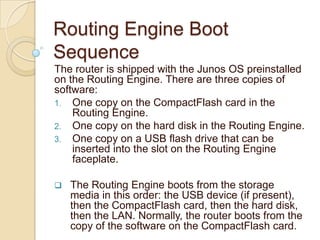
Routing Engine Boot
Sequence
The router is shipped with the Junos OS preinstalled
on the Routing Engine. There are three copies of
software:
1. One copy on the CompactFlash card in the
    Routing Engine.
2. One copy on the hard disk in the Routing Engine.
3. One copy on a USB flash drive that can be
    inserted into the slot on the Routing Engine
    faceplate.

   The Routing Engine boots from the storage
    media in this order: the USB device (if present),
    then the CompactFlash card, then the hard disk,
    then the LAN. Normally, the router boots from the
    copy of the software on the CompactFlash card.
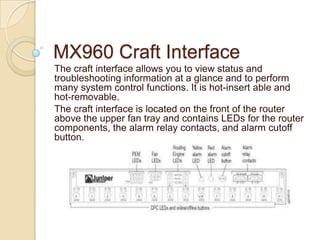
MX960 Craft Interface
The craft interface allows you to view status and
troubleshooting information at a glance and to perform
many system control functions. It is hot-insert able and
hot-removable.
The craft interface is located on the front of the router
above the upper fan tray and contains LEDs for the router
components, the alarm relay contacts, and alarm cutoff
button.
MX960 Power System
The MX960 router uses either AC or DC power
supplies. The MX960 router is configurable with
three or four normal-capacity AC power
supplies, up to four high-capacity DC power
supplies, and up to four high-capacity AC power
supplies.

 The power supplies connect to the midplane,
which distributes the different output voltages
produced by the power supplies to the router
components, depending on their voltage
requirements.
MX960 Cooling System
The cooling system consists of the following
components:
1. Upper front fan tray
2. Lower front fan tray
3. Front air filter


 The cooling system components work together
to keep all router components within the
acceptable temperature range.
MX960 Cable Manager
The standard cable manager is a tray located
below the line-card cage, which has a row of
fourteen dividers for securing the cables for each
Dense Port Concentrator (DPC), Modular Port
Concentrator (MPC), Modular Interface Card
(MIC), or PIC.
Installing an MX960 Router
To install the MX960 router follow these steps:
1. Prepare your installation site
2. Review the safety guidelines
3. Unpack the router and verify the parts
4. Install the mounting hardware
5. Lift the router on to the rack. Because of the weight
     of the router, we recommend that you use a
     mechanical lift
6. Connect cables to the network and external devices
7. Connect the grounding cable
8. Connect the AC power cord or DC power cables
9. Power on the router
10. Perform the initial system configuration
Tools and Parts Required to
      Maintain the MX960 Router
To maintain hardware components, you need
the following tools and parts:

1.   ESD grounding wrist strap
2.   Flat-blade (–) screwdriver
3.   Phillips (+) screwdriver, number 1
4.   Phillips (+) screwdriver, number 2
Troubleshooting Resources
     for MX960 Routers
These are the resources which are helpful on
troubleshooting for MX960 routers:

1.   Command-Line Interface
2.   Chassis and Interface Alarm Messages
3.   Alarm Relay Contacts
4.   Craft Interface LEDs
5.   Component LEDs
6.   Networks Technical Assistance Center
MX960 Field-Replaceable
Units
Field-replaceable units (FRUs) are router
components that can be replaced at the customer
site. Replacing most FRUs requires minimal router
downtime. The router uses
the following types of FRUs:
 Hot-removable and hot-insert able FRUs—You
can remove and replace these components without
powering off the router or disrupting the routing
functions.
 Hot-pluggable FRUs—You can remove and
replace these components without powering off the
router, but the routing functions of the system are
interrupted when the component is removed.
Hot-Removable and Hot-Insert able
FRUs
1.    Air filter
2.    Craft interface
3.    Backup Switch Control Board (SCB) (if redundant)
4.    Master Switch Control Board (SCB) (if nonstop active
      routing is configured)
5.    Backup Routing Engine (if redundant)
6.    Master Routing Engine (if nonstop active routing is
      configured)
7.    Dense Port Concentrators (DPCs)
8.    Flexible PIC Concentrators (FPCs)
9.    Modular Port Concentrators (MPCs)
10.   Modular Interface Cards (MICs)
11.   PICs
12.   AC and DC power supplies (if redundant)
13.   Fan tray
Hot-Pluggable FRUs

1.   Master Switch Control Board (SCB) (if
     nonstop active routing is not configured)
2.   Master Routing Engine (if nonstop active
     routing is not configured)
3.   Switch Control Board (SCB) (non
     redundant)
4.   Routing Engine (non redundant)
General Safety Guidelines of
        Hardware Equipment
The following guidelines help ensure your safety and protect
the hardware equipment from damage. The list of guidelines
might not address all potentially hazardous situations in your
working environment, so be alert and exercise good judgment
at all times.
     Make sure that only authorized service personnel perform
      other system services.
     Keep the area around the chassis clear and free from dust
      before, during, and after installation.
     Keep tools away from areas where people could trip over
      them while walking.
     Do not wear loose clothing or jewelry, such as rings,
      bracelets, or chains, which could become caught in the
      chassis.
     Wear safety glasses if you are working under any
      conditions that could be hazardous to your eyes.
     Do not perform any actions that create a potential hazard
      to people or make the equipment unsafe.
Count…
    Never attempt to lift an object that is too heavy for one
    person to handle.
    Never install or manipulate wiring during electrical storms.
    Never install electrical jacks in wet locations unless the
    jacks are specifically designed for wet environments.
    Operate the hardware equipment only when the chassis is
    properly grounded.
    Do not open or remove chassis covers or sheet metal
    parts.
    Do not push or force any objects through any opening in
    the chassis frame. Such an action could result in electrical
    shock or fire.
    Avoid spilling liquid onto the chassis or onto any hardware
    component. Such an action could cause electrical shock or
    damage the hardware equipment.
    Avoid touching uninsulated electrical wires or terminals
    that have not been disconnected from their power source.
    Such an action could cause electrical shock.
Tools and Parts Required to
Remove Components from an
MX960 Router
To remove components from the router or the router from
a rack, you need the following tools and parts:
1. 2.5-mm flat-blade (–) screwdriver, for detaching alarm
    relay terminal block
2. 7/16-in. (11 mm) nut driver
3. Blank panels to cover empty slots
4. Electrostatic bag or antistatic mat, for each
    component
5. Electrostatic discharge (ESD) grounding wrist strap
6. Flat-blade (–) screwdriver
7. Mechanical lift, if available
8. Phillips (+) screwdrivers, numbers 1 and 2
9. Rubber safety cap for fiber-optic interfaces or cable
10. Wire cutters
Kashif Latif

MX960 Router

  • 1.
    MX960 Router Kashif Latif
  • 2.
    MX960 Router Overview TheMX960 3D Universal Edge Router is an Ethernet-optimized edge router that provides both switching and carrier-class Ethernet routing.  The MX960 router has a capacity of up to 1,320 gigabits per second (Gbps), full duplex.
  • 3.
    Count… The MX960 routerenables a wide range of business and residential applications and services, including high-speed transport and VPN services, next-generation broadband multiply services, and high-volume Internet data center internetworking.  The MX960 chassis provides redundancy and resiliency. The hardware system is fully redundant, including power supplies, fan trays, Routing Engines, and Switch Control Boards.
  • 4.
    Count… The MX960 routeris 16 rack units (U) tall. Three routers can be stacked in a single floor-to-ceiling rack, for increased port density per unit of floor space.  The router provides 14 slots that can be populated with up to 12 Dense Port Concentrators (DPCs) or Modular Port Concentrators (MPCs), six Flexible PIC Concentrators (FPCs), and two Switch Control Boards (SCBs) in nonredundant fabric configurations.
  • 5.
    MX960 Hardware Components  MX960 Chassis Description  MX960 Rack-Mounting Hardware  MX960 Midplane Description  MX960 Dense Port Concentrator (DPC)  MX960 Modular Port Concentrator (MPC)  MX960 Modular Interface Card  MX960 Switched Fabric (SF)  MX960 Flexible PIC
  • 6.
    Count…  MX960 PIC  MX960 Host Subsystem  MX960 Switch Control Board (SCB)  MX960 Routing Engine (RE)  MX960 Craft Interface Description  MX960 Power System Description  MX960 Cooling System  MX960 Cable Manager
  • 7.
    MX960 Chassis Description Therouter chassis is a rigid sheet metal structure that houses all the other router. The chassis installs in many types of racks, including 800-mm deep (or larger) enclosed cabinets, standard19-in. equipment racks, or telco open- frame racks.
  • 8.
    MX960 Rack-Mounting Hardware The rack-mountinghardware for the MX960 router includes:  The large mounting shelf for mounting in four- post racks, cabinets, and open-frame racks.  The small mounting shelf for front-mounting in a four-post rack or cabinet.  Front-mounting flanges on the front of the chassis for front-mounting in a four-post rack or cabinet.  Two center-mounting brackets attached to the center of the chassis for center-mounting in an open-frame rack. For an open-frame rack, center- mounting is preferable because of the more even distribution of weight.
  • 9.
    MX960 Midplane Description Themidplane is located toward the rear of the chassis and forms the rear of the card cage. The midplane performs the following major functions:  Data Path—Data packets are transferred across the midplane between the line cards through the fabric ASICs on the SCBs.  Power Distribution—The router power supplies connect to the midplane, which distributes power to all the router components.  Signal Path—The midplane provides the signal path to the line cards, SCBs, Routing Engines, and other system components for monitoring and control of the system.
  • 10.
    MX960 Dense Port Concentrator  A Dense Port Concentrator (DPC) is optimized for Ethernet density.  The DPC assembly combines packet forwarding and Ethernet interfaces on a single board, with either two or four 10-Gbps Packet Forwarding Engines.
  • 11.
    Count… The router has11 dedicated DPC slots. DPCs install vertically in the front of the router. The dedicated DPC slots are numbered 0 though 5, and 7 though11, left to right. An additional multifunction slot labeled2/6 supports either an SCB or a DPC. ADPC can be installed in any slot that supports DPCs. You can install any combination of DPC types in the router.
  • 12.
    DPC Components Each DPCconsists of the following components:  DPC cover, which functions as a ground plane and a stiffener  Fabric interfaces  Two Giga bit Ethernet interfaces that allow control information, route information, and Statistics to be sent between the Routing Engine and the CPU on the DPCs  Two interfaces from the SCBs that enable the DPCs to be powered on and controlled  Physical DPC connectors  Two or four Packet Forwarding Engines  Mid plane connectors and power circuitry  Process or sub system, which includes a1.2-GHz CPU, system controller, and1GB of SDRAM  Online button—Takes the DPC online or offline when pressed  LEDs on the DPC face plate.
  • 13.
    MX960 Modular PortConcentrator Modular Port Concentrators (MPCs) provide packet forwarding services. The MPCs are inserted into a slot in a router.  Modular Interface Cards (MICs) provide the physical interfaces and install into the MPCs. You can install up to two MICs of different media types on the same MPC as long as the MPC supports those MICs. The MX960 router supports up to 12 MPCs.
  • 14.
    Count… When a slotis not occupied by an MPC or other line card, you must insert a blank DPC panel to fill the empty slot and ensure proper cooling of the system. MPCs are hot-removable and hot-insert able. When you install an MPC in an operating router, the Routing Engine downloads the MPC software, the MPC runs its diagnostics, and the Packet Forwarding Engines housed on the MPC are enabled. Forwarding on other MPCs continues uninterrupted during this process.
  • 15.
    MPC Components Each MPCconsists of the following components:  MPC card carrier, which includes two MIC slots (excludes the fixed configuration MPC)  Fabric interfaces  Two Giga bit Ethernet interfaces that allow control information, route information, and statistics to be sent between the Routing Engine and the CPU on the MPCs  Two interfaces from the SCBs that enable the MPCs to be powered on and controlled  Physical MPC connectors  Up to four Junos Trio chipsets, which perform control functions tailored to the MPC’s media type.  Mid plane connector sand power circuitry  Process or subsystem, which includes a1.5-GHz CPU, system controller, and1GB of SDRAM.  Online button which takes the MPC online or offline when pressed  OK/Fail LED on the MPC face plate.
  • 16.
    MX960 Modular Interface Card ModularInterface Cards (MICs) install into Modular Port Concentrators (MPCs) and provide the physical connections to various network media types. MICs allow different physical interfaces to be supported on a single line card. MICs are hot-removable and hot-insertable. You can install up to two MICs in the slots in each MPC.
  • 17.
    MX960 Switched Fabric(SF) Switched Fabric is a network topology where network nodes connect with each other via one or more network switches.
  • 18.
    Count…  Each PFE(Packet Forwarding Engines) is connected to all Fabric Planes.  Diagram shows only two DPCs (FPCs) in the chassis.  All other DPCs are also connected in same way.  4 Active Planes and 2 Spare Planes.
  • 19.
    MX960 Flexible PICConcentrator A Flexible PIC Concentrator (FPC) occupies two Dense Port Concentrator (DPC) slots on an MX Series router. The MX960 router has 11 dedicated DPCs lots and one multi functions lot that supports either a DPC, FPC, or Switch Control Board (SCB). The dedicated DPC slots are numbered 0 though 5, and 7 though 11, left to right. The multi functions lot is labeled 2/6. Up to six FPC scan be installed vertically in any two slots that support FPCs. The interface corresponds to the lowest numbered DPC slot for which the FPC is installed.
  • 20.
    FPC Components Each FPCconsists of the following components:  FPC card carrier, which includes two PIC slots  Up to two Packet Forwarding Engines, each consisting of one I-chip for Layer 3 processing and one Layer 2 network processor  Mid plane connectors and power circuitry  Process or subsystem (PMB), which includes a1.2- GHz CPU, system controller, 1GB of SDRAM, and two Giga bit Ethernet interfaces  Two LEDs, located on the craft interface above the FPC, that display the status of the FPC and are labeled OK and FAIL  FPC online/offline button, located on the craft interface above the FPC
  • 21.
    MX960 PIC PICs providethe physical connection to various network media types, receiving incoming packets from the network and transmitting out going packets to the network. During this process, each PIC performs framing and line-speed signaling for its media type. Before transmitting out going data packets, the PICs encapsulate the packets received from the FPCs. Each PIC is equipped with an ASIC that performs control functions specific to the media type of that PIC. PICs are hot-removable and hot-insert able. Up to two PICs can be installed in the slots in each FPC. Up to six FPCs can be installed in an MX960 router. PICs used in an FPC2 have captive screws at their upper and lower corners. PICs used in a Type 3 FPC have an upper eject or handle and a lower captive screw.
  • 22.
    MX960 Host Subsystem Thehost subsystem provides the routing and system management functions of the router. You can install one or two host subsystems on the router. Each host subsystem functions as a unit; the Routing Engine must be installed directly into the Switch Control Board.
  • 23.
    MX960 Switch ControlBoard The Switch Control Board (SCB) provides the following functions:  Powers on and powers off DPCs, FPCs, and MPCs  Controls clocking, system resets, and booting  Monitor sand controls system functions, including fan speed, board power status, PDM status and control, and the craft interface  Provides inter connections to all the DPCs, FPCs, and MPCs with in the chassis through the switch fabrics integrated into the SCB
  • 24.
    SCB Components Each SCBconsists of the following components:  Chassis management Ethernet switch  I2C bus logic, used for low-level communication with each component  Component redundancy circuitry  Control Board/Routing Engine master ship mechanism  Gigabit Ethernet switch that is connected to the embedded CPU complex on all components
  • 25.
    Count…  Switch fabric—Providesthe switching functions for the DPCs, FPCs, and MPCs  Control FPGA—Provides the Peripheral Component Interconnect (PCI) interface to the Routing Engine  1000Base-T Ethernet controller—Provides a 1- Gbps Ethernet link between the Routing Engines  Ethernet switch—Provides 1-Gbps link speeds between the Routing Engine and the DPCs, FPCs, and MPCs  Circuits for chassis management and control  Power circuits for the Routing Engine and SCB  LEDs—Provide status
  • 26.
    MX960 Routing Engine Ifthe host system is redundant, the backup Routing Engine is hot-removable and hot- insertable, but the master Routing Engine is hot- pluggable.  A Routing Engine that is not redundant is hot- pluggable.
  • 27.
    Supported Routing Engines TheMX960 router supports the following Routing Engines:  RE-S-1300-2048 supported for Junos OS Release 8.2 and later.  RE-S-2000-4096 supported for Junos OS Release 8.2 and later.  RE-S-1800x2 supported for Junos OS Release 10.4 and later.  RE-S-1800x4 supported for Junos OS Release 10.4 and later.
  • 28.
    Routing Engine Function TheRouting Engine runs the Junos OS. Software processes that run on the Routing Engine maintain the routing tables, manage the routing protocols used on the router, control the router interfaces, control some chassis components, and provide the interface for system management and user access to the router.
  • 29.
    Routing Engine Slots Youcan install one or two Routing Engines in the router. Each Routing Engine must be installed directly in to an SCB. A USB port on the Routing Engine accepts a USB memory device that allows you to load Junos OS.  The Routing Engines install in to the front of the chassis in vertical slots directly into the SCBs labeled 0 and1.
  • 30.
    Count…  If two Routing Engines are installed, one functions as the master and the other acts as the backup. If the master Routing Engine fails or is removed and the backup is configured appropriately, the backup takes over as the master.  On the MX960 router, a Routing Engine installed in SCB slot 2/6 receives no power and supplies no additional routing functions. If no SCB is installed in slot2/6, install a blank panel in the slot.
  • 31.
    Routing Engine Interface Ports Threeports, located on the right side of the routing engine, connect the Routing Engine to one or more external devices on which system administrators can issue Junos OS command- line interface (CLI) commands to manage the router. The ports with the indicated labels function as follows: 1. AUX 2. CONSOLE 3. ETHERNET
  • 32.
    Count…  AUX—Connects theRouting Engine to a laptop, modem, or other auxiliary device through a serial cable with an RJ-45 connector.  CONSOLE—Connects the Routing Engine to a system console through a serial cable with an RJ-45 connector.  ERNEETHT—Connects the Routing Engine through an Ethernet connection to a management LAN (or any other device that plugs into an Ethernet connection) for out-of-band management. The port uses an auto sensing RJ-45 connector to support 10-Mbps or100 Mbps connections. Two small LEDs on the bottom of the port indicate the connection in use: the LED flashes yellow or green for a10-Mbps or100-Mbps connection, and the LED is light green when traffic is passing through the port.
  • 33.
    Routing Engine Boot Sequence Therouter is shipped with the Junos OS preinstalled on the Routing Engine. There are three copies of software: 1. One copy on the CompactFlash card in the Routing Engine. 2. One copy on the hard disk in the Routing Engine. 3. One copy on a USB flash drive that can be inserted into the slot on the Routing Engine faceplate.  The Routing Engine boots from the storage media in this order: the USB device (if present), then the CompactFlash card, then the hard disk, then the LAN. Normally, the router boots from the copy of the software on the CompactFlash card.
  • 34.
    MX960 Craft Interface Thecraft interface allows you to view status and troubleshooting information at a glance and to perform many system control functions. It is hot-insert able and hot-removable. The craft interface is located on the front of the router above the upper fan tray and contains LEDs for the router components, the alarm relay contacts, and alarm cutoff button.
  • 35.
    MX960 Power System TheMX960 router uses either AC or DC power supplies. The MX960 router is configurable with three or four normal-capacity AC power supplies, up to four high-capacity DC power supplies, and up to four high-capacity AC power supplies.  The power supplies connect to the midplane, which distributes the different output voltages produced by the power supplies to the router components, depending on their voltage requirements.
  • 36.
    MX960 Cooling System Thecooling system consists of the following components: 1. Upper front fan tray 2. Lower front fan tray 3. Front air filter  The cooling system components work together to keep all router components within the acceptable temperature range.
  • 37.
    MX960 Cable Manager Thestandard cable manager is a tray located below the line-card cage, which has a row of fourteen dividers for securing the cables for each Dense Port Concentrator (DPC), Modular Port Concentrator (MPC), Modular Interface Card (MIC), or PIC.
  • 38.
    Installing an MX960Router To install the MX960 router follow these steps: 1. Prepare your installation site 2. Review the safety guidelines 3. Unpack the router and verify the parts 4. Install the mounting hardware 5. Lift the router on to the rack. Because of the weight of the router, we recommend that you use a mechanical lift 6. Connect cables to the network and external devices 7. Connect the grounding cable 8. Connect the AC power cord or DC power cables 9. Power on the router 10. Perform the initial system configuration
  • 39.
    Tools and PartsRequired to Maintain the MX960 Router To maintain hardware components, you need the following tools and parts: 1. ESD grounding wrist strap 2. Flat-blade (–) screwdriver 3. Phillips (+) screwdriver, number 1 4. Phillips (+) screwdriver, number 2
  • 40.
    Troubleshooting Resources for MX960 Routers These are the resources which are helpful on troubleshooting for MX960 routers: 1. Command-Line Interface 2. Chassis and Interface Alarm Messages 3. Alarm Relay Contacts 4. Craft Interface LEDs 5. Component LEDs 6. Networks Technical Assistance Center
  • 41.
    MX960 Field-Replaceable Units Field-replaceable units(FRUs) are router components that can be replaced at the customer site. Replacing most FRUs requires minimal router downtime. The router uses the following types of FRUs:  Hot-removable and hot-insert able FRUs—You can remove and replace these components without powering off the router or disrupting the routing functions.  Hot-pluggable FRUs—You can remove and replace these components without powering off the router, but the routing functions of the system are interrupted when the component is removed.
  • 42.
    Hot-Removable and Hot-Insertable FRUs 1. Air filter 2. Craft interface 3. Backup Switch Control Board (SCB) (if redundant) 4. Master Switch Control Board (SCB) (if nonstop active routing is configured) 5. Backup Routing Engine (if redundant) 6. Master Routing Engine (if nonstop active routing is configured) 7. Dense Port Concentrators (DPCs) 8. Flexible PIC Concentrators (FPCs) 9. Modular Port Concentrators (MPCs) 10. Modular Interface Cards (MICs) 11. PICs 12. AC and DC power supplies (if redundant) 13. Fan tray
  • 43.
    Hot-Pluggable FRUs 1. Master Switch Control Board (SCB) (if nonstop active routing is not configured) 2. Master Routing Engine (if nonstop active routing is not configured) 3. Switch Control Board (SCB) (non redundant) 4. Routing Engine (non redundant)
  • 44.
    General Safety Guidelinesof Hardware Equipment The following guidelines help ensure your safety and protect the hardware equipment from damage. The list of guidelines might not address all potentially hazardous situations in your working environment, so be alert and exercise good judgment at all times.  Make sure that only authorized service personnel perform other system services.  Keep the area around the chassis clear and free from dust before, during, and after installation.  Keep tools away from areas where people could trip over them while walking.  Do not wear loose clothing or jewelry, such as rings, bracelets, or chains, which could become caught in the chassis.  Wear safety glasses if you are working under any conditions that could be hazardous to your eyes.  Do not perform any actions that create a potential hazard to people or make the equipment unsafe.
  • 45.
    Count…  Never attempt to lift an object that is too heavy for one person to handle.  Never install or manipulate wiring during electrical storms.  Never install electrical jacks in wet locations unless the jacks are specifically designed for wet environments.  Operate the hardware equipment only when the chassis is properly grounded.  Do not open or remove chassis covers or sheet metal parts.  Do not push or force any objects through any opening in the chassis frame. Such an action could result in electrical shock or fire.  Avoid spilling liquid onto the chassis or onto any hardware component. Such an action could cause electrical shock or damage the hardware equipment.  Avoid touching uninsulated electrical wires or terminals that have not been disconnected from their power source. Such an action could cause electrical shock.
  • 46.
    Tools and PartsRequired to Remove Components from an MX960 Router To remove components from the router or the router from a rack, you need the following tools and parts: 1. 2.5-mm flat-blade (–) screwdriver, for detaching alarm relay terminal block 2. 7/16-in. (11 mm) nut driver 3. Blank panels to cover empty slots 4. Electrostatic bag or antistatic mat, for each component 5. Electrostatic discharge (ESD) grounding wrist strap 6. Flat-blade (–) screwdriver 7. Mechanical lift, if available 8. Phillips (+) screwdrivers, numbers 1 and 2 9. Rubber safety cap for fiber-optic interfaces or cable 10. Wire cutters
  • 47.