
Routing Polices and
  Firewall Filter


                  Kashif Latif
What is Routing Policies…?
A routing policy is a mechanism in the JUNOS software that
allows you to modify the routing policy framework to suit your
needs.
You can create and implement your own routing policies to do
the following:
 Control which routes a routing protocol places in the routing
  table.
 Control which active routes a routing protocol advertises from
  the routing table. (An active route is a route that is chosen from
  all routes in the routing table to reach a destination).
 Manipulate the route characteristics as a routing protocol
  places it in the routing table or advertises it from the routing
  table.
Count…
 You can manipulate the route characteristics to control
 which route is selected as the active route to reach a
 destination. The active route is placed in the forwarding
 table and used to forward traffic toward the route’s
 destination. In general, the active route is also advertised
 to a router’s neighbors.
 To create a routing policy, you must define the policy and
 apply it. You define the policy by specifying the criteria
 that a route must match and the actions to perform if a
 match occurs. You then apply the policy to a routing
 protocol or to the forwarding table.
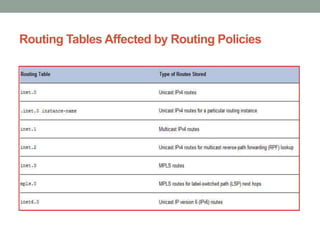
Routing Tables Affected by Routing Policies
Default Actions on Routing Policies
The following default actions are taken if the following situations arise
during policy evaluation:
1. If a policy does not specify a match condition, all routes evaluated
    against the policy match.
2. If a match occurs but the policy does not specify an
    accept, reject, next term, or next policy action, one of the following
    occurs:
     1.     The next term, if present, is evaluated.
     2.     If no other terms are present, the next policy is evaluated.
     3.     If no other policies are present, the action specified by the default policy is
            taken.
3.        If a match does not occur with a term in a policy and subsequent
          terms in the same policy exist, the next term is evaluated.
4.        If a match does not occur with any terms in a policy and
          subsequent policies exist, the next policy is evaluated.
5.        If a match does not occur by the end of a policy or all policies, the
          accept or reject action specified by the default policy is taken.
Creating Routing Policies
The following are typical circumstances under which you might
want to preempt the default routing policies in the routing policy
framework by creating your own routing policies:

 You do not want a protocol to import all routes into the routing
 table. If the routing table does not learn about certain routes,
 they can never be used to forward packets and they can never
 be redistributed into other routing protocols.
 You do not want a routing protocol to export all the active
 routes it learns.
 You want a routing protocol to announce active routes learned
 from another routing protocol, which is sometimes called route
 redistribution.
Count…
 You want to manipulate route characteristics, such as the
 preference value, AS path, or community. You can
 manipulate the route characteristics to control which route
 is selected as the active route to reach a destination. In
 general, the active route is also advertised to a router’s
 neighbors.
 You want to change the default BGP route flap-damping
 parameters.
 You want to perform per-packet load balancing.
 You want to enable class of service (CoS).
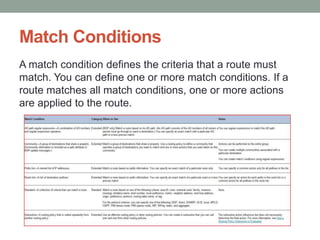
Match Conditions
A match condition defines the criteria that a route must
match. You can define one or more match conditions. If a
route matches all match conditions, one or more actions
are applied to the route.
What is Firewall Filter…?
Firewall filters allow you to filter packets based on their
components and to perform an action on packets that match the
filter.
Depending on the hardware configuration of the routing platform,
you can use firewall filters for the following purposes:
1. On routing platforms equipped with an Internet Processor II
     application-specific integrated circuit (ASIC), you can
     control data packets, which are chunks of data transiting the
     routing platform as they are forwarded from a source to a
     destination.
2. On all routing platforms, you can control the local packets,
     which are chunks of data that are destined for or sent by the
     Routing Engine.
Count…
 You can use the filters to restrict the local packets that pass
 from the routing platform's physical interfaces to the Routing
 Engine.
 You can apply firewall filters to packets entering or leaving the
 routing platform on one, more than one, or all interfaces. For
 each interface, you can apply a firewall filter to incoming or
 outgoing traffic, or both, and the same filter can be used for
 both.
 You can define firewall filters that apply to IP version 4 (IPv4),
 IP version 6 (IPv6), or Multiprotocol Label Switching (MPLS)
 traffic.
 Filters with more than 1000 terms and counters have been
 implemented successfully.
Firewall Filter Components
Firewall Filter have following two components:
1. Match conditions—Values or fields that the packet must
    contain. You can define various match conditions, including
    the IP source address field, IP destination address
    field, Transmission Control Protocol (TCP) or User Datagram
    Protocol (UDP) source port field, IP protocol field, Internet
    Control Message Protocol (ICMP) packet type, IP
    options, TCP flags, incoming logical or physical
    interface, and outgoing logical or physical interface.
2. Action—Specifies what to do if a packet matches the match
    conditions. Possible actions are to accept, discard, or reject a
    packet, go to the next term, or take no action.

 In addition, statistical information can be recorded for a packet:
 it can be counted, logged, or sampled.
Supported Standards
The JUNOS software supports the following RFCs related
to filtering:
1. RFC 792, Internet Control Message Protocol (ICMP)
2. RFC 2373, IP Version 6 Addressing Architecture
3. RFC 2460, Internet Protocol, Version 6 (IPv6)
4. RFC 2474, Definition of the Differentiated Services (DS)
     Field
5. RFC 2475, An Architecture for Differentiated Services
6. RFC 2597, Assured Forwarding PHB
7. RFC 2598, An Expedited Forwarding PHB
Kashif Latif

Routing Polices And Firewall Filter

  • 1.
    Routing Polices and Firewall Filter Kashif Latif
  • 2.
    What is RoutingPolicies…? A routing policy is a mechanism in the JUNOS software that allows you to modify the routing policy framework to suit your needs. You can create and implement your own routing policies to do the following:  Control which routes a routing protocol places in the routing table.  Control which active routes a routing protocol advertises from the routing table. (An active route is a route that is chosen from all routes in the routing table to reach a destination).  Manipulate the route characteristics as a routing protocol places it in the routing table or advertises it from the routing table.
  • 3.
    Count…  You canmanipulate the route characteristics to control which route is selected as the active route to reach a destination. The active route is placed in the forwarding table and used to forward traffic toward the route’s destination. In general, the active route is also advertised to a router’s neighbors.  To create a routing policy, you must define the policy and apply it. You define the policy by specifying the criteria that a route must match and the actions to perform if a match occurs. You then apply the policy to a routing protocol or to the forwarding table.
  • 4.
    Routing Tables Affectedby Routing Policies
  • 5.
    Default Actions onRouting Policies The following default actions are taken if the following situations arise during policy evaluation: 1. If a policy does not specify a match condition, all routes evaluated against the policy match. 2. If a match occurs but the policy does not specify an accept, reject, next term, or next policy action, one of the following occurs: 1. The next term, if present, is evaluated. 2. If no other terms are present, the next policy is evaluated. 3. If no other policies are present, the action specified by the default policy is taken. 3. If a match does not occur with a term in a policy and subsequent terms in the same policy exist, the next term is evaluated. 4. If a match does not occur with any terms in a policy and subsequent policies exist, the next policy is evaluated. 5. If a match does not occur by the end of a policy or all policies, the accept or reject action specified by the default policy is taken.
  • 6.
    Creating Routing Policies Thefollowing are typical circumstances under which you might want to preempt the default routing policies in the routing policy framework by creating your own routing policies:  You do not want a protocol to import all routes into the routing table. If the routing table does not learn about certain routes, they can never be used to forward packets and they can never be redistributed into other routing protocols.  You do not want a routing protocol to export all the active routes it learns.  You want a routing protocol to announce active routes learned from another routing protocol, which is sometimes called route redistribution.
  • 7.
    Count…  You wantto manipulate route characteristics, such as the preference value, AS path, or community. You can manipulate the route characteristics to control which route is selected as the active route to reach a destination. In general, the active route is also advertised to a router’s neighbors.  You want to change the default BGP route flap-damping parameters.  You want to perform per-packet load balancing.  You want to enable class of service (CoS).
  • 8.
    Match Conditions A matchcondition defines the criteria that a route must match. You can define one or more match conditions. If a route matches all match conditions, one or more actions are applied to the route.
  • 9.
    What is FirewallFilter…? Firewall filters allow you to filter packets based on their components and to perform an action on packets that match the filter. Depending on the hardware configuration of the routing platform, you can use firewall filters for the following purposes: 1. On routing platforms equipped with an Internet Processor II application-specific integrated circuit (ASIC), you can control data packets, which are chunks of data transiting the routing platform as they are forwarded from a source to a destination. 2. On all routing platforms, you can control the local packets, which are chunks of data that are destined for or sent by the Routing Engine.
  • 10.
    Count…  You canuse the filters to restrict the local packets that pass from the routing platform's physical interfaces to the Routing Engine.  You can apply firewall filters to packets entering or leaving the routing platform on one, more than one, or all interfaces. For each interface, you can apply a firewall filter to incoming or outgoing traffic, or both, and the same filter can be used for both.  You can define firewall filters that apply to IP version 4 (IPv4), IP version 6 (IPv6), or Multiprotocol Label Switching (MPLS) traffic.  Filters with more than 1000 terms and counters have been implemented successfully.
  • 11.
    Firewall Filter Components FirewallFilter have following two components: 1. Match conditions—Values or fields that the packet must contain. You can define various match conditions, including the IP source address field, IP destination address field, Transmission Control Protocol (TCP) or User Datagram Protocol (UDP) source port field, IP protocol field, Internet Control Message Protocol (ICMP) packet type, IP options, TCP flags, incoming logical or physical interface, and outgoing logical or physical interface. 2. Action—Specifies what to do if a packet matches the match conditions. Possible actions are to accept, discard, or reject a packet, go to the next term, or take no action.  In addition, statistical information can be recorded for a packet: it can be counted, logged, or sampled.
  • 12.
    Supported Standards The JUNOSsoftware supports the following RFCs related to filtering: 1. RFC 792, Internet Control Message Protocol (ICMP) 2. RFC 2373, IP Version 6 Addressing Architecture 3. RFC 2460, Internet Protocol, Version 6 (IPv6) 4. RFC 2474, Definition of the Differentiated Services (DS) Field 5. RFC 2475, An Architecture for Differentiated Services 6. RFC 2597, Assured Forwarding PHB 7. RFC 2598, An Expedited Forwarding PHB
  • 13.