E-Learning workshop Museums and the Web 2009 Carolyn Royston, NMOLP Steve Gardam, IWM
Aims of the Workshop Gain an understanding of how to plan an e-Learning resource Explore and share different ideas for your own  e-Learning resources Create an action plan to take back to your institution
Who we are Carolyn Royston Project Manager for the National Museums Online Learning Project (NMOLP) Previously Head of e-Learning at a top 25 UK new media agency Developed several large cultural and educational online learning projects Primary school teacher
Who we are Steve Gardam Head of Corporate Education, Imperial War Museum IWM’s representative for the National Museums Online Learning Project
Workshop approach Workshop draws on our experience of creating school resources for the National Museums Online Learning Project (NMOLP) Throughout we will show examples from NMOLP of different planning stages Approach adaptable and scaleable to fit any e-Learning project – regardless of size and budget Opportunities throughout for you to share and plan for your own resources
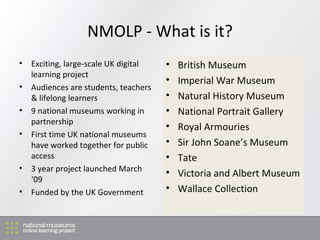
NMOLP - What is it? Exciting, large-scale UK digital learning project Audiences are students, teachers & lifelong learners 9 national museums working in partnership First time UK national museums have worked together for public access 3 year project launched March ‘09 Funded by the UK Government British Museum Imperial War Museum Natural History Museum National Portrait Gallery Royal Armouries Sir John Soane’s Museum Tate Victoria and Albert Museum Wallace Collection
What are we delivering for our audiences? Resources for schools (WebQuests) Resources for lifelong learners (Creative Spaces) Linking together 9 national collections via a federated search Resources that can be used & shared across all 9 national museums Engaging new and existing audiences with museum digital collections
Workshop programme Planning your e-Learning resource Developing a framework for production of your resource Approaches to online content Your next steps Q&A
1. Planning your resource
Why is planning important? NMOLP had 9 partner museums, so we needed a common understanding of the project’s aims and deliverables Time constraints imposed by funders meant that we needed to have a clear plan and way forward in stages Designated staff at NMOLP partners did not necessarily cover every area (learning, web, project planning) so planning needed to be checked with other colleagues across each institution
Planning your resource - Key questions Be as specific as you can about your target audience Informal or formal? Teachers or students? Are you genuinely meeting an audience need? Your aims: What do you want to achieve with this resource? Internal objectives e.g. repurpose existing content? Support a new education programme? Fits with a wider museum strategy e.g. increase access to ‘hidden’ collections, improve online services? Spend to save i.e. take a funding opportunity for longer-term benefit?
Planning your resource - Key questions Who is leading this project? Establish the roles of project leader and their team Allocate key roles and responsibilities from the start Set up lines of communication for project team Who else might you need to involve? How is the project funded? Are there implications when the funding ends? How do the funders’ requirements shape your project aims?
Activity 1: Planning your resource Work in groups of 3 Pick one idea in your group for a new e-Learning resource Fill in the template for yourself to take away 10 mins activity 10 mins feedback
2.   Developing a framework for  your resource
NMOLP framework Project plan gave project a common understanding of aims and deliverables Needed to expand this i.e. map out broad functionality, design considerations, content requirements This step enabled us to visualise what we were producing, highlight challenges to overcome, and detail resources required for delivery
Step 1 - Develop a framework What is a framework? An approach for developing your resource Content and information design Paper-based Why is it important?  Try different ideas and approaches Build on your overall project aim Visual approach easy for everyone to understand Helps you to identify next steps
Step 2 - Test your ideas Test out your ideas on your target audience - use paper concepts Focus group with pupils and teachers Invite other stakeholders to attend sessions Be iterative Don’t be afraid to try different approaches and ideas Keep it simple to keep costs down  Set time aside in your project timeline for this very important stage
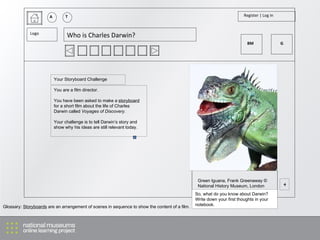
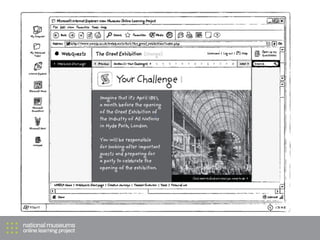
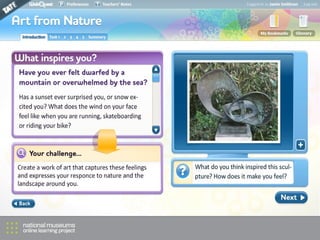
Step 3 - Wireframes Keep it very simple – work with tools you know Wireframes can range from: Storyboard Post-its on big pieces of paper Simple designs on screen Basic prototype to explore functionality Most important aspect is to see how web design, interface and content will work together
A T Register | Log in Logo Who is Charles Darwin? You are a film director.  You have been asked to make a  storyboard  for a short film about the life of Charles Darwin called  Voyages of Discovery. Your challenge is to tell Darwin’s story and show why his ideas are still relevant today. + Green Iguana, Frank Greenaway © National History Museum, London So, what do you know about Darwin? Write down your first thoughts in your notebook. Your Storyboard Challenge Glossary:  Storyboards  are an arrangement of scenes in sequence to show the content of a film. BM G


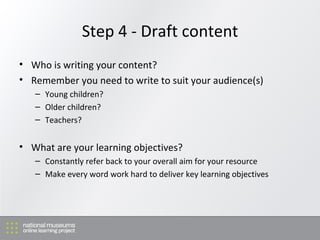
Step 4 - Draft content Who is writing your content? Remember you need to write to suit your audience(s) Young children? Older children? Teachers? What are your learning objectives? Constantly refer back to your overall aim for your resource Make every word work hard to deliver key learning objectives
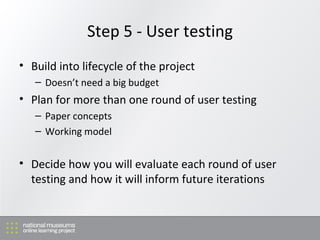
Step 5 - User testing Build into lifecycle of the project Doesn’t need a big budget Plan for more than one round of user testing Paper concepts Working model Decide how you will evaluate each round of user testing and how it will inform future iterations
Activity 2: Plan your framework What are the next steps for planning your resource? How will you go about making wireframes or storyboards? Who will write draft content? How will you organise user testing? Work in groups of 3 Complete the template Activity 15 mins, discussion and feedback 10 mins
3. Approaches to online content
What makes good online content? Limit your text Think about the best use of imagery e.g. clarity and impact Use multi-media if you can, but keep it simple Clear, simple and intuitive design Don’t forget your end users, keep testing ideas!
 
 
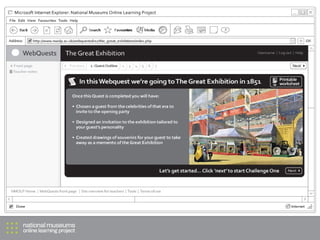
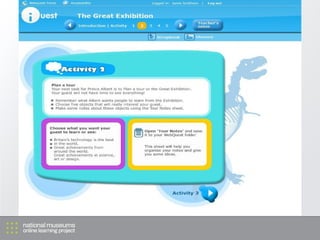
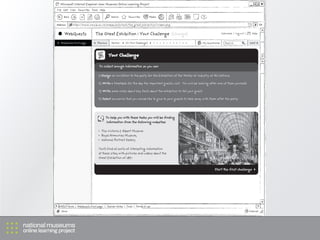
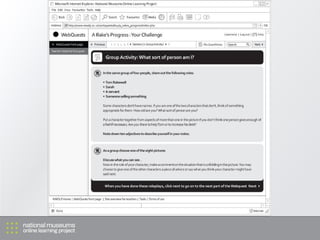
WebQuests IWM WebQuests
Key questions How will you produce content appropriate for your audience?  Who will provide content? What format will the content take? Do they have the right skills? How will you make sure that your content maximises the potential of the web? How will you transform raw content into an online resource? Do you need content templates for your resource? How will you manage your Quality Control?
Activity 3: Developing your online content Work in groups of 3 Complete the template Activity 10 mins, discussion and feedback 5 mins
4. Summary
Summary and next steps You should now have: An outline project plan Plan for developing a framework A guide to developing your online content What are your next steps? Spend 5 mins writing down 3 key next steps Q&A
Contact details Carolyn Royston [email_address]  (from 27 April) Steve Gardam [email_address]

Museums and the Web 2009: E-Learning workshop

  • 1.
  • 2.
    E-Learning workshop Museumsand the Web 2009 Carolyn Royston, NMOLP Steve Gardam, IWM
  • 3.
    Aims of theWorkshop Gain an understanding of how to plan an e-Learning resource Explore and share different ideas for your own e-Learning resources Create an action plan to take back to your institution
  • 4.
    Who we areCarolyn Royston Project Manager for the National Museums Online Learning Project (NMOLP) Previously Head of e-Learning at a top 25 UK new media agency Developed several large cultural and educational online learning projects Primary school teacher
  • 5.
    Who we areSteve Gardam Head of Corporate Education, Imperial War Museum IWM’s representative for the National Museums Online Learning Project
  • 6.
    Workshop approach Workshopdraws on our experience of creating school resources for the National Museums Online Learning Project (NMOLP) Throughout we will show examples from NMOLP of different planning stages Approach adaptable and scaleable to fit any e-Learning project – regardless of size and budget Opportunities throughout for you to share and plan for your own resources
  • 7.
    NMOLP - Whatis it? Exciting, large-scale UK digital learning project Audiences are students, teachers & lifelong learners 9 national museums working in partnership First time UK national museums have worked together for public access 3 year project launched March ‘09 Funded by the UK Government British Museum Imperial War Museum Natural History Museum National Portrait Gallery Royal Armouries Sir John Soane’s Museum Tate Victoria and Albert Museum Wallace Collection
  • 8.
    What are wedelivering for our audiences? Resources for schools (WebQuests) Resources for lifelong learners (Creative Spaces) Linking together 9 national collections via a federated search Resources that can be used & shared across all 9 national museums Engaging new and existing audiences with museum digital collections
  • 9.
    Workshop programme Planningyour e-Learning resource Developing a framework for production of your resource Approaches to online content Your next steps Q&A
  • 10.
  • 11.
    Why is planningimportant? NMOLP had 9 partner museums, so we needed a common understanding of the project’s aims and deliverables Time constraints imposed by funders meant that we needed to have a clear plan and way forward in stages Designated staff at NMOLP partners did not necessarily cover every area (learning, web, project planning) so planning needed to be checked with other colleagues across each institution
  • 12.
    Planning your resource- Key questions Be as specific as you can about your target audience Informal or formal? Teachers or students? Are you genuinely meeting an audience need? Your aims: What do you want to achieve with this resource? Internal objectives e.g. repurpose existing content? Support a new education programme? Fits with a wider museum strategy e.g. increase access to ‘hidden’ collections, improve online services? Spend to save i.e. take a funding opportunity for longer-term benefit?
  • 13.
    Planning your resource- Key questions Who is leading this project? Establish the roles of project leader and their team Allocate key roles and responsibilities from the start Set up lines of communication for project team Who else might you need to involve? How is the project funded? Are there implications when the funding ends? How do the funders’ requirements shape your project aims?
  • 14.
    Activity 1: Planningyour resource Work in groups of 3 Pick one idea in your group for a new e-Learning resource Fill in the template for yourself to take away 10 mins activity 10 mins feedback
  • 15.
    2. Developing a framework for your resource
  • 16.
    NMOLP framework Projectplan gave project a common understanding of aims and deliverables Needed to expand this i.e. map out broad functionality, design considerations, content requirements This step enabled us to visualise what we were producing, highlight challenges to overcome, and detail resources required for delivery
  • 17.
    Step 1 -Develop a framework What is a framework? An approach for developing your resource Content and information design Paper-based Why is it important? Try different ideas and approaches Build on your overall project aim Visual approach easy for everyone to understand Helps you to identify next steps
  • 18.
    Step 2 -Test your ideas Test out your ideas on your target audience - use paper concepts Focus group with pupils and teachers Invite other stakeholders to attend sessions Be iterative Don’t be afraid to try different approaches and ideas Keep it simple to keep costs down Set time aside in your project timeline for this very important stage
  • 19.
    Step 3 -Wireframes Keep it very simple – work with tools you know Wireframes can range from: Storyboard Post-its on big pieces of paper Simple designs on screen Basic prototype to explore functionality Most important aspect is to see how web design, interface and content will work together
  • 20.
    A T Register| Log in Logo Who is Charles Darwin? You are a film director. You have been asked to make a storyboard for a short film about the life of Charles Darwin called Voyages of Discovery. Your challenge is to tell Darwin’s story and show why his ideas are still relevant today. + Green Iguana, Frank Greenaway © National History Museum, London So, what do you know about Darwin? Write down your first thoughts in your notebook. Your Storyboard Challenge Glossary: Storyboards are an arrangement of scenes in sequence to show the content of a film. BM G
  • 21.
  • 22.
  • 23.
  • 24.
  • 25.
    Step 4 -Draft content Who is writing your content? Remember you need to write to suit your audience(s) Young children? Older children? Teachers? What are your learning objectives? Constantly refer back to your overall aim for your resource Make every word work hard to deliver key learning objectives
  • 26.
    Step 5 -User testing Build into lifecycle of the project Doesn’t need a big budget Plan for more than one round of user testing Paper concepts Working model Decide how you will evaluate each round of user testing and how it will inform future iterations
  • 27.
    Activity 2: Planyour framework What are the next steps for planning your resource? How will you go about making wireframes or storyboards? Who will write draft content? How will you organise user testing? Work in groups of 3 Complete the template Activity 15 mins, discussion and feedback 10 mins
  • 28.
    3. Approaches toonline content
  • 29.
    What makes goodonline content? Limit your text Think about the best use of imagery e.g. clarity and impact Use multi-media if you can, but keep it simple Clear, simple and intuitive design Don’t forget your end users, keep testing ideas!
  • 30.
  • 31.
  • 32.
  • 33.
    Key questions Howwill you produce content appropriate for your audience? Who will provide content? What format will the content take? Do they have the right skills? How will you make sure that your content maximises the potential of the web? How will you transform raw content into an online resource? Do you need content templates for your resource? How will you manage your Quality Control?
  • 34.
    Activity 3: Developingyour online content Work in groups of 3 Complete the template Activity 10 mins, discussion and feedback 5 mins
  • 35.
  • 36.
    Summary and nextsteps You should now have: An outline project plan Plan for developing a framework A guide to developing your online content What are your next steps? Spend 5 mins writing down 3 key next steps Q&A
  • 37.
    Contact details CarolynRoyston [email_address] (from 27 April) Steve Gardam [email_address]