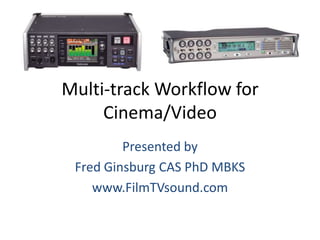

Multi-track Workflow for
Cinema/Video
Presented by
Fred Ginsburg CAS PhD MBKS
www.FilmTVsound.com
Evolution of Production Sound
• Monaural
• Two-track
• Four-track
• 8+2 track, or greater
Monaural (one track)
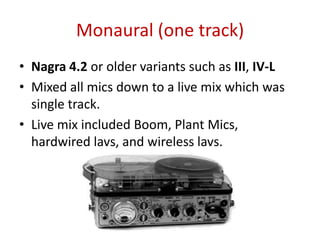
• Nagra 4.2 or older variants such as III, IV-L
• Mixed all mics down to a live mix which was
single track.
• Live mix included Boom, Plant Mics,
hardwired lavs, and wireless lavs.
Monaural (one track)
• Live mix involved opening/closing mics for
volume & perspective, while avoiding phasing
issues caused by multiple mics picking up
same audio.
• Live mix used for dailies, picture cut.
• During sound editing, live mix would be
checkerboarded to separate characters, PFX,
SFX, etc.
Monaural (one track)
• During editing, audio might be augmented
with ADR, Foley, SFX, BG, as needed.
• What began as one track might end up as
nearly 100 separate tracks going into the Mix.
Two Track
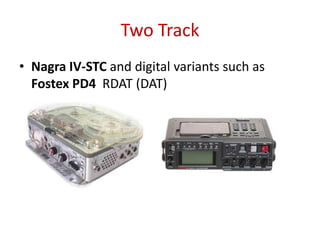
• Nagra IV-STC and digital variants such as
Fostex PD4 RDAT (DAT)
Two Track
• Note that Two Track does not mean the same
thing as Stereo.
• Two Track refers to two (monaural) tracks.
• Stereo refers to pair of Left & Right spacially
arranged tracks, usually music.
• Stereo mixes for film are created in post. Actually,
5.1 film mixes are L, C, R, surround-L, surround-R,
and sub-woofer. Not simple L-R.
• Only some SFX or BG are recorded on set in
stereo. Never dialogue.
Choice of approaches for
using two tracks
• Record live mix on Track One, and
SFX/ambiance on Track Two.
• Or, record some mics/actors on Track One, and
others on Track Two, to avoid phasing issues
between booms & lavs or other open mics.
Also avoids clothing noise from other lav.
• Requires some (track selective) mixing during
basic editing.
Choice of approaches for
using two tracks
• Record live mix on Track One, and one ISO of
key talent on Track Two. (“vanity mix”)
• Or, record monaural live mix on Track
One, and same mix, but attenuated 10 or 15
dB, on Track Two. Referred to as “attenuated
dual mono”.
• Dual Mono technique originated by early
news cameramen who could not adjust levels
and shoot at the same time.
Attenuated Dual Mono
• Protection against unexpected loud outbursts
that create soundtrack clipping.
• Editor only has to drop down to the
attenuated track on the timeline for the
duration of the problem.
• Saves the time & effort of reconstructing the
scene from ISO tracks, which may involve not
only dialogue, but perspective, SFX, BG.
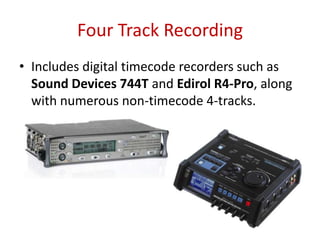
Four Track Recording
• Includes digital timecode recorders such as
Sound Devices 744T and Edirol R4-Pro, along
with numerous non-timecode 4-tracks.
Choice of approaches
for using four tracks: 4 x ISO
• Record all mics onto four ISO tracks.
• Requires less skill as location “recordist”.
• But, requires editor mixing down the tracks,
opening/closing mics, in order to judge dailies
and edit picture. Very time consuming!
• Without this pre-mix, cannot determine
quality of soundtrack, since all mics are open
equally and will compete, phase, and sound
like garbage.
Choice of approaches
for using four tracks: Mix + 3 x ISO
• Record live mix onto one track, and assign
mics to three ISO tracks.
• Some mics may be grouped onto same ISO
track, especially if they do not overlap each
other in the timeline or if unlikely to conflict
with each other.
• Live mix serves for dailies and picture edit,
while ISO tracks available for reconstructing
scene.
Choice of approaches
for using four tracks:
dual Mix + 2 x ISO
• Record live mix as attenuated dual mono onto
two tracks, and assign mics to two ISO tracks.
• Attenuated live mix provides protection
against clipped tracks, as previously discussed.
• Sometimes even possible to boost an actor’s
mic in the “safety” mix in situations where
actor tends to whisper or swallow lines.
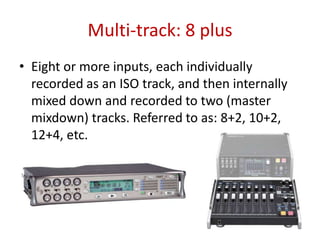
Multi-track: 8 plus
• Eight or more inputs, each individually
recorded as an ISO track, and then internally
mixed down and recorded to two (master
mixdown) tracks. Referred to as: 8+2, 10+2,
12+4, etc.
Multi-track: 8 plus
• All inputs are recorded as individual ISO, but
what to do with the stereo mixdown?
• Hollywood favors treating the “stereo”
mixdown as attenuated dual mono!
• No need for field “stereo”; this is film
dialogue; we are not recording a music event.
• Dual mono also allows us to boost selected
mics, to protect against underwhelming
performance as opposed to shouts.
Dual Mono mixdowns
• Some mfrs, such as TASCAM, will offer built-in
menu option for attenuated dual mono mix.
• Otherwise, dual mono can be set up in the
internal mixing matrix of the recorder.
• When using mfr’s companion fader
controller, eight inputs are mixed to master
L/R. Use the PAN control to achieve dual
mono.
Using an external mixing panel
• If you are not using the mfr’s companion fader
controller, but instead a regular mixing board…
• Sometimes cannot externally access the master
mixdown tracks (9 & 10). In that instance, would
route the master L & R program output from
mixer to inputs 1 & 2 of the recorder.
• Route DIRECT OUTS (of individual mics) or AUX
OUTS (for groups of mics) to recorder inputs 3
thru 8.
Using an external mixing panel
• To record proper ISO, make sure that the
mixer is outputting a pre-fader direct out.
Many Mackie boards only offer post-fader
direct outs, which defeats the purpose of ISO.
• Pre-fader direct outs on a Mackie (1402, 1642,
1604) come from using a mono plug inserted
only to first click in the Channel Insert/Return
jacks. Only the 1640i offers pre-fader direct
outs.
Track Assignments
• Consistency is key.
• As much as possible, always assign same mics
(boom) or same characters (lavs) to same
tracks. If character is not in the shot, just leave
that track empty.
• If you do need to use the track for another
purpose, then clearly note that on your sound
report (and verbal slate) to alert the editors.
ISO miking the talent
• Normally, each key actor in the scene wears a
wireless (or hardwired) lavalier, and these lavs
are recorded as ISO tracks.
• ISO mics are adjusted for a ballpark level, not
too low and not too high. Set ‘em and forget
‘em.
• They are recorded “24/7” with only occasional
(emergency) adjustment of level.
ISO miking the talent
• The whole point of ISO recording is to be able
to fix any errors in opening/closing the faders.
• Therefore, the ISO send must not be tied to
the use of the fader. The fader determines
what gets sent to the live mix.
• Most of the live mix will revolve around boom
and plant mics, but the “ISO lavs” may be
added to the live mix as needed by raising or
lowering the faders.
Hierarchy of Mic Techniques
• Boom from above (sometimes boom from
below).
• Planted mics. Includes shotguns and lavs.
• Bodyworn lavaliers, hardwired.
• Bodyworn lavaliers, wireless.
Selection of Shotgun mics
• Reach versus Echo.
• Long shotguns: most reach, best rejection of
BG noise. Increases echo indoors. Best for ext.
• Short shotguns: actually medium shotguns.
Moderate reach, moderate rejection,
moderate increase of echo. Ext. or int.
• Wide angle cardioids: short reach, poor
rejection, but eliminates echo indoors. Best
for CU interior.
www.FilmTVsound.com
• Free sign-up for UFVA members.
• Just email Fred with your choice of username
and password.
• Lots of articles, powerpoints, hyperlinks.
• Serves as an online coursebook or stand alone
reference.
• Forum for community & class management.

Multitrack Workflow for Cinema/Video

  • 1.
    Multi-track Workflow for Cinema/Video Presentedby Fred Ginsburg CAS PhD MBKS www.FilmTVsound.com
  • 2.
    Evolution of ProductionSound • Monaural • Two-track • Four-track • 8+2 track, or greater
  • 3.
    Monaural (one track) •Nagra 4.2 or older variants such as III, IV-L • Mixed all mics down to a live mix which was single track. • Live mix included Boom, Plant Mics, hardwired lavs, and wireless lavs.
  • 4.
    Monaural (one track) •Live mix involved opening/closing mics for volume & perspective, while avoiding phasing issues caused by multiple mics picking up same audio. • Live mix used for dailies, picture cut. • During sound editing, live mix would be checkerboarded to separate characters, PFX, SFX, etc.
  • 5.
    Monaural (one track) •During editing, audio might be augmented with ADR, Foley, SFX, BG, as needed. • What began as one track might end up as nearly 100 separate tracks going into the Mix.
  • 6.
    Two Track • NagraIV-STC and digital variants such as Fostex PD4 RDAT (DAT)
  • 7.
    Two Track • Notethat Two Track does not mean the same thing as Stereo. • Two Track refers to two (monaural) tracks. • Stereo refers to pair of Left & Right spacially arranged tracks, usually music. • Stereo mixes for film are created in post. Actually, 5.1 film mixes are L, C, R, surround-L, surround-R, and sub-woofer. Not simple L-R. • Only some SFX or BG are recorded on set in stereo. Never dialogue.
  • 8.
    Choice of approachesfor using two tracks • Record live mix on Track One, and SFX/ambiance on Track Two. • Or, record some mics/actors on Track One, and others on Track Two, to avoid phasing issues between booms & lavs or other open mics. Also avoids clothing noise from other lav. • Requires some (track selective) mixing during basic editing.
  • 9.
    Choice of approachesfor using two tracks • Record live mix on Track One, and one ISO of key talent on Track Two. (“vanity mix”) • Or, record monaural live mix on Track One, and same mix, but attenuated 10 or 15 dB, on Track Two. Referred to as “attenuated dual mono”. • Dual Mono technique originated by early news cameramen who could not adjust levels and shoot at the same time.
  • 10.
    Attenuated Dual Mono •Protection against unexpected loud outbursts that create soundtrack clipping. • Editor only has to drop down to the attenuated track on the timeline for the duration of the problem. • Saves the time & effort of reconstructing the scene from ISO tracks, which may involve not only dialogue, but perspective, SFX, BG.
  • 11.
    Four Track Recording •Includes digital timecode recorders such as Sound Devices 744T and Edirol R4-Pro, along with numerous non-timecode 4-tracks.
  • 12.
    Choice of approaches forusing four tracks: 4 x ISO • Record all mics onto four ISO tracks. • Requires less skill as location “recordist”. • But, requires editor mixing down the tracks, opening/closing mics, in order to judge dailies and edit picture. Very time consuming! • Without this pre-mix, cannot determine quality of soundtrack, since all mics are open equally and will compete, phase, and sound like garbage.
  • 13.
    Choice of approaches forusing four tracks: Mix + 3 x ISO • Record live mix onto one track, and assign mics to three ISO tracks. • Some mics may be grouped onto same ISO track, especially if they do not overlap each other in the timeline or if unlikely to conflict with each other. • Live mix serves for dailies and picture edit, while ISO tracks available for reconstructing scene.
  • 14.
    Choice of approaches forusing four tracks: dual Mix + 2 x ISO • Record live mix as attenuated dual mono onto two tracks, and assign mics to two ISO tracks. • Attenuated live mix provides protection against clipped tracks, as previously discussed. • Sometimes even possible to boost an actor’s mic in the “safety” mix in situations where actor tends to whisper or swallow lines.
  • 15.
    Multi-track: 8 plus •Eight or more inputs, each individually recorded as an ISO track, and then internally mixed down and recorded to two (master mixdown) tracks. Referred to as: 8+2, 10+2, 12+4, etc.
  • 16.
    Multi-track: 8 plus •All inputs are recorded as individual ISO, but what to do with the stereo mixdown? • Hollywood favors treating the “stereo” mixdown as attenuated dual mono! • No need for field “stereo”; this is film dialogue; we are not recording a music event. • Dual mono also allows us to boost selected mics, to protect against underwhelming performance as opposed to shouts.
  • 17.
    Dual Mono mixdowns •Some mfrs, such as TASCAM, will offer built-in menu option for attenuated dual mono mix. • Otherwise, dual mono can be set up in the internal mixing matrix of the recorder. • When using mfr’s companion fader controller, eight inputs are mixed to master L/R. Use the PAN control to achieve dual mono.
  • 18.
    Using an externalmixing panel • If you are not using the mfr’s companion fader controller, but instead a regular mixing board… • Sometimes cannot externally access the master mixdown tracks (9 & 10). In that instance, would route the master L & R program output from mixer to inputs 1 & 2 of the recorder. • Route DIRECT OUTS (of individual mics) or AUX OUTS (for groups of mics) to recorder inputs 3 thru 8.
  • 19.
    Using an externalmixing panel • To record proper ISO, make sure that the mixer is outputting a pre-fader direct out. Many Mackie boards only offer post-fader direct outs, which defeats the purpose of ISO. • Pre-fader direct outs on a Mackie (1402, 1642, 1604) come from using a mono plug inserted only to first click in the Channel Insert/Return jacks. Only the 1640i offers pre-fader direct outs.
  • 20.
    Track Assignments • Consistencyis key. • As much as possible, always assign same mics (boom) or same characters (lavs) to same tracks. If character is not in the shot, just leave that track empty. • If you do need to use the track for another purpose, then clearly note that on your sound report (and verbal slate) to alert the editors.
  • 21.
    ISO miking thetalent • Normally, each key actor in the scene wears a wireless (or hardwired) lavalier, and these lavs are recorded as ISO tracks. • ISO mics are adjusted for a ballpark level, not too low and not too high. Set ‘em and forget ‘em. • They are recorded “24/7” with only occasional (emergency) adjustment of level.
  • 22.
    ISO miking thetalent • The whole point of ISO recording is to be able to fix any errors in opening/closing the faders. • Therefore, the ISO send must not be tied to the use of the fader. The fader determines what gets sent to the live mix. • Most of the live mix will revolve around boom and plant mics, but the “ISO lavs” may be added to the live mix as needed by raising or lowering the faders.
  • 23.
    Hierarchy of MicTechniques • Boom from above (sometimes boom from below). • Planted mics. Includes shotguns and lavs. • Bodyworn lavaliers, hardwired. • Bodyworn lavaliers, wireless.
  • 24.
    Selection of Shotgunmics • Reach versus Echo. • Long shotguns: most reach, best rejection of BG noise. Increases echo indoors. Best for ext. • Short shotguns: actually medium shotguns. Moderate reach, moderate rejection, moderate increase of echo. Ext. or int. • Wide angle cardioids: short reach, poor rejection, but eliminates echo indoors. Best for CU interior.
  • 25.
    www.FilmTVsound.com • Free sign-upfor UFVA members. • Just email Fred with your choice of username and password. • Lots of articles, powerpoints, hyperlinks. • Serves as an online coursebook or stand alone reference. • Forum for community & class management.