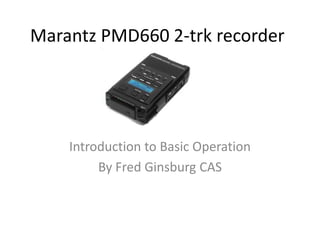
Marantz PMD660 2-trk recorder


    Introduction to Basic Operation
         By Fred Ginsburg CAS
Marantz PMD660 2-trk recorder
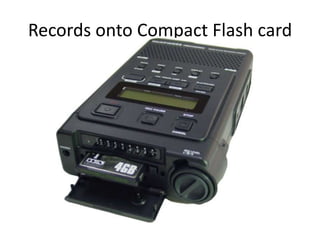
Records onto Compact Flash card
PMD660 features
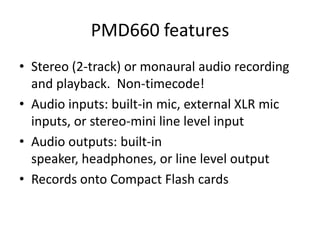
• Stereo (2-track) or monaural audio recording
  and playback. Non-timecode!
• Audio inputs: built-in mic, external XLR mic
  inputs, or stereo-mini line level input
• Audio outputs: built-in
  speaker, headphones, or line level output
• Records onto Compact Flash cards
PMD660 features
• Can transfer files directly via USB; or by
  removing CF card (preferred)
• Recording formats: MP3 mono, MP3
  stereo, PCM16bit/44.1k, PCM16bit/48k
• Uses four AA batteries or AC adapter
• Stores three pre-sets of menu settings that
  you can configure for quick selection
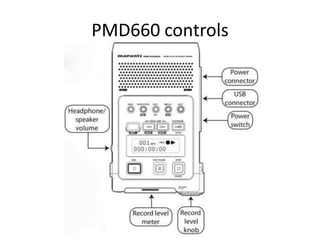
PMD660 controls
1. Speaker
• When menu is set
  to SP/HP, speaker is
  active.
  Headphones mute
  the speaker.
  HP/SPK volume
  controls speaker
  and headphone
  volume.
2. Internal
 Microphones
• Low quality built-in
  mics.
• Better to use
  external mics.
3. MARK button
• Pressing the MARK
  button while
  recording adds an
  EDL marker during
  pause, recording, or
  playback.
• Markers not
  function with other
  playback
  software, so do not
  rely on them
  outside the
  PMD660.
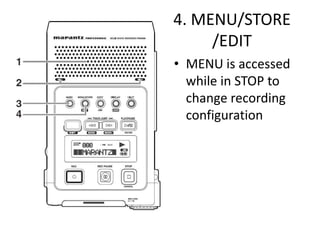
4. MENU/STORE
     /EDIT
• MENU is accessed
  while in STOP to
  change recording
  configuration
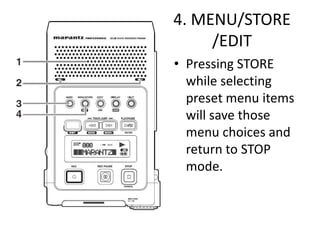
4. MENU/STORE
     /EDIT
• Pressing STORE
  while selecting
  preset menu items
  will save those
  menu choices and
  return to STOP
  mode.
4. MENU/STORE
     /EDIT
• While in STOP, if
  you depress
  SHIFT+EDIT, you
  can erase
  tracks, erase EDL
  markers, and
  format the CF card.
Inputs
• XLR mic or
  line inputs
• Use LEFT
  input when
  in MONO
• LINE input
  from a mixer
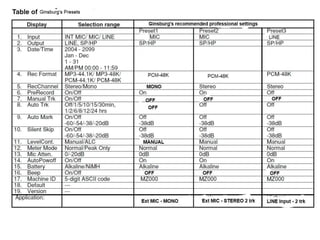
Choice of Inputs (preset menu)
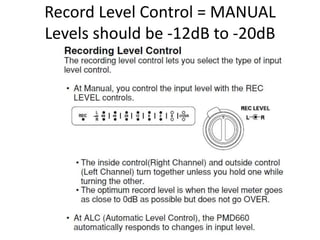
Record Level Control = MANUAL
Levels should be -12dB to -20dB
Mic attenuator = as needed
Pre Record = maybe
causes slight delay after STOP
Silent Skip = OFF
Manual Track = OFF
Automatic Track = OFF
Better to just remove CF card…
Always Double Check Your Display
•   Check visible settings BEFORE recording!
•   PCM-48K (16 bit/48k)
•   ALC = off (not visible)
•   Mono or Stereo
•   Mic, Line, or Internal Mic

Marantz PMD660 2-Track Recorder

  • 1.
    Marantz PMD660 2-trkrecorder Introduction to Basic Operation By Fred Ginsburg CAS
  • 2.
  • 3.
  • 4.
    PMD660 features • Stereo(2-track) or monaural audio recording and playback. Non-timecode! • Audio inputs: built-in mic, external XLR mic inputs, or stereo-mini line level input • Audio outputs: built-in speaker, headphones, or line level output • Records onto Compact Flash cards
  • 5.
    PMD660 features • Cantransfer files directly via USB; or by removing CF card (preferred) • Recording formats: MP3 mono, MP3 stereo, PCM16bit/44.1k, PCM16bit/48k • Uses four AA batteries or AC adapter • Stores three pre-sets of menu settings that you can configure for quick selection
  • 6.
  • 7.
    1. Speaker • Whenmenu is set to SP/HP, speaker is active. Headphones mute the speaker. HP/SPK volume controls speaker and headphone volume.
  • 8.
    2. Internal Microphones •Low quality built-in mics. • Better to use external mics.
  • 9.
    3. MARK button •Pressing the MARK button while recording adds an EDL marker during pause, recording, or playback. • Markers not function with other playback software, so do not rely on them outside the PMD660.
  • 10.
    4. MENU/STORE /EDIT • MENU is accessed while in STOP to change recording configuration
  • 11.
    4. MENU/STORE /EDIT • Pressing STORE while selecting preset menu items will save those menu choices and return to STOP mode.
  • 12.
    4. MENU/STORE /EDIT • While in STOP, if you depress SHIFT+EDIT, you can erase tracks, erase EDL markers, and format the CF card.
  • 15.
  • 16.
    • XLR micor line inputs • Use LEFT input when in MONO • LINE input from a mixer
  • 24.
    Choice of Inputs(preset menu)
  • 25.
    Record Level Control= MANUAL Levels should be -12dB to -20dB
  • 26.
  • 27.
    Pre Record =maybe causes slight delay after STOP
  • 28.
    Silent Skip =OFF Manual Track = OFF
  • 29.
  • 32.
    Better to justremove CF card…
  • 33.
    Always Double CheckYour Display • Check visible settings BEFORE recording! • PCM-48K (16 bit/48k) • ALC = off (not visible) • Mono or Stereo • Mic, Line, or Internal Mic