• Multitasking operating systems allow more than
one program to run at a time. They can support
either preemptive multitasking, where the OS
doles out time to applications (virtually all
modern OSes) or cooperative multitasking,
where the OS waits for the program to give back
control (Windows 3.x, Mac OS 9 and earlier).
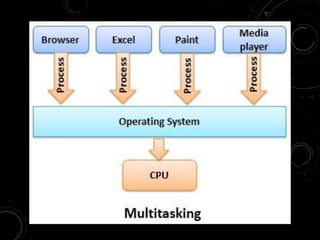
Multitasking, in an operating system, is allowing a user
to perform more than one computer task (such as
the operation of an application program) at a time. The
operating system is able to keep track of where you are
in these tasks and go from one to the other without
losing information.
Multitasking operating systems allow more than one
program to run at a time. They can support either
preemptive multitasking, where the OS doles out time to
applications (virtually all modern OSes) or cooperative
multitasking, where the OS waits for the program to give
back control (Windows 3.x, Mac OS 9 and earlier).
• Preemptive multitasking is task in which a computer operating
system uses some criteria to decide how long to allocate to any one task
before giving another task a turn to use the operating system. The act of
taking control of the operating system from one task and giving it to another
task is called preempting.
• Cooperative multitasking, also known as non-preemptive
multitasking, is a style of computer multitasking in which the operating
system never initiates a context switch from a running process to another
process.
• Running two or more programs at the same
time on the same single-processor (single
CPU) computer. Multitasking is of two main
types: (1) in preemptive multitasking (such as
in Linux, Unix, and Windows) the operating
system (OS) controls the back-and-forth
switching between the programs, and each
program gets its turn in a predictable manner,
(2) in non-preemptive multitasking (such as
in Novell Netware) a program runs until it
stops itself and its execution cannot be
interrupted.
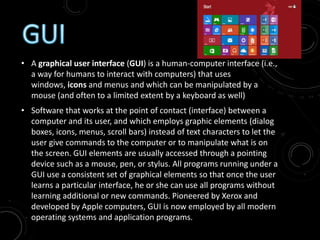
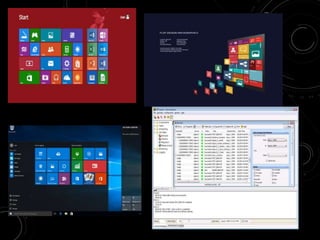
• A graphical user interface (GUI) is a human-computer interface (i.e.,
a way for humans to interact with computers) that uses
windows, icons and menus and which can be manipulated by a
mouse (and often to a limited extent by a keyboard as well)
• Software that works at the point of contact (interface) between a
computer and its user, and which employs graphic elements (dialog
boxes, icons, menus, scroll bars) instead of text characters to let the
user give commands to the computer or to manipulate what is on
the screen. GUI elements are usually accessed through a pointing
device such as a mouse, pen, or stylus. All programs running under a
GUI use a consistent set of graphical elements so that once the user
learns a particular interface, he or she can use all programs without
learning additional or new commands. Pioneered by Xerox and
developed by Apple computers, GUI is now employed by all modern
operating systems and application programs.
• A computer program designed to
allow a computer user to interact
easily with the computer typically
by making choices from menus or
groups of icons
Multitasking and gui

Multitasking and gui

  • 2.
    • Multitasking operatingsystems allow more than one program to run at a time. They can support either preemptive multitasking, where the OS doles out time to applications (virtually all modern OSes) or cooperative multitasking, where the OS waits for the program to give back control (Windows 3.x, Mac OS 9 and earlier).
  • 3.
    Multitasking, in anoperating system, is allowing a user to perform more than one computer task (such as the operation of an application program) at a time. The operating system is able to keep track of where you are in these tasks and go from one to the other without losing information. Multitasking operating systems allow more than one program to run at a time. They can support either preemptive multitasking, where the OS doles out time to applications (virtually all modern OSes) or cooperative multitasking, where the OS waits for the program to give back control (Windows 3.x, Mac OS 9 and earlier).
  • 4.
    • Preemptive multitaskingis task in which a computer operating system uses some criteria to decide how long to allocate to any one task before giving another task a turn to use the operating system. The act of taking control of the operating system from one task and giving it to another task is called preempting. • Cooperative multitasking, also known as non-preemptive multitasking, is a style of computer multitasking in which the operating system never initiates a context switch from a running process to another process.
  • 5.
    • Running twoor more programs at the same time on the same single-processor (single CPU) computer. Multitasking is of two main types: (1) in preemptive multitasking (such as in Linux, Unix, and Windows) the operating system (OS) controls the back-and-forth switching between the programs, and each program gets its turn in a predictable manner, (2) in non-preemptive multitasking (such as in Novell Netware) a program runs until it stops itself and its execution cannot be interrupted.
  • 8.
    • A graphicaluser interface (GUI) is a human-computer interface (i.e., a way for humans to interact with computers) that uses windows, icons and menus and which can be manipulated by a mouse (and often to a limited extent by a keyboard as well) • Software that works at the point of contact (interface) between a computer and its user, and which employs graphic elements (dialog boxes, icons, menus, scroll bars) instead of text characters to let the user give commands to the computer or to manipulate what is on the screen. GUI elements are usually accessed through a pointing device such as a mouse, pen, or stylus. All programs running under a GUI use a consistent set of graphical elements so that once the user learns a particular interface, he or she can use all programs without learning additional or new commands. Pioneered by Xerox and developed by Apple computers, GUI is now employed by all modern operating systems and application programs.
  • 9.
    • A computerprogram designed to allow a computer user to interact easily with the computer typically by making choices from menus or groups of icons