Interactive Notebooks Todd Williamson
What are Interactive Notebooks? A method for organizing student work Help generate creative understanding of classroom topics Allow for student choice Allow students to make connections Help maintain a portfolio of yearly work A student-created textbook personalized to learning styles
The Basics Notebook activities are completed on a two page spread One side is teacher material, the other side is student processing Students are given a list of processing activities to start the year Self-selected processing
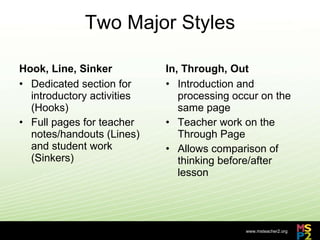
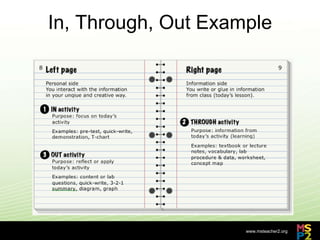
Two Major Styles Hook, Line, Sinker Dedicated section for introductory activities (Hooks) Full pages for teacher notes/handouts (Lines) and student work (Sinkers) In, Through, Out Introduction and processing occur on the same page Teacher work on the Through Page Allows comparison of thinking before/after lesson
In, Through, Out Example
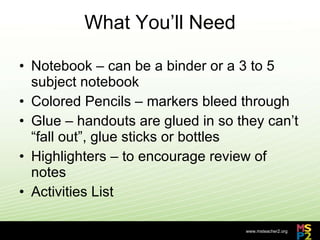
What You’ll Need Notebook – can be a binder or a 3 to 5 subject notebook Colored Pencils – markers bleed through Glue – handouts are glued in so they can’t “fall out”, glue sticks or bottles Highlighters – to encourage review of notes Activities List
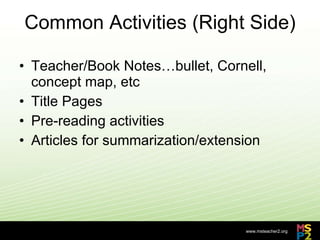
Common Activities (Right Side) Teacher/Book Notes…bullet, Cornell, concept map, etc Title Pages Pre-reading activities Articles for summarization/extension
Sinker Activities These are the typical activities you would use throughout the year Rather than being assigned a particular activity, students select from a list of 20 to 30 Early on, assigning can help build a collection of examples
Sinker Activities Comic Strips/Illustrated Timelines Current Event summaries Illustrations Mnemonic Devices Haiku Song Lyrics Advertisements/Magazine Covers
Sinker Activities Hero/Wanted Posters Sensory Figures Concept Maps Charts/Graphs Lab Write-ups Verbal, Visual, Vocabulary Section Review Questions
Challenges Set-up – overcome with time and planning Choice – students often don’t know how to choose “right” activity Absent students – easiest challenge New Students…second biggest challenge Grading – biggest challenge
Missing Work? Triads – Thanks to Theresa Hinkle Two partners in case someone is absent Absent Student Forms Responsible for their absent partners…handouts, class notes upon return, Hooks, etc
Grading 100 notebooks are a challenge to grade Collected by homeroom (smaller groups) Dedicated approx. 7 days just to grading Feedback comments were personalized and time-consuming
Grading Lots of Rubrics out there Many are not standards-based TOC, Color, Organization, Completion…are these things in your state Standards?  Should they be graded? Open-notebook test, use the notebook as a “toolbox”
Additional Resources http://www.sharetabs.com/?ians
Contact Me Twitter: @twilliamson15 Or through my page at either MSP2 or LearnCentral.org

MSP2 Interactive Notebooks

  • 1.
  • 2.
    What are InteractiveNotebooks? A method for organizing student work Help generate creative understanding of classroom topics Allow for student choice Allow students to make connections Help maintain a portfolio of yearly work A student-created textbook personalized to learning styles
  • 3.
    The Basics Notebookactivities are completed on a two page spread One side is teacher material, the other side is student processing Students are given a list of processing activities to start the year Self-selected processing
  • 4.
    Two Major StylesHook, Line, Sinker Dedicated section for introductory activities (Hooks) Full pages for teacher notes/handouts (Lines) and student work (Sinkers) In, Through, Out Introduction and processing occur on the same page Teacher work on the Through Page Allows comparison of thinking before/after lesson
  • 5.
  • 6.
    What You’ll NeedNotebook – can be a binder or a 3 to 5 subject notebook Colored Pencils – markers bleed through Glue – handouts are glued in so they can’t “fall out”, glue sticks or bottles Highlighters – to encourage review of notes Activities List
  • 7.
    Common Activities (RightSide) Teacher/Book Notes…bullet, Cornell, concept map, etc Title Pages Pre-reading activities Articles for summarization/extension
  • 8.
    Sinker Activities Theseare the typical activities you would use throughout the year Rather than being assigned a particular activity, students select from a list of 20 to 30 Early on, assigning can help build a collection of examples
  • 9.
    Sinker Activities ComicStrips/Illustrated Timelines Current Event summaries Illustrations Mnemonic Devices Haiku Song Lyrics Advertisements/Magazine Covers
  • 10.
    Sinker Activities Hero/WantedPosters Sensory Figures Concept Maps Charts/Graphs Lab Write-ups Verbal, Visual, Vocabulary Section Review Questions
  • 11.
    Challenges Set-up –overcome with time and planning Choice – students often don’t know how to choose “right” activity Absent students – easiest challenge New Students…second biggest challenge Grading – biggest challenge
  • 12.
    Missing Work? Triads– Thanks to Theresa Hinkle Two partners in case someone is absent Absent Student Forms Responsible for their absent partners…handouts, class notes upon return, Hooks, etc
  • 13.
    Grading 100 notebooksare a challenge to grade Collected by homeroom (smaller groups) Dedicated approx. 7 days just to grading Feedback comments were personalized and time-consuming
  • 14.
    Grading Lots ofRubrics out there Many are not standards-based TOC, Color, Organization, Completion…are these things in your state Standards? Should they be graded? Open-notebook test, use the notebook as a “toolbox”
  • 15.
  • 16.
    Contact Me Twitter:@twilliamson15 Or through my page at either MSP2 or LearnCentral.org