


EXCEL
TO INSERT: Select a column to the right of where you want to insert a new one. Or select a row beneath where you want to insert a new one. From the INSERT menu choose row or column. If you want to insert more than one, select more than one column or row. Inserting  Rows and Columns
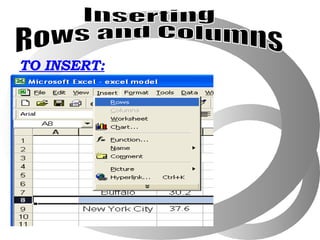
TO INSERT: Inserting  Rows and Columns
TO DELETE: Select either the row or column you wish to delete and press the del key or choose “delete” from the EDIT menu. Deleting Rows and Columns
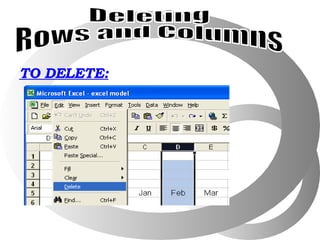
TO DELETE: Deleting Rows and Columns
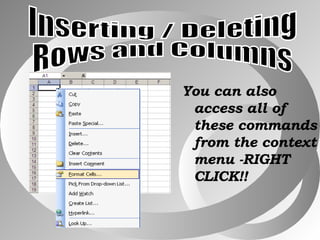
You can also access all of these commands from the context menu -RIGHT CLICK!! Inserting / Deleting Rows and Columns
Move or Copy  Data
Easy as Moving Text in MS Word Just Click the Cell you want to move On its line,drag the content to where you want to locate the data Moving Text
Easy as Copying Text in MS Word Just Click the Cell you want to copy Use Mouse Click Edit Menu Shortcut Key Copying Text
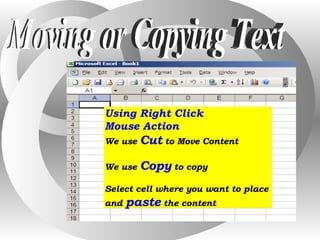
Moving or Copying Text Using Right Click  Mouse Action We use  Cut  to Move Content We use  Copy  to copy Select cell where you want to place  and  paste  the content
Demonstrate: Insert Row Insert Column Delete Rows and Column Move a content to other cell Copy a content to other cell
Assignment: Search the ff. on the net: 1 . What is MS Powerpoint? 2. What are the things  that you can do with  Power point?

Ms Excel 4th

  • 1.
  • 2.
    TO INSERT: Selecta column to the right of where you want to insert a new one. Or select a row beneath where you want to insert a new one. From the INSERT menu choose row or column. If you want to insert more than one, select more than one column or row. Inserting Rows and Columns
  • 3.
    TO INSERT: Inserting Rows and Columns
  • 4.
    TO DELETE: Selecteither the row or column you wish to delete and press the del key or choose “delete” from the EDIT menu. Deleting Rows and Columns
  • 5.
    TO DELETE: DeletingRows and Columns
  • 6.
    You can alsoaccess all of these commands from the context menu -RIGHT CLICK!! Inserting / Deleting Rows and Columns
  • 7.
  • 8.
    Easy as MovingText in MS Word Just Click the Cell you want to move On its line,drag the content to where you want to locate the data Moving Text
  • 9.
    Easy as CopyingText in MS Word Just Click the Cell you want to copy Use Mouse Click Edit Menu Shortcut Key Copying Text
  • 10.
    Moving or CopyingText Using Right Click Mouse Action We use Cut to Move Content We use Copy to copy Select cell where you want to place and paste the content
  • 11.
    Demonstrate: Insert RowInsert Column Delete Rows and Column Move a content to other cell Copy a content to other cell
  • 12.
    Assignment: Search theff. on the net: 1 . What is MS Powerpoint? 2. What are the things that you can do with Power point?