Graphing CalculatorBlair Warren
Step 1First you need to enter your data by entering STAT. Make sure #1 EDIT is highlighted and click ENTER
Step 2To enter your X VALUES you need to enter them in L1. You should do the same thing for your Y VALUES but enter them in L2.If there is data already entered in L1 & L2, then arrow above to where L1 is highlighted and click CLEAR AND ENTER.DELETING DATA
Step 3After you’ve entered your data hit 2ND and then Y=. Hit ENTER. Make sure ON is highlighted.
Step 4Hit WINDOW at the top of the calculator.You then enter your data to fit the graph.
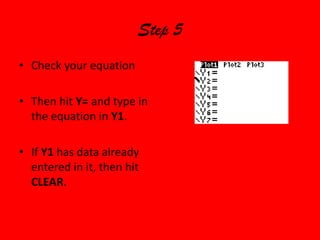
Step 5Check your equationThen hit Y= and type in the equation in Y1. If Y1 has data already entered in it, then hit CLEAR.

Blair graphing

  • 1.
  • 2.
    Step 1First youneed to enter your data by entering STAT. Make sure #1 EDIT is highlighted and click ENTER
  • 3.
    Step 2To enteryour X VALUES you need to enter them in L1. You should do the same thing for your Y VALUES but enter them in L2.If there is data already entered in L1 & L2, then arrow above to where L1 is highlighted and click CLEAR AND ENTER.DELETING DATA
  • 4.
    Step 3After you’veentered your data hit 2ND and then Y=. Hit ENTER. Make sure ON is highlighted.
  • 5.
    Step 4Hit WINDOWat the top of the calculator.You then enter your data to fit the graph.
  • 6.
    Step 5Check yourequationThen hit Y= and type in the equation in Y1. If Y1 has data already entered in it, then hit CLEAR.